
marketing-intelligence-layer
Turn scattered marketing notes into a searchable intelligence layer your AI can read — one command in Claude Code.
Install with your AI
Paste into Claude Code, Cursor, or any agent — it reads the repo and wires the tool into your project.
Install and set up marketing-intelligence-layer (git-clone project) into my current project.
Found on https://claudeers.com/marketing-intelligence-layer
Repo: https://github.com/searchbrat/marketing-intelligence-layer
Homepage/docs: https://kieranflanagan.substack.com
Detected install method: git-clone → git clone https://github.com/searchbrat/marketing-intelligence-layer
Category: automation. Platforms: cli, api, web.
Read the repo's README for exact setup and env vars, then install it and wire it into my project.

Claudeers Health Verdict:
slowing; community-verified: false. Confirm the source before running anything.
git clone https://github.com/searchbrat/marketing-intelligence-layer
// compatibility
| Platforms | cli, api, web |
|---|---|
| Operating systems | — |
| AI compatibility | claude |
| License | MIT |
| Pricing | open-source |
| Language | HTML |
Your Marketing Intelligence Layer
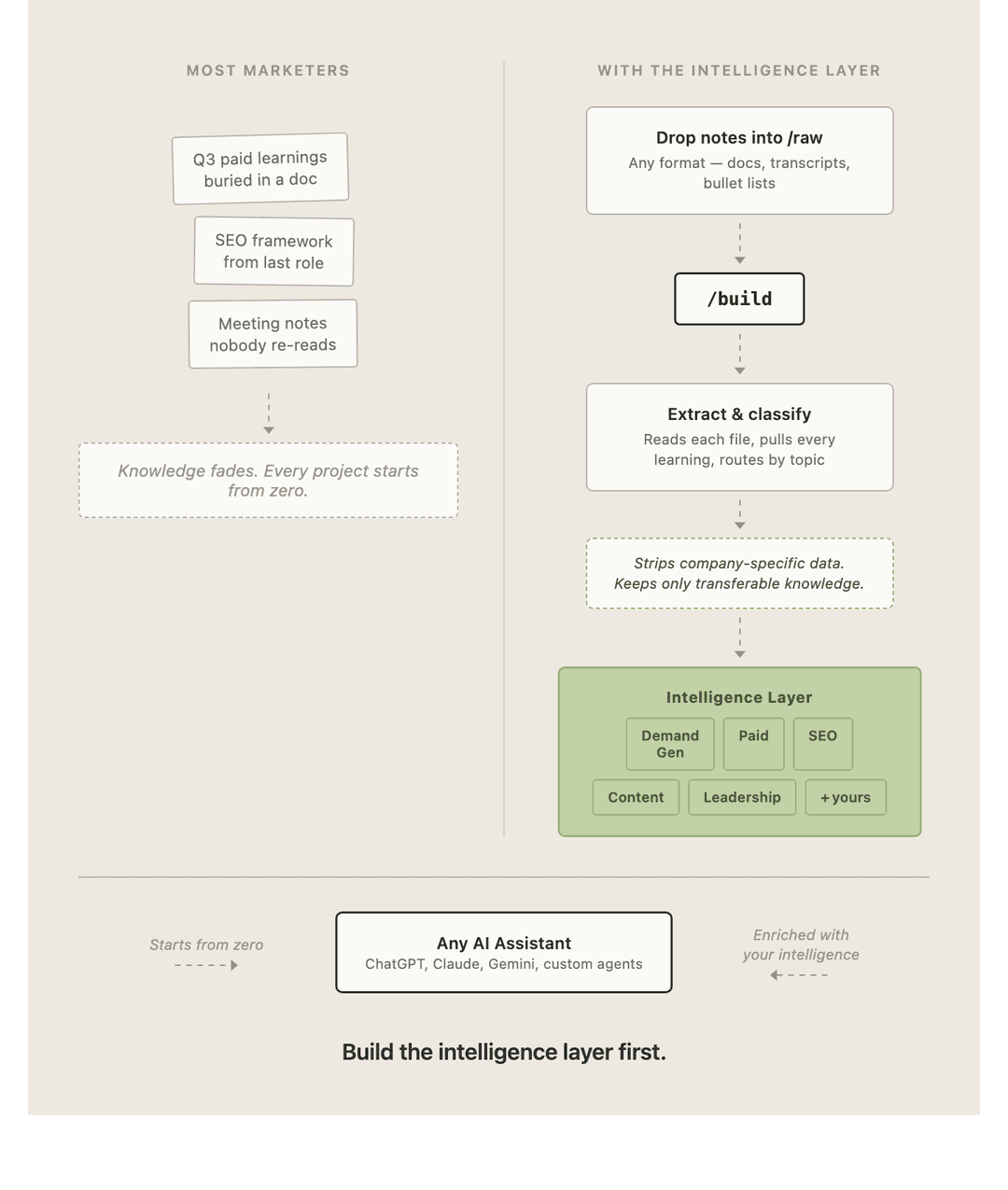
Every marketer has years of hard-won knowledge scattered across old decks, meeting notes, Slack threads and their own head. This turns that pile into a single, searchable intelligence layer you actually use — and that your AI assistants can read.
You drop raw notes into a folder. You run one command. You get a browsable HTML page of everything you've learned, organised by topic and by the companies you've worked at.
What you need
- Claude Code — Anthropic's coding agent. It runs in your terminal. You don't need to know how to code to use it.
- A Claude subscription (Pro or Max) or an API key.
- This repo, downloaded to your computer.
That's it. No database, no server, no hosting.
Setup (5 minutes)
1. Install Claude Code
Open your Terminal (Mac: press Cmd + Space, type "Terminal", hit Enter) and paste:
npm install -g @anthropic-ai/claude-code
If that errors because you don't have Node installed, follow the official install guide first.
2. Get this repo onto your computer
Either click the green Code → Download ZIP button at the top of this page and unzip it, or paste this into Terminal:
git clone https://github.com/searchbrat/marketing-intelligence-layer.git
3. Open the folder in Claude Code
cd marketing-intelligence-layer
claude
4. Add your notes
Put anything into the raw/ folder — meeting notes, old strategy docs, exported Google Docs, voice memo transcripts, half-finished markdown files, a text file of bullet points you typed at 11pm. Messy is fine. That's the point.
There's an example file already in there so you can see it work before you add your own.
5. Run it
Inside Claude Code, type:
/build
The first time, it asks for your name, your role, and any custom topics you want beyond the eight defaults. Then it reads your notes, shows you every learning it found and where it plans to file it, and waits for you to approve before writing anything.
When it's done, open index.html in your browser.
Using it day to day
| Command | What it does |
|---|---|
/build | Process new notes from the local raw/ folder |
/build drive | Process new notes from a Google Drive folder instead |
/build setup | Change your name, role, or topics |
Drop new notes into raw/ whenever you have them and run /build again. It only reads files it hasn't seen before, adds the new learnings into your existing page, and moves the processed files to archive/.
Your intelligence layer grows every time you run it.
What's in this repo
.claude/commands/build.md   The /build skill — the brain of the whole thing
template-index.html         The blank intelligence layer template
raw/                        Drop your notes here
archive/                    Processed notes get moved here automatically
index.html                  Your intelligence layer (created on first run)
config.json                 Your name, role, topics (created on first run)
The eight default topics
Demand Generation · Paid Advertising · SEO · Content Marketing · Attribution & Measurement · Product Marketing · Activation & Onboarding · Leadership & Strategy
Add your own — "AI in Marketing", "Brand", "Partnerships", "Community" — during setup or later with /build setup.
A note on confidentiality
The skill is built to capture transferable knowledge, not company secrets. It deliberately skips exact revenue figures, internal targets, unreleased product names, customer lists and individual employee names, and generalises anything close to the line. What it keeps is the frameworks, the results, the calls you made and what you'd do differently.
Read .claude/commands/build.md if you want to see exactly what it does — it's plain English, and you can edit any of it.
Make it yours
The whole system is two files. Change them.
- Want different topics or a different routing logic? Edit
.claude/commands/build.md. - Want a different look? Edit
template-index.html. - Want it to capture something other than marketing — product, sales, engineering? Rewrite the topic table in the skill. Nothing else needs to change.
Built by Kieran Flanagan. Free to use, fork and modify.
// faq
What is marketing-intelligence-layer?
Turn scattered marketing notes into a searchable intelligence layer your AI can read — one command in Claude Code.. It is open-source on GitHub.
Is marketing-intelligence-layer free to use?
marketing-intelligence-layer is open-source under the MIT license, so it is free to use.
What category does marketing-intelligence-layer belong to?
marketing-intelligence-layer is listed under automation in the Claudeers registry of Claude-compatible tools.
// embed badge

[](https://claudeers.com/marketing-intelligence-layer)
// retro hit counter

[](https://claudeers.com/marketing-intelligence-layer)
// reviews
// guestbook
// related in Automation & Workflows
 🔓
🔓 🔓
🔓The API to search, scrape, and interact with the web at scale. 🔥
 🔓
🔓🌐 Make websites accessible for AI agents. Automate tasks online with ease.
 🔓
🔓Taste-Skill - gives your AI good taste. stops the AI from generating boring, generic slop