
loadout
Claude Code harness manager: switchable profiles, scope provenance and on/off for every harness element
Install with your AI
Paste into Claude Code, Cursor, or any agent — it reads the repo and wires the tool into your project.
Install and set up loadout (claude-plugin project) into my current project.
Found on https://claudeers.com/loadout
Repo: https://github.com/MK27MK/loadout
Homepage/docs: —
Detected install method: claude-plugin → /plugin install loadout@MK27MK/loadout
Category: mcp-servers. Platforms: cli, api, web.
Read the repo's README for exact setup and env vars, then install it and wire it into my project.

Claudeers Health Verdict:
active; community-verified: false. Confirm the source before running anything.
/plugin marketplace add MK27MK/loadout
/plugin install loadout@MK27MK/loadout
git clone https://github.com/MK27MK/loadout
// compatibility
| Platforms | cli, api, web |
|---|---|
| Operating systems | — |
| AI compatibility | claude |
| License | MIT |
| Pricing | open-source |
| Language | TypeScript |
loadout
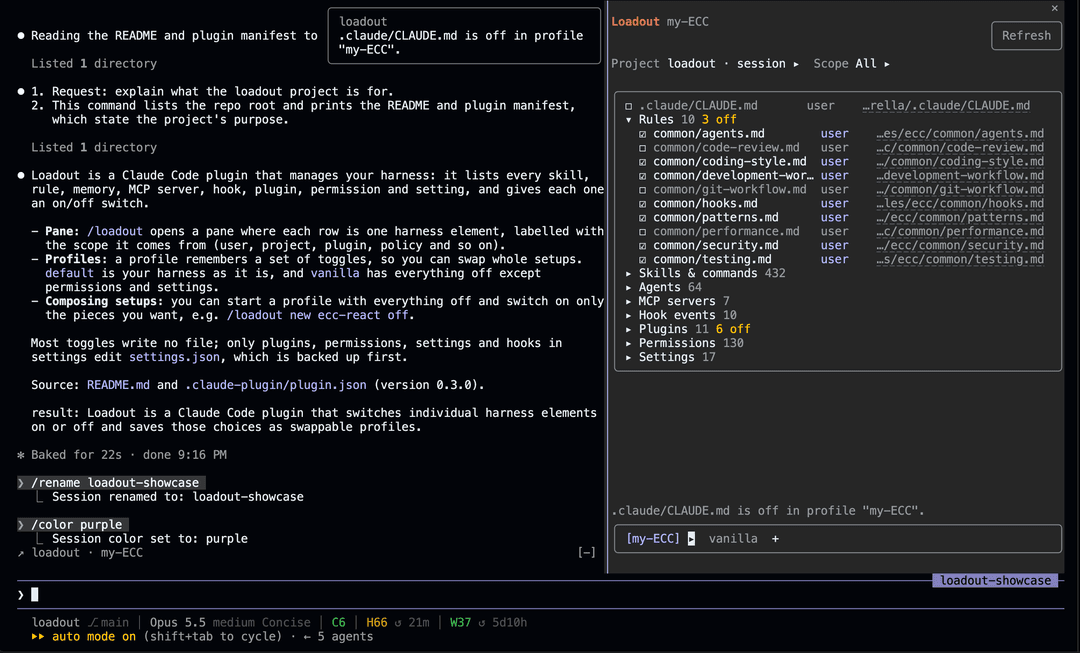
A Claude Code mod that manages your harness: every skill, rule, memory, MCP server, hook, plugin, permission and setting, with one switch each and profiles to swap whole setups.
Install
/plugin marketplace add MK27MK/loadout
/plugin install loadout@loadout
To run it from a local clone instead:
claude --plugin-dir path/to/loadout
The pane
/loadout opens the pane. Elements are grouped by kind, and each row is one harness element:
☑ ecc:plan              plugin   plugin ecc (user)
☐ rules/testing.md      user     ~/.claude/rules/ecc/testing.md
☑ hooks.Stop            policy   locked · managed settings
- Press the checkbox to turn an element on or off.
Projectpicks the project whose files are listed,Scopefilters by scope.- The tabs at the bottom are the profiles, with the applied one in brackets. Press a tab to look at a profile. Its
▸menu applies, duplicates, renames or deletes it. +duplicates the profile you are looking at under a new name.Refreshreads the harness again.
Keys: Tab moves between controls, Enter presses, Esc returns to the prompt.
What it manages
| Kind | Off means | Writes a file |
|---|---|---|
| CLAUDE.md, rules, memories | The file is left out of the context | No |
| Skills and commands | The command is hidden and refuses to run | No |
| Agents | The agent is not offered to the model | No |
| MCP servers | Every call to the server is denied | No |
| Hook events | All hooks of that event are skipped | No |
| Hooks in settings | The hook is removed from its settings.json | Yes |
| Plugins | enabledPlugins is set to false | Yes |
| Permissions | The rule is removed from its settings.json | Yes |
| Settings | The key is removed from its settings.json | Yes |
Plugin hooks can only be skipped per event, not one by one. After a plugin toggle, run /reload-plugins.
Scopes
Every row shows where the element comes from:
| Scope | Source |
|---|---|
policy | Managed settings of your organization. Always locked. |
flag | Command-line flags. Always locked. |
user | Your config directory (~/.claude, or CLAUDE_CONFIG_DIR) |
project | .claude/ and .mcp.json in the project |
local | .claude/settings.local.json |
plugin | An installed plugin, with the scope it was installed in |
account | A claude.ai connector |
memory | A memory file |
mixed | A hook event with hooks from more than one scope |
Profiles
A profile starts with everything on or everything off, and remembers the elements you toggled.
default: your harness as it is.vanilla: everything off, except permissions and settings. It is built in and cannot be changed, renamed or deleted. Duplicate it to build on it.
To compose a setup from several harnesses, create a profile that starts with everything off and switch on the pieces you want:
/loadout new ecc-react off
Commands
| Command | Does |
|---|---|
/loadout | Opens the pane |
/loadout status | Lists what is off in the active profile |
/loadout list | Lists the profiles |
/loadout use <profile> | Switches profile |
/loadout new <profile> [on|off] | Creates a profile with everything on or everything off. Without either, copies the active one. |
/loadout rename <profile> <new name> | Renames a profile |
/loadout delete <profile> | Deletes a profile |
/loadout project [<folder>] | Lists the files of another project folder. Without a folder, goes back to the session's project. |
Only you can change profiles. A /loadout use that you did not type is refused.
Safety
- Before the first change to a settings file, loadout copies it to
<config dir>/loadout-backups/. - A removed entry is stored and restored only into the file it came from.
- Setting values are never shown, only their keys.
- Project settings behind a symbolic link are not written.
Development
claude plugin validate .
claude plugin test .
The engine does not allow $ to cross an import, so every engine call is in hooks/register.tsx. The other files in hooks/ are pure functions.
License
// faq
What is loadout?
Claude Code harness manager: switchable profiles, scope provenance and on/off for every harness element. It is open-source on GitHub.
Is loadout free to use?
loadout is open-source under the MIT license, so it is free to use.
What category does loadout belong to?
loadout is listed under mcp-servers in the Claudeers registry of Claude-compatible tools.
// embed badge

[](https://claudeers.com/loadout)
// retro hit counter

[](https://claudeers.com/loadout)
// reviews
// guestbook
// related in MCP Servers
 🔓
f.k.a. Awesome ChatGPT Prompts. Share, discover, and collect prompts from the community. Free and open source — self-host for your organization with complete…
 🔓
A cross-platform desktop All-in-One assistant for Claude Code, Codex, OpenCode, OpenClaw, Gemini CLI & Hermes Agent. Only official website: ccswitch.io
 🔓
🪨 why use many token when few token do trick — Claude Code skill that cuts 65% of tokens by talking like caveman
 🔓
An open-source AI agent that brings the power of Gemini directly into your terminal.