
lite-cli
CLI tool wrapping claude code to help understand cost breakdown
Install with your AI
Paste into Claude Code, Cursor, or any agent — it reads the repo and wires the tool into your project.
Install and set up lite-cli (git-clone project) into my current project.
Found on https://claudeers.com/lite-cli
Repo: https://github.com/LiteLLM-Labs/lite-cli
Homepage/docs: —
Detected install method: git-clone → git clone https://github.com/LiteLLM-Labs/lite-cli
Category: devtools. Platforms: cli, api, web.
Read the repo's README for exact setup and env vars, then install it and wire it into my project.

Claudeers Health Verdict:
slowing; community-verified: false. Confirm the source before running anything.
git clone https://github.com/LiteLLM-Labs/lite-cli
// compatibility
| Platforms | cli, api, web |
|---|---|
| Operating systems | — |
| AI compatibility | claude |
| License | — |
| Pricing | open-source |
| Language | Rust |
lite-cli
A thin Rust CLI that wraps Claude Code to help you
understand and cut its cost — without changing how you use claude.
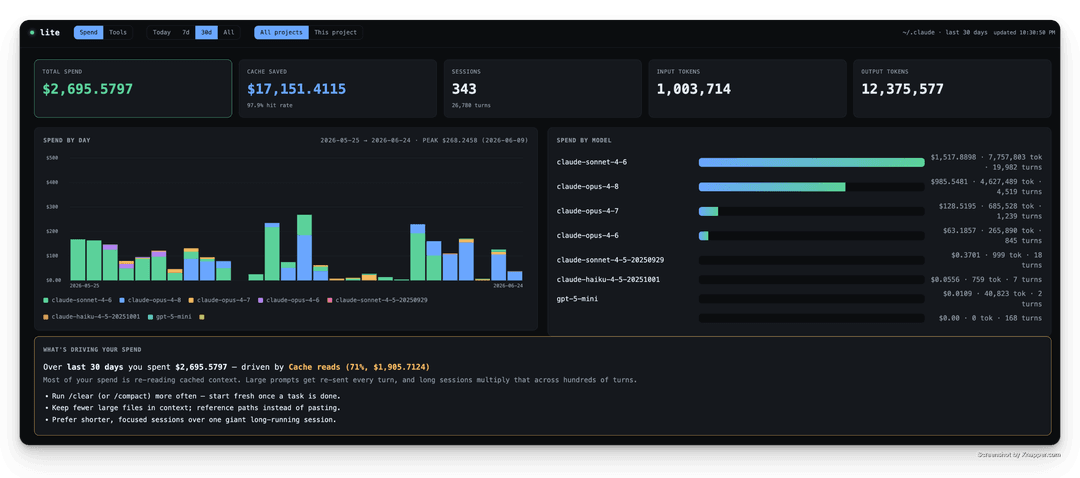
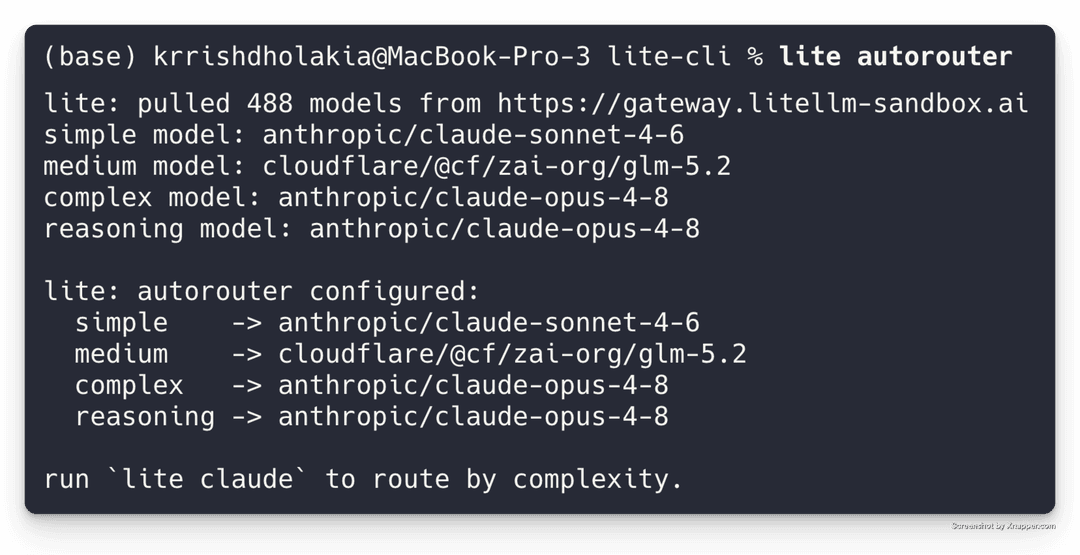
| Spend observability — what's driving cost & how to fix it | Autorouting — cheapest model that fits each session |
 |  |
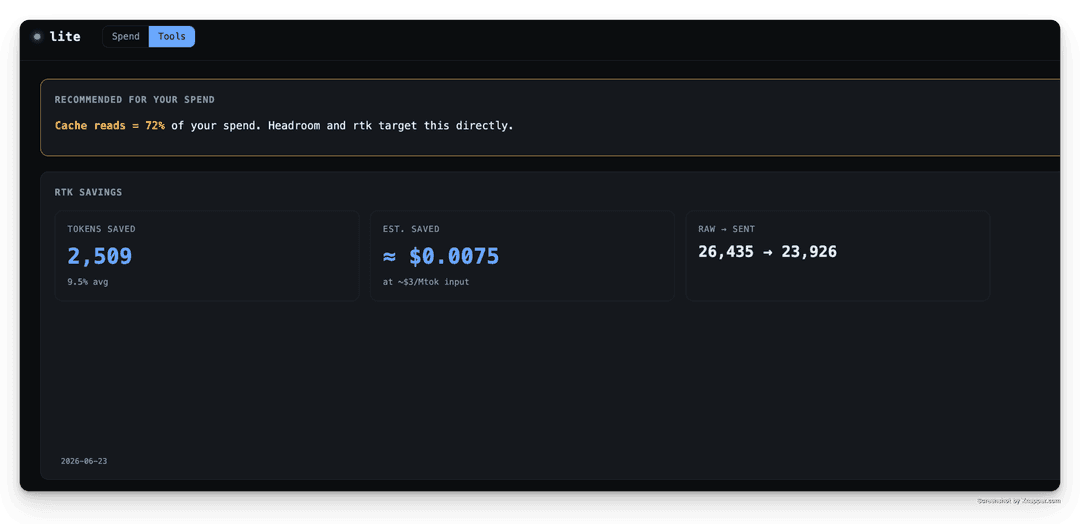
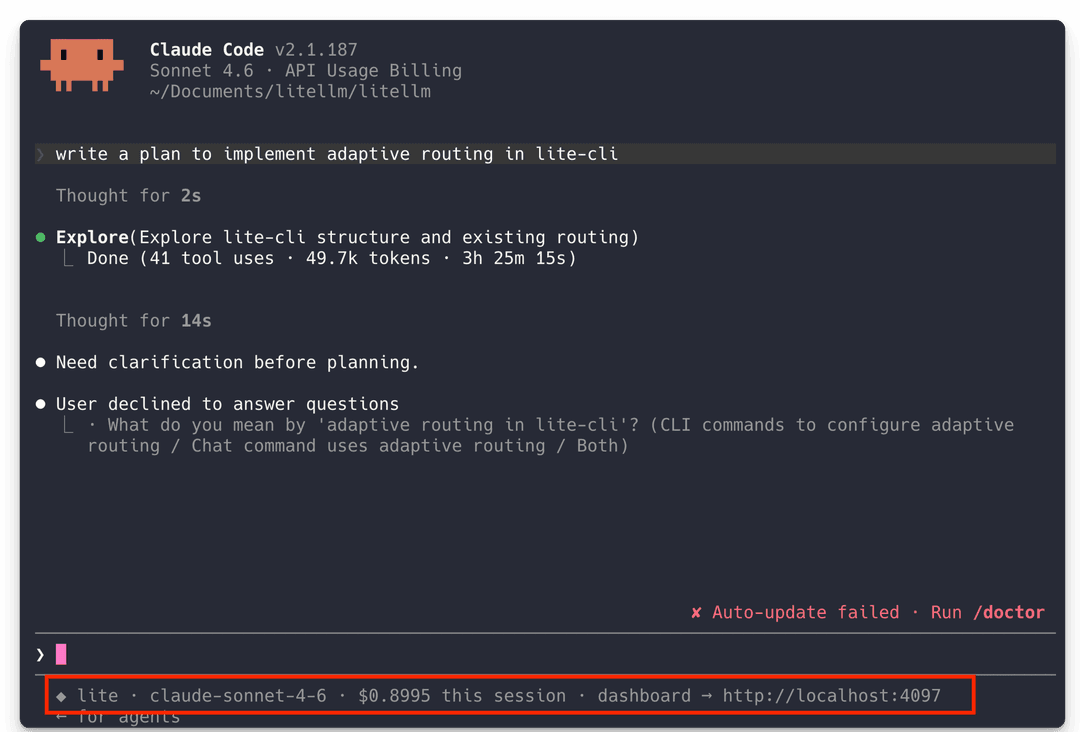
| Prompt compression — rtk savings, in the dashboard | Wraps Claude Code — live spend in the status line |
 |  |
Quickstart (under 30 seconds)
See all your claude code spend, out of the box.
lite dashboard
# running on http://0.0.0.0:4097
What it does
lite just does three things:
- Spend observability — a live dashboard that shows what every Claude Code session costs, broken down by session / project / model / day, and tells you what's driving spend and how to fix it. Sourced from Claude Code's own transcripts, so it's retroactive and complete. → Spend dashboard
- Autorouting — point lite at a LiteLLM gateway and it routes each session to the cheapest model that fits the work (simple turns → small model, hard turns → frontier model), no manual model switching. → Autorouter mode
- Prompt compression — one flag (
--litellm_enable_rtk) injects rtk's tool-output compression, shrinking the tokens Claude Code sends back into context.
Install
./install.sh                         # builds release, installs to ~/.local/bin, re-signs on macOS
PREFIX=/usr/local/bin ./install.sh   # custom install location
Or manually:
cargo build --release
cp target/release/lite ~/.local/bin/lite
codesign -s - -f ~/.local/bin/lite   # macOS only — see note below
macOS note:
cpinvalidates the binary's ad-hoc code signature on Apple Silicon, after which the kernel kills it on launch (zsh: killed, exit 137). Re-sign withcodesign -s - -f <path>after copying.install.shdoes this automatically.
Usage
lite claude                      # launch Claude Code through the proxy, log everything
lite claude --litellm_dashboard  # also open the live web dashboard
lite claude --model opus         # any claude flag passes straight through

lite dashboard                   # spend dashboard at http://localhost:4097
lite logs                        # latest session as a table
lite logs --follow               # live tail
Every claude flag passes through untouched — lite claude <whatever you'd pass to claude>. lite's
own flags all live under the --litellm_* namespace so they never collide with claude's, which
means you almost never need -- (use it only to force a literal --litellm_* token to claude).
Flags (lite claude)
| Flag | Default | Description |
|---|---|---|
--litellm_upstream <url> | $ANTHROPIC_BASE_URL or api.anthropic.com | upstream base URL |
--litellm_port <n> | ephemeral | fixed proxy port |
--litellm_log_dir <path> | ~/.lite/logs | log directory |
--litellm_bodies | off | log full request + response bodies |
--litellm_dashboard | off | also start the web dashboard + open browser |
--litellm_enable_rtk | off | inject rtk's tool-output compression hook for this session |
--litellm_* is lite's reserved flag namespace; lite parses these (from anywhere on the line) and
strips them before launching claude, so they never reach Claude Code.
Spend dashboard
The dashboard is a spend-diagnostic tool: it answers what's driving my spend, and what do I do about it — not just how much.
lite dashboard reads Claude Code's own session transcripts (~/.claude/projects/**/*.jsonl)
— so it shows spend across every session, retroactively, with no proxy required.
- Spend driver panel — ranks
cache_read/cache_write/output/inputby share of spend, names the likely cause, and offers concrete fixes, including a generatedCLAUDE.mdblock you can copy in one click. (Common finding: cache reads dominate spend.) - Time range — Today / 7d / 30d / All, scoping the whole view. "Today" is local midnight.
- Breakdowns — by session, by project, by model, plus Spend by Day (stacked per model) and a cache-savings figure. Toggle All projects / This project in the header.
- Tools tab — recommends prompt/context compression tools (Headroom, rtk) to drive spend down.
Cost is computed from LiteLLM's
model_prices_and_context_window.json
(fetched once, cached to ~/.lite/model_prices.json, refreshed every 24h). The math is a faithful
port of litellm's generic_cost_per_token — separate input / output / cache-read / cache-write
rates, long-context (_above_Nk_tokens) tiered pricing keyed on total context, the 5m/1h
cache-creation split, and service tier. Verified to match litellm's function exactly.
The proxy's own log (
lite claude→~/.lite/logs) is for live low-level observation andlite logs; the dashboard sources spend from Claude's transcripts. SeeAGENTS.md.
Autorouter mode
Opt-in and off by default. This is the one place lite stops being transparent — it rewrites the request
modeland injects gateway auth. With no config, the proxy path is byte-for-byte unchanged. SeeAGENTS.mdfor the design rationale.
Point lite at a LiteLLM gateway and let it route each session to the cheapest model that fits the work — simple turns to a small model, hard turns to a frontier model — without you switching models by hand.
1. Log into the gateway — stores base URL + api key in ~/.lite/settings.json (0600):
lite login
# enter api base
# enter api key
2. Assign a model per complexity tier — lists the gateway's models and lets you pick one for each tier:
lite autorouter
# pick: simple / medium / complex / reasoning
This writes the six fields lite needs to route:
// ~/.lite/settings.json
{
  "api_base":        "https://your-gateway...",
  "api_key":         "sk-...",
  "simple_model":    "claude-sonnet-4-6",
  "medium_model":    "glm-5.2",
  "complex_model":   "claude-opus-4-8",
  "reasoning_model": "claude-opus-4-8"
}
3. Run as usual — with all six fields present, lite claude routes automatically:
lite claude
How it routes:
- The first turn of a session is classified by
classifier.rs— a local, rule-based port of litellm'scomplexity_routerplus Claude Code signals (thethinkingfield → reasoning, tool count, conversation size). No API calls. - That tier is locked for the whole session so Anthropic prompt caching stays stable. The
small/fast slot always uses
simple_model. - The proxy rewrites
modelto the tier's model and injects the gateway api key for that request.
The injected status line shows the dashboard URL and the session's routed model + spend from inside the Claude Code TUI.
Where logs live
~/.lite/logs/session-<timestamp>.jsonl — one JSON object per API call (model, input/output
tokens, cache reads, latency, status). ~/.lite/logs/latest points at the active session.
How it redirects Claude Code
Claude Code reads ANTHROPIC_BASE_URL from ~/.claude/settings.json (env block), which
overrides the process environment. So lite injects the proxy URL via
claude --settings '{"env":{"ANTHROPIC_BASE_URL":"http://127.0.0.1:<port>"}}', which has higher
precedence. In transparent mode your auth token is left untouched and forwarded verbatim by the
proxy; only autorouter mode swaps it for the gateway key.
License
MIT
// faq
What is lite-cli?
CLI tool wrapping claude code to help understand cost breakdown. It is open-source on GitHub.
Is lite-cli free to use?
lite-cli is open-source, so it is free to use.
What category does lite-cli belong to?
lite-cli is listed under devtools in the Claudeers registry of Claude-compatible tools.
// embed badge

[](https://claudeers.com/lite-cli)
// retro hit counter

[](https://claudeers.com/lite-cli)
// reviews
// guestbook
// related in Developer Tools
 🔓
🔓The agent harness performance optimization system. Skills, instincts, memory, security, and research-first development for Claude Code, Codex, Opencode, Curs…
 🔓
🔓Makes your AI agent think like the laziest senior dev in the room. The best code is the code you never wrote.
 🔓
🔓Use Garry Tan's exact Claude Code setup: 23 opinionated tools that serve as CEO, Designer, Eng Manager, Release Manager, Doc Engineer, and QA
 🔓
🔓AI coding assistant skill (Claude Code, Codex, OpenCode, Cursor, Gemini CLI, and more). Turn any folder of code, SQL schemas, R scripts, shell scripts, docs,…