
liquid-glass-skill
Claude plugin for SwiftUI with Apple's Liquid Glass on iOS 26 and iOS 27: verified APIs, Apple's design rules, measured contrast, ten example screens, and a…
Install with your AI
Paste into Claude Code, Cursor, or any agent — it reads the repo and wires the tool into your project.
Install and set up liquid-glass-skill (claude-plugin project) into my current project.
Found on https://claudeers.com/liquid-glass-skill
Repo: https://github.com/heyparsadev/liquid-glass-skill
Homepage/docs: https://github.com/heyparsadev/claude-plugins
Detected install method: claude-plugin → /plugin install liquid-glass-skill@heyparsadev/liquid-glass-skill
Category: plugins. Platforms: cli, api, web, mobile.
Read the repo's README for exact setup and env vars, then install it and wire it into my project.

Claudeers Health Verdict:
active; community-verified: false. Confirm the source before running anything.
/plugin marketplace add heyparsadev/liquid-glass-skill
/plugin install liquid-glass-skill@heyparsadev/liquid-glass-skill
git clone https://github.com/heyparsadev/liquid-glass-skill
// compatibility
| Platforms | cli, api, web, mobile |
|---|---|
| Operating systems | — |
| AI compatibility | claude |
| License | MIT |
| Pricing | open-source |
| Language | Swift |
liquid-glass
A Claude plugin that teaches Claude to build SwiftUI interfaces with Apple's Liquid Glass on iOS 26 and iOS 27 (and the matching iPadOS, macOS, watchOS, and tvOS releases): real APIs only, Apple's design rules, and the iOS 27 additions with a gate for apps that still support iOS 26.
| Explore | Place | Discover | Navigation |
|---|---|---|---|
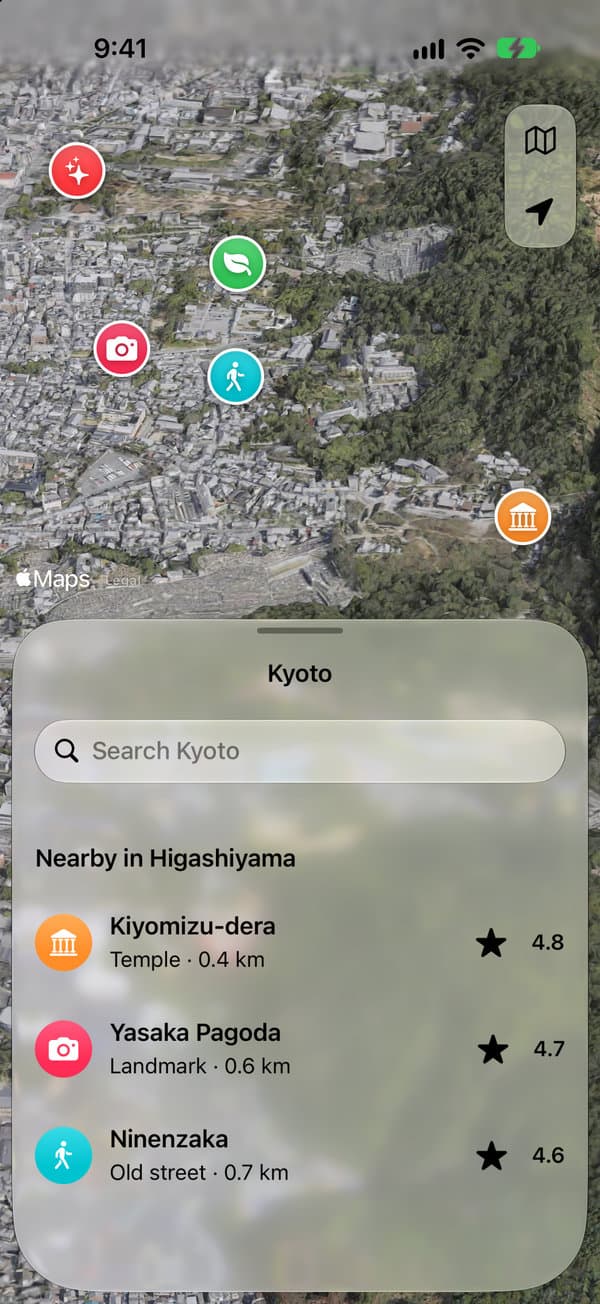 | 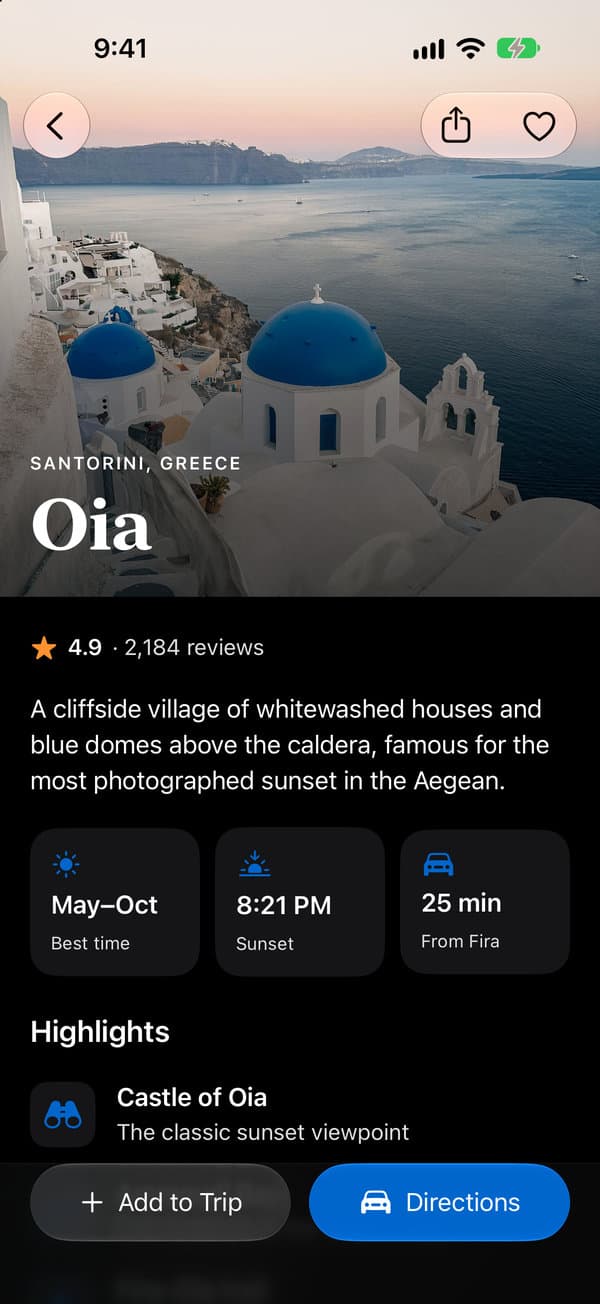 |  |  |
Four of the 14 screenshots of liquid-glass-showcase, a SwiftUI app with six screens, built with this skill on iOS 27. That repo has all of them, light and dark, and the app's code.
What it gives Claude
- Real APIs only. Every declaration was checked against Apple's documentation (iOS 27 SDK, October 2026). The reference includes an availability matrix and a list of names models tend to invent, such as
glassEffect(…, isEnabled:),.containerConcentric, andtoolbarMinimizeBehavior. - Apple's rules in Apple's words. Glass is for controls and navigation, never for content. No glass on glass, regular or clear glass, tint for meaning, and brand color in the content layer.
- The iOS 27 APIs.
toolbarMinimizationBehavior,visibilityPriority,ToolbarOverflowMenu,.topBarPinnedTrailing,TabRole.prominent, the status bar placement, and how to gate each one on an iOS 26 target. - Contrast that was measured. Ratios taken from iOS 27.0 simulator screenshots. They show why small text on glass should be
.primary, which accent keeps a white button label readable, and when a sheet needs its backdrop dimmed. - Ten example screens, six patterns, 22 anti-patterns with fixes, and a pre-ship checklist.
- A linter.
check_glass.pyis a read-only Python script that flags invented APIs, glass where it doesn't belong, and iOS 27 APIs without a gate.
Try it
After installing, ask Claude things like:
- "Build a photo detail screen with a glass toolbar for iOS 26."
- "Review this SwiftUI view for Liquid Glass mistakes."
- "Add the iOS 27 overflow menu to this toolbar and keep iOS 26 working."
- "Should these buttons use regular or clear glass?"
Install
The plugin is listed in the Claude plugin directory. In Claude Code you can also add it from a marketplace:
/plugin marketplace add https://github.com/heyparsadev/claude-plugins.git
/plugin install liquid-glass@parsa-plugins
claude-plugins carries other plugins too. To add this one alone, use this repo as the marketplace:
/plugin marketplace add https://github.com/heyparsadev/liquid-glass-skill.git
/plugin install liquid-glass@liquid-glass
Use the full https://…git URL, not the owner/repo shorthand, so cloning uses HTTPS and needs no SSH key. Update with /plugin marketplace update <marketplace> and remove with /plugin uninstall liquid-glass@<marketplace>.
Without the plugin system, link the skill folder:
git clone https://github.com/heyparsadev/liquid-glass-skill.git
ln -s "$(pwd)/liquid-glass-skill/skills/liquid-glass" ~/.claude/skills/liquid-glass
For a single project, link it into the project's .claude/skills/ instead.
When it activates
Claude chooses the skill from its description. It activates when you:
- write, review, or migrate SwiftUI for iOS 26 or iOS 27, or the matching iPadOS, macOS, watchOS, or tvOS releases,
- mention Liquid Glass,
glassEffect,GlassEffectContainer, glass buttons, iOS 26/27 design, Xcode 27, or the WWDC25/WWDC26 design changes, - ask how a screen, bar, or control in an iPhone, iPad, or Mac app should look in the new design, even without code.
The linter
python3 skills/liquid-glass/scripts/check_glass.py <files-or-folders> --target 26.0
The skill asks Claude to run it on the Swift files it writes or reviews. It only reads files, makes no network requests, and needs only the Python standard library. It reports error (won't compile or is wrong), warn (breaks a design rule, or uses an API newer than --target without a gate), and info (worth migrating). It exits 1 on errors, and with --strict on warnings too. --verbose adds a note for every standard material and every use of clear glass. Silence a line with // check-glass: ignore or // check-glass: ignore=<rule-id>. Tests: python3 -m unittest discover -s tests.
Troubleshooting
- The skill doesn't activate. Ask for it by name ("use the liquid-glass skill"), or run
/liquid-glass:liquid-glassin Claude Code. - The linter doesn't run. It needs Python 3. On a Mac with Xcode or its command line tools installed,
python3is already there.
Scope
- ✅ SwiftUI on iOS, iPadOS, Mac Catalyst, macOS, watchOS, and tvOS 26 and later
- ✅ iOS 27 APIs, with availability gating for apps that still target iOS 26
- ➖ Deployment targets below 26: covered briefly (gated helpers with a material fallback)
- ❌ visionOS (the
Glass/glassEffectAPIs aren't available there) - ❌ UIKit / AppKit, React Native, Flutter
How it was verified
- API declarations and availability come from Apple's DocC documentation. Design rules come from the HIG and WWDC25/WWDC26 sessions, quoted where stated.
- The contrast numbers come from the showcase app: 14 screenshots on the iOS 27.0 simulator, measured with its
scripts/measure_contrast.py. - The examples pass the linter with no errors or warnings. The Gallery app builds and runs all ten with Xcode 27.
Repository layout
.claude-plugin/            ← plugin and marketplace manifests
skills/liquid-glass/
  SKILL.md                 ← entry point: workflow, decision tree, golden rules, file index
  references/              ← 01 API · 02 HIG · 03 tokens · 04 motion · 05 accessibility ·
                             06 performance · 07 anti-patterns · 08 system chrome ·
                             09 what's new in iOS 27 · 10 migration
  patterns/                ← copy-paste recipes per surface
  examples/                ← ten full-screen SwiftUI examples
  checklists/              ← pre-ship review
  scripts/check_glass.py   ← linter
Gallery/                   ← host app that runs the examples (XcodeGen)
tests/                     ← linter tests
evals/                     ← activation evals for `claude plugin eval`
License
MIT. See LICENSE. The documentation is derived from Apple's public developer documentation, Human Interface Guidelines, and WWDC25/WWDC26 sessions. The example code is original.
// faq
What is liquid-glass-skill?
Claude plugin for SwiftUI with Apple's Liquid Glass on iOS 26 and iOS 27: verified APIs, Apple's design rules, measured contrast, ten example screens, and a linter.. It is open-source on GitHub.
Is liquid-glass-skill free to use?
liquid-glass-skill is open-source under the MIT license, so it is free to use.
What category does liquid-glass-skill belong to?
liquid-glass-skill is listed under plugins in the Claudeers registry of Claude-compatible tools.
// embed badge

[](https://claudeers.com/liquid-glass-skill)
// retro hit counter

[](https://claudeers.com/liquid-glass-skill)
// reviews
// guestbook
// related in Claude Plugins
 🔓
A single CLAUDE.md file to improve Claude Code behavior, derived from Andrej Karpathy's observations on LLM coding pitfalls.
 🔓
Claude Code is an agentic coding tool that lives in your terminal, understands your codebase, and helps you code faster by executing routine tasks, explainin…
 🔓
"CLI-Anything: Making ALL Software Agent-Native" -- CLI-Hub: https://clianything.cc/
🔓financial-services — a Claude ecosystem project on GitHub.