
limora-unslop
Free Claude skill: unslop your project with its own icons and banner drawn by Limora AI, plus a shareable before/after video.
Install with your AI
Paste into Claude Code, Cursor, or any agent — it reads the repo and wires the tool into your project.
Install and set up limora-unslop (claude-skill project) into my current project.
Found on https://claudeers.com/limora-unslop
Repo: https://github.com/Logiaweb/limora-unslop
Homepage/docs: https://adrien-ninet.com/unslop
Detected install method: claude-skill → # copy this skill into .claude/skills/limora-unslop/
Category: skills. Platforms: cli, web.
Read the repo's README for exact setup and env vars, then install it and wire it into my project.

Claudeers Health Verdict:
unknown; community-verified: false. Confirm the source before running anything.
# copy the skill dir into your project:
# .claude/skills/limora-unslop/   (or ~/.claude/skills/limora-unslop/ for all projects)
git clone https://github.com/Logiaweb/limora-unslop
// compatibility
| Platforms | cli, web |
|---|---|
| Operating systems | — |
| AI compatibility | claude |
| License | NOASSERTION |
| Pricing | open-source |
| Language | JavaScript |
Limora Unslop
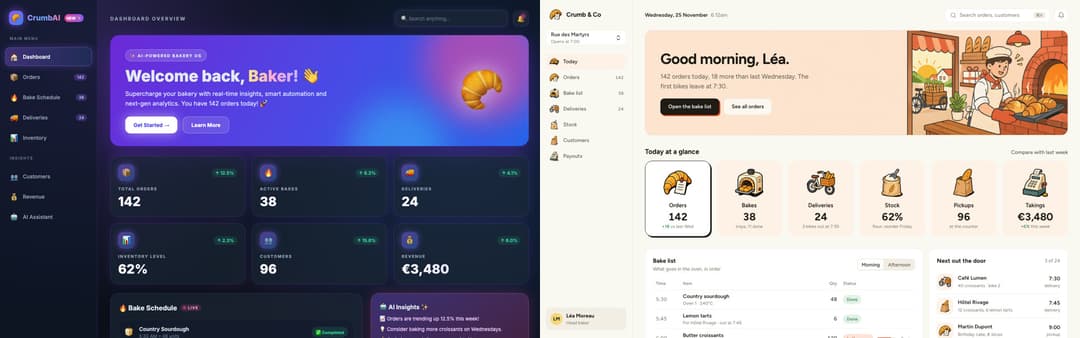
Your AI-built app or website looks like every other AI-built projects. That's because it's made of the same borrowed parts: stock icons, gradient heroes, empty empty states.
Limora Unslop is a free Claude skill that gives your product its own pictures. It finds the one true detail about how your product is used, draws every picture your screen needs with Limora (icons, hero, card images, step illustrations, empty states), and rebuilds your screen around them.
By Adrien Ninet, designer.
Not the same as
unslop. There's a popular skill called unslop by @heydamir that polishes code: spacing, type, color. limora-unslop is a different skill. It draws your product's own pictures with Limora, then rebuilds the screen around them. If you have both installed, say "use limora-unslop" so your agent picks this one.
What it does
- Optionally collects real references first, if you have a reference tool like Refero or Mobbin connected.
- Reads your screen and finds what's borrowed.
- Finds your product's world: who uses it, when, and which objects fill their day.
- Gives you 3-4 visual directions, plus an image plan: every picture the screen needs, with its cost.
- Draws the whole plan in one style with Limora, starting with the icons and the hero so you approve the look first.
- Rebuilds the screen around them: quiet UI, one accent, specific copy.
- Makes a short video of your screen fixing itself, ready to post.
- Builds a before/after page with a drag-to-compare slider, to share the result.
It handles React, Tailwind and plain HTML/CSS. Start from your code, your website address or a screenshot.
Install
Paste this repo's link into Claude Code and ask Claude to install the skill. Or run:
git clone https://github.com/Logiaweb/limora-unslop ~/.claude/skills/limora-unslop
Then start a new session. Skills load when a session starts, so a session that was already open won't see it, and may pick another skill with a similar name instead.
To update: cd ~/.claude/skills/limora-unslop && git pull
Then connect Limora for the drawings:
- Create a free account at limora.ai. New accounts get enough credits to start with the icons and the hero.
- Run
claude mcp add --transport http limora https://app.limora.ai/mcp
Use it
/limora-unslop on my dashboard.
or "Use limora-unslop on my dashboard."
The skill stops once to let you pick a direction, and again before it spends credits.
Helper scripts in scripts/ are plain Node with nothing to install. They cut an icon sheet into single icons (split-sheet.mjs), read the hero's exact edge color (sample-color.mjs), shrink Limora's full-size PNGs for the web (shrink.mjs), and build the before/after page (compare-page.mjs).
The video needs Playwright and ffmpeg: npm i -D playwright && npx playwright install chromium, and brew install ffmpeg on a Mac.
Credits
The video's sound effects are free (CC0) recordings, credited here with thanks:
- Whoosh: "Woosh" by 1bob on Freesound
- Click: "Mouse Click Sound" by Pixeliota on Freesound
- Tick: "Switch 35" from UI Audio by Kenney
- Banner reveal: "Draw Knife 1" from RPG Audio by Kenney
The pop and ding sounds are generated by the render script.
// faq
What is limora-unslop?
Free Claude skill: unslop your project with its own icons and banner drawn by Limora AI, plus a shareable before/after video.. It is open-source on GitHub.
Is limora-unslop free to use?
limora-unslop is open-source under the NOASSERTION license, so it is free to use.
What category does limora-unslop belong to?
limora-unslop is listed under skills in the Claudeers registry of Claude-compatible tools.
// embed badge

[](https://claudeers.com/limora-unslop)
// retro hit counter

[](https://claudeers.com/limora-unslop)
// reviews
// guestbook
// related in Claude Skills
 🔓
An agentic skills framework & software development methodology that works.
 🔓
 🔓
💫 Toolkit to help you get started with Spec-Driven Development
 🔓
AI coding assistant skill (Claude Code, Codex, OpenCode, Cursor, Gemini CLI, and more). Turn any folder of code, SQL schemas, R scripts, shell scripts, docs,…