
lemo-wake
Claude Code plugin: turn one still image into a ~5 s seamless looping animation (MP4, GIF, WebP, Live Photo). 把一张图做成约 5 秒的无缝循环动图。
Install with your AI
Paste into Claude Code, Cursor, or any agent — it reads the repo and wires the tool into your project.
Install and set up lemo-wake (claude-plugin project) into my current project.
Found on https://claudeers.com/lemo-wake
Repo: https://github.com/lemomo-ai/lemo-wake
Homepage/docs: https://lemomo-ai.github.io/lemo-wake/
Detected install method: claude-plugin → /plugin install lemo-wake@lemomo-ai/lemo-wake
Category: plugins. Platforms: cli, api, web.
Read the repo's README for exact setup and env vars, then install it and wire it into my project.

Claudeers Health Verdict:
unknown; community-verified: false. Confirm the source before running anything.
⚠ Unverified / not recently updated — review before pasting a run-this config.
/plugin marketplace add lemomo-ai/lemo-wake
/plugin install lemo-wake@lemomo-ai/lemo-wake
git clone https://github.com/lemomo-ai/lemo-wake
// compatibility
| Platforms | cli, api, web |
|---|---|
| Operating systems | — |
| AI compatibility | claude |
| License | NOASSERTION |
| Pricing | open-source |
| Language | Python |
lemo-wake

把你的照片叫醒
Wake your image.
一张图进去,一段约 5 秒、无缝循环的动图出来。
One picture in, a seamless loop of about five seconds out.
English | 中文
中文用户请看这里:完整中文说明 README.zh-CN.md
English readers: keep reading below.
What it does 它做什么
Give Claude Code one picture and say "make it move". You get a loop of about 5 seconds whose end joins its start seamlessly. Photos, portraits, posters, illustrations, logos, charts, stickers, Xiaohongshu covers and chat screenshots all work.
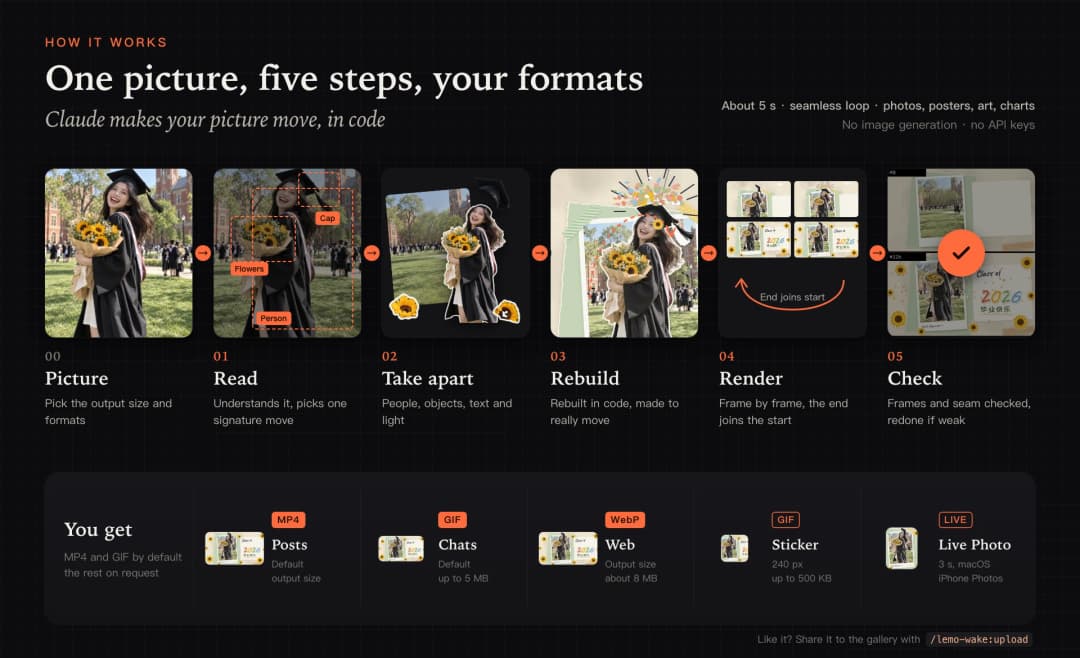
It is not a filter. Claude first reads the image, takes it apart into text, shapes, objects, people and light, rebuilds the pieces in code and choreographs a short film for this one picture. It then renders the frames in a headless browser, joins the end back to the start and encodes the result.
- No image generation. Everything comes from your picture, from code and from small local models.
- No API keys. No cloud services. Everything runs on your machine.
- Your size, your formats. It asks once: keep your image's size or pick another ratio, and which formats you want.
中文简介
把一张图交给 Claude Code,说一句“让它动起来”,就能拿到一段约 5 秒、首尾无缝相接的动图。照片、人像、海报、插画、Logo、图表、表情包、小红书封面、聊天截图都可以。
这不是套滤镜。Claude 会先读懂画面,把文字、图形、物体、人物和光拆开,用代码重建,再为这张图编排一段专属的动作。最后在无头浏览器里逐帧渲染,把结尾接回开头,编码出片。
- 不生图:素材只来自你的图、代码和本地小模型。
- 不用 API key:不连云服务,全部在你的电脑上完成。
- 尺寸和格式你来选:开始前问一次,保持原图尺寸还是换个比例,要哪几种格式。
How it works 流程
Install
Built and tuned for Claude Code. Other agents (Codex, for example) can read the skill too, but the results are not guaranteed.
As a Claude Code plugin (recommended). In a terminal (both lines can be pasted at once):
claude plugin marketplace add lemomo-ai/lemo-wake
claude plugin install lemo-wake@lemo-wake
Or inside Claude Code, one line at a time (run the first, then type the second):
/plugin marketplace add lemomo-ai/lemo-wake
/plugin install lemo-wake@lemo-wake
Then restart Claude Code, or run /reload-plugins.
As a plain skill (without the upload and layers commands):
git clone --depth 1 https://github.com/lemomo-ai/lemo-wake
cp -R lemo-wake/skills/wake ~/.claude/skills/lemo-wake
You can also put it in a project's .claude/skills/lemo-wake.
Use
Give Claude an image and say "make it move". No command needed. Or use the commands:
| Command | What it does |
|---|---|
/lemo-wake:wake <image> | Make a film from an image |
/lemo-wake:layers <image> | Split an image into layers (PSD + PNG) |
/lemo-wake:upload | Share a film to the gallery |
With a plain skill install, the command is /lemo-wake <image>.
Layers. /lemo-wake:layers, or just "split this into layers" / "give me a PSD": each person, object and text block on its own transparent layer, the background behind them filled in, plus a depth map. You get layers.psd (Photoshop, Affinity, Procreate, or free in the browser at Photopea), the PNG layers and a layers.json with positions and stacking order (After Effects, Figma, game engines). People are kept whole, text stays pixels, and large hidden areas come out soft, since nothing is generated. It also reuses the parts of a film you already made.
How cleanly a picture splits depends on the picture, so the result is not guaranteed. If something is off, just tell the agent what you want, for example "put the two people on separate layers", "keep the flowers with the vase" or "clean up the edge of the hair", and it will redo that part.
What you get
Before it starts, Claude asks once: which size (your image's own size by default, or another ratio such as 16:9, 9:16 or 1:1) and which formats. Say "go" to take the defaults. Every format comes from the same frames, and more can be added later without re-rendering.
| File | Default | Size | For |
|---|---|---|---|
<name>.mp4 | yes | output size, no audio | Posts on WeChat Moments, Xiaohongshu, Douyin, Instagram, X |
<name>.gif | yes | at most 5 MB, under 1080 wide | Chats on WeChat, QQ, Weibo |
<name>.webp | on request | output size, about 8 MB | Web pages, GitHub, the gallery |
<name>-sticker.gif | on request | long side 240 px, at most 500 KB | A WeChat custom sticker |
<name>.pvt | on request, macOS only | a 3 s Live Photo, still at output size | iPhone Photos, then Xiaohongshu or Moments |
Why several: most chat apps and phone galleries don't play animated WebP, social platforms want MP4 for posts, and GIF works everywhere but is heavy. If a platform has another limit, such as "GIF under 2 MB", tell Claude.
The Live Photo is a .pvt bundle (Finder shows it as one file). AirDrop that one file to your iPhone and it lands in Photos as a Live Photo. Sending the photo and the video inside it separately gives you a photo and a video.
Photos with a long side over 2560 px are rendered at 2560 to keep it fast. Ask for full resolution if you need it.
First run
On first use Claude runs node scripts/doctor.mjs in the skill folder (skills/wake/). With --fix it installs what is missing.
| Needs | Size | How |
|---|---|---|
| Node.js 18 or later | Install it yourself | |
| ffmpeg and ffprobe | brew install ffmpeg, sudo apt install ffmpeg or winget install Gyan.FFmpeg | |
| uv (runs the Python scripts) | brew install uv, or see https://docs.astral.sh/uv/ | |
Headless Chromium and playwright-core | About 190 MB | node scripts/doctor.mjs --fix, or use an installed Chrome with CHROME=<path> |
| Python packages (Pillow, NumPy, OpenCV, onnxruntime) | About 150 MB | Downloaded automatically on first use |
| Xcode Command Line Tools (Live Photos only, macOS) | xcode-select --install |
Tested on macOS. Linux and Windows should work. If a step fails, Claude works out what is missing.
Local models (optional)
Small models that run locally on the CPU cut out objects and people, fill the space behind them and estimate depth. Most films get better with them: that is what lets things leave their place and really move. Nothing is downloaded until you say yes once, usually in the first question before a film starts.
| Model | What it does | Size | Source | License |
|---|---|---|---|---|
| Depth Anything V2 Small | Depth map for 3D parallax | 99 MB | onnx-community/depth-anything-v2-small | Apache-2.0 |
| BiRefNet-lite | Cuts out the main subject | 224 MB | onnx-community/BiRefNet_lite-ONNX | MIT |
| MODNet | Portrait matting with fine hair | 26 MB | Xenova/modnet | Apache-2.0 |
| MobileSAM (2 files) | Picks one element by point or box | 44 MB | Acly/MobileSAM | MIT |
| LaMa | Fills the hole behind a moved object | 208 MB | Carve/LaMa-ONNX | Apache-2.0 |
About 600 MB in all. Every file is checked by sha256.
Asked once. Before the first film that needs a model, Claude tells you which one, what it is for, how big it is, where it comes from and where it will be stored, and asks once. Your answer is saved. If you say no, Claude finds a compromise in code and still finishes the film.
Where they are stored. With a plugin install, in ~/.claude/plugins/data/<plugin-id>/models/, kept across updates and removed on uninstall. With a plain skill install, in models/ in the skill folder. Set LEMO_WAKE_MODELS=<folder> to use another folder.
Commands. Run them in skills/wake/, or just ask Claude:
scripts/models.py                     # status
scripts/models.py fetch all --yes     # download everything now
scripts/models.py consent yes|no      # change your answer
Mainland China
Hugging Face is often unreachable from mainland China. Use the mirror. Files are still checked against the same sha256:
HF_ENDPOINT=https://hf-mirror.com scripts/models.py fetch all --yes
To use the mirror for every download, add it to ~/.claude/settings.json:
{ "env": { "HF_ENDPOINT": "https://hf-mirror.com" } }
If a download fails, Claude also tries a mirror on its own. For other slow downloads:
- Python packages:
UV_DEFAULT_INDEX=https://pypi.tuna.tsinghua.edu.cn/simple - npm:
npm config set registry https://registry.npmmirror.com - Headless browser: an installed Google Chrome works too, with
CHROME=<path> - Models by hand: download them from the links above, rename them to
depth_anything_v2_small.onnx,birefnet_lite.onnx,modnet.onnx,mobile_sam_image_encoder.onnx,sam_mask_decoder_multi.onnxandlama_fp32.onnx, and put them in the models folder
Community
The gallery is not only for our samples. You are welcome to add your own films. Community films sit on the same wall as the samples, with an orange "Community" badge in the corner of the card and the author's name. The gallery also has a "Community" filter that shows only shared films.
How to share
- Make a film you like with the plugin and run
/lemo-wake:upload. This command is only available with a plugin install. - Claude checks the film (animated WebP or GIF, at most 8 MB) and makes a small preview. It asks for a title, a category and a credit, and whether to include the original image and notes. The original is saved without location, camera or date information.
- Claude shows you everything that will be published. Only after your yes does it open a pull request from your own GitHub account. You need the GitHub CLI, logged in with
gh auth login. - After an automatic check and a maintainer's review, the film appears in the gallery.
Rules
- Only share images you have the rights to, such as your own photo, your own artwork or an image you are allowed to share. If other people are in a photo, ask them first.
- No private details, such as other people's faces, names, phone numbers, addresses, chat contents, documents or licence plates.
- Films are published under CC BY-NC 4.0: others may share and adapt them with credit, but not for commercial use. By sharing, you agree that the project may show your film in this README, the gallery and posts about the project.
- Films always go to the official repository, even if you installed the plugin from a fork or a copy.
- To remove your film, open an issue or a pull request that deletes its folder.
Full rules: CONTRIBUTING.md.
License
- Code and docs: CC BY-NC 4.0: free to use, share and adapt with attribution, not for commercial use. For commercial use, contact Lemomo.
- Gallery films, including samples, community films and any originals shown with them, are licensed by their authors under CC BY-NC 4.0 as well: attribution, non-commercial.
- Local models are downloaded from their own sources and used under their own licenses. They are not part of this repository.
Versions: Releases.
About
lemo-wake is made by Lemomo together with Claude. The official repository is https://github.com/lemomo-ai/lemo-wake and the official gallery is https://lemomo-ai.github.io/lemo-wake/. Forks and copies are welcome under the license. Please keep a link back here.
If you use lemo-wake in your work, you can cite it with CITATION.cff.
Examples
One film from each category, original on the left and film on the right. See the gallery for more.
绘画作品 Paintings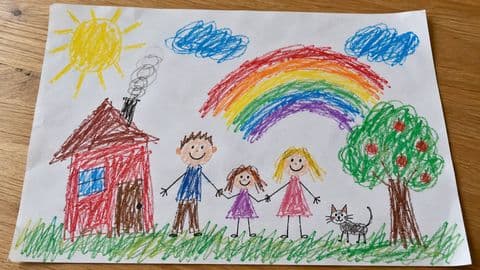  小孩蜡笔画 彩虹落地 A child's crayon drawing, the rainbow lands | 海报广告 Posters  巴黎 套印合拢 Paris, the print plates snap into register |
人像合影 People  樱花野餐 打开就跳出来 Cherry-blossom picnic, pops up as it opens | 生活随拍 Everyday  窗边早餐 早餐蹦蹦 Breakfast by the window, breakfast hops |
社交分享 Social  一年读完 52 本书 书飞进数字 52 books in a year, books fly into the number | 数据图表 Charts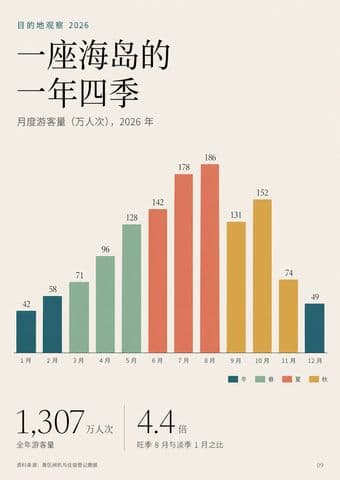  海岛的一年四季 太阳跳过一年 An island's four seasons, the sun hops through the year |
品牌标志 Logos  Moon Groove Records 月亮落针 Moon Groove Records, the moon drops the needle | 表情问候 Stickers  冲鸭 冲出去再冲回来 Go, duck! Dash out and dash back |
// faq
What is lemo-wake?
Claude Code plugin: turn one still image into a ~5 s seamless looping animation (MP4, GIF, WebP, Live Photo). 把一张图做成约 5 秒的无缝循环动图。. It is open-source on GitHub.
Is lemo-wake free to use?
lemo-wake is open-source under the NOASSERTION license, so it is free to use.
What category does lemo-wake belong to?
lemo-wake is listed under plugins in the Claudeers registry of Claude-compatible tools.
// embed badge

[](https://claudeers.com/lemo-wake)
// retro hit counter

[](https://claudeers.com/lemo-wake)
// reviews
// guestbook
// related in Claude Plugins
 🔓
🔓A single CLAUDE.md file to improve Claude Code behavior, derived from Andrej Karpathy's observations on LLM coding pitfalls.
 🔓
🔓Claude Code is an agentic coding tool that lives in your terminal, understands your codebase, and helps you code faster by executing routine tasks, explainin…
 🔓
🔓"CLI-Anything: Making ALL Software Agent-Native" -- CLI-Hub: https://clianything.cc/
🔓financial-services — a Claude ecosystem project on GitHub.