
lantern
Find the conversation you forgot you started — a self-hosted dashboard that groups your Claude Code sessions by topic.
Install with your AI
Paste into Claude Code, Cursor, or any agent — it reads the repo and wires the tool into your project.
Install and set up lantern (npm project) into my current project.
Found on https://claudeers.com/lantern
Repo: https://github.com/WildChildForLife/lantern
Homepage/docs: https://github.com/WildChildForLife/lantern
Detected install method: npm → npm install lantern-viewer
Category: devtools. Platforms: cli, api, web.
Read the repo's README for exact setup and env vars, then install it and wire it into my project.

Claudeers Health Verdict:
active; community-verified: false. Confirm the source before running anything.
npm install lantern-viewer
git clone https://github.com/WildChildForLife/lantern
// compatibility
| Platforms | cli, api, web |
|---|---|
| Operating systems | — |
| AI compatibility | claude |
| License | MIT |
| Pricing | open-source |
| Language | TypeScript |
Lantern
Find the conversation you forgot you started.
Lantern reads the logs your agent CLIs already write — Claude Code's ~/.claude/projects/, and
optionally five others — and groups every conversation by what it is about, not
by which folder it happened to start in. It runs where you already are: a terminal.
$ lantern
 Lantern  6 topics · 69 conversations · enter: resume here

 ⌁ Orders API 12                ≋ Home Network 6              ▣ Deploy Pipeline 5
 ─────────────────────────────  ────────────────────────────  ───────────────────
 ❯ Add refunds to checkout  2h     Router DHCP leases    1d      Cache the build 3h
   Fix the webhook retry    5h     Split the VLANs       2d      Pin the runner  1d
   Rename the price field   1d     Static leases for NAS 4d

  t  sort 4 conversations into topics with the AI · T redoes every topic

 /home/you/work/orders-api · claude-code · sonnet · ~$0.42 · 24 messages · 4f2ab8c1
 ←→ topics · ↑↓ rows · / filter · e change · r reload · ? keys · q quit
One column per topic, conversations as rows, newest topic first. Press R to resume a conversation
in place and come back to the board when you leave it. The board has the rest of the
keys.
The web UI starts behind it and prints its address — the same data, with a full
session viewer, search and cost breakdowns, for when a terminal is the wrong shape for what you are
doing. lantern --cli-only leaves it out: no server, no port, no browser.
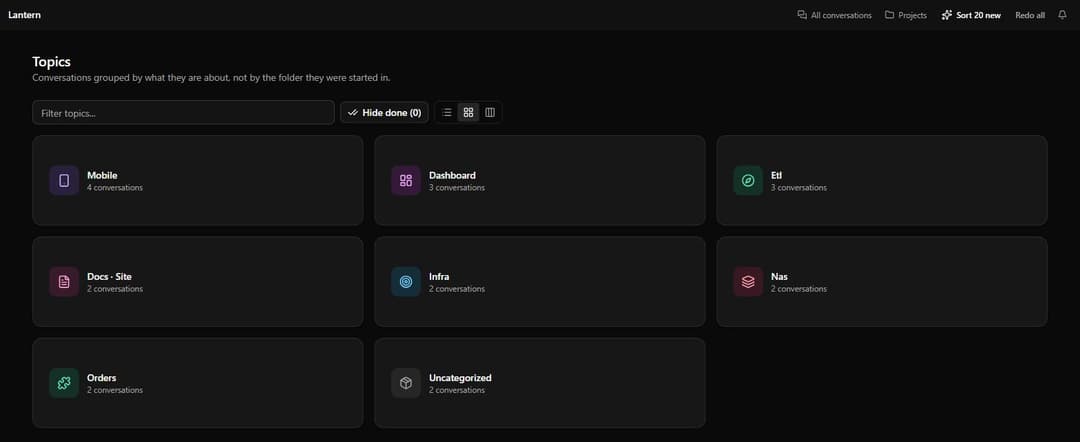
Quick start
With Node.js 24 or newer already present, nothing to install:
npx lantern-viewer
On a first run Lantern reads your logs into its own cache, then draws the board.
Install
npm install -g lantern-viewer                       # any platform, needs Node 24
brew install wildchildforlife/tap/lantern-viewer    # macOS or linuxbrew, brings Node
For Docker, Windows, aarch64, building from source, or which platforms support the web UI's in-app
terminal, see Install.
Nothing to configure afterwards — lantern works out of the box. Only the optional AI topic
naming needs Claude Code installed and signed in.
Commands
lantern                    # the board in your terminal, with the web UI behind it
lantern --cli-only         # the board alone, no port opened
lantern --server-only      # the web UI alone, for a container or a service file
lantern init               # optional: set Lantern up, and remember the answers
lantern upgrade            # move to the latest release
lantern— starts the web server, prints its address, and draws the board over it. Quitting the board stops both.--cli-onlyand--server-onlyask for one half; asking for both is refused. With nothing to draw on — a container, a pipe, CI — it starts the server alone.browse— aliasb, and the same thing as--cli-only. Takes--claude-dir,--executable,--sourceand--verbose, on either side of the command name.init— never required: every setting it writes has a working default, and the board never stops to ask for one. Run it to change the port, bind address or set of agent CLIs.upgrade— runs the package manager that installed Lantern. Anything it did not install is left alone with the right command printed instead.
Every flag and environment variable is in Configuration.
Agent CLIs
| Agent CLI | History Lantern reads | Verified against | Mode |
|---|---|---|---|
| Claude Code | ~/.claude/projects/ | 2.1.221 | Read and drive a turn |
| Codex CLI | ~/.codex/sessions/ | 0.146.0 | Read-only |
| opencode | ~/.local/share/opencode/ | 1.18.13 | Read-only |
| Qwen Code | ~/.qwen/projects/ | 0.21.6 | Read-only |
| Copilot CLI | ~/.copilot/session-state/ | 1.0.78 | Read-only |
| goose | ~/.local/share/goose/ | 1.45.0 | Read-only |
Sessions from every enabled CLI sit in the same topics, the same searchable list and the same board, and are grouped into one workspace when they ran in the same repo. Claude Code stays the only interactive one. "Verified against" means that exact version was run and its history read back — see Agent CLIs for where each one stores history, how to enable them, and what is not read yet.
Grouping
Grouping is local and deterministic by default: Lantern clusters conversations on the words in their
titles, at no cost and with no network. Press t on the board to hand the titles to your existing
Claude Code login for better topic names instead. Nothing runs automatically.
How grouping works.
Security
Lantern's web UI ships an in-app terminal. Binding to anything other than
localhostwithout--passwordhands a remote shell to whoever finds the port. Use--terminal-disabledand a password, or keep it behind a VPN such as Tailscale.--terminal-unrestrictedremoves the guard rails from bash sessions, so treat it as widening that same hole.
None of that applies to lantern --cli-only (or lantern browse), which opens no port and serves
nothing.
If you have run lantern init and told it to bind beyond localhost, that answer is stored, and a
bare lantern now starts a server where lantern browse started none. Check ~/.lantern/config.json
before the first run of a version with this in it, or use --cli-only to open no port at all.
The threat model and how to report a vulnerability privately are in SECURITY.md. Please use GitHub Security Advisories rather than a public issue.
Privacy
Lantern reads your session logs locally and sends them nowhere. The only outbound traffic is the optional topic classification, which goes through your own Claude Code CLI when you ask for it. See PRIVACY.md.
Documentation
Everything else lives in docs/: install, the board, the web UI, configuration, agent CLIs, grouping and developing Lantern.
Contributing
Bug reports, ideas and pull requests are all welcome. CONTRIBUTING.md covers the
setup, the quality gate to run before opening a pull request, and the house rules — no as casting,
Effect-TS for backend side effects, Hono RPC for API calls, and a preference for pure functions.
docs/dev.md describes the architecture: a Hono + Effect-TS backend, a Vite + TanStack
Router frontend, an Ink + React terminal UI in src/cli/, and a SQLite cache.
By taking part you agree to the Code of Conduct.
Support
- Something broken, or an idea? Open an issue.
- A vulnerability? Report it privately — see Security.
- What changed? See the releases.
Licence
MIT — © 2026 Lantern contributors.
The agent CLI marks in docs/icons/ and in the settings panel belong to their respective owners and
are reproduced only to identify which CLI a row or tile stands for. Lantern is not affiliated with,
or endorsed by, any of them. Path data comes from Simple Icons (CC0),
except Codex's, which is the OpenAI mark from Wikimedia Commons.
// faq
What is lantern?
Find the conversation you forgot you started — a self-hosted dashboard that groups your Claude Code sessions by topic.. It is open-source on GitHub.
Is lantern free to use?
lantern is open-source under the MIT license, so it is free to use.
What category does lantern belong to?
lantern is listed under devtools in the Claudeers registry of Claude-compatible tools.
// embed badge

[](https://claudeers.com/lantern)
// retro hit counter

[](https://claudeers.com/lantern)
// reviews
// guestbook
// related in Developer Tools
 🔓
🔓The agent harness performance optimization system. Skills, instincts, memory, security, and research-first development for Claude Code, Codex, Opencode, Curs…
 🔓
🔓Makes your AI agent think like the laziest senior dev in the room. The best code is the code you never wrote.
 🔓
🔓Use Garry Tan's exact Claude Code setup: 23 opinionated tools that serve as CEO, Designer, Eng Manager, Release Manager, Doc Engineer, and QA
 🔓
🔓AI coding assistant skill (Claude Code, Codex, OpenCode, Cursor, Gemini CLI, and more). Turn any folder of code, SQL schemas, R scripts, shell scripts, docs,…