
kpopper
kpopper is a checkable knowledge record for AI-assisted projects: decisions linked to their evidence, assumptions and falsifiers.
Install with your AI
Paste into Claude Code, Cursor, or any agent — it reads the repo and wires the tool into your project.
Install and set up kpopper (claude-plugin project) into my current project.
Found on https://claudeers.com/kpopper
Repo: https://github.com/ilanbm/kpopper
Homepage/docs: —
Detected install method: claude-plugin → /plugin install kpopper@ilanbm/kpopper
Category: plugins. Platforms: cli, api, web, mobile.
Read the repo's README for exact setup and env vars, then install it and wire it into my project.

Claudeers Health Verdict:
unknown; community-verified: false. Confirm the source before running anything.
⚠ Unverified / not recently updated — review before pasting a run-this config.
/plugin marketplace add ilanbm/kpopper
/plugin install kpopper@ilanbm/kpopper
git clone https://github.com/ilanbm/kpopper
// compatibility
| Platforms | cli, api, web, mobile |
|---|---|
| Operating systems | — |
| AI compatibility | claude |
| License | MIT |
| Pricing | open-source |
| Language | Rust |

Your project, more self-aware.
Your agents reason. kpopper makes that reasoning explicit, persistent, and deterministically checkable.
[!IMPORTANT] TL;DR: kpopper makes your AI sessions less forgetful and your work easier to pick up, check, and build on.
kpopper connects decisions to the evidence, assumptions and earlier decisions they depend on, and records what would make them worth revisiting. When a recorded premise changes, kpopper traces its reach through the record and surfaces what needs another look.
Agent reasoning costs time and tokens. kpopper runs calculations and dependency checks deterministically, aiming to turn seconds of model work into milliseconds of computation—and focus the agent on decisions that need judgment.

Get started · Choose your path · Capabilities · Record format · Commands · Contributing · Why the name?

Contents
Where would you like to start?
Choose your path. Click a banner to open its section, or a title to open or close it. Each section includes workflows, examples and the records behind them. You can also go straight to installation.

Claude Code · Codex · Cursor · and more
Explore workflows and examples
Private data exposure
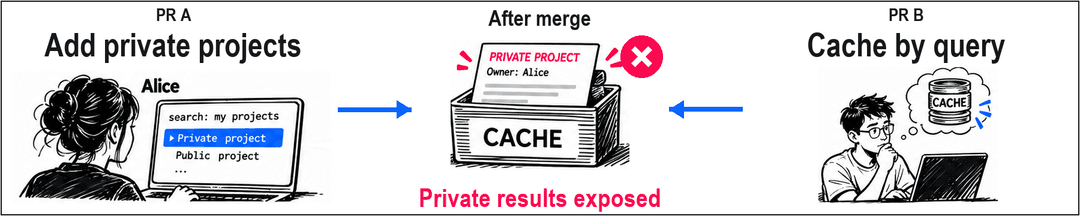
Two agents start from a search service whose results are all public. PR A adds private projects and filters results for each user. PR B adds a shared cache keyed only by the query, relying on those results being public and identical for everyone.

The files merge cleanly. The reason for sharing the cache no longer holds.
The same record retains the surrounding design: query matching, cache behavior, test coverage, operational limits and open questions.

Phone layout · Full design record
A selected excerpt from PR B:
known:
  search.results_public:
    v: true
    from: s.search
    at: INCLUDE_PRIVATE_PROJECTS is false
    measure: search_results_public
  cache.key_fields:
    v: query
    from: s.cache
    at: 'lookup: query not in _CACHE; _CACHE[query]'
  cache.hit_reuses_result:
    v: true
    from: s.cache
    at: 'lookup: return _CACHE[query]'
  cache.test_data:
    v: One mocked public project; no private-result fixture in that test.
    from: s.cache_tests
    at: test_public_query_is_served_once_across_users
judgments:
  search.shared_cache:
    rests_on:
    - search.results_public
    - cache.key_fields
    - cache.goal
    verdict: Search responses can share a cache keyed only by query because all results are public.
    wrong_if: search.results_public == false
    seen:
      search.results_public: true
      cache.key_fields: query
      cache.goal: Avoid a second search for the same public query across users.
  cache.hit_authorization:
    rests_on:
    - search.shared_cache
    - cache.hit_reuses_result
    - cache.miss_delegate
    verdict: Treat cross-user cache hits as depending on the public-results decision, not as a fresh
      authorization check.
    reopened_by: The hit path, key scope or public-results decision changes; review the combined
      path.
known holds values taken from a source or derived from other entries; judgments
holds the decisions that rest on them. rests_on names the premise. seen keeps its
value at the last review. When the measured value becomes false, wrong_if fires
and identifies the cache decision. Source locators and the complete record are in the
example.
How the example measures the change
In the runnable example, a reviewed measurement
recipe reads the explicit visibility switch in search.py. After PR A enables private
projects, kpop remeasure --run tests that new reading against the cache decision
and fails its condition. It leaves the canonical record unchanged; check alone
would still see the old recorded value.
The example creates two local Git branches, runs their tests, merges them and checks the combination. A separate integration probe also catches the privacy problem. kpopper preserves the declared reason and connects the change to it; it does not infer arbitrary security properties from code or replace behavioral tests.
The opening overview uses a download promise and a retention policy. The complete merge example shows the same 7-versus-30-day conflict across two branches, with executable code, measurement recipes and a separate integration probe.
These are executable examples. Checks cover the assumptions the record declares and the inputs deliberately measured or recorded. The examples on this page retain their compact legacy records, which the native runtime continues to read without migration. New records also preserve immutable history.
Two working modes
The difference is whether sessions share one project context or work against different versions of the code. Both modes support several sessions and competing hypotheses.
GROUNDING.yaml is the readable project record shown below: one shared context in
Simple, and a version kept with each branch, including main, in Advanced. New
history-backed records also keep their supporting history in .kpopper/; carry
that directory with the YAML when sharing or versioning the record.

View the full-size illustration · View the vertical version
Simple — one shared context. Sessions read and contribute to the same project graph. Competing ideas are named hypotheses beside it: several sessions can examine the same proposal, and one session can work on several. For a research project, for example, sessions can read different papers and compare explanations against the same sourced record. Consolidation is how those proposals become part of the shared record: compare them with what it already holds, check the combined dependencies and resolve conflicting claims. A proposal can be folded in, refuted with its reason retained, or left pending.
Advanced (experimental) — branch contexts and shared findings. Each branch's record describes its version of the code. A cache decision on one branch may depend on results being public, while another branch introduces private results. Keeping those premises with their branches lets review check whether the reasoning still holds when the changes are combined. Consolidation reconciles those records: it identifies overlapping subjects and conflicting claims, and checks which decisions need another look under the combined premises. Resolve what needs judgment before folding a proposal in; unresolved hypotheses remain explicit.
[!WARNING] Advanced mode is experimental. Parallel branches can add different entries to the same part of
GROUNDING.yaml, leaving an already-checked PR with a merge conflict after another PR lands. Resolving it can trigger another CI run. Automatic conflict-free integration is not implemented. We are keeping the readable file while this remains an open design question: the problem, alternatives and their tradeoffs.
For a supported local record conflict, preview a resolution with kpop consolidate --resolve --dry-run. Competing claims still need a decision.
Knowledge then follows two paths:
- Feature knowledge travels with its branch. Its assumptions, measurements and hypotheses stay attached to the code they describe. Consolidation tests their combination with the target record as part of reviewing the change.
- Shared findings have a continuing path of their own. Shareable findings that apply
independently of the feature enter
pending_grounding, with their sources and scope. They remain available even if the originating session closes or its worktree is removed.
Suppose a session building an integration discovers a documented change to the vendor's API limit. The feature may be abandoned; the finding can still help the project. Other local worktrees can read it immediately, marked as pending, without waiting for the feature to merge. It appears alongside their branch record; reading it does not adopt it or replace their recorded premises. Their consolidation dry run tests it against that record too, and turns red when accepting it would break a recorded decision, until a person decides the finding.
kpopper Board is this continuing shared-findings area. At the start of meaningful work
in an unconfigured Git project, kpopper offers Simple (recommended) with a chosen external
shared record, or Advanced (experimental) with branch-specific knowledge. The illustration
above explains both. Advanced can keep Board findings local or publish them to a named
repository and target through one continuing knowledge PR. A publication choice enables
branch and PR updates, not merging; it is remembered across local worktrees. kpop board
shows the current mode, selection and publication state.
With the project's publication permission, Board findings accumulate in one knowledge PR.
Consolidation reconciles the proposed knowledge with the target record before acceptance;
conflicts and changed premises need resolution. Accepted contributions are then verified
in the target branch, shown as main above. The same publication branch is reused for
the next batch, while the local contribution history persists across review cycles. Local
capture and reading also work without publication.
A measurement of an unmerged commit can be a fact about that commit. A proposed conclusion remains a hypothesis. Merging means the team accepted the contribution; it does not prove the claim, increase confidence or refresh its last review. Private material and information whose sharing permission is unclear stay in a structured private draft.
Projects without Git start in Simple; new Git projects currently start in experimental Advanced mode, including those with only one checkout. Simple can also be configured for a Git project with one external shared record. Existing registered shared records keep their current location and behavior; changing mode requires explicit reconciliation.
See project modes and publication for routing, reproducible reads and the publication lifecycle, and consolidation for the dry run, folding and refutation commands.
These project modes also apply to document and research work.



Keep plans current when the brief changes.
Explore workflows and examples
Outdated planning assumptions
A cooking workshop is planned around the venue's shared kitchen, equipment and ingredients. A later client brief moves it entirely online. For ChatGPT Work, see the runtime requirements and current limits.

Once the agent records the new format, kpopper flags the saved plan for review. It does not decide whether the activities can work remotely. The next session can recover the old reason, read the updated brief, and work out what participants need. Try the Cowork example.
The planning record connects 13 readings to five saved plans and four open questions. The format change reaches the agenda, equipment, ingredients, group arrangement and supervision; the earlier review snapshots remain visible.

Phone layout · Full planning record
Selected entries from the after record:
known:
  workshop.format:
    v: remote
    from: s.updated_brief
    at: Participants join online from home
  workshop.participants:
    v: 18
    from: s.session_plan
    at: Client constraints
  workshop.duration_minutes:
    v: 90
    from: s.session_plan
    at: Client constraints
  venue.workstations:
    v: 6
    from: s.logistics_plan
    at: Venue provision
judgments:
  workshop.agenda:
    rests_on:
    - workshop.format
    - venue.shared_kitchen
    - workshop.duration_minutes
    - workshop.recipe
    verdict: Use the shared-kitchen agenda and provide ingredients at the venue.
    reopened_by: The format or access to the shared kitchen changes; review activities, equipment
      and preparation.
    seen:
      workshop.format: onsite
      venue.shared_kitchen: true
      workshop.duration_minutes: 90
      workshop.recipe: Fresh pasta with tomato sauce.
  workshop.equipment_plan:
    rests_on:
    - workshop.format
    - venue.equipment_supplied
    - venue.workstations
    verdict: Plan equipment around the six venue workstations.
    reopened_by: The format, supplied equipment or access to the workstations changes.
    seen:
      workshop.format: onsite
      venue.equipment_supplied: true
      venue.workstations: 6
  workshop.ingredient_plan:
    rests_on:
    - workshop.format
    - venue.ingredients_supplied
    - workshop.participants
    verdict: Prepare ingredient portions at the venue for the 18 participants.
    reopened_by: The format, ingredient provision or participant count changes; review purchasing,
      portions and distribution.
    seen:
      workshop.format: onsite
      venue.ingredients_supplied: true
      workshop.participants: 18
The current value is remote; the decision was reviewed against onsite. That is a
MOVED notice. The prose in reopened_by tells the agent what deserves attention;
it is not an executable predicate. Read the complete after record.
Before the first answer
The next session opens with the saved context: all five plans need review because
workshop.format changed from onsite to remote. Then the user asks:
Prepare the ingredient portions for the 18 participants.
On a host with the prompt hook enabled, this matching prompt produces a focused pointer (actual hook output, shown here with Codex skill syntax):
kpopper: the record holds workshop.ingredient_plan on this - $ground workshop.ingredient_plan before answering from memory.
The agent follows that pointer with pull workshop.ingredient_plan. It retrieves
remote, the old venue-based plan and its onsite review snapshot before answering.
The next decision is how ingredients will reach participants at home.
See the opening and retrieval output.
Keep your existing documents, notes and task tools. The record links back to relevant evidence; there is no need to migrate your knowledge system. For another example that needs judgment, explore a replacement offer with an uncertain deadline.


Connect evidence and revisit conclusions as findings change.
Explore workflows and examples
Dark matter across studies
The original three-paper view shows the shared-record idea:

A research record can connect observations across scales and retain the tensions between them. This worked example follows six papers: Rubin's galaxy rotation, SPARC's galaxy catalog, the radial acceleration relation, Bullet Cluster lensing, Planck's cosmological fit and the first LZ particle search.

The argument includes 36 source readings, two scope readings, one calculation, seven linked judgments and five open questions. Its depth comes from the links: SPARC and the acceleration paper share data; the Planck density ratio comes from one model fit; a null WIMP search constrains specific interactions without settling the identity of the astronomical mass component.

Phone layout · Complete research record · Sources and exact locations
A source-grounded excerpt:
known:
  sparc.sample_size:
    v: 175
    from: paper.sparc
    at: Abstract
    unit: galaxies
  rar.sample_size:
    v: 153
    from: paper.rar
    at: p. 1, Data / Galaxy Sample
    unit: galaxies
  rar.points:
    v: 2693
    from: paper.rar
    at: 'p. 1, Galaxy Sample: velocity-precision cut'
    unit: points
  cmb.omega_c_h2:
    v: 0.12
    from: paper.cmb
    at: Abstract, combined analysis
    uncertainty: 0.001
    confidence: 68%
  cmb.omega_b_h2:
    v: 0.0224
    from: paper.cmb
    at: Abstract, combined analysis
    uncertainty: 0.0001
    confidence: 68%
  lz.si_limit:
    v: 9.2e-48
    from: paper.lz
    at: 'Abstract, version 4: limit at 36 GeV/c^2'
    unit: cm^2
    confidence: 90%
  lz.mass_at_limit:
    v: 36
    from: paper.lz
    at: Abstract, version 4
    unit: GeV/c^2
  cmb.dark_to_baryon_density:
    rule:
      expr: cmb.omega_c_h2 / cmb.omega_b_h2
judgments:
  evidence.shared_catalog:
    rests_on:
    - sparc.sample_size
    - sparc.inputs
    - rar.catalog
    - rar.selection
    verdict: Treat SPARC and the RAR analysis as related evidence, not two independent observational
      votes.
    reopened_by: A different catalog, sample selection or independently calibrated replication changes
      the dependence between these findings.
  synthesis.dark_matter:
    rests_on:
    - galaxy.extended_mass
    - galaxy.baryon_coupling
    - cluster.mass_location
    - cosmology.cold_component
    - particle.search_scope
    - research.framework
    - research.selection
    verdict: Under the stated models, the selected evidence supports a dark-matter account across
      scales, while baryonic regularities and direct-search limits constrain its explanation.
    reopened_by: A source finding or shared assumption is revised, or a worked alternative jointly
      addresses the galaxy, cluster, cosmological and particle-search constraints. Reassess the
      affected paths and the synthesis.
The next session inherits the argument, including its unresolved questions.
Run the checker on that same record:
kpop check examples/dark-matter/GROUNDING.yaml
Its final summary (exit 0; the full response also lists the seven prose review
conditions):
7 judgments, 58 entries, 0 problems, 7 declared
For a starting overview use open; to inspect a subject use pull; to trace a
premise use affects. The ground skill guides that workflow for an agent.
Read the context, inspect the calculation, and trace a change
Current context — selected lines from the actual open response:
kpop open examples/dark-matter/GROUNDING.yaml --chars 1000
Six-paper worked example; selected source readings and an authored synthesis, not a complete review or live research-agent evaluation.
holds: rar (8) · research (8) · cmb (7) · lz (6) · paper (6) · sparc (6) · lensing (5) · rotation (5)
58 entries, 7 judgments, 5 open questions, updated 2026-09-19
A computed reading and the judgment that uses it:
kpop pull cmb.dark_to_baryon_density examples/dark-matter/GROUNDING.yaml --budget 1100
cmb.dark_to_baryon_density: 75/14 = cmb.omega_c_h2 / cmb.omega_b_h2 (Ratio of the abstract central physical de ...
+ cosmology.cold_component: Within base Lambda-CDM, the fitted physical cold-dark-matter density exceeds the b ...
    holds
    because: The density ratio connects two central values from the same fit. The model assumptions and
             retained lensing-amplitude tension limit the interpretation.
    reopened by: The likelihood, data combination or cosmological model changes enough to alter the inferred c ...

affects <entry> shows what a change reaches
The reach of the adopted framework:
kpop affects research.framework examples/dark-matter/GROUNDING.yaml
cluster.mass_location
    via research.framework -> flagged only
cosmology.cold_component
    via research.framework -> flagged only
galaxy.extended_mass
    via research.framework -> flagged only
synthesis.dark_matter
    via research.framework -> flagged only

4 judgments reached
See all captured commands and responses,
including pull synthesis.dark_matter. Here check reports record consistency;
the scientific review conditions still require judgment.
The illustrations are schematics drawn from the record. The
full example distinguishes source readings,
authored interpretations, shared assumptions and the computed 75/14 density ratio.
That arithmetic does not establish the scientific synthesis.
Run the shared-record example: three concurrent CLI writers retain the prepared six-paper contributions, and the writer records each judgment's review snapshot. A proposed change of framework then reopens several interpretations and the synthesis. No model call or claim of live independent research is part of that replay.
Get started
You can use this request with any of the agents listed below. The agent can carry out the steps its tools allow and guide you through any clicks, approvals or administrator steps that need your input.
Copy and paste the following text to your agent:
Dear agent,
Please help me install kpopper in this environment. Open the guide below and
follow the installation instructions for your environment:
https://github.com/ilanbm/kpopper#get-started
Complete the setup, including the required runtime. Guide me through any
steps that need my input, and tell me when to start a new session.
The sections below explain each app's setup and provide manual alternatives.
Claude Code
In the Claude Code chat: paste the installation request above. It covers both the plugin and its required runtime.
Manual alternative: slash commands or terminal commands
Inside Claude Code, enter these slash commands one at a time:
/plugin marketplace add ilanbm/kpopper
/plugin install kpopper@kpopper
Or, in a terminal, run the equivalent commands:
claude plugin marketplace add ilanbm/kpopper
claude plugin install kpopper@kpopper --scope user
Both routes install the plugin. The native runtime is a separate required step; ask Claude Code to finish it, or follow the manual runtime setup. That guide explains how to find the installed plugin directory and includes Windows instructions. Start a new session after setup is complete.
Codex
In a Codex task: paste the installation request above. The agent can use its terminal tools for setup when available; it will guide you through any client prompts that need your input.
Manual alternative: terminal commands and hook approval
In a terminal:
codex plugin marketplace add ilanbm/kpopper
codex plugin add kpopper@kpopper
Install the native runtime in the plugin root printed by codex plugin add using the
native runtime setup guide.
Then start a new task and review and trust kpopper's hooks when Codex asks.
You can also inspect the hook definitions inside Codex with:
/hooks
Claude Cowork
In Cowork: paste the installation request above for guided setup.
Claude guides the setup while you complete the marketplace and Install clicks in
Customize → Plugins: select Add marketplace, enter ilanbm/kpopper, then
install kpopper.
Cowork runs tasks in its own environment, where kpopper has not yet been verified end to end; see the Cowork notes.
ChatGPT Work
In Work: paste the installation request above for guidance through
the workspace setup. If the plugin is not available, a workspace administrator must
import it from Admin → Plugins → Add → Import marketplace, with
https://github.com/ilanbm/kpopper as the source and Path left empty. Members can
then install it from Plugins.
kpopper's runtime in Work is not yet validated; see Work setup and current limits.
Grok Bot
In Grok Bot: paste the installation request above. Follow the Grok Bot guide to install the runtime on its cloud computer, choose a persistent project folder and save a skill that reads kpopper's shared instructions.
This route has not yet been verified in a live Grok Bot session. It uses explicit commands; automatic hooks and plugin import remain unverified. Grok Build has a separate plugin system, so its Claude Code compatibility claim does not establish Grok Bot support.
Other agents
In Cursor, Gemini CLI, Windsurf, GitHub Copilot, OpenClaw or OpenCode: paste the installation request above. The agent should follow the adapter for the app and environment you're using:
Cursor · Gemini CLI · Windsurf · GitHub Copilot · OpenClaw · OpenCode.
Manual alternative: local checkout and adapter setup
In a terminal, clone the repository where it can stay:
git clone https://github.com/ilanbm/kpopper.git
Follow the adapter linked above. Add to the agent's existing configuration rather than replacing it. What runs automatically differs by agent; see the capability matrix and verification status.
After installing
In Claude Code and Codex, kpopper opens with each new session. Installing creates no record;
your agent starts GROUNDING.yaml when it records the first finding worth keeping (on native
Windows, under WSL). To start from what already exists, ask your agent to map the project.
The native runtime needs no Python, Node, Rust or Lean toolchain.
Use the command line without an agent · Runtime setup and troubleshooting
Installed? See it in your work: Coding agents · Claude Cowork / ChatGPT Work · Research
Quick reference
Use the CLI in a terminal, or ask your agent to follow a plugin skill. A skill guides a workflow and may use several CLI commands. You can also describe what you need in ordinary language.
CLI
These commands assume an installed kpop. From a source checkout, build the native
crate with cargo build --manifest-path native/Cargo.toml --release and use the
resulting kpop binary. For plugin work, use the command supplied by the session's
KPOPPER_AGENT_CONTEXT. <id> names a record entry, such as
workshop.ingredient_plan; kpop --help lists command groups.
| Command | What you need |
|---|---|
kpop where | Locate this project's record |
kpop open | Open the current context and attention items |
kpop pull <id> | Retrieve a subject, its sources and reasons |
kpop context <id> | Read records with their declared dependencies and checks; use --direction impact for dependents |
kpop search "terms" | Find matching claims and local source passages |
kpop affects <id> | Trace what depends on a premise |
kpop check | Check recorded conditions and changed premises |
kpop assess <id> | Inspect findings and scoped attention as JSON |
kpop export <id> | Share a focused Markdown excerpt |
Writing, history and background commands
These commands can record decisions, update project state or configure work. The linked guides describe their arguments and review steps.
| Command or command group | What you need |
|---|---|
kpop add <id> field=value ... | Add a finding or judgment |
kpop set <id> <value> --why "reason" --as-of YYYY-MM-DD | Update a reading with its reason and date |
kpop update --file report.json | Apply one prepared source report |
kpop review <id> | Record a completed review |
kpop same <a> <b> · kpop distinct <a> <b> "reason" | Resolve whether two IDs name the same subject |
kpop answer <question> <id> · kpop answer <question> --dropped "reason" | Close an open question with what answered it, or with why it no longer matters |
kpop correct <id> field=value ... | Fix an entry that no commit holds yet |
kpop consolidate --dry-run · kpop consolidate --from <ref> --dry-run | Test hypotheses or another branch before folding |
kpop consolidate · kpop consolidate --refute <name> "reason" | Fold eligible hypotheses or retain a refutation |
kpop history status | Inspect committed history acceptance |
kpop remeasure --run | Rerun the record's configured measurement recipes |
kpop map | Begin a guided mapping of existing material |
kpop ingest | Capture and process reports in the background |
kpop watch | Configure branch checks or inspect shared findings |
kpop followups | Manage deferred work and its recorded outcomes |
kpop config | Inspect or change workspace guidance |
See the command reference, history commands,
background capture and followups.
review records your assessment; it does not make that assessment for you.
Plugin skills
| Command | Skill | What happens in practice · possible CLI calls |
|---|---|---|
/kpopper:kpopper | kpopper | Explains the method and chooses the workflow that fits the task. CLI calls follow the selected workflow. |
/kpopper:ground | ground | Finds relevant IDs, then prefers kpop context <id> for records with dependencies and checks.Uses pull for concise readings or when the checked reader is unavailable, and affects for changed inputs. |
/kpopper:record | record | Saves findings, their sources and reasons; records decisions, open questions and completed reviews. May use kpop update --file report.json, kpop add, kpop set or kpop review. |
/kpopper:map | map | Examines the agreed materials, builds a sourced record and reports coverage and gaps. Starts with kpop map --json or kpop map --deep --json, then follows the returned workflow. |
/kpopper:consolidate | consolidate | Compares proposals with the record, surfaces disagreements and guides folding or refuting them. May use kpop consolidate --dry-run, kpop consolidate or kpop remeasure --run. |
/kpopper:watch | watch | Inspects branch checks and shared findings; configures background checks or daily review when requested. May use kpop watch status, kpop watch setup, kpop watch shared or kpop followups daily install, plus the host's scheduler. |
The agent chooses the calls for the task and the record's state, using its source-reading tools as needed.
For example, /kpopper:ground workshop.ingredient_plan asks the agent to retrieve that plan and
its basis. ground is a skill; the CLI reads use open, pull, affects and check.
Other hosts expose skills through their adapters.
Experimental — optional HTML applications
These skills require the optional HTML setup and explicit selection. Their interfaces and artifact formats may change.
| Command | Application | What happens in practice · possible CLI calls |
|---|---|---|
/kpopper:hub | kpopper Hub | Builds a browsable snapshot of the record and checks its layout and coverage. Uses kpop experimental hub, for example with --open or --verify. |
/kpopper:annotated-doc | Annotated Documents | Authors or refreshes a standalone HTML document with selected evidence and reviewable copy updates. Uses kpop experimental annotated-doc with operations such as guide, build and refresh. |
The CLI entry points are kpop experimental hub and kpop experimental annotated-doc.
page and document remain compatibility aliases. The separate experimental
checked-session integration uses kpop session and has its
own setup; it is optional alongside the default reasoning engine.
What you can do with kpopper
Carry the reasoning into the next session, check it against recorded inputs, and keep the earlier evidence available when the work changes.
| What you want to do | What kpopper provides | Example |
|---|---|---|
| Resume work with its context | Open the project's standing decisions and attention items, then retrieve the facts and reasons relevant to a question. Before the first answer. | Resume a job search and recover why three roles were shortlisted. |
| Trace why a decision was made | Follow its sources, declared dependencies and the values used at its last review. The knowledge record. | Trace the upload queue decision back to the test that exposed request timeouts. |
| Keep earlier decisions inspectable | History-backed records retain immutable claim versions and explicit acceptance, review, correction and refutation acts as the current record evolves. History. | See why a trip moved from July to August, without losing the original constraints. |
| Calculate and check explicit rules | Evaluate exact arithmetic, compound Boolean conditions and conditional expressions with the packaged native reasoning runtime. Missing inputs and execution errors remain visible. Deterministic reasoning. | Check whether 24 guests fit a venue with 18 seats. |
| Ask questions over a recorded collection | Filter, select, count or sum within a declared scope, or test whether all/any members meet a condition. The result retains scope evidence and diagnostics. Collection queries. | Find apartments below $2,000 with an elevator and a lease that allows pets. |
| Notice which decisions need another look | Trace changed premises, evaluate declared breaking conditions and explicitly rerun configured measurement recipes. Checks and measurements. | Record a babysitter's cancellation and surface the evening plans that depended on it. |
| Test alternatives and reconcile branch work | Keep named hypotheses, inspect the proposed combination and retain conflicts or refutations. Worktrees keep their code-specific context, with checks available before a merge and in CI. Two working modes. | One branch removes password login; another adds a feature that still requires it. |
// faq
What is kpopper?
kpopper is a checkable knowledge record for AI-assisted projects: decisions linked to their evidence, assumptions and falsifiers.. It is open-source on GitHub.
Is kpopper free to use?
kpopper is open-source under the MIT license, so it is free to use.
What category does kpopper belong to?
kpopper is listed under plugins in the Claudeers registry of Claude-compatible tools.
// embed badge

[](https://claudeers.com/kpopper)
// retro hit counter

[](https://claudeers.com/kpopper)
// reviews
// guestbook
// related in Claude Plugins
 🔓
🔓A single CLAUDE.md file to improve Claude Code behavior, derived from Andrej Karpathy's observations on LLM coding pitfalls.
 🔓
🔓Claude Code is an agentic coding tool that lives in your terminal, understands your codebase, and helps you code faster by executing routine tasks, explainin…
 🔓
🔓"CLI-Anything: Making ALL Software Agent-Native" -- CLI-Hub: https://clianything.cc/
🔓financial-services — a Claude ecosystem project on GitHub.