
korrodesign
Design Copilot for Claude Code — two enforcement layers (Taste Guardian + Blind Spot ESLint plugin). Works standalone. Zero dependencies. Awwwards-level output.
Install with your AI
Paste into Claude Code, Cursor, or any agent — it reads the repo and wires the tool into your project.
Install and set up korrodesign (claude-skill project) into my current project.
Found on https://claudeers.com/korrodesign
Repo: https://github.com/KorroAi/korrodesign
Homepage/docs: —
Detected install method: claude-skill → # copy this skill into .claude/skills/korrodesign/
Category: productivity. Platforms: cli, api, web, mobile.
Read the repo's README for exact setup and env vars, then install it and wire it into my project.

Claudeers Health Verdict:
slowing; community-verified: false. Confirm the source before running anything.
# copy the skill dir into your project:
# .claude/skills/korrodesign/   (or ~/.claude/skills/korrodesign/ for all projects)
git clone https://github.com/KorroAi/korrodesign
// compatibility
| Platforms | cli, api, web, mobile |
|---|---|
| Operating systems | — |
| AI compatibility | claude |
| License | MIT |
| Pricing | open-source |
| Language | JavaScript |
KORRO Design Studio v3
Design Copilot for Claude Code
Two enforcement layers. Zero dependencies. Awwwards-level output.
Quick Start · How It Works · 7 Phases · ESLint Plugin · FAQ
Why Korrodesign
AI-generated websites all look the same — purple gradients, Inter font, centered CTAs, zero personality. Existing tools (v0, Bolt, Lovable) generate fast but can't enforce design quality.
Korrodesign is a design copilot with two enforcement layers no other tool has:
- Taste Guardian — guides Claude DURING generation. 500+ lines of design rules absorbed from 6 design philosophies. Catches mistakes before code is written.
- Blind Spot — a 14-rule ESLint plugin that checks UI structural integrity AFTER generation. Not "is it beautiful" — "is this even maintainable as UI?"
Works standalone. Put the skill file in Claude Code and start designing. No API keys, no backend, no dependencies.
Quick Start
# 1. Clone and install the skill
git clone https://github.com/KorroAi/korrodesign.git
cp korrodesign/SKILL.md ~/.claude/skills/korrodesign/SKILL.md

# 2. Reload Claude Code
/claude reload

# 3. Start designing
/korrodesign
Claude becomes your Creative Director. The skill guides you through 7 phases — from asset generation to blind spot audit. Every rule in the SKILL.md is active during generation.
Optional: install the ESLint plugin for post-generation checks:
cp korrodesign/korro-studio/eslint-plugin-korro-design.js your-project/
cp korrodesign/korro-studio/eslint.config.korro.js your-project/
cd your-project
npx eslint . --config eslint.config.korro.js
How It Works
┌─────────────────────────────────────────────────────┐
│                  /korrodesign                        │
│                                                     │
│  LAYER 1: TASTE GUARDIAN (during generation)        │
│  ┌───────────────────────────────────────────────┐  │
│  │  SKILL.md → Claude's system prompt            │  │
│  │  500+ lines of design rules                   │  │
│  │  Active during ALL code generation            │  │
│  │  Catches: fonts, colors, spacing, animations  │  │
│  └───────────────────────────────────────────────┘  │
│                    ↓                                 │
│              Code is generated                      │
│                    ↓                                 │
│  LAYER 2: BLIND SPOT (post-generation)              │
│  ┌───────────────────────────────────────────────┐  │
│  │  eslint-plugin-korro-design.js                │  │
│  │  14 AST-level rules                           │  │
│  │  Catches: div-as-button, missing focus,       │  │
│  │  z-index chaos, magic numbers, duplicate hex  │  │
│  └───────────────────────────────────────────────┘  │
│                                                     │
│  Result: Awwwards-level site with enforced quality   │
└─────────────────────────────────────────────────────┘
Taste Guardian works within Claude — the SKILL.md becomes part of Claude's context. Every code generation is filtered through these rules.
Blind Spot works as a standalone ESLint plugin. Piggybacks on ESLint's existing distribution channel — every team already has ESLint in CI. One config line adds UI structural integrity checks.
The 7 Phases
| # | Phase | What Happens | Time |
|---|---|---|---|
| 0 | Asset Gen | Generate 3D models (Meshy.ai), images (Pollinations.ai), audio (ElevenLabs) before design begins | 2 min |
| 1 | Creative Brief | Stage detection (pre-launch/growth/mature) + 6 questions asked one at a time | 5 min |
| 2 | Configuration | DESIGN_VARIANCE, MOTION_INTENSITY, VISUAL_DENSITY deduced from brief | 1 min |
| 3 | Council | 3 contrasting creative directions (Safe / Bold / Hybrid) + 69-company inspiration library | 3 min |
| 4 | Execution Plan | 3 steps: Foundations → Signature → Polish | 1 min |
| 5 | Generation | Code generation via Claude (or optional OpenRouter backend for automated gen) | 5-15 min |
| 6 | Blind Spot Audit | ESLint audit → auto-fix → pre-commit gate. UI violations block commits | 30 sec |
Total: ~20 minutes from idea to production-ready, design-enforced website.
Phase 3 — The Inspiration Library
During the Council phase, the skill can reference design palettes from 69+ companies:
Stripe, Apple, Linear, Vercel, Figma, Notion, Supabase, Spotify, Nike, SpaceX, Airbnb, Pinterest, Shopify, and 55+ more.
Each palette includes: exact hex values, typography pairings, spacing scales, shadow systems, and border radius tokens.
Installation
Minimal: Claude Code Skill Only
cp SKILL.md ~/.claude/skills/korrodesign/SKILL.md
That's it. /korrodesign now works in Claude Code. The Taste Guardian activates on every invocation.
Full: Skill + ESLint Plugin + Tools
# Clone the repo
git clone https://github.com/KorroAi/korrodesign.git
cd korrodesign

# Skill
cp SKILL.md ~/.claude/skills/korrodesign/SKILL.md

# ESLint Plugin (copy to any project)
cp korro-studio/eslint-plugin-korro-design.js my-project/
cp korro-studio/eslint.config.korro.js my-project/

# Or scaffold a fresh Next.js project with everything pre-configured
node korro-studio/scaffold.js my-new-project
Optional: OpenRouter Backend
For automated one-click generation, add to ~/.claude/.env:
OPENROUTER_API_KEY=sk-or-v1-...
Then node generate.js --prompt-file BRIEF_CURRENT.md --output-dir my-project generates the full project automatically.
Blind Spot ESLint Plugin
14 AST-level rules. No other tool checks these at the component level.
Core Rules (error)
| Rule | What It Catches | Example Violation |
|---|---|---|
no-div-as-button | <div onClick> without button semantics | <div onClick={handler}>Click</div> |
require-focus-visible | Interactive elements missing focus styles | <button className="bg-blue-500"> |
no-pure-black | #000 / #000000 in code | style={{ color: "#000" }} |
no-generic-fonts | Inter, Arial, Helvetica, system-ui | className="font-Inter" |
no-emoji-in-ui | Emoji in JSX text content | <div>🚀 Launch</div> |
no-h-screen | h-screen — breaks on mobile | className="h-screen" |
Supporting Rules (warn)
| Rule | What It Catches | Example Violation |
|---|---|---|
no-z-index-chaos | z-index outside [0,10,20,30,40,50] | className="z-[9999]" |
spacing-grid-4px | Spacing not on 4px grid | className="p-[7px]" |
require-image-outlines | <img> without subtle outline | <img src="/hero.jpg" /> |
prefer-concentric-radii | Nested radius mismatch | Outer rounded-2xl, inner rounded-2xl |
no-hardcoded-magic-numbers | Raw numbers in style props | style={{ marginTop: 37 }} |
no-duplicate-colors | Same hex across one file | #ff6600 used in 2 places |
require-loading-state | Async components without loading | async function Component() with no Suspense |
no-default-tailwind-colors | blue-500, gray-100 etc | className="bg-blue-500" |
Usage
# Audit
npx eslint . --config eslint.config.korro.js

# Auto-fix (where supported)
npx eslint . --config eslint.config.korro.js --fix

# CI gate (block commits with violations)
npx eslint . --config eslint.config.korro.js --max-warnings 0
Editor Integration
Add to your VS Code settings.json for real-time squiggles:
{
  "eslint.options": {
    "overrideConfigFile": "eslint.config.korro.js"
  }
}
Studio Rules (Taste Guardian)
The SKILL.md enforces these during generation. Claude will not produce code that violates these.
Fonts
- Display: Cabinet Grotesk, Clash Display, DM Serif Display, Playfair Display, Boska, Chillax
- Body: Satoshi, Switzer, Geist Sans, DM Sans
- Mono: Geist Mono, JetBrains Mono, Fira Code
- Forbidden: Inter, Arial, Helvetica, system-ui
Colors
- One accent max, saturation below 80%
- Neutral base: Zinc or Slate — never gray
- Accent options: Emerald, Electric Blue, Deep Rose, Amber, Teal
- Pure black (
#000) is banned — use off-black (#0a0a0a)
Motion
- Animate
transform+opacityonly — nevertop/left/width/height - Spring physics over linear:
{ type: "spring", stiffness: 100, damping: 20 } - Duration under 300ms for all UI animations
- Enter animations faster than exits
Layout
min-h-[100dvh]— neverh-screen- Concentric border radii: outer = inner + padding
- Grid over flexbox math
- Dark mode with smooth transitions
Anti-Slop
- No purple/blue glow aesthetic
- No 3-column generic card grids
- No "Welcome to my website", "elevate", "seamless", "unleash"
- No emoji, no Lorem Ipsum, no John Doe
Automation Tools
korrodesign/
├── scaffold.js                    Init Next.js 15 + Tailwind v4 + fonts + Lenis + Grain + ESLint
├── generate.js                    OpenRouter pipeline (GLM 5.2 → Kimi K2.7 → quality check → build)
├── quality-check.js               Cross-file structural checks (config, grain, slop phrases)
├── eslint-plugin-korro-design.js  14 AST-level rules
└── eslint.config.korro.js         Ready-to-use flat config
scaffold.js
node scaffold.js my-project
Creates a fully configured Next.js 15 project with:
- TypeScript, Tailwind CSS v4, App Router
- Premium fonts (Cabinet Grotesk + Satoshi)
- Lenis smooth scroll
- Grain texture overlay component
- ESLint plugin pre-installed with
eslint.config.korro.js - All React dependencies (Framer Motion, GSAP, Three.js, R3F, Phosphor Icons)
generate.js (needs OPENROUTER_API_KEY)
node generate.js --prompt-file BRIEF_CURRENT.md --output-dir my-project
Pipeline:
- GLM 5.2 reads the brief → produces complete design spec (colors, typography, spacing, shadows, component specs)
- Kimi K2.7 reads the design spec → generates production Next.js code for every component
- Runs quality-check.js and npm install
- Output ready for
npm run dev
quality-check.js
node quality-check.js my-project
Cross-file structural validation:
- Checks
tailwind.config.tshas custom palette - Detects Grain component import in layout
- Scans for AI slop phrases across the project
- Verifies project structure completeness
FAQ
Do I need an API key?
No. The skill works entirely within Claude Code. The ESLint plugin and quality checker are standalone Node scripts. Only the optional generate.js needs an OpenRouter key.
What if I don't use Next.js?
The Studio Rules and ESLint plugin work with any React framework. The design phases are framework-agnostic. scaffold.js and generate.js are Next.js-specific but entirely optional.
Can I use this without Claude Code?
The SKILL.md is a Claude Code skill format. The ESLint plugin and quality-check.js work as standalone Node tools with any project.
How is this different from v0/Bolt/Lovable?
Those are AI code generators. Korrodesign is a design enforcement system. It doesn't just generate — it enforces quality through two independent layers. The Taste Guardian catches mistakes during generation. Blind Spot catches what slips through.
What does "14 rules, zero false positives" mean?
Every Blind Spot rule checks an objective property of the code. no-div-as-button checks if <div> has onClick without role="button". This is binary — it's either a button or it's not. No subjectivity, no "I think this looks bad."
Can I add my own rules?
Yes. Copy eslint-plugin-korro-design.js and add rules following the ESLint rule format. The plugin is standard ESLint — any ESLint rule structure works.
How do I run Blind Spot in CI?
Add to your CI pipeline:
- run: npx eslint . --config eslint.config.korro.js --max-warnings 0
Violations fail the build — same as any ESLint error.
Knowledge Foundation
Korrodesign v3 absorbed six design philosophies into a single skill:
- Emil Kowalski's Design Engineering — Animation decision framework, CSS transform mastery, spring physics, Sonner principles
- UI/UX Pro Max — Creative arsenal of 25 premium UI concepts (Bento 2.0, Magnetic Button, Kinetic Marquee, etc.)
- YC Web Design Strategy — Stage-aware design (pre-launch vs growth vs mature), 5-second filter, copy anti-slop
- Awesome DESIGN.md — 69+ curated design system palettes from Stripe, Apple, Linear, Vercel, Figma, Notion, etc.
- Make Interfaces Feel Better — Concentric border radii, optical alignment, shadow-as-border, image outlines, minimum hit areas
- Media Generation — Meshy.ai for 3D, Pollinations.ai for images, ElevenLabs for audio
Before / After
Same prompt. Same product. One generated by vanilla AI, the other with Korrodesign enforcing every rule.
❌ WITHOUT Korrodesign
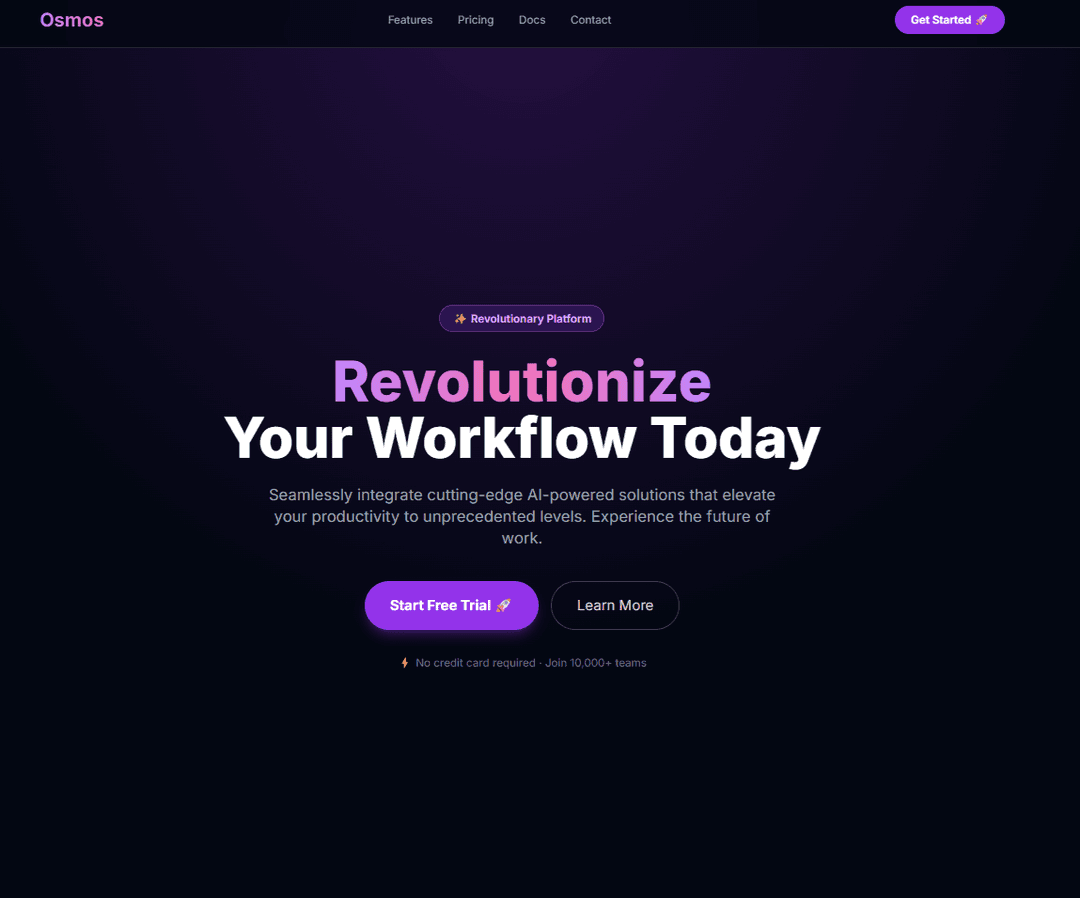
Purple gradient, Inter font, emoji CTAs, centered white text on color, default Tailwind palette, fake testimonials.
✅ WITH Korrodesign
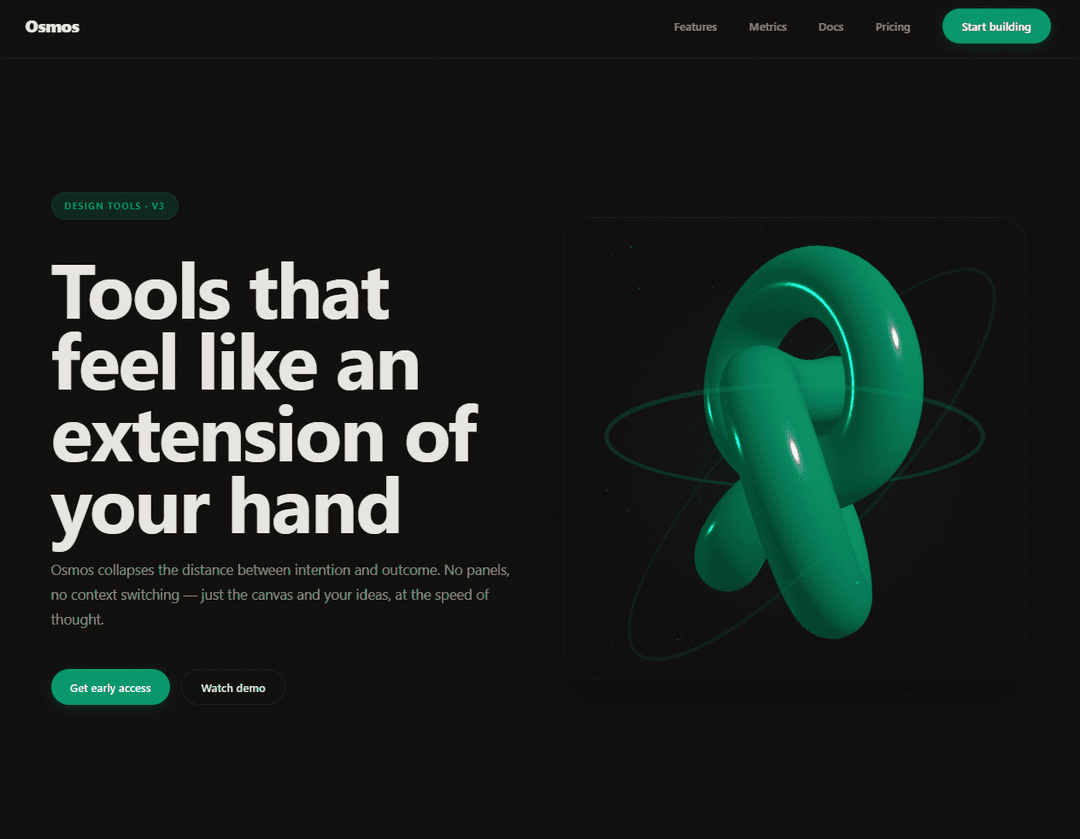
Cabinet Grotesk + Satoshi, custom emerald palette, grain overlay, asymmetric layout, Three.js 3D scene, shadow-as-border, no emoji, no purple, concrete copy.
Contributing
git clone https://github.com/KorroAi/korrodesign.git
cd korrodesign
To add a new ESLint rule:
- Add the rule function to
eslint-plugin-korro-design.js - Register it in the
rulesandconfigsexports - Add a test case to verify it fires correctly
To improve the Taste Guardian:
- Edit
SKILL.md— the rules are plain markdown - Test with
/korrodesignin a fresh Claude Code session
License
MIT — KORRO
// faq
What is korrodesign?
Design Copilot for Claude Code — two enforcement layers (Taste Guardian + Blind Spot ESLint plugin). Works standalone. Zero dependencies. Awwwards-level output.. It is open-source on GitHub.
Is korrodesign free to use?
korrodesign is open-source under the MIT license, so it is free to use.
What category does korrodesign belong to?
korrodesign is listed under plugins in the Claudeers registry of Claude-compatible tools.
// embed badge

[](https://claudeers.com/korrodesign)
// retro hit counter

[](https://claudeers.com/korrodesign)
// reviews
// guestbook
// related in Productivity
 🔓
🔓Agent skills for Obsidian. Teach your agent to use Obsidian CLI and open formats including Markdown, Bases, JSON Canvas.
 🔓
🔓Garry's Opinionated OpenClaw/Hermes Agent Brain
 🔓
🔓Open source repository of plugins primarily intended for knowledge workers to use in Claude Cowork
 🔓
🔓An open-source alternative to Claude Cowork (powered by opencode)