
json-claude-plugin
JSON Schema Claude Plugin
Install with your AI
Paste into Claude Code, Cursor, or any agent — it reads the repo and wires the tool into your project.
Install and set up json-claude-plugin (git-clone project) into my current project.
Found on https://claudeers.com/json-claude-plugin
Repo: https://github.com/MakkPresstech/json-claude-plugin
Homepage/docs: https://jsonschemaapp.com/
Detected install method: git-clone → git clone https://github.com/MakkPresstech/json-claude-plugin
Category: plugins. Platforms: cli, api, web.
Read the repo's README for exact setup and env vars, then install it and wire it into my project.

Claudeers Health Verdict:
unknown; community-verified: false. Confirm the source before running anything.
git clone https://github.com/MakkPresstech/json-claude-plugin
// compatibility
| Platforms | cli, api, web |
|---|---|
| Operating systems | — |
| AI compatibility | claude |
| License | MIT |
| Pricing | open-source |
| Language | Shell |
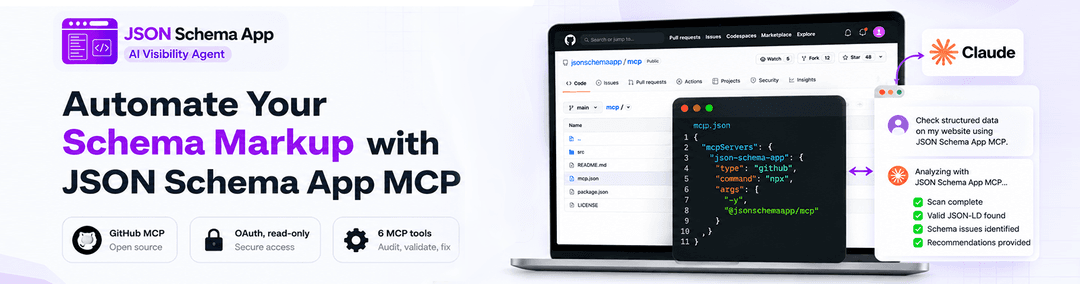
JSON Schema App MCP: Claude Code Plugin
Connects Claude to the JSON Schema App MCP server (https://mcp.jsonschemaapp.com/mcp) so you can check structured data (JSON-LD / Schema.org), scan your site, audit AI-crawler access, and read your structured-data report, right from Claude.
This plugin is a client: it only connects to the hosted MCP server. It does not change or redeploy any server code, so nothing in the existing MCP/app flow is affected.
Quick start
/plugin marketplace add MakkPresstech/json-claude-plugin
/plugin install jsonschemaapp-mcp@jsonschemaapp
/jsonschemaapp-mcp:report
The first command that calls a tool opens the connect page in your browser. See First connection.
Contents
- What's inside
- MCP tools exposed by the server
- First connection
- Authentication
- Install
- Fewer permission prompts
- Usage
- Example output
- Skills (model-invoked)
- Consistent, grounded audits
- Troubleshooting
- Note on FAQPage / HowTo
What's inside
json-claude-plugin/
├── .claude-plugin/
│   ├── plugin.json              # Plugin manifest
│   └── marketplace.json         # Marketplace entry so it installs via /plugin
├── .mcp.json                    # Connects to https://mcp.jsonschemaapp.com/mcp (OAuth)
├── commands/                    # Slash commands (one per workflow)
│   ├── check-page.md            # /jsonschemaapp-mcp:check-page   -> check_page_schema
│   ├── scan-site.md             # /jsonschemaapp-mcp:scan-site    -> scan_site + status + result
│   ├── report.md                # /jsonschemaapp-mcp:report       -> get_report
│   ├── check-llms.md            # /jsonschemaapp-mcp:check-llms   -> check_llms_txt
│   └── ai-search-audit.md       # /jsonschemaapp-mcp:ai-search-audit (full audit, all tools)
├── agents/
│   └── schema-auditor.md        # Subagent that drives a full audit end to end
├── skills/                      # Model-invoked skills (auto-activate from natural language)
│   ├── structured-data-audit/   # Full audit workflow over the MCP tools
│   ├── schema-rich-results/     # Which Schema.org types earn rich results (FAQPage/HowTo rule)
│   ├── ai-search-optimization/  # llms.txt + AI-crawler access via check_llms_txt
│   ├── draft-llms-txt/          # Draft a valid llms.txt from scan data (client-side)
│   ├── ai-crawler-access/       # robots.txt snippets to allow AI crawlers (any platform)
│   └── audit-report-format/     # Canonical report shape (verdict + P1/P2/P3 + tool citations)
├── hooks/
│   ├── hooks.json               # SessionStart connectivity reminder
│   └── connectivity-check.sh    # Non-blocking "connect the server first" notice
├── docs/
│   └── images/                  # Banner, demo GIF and screenshots used in this README
├── icon.png                     # Plugin icon for the directory listing
├── LICENSE                      # MIT
└── README.md
How the pieces fit together
flowchart LR
    subgraph Plugin["json-claude-plugin (client)"]
        CMD[Slash commands]
        SK[Skills]
        AG[schema-auditor subagent]
    end
    CMD --> MCP
    SK --> MCP
    AG --> MCP
    MCP["mcp.jsonschemaapp.com/mcp"] --> T1[check_page_schema]
    MCP --> T2[scan_site / get_scan_status / get_scan_result]
    MCP --> T3[check_llms_txt]
    MCP --> T4[get_report]
MCP tools exposed by the server
| Tool | What it does |
|---|---|
check_page_schema | Structured data of one public page (any URL). 10/min. |
scan_site | Start a background scan of your own site; returns a scan_id. |
get_scan_status | Poll a scan's progress by scan_id. |
get_scan_result | Per-page findings + site totals for a completed scan. |
check_llms_txt | llms.txt / llms-full.txt validity + AI-crawler robots.txt check. 10/min. |
get_report | Combined report: domain, plan/limits, AI credits, latest scans. |
Webflow tenants also get server-side starter prompts (
optimize_for_ai_search,fix_ai_crawler_access,check_schema_coverage,assign_schema_template) which surface automatically in Claude's prompt picker when connected as a Webflow store.
First connection
You need a JSONSchemaApp account and a pairing code. No account yet? Create one free, install the app on your store, then continue below.
- In Claude Code, run any command, for example
/jsonschemaapp-mcp:report. Your browser opens the Connect an AI assistant page. - In another tab, open JSONSchemaApp from your store admin (or sign in at
app.jsonschemaapp.com), go to Settings, then AI assistant access, and click Generate pairing code. - Copy the 8-character code, paste it on the connect page and click Allow. You are sent back to Claude and the command continues.

The connection is read-only: Claude can read your schema reports and scan results but cannot change your store. Disconnect anytime from Settings, AI assistant access.
sequenceDiagram
    participant U as You
    participant C as Claude Code
    participant M as mcp.jsonschemaapp.com
    participant A as JSONSchemaApp dashboard
    U->>C: /jsonschemaapp-mcp:report
    C->>M: Tool call (no token yet)
    M-->>C: 401 + WWW-Authenticate
    C->>U: Opens browser to the connect page
    U->>A: Settings, AI assistant access, Generate pairing code
    U->>M: Paste code, click Allow
    M-->>C: OAuth token
    C->>M: get_report
    M-->>C: Report data
Authentication
The plugin's only built-in auth path is OAuth. There is nothing to configure in the plugin itself; the only manual step is the pairing code above.
.mcp.json points at the HTTP endpoint with no credentials, so on first use Claude
discovers the OAuth flow automatically (via the server's 401 + WWW-Authenticate and
/.well-known/oauth-protected-resource) and prompts you to connect.
Using an API key instead
If you prefer a jsa_live_... key, add your own user-scope MCP server alongside the
plugin. The plugin does not ship a key option, because Claude Code disables OAuth
fallback for any server whose config sets an Authorization header, which would take
the OAuth path away from everyone who does not use a key.
claude mcp add --scope user --transport http -H "Authorization: Bearer YOUR_API_KEY" jsonschemaapp-key https://mcp.jsonschemaapp.com/mcp
Replace YOUR_API_KEY with your own key. Two things to note:
- Pick a server name other than
jsonschemaapp. The example usesjsonschemaapp-key. Reusing the plugin's own server name shadows it, and you then get confusing connection errors because both entries claim the same name. - Your key lives in your personal Claude Code config, not in this repository. Keep it out of version control, and revoke it in your dashboard under Settings if it leaks.
With a key configured this way, disable the plugin's own server in /mcp so you are not
connected twice.
Install
Via marketplace (recommended). This directory ships a .claude-plugin/marketplace.json,
so it installs with /plugin:
/plugin marketplace add MakkPresstech/json-claude-plugin
/plugin install jsonschemaapp-mcp@jsonschemaapp
Local dev. Load the directory directly without a marketplace:
git clone https://github.com/MakkPresstech/json-claude-plugin.git
claude --plugin-dir ./json-claude-plugin
Verify the connection with /mcp (the server lists as
plugin:jsonschemaapp-mcp:jsonschemaapp when installed as a plugin),
then run /jsonschemaapp-mcp:report to confirm the tools respond. On session start the
plugin's connectivity hook prints a short reminder to complete OAuth first. See
Fewer permission prompts.
Fewer permission prompts
Each mcp__plugin_jsonschemaapp-mcp_jsonschemaapp__* tool call prompts for approval by
default. To let the six read-only tools run without interruption, add them to your project .claude/settings.json
(or user settings). Nothing here changes the server. It only pre-approves client-side
tool calls you'd otherwise approve by hand:
{
  "permissions": {
    "allow": [
      "mcp__plugin_jsonschemaapp-mcp_jsonschemaapp__check_page_schema",
      "mcp__plugin_jsonschemaapp-mcp_jsonschemaapp__scan_site",
      "mcp__plugin_jsonschemaapp-mcp_jsonschemaapp__get_scan_status",
      "mcp__plugin_jsonschemaapp-mcp_jsonschemaapp__get_scan_result",
      "mcp__plugin_jsonschemaapp-mcp_jsonschemaapp__check_llms_txt",
      "mcp__plugin_jsonschemaapp-mcp_jsonschemaapp__get_report"
    ]
  }
}
Usage
/jsonschemaapp-mcp:report                       # current state of your store
/jsonschemaapp-mcp:scan-site 200                # scan up to 200 pages, then summarize
/jsonschemaapp-mcp:check-page https://site/x     # check one page's structured data
/jsonschemaapp-mcp:check-llms example.com        # llms.txt + AI-crawler access
/jsonschemaapp-mcp:ai-search-audit               # full readiness audit
Or just ask in natural language (e.g. "audit my store's structured data") and the
schema-auditor subagent will drive the tools for you.
Example output
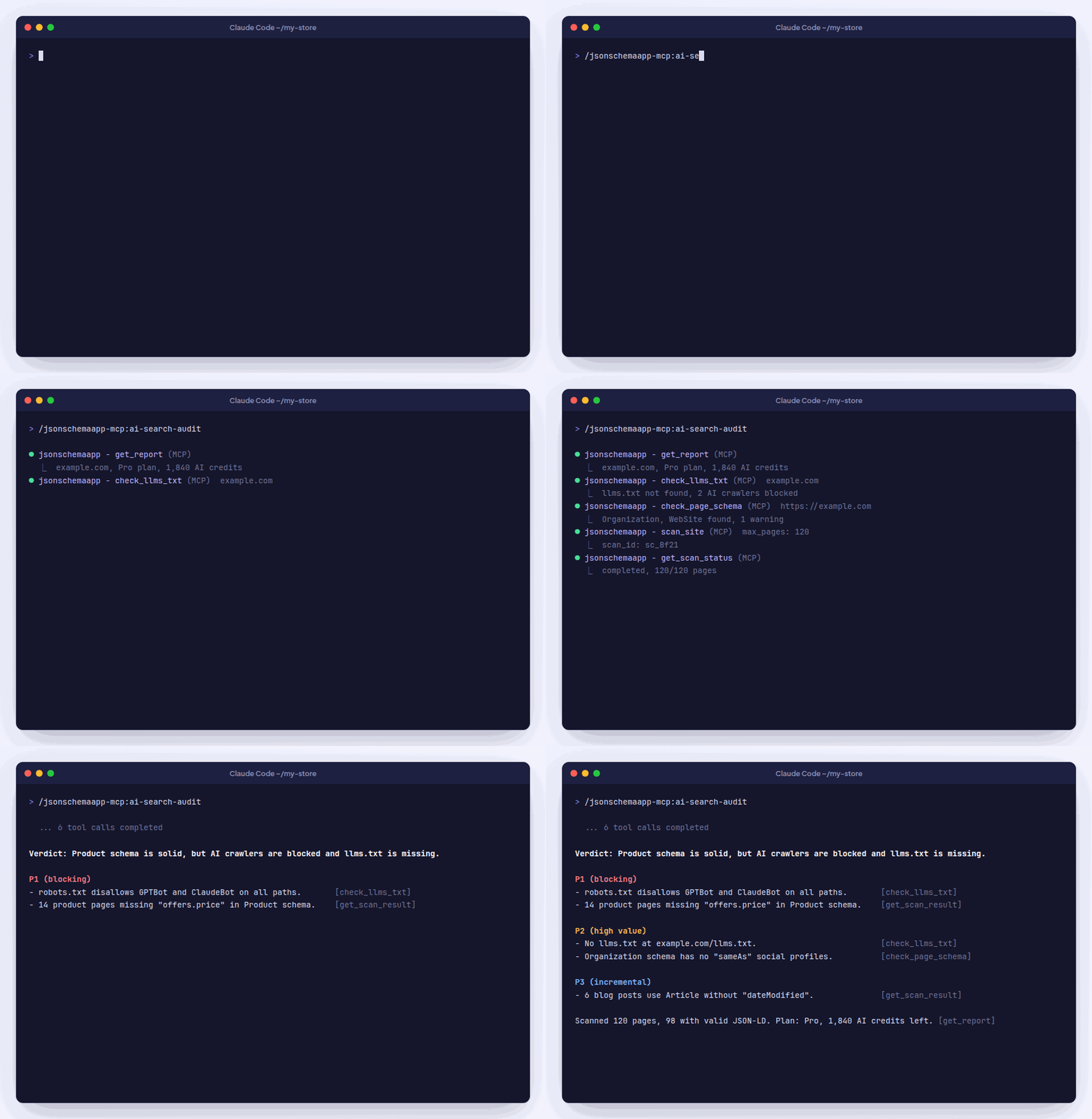
A shortened /jsonschemaapp-mcp:ai-search-audit result for a sample store:
Verdict: Product schema is solid, but AI crawlers are blocked and llms.txt is missing.

P1 (blocking)
- robots.txt disallows GPTBot and ClaudeBot on all paths.          [check_llms_txt]
- 14 product pages missing "offers.price" in Product schema.        [get_scan_result]

P2 (high value)
- No llms.txt at example.com/llms.txt.                              [check_llms_txt]
- Organization schema has no "sameAs" social profiles.              [check_page_schema]

P3 (incremental)
- 6 blog posts use Article without "dateModified".                  [get_scan_result]

Scanned 120 pages, 98 with valid JSON-LD. Plan: Pro, 1,840 AI credits left. [get_report]

Skills (model-invoked)
Unlike the slash commands (which you trigger explicitly), the bundled skills load automatically when your request matches their description. No command needed:
| Skill | Activates when you… |
|---|---|
structured-data-audit | ask to audit/check/improve JSON-LD or Schema.org on your site or a page. |
schema-rich-results | ask which schema types are worth it, what's required, or why FAQPage/HowTo stopped showing rich results. |
ai-search-optimization | ask about AI search visibility, GEO, llms.txt, or whether AI crawlers can reach your site. |
draft-llms-txt | ask to write/generate an llms.txt or llms-full.txt. Drafts a valid file from scan data (the server only checks llms.txt). |
ai-crawler-access | ask to unblock GPTBot/ClaudeBot/PerplexityBot etc. Gives copy-paste robots.txt snippets for any platform (not just Webflow). |
audit-report-format | reference used whenever results are reported. Defines the one-line-verdict + P1/P2/P3 + tool-citation shape so every audit reads the same. |
They carry the same workflow and rules as the commands/subagent (including the FAQPage/HowTo rich-result rule) so behavior stays consistent however you invoke it.
Consistent, grounded audits
So every audit reads the same way and stays efficient, the commands, subagent, and skills share three conventions (all client-side prompt guidance, no server change):
- Standard report format. Every answer leads with a one-line verdict, then findings
grouped P1 (blocking) → P2 (high value) → P3 (incremental), each citing the
tool that produced it. Defined once in the
audit-report-formatskill. Findings must trace to real tool output, with no invented scores or errors. - Poll backoff for scans. After
scan_site,get_scan_statusis polled with a backoff (first poll ~5s, then 5s → 10s → 20s → 30s, ~30s thereafter) instead of a tight loop. - Pagination discipline.
get_scan_resultis read withonly_issues: trueandlimit: 50, paging viaoffset, so large scans don't flood context; the full inventory (only_issues: false) is pulled only when actually needed.
Troubleshooting
| Problem | Fix |
|---|---|
/mcp shows plugin:jsonschemaapp-mcp:jsonschemaapp as not connected | Run any plugin command to start OAuth, or select the server in /mcp and choose authenticate. |
| The connect page says the code is invalid | Codes expire. Generate a fresh one under Settings, AI assistant access and paste it within a few minutes. |
| The connect page is locked | 5 wrong codes lock the page for 15 minutes. Wait, then use a newly generated code. |
| Confusing connection errors after adding an API key | Your key server reuses the name jsonschemaapp. Remove it and re-add it as jsonschemaapp-key. |
| Tools suddenly return 401 | The connection was revoked or expired. Reconnect through /mcp and enter a new pairing code. |
check_page_schema or check_llms_txt returns a rate-limit error | These tools allow 10 calls per minute. Wait a minute and retry. |
| Every tool call asks for approval | Add the allow list from Fewer permission prompts. |
Note on FAQPage / HowTo
FAQPage and HowTo markup no longer produce Google rich results. The tools report them
at the ai_readability level (useful for AI assistants). The commands and the subagent
are instructed never to recommend them as Google rich-result wins.
// faq
What is json-claude-plugin?
JSON Schema Claude Plugin. It is open-source on GitHub.
Is json-claude-plugin free to use?
json-claude-plugin is open-source under the MIT license, so it is free to use.
What category does json-claude-plugin belong to?
json-claude-plugin is listed under plugins in the Claudeers registry of Claude-compatible tools.
// embed badge

[](https://claudeers.com/json-claude-plugin)
// retro hit counter

[](https://claudeers.com/json-claude-plugin)
// reviews
// guestbook
// related in Claude Plugins
 🔓
🔓A single CLAUDE.md file to improve Claude Code behavior, derived from Andrej Karpathy's observations on LLM coding pitfalls.
 🔓
🔓Claude Code is an agentic coding tool that lives in your terminal, understands your codebase, and helps you code faster by executing routine tasks, explainin…
 🔓
🔓"CLI-Anything: Making ALL Software Agent-Native" -- CLI-Hub: https://clianything.cc/
🔓financial-services — a Claude ecosystem project on GitHub.