
jinno-slide-kit
Jinno Slide Kit:Claude Code や Codex に頼んで、図まで作り込んだ神野風のスライドを Markdown と SVG で作るキット
Install with your AI
Paste into Claude Code, Cursor, or any agent — it reads the repo and wires the tool into your project.
Install and set up jinno-slide-kit (git-clone project) into my current project.
Found on https://claudeers.com/jinno-slide-kit
Repo: https://github.com/yuu551/jinno-slide-kit
Homepage/docs: —
Detected install method: git-clone → git clone https://github.com/yuu551/jinno-slide-kit
Category: devtools. Platforms: cli, api, desktop.
Read the repo's README for exact setup and env vars, then install it and wire it into my project.

Claudeers Health Verdict:
unknown; community-verified: false. Confirm the source before running anything.
git clone https://github.com/yuu551/jinno-slide-kit
// compatibility
| Platforms | cli, api, desktop |
|---|---|
| Operating systems | — |
| AI compatibility | claude |
| License | MIT |
| Pricing | open-source |
| Language | JavaScript |
Jinno Slide Kit
図まで作り込んだ神野風のスライドを Claude Code や Codex に頼んで作れるキットです! 原稿は Markdown で図は SVG なので、できたあとも文字や図を手で直せます。
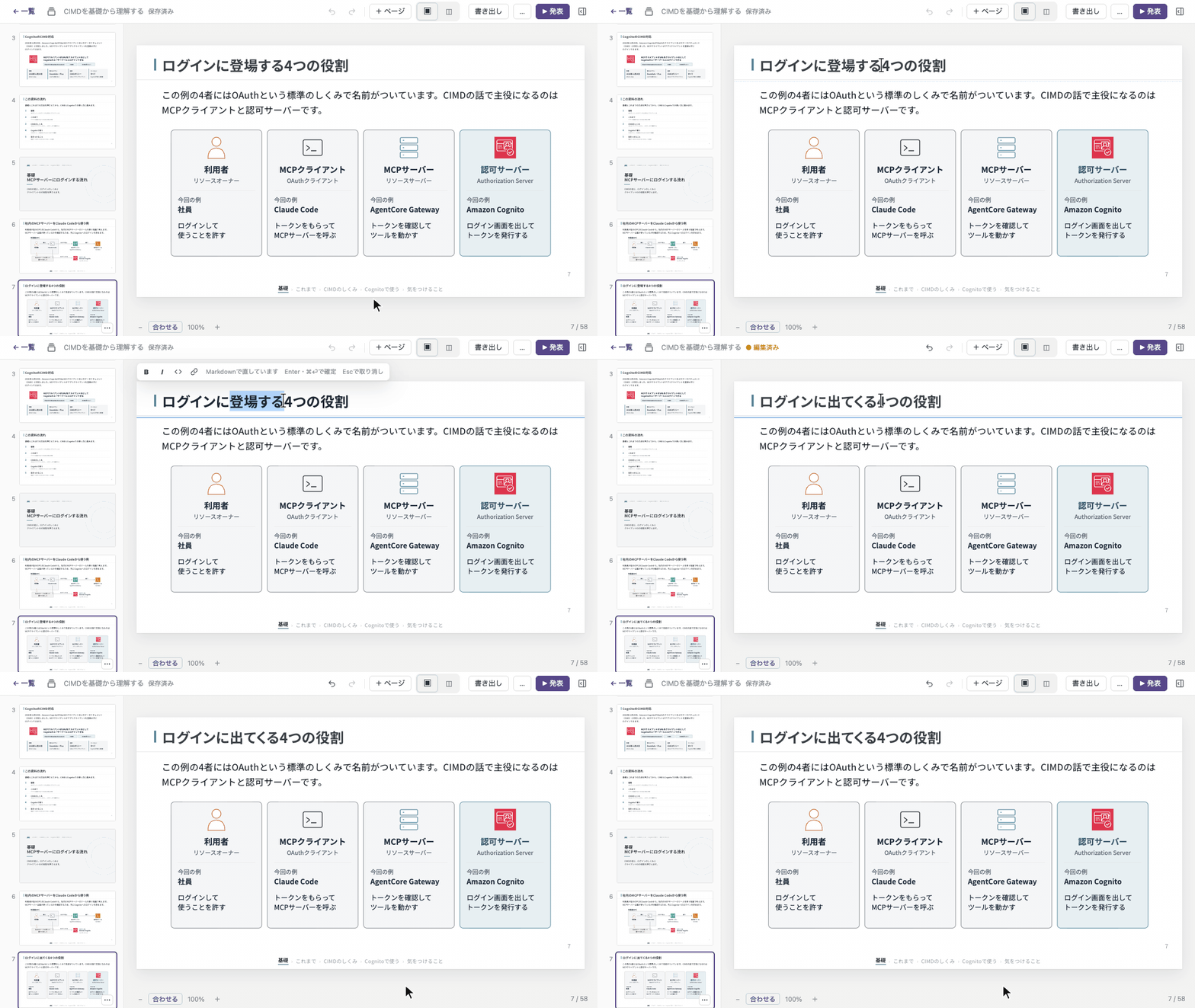
文字を直す
スライドのタイトルや段落をクリックすると、その場で編集できます。
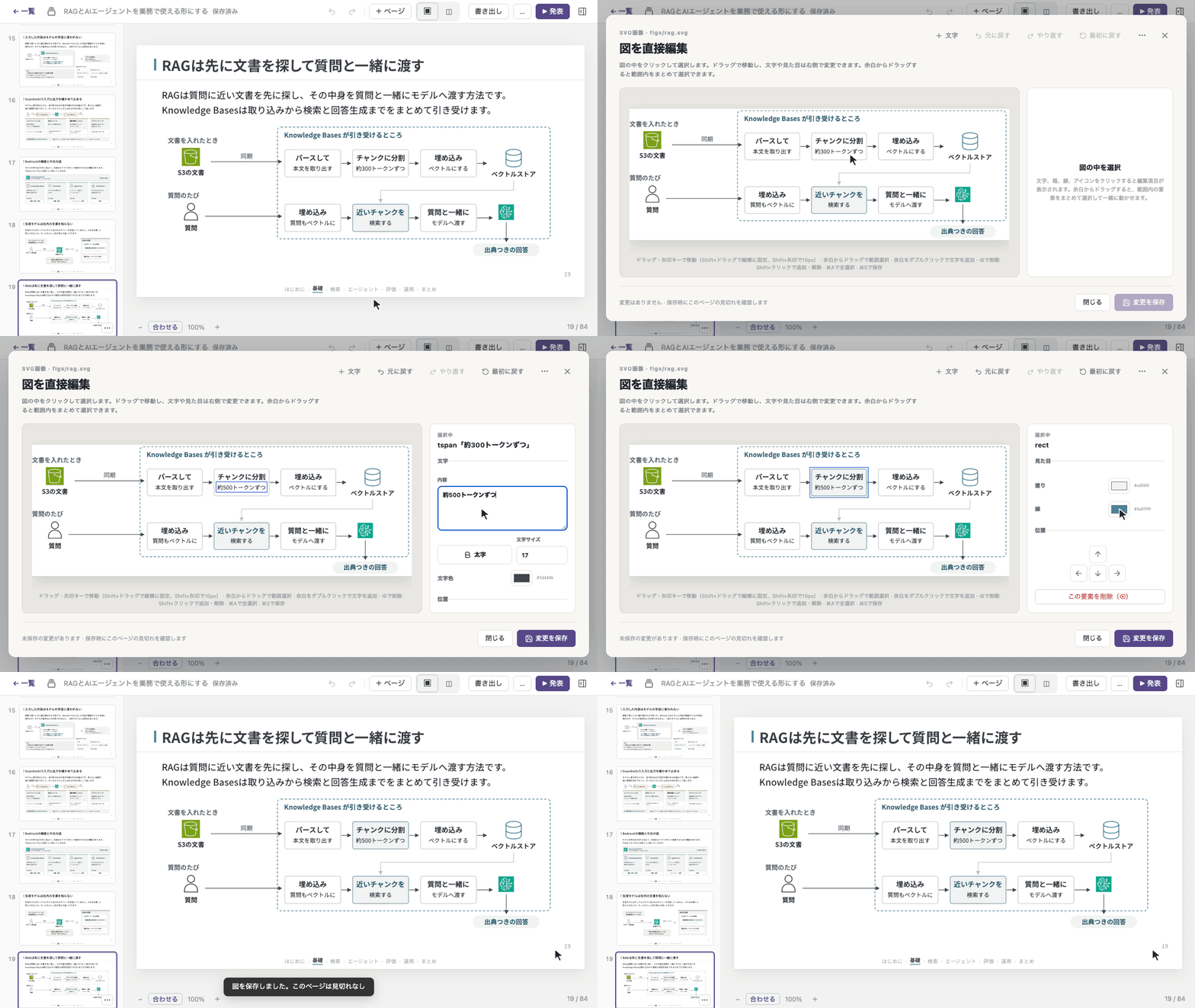
図を直す
エディターでスライドの図をダブルクリックすると、SVG の編集画面が開きます。文字を打ち替えたり箱の色を変えたりして保存すると、そのままスライドに反映されます!
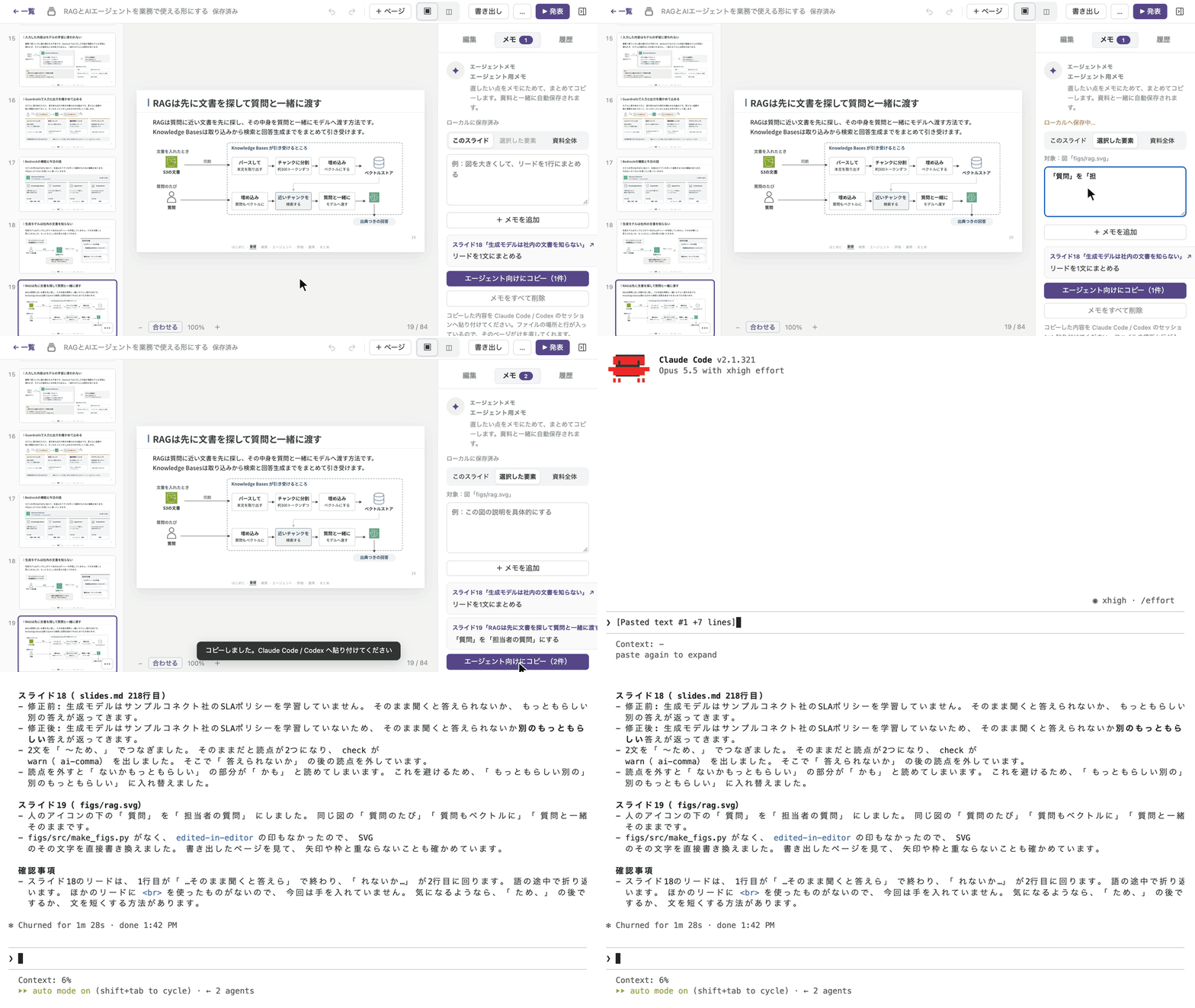
AI にフィードバックする
エディターの右側の「メモ」タブで気になるページや図にメモを残せます。「エージェント向けにコピー」を押すとメモをまとめてコピーできます。 コピーした文にはページと行番号も入るので、Claude Code や Codex に貼るとその行だけを直してくれます!
発表する
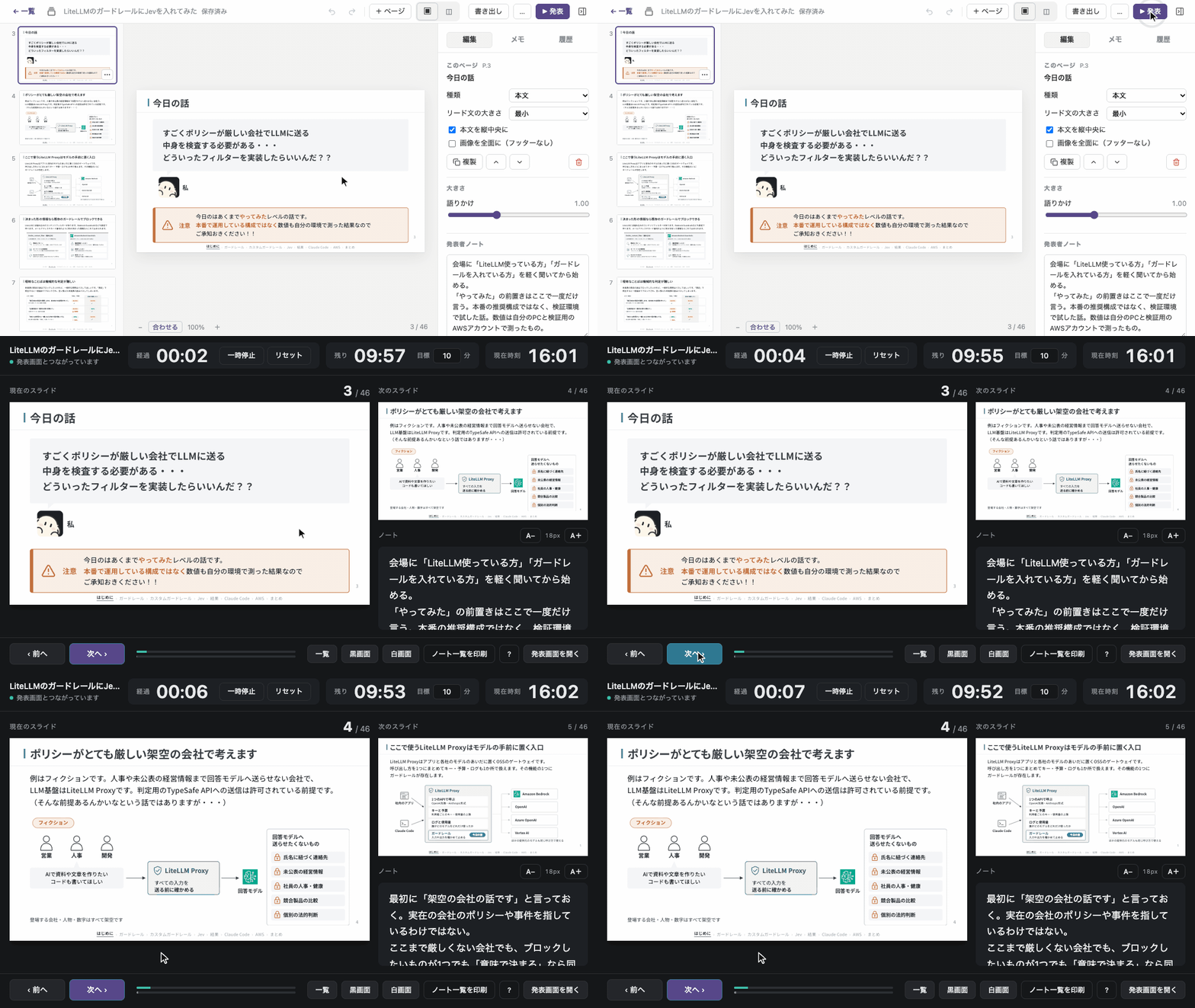
エディター右上の「発表」を押すと発表画面と発表者画面が開きます。発表者画面ではノートや次のスライド、経過時間を見ながら話せます!
PowerPoint にも書き出す
「書き出し」から PowerPoint にもできて、文字や図形をそのまま直せます。Google スライドに取り込んで使うこともできます。 ただコードの書体が変わったり Noto Sans JP がない PC では別の書体になったりするので、見た目は PDF ほどそろわないぼちぼちの仕上がりです!
AI に頼んで作る
Claude Code や Codex にこのリポジトリの URL を渡して「使えるようにして」と頼むだけで、準備ができます!clone から依存パッケージのインストール、スキルの追加まで AI が進めてくれます。必要なものは下の表のとおりです。
このリポジトリを使えるようにして https://github.com/yuu551/jinno-slide-kit
使えるようになったら、あとは頼むだけです!
この記事をアップデート紹介のスライドにして https://example.com/whats-new
社内勉強会で RAG の基本を話す 20 分の資料を作って
できた slides.md の見切れを確かめて PDF にして
スキルは構成とリードを組み、人やサービスの動きを SVG の図に描いてブラウザーで見切れまで確かめます。PDF や PowerPoint への書き出しも頼めます。
デメリットとして、初めて作るときは5分ほどかかるかもしれません。その分、図まで作り込んだ資料ができあがります!
slides check では「APIを叩く」を「APIを呼び出す」にするなど、日本語の言い換えも出ます! 日本語の決まり
自分で入れるなら
macOS に次のものを用意します。最後の行は macOS アプリをビルドするときだけ必要です。
| 必要なもの | バージョン | 何に使うか |
|---|---|---|
| Node.js | 22.12 以降(開発では 24.16.0) | キットを動かす(資料の作成・検査・書き出し・エディター) |
| pnpm | 10.34.5 以降 | 依存パッケージを入れる。package.json で指定した 12.23.0 に切り替わる |
| Google Chrome | — | 見切れの検査と PDF・PowerPoint への書き出し |
| uv | — | 図の SVG を描くスクリプトなどを動かす。Python は uv が用意する |
| Claude Code か Codex | — | スライド作りを頼む。先に入れておくと ./install.sh がスキルを追加する |
| Rust・Xcode Command Line Tools(任意) | Rust 1.100.0 | macOS アプリをビルドするときだけ。rust-toolchain.toml で指定した Rust を rustup が入れる |
uv は brew install uv で入れられます。用意できたら、次のコマンドを実行します。
git clone https://github.com/yuu551/jinno-slide-kit.git
cd jinno-slide-kit
./install.sh
./install.sh は uv で Python 3.14.10 を入れてから依存パッケージをインストールし、同梱のスキル marp-jinno を Claude Code と Codex に追加します。Node.js・pnpm・Chrome・uv が見つからないときは ./install.sh が知らせます。Claude Code や Codex をあとから入れたときは、./install.sh --no-deps でスキルだけ追加できます。
自分でコマンドを打って作るときは キットの使い方 を見てください。
自分流のキットを作る
テーマやスキル、検査のコード、作例を Claude Code や Codex に読んでもらって、自分好みのキットを作るのもありです! たとえば自分で描いた図を1枚添えて「このリポジトリを参考に、うちの会社の色と書体で勉強会用のキットを作って。図はこの見本みたいな線画にして」と頼めます。
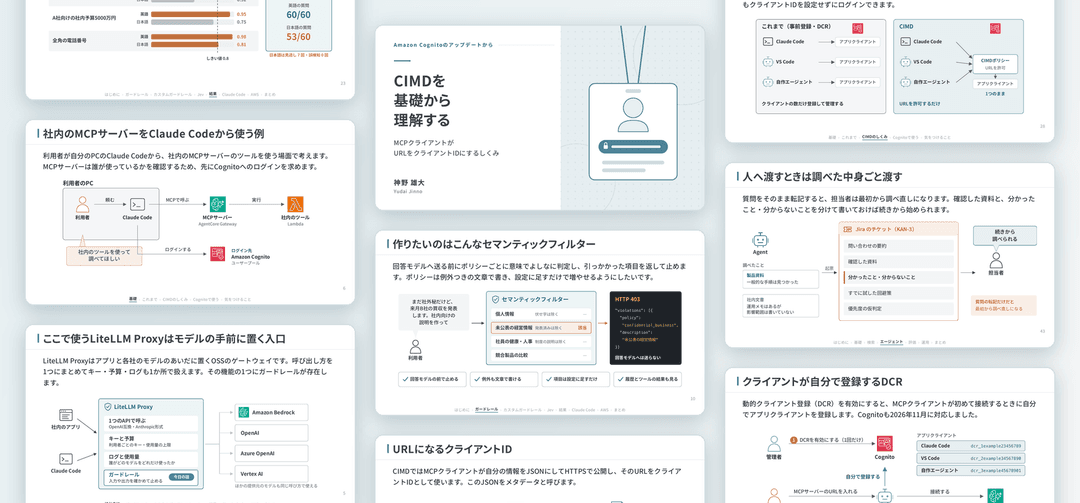
作例
図が主役のページを集めました。画像を押すと PDF が開きます。
作例はどれも一度で出したものではなく、何度も手を入れて仕上げました。キットで完璧な資料が一発でできるわけではないので、AI が作った原稿は自分で読み直して推敲するのが大事です!
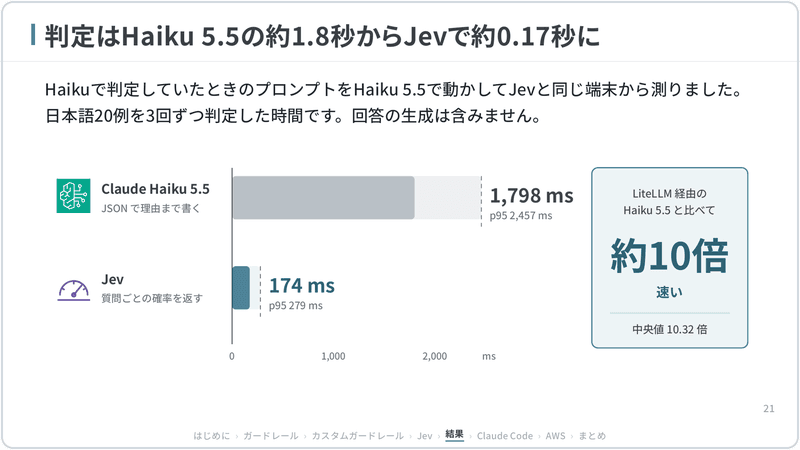
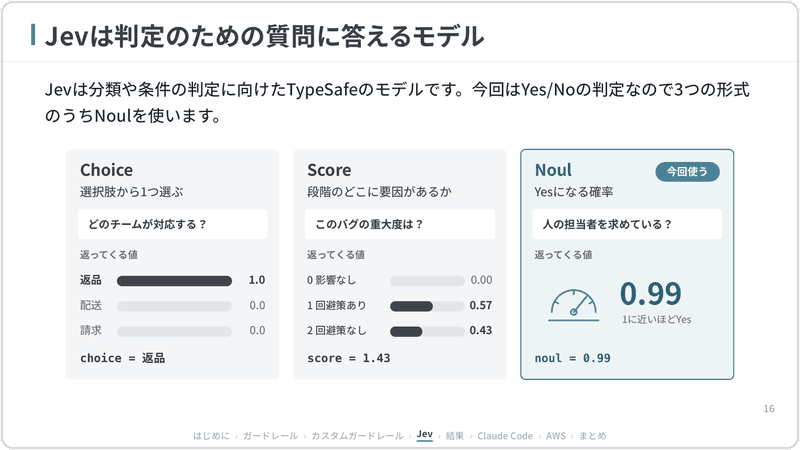
LiteLLMのガードレールにJevを入れてみた(46枚) · 判定時間のグラフ、3つの形式の比較、AWS の構成図

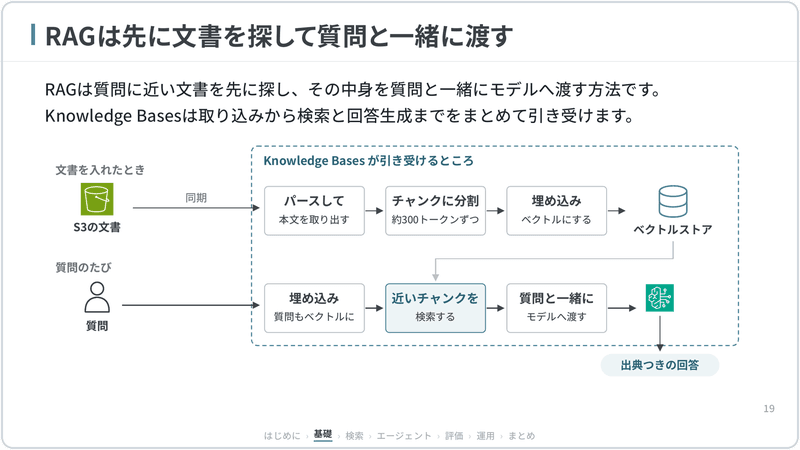
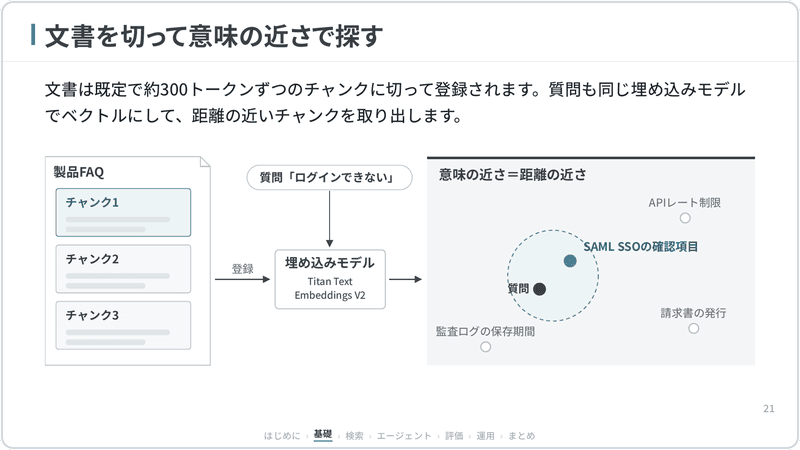
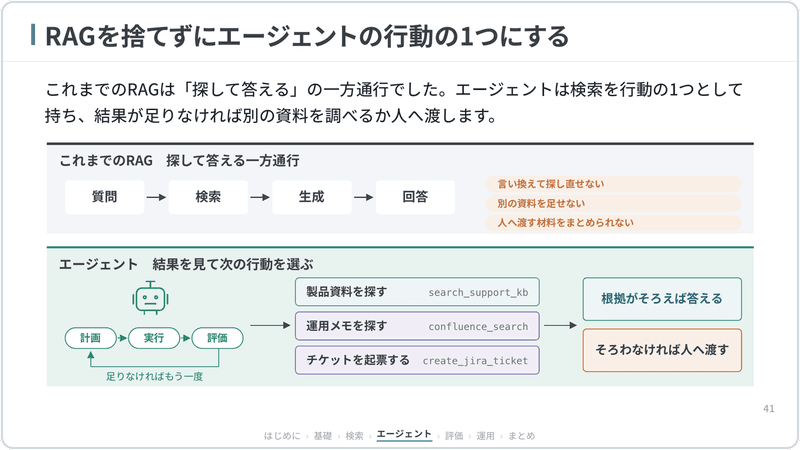
RAGとAIエージェントを業務で使える形にする(84枚) · RAG の処理の流れ、意味の近さの図、RAG とエージェントの比較
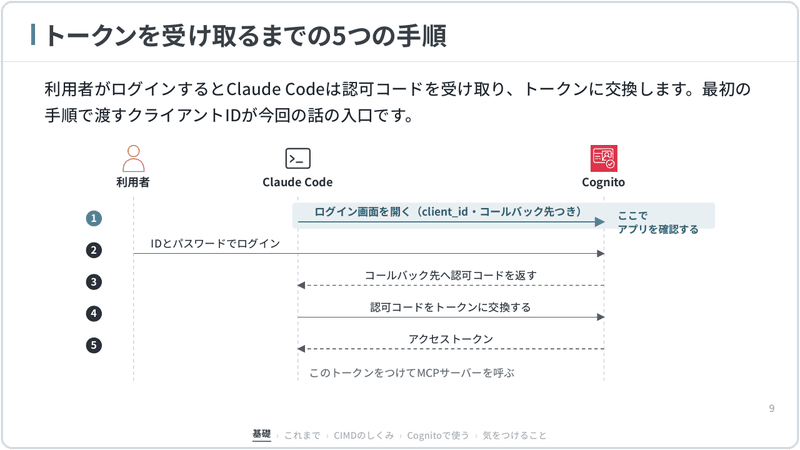
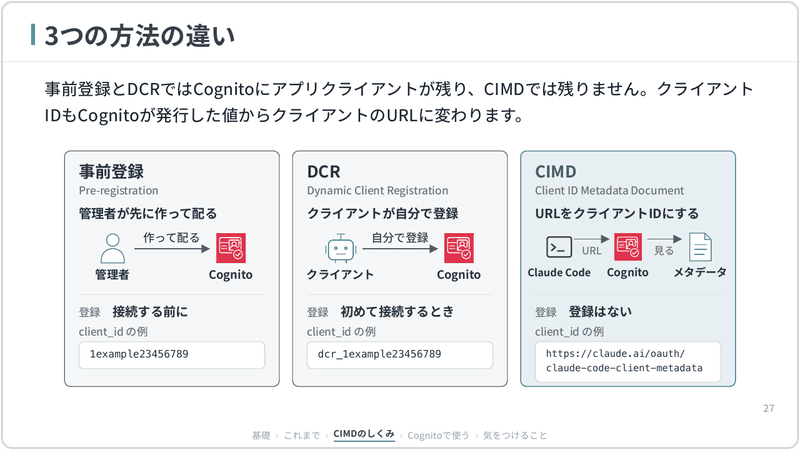
CIMDを基礎から理解する(58枚) · ログインの手順、3つの方法の比較、Cognito と Gateway で試した構成

macOS アプリでも使える
エディターとライブラリーを Tauri で macOS アプリにした MarpKit もあります。ターミナルでコマンドを打たなくても、アプリから資料を開いて直せます。
Rust と Xcode Command Line Tools を入れて pnpm app:build を実行すると、src-tauri/target/release/bundle/macos/MarpKit.app ができます!
Marp を土台にしています
このキットでは @marp-team/marp-core と @marp-team/marp-cli(どちらも MIT)を使っています。
ほかの依存パッケージのライセンスは docs/dependencies.md、線画アイコン(Lucide)の許諾文は THIRD_PARTY_NOTICES.md にあります。
Marpを土台に神野風のテーマと雛形、検査、エディター、編集できる PowerPoint への書き出し、スライド作成用のスキルを追加しています! いつもMarpを使わせていただきありがとうございます!!
// faq
What is jinno-slide-kit?
Jinno Slide Kit:Claude Code や Codex に頼んで、図まで作り込んだ神野風のスライドを Markdown と SVG で作るキット. It is open-source on GitHub.
Is jinno-slide-kit free to use?
jinno-slide-kit is open-source under the MIT license, so it is free to use.
What category does jinno-slide-kit belong to?
jinno-slide-kit is listed under devtools in the Claudeers registry of Claude-compatible tools.
// embed badge

[](https://claudeers.com/jinno-slide-kit)
// retro hit counter

[](https://claudeers.com/jinno-slide-kit)
// reviews
// guestbook
// related in Developer Tools
 🔓
The agent harness performance optimization system. Skills, instincts, memory, security, and research-first development for Claude Code, Codex, Opencode, Curs…
 🔓
Makes your AI agent think like the laziest senior dev in the room. The best code is the code you never wrote.
 🔓
AI coding assistant skill (Claude Code, Codex, OpenCode, Cursor, Gemini CLI, and more). Turn any folder of code, SQL schemas, R scripts, shell scripts, docs,…
 🔓
Orca is the ADE for working with a fleet of parallel agents. Run any coding agent with your own subscription. Available on desktop and mobile.