
jev-router
Pass-through model router for Claude Code and Codex CLI that picks a model tier per human turn with Jev, TypeSafe AI's decision model
Install with your AI
Paste into Claude Code, Cursor, or any agent — it reads the repo and wires the tool into your project.
Install and set up jev-router (npm project) into my current project.
Found on https://claudeers.com/jev-router-2
Repo: https://github.com/dirien/jev-router
Homepage/docs: —
Detected install method: npm → npm install @ediri/jev-router
Category: mcp-servers. Platforms: cli, api, web.
Read the repo's README for exact setup and env vars, then install it and wire it into my project.

Claudeers Health Verdict:
unknown; community-verified: false. Confirm the source before running anything.
npm install @ediri/jev-router
git clone https://github.com/dirien/jev-router
// compatibility
| Platforms | cli, api, web |
|---|---|
| Operating systems | — |
| AI compatibility | claude |
| License | Apache-2.0 |
| Pricing | open-source |
| Language | JavaScript |
jev-router
A local model router for Claude Code and the Codex CLI that picks a model tier for each human turn with Jev.
jev-router is a pass-through proxy that runs on your own Mac or Linux machine. Claude Code talks to it in Anthropic Messages and Codex in OpenAI Responses. When you write a new message, the router asks Jev, TypeSafe AI's System One decision model, which tier the work needs, and sends the session to a fast, balanced or frontier model.
Many turns in a coding session don't need the most expensive model. Switching models in the middle of a task costs more than it saves, though: the prompt cache is per model, and a stronger model that inherits a weaker model's half-done transcript recovers only part of the quality gap. So the router decides only when a person writes, and within a session it only moves up.
Requests go upstream unchanged except for model, the credential, and fields a target can't accept. Responses,
SSE included, stream back byte for byte. Node.js 22 or newer is all it needs: there are no runtime dependencies, and
you don't need Docker or a clone of this repository.
Boundary: Anthropic doesn't support routing Claude Code to non-Claude models through a gateway (Claude Code docs).
jev-router setupkeeps Claude Code on Claude models unless you pick its Ollama Cloud option.
Quick start
jev-router is a small server that runs on your machine. Claude Code sends its requests to it instead of to
Anthropic. For each message you write, the router asks Jev which model the work needs, and forwards the request to
that model. jev-router setup runs the router in the background, so you don't have to start it yourself.
Two commands set it up:
npx @ediri/jev-router setup
claude
npx asks before it downloads the package. You can also install jev-router first, with
npm install -g @ediri/jev-router, and then run jev-router setup. To run it from GitHub instead of the npm
registry, use npx github:dirien/jev-router setup, which needs git.
Don't run npx jev-router or npm install -g jev-router. Without the @ediri/ scope, that name belongs to an
unrelated project, gargpratyush/jev-router. Run setup as your own user,
not with sudo: it sets up jev-router for the user who runs it, and refuses to run as root for someone else.
What setup does
Setup asks three questions:
- Which models Claude Code uses. The default is Claude only: Haiku 4.5, Sonnet 5 and Opus 5.5. The second
option adds Fable 5.1 for deep work, as a fourth tier called
max. The third sends quick work to Ollama Cloud'sglm-5.3-flash. - Your keys. Jev needs a key from TypeSafe or OpenRouter. The Ollama option also needs an Ollama key. Setup checks the Jev key with one call, which costs about $0.00003. There's no Anthropic key to enter: Claude Code keeps using your own Claude login.
- Whether to run the router in the background. Press Enter for yes.
Then setup:
- saves your keys in
~/.config/jev-router/env, a file only you can read; - installs jev-router with npm, if you ran setup through npx, because the background service needs a copy that stays;
- starts the router as a launchd agent on macOS, or a systemd user service on Linux, and starts it again whenever you log in;
- points Claude Code at the router in
~/.claude/settings.json, after it keeps a backup of that file.
Restart any Claude Code session that was already running. You can run setup again at any time. Press Enter to keep your models and your saved keys, or pick other models to switch: setup replaces the config it wrote, unless you changed it. It restarts the background service, so a switch takes effect right away.
If Claude Code already goes to another gateway, such as a company LiteLLM with an ANTHROPIC_AUTH_TOKEN, setup leaves
its settings alone and says what to remove first. Behind the router, Claude Code would send that gateway's credentials
to Anthropic. If such a gateway turns up in your shell later, jev-router doctor says so, and running setup again takes
the router back out of Claude Code's settings.
- Check it:
jev-router doctorlists the config, the keys, the service, and whether the router answers. - Watch it: open http://127.0.0.1:4100. Each message you write shows up with the model the router picked, and why.
- Upgrade:
npx @ediri/jev-router@latest setupinstalls the newest version and restarts the router. - Undo it:
jev-router uninstallstops the router and takes setup's changes back out of Claude Code's settings. It keeps your config, keys and logs, and prints the command that deletes them.
Without a background service
Setup can't install a service on a machine without launchd or a systemd user session, such as a container. There, and when you answer no, it saves your keys and stops. Then start Claude Code through the router for one session:
jev-router launch claude              # through npx: npx @ediri/jev-router launch claude
jev-router launch claude --ui 4100    # the same, with the live view on http://127.0.0.1:4100
launch starts a router for the session and stops it when Claude Code exits. Setup prints the exact command for
the way you installed jev-router.
To run each step yourself instead, see Manual setup.
Tiers
| Client | fast | balanced | frontier | max | trusted (sessions that contained a secret) |
|---|---|---|---|---|---|
| Claude Code, setup's default (Claude only) | Anthropic claude-haiku-4-5 | Anthropic claude-sonnet-5 | Anthropic claude-opus-5-5 | none | Anthropic claude-sonnet-5 |
| Claude Code, setup's Fable option | Anthropic claude-haiku-4-5 | Anthropic claude-sonnet-5 | Anthropic claude-opus-5-5 | Anthropic claude-fable-5-1 | Anthropic claude-sonnet-5 |
| Claude Code, setup's Ollama option | Ollama Cloud glm-5.3-flash | Anthropic claude-sonnet-5 | Anthropic claude-opus-5-5 | none | Anthropic claude-sonnet-5 |
| Codex CLI | Ollama Cloud glm-5.3-flash | Ollama Cloud kimi-k2.7-code | OpenAI gpt-6-astra | OpenAI gpt-6-astra, with the Fable option | OpenAI gpt-6-sol |
Setup's default writes config/anthropic-only.json to
~/.config/jev-router/config.json. The Ollama option writes config/default.json instead,
which changes only Claude Code's fast tier; the router also uses that file when you have no config. Claude Code's
own background calls (session titles, topic checks, quota probes) go to claude-haiku-4-5 in all three. The OpenAI
model names come from Codex's bundled model catalog, so check them against your account.
The Fable option writes config/anthropic-fable.json: the Claude-only config plus
the max tier. A message goes to Fable 5.1 when deep is Jev's most likely answer, and so do /model fable and
#max. A message that Jev thinks would change production systems, credentials, permissions or billing goes to the
top tier, so it goes to Fable 5.1 too. When Jev is unsure, the router still takes the more capable of its two most
likely tiers, but no higher than Opus 5.5 (policy.escalationCeiling): apart from those cases, the Fable config
routes like the Claude-only one. Codex has no model above gpt-6-astra here, so its max tier is the same as
frontier. The savings in report and the live view compare against running every request on Fable 5.1.
Install
The Quick start installs jev-router for you. To install it yourself, or to pin a version:
npm install -g @ediri/jev-router                     # the newest release
npm install -g @ediri/[email protected]               # one release
npm install -g github:dirien/jev-router#semver:^1    # the newest 1.x from GitHub, which needs git
To update, run the install command again.
Up to 1.4.0 the package was called @dirien/jev-router. If you installed one of those versions, run
npm uninstall -g @dirien/jev-router before you install a newer one: npm won't replace a command that another
package owns.
What else you need:
| Node.js | 22 or newer, on macOS or Linux |
| Jev | A TypeSafe API key, an OpenRouter key with credits, or both for failover |
| Anthropic | Your Claude login. The router passes it through, so there's no Anthropic key to set |
| Ollama Cloud | An API key for Claude Code's fast tier with setup's Ollama option, and for Codex's fast and balanced tiers |
| OpenAI | An API key for Codex's frontier and trusted tiers. You don't need one if you only use Claude Code |
| Claude Code | 2.1.273 or newer, for the gateway hint headers (request shapes taken from 2.1.281) |
| Codex CLI | 0.134.0 or newer, for profile files (request shapes taken from 0.156.1) |
To remove jev-router, run jev-router uninstall, then npm uninstall -g @ediri/jev-router. Your config, keys and
session state stay in ~/.config/jev-router and ~/.local/state/jev-router until you delete them.
Use it with Claude Code
jev-router setup points every Claude Code session at the router. Claude Code needs four environment variables to
work through the router, and there are three ways to set them:
- For every session. Setup puts them in the
envblock of~/.claude/settings.jsonand runs the router as a service. While the router is down, Claude Code can't connect. - For one run.
jev-router launch claudesets them for one Claude Code session and exits with Claude Code's exit code. If no router answers on the port, it starts one inside its own process, with the keys from~/.config/jev-router/env. Claude Code doesn't get the file's variables. - For one shell. With the router running,
eval "$(jev-router env claude)"exports them, and everyclaudeyou start from that shell goes through the router.
This is what setup adds to ~/.claude/settings.json, next to the keys the file already has:
{
  "env": {
    "ANTHROPIC_BASE_URL": "http://127.0.0.1:4000",
    "CLAUDE_CODE_GATEWAY_HINT_HEADERS": "1",
    "CLAUDE_CODE_AUTO_COMPACT_WINDOW": "160000",
    "ENABLE_TOOL_SEARCH": "true"
  }
}
| Variable | Why |
|---|---|
ANTHROPIC_BASE_URL | Sends Claude Code's API traffic to the router |
CLAUDE_CODE_GATEWAY_HINT_HEADERS=1 | Labels each request as main loop, subagent, compaction, workflow or background work, so only your messages decide the tier |
CLAUDE_CODE_AUTO_COMPACT_WINDOW=160000 | Claude Code can't learn the routed model's context window through a gateway. 160,000 tokens compacts before the smallest window among the tiers |
ENABLE_TOOL_SEARCH=true | Behind any gateway, Claude Code turns MCP tool search off and sends every MCP tool definition with every request. In a live test with a few MCP servers, that was about 200,000 tokens per request, more than the compaction window, so Claude Code compacted on every message |
Setup doesn't overwrite a compaction window or a tool search setting you already have. When the router has a token,
setup also adds it to ANTHROPIC_CUSTOM_HEADERS. When ANTHROPIC_BASE_URL, in the settings file or in your shell,
already points somewhere else, such as a company gateway, setup asks before it replaces it, and --yes keeps it.
Setup never replaces it when Claude Code also carries credentials for that gateway: ANTHROPIC_AUTH_TOKEN,
ANTHROPIC_API_KEY or custom headers, in your shell or the settings file, or an apiKeyHelper. Behind the router,
Claude Code would send them to Anthropic. Setup names them, and where they're set, so you can remove them first.
launch claude and env claude refuse in the same case, and show the command that leaves them out.
You don't need an Anthropic API key: the router passes Claude Code's own login to Anthropic and to no other host. If
the router's environment has an ANTHROPIC_API_KEY, the router uses that key for every Anthropic request instead,
and the key pays.
jev-router doctor checks these settings. When ANTHROPIC_BASE_URL in your shell or in ~/.claude/settings.json
points at the router, it names each of the other three that's missing. docs/activation.md
covers a router token, undoing each setup, and troubleshooting.
Use it with Codex
jev-router launch codex
launch codex writes a jev profile to ~/.codex/jev.config.toml and runs codex --profile jev. Like
launch claude, it uses the router on the port or starts one, and arguments after -- go to codex. A profile that
launch wrote is refreshed when the router's port or token changes; a profile you edited is kept, and --force
replaces it. Once the profile exists, plain codex --profile jev works too while a router runs.
Setup asks only for the keys Claude Code needs. Codex also needs OLLAMA_API_KEY and OPENAI_API_KEY: add them to
~/.config/jev-router/env, one KEY=value line each, and run jev-router setup again so the router picks them up.
The profile talks to one virtual model, jev-auto, from
examples/codex/jev-models.json. Codex shapes every request from the model's
catalog entry (tool types, shell type, parallel tool calls), so the entry uses settings every routed model can handle.
It also carries Codex's own system prompt: an empty prompt there would silently drop Codex's instructions. To set the
profile up by hand, see Codex profile by hand.
Run it as a service
jev-router setup installs the service for you: a launchd agent on macOS
(~/Library/LaunchAgents/io.github.dirien.jev-router.plist) or a systemd user unit on Linux
(~/.config/systemd/user/jev-router.service). It keeps one router running for all your sessions, starts when you
log in, and restarts the router if it fails. It runs jev-router serve --ui 4100 with your config, your env file and
the log file.
Setup writes the service from the templates in the package, under examples/service/, which are also the manual
route. docs/activation.md has the commands to install, reload,
restart and remove each service by hand. jev-router uninstall removes the service setup installed.
The router's JSON log goes to ~/.local/state/jev-router/router.log and rotates at 50 MiB. jev-router report and
jev-router ui read that file without an argument. Messages for people, such as startup errors, go to
~/Library/Logs/jev-router/router.err.log on macOS, and to the journal (journalctl --user -u jev-router) on Linux.
On Linux, the service runs while you're logged in; loginctl enable-linger keeps it running after you log out.
Watch routing live
The live view shows every decision as it happens, in a browser next to the terminal where Claude Code runs:
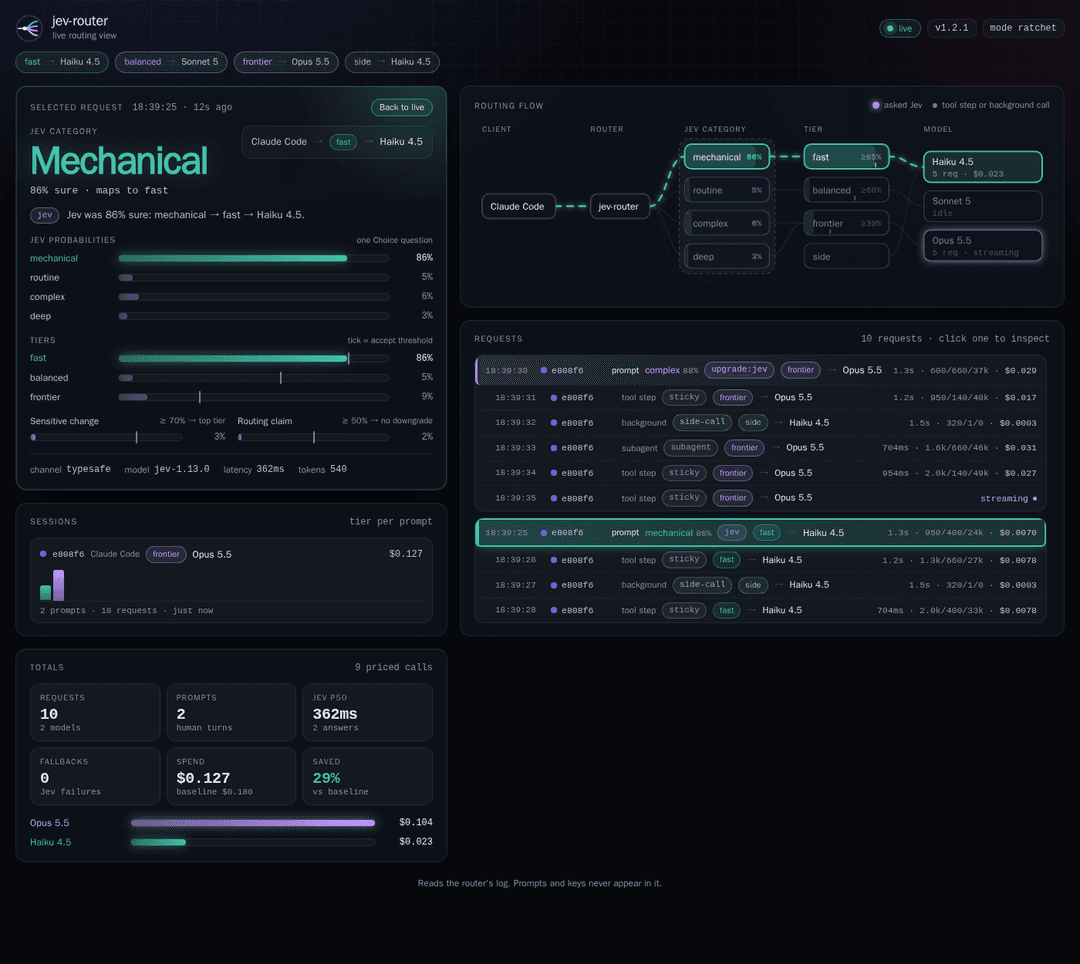
- Latest decision. Jev's category for the message you just sent, its probabilities against each tier's threshold, the guards, and the tier and model the router picked, with the reason in plain words. When the router passes over Jev's tier, the panel says why, for example "82% sure · Jev's tier fast ✗ 82% is under its 85% bar → balanced".
- Flow. An animated graph from Claude Code or Codex through Jev's categories and the tiers to the models. Every request travels it as a dot; tool-loop steps, subagents and background calls skip Jev.
- Timeline and sessions. Each request with its status, tokens and cost, grouped under the message that started it, and each session's tier per human message, so the ratchet shows.
- Totals. Spend against the baseline model, Jev's latency and its fallbacks.
- Any request, on a click. Click a request in the timeline, or focus it and press Enter, and the decision panel
and the flow switch to it: its route streams across the graph in its tier's color. A tool step, subagent or
compaction shows the prompt whose decision it runs on; a background call shows that it always takes
side. Escape, or Back to live, follows the traffic again.
The service that setup installs serves the view on port 4100. serve --ui and launch --ui (or JEV_ROUTER_UI)
take a port or host:port, and launch prints the view's address before Claude Code starts. The view gets every log
entry from the router in-process and needs no log file. It listens on loopback unless you give it an address.
For a router started without --ui, jev-router ui [<log.jsonl>] [--port <n>] serves the same view on
http://127.0.0.1:4100 by following the router's log.
- A token for the view. Set
JEV_ROUTER_UI_TOKEN, or pass--ui-token, and the view asks for that token. The router prints an address that ends in?token=; open it, and the page keeps the token in a cookie. Prefer the variable, which can also live in your env file, because other users can see a flag inps. - Another address.
--ui 0.0.0.0:4100lets other machines reach the view, for port forwarding such assbx ports. Without a token, the router warns that anyone who can reach that address can watch routing decisions. The router's own port still refuses every browser request.
How routing works
The router tracks each conversation as a session. It takes the session ID from Claude Code's
X-Claude-Code-Session-Id header or metadata.user_id, from Codex's session-id or thread-id header, from
prompt_cache_key, or else from a hash of the system prompt and the first messages. The log names the source as
key_source.
| Request | Tier | Asks Jev? |
|---|---|---|
count_tokens | The session's tier. A target with countTokens: false (Ollama Cloud) answers with a local 404, and Claude Code estimates instead | no |
Background call: request class auxiliary, Codex memory consolidation, a max_tokens <= 1 probe, or a haiku model when no request class is sent | side: claude-haiku-4-5 for Claude Code, the fast target for Codex | no |
| Subagent, compaction, workflow | The session's tier | no |
x-jev-tier header or JEV_ROUTER_TIER | That tier | no |
/model switch to another model family in Claude Code | The family's tier from modelPins | no |
#fast, #balanced or #frontier (and #max in the Fable config) as the first or last word you type | That tier | no |
| Tool-loop step (no new human message) | The session's tier | no |
| New human message | Jev's answer through the policy: freely for a new, idle or provisional session, and only upward otherwise | yes, once per message |
Then, for every request, the router:
- Picks the target. A session whose human messages contained a secret uses the
trustedtarget from then on. - Strips foreign reasoning. When a session moves to another upstream host (Ollama Cloud to Anthropic, say), signed thinking from before the move is dropped, because another provider's signatures are always rejected. Between Anthropic models nothing is stripped, and subagent and compacted conversations are never touched.
- Redacts. For an untrusted target it redacts secrets anywhere in the body, tool output included.
- Drops unsupported fields. It removes the fields the target lists in
omit, for example the adaptivethinking,output_config.effortandcontext_managementthat Haiku 4.5 rejects. - Caps the output. It lowers
max_tokensto what the target's model accepts. Claude Code asks for 128,000 output tokens because it believes it talks to Opus 5.5, and Haiku 4.5 refuses anything above 64,000. The limits of the Claude models in the shipped configs are built in, and a target'smaxOutputTokensoverrides them. - Folds system messages. Claude Code puts
role: "system"messages inside the conversation for the Claude 5 family. Haiku 4.5 rejects them, so for any other model the router folds each into the user message it follows, as<system-reminder>text after that message's tool results; the tools such a message adds jointools. A target'sfoldSystemMessagesoverrides it. - Drops betas the model rejects. Once Claude Code's own model has a 1M window, it asks for the 1M-context
beta, which Haiku 4.5 refuses on a subscription. The router leaves it out for Haiku; a target's
omitBetasoverrides that. - Trims identifiers. An untrusted target gets a minimal set of headers and no
metadata. - Forwards. It streams the response back with back-pressure, and cancels the upstream request when the client goes away.
Every decision is in the log and in the response headers x-jev-tier, x-jev-model, x-jev-reason and
x-jev-session (plus x-jev-redacted when something was redacted, and x-jev-max-tokens when max_tokens was
lowered).
Choosing the tier yourself:
- Put
#frontieras the first or last word of a message. A tag inside a code block or mid-sentence doesn't count. - Send
x-jev-tier: frontier: throughANTHROPIC_CUSTOM_HEADERSfor Claude Code, orhttp_headersin the Codex profile. SetJEV_ROUTER_TIERon the router to pin every session. - Use
/model opusin Claude Code. WithpinOnModelChangeon (the default), a switch to another model family pins that family's tier. - Run
/clearin Claude Code for a new session, which Jev decides from scratch.
None of these can move a session that contained a secret to an untrusted upstream.
docs/design.md explains why the router works this way, with sources.
How it compares
docs/comparison.md compares jev-router in detail with four other projects that route coding agents with Jev, and lists a few more it didn't test. Its summary:
| Project | Clients and upstreams | When Jev decides | Claude Code on a Haiku 4.5 tier | Pick it for |
|---|---|---|---|---|
| jev-router 1.6.0 | Claude Code and Codex, each on its own protocol; Anthropic, OpenAI, Ollama Cloud | Once per human message; a session only moves up | Rejected fields dropped, max_tokens capped, system messages folded, 1M beta dropped (live) | Your own Claude Code and Codex sessions, with Claude, OpenAI or Ollama Cloud tiers |
| LiteLLM 1.102.1 | Messages, Responses, Chat Completions; 100+ providers, with translation | Every request by default, tool-loop steps included (mock) | max_tokens capped, thinking converted; system messages passed through (mock) | A team gateway: virtual keys, budgets, spend tracking, an admin UI |
| Jevonian 0.1.7 | Messages, Responses, Chat Completions, bridged; many providers | Every request; the model can change on any turn (mock) | Turns Jev sends to Haiku fail with a 400 (live) | Many clients and providers behind one local endpoint, with a dashboard |
| gargpratyush/jev-router 0.3.0 | Claude Code to Anthropic, Codex to OpenAI | Each new user turn, unless a system message follows it (mock) | Thinking and effort dropped; max_tokens and system messages passed through (mock) | Same-vendor tiering, also on Windows; last commit 2026-09-19 |
| Switchboard 0.1.0 | Claude Code to Anthropic, Codex to OpenAI or ChatGPT | Once per conversation (docs) | Thinking and effort dropped; max_tokens and system messages passed through (source) | Packaged same-vendor tiering that also sets the reasoning effort |
Each project was checked on 2026-09-25. The labels say how: live against Anthropic's API, mock against mock upstreams and a mock Jev, source by reading the code, and docs from the project's documentation.
Where jev-router does better:
- Claude Code keeps working on a cheaper Claude model. In live checks, five request shapes broke Claude Code turns routed to Haiku 4.5, and jev-router adapts all five. LiteLLM, gargpratyush/jev-router and Switchboard adapt thinking and effort, but none of the other routers folds the system messages that Claude Code puts inside the conversation.
- MCP tool search stays on.
launch claude,env claudeand the example env file setENABLE_TOOL_SEARCH=true. Of the others, only LiteLLM'sliteCLI sets it for you. - Models change only at human messages. A tool loop never switches models, so it keeps its prompt cache, and within a session the tier only moves up.
- Every decision is visible. Each request leaves a
routeline with its reason, and in the live view you can click any request to see Jev's answer, each tier's threshold and the guards. - Secrets stay with trusted upstreams. A scanner checks every human message. A hit keeps the session on its trusted target, and untrusted targets get the secrets redacted.
- It runs as a service.
jev-router setupinstalls it in one command. Session tiers survive a restart,SIGHUPreloads the config, and one router serves every Claude Code session thatsettings.jsonpoints at it.
For a team gateway with virtual keys and budgets, many clients behind one endpoint, or same-vendor tiering on Windows, another project fits better. When to pick something else says which.
Docker Sandboxes
jev-router doesn't need Docker Sandboxes. If your agents run in one, the
jev-router kit keeps the upstream keys on the host: you store them with
sbx secret set, and the sandbox proxy adds them to outgoing requests. Three steps differ from a plain machine:
- Create the sandbox with the kit:
sbx create --kit ghcr.io/dirien/jev-router-kit:1.6.0 claude <workspace>. - In the sandbox, install jev-router with the same
npm install -gcommand, and start the router withjev-router serve --ui 0.0.0.0:4100, so the view can be forwarded. A sandbox has no service manager, and the kit provides the keys, sojev-router setupisn't needed there. - On the host, forward the view with
sbx ports <name> --publish 4100:4100, and pass Claude Code's four variables tosbx runwith-e.
docs/sandbox.md has the full steps, including how to use the kit from git instead of GHCR.
Operations
- Logs.
servewrites one JSON line per event to stdout, and to a file when you pass--log-file(or setJEV_ROUTER_LOG_FILE, orlogFilein the config). A router thatlaunchstarted logs to~/.local/state/jev-router/router.loginstead of stdout, so the agent's terminal stays clean. A log file rotates to<file>.1when it would grow pastlogMaxBytes(50 MiB by default;0turns rotation off), and one old file is kept. If a log file can't be written, the router says so once and goes on routing. - Report.
jev-router report [<log.jsonl>]sums up a log: requests and sessions, spend per model, cost against the baseline and the savings, and Jev's call count, fallback rate, p50 and p95 latency and cost. Without an argument it readsJEV_ROUTER_LOG_FILE, elselogFilefrom the config, else~/.local/state/jev-router/router.log, together with its rotated.1file. Lines that aren't JSON are skipped. - Health.
GET /healthzreturns the version, uptime, the session count, active requests, and each Jev channel's calls, errors, last error and circuit state. It needs no token. - State. Decisions persist in
stateFile, so a restart doesn't move live sessions to another model. Entries expire after seven days, and the router compacts the file to one line per session at startup and while it runs. - Signals.
SIGHUPre-reads and re-validates the config; if the new config is invalid, the old one stays in effect. It doesn't reload keys: restart the router after you change the env file.SIGTERMandSIGINTstop new connections and wait up to 30 seconds for streams in flight, and a second signal stops the router at once. - Validation. A bad config stops the router at startup with every problem listed.
jev-router report                    # reads ~/.local/state/jev-router/router.log when nothing else is set
curl -s http://127.0.0.1:4000/healthz
pgrep -f 'jev-router serve'          # the router's process ID
kill -HUP <pid>                      # reload its config
| Log line | When | What it holds |
|---|---|---|
route | A request is routed | Session hash, request kind, tier, reason, model and upstream. After a Jev call, also the channel, model version, request ID, probabilities, guard values and latency |
done | A request ends | Status, bytes, the SHA-256 of the streamed bytes, token usage, cost_usd, and baseline_usd: the same usage priced on baselineModel. capped_max_tokens and folded_system when the router changed the request, and the upstream's error message when it failed. Status 499 when the client left before the upstream answered |
error | The router couldn't handle a request or reach its upstream, or the upstream broke off a stream | What failed. A broken stream also gets a done line with the usage so far and an error, even after a 200 |
deciding | A Jev call starts | The session and its turn |
config | At startup and after every reload | The tiers, Jev's options, and each target's model and host, never keys |
warning | Once per problem | For example, Claude Code requests without hint headers, an unknown tier pin, or a log file that can't be written |
A req number pairs each route line with its done line.
CLI
jev-router setup [--yes] [--models claude|fable|ollama] [--service auto|launchd|systemd|none]
                 [--no-claude-settings]
jev-router uninstall
jev-router [serve] [--config <file>] [--env-file <file>] [--log-file <file>] [--host <h>] [--port <n>]
                   [--ui [<host>:]<port>] [--ui-token <token>]
jev-router launch claude [--config <file>] [--env-file <file>] [--port <n>] [--ui [<host>:]<port>]
                         [--] [claude args…]
jev-router launch codex  [--config <file>] [--env-file <file>] [--port <n>] [--ui [<host>:]<port>]
                         [--force] [--] [codex args…]
jev-router env claude|codex [--config <file>] [--env-file <file>] [--port <n>]
jev-router doctor [--config <file>] [--env-file <file>] [--live]
jev-router init [--models claude|fable|ollama] [--force]
jev-router report [<log.jsonl>]
jev-router ui [<log.jsonl>] [--port <n>] [--ui-token <token>]
jev-router version | help
| Command | What it does |
|---|---|
setup | Asks which models Claude Code uses and for their keys, checks the Jev key with one call, then saves them, runs the router in the background and points Claude Code at it. Safe to run again, also to switch models. --yes answers with the defaults and takes the keys from the environment |
uninstall | Removes the service and what setup put in Claude Code's settings. Keeps the config, the keys and the logs |
serve | Runs the router in the foreground; it's the default command. --ui also serves the live view |
launch | Runs Claude Code or Codex through the router on the configured port, and starts one if none runs. --ui also serves the live view of a router it starts |
env | Prints shell exports for a running router: eval "$(jev-router env claude)" |
doctor | Checks the config, the env file, the keys, the log file, the service, Claude Code's settings and a running router. --live makes one Jev call (about $0.00003) |
init | Writes the user config from a packaged one: the Ollama Cloud and Claude one, or the one --models names. --anthropic-only is the same as --models claude |
report | Sums up requests, spend and savings from a router log |
ui | Serves the live view for a log that another process writes |
setup also takes --models claude|fable|ollama (the packaged config to write, on a machine without a config or
with an unchanged packaged one), --service auto|launchd|systemd|none (auto picks launchd on macOS and systemd on
Linux, when a user session is there) and --no-claude-settings.
JEV_ROUTER_CLAUDE_BIN and JEV_ROUTER_CODEX_BIN point launch at a specific claude or codex binary.
Configuration
The router reads the first config it finds:
- the file passed with
--config JEV_ROUTER_CONFIG$XDG_CONFIG_HOME/jev-router/config.json(~/.config/jev-router/config.jsonby default)- the packaged
config/default.json
jev-router setup writes ~/.config/jev-router/config.json when there's none, from
config/anthropic-only.json, or from
config/anthropic-fable.json or config/default.json with its
Fable or Ollama option. Run again, it switches a config that is still an unchanged copy of one of them, from this
release or an earlier one, and keeps any other. jev-router init writes one without the rest of setup.
docs/configuration.md documents every key, its default and its validation.
| Key | Meaning |
|---|---|
tiers, defaultTier | Tier names, cheapest first, and the tier a new session gets when Jev can't decide |
policy.mode | ratchet (default) re-decides at each human message and only moves up; sticky decides once per session |
policy.accept | Minimum probability per tier. Cheap tiers need more; below it, the more capable of the top two wins |
policy.escalationCeiling | The most capable tier that the step up after a missed bar can reach; unset, the top tier. The Fable config sets frontier |
policy.sensitiveOverride, policy.claimGuard | Guard thresholds |
policy.maxProvisional, policy.idleResetMinutes, policy.failClosed | Retries after Jev failures, the idle reset, and whether unvetted sessions use trusted targets |
jev.channels | Ordered System One channels, each with baseUrl, model (pin a version such as jev-1.13.0), keyEnv and timeoutMs |
jev.deadlineMs, jev.requestChars | The total Jev budget per decision, and the size cap for the latest message |
jev.question, jev.options | The rubric: one choice question with what, examples and not_for per option, and each option's tier |
surfaces.<anthropic|openai>.<tier|side|trusted> | Targets: url, model, auth (x-api-key or bearer), keyEnv, clientAuth, trusted, countTokens, omit, maxOutputTokens, foldSystemMessages, omitBetas |
prices, baselineModel | USD per million tokens for the cost ledger, and the model savings are measured against |
sideCallModel, pinOnModelChange, modelPins | Background-call detection, and model family to tier for /model switches |
host, port, token, allowedHosts, allowedOrigins, maxBodyBytes, maxSessions, stateFile | Server settings |
logFile, logMaxBytes | A file for the JSON log besides stdout, and the size at which it rotates (50 MiB; 0 never rotates) |
Keys come from the environment, or from an env file of KEY=value lines, ~/.config/jev-router/env, which setup
writes:
serve,launch,env,doctorandsetupload that file when it exists.--env-file, orJEV_ROUTER_ENV_FILE, names another one, and/dev/nullturns it off.- Setup saves a
JEV_ROUTER_HOSTorJEV_ROUTER_PORTyou set in your shell there too, so the service and every other command find the router at the same address. - Variables that are already set win over the file. A leading
~in the path is expanded, for services that start without a shell. - The router warns when other users can read or change the file.
- Proxy settings and
NODE_EXTRA_CA_CERTShave no effect from the file, because Node reads them only when it starts. - A file that is named but missing stops the command. For
--env-file, Node printsnode: <path>: not foundand exits with status 9 before jev-router runs.
| Environment variable | Meaning |
|---|---|
TYPESAFE_API_KEY, OPENROUTER_API_KEY | Jev channel keys (the shipped channels' keyEnv) |
OLLAMA_API_KEY, OPENAI_API_KEY | Upstream keys for Ollama Cloud and OpenAI |
ANTHROPIC_API_KEY | Optional. Without it, Claude Code's own login goes to Anthropic |
JEV_ROUTER_ENV_FILE | The env file to load instead of ~/.config/jev-router/env, when --env-file isn't given; setup writes the keys there. /dev/null turns the env file off |
JEV_ROUTER_CONFIG | Config file, after --config |
JEV_ROUTER_HOST, JEV_ROUTER_PORT | Listen address, overriding the config. Setup saves them in the env file |
JEV_ROUTER_LOG_FILE | The log file for serve, when --log-file isn't given; report and ui read it too |
JEV_ROUTER_TOKEN | Shared secret clients send as x-jev-router-token; required for a non-loopback address |
JEV_ROUTER_UI, JEV_ROUTER_UI_TOKEN | The live view's address, like --ui, and its token, like --ui-token |
JEV_ROUTER_TIER | Pin every session to one tier |
JEV_ROUTER_CLAUDE_BIN, JEV_ROUTER_CODEX_BIN | The claude and codex binaries launch runs |
JEV_ROUTER_SETUP_WAIT | How many seconds setup waits for the service's router to answer (15) |
JEV_BASE_URL, JEV_MODEL, JEV_API_KEY | Add an extra System One channel in front of the configured ones |
Security and privacy
- Loopback by default. The router listens on
127.0.0.1:4000. It refuses aHostheader other than127.0.0.1,localhostor[::1]on its port (DNS rebinding), any request with anOriginheader (browser tabs), and bodies that aren't JSON. It won't listen on a non-loopback address unlessJEV_ROUTER_TOKENis set; clients then send the token asx-jev-router-token. - Keys stay with their hosts. Each key comes from the environment variable its target or Jev channel names, and
goes only to that host. Upstream redirects are refused, so a key can't follow one. Your Claude login is forwarded
only to targets marked
clientAuth(Anthropic). So that another gateway's credentials never reach Anthropic, setup,launch claudeandenv claudewon't route Claude Code while it goes to another gateway with credentials for it. - Keys at rest. Setup saves them in
~/.config/jev-router/envwith mode 0600, and never prints them. You can also keep them in your shell environment.serve,launch,env,doctorandsetupwarn when other users can read or change the env file.launchkeeps the file's variables out of the agent's environment, so the commands the agent runs don't see those keys. - What Jev sees. The latest human message, with harness text removed (system reminders, shell-mode output, hook output, command wrappers), code blocks replaced by a one-line summary, secrets scrubbed, and cut to 4,000 characters keeping its start and end. Plus up to two earlier human messages, the last assistant message for short approvals like "yes, go ahead", and named buckets for session depth and recent tool use. Jev never sees tool output, file contents or the system prompt, and the questions it answers never name a model.
- Secrets. A deterministic scanner checks every human message for private keys, API tokens (Anthropic, OpenAI,
OpenRouter, AWS, GitHub, GitLab, Slack, Stripe, Google, Pulumi), JWTs, credentials in URLs and
password=-style assignments. A hit keeps the session on thetrustedtarget. Untrusted targets get bodies with secrets redacted, a minimal set of headers and nometadata, so Claude Code's session and account identifiers stay with Anthropic. A pattern list can't catch every secret, so don't paste credentials into prompts. - What's stored. The state file (
~/.local/state/jev-router/sessions.jsonl, mode 0600) holds hashed session keys, tiers, trust flags, the last upstream host, and a hash of the message where the provider changed. It holds no prompt text. The log files (mode 0600) hold decisions, token usage and cost, never prompt text or keys. Setup also records what it changed in Claude Code's settings in~/.config/jev-router/setup.json, without keys or the router token, so thatuninstallcan undo it. - The live view. It has its own port and only shows log entries: models, tiers and costs, never prompts or
keys. It listens on
127.0.0.1unless--uinames another address, and an optional token (JEV_ROUTER_UI_TOKEN) keeps it private on a shared address. It answers only aHostthat names loopback or the address it listens on, refuses a foreignOrigin, serves nothing but its page and the event stream, and sends a Content Security Policy that allows only its own origin. - Where prompts go. A session's requests go to the upstream its tier maps to, and Jev's small state goes to the first Jev channel that answers (TypeSafe, then OpenRouter). Check each provider's retention terms before you use the router on sensitive code. TypeSafe says Jev isn't trained on customer requests (Models).
SECURITY.md explains how to report a vulnerability.
Development
To work on jev-router itself, clone the repository. Nothing else in this README needs a clone.
git clone https://github.com/dirien/jev-router.git
cd jev-router
npm ci
npm run check          # Biome, tsc, markdownlint, then the tests with coverage thresholds
npm run test:package   # installs the packed package into a temporary prefix and runs it like a user would
The router itself has zero runtime dependencies. The dev tools are Biome for linting and
formatting, TypeScript 7 (tsc) to type-check the JSDoc-annotated JavaScript without emitting anything,
markdownlint-cli2 for the docs, and node:test with Node's
built-in coverage.
| Script | What it runs |
|---|---|
npm run lint | biome check --error-on-warnings . |
npm run format | biome check --write . |
npm run typecheck | tsc in strict checkJs mode on the JSDoc types, for the Node code and for ui/ |
npm run lint:md | markdownlint-cli2 |
npm test | node --test test/*.test.mjs: offline, against mock upstreams and a mock Jev |
npm run test:coverage | The tests with coverage thresholds on src/**: lines 85%, branches 75%, functions 85% |
npm run check | lint, typecheck, lint:md and test:coverage, the gate CI runs |
npm run test:package | Packs the package, installs it with npm install -g --prefix into a temporary directory, and runs version, init, serve with an env file and the live view, env claude, launch claude, a clean SIGTERM, then setup --yes --service none against a local Jev stand-in, and uninstall, with no network. -- --git also installs the last commit from git |
npm run test:live | Three live Anthropic calls with Jev mocked; needs Anthropic credentials |
npm run eval / npm run eval:mock | The Jev evaluation on 58 labeled prompts, live or with a keyword stand-in |
npm start | Starts the router (jev-router serve) |
CI runs npm run check and npm run test:package -- --git on Node.js 22 and 24, and lints the workflows with
actionlint.
Evaluation. npm run eval measures Jev as the router uses it (the same state, questions, channels and policy) on
58 labeled coding-agent prompts: 48 base prompts, 6 prompt-injection variants and 4 firewall probes. It reports
accuracy, under-routing with a 95% Wilson bound, calibration, injection downgrades, latency, cost, and a sweep of the
fast threshold. A live run needs a Jev key and costs about $0.002; npm run eval:mock checks the harness without
one. The shipped thresholds are starting values that haven't been tuned on real Jev answers yet.
docs/evaluation.md covers the metrics, how to tune policy.accept, and the sample sizes to aim
for.
Releases. A vX.Y.Z tag runs the release workflow, which publishes the GitHub Release and the Docker Sandboxes
kit, and later the npm package. docs/releasing.md has the steps.
| Path | Purpose |
|---|---|
bin/jev-router.mjs, src/cli.mjs | The command-line entry point |
src/setup.mjs, src/prompt.mjs, src/service.mjs, src/install.mjs | setup and uninstall: the questions, the launchd agent and systemd unit, and the global install from npx |
src/files.mjs, src/net.mjs, src/envfile.mjs, src/claude.mjs | What the commands share: paths, the health probe, the env file, and Claude Code's variables and settings |
src/router.mjs | The server, the routing pipeline, forwarding, and report |
src/config.mjs | Config defaults and validation |
src/jev.mjs | Jev's state, the questions, the channels, and the policy |
src/messages.mjs | Human turns, harness wrappers and tier tags |
src/secrets.mjs | The secret scanner and redaction |
src/sessions.mjs | The persistent session store |
src/usage.mjs | The usage tap and prices |
src/logfile.mjs | Appending to the log file, and rotating it |
src/ui.mjs, ui/ | The live view: the log follower and server, and the page |
config/ | The packaged configs |
examples/ | The Claude Code env file, the Codex profile and model catalog, and the launchd and systemd templates |
sbx/jev-router-kit/ | The Docker Sandboxes kit for the upstream keys |
eval/ | The evaluation harness and labeled prompts |
scripts/ | The package smoke test and the release-notes script |
docs/ | Activation, configuration, design, comparison, evaluation, Docker Sandboxes, releasing |
CONTRIBUTING.md has the workflow, and AGENTS.md the conventions for coding agents.
Status
The current release is 1.6.0. The offline suite has 176 tests against mock upstreams and a mock Jev, and the package smoke test installs the packed package and runs it the way a user would.
Live checks on 2026-09-24 ran Claude Code 2.1.281 through the router against Anthropic and found six problems, listed
in Claude Code compatibility: five request shapes that broke turns
routed to Haiku 4.5, and MCP tool search. The router now handles the five, and launch and env set
ENABLE_TOOL_SEARCH=true. With Claude Code's full request shape and Jev mocked, Haiku 4.5 (with its omit list, and
max_tokens lowered from 128,000 to 64,000) and Sonnet 5 both answered 200, the streams were byte-exact, and the
router made one Jev call per human message.
Not verified yet, because it needs keys: thresholds tuned on real Jev answers, Ollama Cloud and OpenAI as live
upstreams, and full Codex sessions, especially Codex's file edits on Ollama models. The Docker Sandboxes kit passes
sbx kit validate, but hasn't run in a sandbox end to end. jev-router setup hasn't run against a real launchd or
systemd yet: its tests use stand-ins that record each command and start the router from the file setup installed.
License
Apache-2.0. See LICENSE. NOTICE credits the Codex system prompt in
examples/codex/jev-models.json, which comes from
openai/codex under Apache-2.0.
// faq
What is jev-router?
Pass-through model router for Claude Code and Codex CLI that picks a model tier per human turn with Jev, TypeSafe AI's decision model. It is open-source on GitHub.
Is jev-router free to use?
jev-router is open-source under the Apache-2.0 license, so it is free to use.
What category does jev-router belong to?
jev-router is listed under mcp-servers in the Claudeers registry of Claude-compatible tools.
// embed badge

[](https://claudeers.com/jev-router-2)
// retro hit counter

[](https://claudeers.com/jev-router-2)
// reviews
// guestbook
// related in MCP Servers
 🔓
🔓f.k.a. Awesome ChatGPT Prompts. Share, discover, and collect prompts from the community. Free and open source — self-host for your organization with complete…
 🔓
🔓A cross-platform desktop All-in-One assistant for Claude Code, Codex, OpenCode, OpenClaw, Gemini CLI & Hermes Agent. Only official website: ccswitch.io
 🔓
🔓🪨 why use many token when few token do trick — Claude Code skill that cuts 65% of tokens by talking like caveman
 🔓
🔓An open-source AI agent that brings the power of Gemini directly into your terminal.