
infostyle-skill
Claude Code skill for editing Russian text using Ilyakhov's information style (инфостиль). First-ever AI skill based on 'Пиши, сокращай' methodology.
Install with your AI
Paste into Claude Code, Cursor, or any agent — it reads the repo and wires the tool into your project.
⚠ Unverified source (community-unclaimed, low activity) — reveal the prompt
⚠ Unverified source (community-unclaimed, low activity). Inspect the repo before letting your agent install it.

Install and set up infostyle-skill (claude-plugin project) into my current project.
Found on https://claudeers.com/infostyle-skill
Repo: https://github.com/artgas1/infostyle-skill
Homepage/docs: —
Detected install method: claude-plugin → /plugin install infostyle-skill@artgas1/infostyle-skill
Category: skills. Platforms: cli, desktop, web.
Read the repo's README for exact setup and env vars, then install it and wire it into my project.

Claudeers Health Verdict:
dormant; community-verified: false. Confirm the source before running anything.
⚠ Unverified / not recently updated — review before pasting a run-this config.
/plugin marketplace add artgas1/infostyle-skill
/plugin install infostyle-skill@artgas1/infostyle-skill
git clone https://github.com/artgas1/infostyle-skill
// compatibility
| Platforms | cli, desktop, web |
|---|---|
| Operating systems | — |
| AI compatibility | claude |
| License | MIT |
| Pricing | open-source |
| Language | Python |
/infostyle — Claude Code Skill
Редактор русского текста по методологии Максима Ильяхова (инфостиль).
На основе «Пиши, сокращай», сервиса Главред и 12+ лет редакторской практики.
Что делает
- Убирает стоп-слова, штампы, канцеляризмы и голословные утверждения
- Заменяет конкретикой: фактами, цифрами, полезной информацией
- Адаптируется к контексту: кнопки, формы, ошибки, лендинги, email, статьи
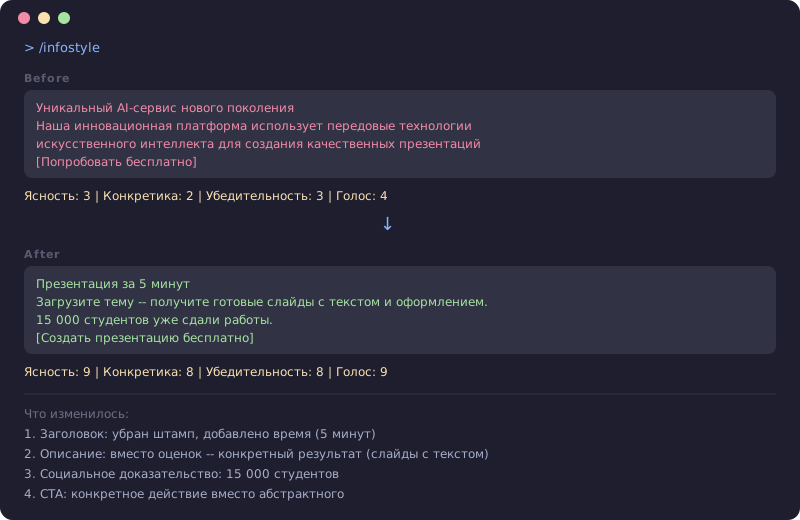
- Оценивает текст по 4 измерениям: ясность, конкретика, убедительность, голос
- Показывает до/после с объяснением каждого изменения
- Три режима: лёгкая правка, стандартная редактура, глубокая переработка
Установка
Claude Code (CLI / Desktop / Web)
# 1. Добавить marketplace
/plugin marketplace add artgas1/infostyle-skill

# 2. Установить плагин
/plugin install infostyle@infostyle-skill

# 3. Применить (или перезапустить Claude Code)
/reload-plugins
Установка для всей команды
Добавьте в .claude/settings.json вашего проекта:
{
  "extraKnownMarketplaces": {
    "infostyle-skill": {
      "source": {
        "source": "github",
        "repo": "artgas1/infostyle-skill"
      }
    }
  },
  "enabledPlugins": {
    "infostyle@infostyle-skill": true
  }
}
При клонировании проекта Claude Code предложит установить плагин автоматически.
Ручная установка (fallback)
Если /plugin не поддерживается в вашей версии Claude Code:
mkdir -p .claude/skills/infostyle
cp -r skills/infostyle/* .claude/skills/infostyle/
Другие агенты (Cursor, Codex, Windsurf, Gemini CLI)
Скопируйте skills/infostyle/ в директорию скиллов вашего агента. Скилл следует открытому стандарту Agent Skills.
Использование
/infostyle Презентация за 5 минут — загрузите тему и получите готовые слайды

/infostyle [вставьте текст]

/infostyle путь/к/файлу.md
Скилл:
- Спросит контекст (тип текста, аудитория, размещение, цель) — если не очевидно
- Оценит исходный текст
- Отредактирует в два этапа: вычистить → наполнить фактами
- Покажет до/после с оценками и объяснениями
- Предложит альтернативы для ключевых элементов
Режимы
| Режим | Когда использовать | Что меняется |
|---|---|---|
| Лёгкая правка | Текст в целом хорош, мелкая чистка | Убрать очевидное, сохранить голос автора |
| Стандартная редактура | По умолчанию | Убрать стоп-слова, усилить конкретику, исправить структуру |
| Глубокая переработка | Текст не работает | Полная перестройка, текст может измениться значительно |
Что внутри
skills/infostyle/
  SKILL.md                        # Главный файл — порядок работы, правила
  references/
    stop-words.md                 # 15 категорий стоп-слов с примерами трансформаций
    text-types.md                 # Правила по типам: UI, лендинг, email, статья, саппорт
    scoring.md                    # 4 измерения оценки + чеклист самопроверки
    manipulation-patterns.md      # 12 антипаттернов манипуляции
    examples.md                   # Примеры до/после по каждому типу текста
Методология
Двухэтапный процесс редактуры по Ильяхову:
- Вычистить — убрать стоп-слова, штампы, канцеляризмы, усилители, размытые формулировки, отглагольные существительные, пассивный залог, модальные глаголы
- Наполнить — заменить удалённое фактами, данными, примерами. Никогда не оставлять пустоту.
«Не выключайте голову.» — Ильяхов
Инфостиль — это навигация, а не автозамена. Каждое правило требует осмысления в контексте.
Адаптация к контексту
Строгость зависит от типа текста:
- UI кнопки/лейблы — расслабленная. Краткость важнее всего. 1-3 слова.
- Формы и ошибки — средняя. Что случилось + как исправить.
- Лендинги — средняя. Конкретные выгоды, эмоции допустимы.
- Email — средняя-строгая. Один топик, ясный призыв к действию.
- Статьи — строгая. Полный инфостиль.
- Юридический текст — не применять. Точность важнее краткости.
Пример
До:
Уникальный AI-сервис нового поколения
Наша инновационная платформа использует передовые технологии
искусственного интеллекта для создания качественных презентаций
[Попробовать бесплатно]
После:
Презентация за 5 минут
Загрузите тему — получите готовые слайды с текстом и оформлением.
15 000 студентов уже сдали работы.
[Создать презентацию бесплатно]
Источники
- Ильяхов М., Сарычева Л. «Пиши, сокращай» (2016, обновлено 2025)
- Ильяхов М. «Ясно, понятно» (2020)
- Ильяхов М., Сарычева Л. «Новые правила деловой переписки» (2018)
- Сервис Главред и справочник
- Электронный учебник Бюро
- 22 заповеди инфостиля
- Чеклист редактора
English
Claude Code skill for editing Russian text using Maxim Ilyakhov's information style methodology.
Based on "Пиши, сокращай" (Write and Cut), Glavred service, and 12+ years of Russian editorial practice.
What it does:
- Removes stop-words, cliches, bureaucratic language, and vague claims
- Replaces with concrete facts, numbers, and useful information
- Adapts to context: UI buttons, forms, errors, landing pages, emails, articles
- Scores text on 4 dimensions: clarity, specificity, persuasion, voice
- Shows before/after with explanations
- Three modes: light edit, standard, deep rewrite
Install:
/plugin marketplace add artgas1/infostyle-skill
/plugin install infostyle@infostyle-skill
/reload-plugins
Cross-agent compatible: Claude Code, Codex, Cursor, Gemini CLI, Windsurf.
License
MIT
// faq
What is infostyle-skill?
Claude Code skill for editing Russian text using Ilyakhov's information style (инфостиль). First-ever AI skill based on 'Пиши, сокращай' methodology.. It is open-source on GitHub.
Is infostyle-skill free to use?
infostyle-skill is open-source under the MIT license, so it is free to use.
What category does infostyle-skill belong to?
infostyle-skill is listed under skills in the Claudeers registry of Claude-compatible tools.
// embed badge

[](https://claudeers.com/infostyle-skill)
// retro hit counter

[](https://claudeers.com/infostyle-skill)
// reviews
// guestbook
// related in Claude Skills
 🔓
🔓An agentic skills framework & software development methodology that works.
 🔓
🔓 🔓
🔓💫 Toolkit to help you get started with Spec-Driven Development
 🔓
🔓AI coding assistant skill (Claude Code, Codex, OpenCode, Cursor, Gemini CLI, and more). Turn any folder of code, SQL schemas, R scripts, shell scripts, docs,…