
idiolect
Teach Claude Code your words. Custom vocabulary for voice dictation.
Install with your AI
Paste into Claude Code, Cursor, or any agent — it reads the repo and wires the tool into your project.
Install and set up idiolect (claude-plugin project) into my current project.
Found on https://claudeers.com/idiolect
Repo: https://github.com/GiorgiTarsaidze/idiolect
Homepage/docs: —
Detected install method: claude-plugin → /plugin install idiolect@GiorgiTarsaidze/idiolect
Category: devtools. Platforms: api, web.
Read the repo's README for exact setup and env vars, then install it and wire it into my project.

Claudeers Health Verdict:
slowing; community-verified: false. Confirm the source before running anything.
/plugin marketplace add GiorgiTarsaidze/idiolect
/plugin install idiolect@GiorgiTarsaidze/idiolect
git clone https://github.com/GiorgiTarsaidze/idiolect
// compatibility
| Platforms | api, web |
|---|---|
| Operating systems | — |
| AI compatibility | claude |
| License | MIT |
| Pricing | open-source |
| Language | JavaScript |
Idiolect
Teach Claude Code your words.
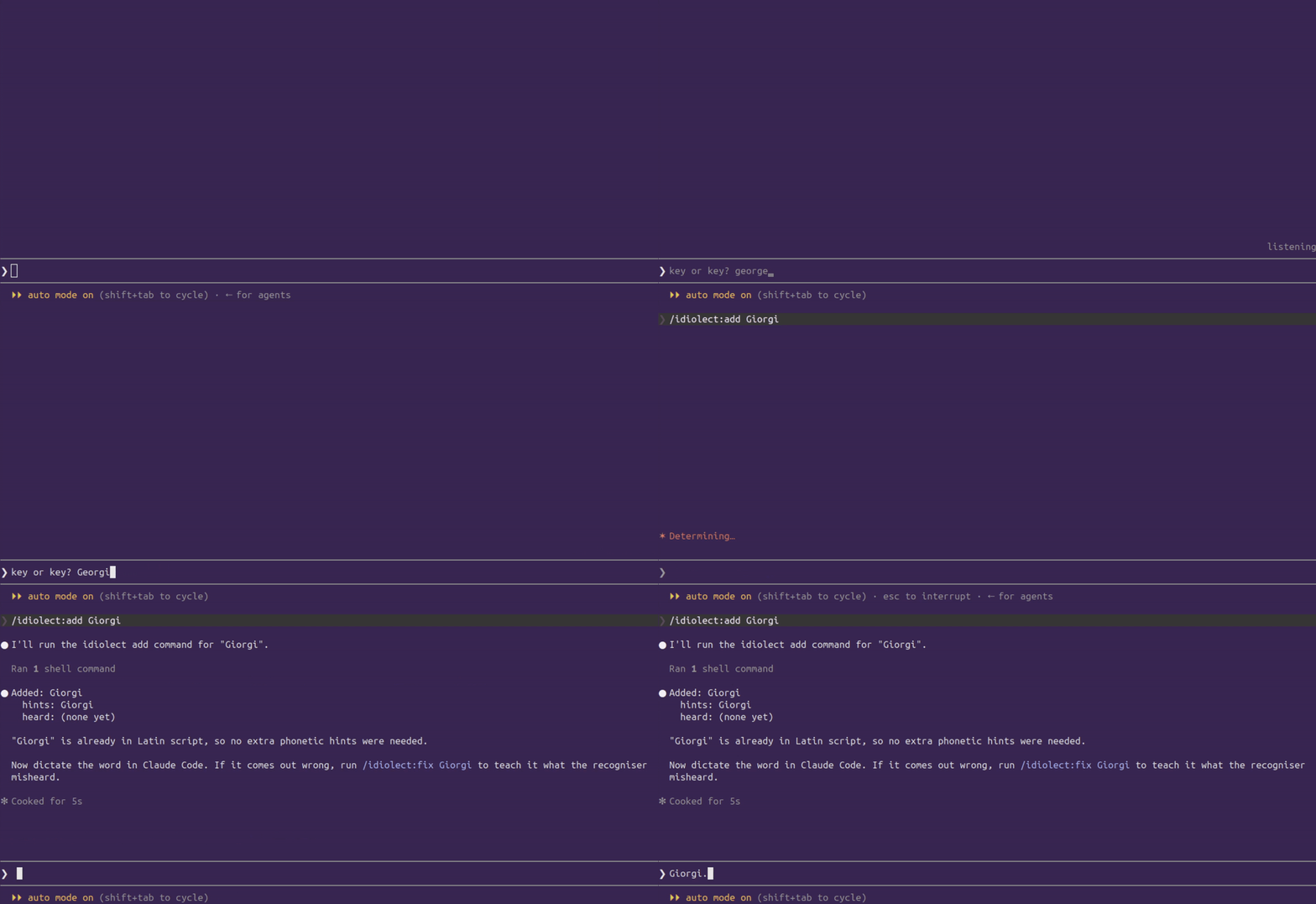
Voice dictation mishears anything unusual: product names, jargon, non-English words. There is no setting to fix it. This adds one.
Install
1. In Claude Code:
/plugin marketplace add GiorgiTarsaidze/idiolect
/plugin install idiolect
2. Point voice at the relay, then restart Claude Code:
/idiolect:setup
3. Check it took:
/idiolect:status
Needs Node 20+ and Claude Code voice dictation (which needs a Claude.ai account).
Use
/idiolect:add Flurbix
Say it. Usually that is all it takes, because the recogniser is told to expect the word.
If it still comes out wrong, teach it what was heard:
/idiolect:fix Flurbix
It shows you the last transcript, you point at the wrong part, and it stays fixed in every project, with no restart.
Commands
| command | what it does |
|---|---|
/idiolect:add <word> | Add a word |
/idiolect:fix <word> | Teach it a mishearing |
/idiolect:list | Your words |
/idiolect:recent | What was heard recently |
/idiolect:remove <word> | Delete a word |
/idiolect:status | Is everything running |
How it works
Claude never hears your voice. Audio goes to a speech to text service, and only the text it returns reaches Claude. So when a word comes out wrong, Claude has no idea; it just sees the wrong word.
Idiolect sits in that path, on your machine, and does two things:
flowchart LR
    You([you speak]) --> I[idiolect]
    I -->|"layer 1: hints<br/>expect these words"| S[speech to text]
    S -->|"text"| I
    I -->|"layer 2: corrections<br/>swap known mistakes"| P([prompt box])
Layer 1, hints (/idiolect:add) is a nudge before you speak. Usually enough on
its own. Still a guess, because the recogniser reads your spelling using English
rules.
Layer 2, corrections (/idiolect:fix) is a straight swap after the text comes
back. No guessing, so it always works.
| when | reliable? | limit | |
|---|---|---|---|
| hints | before you speak | helps, not guaranteed | 1024 bytes total |
| corrections | after the text returns | always | none |
Your audio is passed straight through and never inspected.
Your words
One file, shared by every project: ~/.claude/idiolect/vocab.json
{
  "terms": [{
    "word":  "ზამთარი",
    "hints": ["Zamtari"],
    "heard": ["some tarry"]
  }]
}
| field | what goes in it |
|---|---|
word | What gets typed. Any language, any script. |
hints | Latin letters only. Anything else is stripped before sending, so a Georgian word needs its Latin spelling here. |
heard | Mishearings to correct. /idiolect:fix fills these in for you. |
Where everything lives
| path | what |
|---|---|
~/.claude/idiolect/vocab.json | your words |
~/.claude/idiolect/log.jsonl | last 5 transcripts, so fix can show you what was heard |
~/.claude/idiolect/daemon.pid | process id of the running relay |
~/.claude/idiolect/daemon.log | relay output, if something goes wrong |
~/.claude/settings.json | the one line pointing voice at the relay |
The relay
A small WebSocket server on ws://127.0.0.1:8787. Your Claude session starts it
automatically. It is never stopped automatically, because one relay serves every
open session, so closing one window must not kill dictation in the others.
| command | what it does |
|---|---|
node bin/idiolect.js status | is it running, and is voice pointed at it |
node bin/idiolect.js start | start it |
node bin/idiolect.js stop | stop it |
If something else is already using the port, Idiolect refuses to start rather than assume the port is its own. Change the port below.
Configuration
| variable | default | what it changes |
|---|---|---|
IDIOLECT_PORT | 8787 | port the relay listens on |
IDIOLECT_HOME | ~/.claude/idiolect | where your words and transcripts live |
IDIOLECT_UPSTREAM | wss://api.anthropic.com | where audio is forwarded |
Set them in ~/.claude/settings.json so Claude Code and the relay agree:
{
  "env": {
    "IDIOLECT_PORT": "9123",
    "VOICE_STREAM_BASE_URL": "ws://127.0.0.1:9123"
  }
}
Both lines must point at the same port. /idiolect:setup writes the second one
for you using whatever IDIOLECT_PORT is set to. Restart Claude Code afterwards,
since these are read at startup.
Privacy
- Runs entirely on your machine. Binds to
127.0.0.1only. - Keeps your last 5 transcripts so
fixcan show you what was heard. Mode0600. Delete any time withnode bin/idiolect.js purge. - Never stores audio.
Limits
- Works by redirecting an undocumented internal setting in Claude Code. Verified on 2.1.231 to 2.1.233. A future release could break it.
- Hints cap at 1024 bytes total, roughly 50 long words. Corrections are unlimited.
- Hints only work for English dictation. Corrections work regardless.
- Inherits voice dictation's limits: no SSH sessions, no Claude Code on the web, disabled under HIPAA configuration.
Design rule
Never break dictation. If the vocabulary is broken, the connection fails, or a correction throws, audio passes through untouched. A missed correction is annoying. A dead microphone is an uninstall.
Development
npm test
No dependencies to install. ws is vendored in vendor/.
License
MIT
// faq
What is idiolect?
Teach Claude Code your words. Custom vocabulary for voice dictation.. It is open-source on GitHub.
Is idiolect free to use?
idiolect is open-source under the MIT license, so it is free to use.
What category does idiolect belong to?
idiolect is listed under devtools in the Claudeers registry of Claude-compatible tools.
// embed badge

[](https://claudeers.com/idiolect)
// retro hit counter

[](https://claudeers.com/idiolect)
// reviews
// guestbook
// related in Developer Tools
 🔓
🔓The agent harness performance optimization system. Skills, instincts, memory, security, and research-first development for Claude Code, Codex, Opencode, Curs…
 🔓
🔓Makes your AI agent think like the laziest senior dev in the room. The best code is the code you never wrote.
 🔓
🔓Use Garry Tan's exact Claude Code setup: 23 opinionated tools that serve as CEO, Designer, Eng Manager, Release Manager, Doc Engineer, and QA
 🔓
🔓AI coding assistant skill (Claude Code, Codex, OpenCode, Cursor, Gemini CLI, and more). Turn any folder of code, SQL schemas, R scripts, shell scripts, docs,…