
hype-reel
Claude Code skill: turn any product into an insane Framer Motion promo reel from its real screens. 1080x1920 MP4 in one prompt.
Install with your AI
Paste into Claude Code, Cursor, or any agent — it reads the repo and wires the tool into your project.
Install and set up hype-reel (claude-skill project) into my current project.
Found on https://claudeers.com/hype-reel
Repo: https://github.com/OutOfAmine/hype-reel
Homepage/docs: —
Detected install method: claude-skill → # copy this skill into .claude/skills/hype-reel/
Category: skills. Platforms: cli, api, web, mobile.
Read the repo's README for exact setup and env vars, then install it and wire it into my project.

Claudeers Health Verdict:
active; community-verified: false. Confirm the source before running anything.
# copy the skill dir into your project:
# .claude/skills/hype-reel/   (or ~/.claude/skills/hype-reel/ for all projects)
git clone https://github.com/OutOfAmine/hype-reel
// compatibility
| Platforms | cli, api, web, mobile |
|---|---|
| Operating systems | — |
| AI compatibility | claude |
| License | MIT |
| Pricing | open-source |
| Language | HTML |
hype-reel
A Claude Code skill that turns any product into an insane promo reel — from its real screens, in one prompt.
/hype-reel https://your-product.com
Claude screenshots your product with headless Chrome, finds the story (the promise, the three moments worth seeing, one honest number), writes a storyboard, and stages it with Framer Motion: the device flies in from deep 3D and the camera dives onto each feature, the UI explodes into floating layers, the camera flies through a corridor of your screens, a giant word filled with your product swallows the viewer… Then it renders a frame-exact 1080x1920 MP4 and a shareable page.
No After Effects. No templates you fill by hand. No API key.
Demos
Four unofficial demos made with the skill from the products' public websites (not affiliated with these companies):
Supabase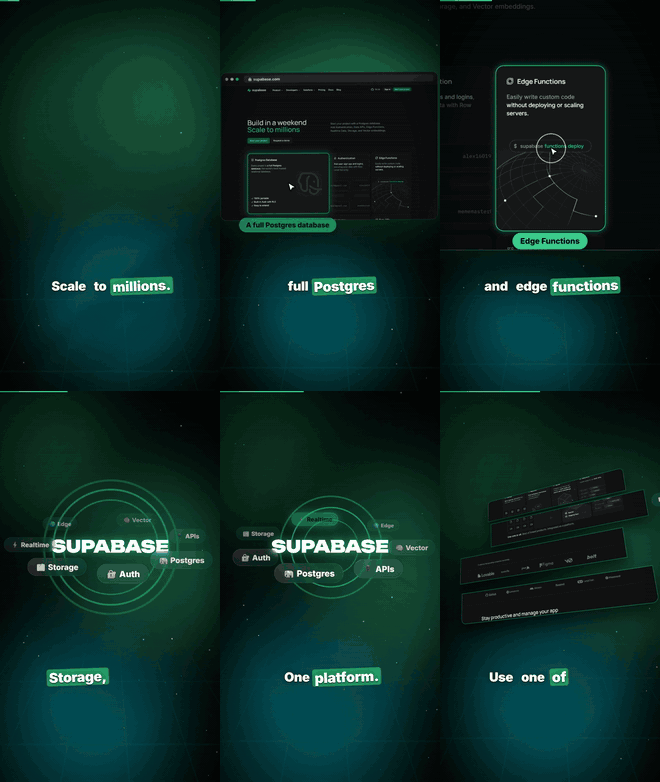 ▶ MP4 · storyboard | Cal.com ▶ MP4 · storyboard |
Resend ▶ MP4 · storyboard | Linear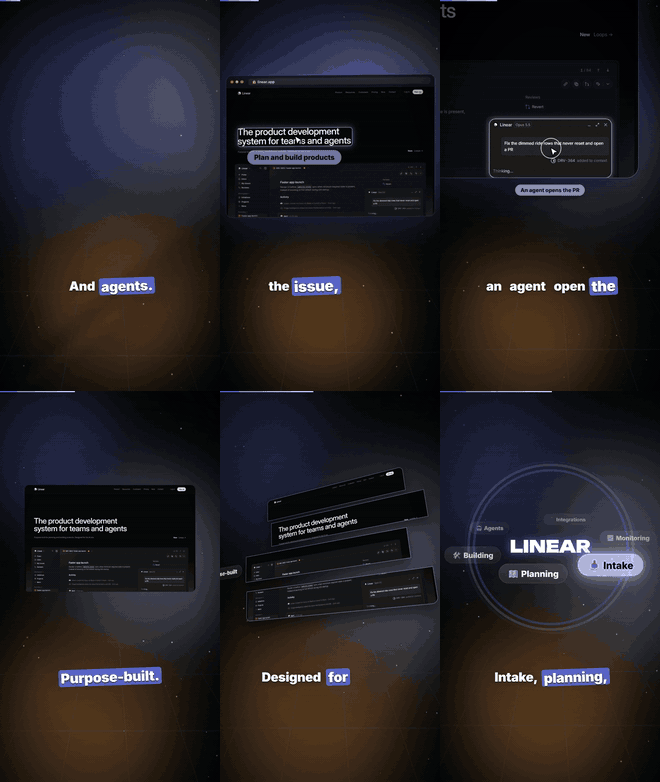 ▶ MP4 · storyboard |
GIFs are 12-second highlights; click one (or ▶ MP4) for the full 1080x1920 video in videos/.
Install
git clone https://github.com/OutOfAmine/hype-reel ~/.claude/skills/hype-reel
cd ~/.claude/skills/hype-reel && npm install
Needs Node 18+, Python 3, and Chrome / Edge / Chromium installed (or CHROME_PATH). ffmpeg comes with npm install.
Then in Claude Code: /hype-reel <url> or just "make a reel for my app".
Product promo from one photo (new)
Got a physical product — shoes, perfume, a bag, food? Send Claude one photo and it walks you through the rest, one question at a time: the name, your brand colour, what makes it special, the voice you want. It writes the script, cuts the product out of the photo, builds the studio shots, close-ups and colourways, voices it with an open-source model (Kokoro, or Chatterbox for an emotional read), and renders the reel — with an optional line in your own voice before and after ("Comment PROMO and I'll send you the link").
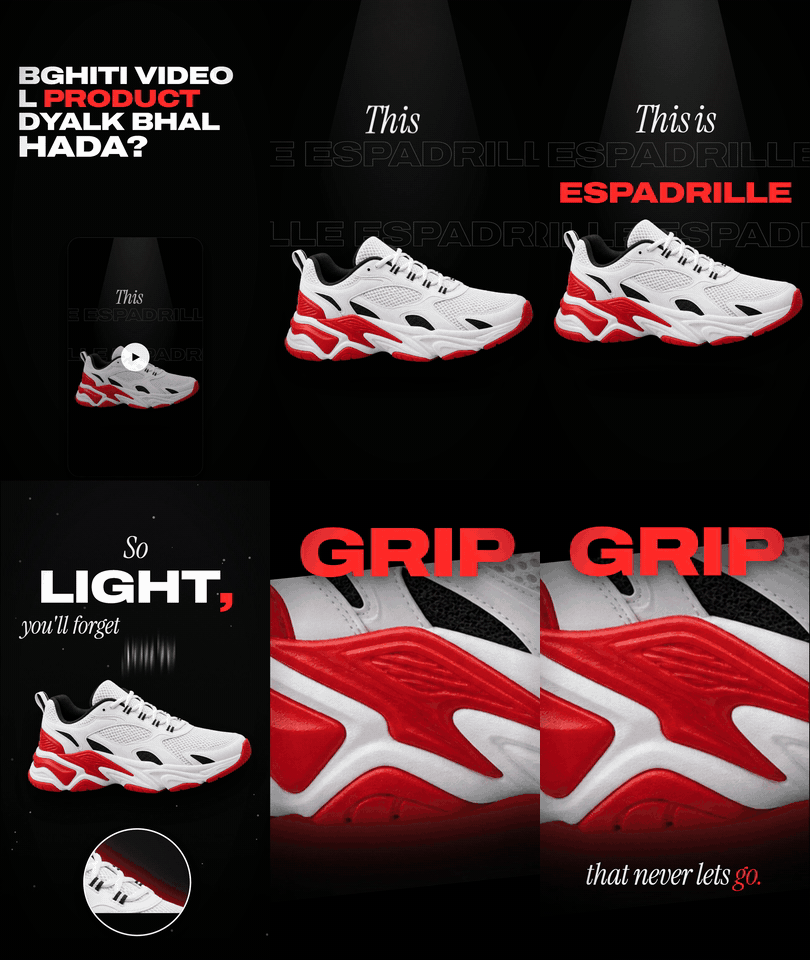
▶ Espadrille promo (MP4) · promo.json
In Claude Code, just say: "make a promo video for my product" and attach the photo.
python scripts/promo_assets.py examples/espadrille/promo.json   # cutout, studio plate, close-ups, colourways
python scripts/promo_voice.py  examples/espadrille/promo.json   # AI voice (kokoro / chatterbox)
python scripts/promo_build.py  examples/espadrille/promo.json   # voice + word timing + music + SFX -> build/reel.html
node scripts/render.mjs examples/espadrille/build/reel.html espadrille.mp4
Extra Python packages: pip install pillow numpy "kokoro>=0.9.4" soundfile (+ rembg onnxruntime for photos with a background,
chatterbox-tts "setuptools<81" for the emotional voice, torch torchaudio for exact word timing). Guide: references/promo.md.
Real footage, your voice
scripts/record_site.mjsrecords a real site loading and scrolling.scripts/record_term.mjs+render_term.mjsrecord a real terminal session (Claude Code included) and replay it in xterm.js to an MP4.scripts/sfx.pysynthesises the sound design (whooshes, impacts, pops, keyboard clicks, shutters, risers) from the storyboard and mixes it under the voice.scripts/align_words.pytimes every word of your own voice-over, so captions and cuts land on the words.theme.mode: "light"for a clean paper/ink look, or the default dark one; fonts: Inter Tight, Instrument Serif, Anton, Montserrat, Unbounded.
Scenes
| scene | what happens |
|---|---|
clip | real footage: screen recordings, a terminal session, any MP4, on a tilted card or full screen |
slam | words slam in with blur, RGB split, screen shake |
mask | a giant word filled with your product — the camera dives through it into the real screen |
prompt | a prompt types itself, the product flips out of the box in a burst |
screen | browser/phone flies in, camera dolly-zooms onto each feature, cursor clicks, labels pop |
exploded | the UI splits into floating 3D layers and snaps back |
tunnel | the camera flies down a corridor of your screens |
wall | an infinite tilted wall of screens |
orbit | feature chips orbit your logo in 3D |
wipe | before/after diagonal glitch wipe that swings back |
counter | a real number counts up, rings + particle burst |
fan | phone screens rise and fan out |
end | logo spin, light sweep, CTA pill (Comment *KEYWORD*) |
Field-by-field reference: references/scenes.md.
By hand
node scripts/capture.mjs https://example.com shots --name home --rects "h1,#cta"
node scripts/capture.mjs https://example.com shots --mobile --name home-m
python scripts/build.py reel.json                       # -> reel.html (plays in any browser)
node scripts/render.mjs reel.html --stills 1,5,9        # quick PNG checks
node scripts/render.mjs reel.html reel.mp4              # frame-exact MP4, with your voice if reel.json has "audio"
Every animation is a pure function of time driven by a Framer Motion value, so the page you watch live and the MP4 are the same film.
License
MIT
// faq
What is hype-reel?
Claude Code skill: turn any product into an insane Framer Motion promo reel from its real screens. 1080x1920 MP4 in one prompt.. It is open-source on GitHub.
Is hype-reel free to use?
hype-reel is open-source under the MIT license, so it is free to use.
What category does hype-reel belong to?
hype-reel is listed under skills in the Claudeers registry of Claude-compatible tools.
// embed badge

[](https://claudeers.com/hype-reel)
// retro hit counter

[](https://claudeers.com/hype-reel)
// reviews
// guestbook
// related in Claude Skills
 🔓
An agentic skills framework & software development methodology that works.
 🔓
 🔓
AI coding assistant skill (Claude Code, Codex, OpenCode, Cursor, Gemini CLI, and more). Turn any folder of code, SQL schemas, R scripts, shell scripts, docs,…
 🔓
💫 Toolkit to help you get started with Spec-Driven Development