
hotpath-rs
Quickly find bottlenecks in Rust - one profiler for CPU, time, memory, SQL and async code.
Install with your AI
Paste into Claude Code, Cursor, or any agent — it reads the repo and wires the tool into your project.
Install and set up hotpath-rs (release-binary project) into my current project.
Found on https://claudeers.com/hotpath-rs
Repo: https://github.com/pawurb/hotpath-rs
Homepage/docs: https://hotpath.rs
Detected install method: release-binary → inspect the README
Category: uncategorized. Platforms: cli, api.
Read the repo's README for exact setup and env vars, then install it and wire it into my project.

Claudeers Health Verdict:
active; community-verified: false. Confirm the source before running anything.
Grab the latest release asset from GitHub.
# download a build from https://github.com/pawurb/hotpath-rs/releases
git clone https://github.com/pawurb/hotpath-rs
// compatibility
| Platforms | cli, api |
|---|---|
| Operating systems | — |
| AI compatibility | claude |
| License | MIT |
| Pricing | open-source |
| Language | Rust |
 hotpath - Rust Performance, CPU & Memory Profiler
hotpath-rs is an easy-to-configure Rust performance profiler that shows exactly where your code spends time, burns CPU, and allocates memory.
It helps you distinguish between functions that are slow because they wait on I/O and those that are CPU-intensive. Instrument functions, channels, futures, and streams to find bottlenecks and focus optimizations where they matter most. Get actionable insights into time, memory, and async data flow with minimal setup.
Try the TUI demo via SSH - no installation required:
ssh demo.hotpath.rs
Explore the full documentation at hotpath.rs. See CONTRIBUTING.md for development setup and guidelines.
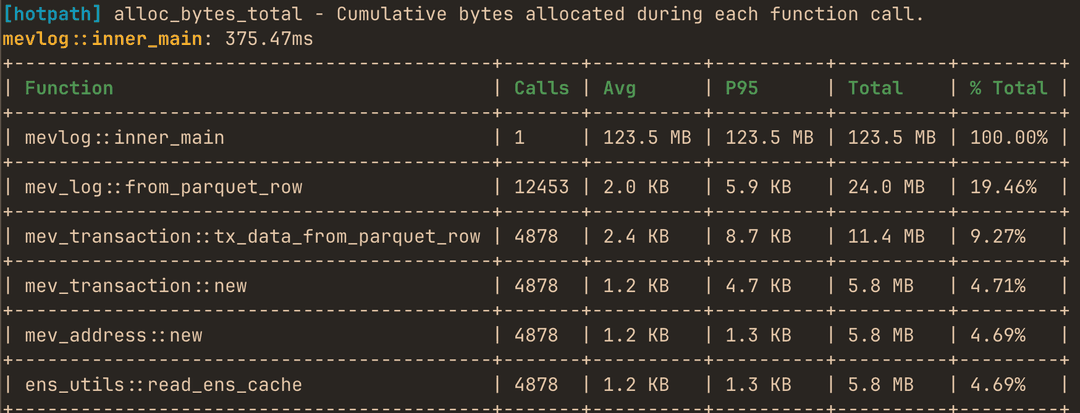
You can use it to produce one-off performance (timing, memory or CPU) reports:
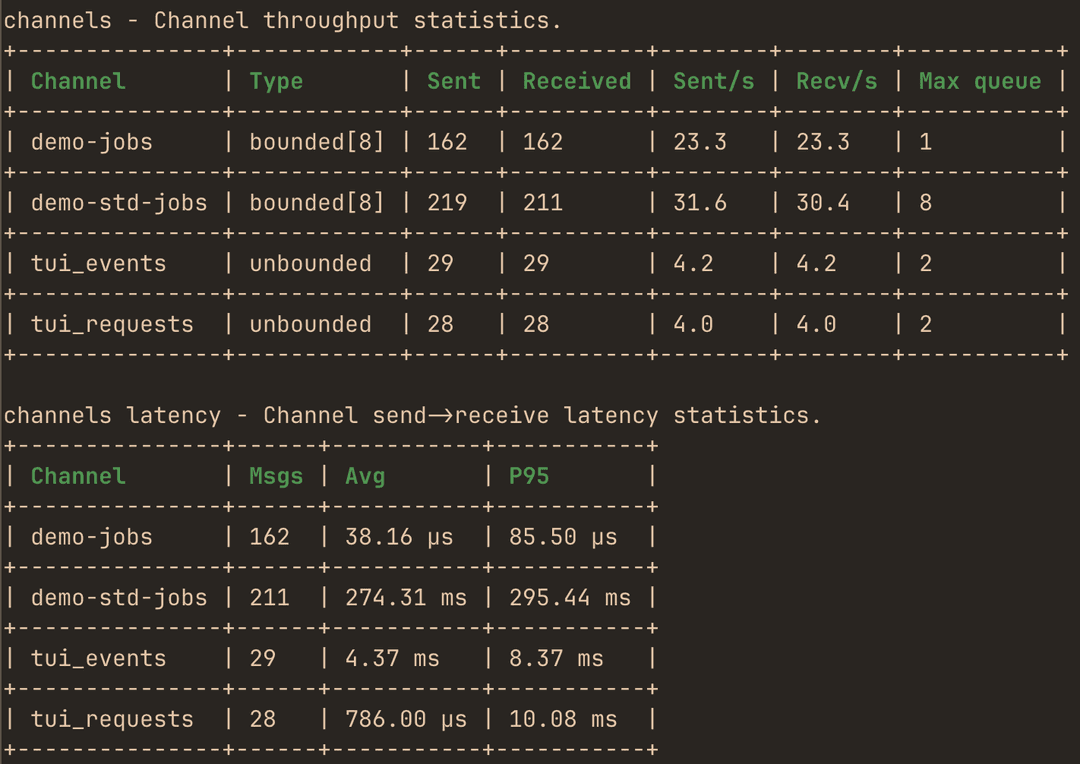
monitor throughput, performance and max queue depth of instrumented channels:
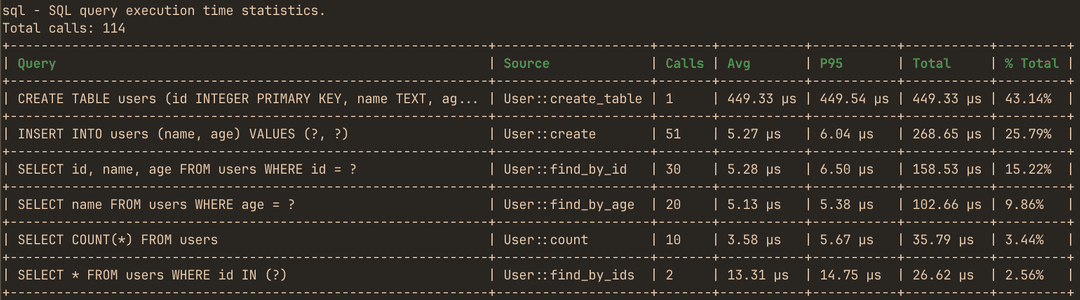
analyze SQL calls performance:
or use the live TUI dashboard to monitor real-time performance metrics with debug info:
https://github.com/user-attachments/assets/2e890417-2b43-4b1b-8657-a5ef3b458153
Features
- Time, CPU & memory profiling - identify expensive functions, allocation hotspots, and investigate memory leaks.
- Async observability - futures, channels and streams.
- SQL query profiling - query performance metrics for sqlx and Diesel.
- Concurrency metrics - Mutex/RwLock wait time and contention.
- Tokio runtime monitoring - workers, scheduling and queues.
- Live TUI dashboard & static reports - real-time or one-off analysis.
- CI regression detection - benchmark every PR automatically.
- MCP server for AI agents - query profiling data in real time.
- Zero cost when disabled - fully feature-gated.
Current roadmap
-
hotpath::channel!/stream!/future!events batching -
hotpath::mutex!/rw_lock! -
hotpath::channel!(..., wrap = true) -
hotpath::channel!timing histogram - Instrument AsyncRead/AsyncWrite and Read/Write wrappers
-
hotpath::sql!(...) -
hotpath::http!(...)
Getting Started
AI Setup (Recommended)
The quickest way to set up hotpath is to let an AI coding agent do it. Install the hotpath CLI and run init inside your project:
cargo install hotpath --version '^0.21'
hotpath init --agent claude # or --agent codex
hotpath init downloads the hotpath_init agent skill from GitHub and starts an interactive Claude Code or Codex session with it as setup instructions. The agent inspects your project, adds the feature-gated dependency, instruments main and a starting set of functions, channels and locks, then verifies that everything compiles with profiling enabled and disabled. You review and approve each edit through the agent's regular permission prompts. Requires curl and the claude or codex CLI on PATH.
You can also use the skill directly, without the hotpath CLI: copy it to ~/.claude/skills/hotpath_init/SKILL.md and run /hotpath_init in a Claude Code session.
Manual installation
Add to your Cargo.toml:
[dependencies]
hotpath = "0.21"

[features]
hotpath = ["hotpath/hotpath"]
hotpath-cpu = ["hotpath/hotpath-cpu"]
hotpath-alloc = ["hotpath/hotpath-alloc"]
This config ensures that the lib has no compile time or runtime overhead unless explicitly enabled via a hotpath feature. All the lib dependencies are optional (i.e. not compiled) and all macros are noop unless profiling is enabled.
Basic setup
You'll need only #[hotpath::main] and #[hotpath::measure] macros to get started:
#[hotpath::measure]
fn sync_function(sleep: u64) {
    std::thread::sleep(Duration::from_nanos(sleep));
    let vec1 = vec![1, 2, 3];
    std::hint::black_box(&vec1); // force mem allocation
}

#[hotpath::measure]
async fn async_function(sleep: u64) {
    tokio::time::sleep(Duration::from_nanos(sleep)).await;
}

// When using with tokio, place the #[tokio::main] first
#[tokio::main]
#[hotpath::main]
async fn main() {
    for i in 0..10000 {
        sync_function(i);
        async_function(i * 2).await;

        hotpath::measure_block!("custom_block", {
            std::thread::sleep(Duration::from_nanos(i * 3))
        });
    }
}
Now, run your program with hotpath (and optionally hotpath-alloc features):
cargo run --features='hotpath,hotpath-alloc'
On exit it will print a report with timings, memory allocations and thread usage metrics:
[hotpath] 1.20s | timing, alloc, threads

timing - Function execution time metrics.
+------------------------------+-------+----------+----------+----------+---------+
| Function                     | Calls | Avg      | P95      | Total    | % Total |
+------------------------------+-------+----------+----------+----------+---------+
| docs_example::main           | 1     | 1.20 s   | 1.20 s   | 1.20 s   | 100.00% |
+------------------------------+-------+----------+----------+----------+---------+
| docs_example::async_function | 1000  | 1.15 ms  | 1.20 ms  | 1.15 s   | 96.10%  |
+------------------------------+-------+----------+----------+----------+---------+
| custom_block                 | 1000  | 18.13 µs | 31.71 µs | 18.13 ms | 1.51%   |
+------------------------------+-------+----------+----------+----------+---------+
| docs_example::sync_function  | 1000  | 16.58 µs | 27.63 µs | 16.58 ms | 1.38%   |
+------------------------------+-------+----------+----------+----------+---------+

alloc - Cumulative allocations during each function call (including nested calls).
+------------------------------+-------+---------+---------+---------+---------+
| Function                     | Calls | Avg     | P95     | Total   | % Total |
+------------------------------+-------+---------+---------+---------+---------+
| docs_example::main           | 1     | 63.0 KB | 63.1 KB | 63.0 KB | 100.00% |
+------------------------------+-------+---------+---------+---------+---------+
| docs_example::sync_function  | 1000  | 12 B    | 12 B    | 11.7 KB | 18.58%  |
+------------------------------+-------+---------+---------+---------+---------+
| custom_block                 | 1000  | 0 B     | 0 B     | 0 B     | 0.00%   |
+------------------------------+-------+---------+---------+---------+---------+
| docs_example::async_function | 1000  | 0 B     | 0 B     | 0 B     | 0.00%   |
+------------------------------+-------+---------+---------+---------+---------+

threads - Thread CPU and memory statistics. (RSS: 7.8 MB, Alloc: 2.1 MB, Dealloc: 304.3 KB, Diff: 1.8 MB, 5/10)
+--------------+----------+------+------+----------+---------+-----------+----------+----------+----------+
| Thread       | Status   | CPU% | Max% | CPU User | CPU Sys | CPU Total | Alloc    | Dealloc  | Diff     |
+--------------+----------+------+------+----------+---------+-----------+----------+----------+----------+
| hp-functions | Sleeping | 1.8% | 1.8% | 0.018s   | 0.001s  | 0.019s    | 1.8 MB   | 291.3 KB | 1.5 MB   |
+--------------+----------+------+------+----------+---------+-----------+----------+----------+----------+
| main         | Sleeping | 6.3% | 6.3% | 0.123s   | 0.070s  | 0.193s    | 367.8 KB | 9.9 KB   | 357.9 KB |
+--------------+----------+------+------+----------+---------+-----------+----------+----------+----------+
| hp-threads   | Running  | 0.0% | 0.0% | 0.000s   | 0.001s  | 0.001s    | 10.3 KB  | 3.0 KB   | 7.3 KB   |
+--------------+----------+------+------+----------+---------+-----------+----------+----------+----------+
| hp-server    | Sleeping | 0.0% | 0.0% | 0.000s   | 0.001s  | 0.001s    | 1.8 KB   | 56 B     | 1.7 KB   |
+--------------+----------+------+------+----------+---------+-----------+----------+----------+----------+
| thread_5     | Sleeping | -    | -    | 0.000s   | 0.000s  | 0.000s    | 640 B    | 24 B     | 616 B    |
+--------------+----------+------+------+----------+---------+-----------+----------+----------+----------+
Full documentation
See the full docs and advanced config tutorials at hotpath.rs.
- Sampling Comparison - when to use
hotpathvs CPU sampling profilers - Profiling modes - static reports vs live TUI dashboard
- Profiling overhead - per-operation instrumentation cost and time sampling
- Functions - measure execution time and memory allocations
- CPU profiling - attribute CPU samples to instrumented functions
- Threads - monitor threads usage
- Async Data Flow - monitor channels, streams, and futures
- Locks - track Mutex and RwLock wait and hold times
- SQL queries - profile query execution time for sqlx and Diesel
- Tokio Runtime - monitor Tokio runtime worker stats and task scheduling
- Debug & Metrics - track custom values with
dbg!,val!, andgauge!macros - A/B Benchmarks - compare performance between app versions
- GitHub CI - automated benchmarking and regression detection in CI
- MCP Server - LLM integration via Model Context Protocol
- Configuration - explore all config options
Waitlist
My long-term goal for hotpath-rs is to become the single place to understand all performance signals in a Rust application. From CPU and memory usage to locks, channels, and async execution, all the way up to SQL queries and HTTP/RPC calls.
I'm also building a hosted version that makes profiling reports easier to share, compare, and analyze across pull requests, deployments, and teams.
If that sounds useful, join the waitlist for early access:
Status
This project is under active development. Core public APIs are stable, but implementation details (JSON report formats, TUI/MCP internals, and advanced config options) may change between releases as the project evolves.
// faq
What is hotpath-rs?
Quickly find bottlenecks in Rust - one profiler for CPU, time, memory, SQL and async code.. It is open-source on GitHub.
Is hotpath-rs free to use?
hotpath-rs is open-source under the MIT license, so it is free to use.
What category does hotpath-rs belong to?
hotpath-rs is listed under uncategorized in the Claudeers registry of Claude-compatible tools.
// embed badge

[](https://claudeers.com/hotpath-rs)
// retro hit counter

[](https://claudeers.com/hotpath-rs)
// reviews
// guestbook
// related in Uncategorized / Others
 🔓
🔓Fair-code workflow automation platform with native AI capabilities. Combine visual building with custom code, self-host or cloud, 400+ integrations.
 🔓
🔓The agent engineering platform.
 🔓
🔓FULL Augment Code, Claude Code, Cluely, CodeBuddy, Comet, Cursor, Devin AI, Junie, Kiro, Leap.new, Lovable, Manus, NotionAI, Orchids.app, Perplexity, Poke, Q…
 🔓
🔓100+ AI Agent & RAG apps you can actually run — clone, customize, ship.