
hommies-plugin
Hommie, a floating Omarchy companion for your coding agents (Claude Code, Codex, OpenCode, Omacode). The bridge lives in ayandexyz/Hommies.
Install with your AI
Paste into Claude Code, Cursor, or any agent — it reads the repo and wires the tool into your project.
Install and set up hommies-plugin (git-clone project) into my current project.
Found on https://claudeers.com/hommies-plugin
Repo: https://github.com/ayandexyz/hommies-plugin
Homepage/docs: —
Detected install method: git-clone → git clone https://github.com/ayandexyz/hommies-plugin
Category: data. Platforms: cli, api, desktop.
Read the repo's README for exact setup and env vars, then install it and wire it into my project.

Claudeers Health Verdict:
unknown; community-verified: false. Confirm the source before running anything.
git clone https://github.com/ayandexyz/hommies-plugin
// compatibility
| Platforms | cli, api, desktop |
|---|---|
| Operating systems | — |
| AI compatibility | claude |
| License | MIT |
| Pricing | open-source |
| Language | QML |
Hommies
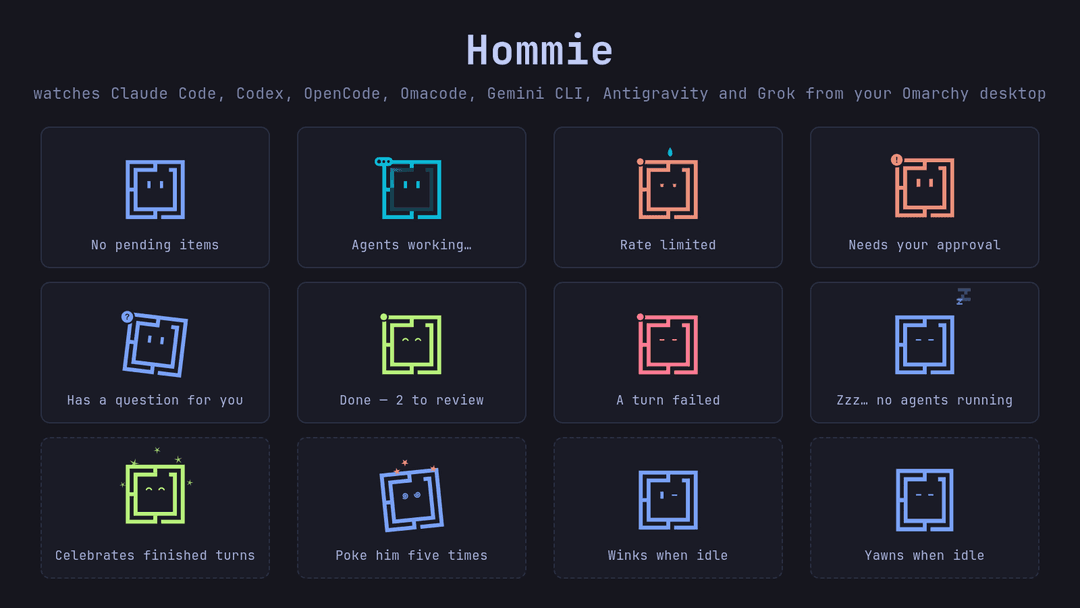
Hommie is a floating companion for the Omarchy desktop that watches your coding agents (Claude Code, Codex, OpenCode, Omacode, Gemini CLI, Antigravity, and Grok Build). When an agent asks for a permission, asks you a question, or finishes a turn, Hommie's mood changes and the item shows up in a card beside it and in a bell in the top bar. You can approve or decline permissions and answer questions from there, or leave the answer to the agent's own prompt and use Hommie as a read-only mirror.
While an agent works you see its latest steps, with +N −M line counts for
file edits, and when a turn ends you can read the agent's full final message.
Requirements
- Omarchy 4 (Quattro shell)
- Node.js 20.10 or newer
- The companion npm package
@thisisayande/hommies, which provides the local bridge (hommies-bridge) this plugin starts. Its source is in ayandexyz/Hommies underpackages/omarchy-bridge.
Install
-
Install the companion package:
npm install -g @thisisayande/[email protected] -
Add the plugin:
omarchy plugin add https://github.com/ayandexyz/hommies-pluginThen enable it and add Hommies to the bar from the Omarchy plugin settings.
-
Connect your agents. This is a separate step that you choose to run.
Hommie only sees an agent that reports to the bridge. Omacode reports to it out of the box. The others each need an entry in their own config: a hook in
~/.claude/settings.json,~/.codex/hooks.json,~/.gemini/settings.json(Gemini CLI),~/.gemini/config/hooks.json(Antigravity), or~/.grok/hooks/hommies.json(Grok Build), or a plugin entry in~/.config/opencode/opencode.json.This plugin never creates or edits those files. The companion package can add the entries when you run it yourself:
hommies setupIt lists the agents it finds and asks which ones to connect, and it saves a copy of each config next to it (
<file>.hommies-backup-<time>) before changing it. For Codex, approve the new hooks in its/hooksscreen; restart OpenCode, Gemini CLI,agy, andgrokso they load the new entries. To add the entries by hand instead, follow the manual setup sections.
Update
npm install -g @thisisayande/hommies@<new version>
omarchy plugin update io.github.ayandexyz.hommies
hommies setup
omarchy restart shell
Restart the shell after updating either part. A running shell keeps the
plugin code it first loaded, and the bridge it started keeps running the old
package version. Run hommies setup again when a release adds agents or hook
events (0.2 does both); until then the panel says the hooks are out of date.
Remove
hommies uninstall
npm uninstall -g @thisisayande/hommies
omarchy plugin remove io.github.ayandexyz.hommies
hommies uninstall takes out only the entries hommies setup added and keeps
the rest of each config. Run it before removing the npm package. Hooks left
behind by removing the package first do nothing, except OpenCode's plugin
entry, which you then delete from ~/.config/opencode/opencode.json by hand.
What it does on your machine
- Runs with your normal user permissions.
- The plugin starts one background process,
hommies-bridge, and restarts it if it exits. - The bridge listens on
127.0.0.1only, on a random port, and every request must carry a random token. It writes the port and token to$XDG_DATA_HOME/hommies/port.json(mode0600) and removes it when it stops. - Nothing trusts a stale port. The plugin only talks to the port the running
hommies-bridgechild announced, and stops when that process exits. Agent hooks check that the port belongs to your user before sending anything, and only accept a decision signed with a key that never leavesport.json. Otherwise the agent keeps its own prompt. - Pending items are kept in memory and are lost when the bridge stops. Hommie's
own preferences are saved in
$XDG_DATA_HOME/hommies/floating.json. - Desktop notifications use
notify-sendand only name the agent and the kind of item (for example "Claude" / "Permission needed"). They never include the question, command, file path, session title, or project folder, because process arguments are visible to other local users. Optional sounds usepw-playorpaplay. - No telemetry, analytics, or update checks. Nothing leaves your machine.
- The plugin contains no code that installs, edits, or removes agent hooks or
agent config. Only the companion package's
hommies setupandhommies uninstalldo that, and only when you run them.
If the bridge is not running, every agent falls back to its own normal prompt.
Settings
Right-click Hommie for its settings: whether questions are answered here or in the agent's CLI, desktop notifications, sounds, showing over fullscreen windows, his outfit, and moving it to the next monitor. Drag it to move it. The bar bell has the same answer-surface, notification, and sound settings.
Outfits. Use Outfit ‹ › to dress Hommie in a party hat, beanie, crown, Santa hat, pumpkin, bow, glasses, sunglasses, or a scarf. Auto (the default) dresses him for the season: a pumpkin from 20 October, a Santa hat in December, and a party hat over New Year.
Answering from the bar. Claude Code, OpenCode, Omacode, Antigravity, and Grok Build questions can be answered here. Antigravity and Grok cannot take an answer from a hook directly, so your answer reaches the agent as the reason its own question prompt was skipped; their screens may show that prompt as blocked. Codex questions are shown read-only.
Keyboard shortcuts
Plugins cannot bind keys, so Hommie exposes its actions over shell IPC and you
add the binds yourself, for example in ~/.config/hypr/bindings.lua:
o.bind("SUPER + ALT + A", "Hommies: answer next", "omarchy-shell hommies jumpToPending")
o.bind("SUPER + ALT + H", "Hommies: toggle card", "omarchy-shell hommies toggle")
o.bind("SUPER + ALT + T", "Hommies: go to agent terminal", "omarchy-shell hommies focusTerminal")
Other actions: open, close, toggleSounds, toggleNotifications,
outfit <name>, and emote <name>. In the open card, the arrow keys (or
h/j/k/l) move between sessions and agents, Enter opens a session, a /
d / A allow, deny, or always allow a permission, 1–9 pick a question's
option, x dismisses a finished item, t jumps to the agent's terminal, and
Esc goes back.
Source
The bridge, the agent hooks, and development notes live in ayandexyz/Hommies. Report issues there.
License
MIT. See LICENSE.
// faq
What is hommies-plugin?
Hommie, a floating Omarchy companion for your coding agents (Claude Code, Codex, OpenCode, Omacode). The bridge lives in ayandexyz/Hommies.. It is open-source on GitHub.
Is hommies-plugin free to use?
hommies-plugin is open-source under the MIT license, so it is free to use.
What category does hommies-plugin belong to?
hommies-plugin is listed under data in the Claudeers registry of Claude-compatible tools.
// embed badge

[](https://claudeers.com/hommies-plugin)
// retro hit counter

[](https://claudeers.com/hommies-plugin)
// reviews
// guestbook
// related in Data & Analytics
 🔓
🔓Wrap Antigravity, ChatGPT Codex, Claude Code, Grok Build as an OpenAI/Gemini/Claude/Codex compatible API service, allowing you to enjoy the free Gemini 3.1 P…
 🔓
🔓Marketing skills for Claude Code and AI agents. CRO, copywriting, SEO, analytics, and growth engineering.
 🔓
🔓Apache Airflow - A platform to programmatically author, schedule, and monitor workflows
 🔓
🔓CLI tool for configuring and monitoring Claude Code