
hobstack
Delegate a project, not a prompt. Hobstack gives each project a team of Claude Code agents: a lead plans the work, specialists build it, reviewers check it,…
Install with your AI
Paste into Claude Code, Cursor, or any agent — it reads the repo and wires the tool into your project.
Install and set up hobstack (release-binary project) into my current project.
Found on https://claudeers.com/hobstack
Repo: https://github.com/vladutt/hobstack
Homepage/docs: —
Detected install method: release-binary → inspect the README
Category: mcp-servers. Platforms: cli, api, desktop, web.
Read the repo's README for exact setup and env vars, then install it and wire it into my project.

Claudeers Health Verdict:
unknown; community-verified: false. Confirm the source before running anything.
Grab the latest release asset from GitHub.
# download a build from https://github.com/vladutt/hobstack/releases
git clone https://github.com/vladutt/hobstack
// compatibility
| Platforms | cli, api, desktop, web |
|---|---|
| Operating systems | — |
| AI compatibility | claude |
| License | MIT |
| Pricing | open-source |
| Language | Go |
HobStack
Local Claude Code agent teams. A single Go binary, with a browser UI on 127.0.0.1.
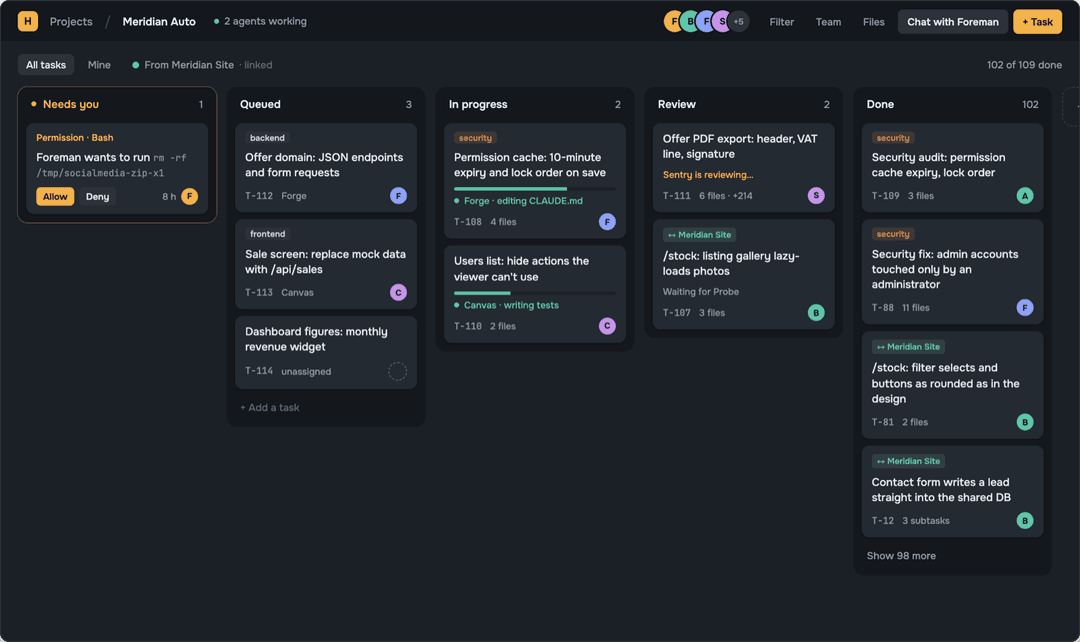
A project's team is a hierarchy: you give goals to the root agents, leads split the work only among their direct team, and work goes through the reviewer (if there is one), then to the lead that created the task. You can talk to any agent. Everything is visible live on a board and saved in SQLite.
Install
From Releases:
- Windows:
HobStack-Setup-<version>.exe. Installs for your user (no admin) in the folder you pick, with a desktop and Start menu shortcut and an uninstaller (Add/Remove Programs). If SmartScreen warns about an unknown app, choose "More info" > "Run anyway". - macOS:
HobStack-<version>.dmg(Apple Silicon and Intel). Drag HobStack to Applications. The app is not signed by an Apple developer, so the first time right-click it > Open (or System Settings > Privacy & Security > Open Anyway). - Linux: unpack
hobstack_<version>_linux_amd64.tar.gz(orarm64) and run./hobstack install: it asks for the folder (default~/.local/share/hobstack), adds HobStack to the applications menu and the desktop, andhobstackto~/.local/bin.hobstack uninstallremoves it.
HobStack runs in the background, without a terminal. Its H sits next to the clock (Windows notification area, macOS menu
bar, Linux tray with StatusNotifierItem: KDE, XFCE, Cinnamon, GNOME with the AppIndicator extension): click it for
Open HobStack / Quit HobStack. It starts when you log in (turn that off in Settings > App) and starting it again opens
the running one. Installed on Windows or Linux, it keeps its data (database, logs, project files, backups) in a data
folder next to hobstack; on macOS in ~/.hobstack. Data from an earlier HobStack in ~/.hobstack moves there once.
You also need Claude Code (claude); if it is missing or not logged in, HobStack's start page installs it, can add it to
your PATH and opens the login. The plain archives (.tar.gz, .zip) work too: unpack and run hobstack.
HobStack checks GitHub for a new release every hour. When there is one, it shows the version and its notes when you open it; "Update and restart" downloads it, verifies it, waits for running agents to finish, backs up the database and restarts. The previous version is removed once the new one is running.
Screenshots
Every task, fully accounted for: what changed, who checked it and why.
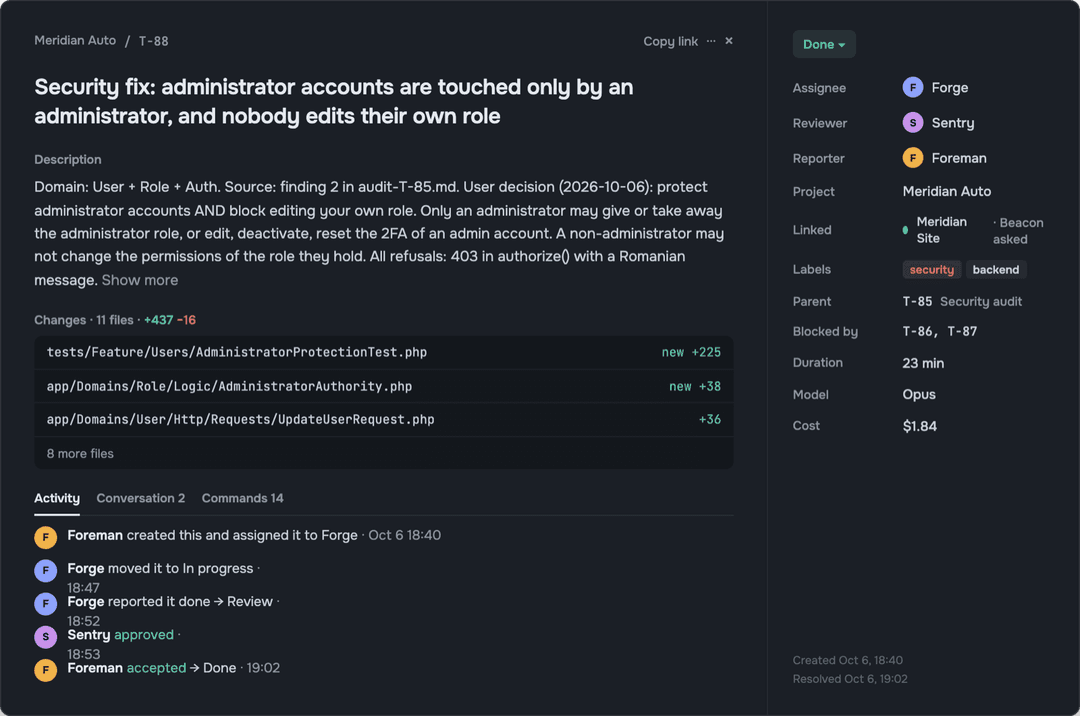
A team you can read at a glance: who reports to whom, and who reviews.
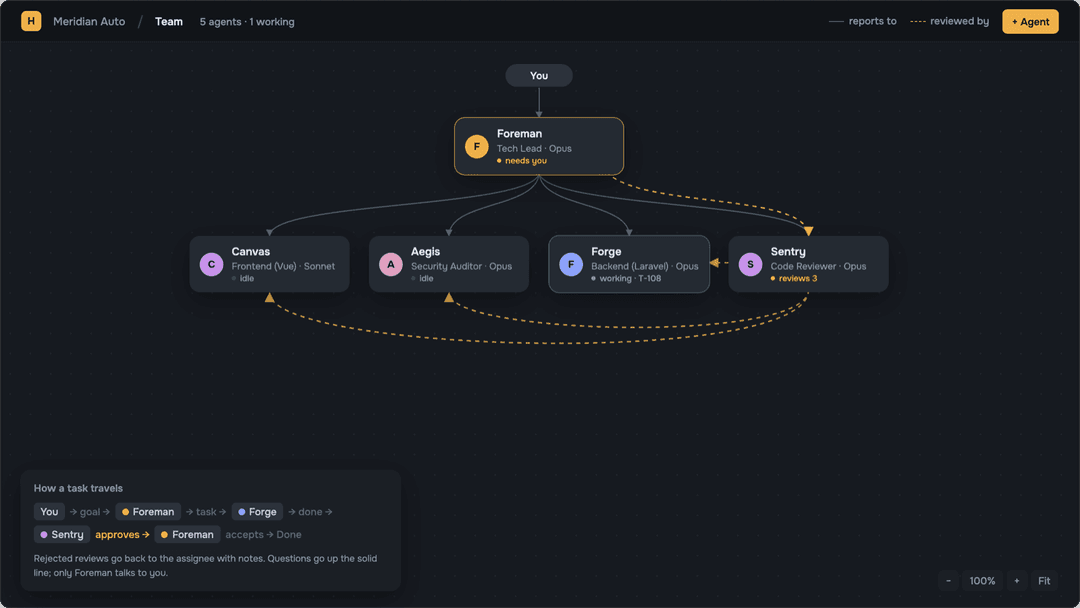
Talk to any agent directly.
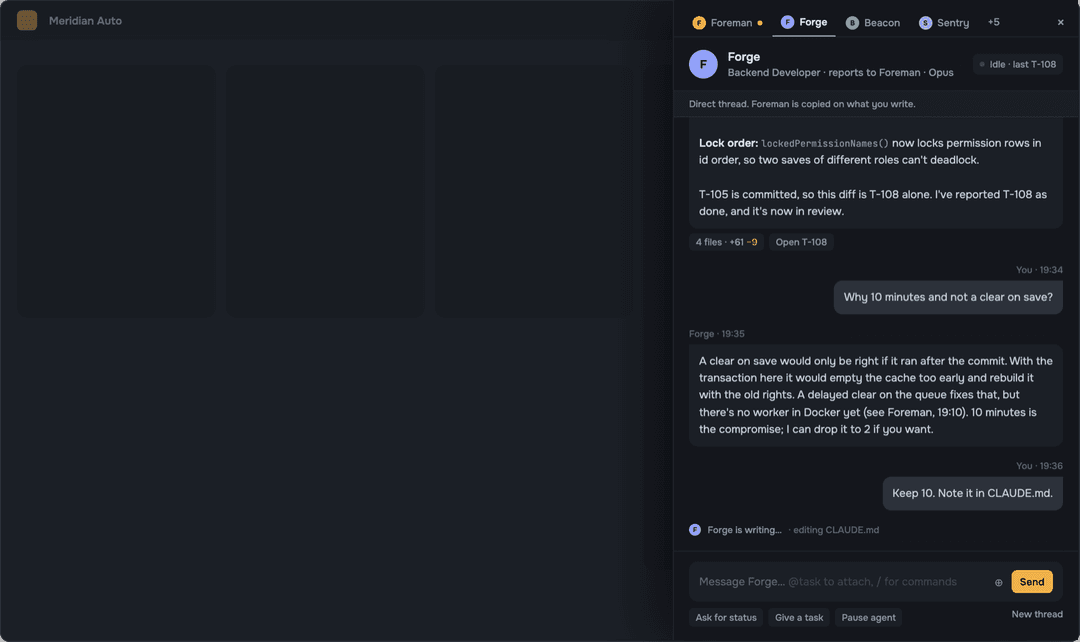
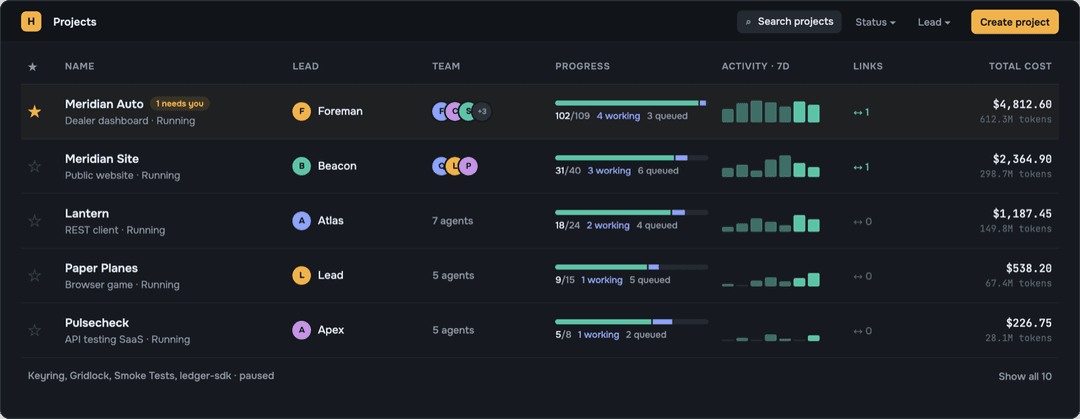
All your projects in one place.
Running from source
go run ./cmd/hobstack start
Open http://127.0.0.1:7777. Options: --port 8080, --no-open.
The project's working folder is optional: if you don't choose one, ~/HobStack/<name> is used.
You need claude (Claude Code) in PATH, logged in.
Build
scripts/build.sh                 # ./hobstack with the version from git describe (e.g. 1.0.0-3-g657c1cf)
go build -o hobstack ./cmd/hobstack   # a "dev" build: it shows releases but does not offer them by itself
scripts/build-release.sh 1.0.0   # the release archives and checksums.txt in dist/
Releasing
Tag a version and push the tag; GitHub Actions (.github/workflows/release.yml) runs the tests, builds the
archives and publishes the release. The tag message becomes the release notes shown in the app:
git tag -a v1.1.0 -m "- what changed"
git push hobstack v1.1.0
How it works
- Agents run as headless
claude -p, with the project folder as the working directory. - The app exposes an MCP server at
/mcp/<token>. The tools depend on the role:- leads have
create_task,list_tasks,accept_taskandsend_back; - agents with a boss have
report_done; - reviewers have
review_approveandreview_reject; - a root agent without a team has no tools.
- leads have
- When an agent finishes, the reviewer (if any) and then the lead that created the task are
woken up (
--resume) with the result. - A sub-lead splits the task it received into subtasks for its team. When all subtasks are done, the task returns to its queue, and the sub-lead checks it and reports it up.
- On the canvas, nodes are moved with the mouse, links are dragged from ●, and double-click opens the editor.
- In the API (
POST /api/projects/{id}/agents,PUT /api/agents/{id}), a missing or nullparentIdmeans a root agent. max_parallelapplies only to agents that have a boss.- Permissions come only from the app (
--settingsinline,--setting-sources user).CLAUDE.mdfrom the project's repo is still read.git push,rm -rf,sudoand package installs are blocked as command prefixes; with "Shell commands" enabled, an agent can get around them (rm -fr,bash -c ...). Only give shell to agents you trust (approvals come in a future version). - Your global Claude settings (
~/.claude/settings.json) also apply to agents, so a globalpermissions.allowrule widens their permissions. - The API accepts only Host 127.0.0.1/localhost and requires
Content-Type: application/jsonon requests that change something (protection against web pages that would send requests to the app). - Files attached to a project live in
~/.hobstack/projects/<id>/files/; agents get them with--add-dirand read them with Read (including images and PDFs). - On startup all projects are paused: nothing runs (or costs money) until you press "Start team".
Data
~/.hobstack/hobstack.db           projects, agents, tasks, runs, messages
~/.hobstack/logs/runs/<id>.jsonl raw log of each run
~/.hobstack/projects/<id>/files/ files attached to the project
Structure
cmd/hobstack/        CLI: start, clean shutdown on Ctrl+C
internal/config/    AppName and paths on disk
internal/store/     SQLite (modernc.org/sqlite, no CGO)
internal/prompt/    system prompt, turn message, permissions, MCP config
internal/runner/    starts claude, parses stream-json, log + broadcast
internal/mcp/       minimal MCP server (JSON-RPC over HTTP)
internal/team/      the scheduler: team tools, run start/finish
internal/events/    live per-project events (SSE)
internal/web/       API, SSE, embedded UI
Renaming
The name is in internal/config/config.go (AppName). Change it there, rename
cmd/<name>, run go mod edit -module <name> and replace the imports.
// faq
What is hobstack?
Delegate a project, not a prompt. Hobstack gives each project a team of Claude Code agents: a lead plans the work, specialists build it, reviewers check it, and you approve the decisions that are yours. Runs locally. MIT.. It is open-source on GitHub.
Is hobstack free to use?
hobstack is open-source under the MIT license, so it is free to use.
What category does hobstack belong to?
hobstack is listed under mcp-servers in the Claudeers registry of Claude-compatible tools.
// embed badge

[](https://claudeers.com/hobstack)
// retro hit counter

[](https://claudeers.com/hobstack)
// reviews
// guestbook
// related in MCP Servers
 🔓
f.k.a. Awesome ChatGPT Prompts. Share, discover, and collect prompts from the community. Free and open source — self-host for your organization with complete…
 🔓
A cross-platform desktop All-in-One assistant for Claude Code, Codex, OpenCode, OpenClaw, Gemini CLI & Hermes Agent. Only official website: ccswitch.io
 🔓
🪨 why use many token when few token do trick — Claude Code skill that cuts 65% of tokens by talking like caveman
 🔓
An open-source AI agent that brings the power of Gemini directly into your terminal.