
Hephaestus
Open Agent OS for Claude Code, Codex, and Cursor: meta-agent builder, A2A Hub routing, local ontology, memory and security gates.
Install with your AI
Paste into Claude Code, Cursor, or any agent — it reads the repo and wires the tool into your project.
Install and set up Hephaestus (claude-plugin project) into my current project.
Found on https://claudeers.com/hephaestus
Repo: https://github.com/agentlas-ai/Hephaestus
Homepage/docs: https://agentlas.cloud/models/hephaestus
Detected install method: claude-plugin → /plugin install hephaestus@agentlas-ai/Hephaestus
Category: rag. Platforms: cli, api, desktop, web, mobile.
Read the repo's README for exact setup and env vars, then install it and wire it into my project.

Claudeers Health Verdict:
active; community-verified: false. Confirm the source before running anything.
/plugin marketplace add agentlas-ai/Hephaestus
/plugin install hephaestus@agentlas-ai/Hephaestus
git clone https://github.com/agentlas-ai/Hephaestus
// compatibility
| Platforms | cli, api, desktop, web, mobile |
|---|---|
| Operating systems | — |
| AI compatibility | claude |
| License | Apache-2.0 |
| Pricing | open-source |
| Language | Python |
Hephaestus — Agent OS
Open Agent OS for Claude Code, Codex, and Cursor: meta-agent builder, A2A Hub routing, local ontology, and governed memory/security gates.
Build developer-owned agents, route them across runtimes, give them project context, and let them evolve only through explicit memory, skill, verification, and security gates.
English · 한국어 · 中文 · 日本語 · हिन्दी
Paste Install · Quickstart · Where To Type · Visual Install Guide · What It Builds · Architecture · Compare · Desktop
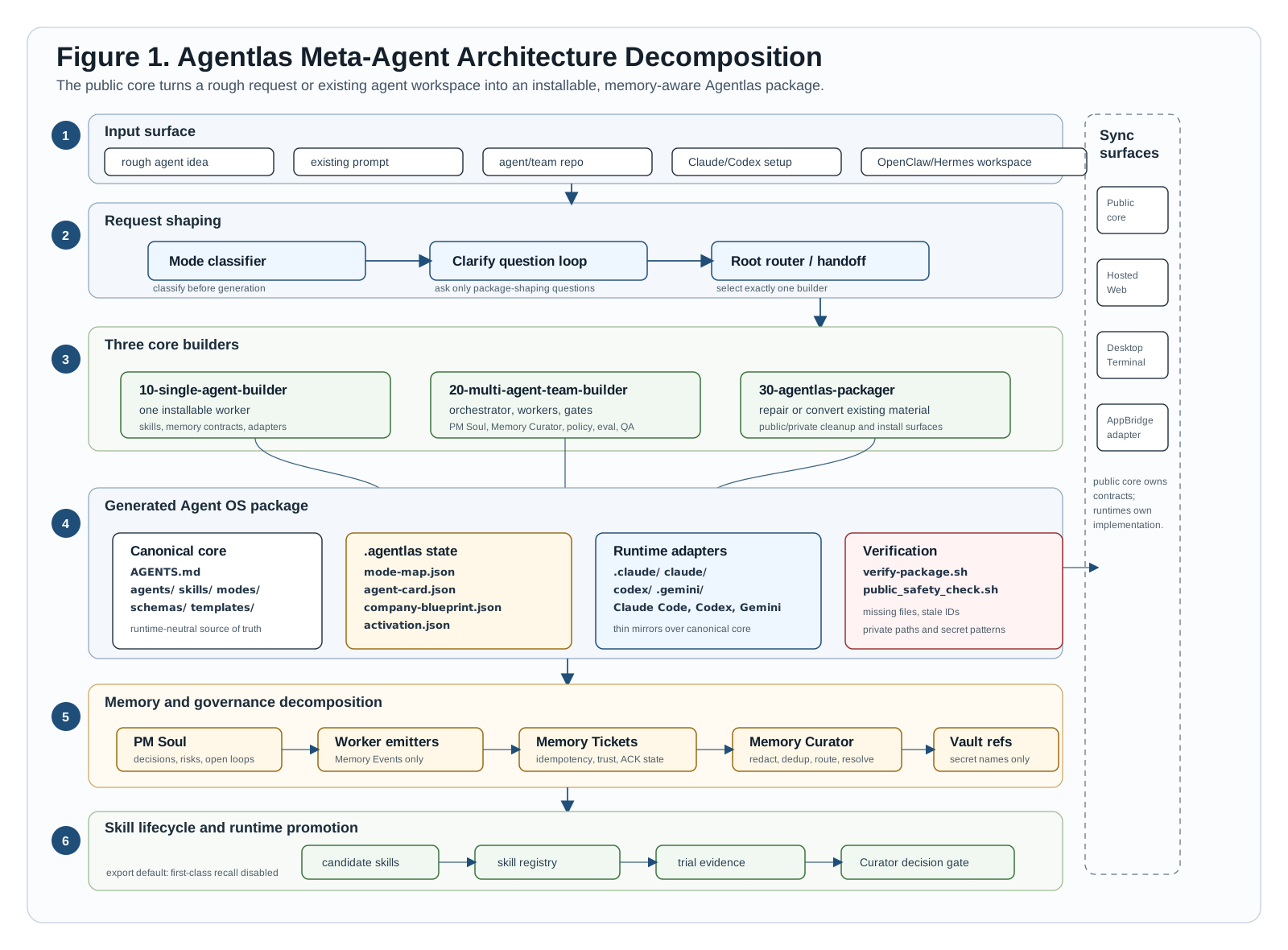
Figure 1. Request shaping, three builders, generated package contracts, memory curation, skill lifecycle, runtime adapters, and sync boundaries.
Copy-Paste Quickstart
Paste this into Claude Code, Codex, Gemini CLI, Antigravity, or Cursor. Let the AI install Hephaestus and tell you which command surface is active in that tool.
Install Hephaestus Agentlas for this workspace from this GitHub repo:
https://github.com/agentlas-ai/Hephaestus

Use the latest release/instructions. If anything errors, diagnose and fix it, retry, and confirm which command surface is active in this tool.

After it finishes, tell me the three primary commands I should use:
1. create/build agents
2. borrow public Hub agents
3. use agents saved in my Agentlas Cloud

Then also tell me the two power-user commands:
4. search Cloud and Hub candidates without invoking
5. call exact agent slugs I name
6. upload agents only after asking whether I mean private Cloud or public Hub

If anything fails, read the error, fix it, retry, and confirm Claude Code,
Codex, Gemini CLI, Antigravity, and Cursor registration status.
Three Primary Commands
| Job | Command | Example prompt |
|---|---|---|
| Create | /hep-build | /hep-build create a customer support agent for Shopify refunds |
| Borrow | /hep-network | /hep-network split this launch plan into research, copy, QA, and release agents |
| Share | /hep-cloud | /hep-cloud use my saved finance analyst agent to review this report |
Utility Commands
| Job | Command | Example prompt |
|---|---|---|
| Search | /hep-search | /hep-search 시장 리포트 써야 하는데 쓸만한 에이전트 찾아줘 |
| Call | /hep-call | /hep-call market-researcher, report-writer {시장 리포트 초안 만들어줘} |
| Upload | /hep-upload | /hep-upload ./agents/customer-support-hq |
Fresh installs and updates prune the old visible /hephaestus chat command so
new users see the clean command surface above: three primary commands, plus
search, call, and upload utilities when they need explicit control.
New In v0.7.21
- Hub taxonomy cleanup. Public Hub surfaces now separate Agents, Teams, and Plugins, and show invocation credits separately from downloadable packages.
- Local trust stays local. Local routing-card
trustedremains the local-first Network trust path, while upload and Hub publication security review stay a separate gate. - Private namespace redaction. Mason-local package buckets are no longer exposed in docs, adapter skills, CLI tier names, benchmarks, or mirrored runtime packages.
Hephaestus is the open core engine that makes Agentlas behave like an agent operating system instead of a one-off prompt generator. It gives developers five connected control planes:
- Meta-agent builder. Classify intent, ask the missing setup questions, and emit one agent, a multi-agent team, or a clean package with runtime adapters.
- A2A Hub router. Route requests through local routing cards first, then approved Agentlas Hub fallback, with receipts for every handoff.
- Hephaestus Stormbreaker. Keep long-running work inside a scope lock, failure-memory check, verifier-first plan, parallel session fabric, evidence loop, review gate, and final gate so agents cannot silently stop or claim completion before checks pass.
- Project ontology. Turn approved project sources into local graph, search, and source-lineage context agents can query without sweeping unrelated folders. This is not the Hub marketplace search. It is the project-local knowledge/memory map that routed agents may consult when a task needs grounding.
- Memory, self-evolution, and security gates. Admit durable memory, promote skills, verify installs, scan packages, and block unsafe publish paths before agents are allowed to keep or ship new behavior.
Hephaestus Network 2.0
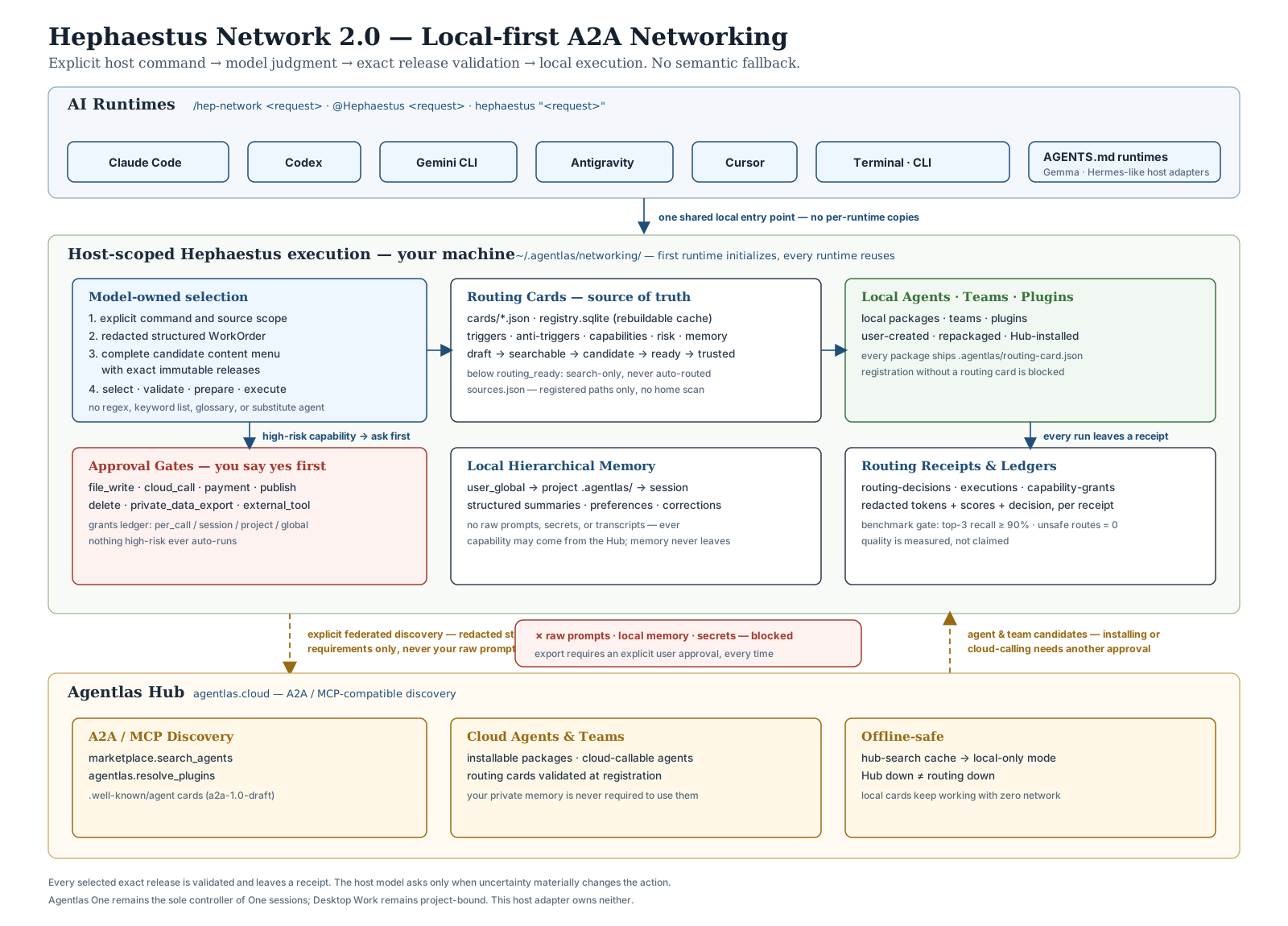
Figure 2. Hephaestus Network 2.0 — runtimes, the global local-first orchestrator, routing cards, local memory, and the Agentlas Hub A2A/MCP fallback.
One command, every runtime, all local:

One prompt. Hub MCP agents only. Hephaestus shows which public agents it called, why, and what they decided.
/hep-build create a customer support agent
/hep-network borrow the right agents for this launch plan
/hep-cloud use the agent I shared to my Agentlas Cloud
/hep-search find agents for an ASO review workflow
/hep-call aso-researcher, reply-writer {draft replies for these reviews}
- Routing cards. Every agent, team, and plugin ships a standardized routing card (triggers, anti-triggers, capabilities, risk profile, memory behavior). Cards that fail the quality gates are never auto-routed.
- Local first. Explicit commands → project overrides → your local cards. The Agentlas Hub is a fallback that only ever receives redacted keywords — never your raw prompt.
- Memory stays local. Agent capability can come from the Hub; your
user/project memory lives in
~/.agentlas/networking/and never leaves the machine without an explicit export approval. - Receipts, not execution. Every routing decision writes a receipt. The router only selects agents or Hub bundles; the host runtime enforces permissions when tools actually execute.
- Three primary commands. Use
/hep-buildto create or repair agents,/hep-networkto borrow public Hub agents into a temporary task force, and/hep-cloudto use agents you saved or shared through Agentlas Cloud. Heavy users can add/hep-searchto compare Cloud and Hub candidates without invoking, and/hep-callto prepare exact named agents. The lower-levelao,network,cards, andmcpcommands stay available for automation and debugging. - Temporary task forces. Composite
/hep-networkrequests are decomposed only when needed, then returned as a Hub/local TF plan with Stormbreaker packets, session hints, ontology graph paths, Local Operator policy labels, and Memory/Playbook candidates in the receipt. - Measured, not claimed. A routing benchmark (Korean + English) gates auto-routing: top-3 recall ≥ 90%, zero unsafe routes in the privacy suite.
- Stormbreaker operational evals. A separate scorecard compares native Codex, Hephaestus Network routing, and Hephaestus Stormbreaker on the same task fixtures.
A2A Agent Card Boundary
The A2A upgrade is the external agent interoperability boundary. It does more than find a Hub result: it imports, exports, and gates agent-to-agent cards without leaking local project state.
agentlas-cloud ao a2a import ./agent-card.json .
agentlas-cloud ao a2a export . --agent local/10-builder
agentlas-cloud route "run the release check" --caller local/orchestrator .
- Import is a proposal. External A2A
AgentCardfiles becomeExternalAgentproposals plus capability alignment edges only. Import never grantscan_invoke, rejects malformed JSON, and caps untrusted skill lists. - Export is whitelist-only. Internal agents are projected to
/.well-known/agent-card.jsonfrom public fields. Private paths, local memory behavior, raw routing-card text, and policy rationale are redacted. - Invocation is caller-gated. The CLI
route --callerflag and MCPhephaestus_route.caller_idinput thread the caller into the route gate, so blocked agent-to-agent calls stay blocked before a route is selected.
Details: docs/hephaestus-network-2.0.md · runtime support matrix: docs/runtime-fallback-adapters.md · Stormbreaker protocol: docs/robustness-protocol.md
Hephaestus Stormbreaker
Stormbreaker is the execution discipline inside Hephaestus: the part that keeps agent work from looking done before it is actually verified. It is not a new foundation model and it is not a benchmark leaderboard claim. It is the operating envelope around coding agents: scope, evidence, failure memory, review, and final proof.
Current public-safe evaluation signal:
| Scorecard | Native Codex | Network Baseline | Stormbreaker |
|---|---|---|---|
| Local macro operational robustness | 76.48 | 92.22 | 99.26 |
| Local micro operational robustness | 76.67 | 91.85 | 98.52 |
| Local holdout operational robustness | 80.00 | 91.67 | 100.00 |
| Local stress operational robustness | 73.33 | 93.33 | 100.00 |
Stormbreaker also preserved the operational ladder across 6/6 process-aware
metric variants, beat native on 9/9 paired local task units, and beat the
Network baseline on 8/9 paired local task units.
The v2 loop is:
scope lock
-> issue contract extraction
-> failure-memory check
-> verifier-first plan
-> parallel session fabric
-> bounded evidence loop
-> adversarial review gate
-> outcome ledger
-> final gate
The point is practical: Stormbreaker turns "the agent probably handled it" into "the agent left enough evidence that a developer can trust, audit, resume, or reject the work."
For Hephaestus Network pipeline decisions, Stormbreaker now returns an
execution_fabric: work packets, dependency groups, session hints, and the
required packet list for the final gate. Host runtimes can map those packets to
active Codex, Claude, GLM, DeepSeek, Gemini, or local model sessions, while
Hephaestus keeps privacy boundaries and success gating explicit.
Robustness Protocol
Hephaestus Robustness Protocol is the generic name for the Stormbreaker operating protocol. It is global infrastructure, not a standalone agent or skill. It applies to native runtime work, Hephaestus Network-selected agents, and Hub bundles:
scope lock -> issue contract -> failure memory -> verifier-first plan -> parallel session fabric -> evidence loop -> review gate -> final gate
The first benchmark topic is public agent repo repair because it tests file
inspection, package contracts, schema validity, validation scripts, public
safety, and false completion in one repeatable workflow. See
docs/robustness-eval.md, the seed tasks in
benchmarks/robustness/, and scripts/score-robustness-eval.py.
Paste-to-install (let your AI do it)
New to terminals? Don't run anything yourself. Open any AI coding tool — Claude Code, Codex, Gemini CLI, Antigravity, or Cursor — and paste the message below into its chat box. The agent runs the installer for you, then tells you the exact command to use next:
Set up the Hephaestus Agentlas meta-agent in this workspace from this GitHub repo:
https://github.com/agentlas-ai/Hephaestus

Use the latest release/instructions, then tell me the exact three-command surface
for the tool I am using (Claude Code, Codex, Gemini CLI, Antigravity, or Cursor).
Also tell me the optional search/call power-user commands. If anything fails,
read the error, fix it, and retry.
When it finishes, use /hep-build, /hep-network, or
/hep-cloud in your tool. Use /hep-search and
/hep-call when you want to compare candidates or call exact slugs.
Prefer to run the commands yourself? Use the terminal Quickstart below.
Quickstart
Use one of these paths on a new computer. Start with a Claude Code or Codex plugin install unless you only want the package files copied into a normal project folder.
Step 0. Fresh macOS check
Claude and Codex plugin marketplace commands use git clone. On a fresh Mac,
git requires Apple's Command Line Tools. If you see
xcode-select: note: No developer tools were found, run this once:
xcode-select --install
Finish the Apple installer popup, open a new Terminal window, then verify:
git --version
After git --version works, rerun the Claude or Codex plugin install command.
Recommended. One terminal command for all runtimes
Run this from your normal OS terminal. It installs or updates the
runtime-neutral runner (~/.agentlas/runtime/current), the universal
AgentSkills skill (~/.agents/skills/hephaestus-network), the Claude Code
plugin, Codex plugin + custom prompts + local MCP, Gemini CLI
extension/custom command, Antigravity workflow, and — when detected — Cursor,
OpenCode, OpenClaw, and Hermes Agent surfaces. It also fixes the common
Already added from a different source marketplace conflict by removing the
old agentlas-core-engine entry and adding it again from this repo.
curl -fsSL https://raw.githubusercontent.com/agentlas-ai/Hephaestus/main/scripts/install-all-runtimes.sh | bash
After it finishes, restart any open AI apps. Then use:
Claude Code: /reload-plugins, then /hep-build, /hep-network, /hep-cloud, /hep-search, /hep-call, /hep-upload
Codex:       /prompts:hep-build, /prompts:hep-network, /prompts:hep-cloud, /prompts:hep-search, /prompts:hep-call, or /prompts:hep-upload
Gemini CLI:  /extensions list or /commands list, then /hep-build, /hep-network, /hep-cloud, /hep-search, /hep-call, /hep-upload
Antigravity: reopen the workspace, then /hep-build, /hep-network, /hep-cloud, /hep-search, /hep-call, /hep-upload
Cursor:      /hep-build, /hep-network, /hep-cloud, /hep-search, /hep-call, /hep-upload
OpenCode:    /hep-build, /hep-network, /hep-cloud, /hep-search, /hep-call, /hep-upload
OpenClaw:    /skill hephaestus-network <request>
Hermes:      hephaestus-network skill (+ MCP, hermes/README.md)
Ollama/Gemma/DeepSeek local models: docs/local-models.md
Use the same command again to update to the packaged ref. To force a different ref:
curl -fsSL https://raw.githubusercontent.com/agentlas-ai/Hephaestus/main/scripts/install-all-runtimes.sh | HEPHAESTUS_REF=main bash
Option A. Claude Code plugin
Open your normal OS terminal, not the Claude chat box, and run:
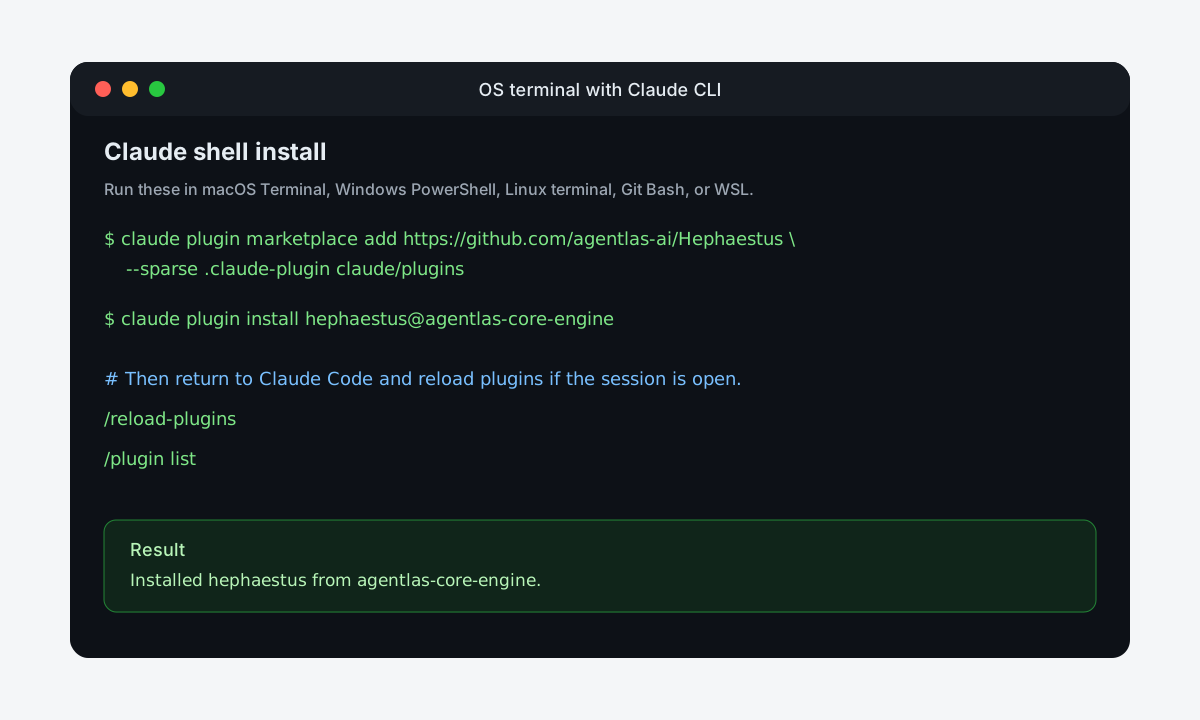
claude plugin marketplace add https://github.com/agentlas-ai/Hephaestus --sparse .claude-plugin claude/plugins
claude plugin install hephaestus@agentlas-core-engine
Then open or restart Claude Code in the project you want to work on and type:
/reload-plugins
/hep-build ontology
If you already installed the old agentlas-meta-agent plugin and Claude says
hephaestus is not found, refresh the marketplace and replace the old plugin:
curl -fsSL https://raw.githubusercontent.com/agentlas-ai/Hephaestus/main/scripts/install-all-runtimes.sh | bash
/hep-build ontology is now the Knowledge/Memory panel, not the main Agent OS
surface. Use it when you want to inspect project sources, memory candidates,
and reusable playbook material that routed agents may later reference. The
dashboard has a left navigation rail, an Obsidian-style knowledge graph, source
search, a GraphRAG query builder, a Memory Candidate Queue, and copyable
commands. It creates these files in that project only:
.agentlas/ontology-inbox/
.agentlas/ontology-sources.json
.agentlas/ontology-runtime.sqlite
.agentlas/ontology-gui/index.html
It does not scan your home folder or sibling projects. Put approved company docs
inside .agentlas/ontology-inbox/, then run /hep-build ontology again to
refresh the dashboard.
To create agents or teams after install:
/hep-build create a research agent for SEC filing analysis
/hep-build create a customer support operations team
/hep-build package this existing Claude agent into Agentlas architecture
Claude also supports claude plugins ... as an alias, but this README uses
claude plugin ... everywhere so the command shape stays consistent.
Option B. Codex plugin
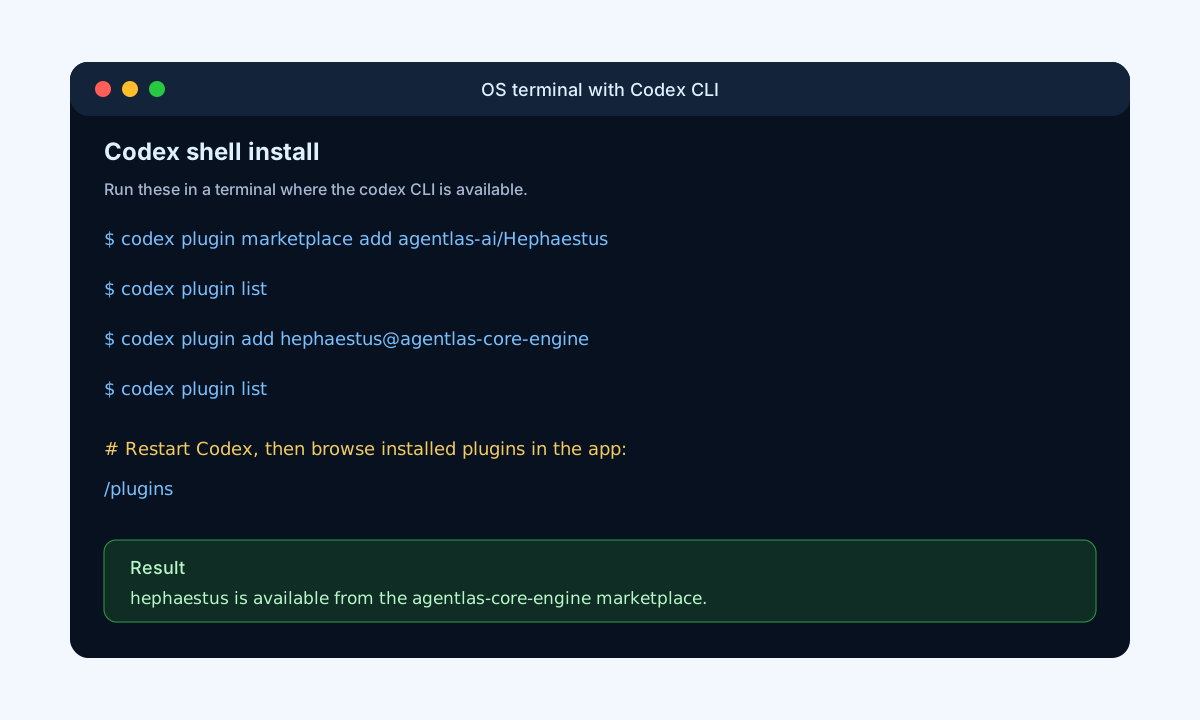
Open your normal OS terminal, not the Codex chat box, and run:
codex plugin marketplace add agentlas-ai/Hephaestus --ref v0.7.21
codex plugin add hephaestus@agentlas-core-engine
Then open or restart Codex in the project you want to work on and type:
/prompts:hep-build ontology
If Codex still shows agentlas-meta-agent or internal support names like
mode-classification, refresh the marketplace and replace the old plugin:
curl -fsSL https://raw.githubusercontent.com/agentlas-ai/Hephaestus/main/scripts/install-all-runtimes.sh | bash
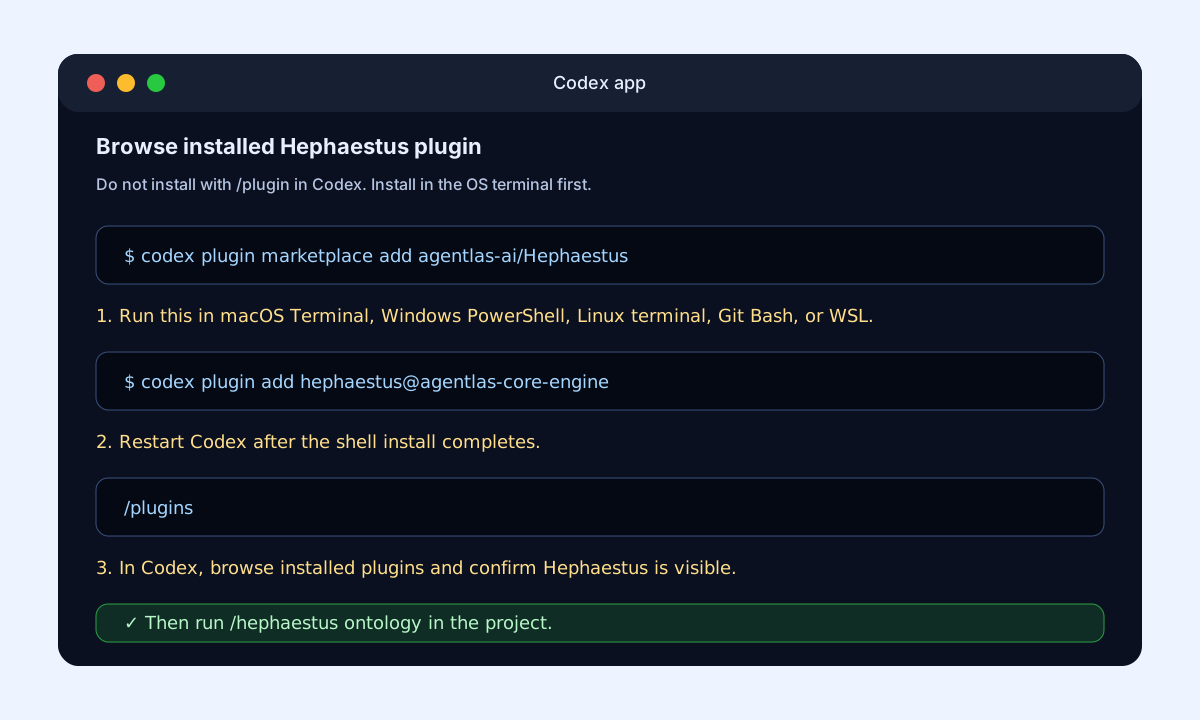
The Codex OS-terminal CLI command is singular: codex plugin, not
codex plugins. Inside the Codex app, the slash command for the plugin browser
is plural: /plugins. After plugin install, /prompts:hep-build ontology creates and
opens the same project-local dashboard with graph, sources, query, memory queue,
and command views:
.agentlas/ontology-gui/index.html
To create agents or teams after install:

```text
/hep-build create a self-evolving research agent
/hep-build create a finance analyst team
/hep-build package this existing Codex workspace into Agentlas architecture
Every generated or packaged Agentlas agent receives a global command during
creation. The final handoff must include global_commands for Claude Code,
Codex, Gemini CLI, generic AGENTS.md tools, and terminal use. For a team,
that public command routes to the orchestrator/HQ.
Agentlas Cloud readiness
Run these local checks before uploading an existing agent to Agentlas Cloud or publishing a clean copy to the Hub:
bin/hephaestus wizard ./some-agent --name instagram-operator
bin/hephaestus security scan ./some-agent --strict
bin/hephaestus runtime bundle ./some-agent
bin/hephaestus runtime read-agent-file ./some-agent AGENTS.md
bin/hephaestus field-test
The wizard creates agentlas.json, the scan writes
.agentlas/security-scan.json, and the runtime bundle uses manifest allowlists
instead of sending an entire ZIP to the model. For the actual upload, use
/hep-upload or hep-upload <agent-folder> so the runtime asks whether this
is private Cloud or public Agentlas Hub before any upload/publish/register
action.
Option C. Copy the files into a project
Use this if you are not installing the Claude/Codex plugin and just want the repo package files in your current project. Open macOS Terminal, Linux terminal, Windows Git Bash, or WSL in that project folder and run:
curl -fsSL https://raw.githubusercontent.com/agentlas-ai/Hephaestus/main/scripts/install.sh | bash
scripts/verify-package.sh
scripts/public_safety_check.sh
Windows PowerShell:
$zip = "$env:TEMP\hephaestus-main.zip"
$extract = "$env:TEMP\hephaestus-main"
Invoke-WebRequest "https://github.com/agentlas-ai/Hephaestus/archive/refs/heads/main.zip" -OutFile $zip
Remove-Item $extract -Recurse -Force -ErrorAction SilentlyContinue
Expand-Archive $zip -DestinationPath $extract -Force
$src = Get-ChildItem $extract -Directory | Select-Object -First 1
Get-ChildItem $src.FullName -Force | Copy-Item -Destination (Get-Location) -Recurse -Force
After file install, run the ontology GUI directly:
bin/hephaestus ontology
Optional Claude Code in-chat plugin install
Use this only when you are already inside Claude Code and want to install from the Claude chat UI instead of the OS terminal.
Claude Code chat:
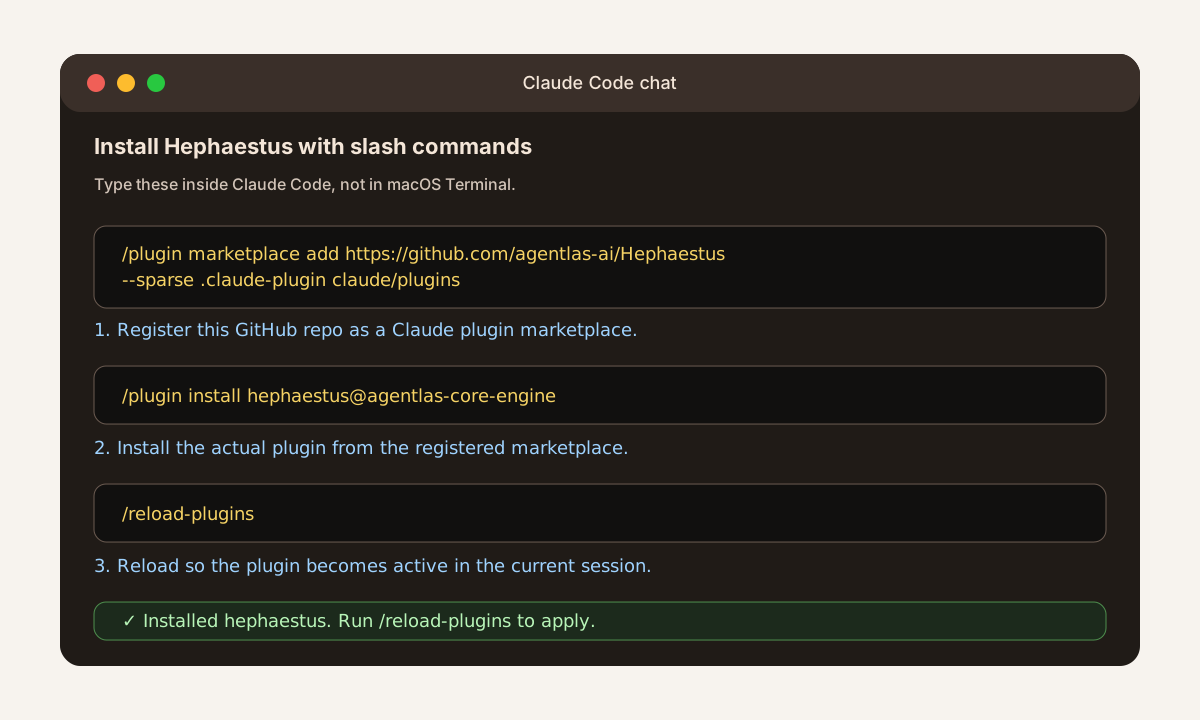
/plugin marketplace add https://github.com/agentlas-ai/Hephaestus --sparse .claude-plugin claude/plugins
/plugin install hephaestus@agentlas-core-engine
/reload-plugins
/hep-build ontology
Codex does not accept /plugin marketplace add inside the app. In Codex,
install from the OS terminal with codex plugin ..., then restart Codex and
use /plugins only to browse or enable installed plugins. After Hephaestus is
installed, run /prompts:hep-build ontology.
If a Claude chat window does not show the new command after install, restart Claude Code in that project.
Visual Install Guide
Use the Claude slash-command image only when you are already inside Claude
Code. For Codex, install from the OS terminal; inside the Codex app, use
/plugins to browse installed plugins.
Claude Code chat
Type these commands directly into Claude Code:
Claude CLI from your OS terminal
Use this path when the claude command is available in your shell:
Codex app plugin browser
Use this only after the OS-terminal codex plugin ... install:
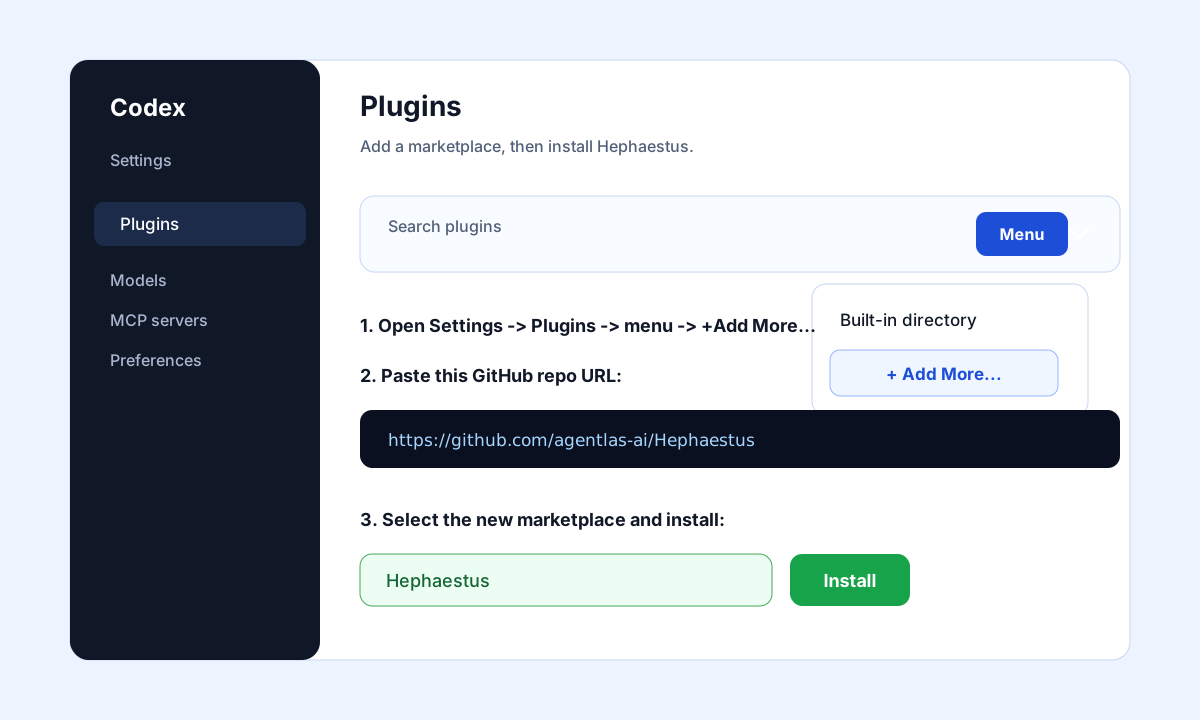
Codex Desktop or IDE Extension
Use this path when Codex shows a Plugins settings screen:
Codex CLI from your OS terminal
Use this path when the codex command is available in your shell:
What You Open And Where You Type
| Task | Open this | Type here |
|---|---|---|
| Download Desktop | Browser | https://agentlas.cloud/desktop or the OS download command |
Install agentlas CLI | Agentlas Desktop | Settings -> Use from the terminal -> Install CLI |
| Run Agentlas Terminal | OS terminal | agentlas list, agentlas run ... |
| Install Claude plugin by slash command | Claude Code | /plugin marketplace add ..., /plugin install ..., /reload-plugins |
| Install Claude plugin by shell | OS terminal | claude plugin marketplace add ..., claude plugin install ... |
| Browse installed Codex plugins | Codex app | /plugins |
| Install Codex plugin by shell | OS terminal | codex plugin marketplace add ..., codex plugin add ... |
After Install: How To Actually Use It (3 minutes)
Installation also registers the agentlas Hub MCP for you — Claude Code gets it
from the bundled .mcp.json, Codex/Antigravity from the one-touch install script,
and Gemini CLI from the extension manifest. No separate MCP setup needed.
1. Where do I type?
| Runtime | Open it | Then |
|---|---|---|
| Claude Code | Type claude in your OS terminal (or open the desktop app) | /hep-build, /hep-network, /hep-cloud, /hep-search, /hep-call, /hep-upload |
| Codex | Type codex in your OS terminal (or Codex app) | /prompts:hep-build, /prompts:hep-network, /prompts:hep-cloud, /prompts:hep-search, /prompts:hep-call, /prompts:hep-upload |
| Gemini CLI | Type gemini in your OS terminal | /hep-build, /hep-network, /hep-cloud, /hep-search, /hep-call, /hep-upload |
| Antigravity | Open your workspace | /hep-build, /hep-network, /hep-cloud, /hep-search, /hep-call, /hep-upload |
/hep-build is for creating agents. /hep-network is for
borrowing public Hub agents. /hep-cloud is for sharing/using
agents in your own Agentlas Cloud. /hep-search lists Cloud and Hub
candidates without invoking. /hep-call prepares the exact agent slugs
you name. /hep-upload asks Cloud-vs-Hub before any upload action. Fresh chat
installs no longer expose the old general /hephaestus
command as a visible command.
2. MCP tools are used in plain language, not commands
You never call MCP tools directly. Just say what you want and the AI picks the right tool.
| Say this | Tool that runs underneath |
|---|---|
| "Find an agentlas agent that helps with ASO" | agentlas.search |
| "What agents are on the agentlas marketplace? Show them by category" | marketplace.search_agents |
| "Install that team into this project" | agentlas.get_runtime_bundle |
| "Show my agents" (sign-in required) | cargo.* |
When a feature needs sign-in for the first time, Hephaestus opens the default browser and sends the user to the Agentlas/Google sign-in screen. After that, the signed-in state carries across Claude Code, Codex, Gemini, Antigravity, and other Hephaestus surfaces; users do not paste or manage anything.
To verify the registration:
| Runtime | Check |
|---|---|
| Claude Code | Type /mcp in chat — you should see the agentlas server and its tools |
| Codex | codex mcp list in the terminal; private agent features should open browser sign-in on first use |
| Gemini CLI | /mcp in chat or gemini mcp list in the terminal |
3. When you don't know what agents exist
- Just ask: "What agents are on agentlas?", "Recommend agents that could help me launch my app" — the search tools take it from there.
- Browse on the web: agentlas.cloud/marketplace
- Register the MCP manually in other clients (Cursor, Windsurf, VS Code, ...): agentlas.cloud/mcp
What It Builds
Hephaestus leaves behind a repository that another runtime can inspect, install, verify, and keep improving.
| You ask for | It routes to | You get |
|---|---|---|
| "Make one agent that does X" | 10-single-agent-builder | One installable worker with skills, memory contracts, runtime adapters, and verification |
| "Make a team/company for this workflow" | 20-multi-agent-team-builder | A multi-role operating team with HQ, PM Soul, Memory Curator, Policy Gate, eval, QA, and handoffs |
| "Package this existing agent/repo/workspace" | 30-agentlas-packager | A cleaned Agentlas package for Desktop import, terminal use, Codex, Claude, Gemini, or public GitHub release |
All three modes must create .agentlas/global-commands.json and report the
exact global command after generation. The user should not have to infer how to
run the new agent.
Generated or repaired packages can include:
AGENTS.md
CLAUDE.md
GEMINI.md
agent.md
agents/
skills/
modes/
.agentlas/
.agentlas/global-commands.json
.agents/
.claude/
.gemini/
.gemini/commands/
codex/
schemas/
templates/
scripts/verify-package.sh
scripts/public_safety_check.sh
Architecture
The public core is the architecture and foldering contract. Runtime-specific folders are adapters over the same core, not separate sources of truth.
| Public contract | What it does |
|---|---|
| Mode auto-detection | Chooses single-agent-creator, team-builder, or agentlas-packager before generation |
| Clarify question loop | Asks only package-shaping questions that affect runtime, public boundary, tools, or safety |
| Global command registry | Adds .agentlas/global-commands.json, runtime command files, and the final global_commands handoff |
.agentlas auto-activation | Lets local runtimes seed project memory, sitemap/task-bias, Memory Tickets, and vault references |
| Skill lifecycle registry | Ships candidate skill metadata, empty trial ledgers, and Curator decision ledgers before first-class recall |
| Super Ontology candidate layer | Seeds public-safe graph and memory governance files for source lineage, privacy, task coverage, causality, consensus, repair, and reflexive feedback checks (currently in active development) |
| Production Ontology Runtime | Ingests local sources into SQLite/FTS chunks, entities, relations, GraphRAG retrieval, Memory Curator tickets, and Agent Working Memory cache |
| Ontology-backed agent overlay | Routes corpus-dependent requests (ontology_backed: true) so builders activate the runtime, wire a retrieval-first workflow, and set loop_policy per risk tier |
| Rule-based contract injection | .agentlas/contract-injection-map.json injects only the governance contracts matching the agent's task traits instead of all 26 |
The default export state is conservative. Generated skills are searchable candidate metadata, not automatically promoted runtime behavior. A local Curator must see execution evidence, sealed holdout or replay proof, rollback coverage, and workspace policy approval before a skill becomes first-class recall.
Production Ontology Runtime
For knowledge-heavy personal or company agents, Hephaestus now ships a real local-first ontology runtime under ontology/ with the executable CLI bin/ontology. It turns approved files into an agent-readable source archive, chunk store, full-text index, vector index, ontology graph, GraphRAG result, Memory Curator candidate ticket, and Agent Working Memory cache.
Hephaestus Network MCP capabilities:
hephaestus_hub_invokeMCP tool. Hephaestus Network now has a real Hub invocation surface, not only Hub candidate search. The tool skips local routing, calls Agentlas Hub MCP (marketplace.search_agents,agentlas.get_runtime_bundle,agentlas.resolve_plugins), and writes execution receipts under~/.agentlas/networking/ledgers/executions.jsonl.- Hub-only local bypass.
hub_onlyrouting withlocal_inventory: []andhub_only: trueensures local private/restricted/plugin cards are not selected or executed. - Global Agentlas memory bootstrap. Hub invocation can create the missing shared files under
~/.agentlas/(memory-map.json,project-soul-memory.md,invocation-ledger.jsonl, etc.) and appends invocation evidence without storing raw prompts or secrets. - Installed-runtime verification. The one-touch installer now verifies five runtime surfaces and keeps the neutral runner at
~/.agentlas/runtime/current/bin/hephaestus.
Ontology runtime upgrades:
- First-party Korean document parsing. HWPX is parsed as ZIP/XML with paragraph and table spans, and legacy HWP5
.hwpis parsed directly from CFBFileHeaderandBodyText/Section*streams. No GPL/AGPL parser orhwp5txtbinary is required. Encrypted or distribution-protected HWP stays blocked with an explicit parser status. - CJK search works. The tokenizer now emits character bigrams for Korean/Japanese/Chinese runs and the FTS index uses the
trigramtokenizer, so Korean corpora (proposals, contracts, and quotes in HWPX and Office formats) are searchable with zero install. Existing databases migrate and re-index automatically on first open. - RRF hybrid ranking. Full-text and vector rankings fuse via Reciprocal Rank Fusion instead of mixed-scale fixed weights, on a bounded candidate pool (no full-corpus Python scan).
- Host-LLM search hooks (optional, zero extra cost). A host CLI runtime (Claude Code / Codex) can inject query-expansion and rerank hooks — no embedding API or key needed. Chunks scoped private/confidential are never passed to cloud hooks; the gate is enforced inside the search pipeline.
- Chunk overlap. Sliding windows now overlap 15% so context is not cut at chunk boundaries.
- Ontology-backed agent mode. Builders can generate retrieval-first, citation-attached agents (see
modes/ontology-backed-agent.mdand the golden-path reference inexamples/ontology-proposal-agent/), with governance contracts injected by rule andloop_policy(none / self-correct / verified) derived from task risk. - Adapter drift gate + MCP surface check.
scripts/sync-adapters.sh --checkkeeps runtime adapters byte-identical to the canonical core, andscripts/verify-mcp-surface.shguards theagentlasMCP registration contract across Claude Code, Codex, Gemini, and Antigravity.
The Super Ontology files under .agentlas/ are currently in active development as the safety/governance layer. They define the source-lineage, privacy, task-coverage, causal, consensus, and memory-write gates around the runtime. The runtime is the implementation layer.
In Agentlas Terminal and Desktop, the same runtime is exposed as
agentlas ontology; in plugin-hosted tools, use /hep-build ontology
or Codex /prompts:hep-build ontology.
The runtime never scans your home folder or sibling projects; it only ingests
explicit approved paths, registered sources, and project-local inbox files.
Supported ingest formats:
| Format | Status |
|---|---|
.txt, .md, .json, .csv | parsed |
.docx, .xlsx, .pptx | parsed through OpenXML adapters |
.pdf | parsed through pdftotext when installed |
.hwpx | parsed through the first-party HWPX ZIP/XML adapter with paragraph and table spans |
| images/OCR | parsed through macOS Vision OCR or Tesseract when available |
.hwp binary | parsed through the first-party HWP5 CFB/BodyText adapter; encrypted or distribution-protected files are blocked |
| unknown extensions | unsupported_pending_adapter |
The storage default is SQLite at .agentlas/ontology-runtime.sqlite, ignored by Git. The schema includes sources, source_lineage, chunks, chunk_fts, entities, entity_aliases, relations, memory_candidates, memory_candidate_events, working_memory, runtime_adapters, and schema_migrations.
Basic local run:
bin/ontology ingest examples/ontology-corpus --scope internal
bin/ontology query "Project Helios Memory Curator" --agent verifier
bin/ontology graph entity "Project Helios"
bin/ontology memory candidates
bin/ontology working-memory read --agent verifier
bin/ontology verify
The query response includes relevant chunks, related entities, relation edges, evidence refs, source spans, confidence, Memory Curator candidate suggestions, and optional Agent Working Memory writes. It is not a vector-only result.
The runtime stack is layered:
| Layer | Role |
|---|---|
| Source archive and chunk store | Stores source metadata, checksum, source type, parser status, version, privacy scope, lineage, chunks, source spans, token estimates, and checksums |
| Search index | SQLite FTS5 (trigram, CJK-capable) plus local hashing vectors with CJK bigram tokens, fused with RRF; optional host-LLM query expansion/rerank hooks; no API key is needed and source text stays local |
| Ontology graph | Stores entities, aliases, relations, confidence, evidence chunks, observed/valid time fields, source lineage, and active/stale/deprecated status |
| GraphRAG retriever | Returns text evidence and graph slices together |
| Memory Curator bridge | Creates candidate tickets only; direct durable memory writes are blocked |
| Agent Working Memory | Per-agent hot cache with task/run scope, source refs, confidence, importance, TTL, last-used time, and invalidation reason |
Memory Curator flow:
bin/ontology memory candidates
bin/ontology memory decide <ticket-id> approve --reason "Curator accepted source-backed fact"
bin/ontology memory decide <ticket-id> quarantine --reason "Needs source owner review"
Approval records review state but still does not write durable memory. The Memory Curator owns durable promotion. Agent Working Memory is intentionally a cache, not a source of truth.
See docs/ontology-runtime.md for the schema, adapter behavior, storage commands, and verification coverage.
Why Agentlas Desktop And Terminal Make It Better
Desktop and Terminal make this package useful beyond a static prompt:
- Desktop shows the agent/team structure, local projects, Apps, vault references, and runtime choices.
- Terminal runs the same package from a shell with
agentlas. - The built-in Core Engine Meta-Agent path means fresh Desktop/Terminal installs can create or package agents without a separate standalone plugin install.
- Standalone Claude/Codex install is still useful when you want this package directly inside those runtimes.
Compare
| Compared with | Their strength | What Hephaestus adds |
|---|---|---|
| OpenAI / Codex | Strong models and coding terminal | Portable repo contracts, .agentlas memory/package files, skills, schemas, runtime adapters, and public verification |
| Claude / Claude Code | Strong reasoning and Claude-native workflows | Claude support without becoming Claude-only; Codex, Gemini, Desktop, terminal, and AGENTS.md stay aligned |
| OpenClaw | Local identity and workspace agent loop | Visible role folders, Agentlas package contracts, public-safety checks, Desktop import, vault references, and install surfaces |
| Hermes | Persona and memory-centered local agent runtime | PM Soul, Memory Tickets, sitemap/task-bias, policy/eval/QA, and skill lifecycle evidence as files |
OpenAI and Claude are model/runtime surfaces. OpenClaw and Hermes are local-agent experiences. Hephaestus is the package layer that makes agents portable, inspectable, installable, and publishable.
Use It
Single agent:
/meta-agent Create a research agent for SEC filing analysis.
Package it for Codex, Claude Code, Gemini, and Agentlas Desktop.
Multi-agent team:
Use Hephaestus.
Build a customer-support operations team with PM Soul, Memory Curator, Policy Gate, QA, eval, and public-safe release checks.
Package an existing workspace:
Package this local OpenClaw/Hermes-style workspace into Agentlas architecture.
Keep private notes, machine paths, raw logs, and secrets out of the public repo.
Docs By Goal
| Goal | Start here |
|---|---|
| Understand the canonical route | AGENTS.md |
| See the full team contract | agent.md |
| See the architecture source of truth | docs/source-of-truth.md |
| Understand runtime boundaries | docs/runtime-sync-boundaries.md |
| Choose a mode | docs/mode-classifier.md |
| Ask the right setup questions | docs/clarify-question-loop.md |
Activate local .agentlas workspace files | docs/agentlas-auto-activation.md |
| Review skill lifecycle promotion | docs/skill-lifecycle-promotion.md |
| Prepare Cloud runtime bundles | docs/agentlas-cloud-runtime.md |
| Run the production ontology runtime | docs/ontology-runtime.md |
| Review Super Ontology candidate contract | docs/super-ontology-candidate-contract.md |
| Understand graph and Memory Curator boundaries | docs/super-ontology-candidate-contract.md |
| Verify ontology runtime behavior | scripts/verify-ontology-runtime.sh |
| Verify a package | scripts/verify-package.sh |
| Check public safety | scripts/public_safety_check.sh |
Public Safety Boundary
This repo intentionally does not include hosted Agentlas billing/account logic, production credentials, customer data, raw private logs, raw transcripts, desktop keychain storage, local database implementation, or private deployment configuration.
Public output packages should not include local machine paths, API keys, tokens, private keys, service-account JSON, .env secrets, private research notes, raw chat transcripts, customer logs, hosted billing/account/OAuth internals, or desktop storage internals.
Contributing
Before opening a PR or publishing a release, run:
scripts/verify-package.sh
scripts/verify-ontology-runtime.sh
scripts/public_safety_check.sh
License
Apache-2.0. See LICENSE.
// faq
What is Hephaestus?
Open Agent OS for Claude Code, Codex, and Cursor: meta-agent builder, A2A Hub routing, local ontology, memory and security gates.. It is open-source on GitHub.
Is Hephaestus free to use?
Hephaestus is open-source under the Apache-2.0 license, so it is free to use.
What category does Hephaestus belong to?
Hephaestus is listed under automation in the Claudeers registry of Claude-compatible tools.
// embed badge

[](https://claudeers.com/hephaestus)
// retro hit counter

[](https://claudeers.com/hephaestus)
// reviews
// guestbook
// related in RAG & Knowledge
 🔓
🔓Persistent Context Across Sessions for Every Agent – Captures everything your agent does during sessions, compresses it with AI, and injects relevant contex…
 🔓
🔓✨ Light and Fast AI Assistant. Support: Web | iOS | MacOS | Android | Linux | Windows
 🔓
🔓Compress tool outputs, logs, files, and RAG chunks before they reach the LLM. 60-95% fewer tokens, same answers. Library, proxy, MCP server.
 🔓
🔓A light-weight and powerful meta-prompting, context engineering and spec-driven development system for Claude Code by TÂCHES.
// built by
1 of its contributors also build on official projects — claude-code, claude-cookbooks, claude-plugins-official
→ see how Hephaestus connects across the ecosystem