
hello-cc
Connect all your Claude Code and Codex terminals into one team — web control included
Install with your AI
Paste into Claude Code, Cursor, or any agent — it reads the repo and wires the tool into your project.
Install and set up hello-cc (npm project) into my current project.
Found on https://claudeers.com/hello-cc
Repo: https://github.com/Dullne/hello-cc
Homepage/docs: —
Detected install method: npm → npm install @logicseek/hello-cc
Category: devtools. Platforms: cli, api, web.
Read the repo's README for exact setup and env vars, then install it and wire it into my project.

Claudeers Health Verdict:
active; community-verified: false. Confirm the source before running anything.
npm install @logicseek/hello-cc
git clone https://github.com/Dullne/hello-cc
// compatibility
| Platforms | cli, api, web |
|---|---|
| Operating systems | — |
| AI compatibility | claude |
| License | Apache-2.0 |
| Pricing | open-source |
| Language | JavaScript |
hello-cc
English | 中文
hello-cc is a local control plane for Claude Code, Codex, and other coding
CLI sessions. It gives every terminal in one project a shared task board,
mailbox, lock table, and browser console while keeping the real local terminal
as the source of interaction.
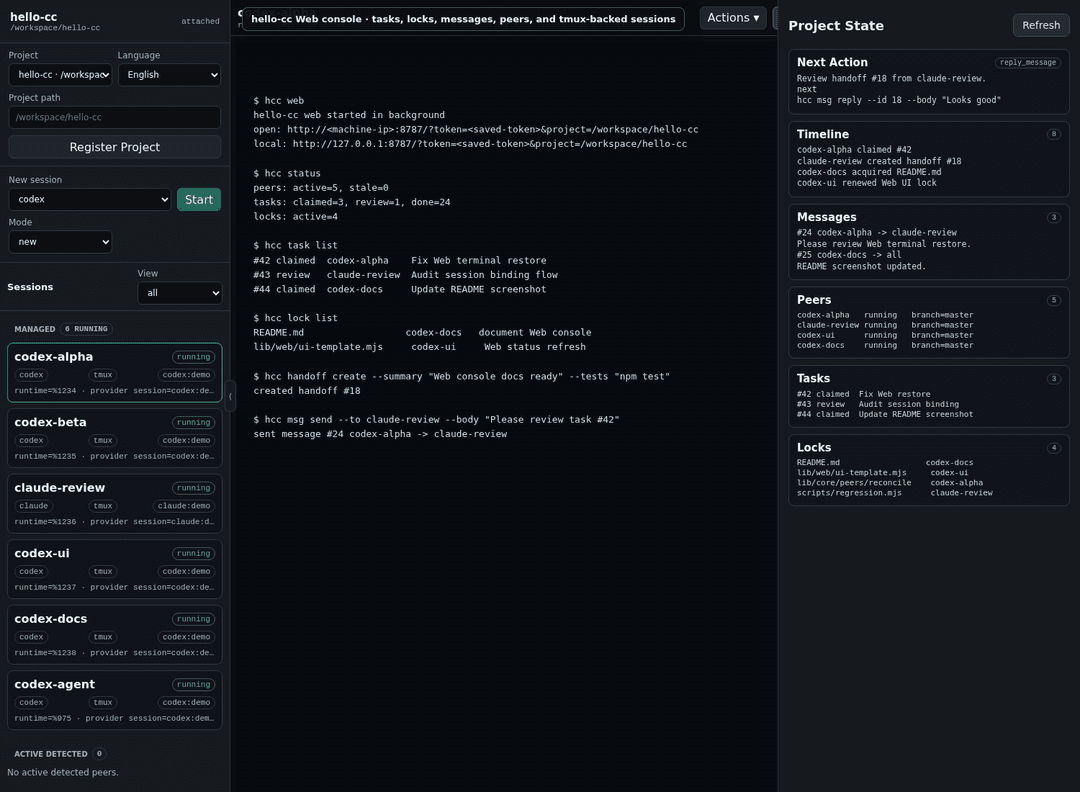
One local Web console for tmux-backed Claude Code, Codex, tasks, locks, messages, and handoffs.
It is built for developers who run multiple AI coding agents in the same repo and need them to coordinate instead of guessing what the other sessions are doing.
Highlights
- Shared project memory: peers, tasks, messages, locks, handoffs, and
events are stored in
<project>/.hello-cc/mesh.db. - Real terminal control: Web attaches to the same local tmux pane as your terminal, not a separate browser-only shell.
- Claude/Codex awareness: hooks inject live
hccstate before model turns, so agents can answer from current project state. - Conflict avoidance: advisory locks and handoffs make multi-agent editing explicit.
- Explicit team splits:
hcc team plan/start/statusturns one parallel task into auditable child tasks without hidden auto-spawning. - Resume-friendly identity: resumed Claude/Codex sessions map back to stable peers when provider session ids are available.
- One console, many projects: one local Web runtime can switch between registered project roots.
Install And Manage
hello-cc supports Linux and macOS. Node.js 24 or newer is required, and
browser-controllable terminals require tmux. Native Windows shells are not
currently supported; use WSL for a Linux-like environment.
Linux has richer process auto-discovery through /proc. On macOS, use
hello-cc shims or hcc peer start for reliable tmux-managed terminal sessions.
npm install -g @logicseek/hello-cc
Update an existing global install:
hcc update
Or run it without a global install:
npx @logicseek/hello-cc web
Remove hooks, shims, and the shell PATH entry from this machine:
hcc uninstall
Remove the global npm package:
npm uninstall -g @logicseek/hello-cc
Quick Start
Run this inside the project you want agents to share:
cd /path/to/project
hcc web
Then open the printed URL. By default, hcc web listens on LAN interfaces and
requests 0.0.0.0:8787, using a saved URL token generated on first use. If
port 8787 is already busy and you did not pass --port, it automatically tries
the next available port. The command prints both the LAN login URL and the local
loopback URL:
open: http://<machine-ip>:8787/?token=<saved-token>&project=/path/to/project
local: http://127.0.0.1:8787/?token=<saved-token>&project=/path/to/project
Use --local to bind only to 127.0.0.1, or --port N to request a specific
port. hcc web initializes the project bus, installs Claude/Codex hooks and
shims, starts or reuses the Web console, and returns the terminal to you.
hcc web --local is still Web mode; it only limits the listener to loopback.
Use hcc up when you want local coordination commands without the Web console
or shims.
After the first shim install, open a new terminal or reload the rc file for your shell:
- bash:
source ~/.bashrc - zsh:
source ~/.zshrc - fish:
source ~/.config/fish/config.fish
Start normal agent sessions from the project:
claude
codex
claude --resume <session-id>
codex resume <session-id>
Those sessions become tmux-backed peers that can be seen and controlled from
Web while remaining usable from the local terminal. The shims only use the
current project's runtime file. If you start claude or codex in a directory
where hcc web has not created .hello-cc/runtime.json, the shim falls back to
the real provider CLI instead of using the global Web runtime or creating a new
project database.
Basic Workflow
hcc task create --title "Review router changes" --priority 20
hcc task next
hcc lock acquire --resource src/router --ttl 900 --reason "edit router"
hcc status
hcc handoff create --summary "Router change ready for review" --tests "npm test"
hcc task done --id 1 --summary "Done"
Ask an agent what is happening in the project:
What are the other hello-cc sessions doing?
Attached Claude/Codex sessions should answer from live hcc state rather than
generic session-isolation assumptions.
Documentation
- Documentation Index: all user and implementation docs.
- User Guide: setup, Web console, workflows, coordination semantics, and environment behavior.
- Command Reference: compact public command list.
- Changelog: release notes for published versions.
- Design Notes: product boundaries and coordination model.
- Implementation Notes: architecture and internal protocol.
Testing
npm test
The regression suite uses temporary projects, fake Claude/Codex binaries, temporary tmux sessions, and a temporary Web runtime to test the main flows.
License
// faq
What is hello-cc?
Connect all your Claude Code and Codex terminals into one team — web control included. It is open-source on GitHub.
Is hello-cc free to use?
hello-cc is open-source under the Apache-2.0 license, so it is free to use.
What category does hello-cc belong to?
hello-cc is listed under devtools in the Claudeers registry of Claude-compatible tools.
// embed badge

[](https://claudeers.com/hello-cc)
// retro hit counter

[](https://claudeers.com/hello-cc)
// reviews
// guestbook
// related in Developer Tools
 🔓
🔓The agent harness performance optimization system. Skills, instincts, memory, security, and research-first development for Claude Code, Codex, Opencode, Curs…
 🔓
🔓Makes your AI agent think like the laziest senior dev in the room. The best code is the code you never wrote.
 🔓
🔓Use Garry Tan's exact Claude Code setup: 23 opinionated tools that serve as CEO, Designer, Eng Manager, Release Manager, Doc Engineer, and QA
 🔓
🔓AI coding assistant skill (Claude Code, Codex, OpenCode, Cursor, Gemini CLI, and more). Turn any folder of code, SQL schemas, R scripts, shell scripts, docs,…