
headroom
Track and rotate your Claude & Codex usage across accounts from one live dashboard — read live, never spending a token.
Install with your AI
Paste into Claude Code, Cursor, or any agent — it reads the repo and wires the tool into your project.
Install and set up headroom (release-binary project) into my current project.
Found on https://claudeers.com/headroom-3
Repo: https://github.com/domanski-ai/headroom
Homepage/docs: —
Detected install method: release-binary → inspect the README
Category: devtools. Platforms: cli, api.
Read the repo's README for exact setup and env vars, then install it and wire it into my project.

Claudeers Health Verdict:
active; community-verified: false. Confirm the source before running anything.
Grab the latest release asset from GitHub.
# download a build from https://github.com/domanski-ai/headroom/releases
git clone https://github.com/domanski-ai/headroom
// compatibility
| Platforms | cli, api |
|---|---|
| Operating systems | — |
| AI compatibility | claude |
| License | MIT |
| Pricing | open-source |
| Language | Python |
headroom
Never hit a Claude or Codex usage limit mid-flight again.
headroom tracks the remaining capacity of every Claude and ChatGPT/Codex subscription you own — without spending a single token — puts it on a live dashboard you'll actually want to look at, and rotates your tools to the next account with headroom the moment one hits a limit.
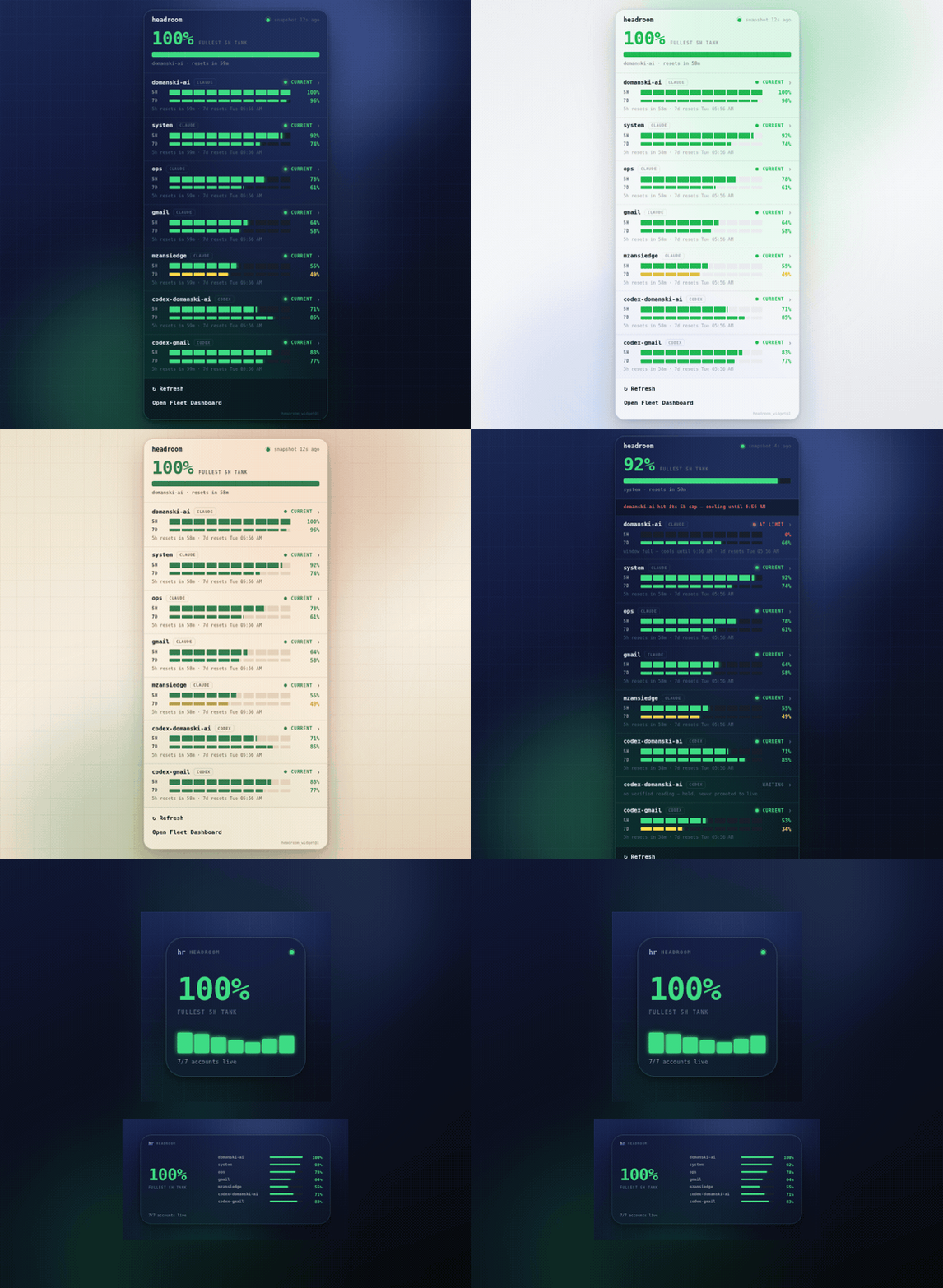
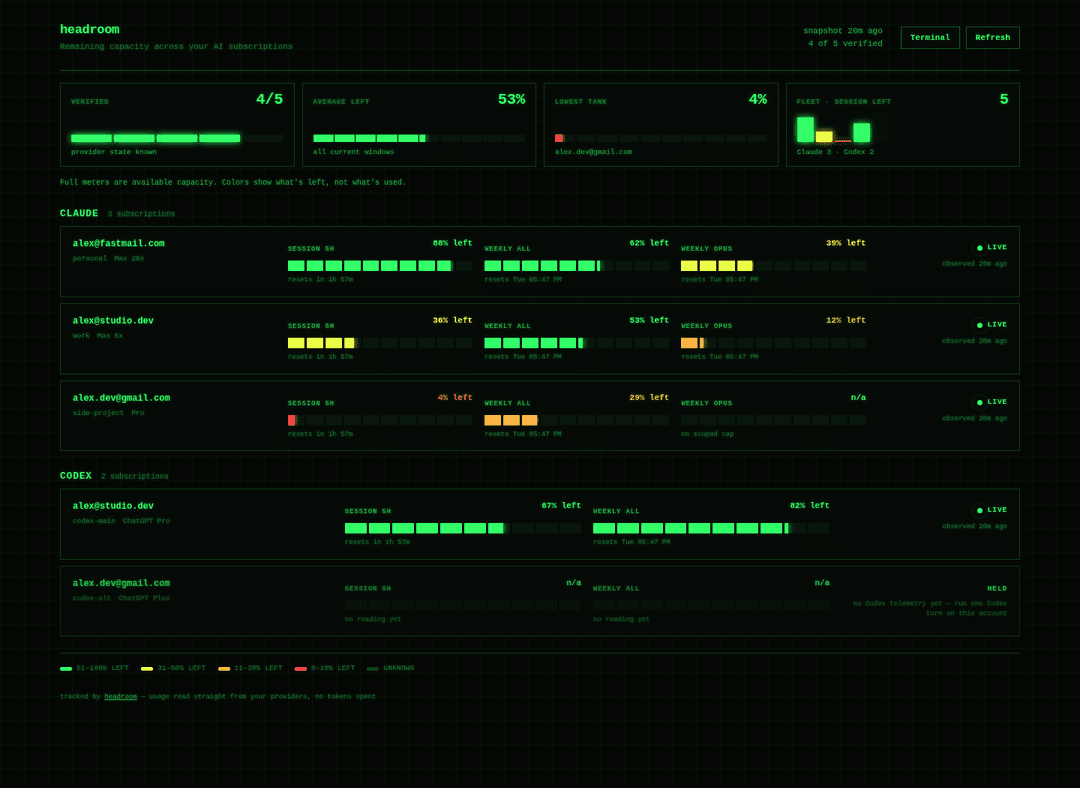
Five built-in themes (Midnight, Minimal, Chrome, Paper, Terminal), switchable live from the dashboard. The setup wizard asks how you want it to look.
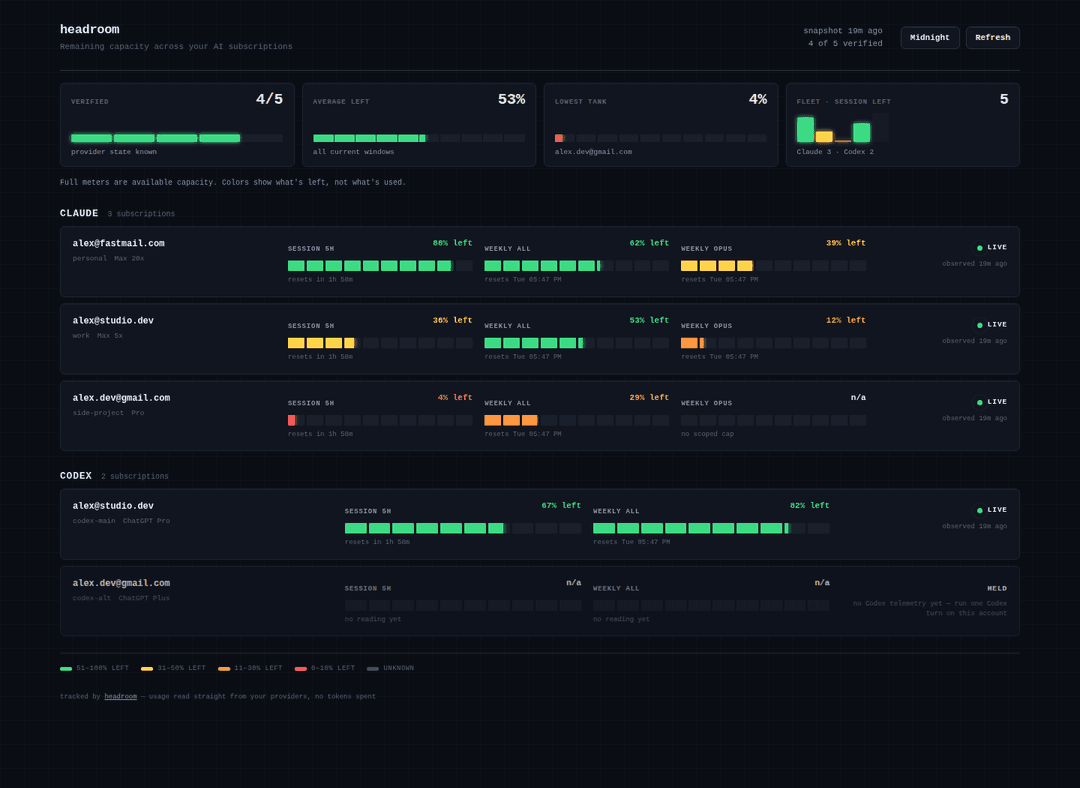
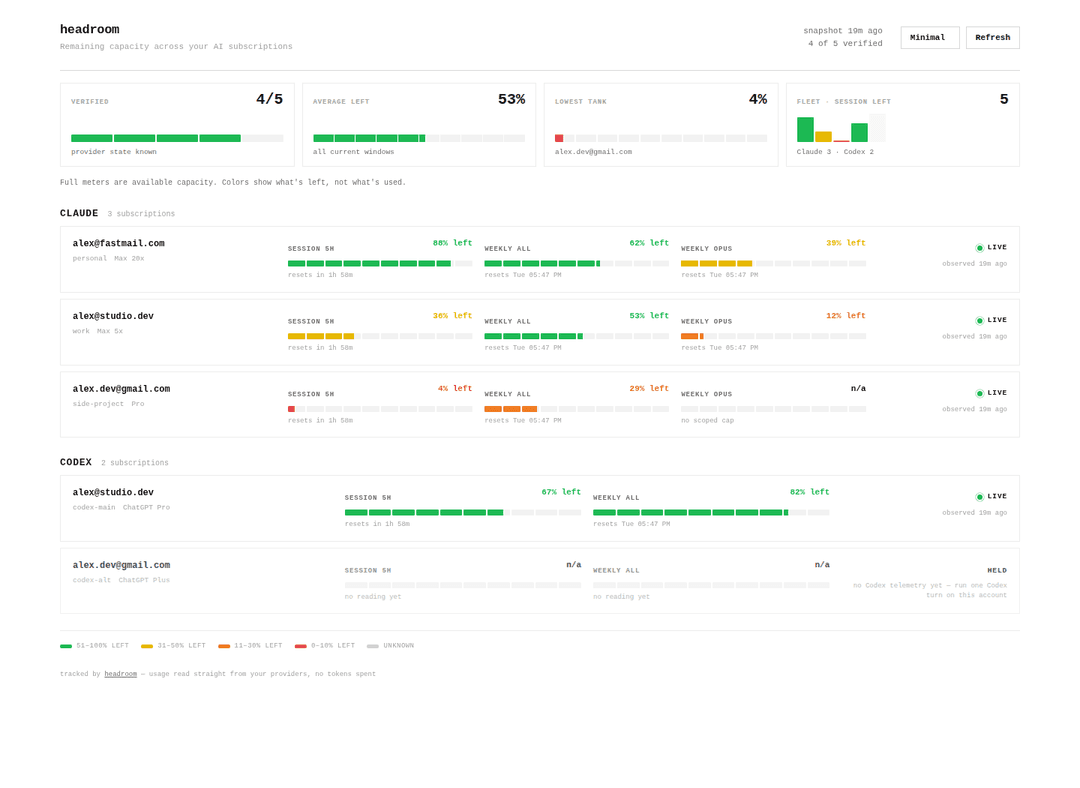
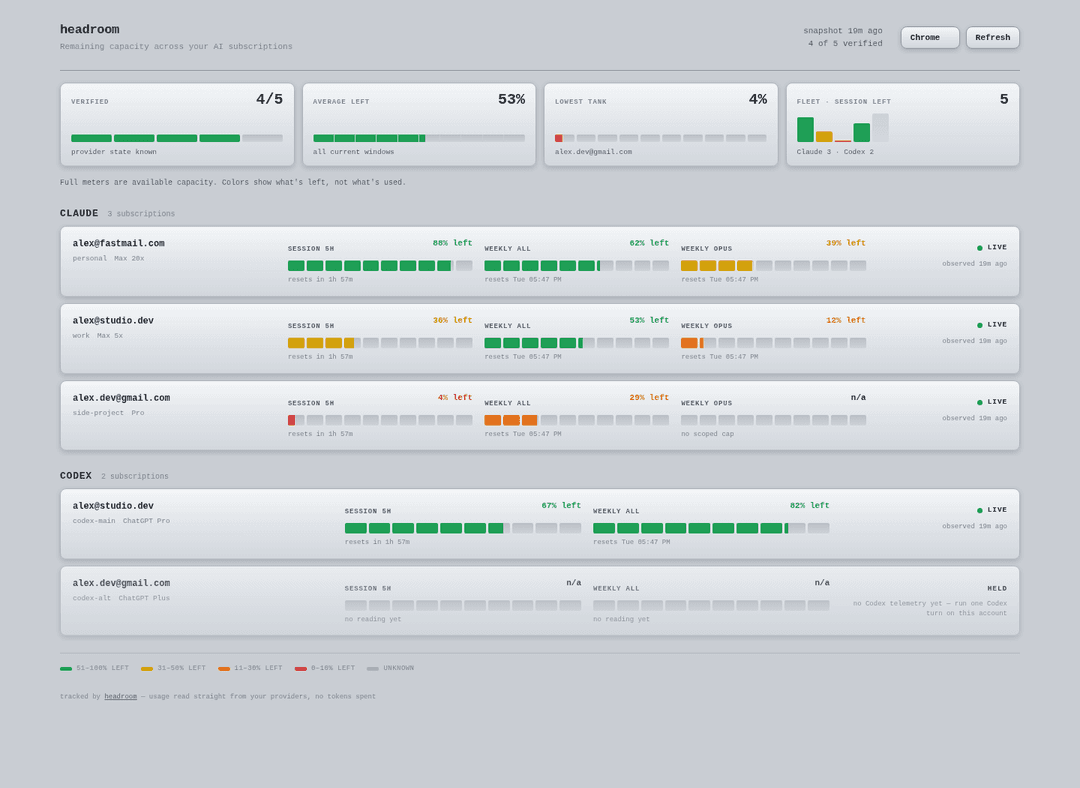
All five themes (static)
| Midnight | Minimal |
|---|---|
 |  |
| Chrome | Terminal |
|---|---|
 |  |
Why this exists
If you run more than one Claude or ChatGPT subscription (work + personal + team), you know the drill: a session dies with "you've hit your limit", you have no idea how much is left on the other accounts, and you burn ten minutes logging in and out to find out.
headroom fixes all three problems:
- See — every account's 5-hour, weekly, and model-scoped windows on one page, color-coded by what's left, not what's used.
- Read for free — usage comes live from the same reads your CLIs already use (Anthropic's OAuth usage API; the Codex app-server's rate-limits read). Checking your limits never consumes them.
- Rotate —
headroom claudelaunches on the first account in your preference order with proven headroom. When a limit hits,headroom rotate(or the/rotatorskill inside Claude Code) cools that login down until its window resets and hands you the next one.
Quickstart
Requirements: Python 3.9+ (stdlib only — no pip installs), macOS or Linux,
and the claude and/or codex CLIs you already use. (On macOS, connect
Claude accounts with a fresh headroom connect login rather than adopting the
Keychain-backed default — see docs/KNOWN-LIMITS.md.)
git clone https://github.com/domanski-ai/headroom
cd headroom
./install.sh              # symlinks bin/headroom onto your PATH
headroom serve --demo     # OPTIONAL: preview it now with sample data, no setup
headroom setup            # the wizard: connects accounts, styles your dashboard
Want to see it before connecting anything? headroom serve --demo opens the
dashboard on bundled sample data — it's exactly what the screenshots show.
The wizard finds logins already on your machine (~/.claude, ~/.codex) and
adopts them in place — credentials are never moved, copied, or read beyond
what's needed to verify who's logged in. Extra accounts get their own isolated
config home and log in through the provider's own flow.
Then:
headroom serve --open      # live dashboard at http://127.0.0.1:8377
headroom status sonnet     # who has capacity right now, and why not
headroom claude            # launch Claude Code on the best account
headroom rotate            # limit hit? cool this login, switch to the next
The commands
| command | what it does |
|---|---|
headroom setup | first-run wizard: accounts + dashboard style quiz |
headroom connect | add another account (guided login, clobber-proof) |
headroom collect | refresh usage for every account (no tokens spent) |
headroom status [model] | table: every account, its windows, and exactly why any is skipped |
headroom pick <model> | print the best account name (exit 2 if none) — script-friendly |
headroom env <model> | print the export CLAUDE_CONFIG_DIR=... line for the best account |
headroom claude / codex [args] | launch the CLI on the best account |
headroom run <model> -- <cmd> | headless run with automatic rotation on limit-hit |
headroom rotate [model] | cool the current account, hand you the next |
headroom serve [--open] | local live dashboard (auto-refreshes stale data) |
headroom serve --demo | preview the dashboard with bundled sample data — no accounts needed |
headroom statusline | color-coded capacity for your Claude Code status line |
headroom doctor | environment + config health check (handy for bug reports) |
How the reads work (and why they're safe)
- Claude — real-time. Your login token already has access to
api.anthropic.com/api/oauth/usage, the endpoint the Claude apps themselves use to draw their usage UI. headroom calls it read-only and verifies the organization the response belongs to matches the login bound to that slot — a swapped or clobbered login can never report another account's headroom. Claude usage is always live. - Codex — real-time. headroom reads Codex usage live from the Codex
app-server (
codex app-server→account/rateLimits/read+account/read), bound to each account's own config home. That's a live, identity-verified read of the same rate-limit data ChatGPT/Codex uses — not a scrape of stale session logs — so Codex usage is as current as Claude's, and Codex accounts are routed and rotated just like Claude ones. (On an older Codex CLI without the app-server, headroom falls back to a best-effort session-log read and the router holds those accounts until a fresh reading appears.)
Every account is optional — run only Claude, only Codex, or both. Both providers are read live, identity-bound, and fully routed.
- Snapshots are written atomically. The dashboard gets a sanitized projection
(optionally with emails redacted) — raw identity material stays in the
private state directory with
0600permissions.
Fail-closed by design
headroom never guesses. An account with a stale reading, an unverifiable
identity, an out-of-range percentage, or an active cooldown is held — shown
on the dashboard as held, skipped by the router, with the reason spelled out
in headroom status. If no account has proven capacity, pick says so with a
non-zero exit instead of pointing you at a login that will die mid-task.
Connecting accounts is protected the same way: a fresh login that turns out to be an account you already connected is rolled back and refused, because two slots silently sharing one login is how you eat a week's quota by accident.
Claude Code integration
See integrations/claude-code — a status line
showing live capacity at the bottom of every session, and a /rotator skill
so Claude can rotate accounts for you when a limit hits.
Hosting the dashboard somewhere else
headroom dashboard builds two static files (index.html + usage.json)
in ~/.headroom/state/public/. Put them behind any static host or reverse
proxy; add a cron for headroom collect to keep the JSON fresh. Turn on
redact_emails in setup if the page might be visible to others.
Security posture
The engine was adversarially reviewed cross-model (GPT-5.6 at x-high reasoning effort) before first release; every fixable finding is patched and the deliberate tradeoffs are documented in docs/KNOWN-LIMITS.md. Highlights: auth-override environment variables are scrubbed from every provider subprocess, usage snapshots are atomic with a sanitized public projection (emails redacted by default), authenticated requests never follow redirects, corrupt protective state holds routing instead of clearing it, and stale data is always shown as held — never promoted to live.
A note on multiple accounts
headroom manages accounts you legitimately hold — a personal plan, a work plan, a team seat. It doesn't create accounts, share credentials, or bypass provider controls; it just routes your own tools at your own logins and tells you what's left. Check your providers' terms if you're unsure what applies to your setup.
License
MIT — see LICENSE.
// faq
What is headroom?
Track and rotate your Claude & Codex usage across accounts from one live dashboard — read live, never spending a token.. It is open-source on GitHub.
Is headroom free to use?
headroom is open-source under the MIT license, so it is free to use.
What category does headroom belong to?
headroom is listed under devtools in the Claudeers registry of Claude-compatible tools.
// embed badge

[](https://claudeers.com/headroom-3)
// retro hit counter

[](https://claudeers.com/headroom-3)
// reviews
// guestbook
// related in Developer Tools
 🔓
🔓The agent harness performance optimization system. Skills, instincts, memory, security, and research-first development for Claude Code, Codex, Opencode, Curs…
 🔓
🔓Makes your AI agent think like the laziest senior dev in the room. The best code is the code you never wrote.
 🔓
🔓Use Garry Tan's exact Claude Code setup: 23 opinionated tools that serve as CEO, Designer, Eng Manager, Release Manager, Doc Engineer, and QA
 🔓
🔓AI coding assistant skill (Claude Code, Codex, OpenCode, Cursor, Gemini CLI, and more). Turn any folder of code, SQL schemas, R scripts, shell scripts, docs,…