
harness-profiler
Records every skill, agent, and tool call of a Claude Code session, and shows which calls share a context and what each one costs in tokens.
Install with your AI
Paste into Claude Code, Cursor, or any agent — it reads the repo and wires the tool into your project.
Install and set up harness-profiler (claude-plugin project) into my current project.
Found on https://claudeers.com/harness-profiler
Repo: https://github.com/afurmanov/harness-profiler
Homepage/docs: https://afurmanov.com
Detected install method: claude-plugin → /plugin install harness-profiler@afurmanov/harness-profiler
Category: automation. Platforms: cli, api, web.
Read the repo's README for exact setup and env vars, then install it and wire it into my project.

Claudeers Health Verdict:
unknown; community-verified: false. Confirm the source before running anything.
⚠ Unverified / not recently updated — review before pasting a run-this config.
/plugin marketplace add afurmanov/harness-profiler
/plugin install harness-profiler@afurmanov/harness-profiler
git clone https://github.com/afurmanov/harness-profiler
// compatibility
| Platforms | cli, api, web |
|---|---|
| Operating systems | — |
| AI compatibility | claude |
| License | MIT |
| Pricing | open-source |
| Language | HTML |
harness-profiler
Why you might need it
If you built or use a non-trivial Claude Code or Codex setup (skills, subagents, and memory files working together), you might have run into one of these:
- It does not do what you expect.
- It takes too much time.
- It eats too many tokens.
harness-profiler shows what your setup does underneath. It records only what Claude Code itself reports through hooks, and it gives you what a regular profiler does, a call tree with timings and costs.
Let's take a small example. An orchestrator skill picks up new stories in an epic and starts a process-story subagent for each one. That subagent runs the planner and implementor skills, and implementor calls validator in a separate context, which returns PASS or FAIL. When a story passes, process-story uses a github skill, also in its own context, that writes the pull request description and calls validator again to check it.
You might wonder whether validator is called at all, and whether it checks the right thing each time. You run the orchestration for a single story and get this:
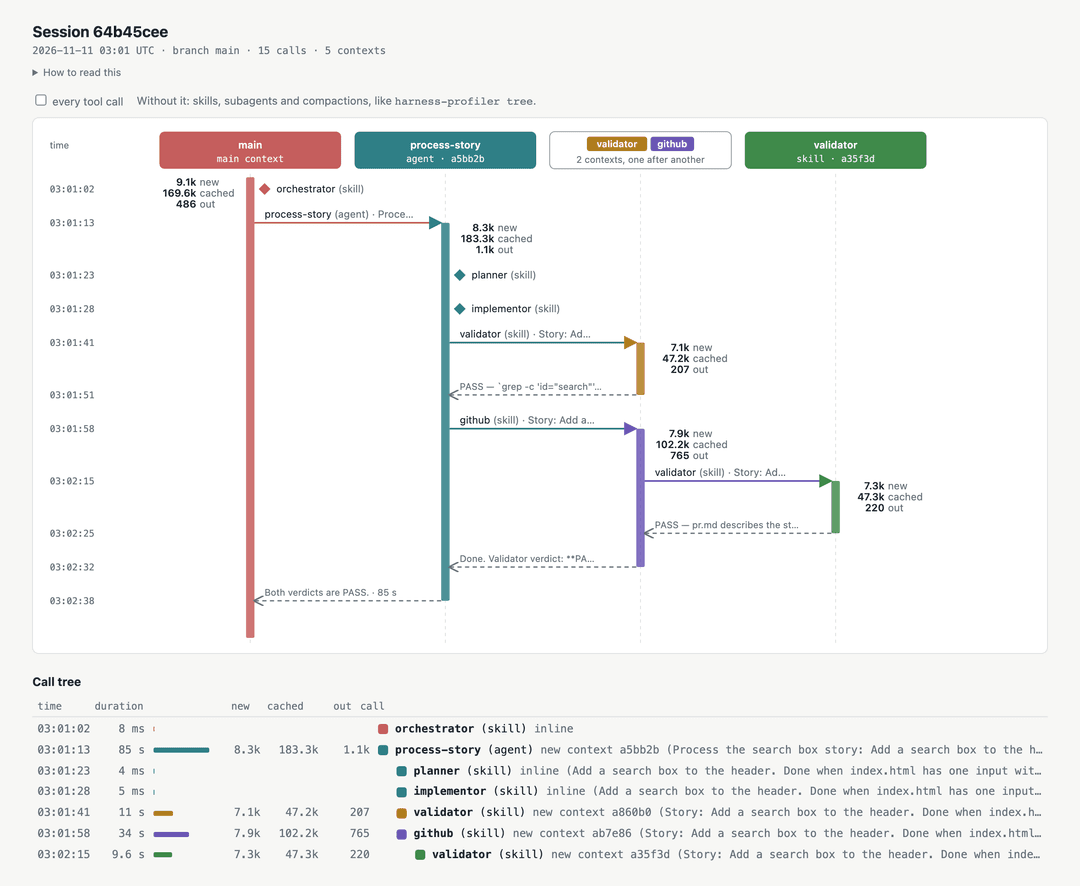
It is a UML sequence diagram with one addition: each vertical bar is a context, a conversation history the model reads. process-story (a subagent), github, and each validator call (skills with context: fork) start fresh, so each gets its own color. A subagent that starts with a copy of its caller's history (Claude Code's built-in fork agent) keeps the caller's color. To save width, contexts that don't overlap in time share a column: the first validator ended before github started, so the two sit in one column, and its header has a chip for each in the color of its bar. Diamonds mark skills loaded inline, into the caller's context. Next to each bar are the tokens that context spent. The example is recorded from a real session, described in e2e/.
Install
You need Node 18 or newer and git. harness-profiler isn't on npm yet, so npx runs it straight from GitHub.
Claude Code on your machine
In Claude Code, run:
/plugin marketplace add afurmanov/harness-profiler
/plugin install harness-profiler@harness-profiler
Run /reload-plugins, or start a new session. Every tool call from then on lands in the trace.
Claude Code on the web
Cloud sessions install only plugins synced from your claude.ai account, not plugins enabled in a repository's settings. So commit the hook to the repository instead. From the repository root on your machine:
npx -y github:afurmanov/harness-profiler init claude
git add .claude/harness-profiler .claude/skills/show-profile .claude/settings.json && git commit -m "Record tool calls with harness-profiler"
init copies the hook to .claude/harness-profiler/, adds its entries to .claude/settings.json, keeping everything else there, and adds the show-profile skill to .claude/skills/. Run it again after you update harness-profiler. A Claude Code session already running in that repository on your machine starts recording at once, because it reads hooks from .claude/settings.json as the file changes.
Codex
Not supported yet. See Constraints.
Check it
From the repository you work in:
npx -y github:afurmanov/harness-profiler doctor
It says which Node runs the hook, where traces go, which hook is installed, and whether a committed copy is out of date. Without Node the hook does nothing, silently, and doctor says so.
Usage
In the session
Before you leave a session, ask Claude for its profile:
/show-profile
With the plugin, the command is /harness-profiler:show-profile. Claude renders the trace and puts the page where you can open it:
- On the web, as a private claude.ai artifact, and you get a link. A cloud session's container is thrown away when the session ends, and the trace goes with it, so this is the way to see a web session's trace. If the session can't publish an artifact, Claude commits the page and the trace under
harness-profile/on the session's branch and pushes them. - On your machine, in your browser.
The trace ends where the skill runs, so the calls that render the page aren't on it.
From the command line
Run these from the repository you worked in. The newest session as a text tree:
npx -y github:afurmanov/harness-profiler tree
The same session as the diagram above, one self-contained page:
npx -y github:afurmanov/harness-profiler tree --format html > trace.html
tree also takes a session id prefix (tree 11cf), --branch <name> for every session recorded on that branch, and --verbose for every tool call, untrimmed. In a repository with the committed hook, sh .claude/harness-profiler/hp.sh tree does the same with no network.
The text tree of the example, one line per skill or subagent call:
time     duration             new  cached    out  call
03:01:02     8 ms ▏                               orchestrator (skill) inline
03:01:13     85 s ████████   8.3k  183.3k   1.1k  process-story (agent) new context a5bb2b (Process the search box story: Add…) -> Both verdicts are PASS.
03:01:23     4 ms                                   planner (skill) inline (Add a search box to the header. Done when index.html has one input with id "search".)
03:01:28     5 ms                                   implementor (skill) inline (Add a search box to the header. Done when index.html has one input with id "sea…)
03:01:41     11 s ██▉        7.1k   47.2k    207    validator (skill) new context a860b0 (Story: Add a search box to the hea…) -> PASS — `grep -c 'id="search"…
03:01:58     34 s █████      7.9k  102.2k    765    github (skill) new context ab7e86 (Story: Add a search box to the head…) -> Done. Validator verdict: **PAS…
03:02:15    9.6 s ██▋        7.3k   47.3k    220      validator (skill) new context a35f3d (Story: Add a search box to the he…) -> PASS — pr.md describes the …
Each line starts with fixed columns: start time (UTC), duration with a bar, and the tokens the new context spent (new, cached, out). The bar uses a square-root scale, so the longest call fills it and short ones still show. Then come the name and kind, where the call ran (inline or new context <id>), its arguments, and the first line of its result. --verbose adds every other tool call under the context that made it.
How it works
The plugin registers hooks that run after every tool call, when a subagent stops, when a session starts, and before and after a compaction. Each hook appends one JSON line to .harness-profile/<session-id>.jsonl at the git root:
{"v":2,"harness":"claude","at":"2026-11-11T02:03:35.731Z","session":"6bf84955-b026-428a-b2e2-ad3bb1a3cb72","tool_use_id":"toolu_01BQtQxAxtVc1uDmGEyvbNJ1","tool":"Skill","name":"planner","duration_ms":12,"ok":true,"branch":"main","args":"Add a search box to the header. Done when index.html has one input with id \"search\".","context_tokens":44437}
tree reads these lines and builds the contexts: which call started which subagent, and which subagent made each call. The first write adds .harness-profile/ to .git/info/exclude, so traces stay out of commits. Nothing leaves your machine unless you run /show-profile in a cloud session.
The whole tool is one dependency-free file, plugin/libexec/hp.js, started by a small shell launcher, plugin/libexec/hp.sh, plus the page template plugin/libexec/view.html. The plugin/ folder is all that Claude Code installs. The rest of the repository is tests, the recorded example, and notes. The hook runs in the background (async), so tool calls don't wait for it, and it exits 0 whatever happens, so a broken trace doesn't break your session.
Claude Code (web or CLI)
Claude Code on the web and the CLI send the same hook data, so the trace is the same in both. A forked skill or a subagent reports its agent id, and every call it makes carries that id, so the tree links calls by id, not by time. A subagent or forked skill started in the background returns at once, so its end and tokens come from its last SubagentStop, and its result is the report it hands back. Tokens come from Claude Code's transcript of each context under ~/.claude/projects/.
Codex (web or CLI)
Not supported yet. For Codex on your machine, what the hook can see is in Constraints. Codex on the web is out of scope for now.
Tricks and tips
The trace is plain JSON lines, so Claude can read it. Only you know what your setup should do, so write those expectations down as a skill in your project, and run it after a session:
---
name: check-trace
description: Checks the newest harness-profiler trace against what the story setup should do.
---
Run `npx -y github:afurmanov/harness-profiler tree --verbose` and check:
1. Every story ran in its own `process-story` subagent: `planner`, then `implementor`, then `validator`, in that order.
2. `github` ran inside `process-story` only after the first `validator` reported PASS, and called `validator` on `pr.md`.
3. Every `validator` ran in a new context, never inline, and returned PASS or FAIL on its first line.
4. No skill ran twice for the same story, other than the two `validator` calls.
Report each check as pass or fail, with the tree line that shows it.
Constraints
- What a context holds. The trace knows how many tokens a context held and spent, not what those tokens were.
- The transcript format is undocumented. If it changes, the token numbers disappear rather than go wrong.
- What an inline skill costs. Its tokens are part of its caller's, and the calls after it can't be told apart from the caller's own.
- Tokens come in three kinds:
newinput (plain input and prompt-cache writes),cachedinput that the prompt cache already held, andoutput. A model call doesn't remember the previous one. Each call sends the context's whole history again. To process input, the model computes internal state for every token, and each token's state depends on all the tokens before it. The prompt cache keeps that state for a prefix of the history for a few minutes. When the next call starts with the same prefix, the model reuses the stored state instead of computing it again, so those tokens cost less and come back faster. Only the new tail is computed, and writing it to the cache costs a little more than plain input. Output is the most expensive kind: the model produces it one token at a time. So a context's cached count grows fast but stays cheap, and a subagent that copies its caller's history sends many tokens that are mostly cache reads. How a subscription counts these against its limits isn't published, so the profiler shows counts, not a share of your limit. - Only the tools the model calls. Claude often reads and edits files through Bash (
cat,sed, apython3one-off), Claude Code on the web especially. Those show up as Bash calls, and the trace then has few or no Read, Edit, Grep, or Glob calls. - Windows. The hook is started by
sh, so it runs under Git Bash or WSL. Without Git Bash, Claude Code on Windows can't start it and nothing is recorded. - Codex, from recorded Codex 0.166 sessions:
- Codex runs a hook only after you trust it in
/hooks. Until then it skips the hook without a warning. - Codex reports no tool failures. A failed shell command arrives as a normal call with an empty response.
- Codex has no skill call. It counts a skill as used when a shell command reads its
SKILL.mdor runs a script from the skill's directory, so a skill used from its description alone leaves no trace.context: forkis ignored. spawn_agentreturns only a task name. The tree links a subagent to the latest spawn before it started, so two spawns in flight at once can be swapped.
- Codex runs a hook only after you trust it in
Turn it off
- Plugin:
/plugin uninstall harness-profiler@harness-profiler. - Committed hook: remove the
harness-profiler/hp.shentries from.claude/settings.jsonand delete.claude/harness-profiler/. - Traces: delete
.harness-profile/.
Development
node --test
The tests need only Node 18+. docs/design.md has the decisions and what Claude Code's hooks report. e2e/README.md has the recorded end-to-end run and how to record it again.
License
MIT
// faq
What is harness-profiler?
Records every skill, agent, and tool call of a Claude Code session, and shows which calls share a context and what each one costs in tokens.. It is open-source on GitHub.
Is harness-profiler free to use?
harness-profiler is open-source under the MIT license, so it is free to use.
What category does harness-profiler belong to?
harness-profiler is listed under automation in the Claudeers registry of Claude-compatible tools.
// embed badge

[](https://claudeers.com/harness-profiler)
// retro hit counter

[](https://claudeers.com/harness-profiler)
// reviews
// guestbook
// related in Automation & Workflows
 🔓
 🔓
The API to search, scrape, and interact with the web at scale. 🔥
 🔓
🌐 Make websites accessible for AI agents. Automate tasks online with ease.
 🔓
Taste-Skill - gives your AI good taste. stops the AI from generating boring, generic slop