
harness-bridge
Point any coding harness (Claude Code, Codex, OpenCode, Pi, OMP, Crush, Copilot, Grok…) at any OpenAI/Anthropic/Responses-compatible inference endpoint. Core…
Install with your AI
Paste into Claude Code, Cursor, or any agent — it reads the repo and wires the tool into your project.
Install and set up harness-bridge (git-clone project) into my current project.
Found on https://claudeers.com/harness-bridge
Repo: https://github.com/0xSero/harness-bridge
Homepage/docs: —
Detected install method: git-clone → git clone https://github.com/0xSero/harness-bridge
Category: devtools. Platforms: cli, api, web.
Read the repo's README for exact setup and env vars, then install it and wire it into my project.

Claudeers Health Verdict:
active; community-verified: false. Confirm the source before running anything.
git clone https://github.com/0xSero/harness-bridge
// compatibility
| Platforms | cli, api, web |
|---|---|
| Operating systems | — |
| AI compatibility | claude |
| License | MIT |
| Pricing | open-source |
| Language | TypeScript |
Local AI
Point any coding harness — Claude Code, Codex, OpenCode, Pi, OMP, Crush, Copilot, Grok — at any OpenAI-, Anthropic- or Responses-compatible inference endpoint. Pick a model from what the endpoint actually serves, click a harness, and it opens already talking to that model.
Nothing you own is edited. Your ~/.claude.json, ~/.codex/config.toml and
~/.config/opencode are untouched: the endpoint, key and model travel in the launch
environment, and the only setting the tool persists is its own selection.
Four packages, one core:
| Package | What it is |
|---|---|
packages/core | providers, model discovery, launch plans, sessions |
packages/cli | the harness-bridge / hbr executables |
packages/tray | Local AI — the macOS menu bar app |
packages/web | a browser UI on 127.0.0.1 |
Everything else is a thin shell over the core; each shell issues the same commands you would type.
Quick start
Requires Bun ≥ 1.1; the menu bar app needs macOS with Xcode command line tools.
git clone https://github.com/0xSero/harness-bridge && cd harness-bridge
bun install
cd packages/cli && bun link      # puts `harness-bridge` and `hbr` on your PATH
# 1. name an endpoint
harness-bridge providers add --name HomeLab --url http://host:8080/v1 --key sk-…

# 2. see what it actually serves, and pick
harness-bridge models
harness-bridge use deepseek-v4.1-flash

# 3. open a harness on it
harness-bridge run claude
The key is written to ~/.config/harness-bridge/config.json, mode 0600. It is never
passed on a command line, never logged, and never committed. A session never contains it
either — see Sessions.
macOS menu bar
bash packages/tray/build.sh builds Local AI.app and a Local AI.dmg; install from the
DMG, or:
open -a "/Applications/Local AI.app"
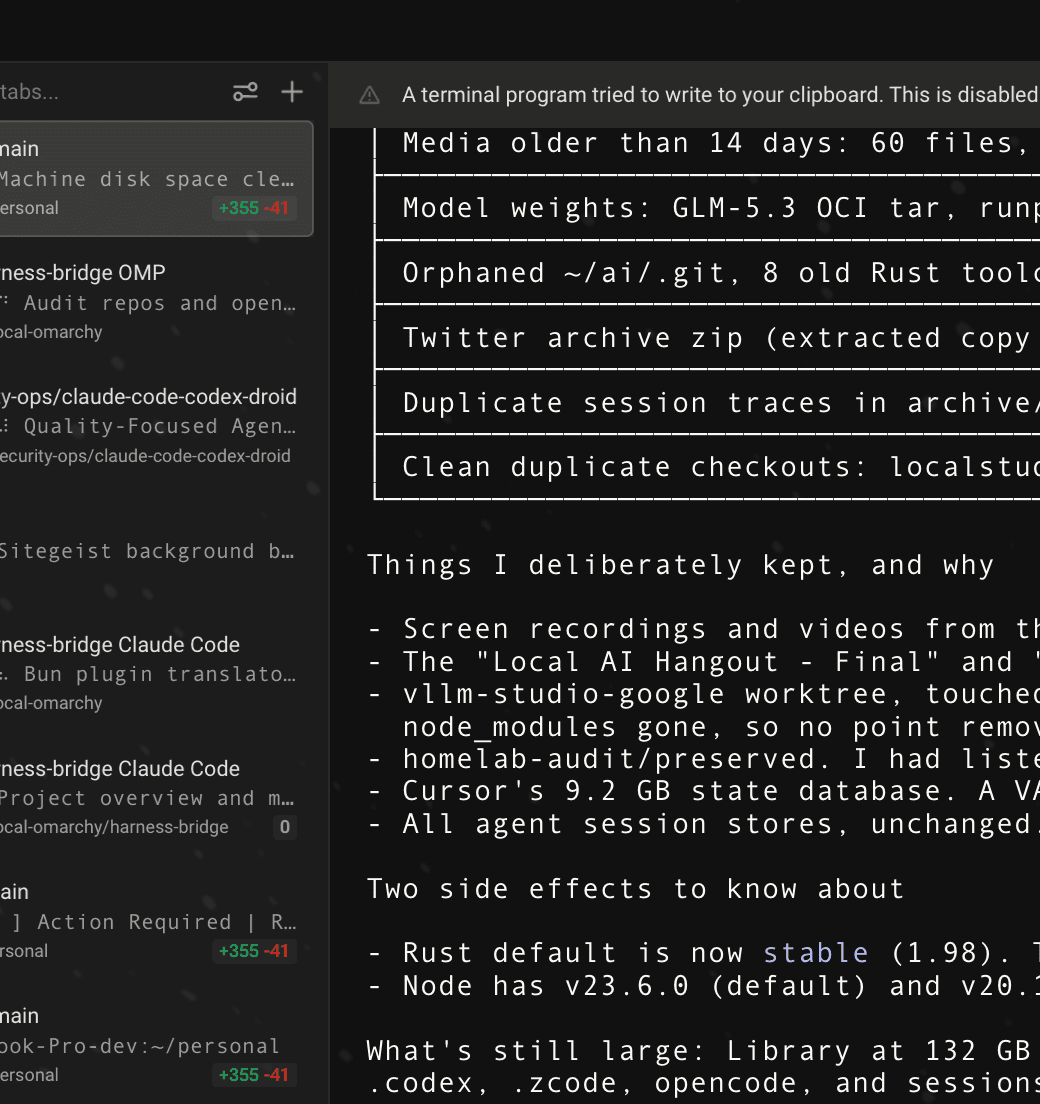
The panel shows the model in use, everything pinned beside it, the folder and terminal a session opens in, and every installed harness. Settings holds the providers — select one to edit it; the key is never displayed and a blank field keeps the stored one — and the full model catalogue, with pin toggles.
Sessions are a command
A session is not a generated script. It is one command you can read:
harness-bridge run --harness omp --exec --dir /Users/you/project
The terminal is handed exactly that. It re-enters the CLI, which builds the launch
environment at run time from the 0600 config — so no key is ever written to a file,
and a session always reflects your current selection rather than one frozen when a
command was composed. Delete ~/.config/harness-bridge/ and the tool leaves no trace.
Choosing the terminal
harness-bridge terminal                 # what is installed, and what is in use
harness-bridge terminal ghostty         # warp, terminal, iterm, kitty, wezterm, …
harness-bridge terminal custom --command 'open -a WezTerm {dir}'
auto, the default, follows $TERM_PROGRAM: launch from Warp and it opens in Warp;
from Ghostty, in Ghostty. Each terminal has its own mechanism — Ghostty, kitty, Alacritty
and WezTerm take the command as argv; Terminal.app and iTerm are driven by AppleScript;
Warp has no -e, so it is driven by a Tab Config
(warp://tab_config/<name>), which opens a tab in the window that already has focus
and only opens a window when none is open. That file is the only thing this tool writes
into another app's directory.
{command}, {dir} and {name} substitute into a custom template.
Choosing the folder
harness-bridge dir ~/code          # remembered for every later session
harness-bridge run --dir /tmp omp  # or just this one
With no dir set, a session opens wherever the shell started. The panel has a folder
picker and the web UI a text field for the same setting.
Harness flags
Claude Code and Codex skip their own confirmation prompts by default —
--dangerously-skip-permissions and --dangerously-bypass-approvals-and-sandbox. That is
convenient against a local endpoint and worth knowing about, so it is not hidden:
harness-bridge args claude                 # what it launches with
harness-bridge args claude -- --permission-mode acceptEdits
harness-bridge args claude --default       # back to the built-in flags
harness-bridge run --safe claude           # omit them for this one launch
Dialects
A harness is only offered when the endpoint speaks its dialect. That is a correctness rule, not a preference: Responses-shaped traffic to a Chat endpoint fails on the first turn.
Which dialects an endpoint serves is discovered, not declared: providers scan sends a
one-token request to /chat/completions, /messages and /responses and records what
answers. Running it after a provider changes — or an engine gains a dialect — is what
unblocks a harness that was greyed out.
| Harness | Dialect | How it reaches the endpoint |
|---|---|---|
claude | messages | ANTHROPIC_BASE_URL, ANTHROPIC_AUTH_TOKEN, ANTHROPIC_MODEL, --model |
codex | responses | -c model_providers.local.*, -c model_provider=local, LOCAL_AI_KEY |
opencode | chat | inline OPENCODE_CONFIG_CONTENT provider, key via {env:…} |
pi, omp | chat | a config the harness reads through its own environment variable |
crush | chat | plugin-owned XDG_CONFIG_HOME |
copilot | chat | COPILOT_PROVIDER_BASE_URL, COPILOT_PROVIDER_API_KEY |
grok | chat | plugin-owned GROK_HOME/config.toml |
aider, hermes, and anything else | chat | OPENAI_BASE_URL, OPENAI_API_BASE, OPENAI_MODEL |
The context window a harness is told about is the model's real one, read from the
endpoint's /models, so nothing silently assumes 128k. Claude Code does not know locally
served model names, so the bridge also sets CLAUDE_CODE_MAX_CONTEXT_TOKENS and
CLAUDE_CODE_DISABLE_UNKNOWN_MODEL_WINDOW_ENFORCEMENT — it then uses the real window
instead of warning and compacting early.
Reasoning
auto by default: nothing is sent, and the harness and engine keep their own settings.
harness-bridge providers reasoning high
| Harness | How the level is passed |
|---|---|
| Claude Code | MAX_THINKING_TOKENS (4096 / 16384 / 32768) |
| Codex | -c model_reasoning_effort=<low|medium|high>, and minimal for off |
| Pi, OMP | the supportsReasoningParams compat flag is lifted, so params are sent |
| others | no reasoning knob; the setting is ignored |
Missing harnesses install themselves
harness-bridge run --harness crush     # not installed -> installed, then launched
harness-bridge install crush           # or on its own
Installs use the vendor's own package (npm, bun or pipx). Harnesses that ship as
downloaded binaries — OMP, Grok, Hermes — are not guessed at: the tool prints the vendor's
install hint instead. --no-install refuses to install anything.
Command reference
providers                              list configured providers
providers add --name N --url U --key K [--apis chat,messages] [--reasoning L]
providers rm <id> | use <id> | reasoning <level> [provider] | show <id> [--json]
models [provider] [--fresh]            live models from the endpoint
use <model> [provider]                 select a model
harnesses [provider]                   installed, and what the endpoint can drive
install <harness>                      install one
run [model] [harness]                  open a session
     --print  --exec  --no-install  --safe  --provider <id>  --dir <path>  -- <flags…>
pin <model> | unpin <model> | pins     what the panel shows
dir [path]                             where sessions open
terminal [id|auto|custom]              which terminal sessions open in
args <harness> [-- flags | --default]  the flags a harness launches with
snapshot [--json] | status | config    the whole state, a summary, or the file path
models and snapshot cache the model list on disk for 30 seconds, so a UI opens
instantly instead of waiting on the endpoint; --fresh refetches now. When the endpoint
fails, the last list is served rather than an empty one — a momentary blip should not
blank the panel.
Web UI
bun packages/web/src/server.ts # http://127.0.0.1:4141
Providers, the model catalogue, and launching — the same commands as the CLI, in a browser. Bound to loopback with no authentication: it is for your machine, or for a tailnet you trust.
Layout
packages/core/src/core.ts        providers, sessions, launch plans
packages/core/src/harnesses.ts   what each harness is, how it installs, its default flags
packages/core/src/terminals.ts   how a session is opened in each terminal
packages/core/src/models.ts      the model list and its disk cache
packages/core/src/snapshot.ts    the read model every UI renders
packages/cli/src/cli.ts          command wiring
packages/tray/*.swift            the menu bar app
packages/web/src/server.ts       Bun.serve and the single page
Testing
bun test
Unit tests cover dialect gating, the argv and environment built for each harness, secret
handling and config round-tripping. test/cli.test.ts runs every verb in a throwaway
config home — the test that catches the bugs refactors actually introduce.
End to end, a real completion was returned through the generated launch environment on:
| Machine | Architecture | What ran |
|---|---|---|
| macOS | arm64 | Claude Code (messages), OMP (chat), Warp and Terminal.app launches |
| Pop!_OS 22.04 | x86_64 | Claude Code, OMP |
| DGX Spark, Ubuntu 24.04 | aarch64 | OMP; and Claude Code from a clean machine, installed by run before launching |
Headless hosts are fine for everything except opening a window: terminal and snapshot
work, and a launch reports the missing emulator instead of failing silently.
Licence
MIT
// faq
What is harness-bridge?
Point any coding harness (Claude Code, Codex, OpenCode, Pi, OMP, Crush, Copilot, Grok…) at any OpenAI/Anthropic/Responses-compatible inference endpoint. Core library + CLI + macOS tray + web UI.. It is open-source on GitHub.
Is harness-bridge free to use?
harness-bridge is open-source under the MIT license, so it is free to use.
What category does harness-bridge belong to?
harness-bridge is listed under devtools in the Claudeers registry of Claude-compatible tools.
// embed badge

[](https://claudeers.com/harness-bridge)
// retro hit counter

[](https://claudeers.com/harness-bridge)
// reviews
// guestbook
// related in Developer Tools
 🔓
🔓The agent harness performance optimization system. Skills, instincts, memory, security, and research-first development for Claude Code, Codex, Opencode, Curs…
 🔓
🔓Makes your AI agent think like the laziest senior dev in the room. The best code is the code you never wrote.
 🔓
🔓Use Garry Tan's exact Claude Code setup: 23 opinionated tools that serve as CEO, Designer, Eng Manager, Release Manager, Doc Engineer, and QA
 🔓
🔓AI coding assistant skill (Claude Code, Codex, OpenCode, Cursor, Gemini CLI, and more). Turn any folder of code, SQL schemas, R scripts, shell scripts, docs,…