
grey2art
From gameplay greyboxes to playable art worlds. Agent Skill for Codex, Claude Code and WorkBuddy.
Install with your AI
Paste into Claude Code, Cursor, or any agent — it reads the repo and wires the tool into your project.
Install and set up grey2art (release-binary project) into my current project.
Found on https://claudeers.com/grey2art
Repo: https://github.com/hbzheng0942/grey2art
Homepage/docs: —
Detected install method: release-binary → inspect the README
Category: skills. Platforms: cli.
Read the repo's README for exact setup and env vars, then install it and wire it into my project.

Claudeers Health Verdict:
unknown; community-verified: false. Confirm the source before running anything.
Grab the latest release asset from GitHub.
# download a build from https://github.com/hbzheng0942/grey2art/releases
git clone https://github.com/hbzheng0942/grey2art
// compatibility
| Platforms | cli |
|---|---|
| Operating systems | — |
| AI compatibility | claude |
| License | MIT |
| Pricing | open-source |
| Language | Python |
Grey2Art
Turn one gameplay greybox into playable prototypes in multiple art styles.
Setup · Install · Capabilities · Workflow · Showcases · Docs · Community
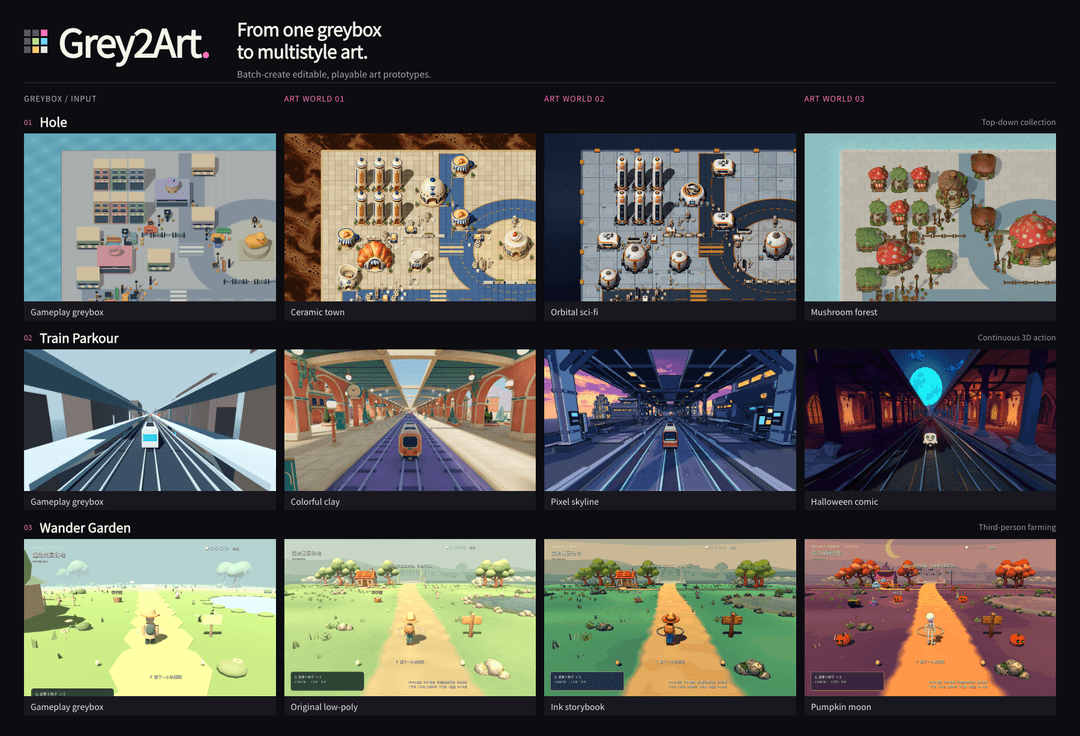
Grey2Art is an Agent Skill for Codex, Claude Code and WorkBuddy. Turn an existing playable greybox into one or more art versions, or start with a gameplay brief or reference and build the greybox first. Outputs remain editable in Godot or Unity.
Start with the quickstart to install. For game production tasks, agents use SKILL.md.
Capabilities
Use the same gameplay to compare art directions, develop a vertical slice, or extend an existing style to new areas. Start with a priority style's complete playable sample, then carry the remaining selected styles through production.
| Task | What the agent does |
|---|---|
| Explore styles | Develop scene concepts and compare composition, materials and atmosphere. |
| Plan the scene | Work out key views, spatial layout, asset responsibilities and assembly order. |
| Produce and assemble | Combine generated models, reusable assets and native geometry in an editable scene. |
| Revise and continue | Make local changes, check affected gameplay and resume interrupted work. |
Design reviews and production plans keep the work directed: choose references, agree on costs, then produce assets. Asset inspection, remeshing routes and native scene checks support the work as needed. Capabilities and tools
Gameplay
Greybox video · Art video · Hole gameplay GIF
Requirements
| Prepare | Choose |
|---|---|
| Agent and Python | Codex, Claude Code or WorkBuddy with local command execution; for production, use Python 3.11+. |
| Authoring and validation | Blender for spatial greyboxes, scale, cameras and geometry; Godot / Unity for playable loops, interactions and runtime tests. Choose for the task and retain existing project versions. |
| Image tools | Use your host's image tool or configure an image service for concepts and modeling references. |
| AI 3D provider | Choose one when generating new models: Lux3D, Meshy, Tripo, Rodin or Hi3D. Sign up and configure |
Blender is a DCC tool; a spatial greybox or .blend delivery needs no game engine. Greybox work needs no image or 3D account. Image operations use Pillow 13+; review costs before paid generation.
Quickstart
Paste this request into the agent you already use:
Install the Grey2Art Skill from https://github.com/hbzheng0942/grey2art for my current agent.
A first install needs no Python. Refresh skills or start a new session to try a task below. Install guide and offline setup
Existing greybox, one style
Use greybox-to-multistyle-art to turn <project path> into a clay-style playable art prototype.
Preserve gameplay, target <engine and device>, and keep the project editable.
One greybox, multiple styles
Use greybox-to-multistyle-art to make paper, pixel and clay playable versions of <project path>.
Preserve gameplay. Complete a whole paper-style sample first, then the other two styles.
Target: <device>.
Build a greybox first
Use greybox-to-multistyle-art to create a top-down collection game in Godot at <new directory>.
First build and check a playable greybox with movement, collection and level completion,
then develop it into a toy-style art prototype.
You can start with spatial validation:
Use greybox-to-multistyle-art to block out <scene> in Blender.
Check scale, layout and camera views, deliver an editable .blend,
then integrate it into <Godot/Unity> for a playable sample.
Start from a game reference
Use greybox-to-multistyle-art to explore <core gameplay> from <game link, screenshots or recording>.
Describe controls, camera and rules, and list what is unclear. Build one small greybox level
in <engine> at <directory>, check its core loop, then make a <style> playable art prototype.
Target: <device>.
Replace paths, styles and devices with your own, or ask the agent to propose art directions. References establish the core experience; hidden rules and dimensions need separate clarification. The agent checks the project and setup first, then presents references and costs before new asset production.
Installation and setup · Complete first task · User guide
Workflow
Greybox → art direction → scene and asset design → playable sample → multistyle expansion.
The level determines the intermediate work. A compact scene can move quickly from a concept to assembly; a longer route benefits from several key views, a rough spatial model and an explicit assembly plan. Review these decisions before committing to detailed assets.
Hole
Ceramic Town follows the greybox's layout from concept to native assembly. The final panel shows six other playable art directions built around the same gameplay.

Train Parkour
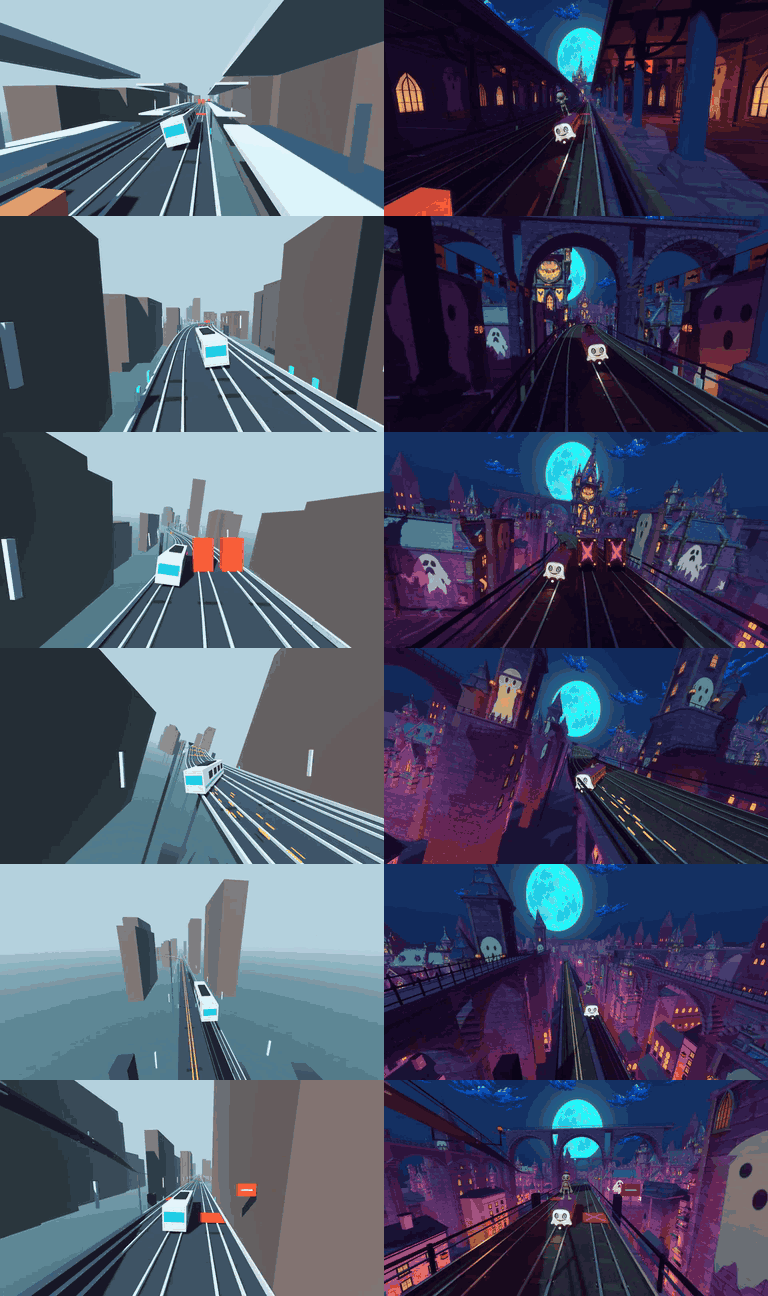
Colorful Clay turns scene concepts into a spatial recipe for route rhythm, massing and camera constraints, then an asset and assembly plan. Rough geometry checks massing and camera views before asset boards, 3D assets, an assembled slice and the playable result. Other styles extend the same gameplay.

Deliverables include editable scenes and resources, references and assembly plans, gameplay captures, and the records needed to continue the work.
Showcases

Docs and tools
Documentation · Asset tools · Support · Contribute · Release notes · MIT · Third-party notices
Community

// faq
What is grey2art?
From gameplay greyboxes to playable art worlds. Agent Skill for Codex, Claude Code and WorkBuddy.. It is open-source on GitHub.
Is grey2art free to use?
grey2art is open-source under the MIT license, so it is free to use.
What category does grey2art belong to?
grey2art is listed under skills in the Claudeers registry of Claude-compatible tools.
// embed badge

[](https://claudeers.com/grey2art)
// retro hit counter

[](https://claudeers.com/grey2art)
// reviews
// guestbook
// related in Claude Skills
 🔓
An agentic skills framework & software development methodology that works.
 🔓
 🔓
AI coding assistant skill (Claude Code, Codex, OpenCode, Cursor, Gemini CLI, and more). Turn any folder of code, SQL schemas, R scripts, shell scripts, docs,…
 🔓
💫 Toolkit to help you get started with Spec-Driven Development