
grammar-watch
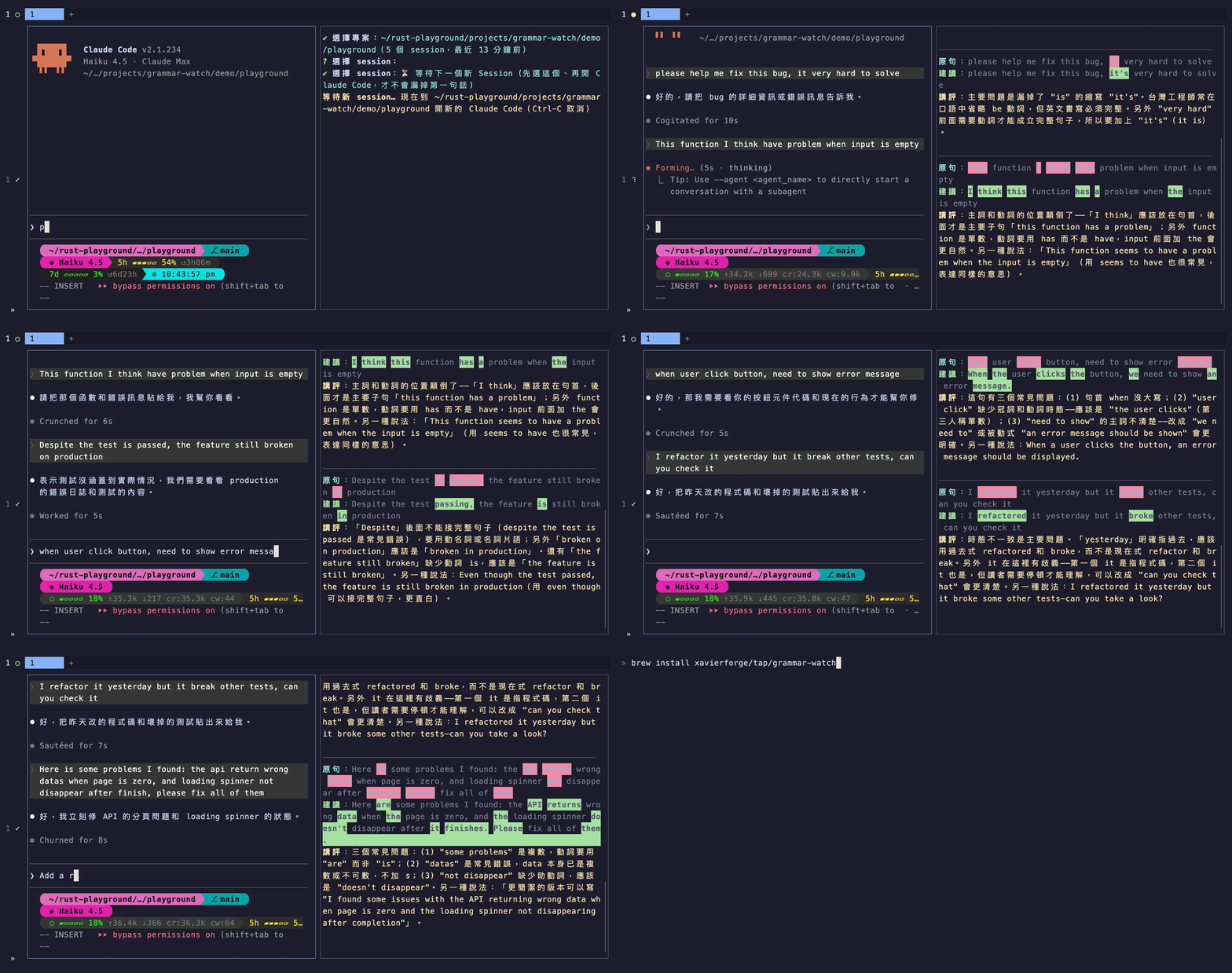
監看 Claude Code 與 Codex 的 session,即時用繁體中文講評你打的英文 prompt
Install with your AI
Paste into Claude Code, Cursor, or any agent — it reads the repo and wires the tool into your project.
Install and set up grammar-watch (release-binary project) into my current project.
Found on https://claudeers.com/grammar-watch
Repo: https://github.com/xavierforge/grammar-watch
Homepage/docs: —
Detected install method: release-binary → inspect the README
Category: devtools. Platforms: cli.
Read the repo's README for exact setup and env vars, then install it and wire it into my project.

Claudeers Health Verdict:
active; community-verified: false. Confirm the source before running anything.
Grab the latest release asset from GitHub.
# download a build from https://github.com/xavierforge/grammar-watch/releases
git clone https://github.com/xavierforge/grammar-watch
// compatibility
| Platforms | cli |
|---|---|
| Operating systems | — |
| AI compatibility | claude |
| License | Apache-2.0 |
| Pricing | open-source |
| Language | Rust |
grammar-watch
監看 coding agent(Claude Code、OpenAI Codex)的 session 紀錄,偵測到新打的 prompt 就送給 LLM,然後在終端機印出「你打了什麼 / 建議怎麼打 / 文法或單字的改進點」。
推薦在另一個 tmux window 或 Herdr pane 執行,工作時瞄一眼即可。
安裝
不需要 Rust 工具鏈,依平台擇一即可:
# macOS / Linux:Homebrew
brew install xavierforge/tap/grammar-watch

# macOS / Linux:安裝腳本(自動偵測平台,含 Apple Silicon 和 Linux aarch64)
curl -LsSf https://github.com/xavierforge/grammar-watch/releases/latest/download/grammar-watch-installer.sh | sh
# Windows:PowerShell
powershell -ExecutionPolicy Bypass -c "irm https://github.com/xavierforge/grammar-watch/releases/latest/download/grammar-watch-installer.ps1 | iex"
有 Rust 的人也可以從原始碼裝:
cargo install --git https://github.com/xavierforge/grammar-watch
更新
Homebrew 裝的用 upgrade:
brew upgrade grammar-watch
安裝腳本和 PowerShell 裝的,重跑一次上面的安裝指令就是最新版;cargo 裝的重跑時加上 --force。更新後記得重啟正在跑的 grammar-watch 才會生效。
使用說明
export ANTHROPIC_API_KEY=sk-...

# 不帶參數:互動式選單(推薦)
grammar-watch

# 或直接指定 session 檔,兩家的 JSONL 格式會自動辨識,不用擔心
grammar-watch ~/.claude/projects/<專案編碼>/<uuid>.jsonl
grammar-watch ~/.codex/sessions/YYYY/MM/DD/rollout-xxx.jsonl
互動式選單
不帶參數啟動時,會列出偵測到的專案(實際路徑、session 數、最近活動時間,最新的排最前面)。
若同時有在用 Claude Code 和 Codex 的話,選單最上面會有分頁列、使用 Tab 能進行切換(預設停在最近有活動的那家),若只用一家的人則不會看到分頁列。
選了專案之後就能選 session(顯示時間、識別碼、第一句 prompt 的預覽)。
操作方法:↑↓ 移動、Tab 換工具、Enter 或 → 確認、← 或 Esc 回上一層(← 在專案層沒作用,Esc 在專案層是離開)、打字過濾、Ctrl-C 離開。
另外,session 清單的第一個選項是「等待下一個新 Session」,它存在的理由是因為 session 檔得等使用者打出第一句話才會建立,如果等到建立之後再附著既有檔案,就會漏掉第一句話。
這時候選這個選項、再去開新的 Claude Code 或 Codex,新檔一出現就能自動接上並從頭讀,讓第一句不會被漏掉。
供應商與模型
預設 Anthropic(haiku)。用 --provider 換供應商、--model 換模型,金鑰一律讀環境變數:
| provider | 環境變數 | 預設模型 |
|---|---|---|
anthropic | ANTHROPIC_API_KEY | claude-haiku-4-5 |
openrouter | OPENROUTER_API_KEY | anthropic/claude-haiku-4.5 |
gemini | GEMINI_API_KEY | gemini-2.5-flash |
openai | OPENAI_API_KEY | gpt-4.1-mini |
export OPENROUTER_API_KEY=sk-or-...
grammar-watch --provider openrouter --model google/gemini-2.5-flash
設定檔(選用)
~/.config/grammar-watch/config.toml(如果有設定 XDG_CONFIG_HOME 則以它為準)。
全部欄位都可省略,優先級是 CLI 旗標 > 設定檔 > 內建預設:
provider = "openrouter"                 # anthropic / openrouter / gemini / openai
model = "anthropic/claude-haiku-4.5"    # 省略就用該供應商的預設
log = "~/gw-journal.md"                 # 等同 --log:講評日誌
# extra = """講評改用英文"""            # 等同 --extra:補充講評偏好(語言、語氣)
講評語言與風格(選用)
講評預設用繁體中文。想換語言或調整語氣,用 --extra 旗標或設定檔的 extra 欄位補充偏好:
# 臨時:加旗標
grammar-watch --extra "講評改用英文"

# 常駐:寫進設定檔
echo 'extra = "講評改用日文,語氣輕鬆一點"' >> ~/.config/grammar-watch/config.toml
0.4 以前的 preamble 欄位(完全自訂 system prompt)已移除,設定檔如果還有會直接報錯。現行的 extra 只能調整語言和風格。
講評日誌
把每則講評附時間戳追加到一個本地檔案,可以拿來回顧自己常犯的錯。 開啟方式如下:
# 臨時:加旗標
grammar-watch --log ~/gw-journal.md

# 常駐:寫進設定檔,之後每次自動記
mkdir -p ~/.config/grammar-watch
echo 'log = "~/gw-journal.md"' >> ~/.config/grammar-watch/config.toml
有成功生效的話,啟動時「模型:」下面會多一行「日誌:~/gw-journal.md」。
檔案是純文字(markdown 風格),每則講評一段:
## 2026-08-21 14:03:21

原文:<實際打的字,多行照原樣保留>
建議:<建議句>
講評:<講評,含另一種說法>
等日誌累積一段時間後,直接餵給任何 LLM 就可以整理出屬於自己的「常犯錯誤週報」,例如:
cat ~/gw-journal.md | claude -p "歸納這份英文講評日誌最常見的錯誤模式:每類給出現次數、兩三個原文與建議的對照例句、一句針對性的改進建議"
再搭配 cron 每週一早上跑一次,就能有全自動的學習回顧。
其他行為
- 預設只看「啟動之後」的新 prompt。若要從頭檢討整個 session 的過往對話,請加
--from-start(--from_start也可);「等待下一個新 Session」模式一律從頭讀。 - 自動跟隨:按
/clear(或 Codex 的/new)開出新 session 時會自動切換過去從頭講評,不用重開;Codex 跨午夜換日期資料夾也會跟上。 - 閒置提醒:整個監看範圍超過 15 分鐘沒動靜會提示一聲(工具可能已關閉),之後間隔翻倍再提醒。session 被 resume 的話會自動接續講評。
- 只有「純英文」的行才會送講評:純中文、純指令,或中文夾英文詞(「我先本地 build 新版本」)的行都自動跳過。
session 紀錄在哪
- Claude Code:
~/.claude/projects/<專案路徑編碼>/<session-uuid>.jsonl - Codex:
~/.codex/sessions/YYYY/MM/DD/rollout-*.jsonl
互動式選單會幫你翻這些資料夾,不用手動撈檔名。
License
依 Rust 生態慣例採 MIT / Apache-2.0 雙授權,可任擇其一使用:
除非你另有明確聲明,你提交到本專案的任何貢獻(依 Apache-2.0 授權中的定義)都視為同意以上述雙授權釋出,不附加其他條款。
// faq
What is grammar-watch?
監看 Claude Code 與 Codex 的 session,即時用繁體中文講評你打的英文 prompt. It is open-source on GitHub.
Is grammar-watch free to use?
grammar-watch is open-source under the Apache-2.0 license, so it is free to use.
What category does grammar-watch belong to?
grammar-watch is listed under devtools in the Claudeers registry of Claude-compatible tools.
// embed badge

[](https://claudeers.com/grammar-watch)
// retro hit counter

[](https://claudeers.com/grammar-watch)
// reviews
// guestbook
// related in Developer Tools
 🔓
🔓The agent harness performance optimization system. Skills, instincts, memory, security, and research-first development for Claude Code, Codex, Opencode, Curs…
 🔓
🔓Makes your AI agent think like the laziest senior dev in the room. The best code is the code you never wrote.
 🔓
🔓Use Garry Tan's exact Claude Code setup: 23 opinionated tools that serve as CEO, Designer, Eng Manager, Release Manager, Doc Engineer, and QA
 🔓
🔓AI coding assistant skill (Claude Code, Codex, OpenCode, Cursor, Gemini CLI, and more). Turn any folder of code, SQL schemas, R scripts, shell scripts, docs,…