
google-maps-scraper
scrape data from Google Maps. Extracts data such as the name, address, phone number, website URL, rating, reviews number, latitude and longitude, reviews,e…
Install with your AI
Paste into Claude Code, Cursor, or any agent — it reads the repo and wires the tool into your project.
Install and set up google-maps-scraper (git-clone project) into my current project.
Found on https://claudeers.com/google-maps-scraper
Repo: https://github.com/gosom/google-maps-scraper
Homepage/docs: —
Detected install method: git-clone → git clone https://github.com/gosom/google-maps-scraper
Category: skills. Platforms: cli, api, web.
Read the repo's README for exact setup and env vars, then install it and wire it into my project.

Claudeers Health Verdict:
active; community-verified: false. Confirm the source before running anything.
git clone https://github.com/gosom/google-maps-scraper
// compatibility
| Platforms | cli, api, web |
|---|---|
| Operating systems | — |
| AI compatibility | claude |
| License | MIT |
| Pricing | open-source |
| Language | Go |
Google Maps Scraper
Extract Google Maps business leads, emails, reviews, phone numbers, websites, ratings, coordinates, and more with a free open-source CLI, Web UI, REST API, and optional self-hosted platform.
Use it for lead generation, local business research, sales prospecting, data enrichment, or developer automation.
| Goal | Start here |
|---|---|
| Get leads into CSV/JSON | Command Line |
| Ask an AI coding agent to run a scrape | AI Agent Skill |
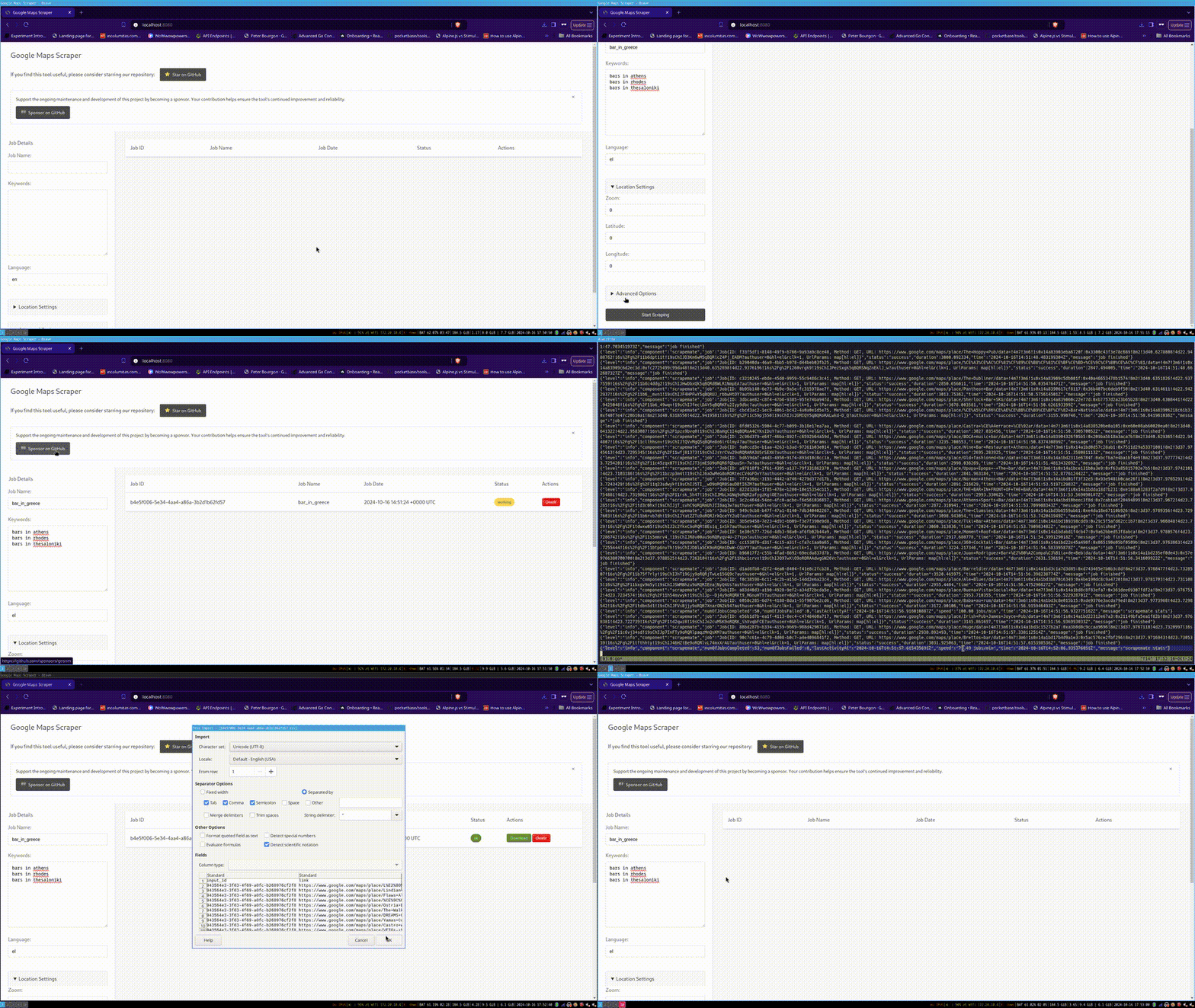
| Run a browser UI locally | Web UI |
| Automate scraping from your app | REST API |
| Run a multi-user scraping platform | SaaS Edition |
| Follow common workflows | Recipes |
If this project is useful to you, a GitHub star helps others discover it. Sponsorships help fund maintenance and new work.
Sponsored By
This project is made possible by our amazing sponsors
NetNut – Limitless Web Data Collection
Built on a fully owned premium residential proxies network infrastructure powering enterprise-grade Website Unblocker, SERP APIs, LLM scraper, ecommerce data collection, and ready-to-use datasets.
Scrap.io - Extract ALL Google Maps listings at country-scale
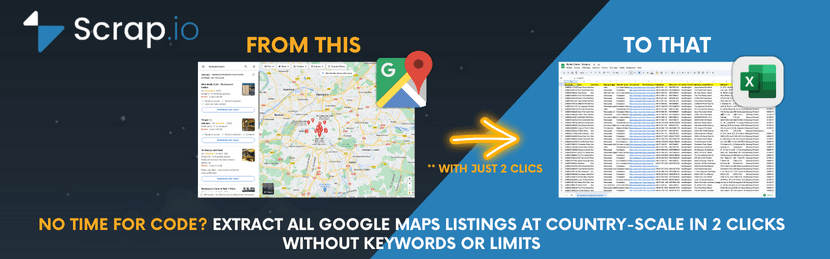
No keywords needed. No limits. Export millions of businesses in 2 clicks. Try it free →
G Maps Extractor - No-code Google Maps scraper

Chrome extension that extracts emails, social profiles, phone numbers, reviews & more. Get 1,000 free leads →
SerpApi - Google Maps API and 30+ search engine APIs
Fast, reliable, and scalable. Used by Fortune 500 companies. View all APIs →
SearchApi - Google Maps API for SERP scraping
Real-time Google Maps data with a simple integration. Explore the API →
Evomi - Swiss quality proxies for scraping
Swiss quality proxies from $0.49/GB across 150+ countries, with 24/7 support and 99.9% uptime. Visit Evomi →
HasData - No-code Google Maps Scraper & Email Extraction
Extract business leads, emails, addresses, phones, reviews and more. Get 1,000 free credits →
RapidProxy - High-Performance Proxy Solution
Unlock global access with consistent, high-speed connections from $0.65/GB, 90M+ real residential IPs worldwide, and traffic that never expires. Try it free →
LeadsDB - Your Central Database for Business Leads
Push leads via API or AI agent, remove duplicates automatically, and export when ready. Start free →
Webshare - Premium proxies for scraping at scale

The most affordable premium proxies across 195 countries & 80+ million IPs, plus a FREE plan for new users. Learn more
BirdProxies - Residential and ISP proxies

Hey, we built BirdProxies because proxies shouldn't be complicated or overpriced. Fast residential and ISP proxies in 195+ locations, fair pricing, and real support. Try our FlappyBird game on the landing page for free data!
Visit BirdProxies → | Join Discord
View all sponsors | Become a sponsor
Why Use This Scraper?
| Completely Free & Open Source | MIT licensed, no hidden costs or usage limits |
| Multiple Interfaces | CLI, Web UI, REST API - use what fits your workflow |
| High Performance | ~120 places/minute with optimized concurrency |
| 33+ Data Points | Business details, reviews, emails, coordinates, and more |
| Production Ready | Scale from a single machine to Kubernetes clusters |
| Flexible Output | CSV, JSON, PostgreSQL, S3, LeadsDB, or custom plugins |
| Proxy Support | Built-in SOCKS5/HTTP/HTTPS proxy rotation |
What's Next After Scraping?
Once you've collected your data, you'll need to manage, deduplicate, and work with your leads. LeadsDB is a companion tool designed exactly for this:
- Automatic Deduplication - Import from multiple scrapes without worrying about duplicates
- AI Agent Ready - Query and manage leads with natural language via MCP
- Advanced Filtering - Combine filters with AND/OR logic on any field
- Export Anywhere - CSV, JSON, or use the REST API
The scraper has built-in LeadsDB integration - just add your API key and leads flow directly into your database.
Quick Start
Command Line
mkdir -p gmaps-output

docker run \
  -v gmaps-playwright-cache:/opt \
  -v "$PWD/example-queries.txt:/queries.txt:ro" \
  -v "$PWD/gmaps-output:/out" \
  gosom/google-maps-scraper \
  -input /queries.txt \
  -results /out/results.csv \
  -depth 1 \
  -exit-on-inactivity 3m
Useful options:
| Need | Flag |
|---|---|
| Extract emails from business websites | -email |
| Write JSON instead of CSV | -json -results /out/results.json |
| Collect extra reviews | -extra-reviews -json -results /out/results.json |
| Increase concurrency | -c 4, -c 8, or -c 16 |
| Run multiple pages per browser | -pages-per-browser 4 |
| Limit browser processes | -browser-pool-size 2 |
| Use proxies | -proxies "http://user:pass@host:port,socks5://host:port" |
-c controls how many scrape jobs run in parallel. Higher concurrency can finish large input files faster, but it also uses more CPU/RAM and can increase blocking or failures, especially without proxies. Start with the default for a first run. For larger jobs on a capable machine, try -c 4, -c 8, or -c 16 and measure the result.
Want to skip CSV files? Send leads directly to LeadsDB:
docker run \
  -v gmaps-playwright-cache:/opt \
  -v "$PWD/example-queries.txt:/queries.txt:ro" \
  gosom/google-maps-scraper \
  -input /queries.txt \
  -depth 1 \
  -leadsdb-api-key "your-api-key" \
  -exit-on-inactivity 3m
Web UI
Start the web interface with a single command:
mkdir -p gmapsdata

docker run \
  -v "$PWD/gmapsdata:/gmapsdata" \
  -p 8080:8080 \
  gosom/google-maps-scraper \
  -data-folder /gmapsdata
Then open http://localhost:8080 in your browser.
Or download the binary release for your platform.
Note: Results take at least 3 minutes to appear (minimum configured runtime).
macOS Users: Docker command may not work. See MacOS Instructions.
REST API
When running the web server, a full REST API is available:
| Endpoint | Method | Description |
|---|---|---|
/api/v1/jobs | POST | Create a new scraping job |
/api/v1/jobs | GET | List all jobs |
/api/v1/jobs/{id} | GET | Get job details |
/api/v1/jobs/{id} | DELETE | Delete a job |
/api/v1/jobs/{id}/download | GET | Download results as CSV |
Full OpenAPI 3.0.3 documentation available at http://localhost:8080/api/docs
SaaS Edition
Need a multi-user platform with API keys, admin UI, job queue, workers, and cloud provisioning? Use the optional self-hosted SaaS edition:
curl -fsSL https://raw.githubusercontent.com/gosom/google-maps-scraper/main/PROVISION | sh
See SaaS documentation for deployment and operations details. There is also a 5-minute deployment walkthrough and a YouTube video walkthrough.
More examples are available in Recipes. If you need proxies for larger jobs, see Proxy Sponsors.
AI Agent Skill
Use Google Maps Scraper directly from AI coding agents like Claude Code, Cursor, GitHub Copilot, and 20+ other agents. Just tell your agent to find businesses and it handles everything — query creation, scraping, and result analysis.
Install the skill:
npx skills add gosom/google-maps-scraper
Then just ask your agent:
Find me all dentists in Berlin with their emails
The agent will ask you a few setup questions, run the scraper in the background via Docker, and present the results with options to save, filter, analyze, or export.
Requires Docker installed and running. See the skill definition for details.
Installation
Using Docker (Recommended)
The published Docker image uses Playwright:
docker pull gosom/google-maps-scraper
Build from Source
Requirements: Go 1.26.4+
git clone https://github.com/gosom/google-maps-scraper.git
cd google-maps-scraper
go mod download

go build
./google-maps-scraper -input example-queries.txt -results results.csv -exit-on-inactivity 3m
First run downloads required browser libraries for Playwright.
Features
| Feature | Description |
|---|---|
| 33+ Data Points | Business name, address, phone, website, reviews, coordinates, and more |
| Email Extraction | Optional crawling of business websites for email addresses |
| Multiple Output Formats | CSV, JSON, PostgreSQL, S3, LeadsDB, or custom plugins |
| Proxy Support | SOCKS5, HTTP, HTTPS with authentication |
| Scalable Architecture | Single machine to Kubernetes cluster |
| REST API | Programmatic control for automation |
| Web UI | User-friendly browser interface |
| Fast Mode (Beta) | Quick extraction of up to 21 results per query |
| AWS Lambda | Serverless execution support (experimental) |
Extracted Data Points
Click to expand all 36 data points
| # | Field | Description |
|---|---|---|
| 1 | input_id | Internal identifier for the input query |
| 2 | link | Direct URL to the Google Maps listing |
| 3 | title | Business name |
| 4 | category | Business type (e.g., Restaurant, Hotel) |
| 5 | address | Street address |
| 6 | open_hours | Operating hours |
| 7 | popular_times | Visitor traffic patterns |
| 8 | website | Official business website |
| 9 | phone | Contact phone number |
| 10 | plus_code | Location shortcode |
| 11 | review_count | Total number of reviews |
| 12 | review_rating | Average star rating |
| 13 | reviews_per_rating | Breakdown by star rating |
| 14 | latitude | GPS latitude |
| 15 | longitude | GPS longitude |
| 16 | cid | Google's unique Customer ID |
| 17 | status | Business status (open/closed/temporary) |
| 18 | descriptions | Business description |
| 19 | reviews_link | Direct link to reviews |
| 20 | thumbnail | Thumbnail image URL |
| 21 | timezone | Business timezone |
| 22 | price_range | Price level ($, $$, $$$) |
| 23 | data_id | Internal Google Maps identifier |
| 24 | street_view_url | Street View URL |
| 25 | place_id | Google's unique place id |
| 26 | images | Associated image URLs |
| 27 | reservations | Reservation booking link |
| 28 | order_online | Online ordering link |
| 29 | menu | Menu link |
| 30 | owner | Owner-claimed status |
| 31 | complete_address | Full formatted address |
| 32 | credit_cards_accepted | Accepted credit card networks |
| 33 | about | Additional business info |
| 34 | user_reviews | Customer reviews (text, rating, timestamp) |
| 35 | user_reviews_extended | Extended reviews up to ~300 (requires -extra-reviews) |
| 36 | emails | Extracted email addresses (requires -email flag) |
Custom Input IDs: Define your own IDs in the input file:
Matsuhisa Athens #!#MyCustomID
Direct Google Maps URLs: Input lines can be regular search queries or direct Google Maps URLs. Supported URL formats include:
https://www.google.com/maps/search/pizza
https://www.google.com/maps/place/Empire+State+Building/@40.7484405,-73.9856632
https://maps.google.com/maps?z=16&q=Empire+State+Building
maps.app.goo.gl/abc123
URLs on google.com subdomains must include a scheme (http:// or https://) and a /maps path. Short maps.app.goo.gl links are also supported without a scheme.
Configuration
Command Line Options
Usage: google-maps-scraper [options]

Core Options:
  -input string       Path to input file with queries (one per line)
  -results string     Output file path (default: stdout)
  -json              Output JSON instead of CSV
  -depth int         Max scroll depth in results (default: 10)
  -c int             Concurrency level (default: half of CPU cores)

Email & Reviews:
  -email             Extract emails from business websites
  -extra-reviews     Collect extended reviews (up to ~300)

Location Settings:
  -lang string       Language code, e.g., 'de' for German (default: "en")
  -geo string        Coordinates for search, e.g., '37.7749,-122.4194'
  -zoom int          Zoom level 0-21 (default: 15)
  -radius float      Search radius in meters (default: 10000)
  -grid-bbox string  Bounding box for grid scraping, format: "minLat,minLon,maxLat,maxLon"
  -grid-cell float   Grid cell size in km (default: 1.0, used with -grid-bbox)

Web Server:
  -web               Run web server mode
  -addr string       Server address (default: ":8080")
  -data-folder       Data folder for web runner (default: "webdata")

Database:
  -dsn string        PostgreSQL connection string
  -produce           Produce seed jobs only (requires -dsn)

Proxy:
  -proxies string    Comma-separated proxy list
                     Format: protocol://user:pass@host:port

Export:
  -leadsdb-api-key   Export directly to LeadsDB (get key at getleadsdb.com)

Advanced:
  -exit-on-inactivity duration    Exit after inactivity (e.g., '5m')
  -fast-mode                      Quick mode with reduced data
  -debug                          Show browser window
  -writer string                  Custom writer plugin (format: 'dir:pluginName')
  -browser-pool-size int          Number of browser processes to launch (default: 0, derived from -c and -pages-per-browser)
  -pages-per-browser int          Max concurrent pages per browser process (default: 1)

Notes:
  -grid-bbox requires a valid zoom level (1-21)
  -fast-mode cannot be used together with -grid-bbox
Run ./google-maps-scraper -h for the complete list.
Using Proxies
For larger scraping jobs, proxies help avoid rate limiting. Here's how to configure them:
./google-maps-scraper \
  -input queries.txt \
  -results results.csv \
  -proxies 'socks5://user:pass@host:port,http://host2:port2' \
  -depth 1 -c 2
Supported protocols: socks5, socks5h, http, https
Current proxy sponsors are listed in Proxy Sponsors. Using those links helps fund project maintenance.
Email Extraction
Email extraction is disabled by default. When enabled, the scraper visits each business website to find email addresses.
./google-maps-scraper -input queries.txt -results results.csv -email
Note: Email extraction increases processing time significantly.
Fast Mode
Fast mode returns up to 21 results per query, ordered by distance. Useful for quick data collection with basic fields.
./google-maps-scraper \
  -input queries.txt \
  -results results.csv \
  -fast-mode \
  -zoom 15 \
  -radius 5000 \
  -geo '37.7749,-122.4194'
Warning: Fast mode is in Beta. You may experience blocking.
Grid Scraping (BBox)
Grid mode splits a bounding box into cells and runs one search per cell. This is useful when a single search does not return enough places.
queries.txt example:
cafes in Peristeri, Greece
Command example:
./google-maps-scraper \
  -input queries.txt \
  -results peristeri-cafes.csv \
  -grid-bbox "38.0077,23.6719,38.0257,23.6947" \
  -grid-cell 0.5 \
  -zoom 16 \
  -depth 1 \
  -c 4
Notes:
-grid-bboxguides where searches are launched from, but results are not strictly clipped to the box.- For strict distance filtering, use
-fast-modewith-geo+-radius(or post-filter by latitude/longitude).
Browser Page Concurrency
With the default -pages-per-browser 1, each concurrent job (-c) effectively uses its own browser process with a single page tab. This can be inefficient because browser pages can be CPU- and memory-heavy, and each browser process adds overhead.
The -pages-per-browser flag lets you run multiple page tabs inside the same browser process, reducing overhead. Leave -browser-pool-size at 0 to derive the browser count from concurrency and pages per browser, or set it explicitly to cap the number of browser processes independently of concurrency.
How the flags interact:
| Flag | What it controls |
|---|---|
-c | Total number of concurrent scrape jobs |
-browser-pool-size | Number of browser processes to launch (default: 0, derived from -c and -pages-per-browser) |
-pages-per-browser | Number of page tabs per browser process (default: 1) |
When -pages-per-browser is greater than 1, the scraper opens multiple tabs within each browser process and routes jobs through a shared page pool. This can significantly increase job throughput on the same hardware.
Example — 8 concurrent jobs across 2 browsers with 4 tabs each:
./google-maps-scraper \
  -c 8 \
  -browser-pool-size 2 \
  -pages-per-browser 4 \
  -input queries.txt \
  -results results.csv \
  -depth 1
Tuning guidance:
- Start with
-c 4 -browser-pool-size 1 -pages-per-browser 4for a 4:1 page-to-browser ratio. - Monitor CPU and RAM usage with
htopordocker stats; browser resource use varies significantly by workload, Chromium version, and page count. - If memory is the bottleneck, keep
-browser-pool-sizelow and reduce-cor-pages-per-browser. - If CPU is the bottleneck, reduce the total number of active pages by lowering
-cor-pages-per-browser. - The product
-browser-pool-size × -pages-per-browsershould roughly equal or exceed-cto keep all jobs busy. - Setting an explicit
-browser-pool-sizeis most useful in containerized environments (Docker, Kubernetes) where you want predictable resource usage.
Export to LeadsDB
Skip the CSV files and send leads directly to a managed database. LeadsDB handles deduplication, filtering, and provides an API for your applications.
Using Docker:
docker run \
  -v gmaps-playwright-cache:/opt \
  -v "$PWD/example-queries.txt:/queries.txt:ro" \
  gosom/google-maps-scraper \
  -input /queries.txt \
  -depth 1 \
  -leadsdb-api-key "your-api-key" \
  -exit-on-inactivity 3m
Using binary:
./google-maps-scraper \
  -input queries.txt \
  -leadsdb-api-key "your-api-key" \
  -exit-on-inactivity 3m
Or via environment variable:
export LEADSDB_API_KEY="your-api-key"
./google-maps-scraper -input queries.txt -exit-on-inactivity 3m
Field Mapping
| Google Maps | LeadsDB |
|---|---|
| Title | Name |
| Category | Category |
| Categories | Tags |
| Phone | Phone |
| Website | Website |
| Address | Address, City, State, Country, PostalCode |
| Latitude/Longitude | Coordinates |
| Review Rating | Rating |
| Review Count | ReviewCount |
| Emails | |
| Thumbnail | LogoURL |
| CID | SourceID |
Additional fields (Google Maps link, plus code, price range, etc.) are stored as custom attributes.
Get your API key at getleadsdb.com/settings after signing up.
Advanced Usage
PostgreSQL Database Provider
For distributed scraping across multiple machines:
1. Start PostgreSQL:
docker-compose -f docker-compose.dev.yaml up -d
2. Seed the jobs:
./google-maps-scraper \
  -dsn "postgres://postgres:postgres@localhost:5432/postgres" \
  -produce \
  -input example-queries.txt \
  -lang en
3. Run scrapers (on multiple machines):
./google-maps-scraper \
  -c 2 \
  -depth 1 \
  -dsn "postgres://postgres:postgres@localhost:5432/postgres"
Kubernetes Deployment
apiVersion: apps/v1
kind: Deployment
metadata:
  name: google-maps-scraper
spec:
  replicas: 3  # Adjust based on needs
  selector:
    matchLabels:
      app: google-maps-scraper
  template:
    metadata:
      labels:
        app: google-maps-scraper
    spec:
      containers:
      - name: google-maps-scraper
        image: gosom/google-maps-scraper:latest
        args: ["-c", "1", "-depth", "10", "-dsn", "postgres://user:pass@host:5432/db"]
        resources:
          requests:
            memory: "512Mi"
            cpu: "500m"
Note: The headless browser requires significant CPU/memory resources.
Custom Writer Plugins
Create custom output handlers using Go plugins:
1. Write the plugin (see examples/plugins/example_writer.go)
2. Build:
go build -buildmode=plugin -tags=plugin -o myplugin.so myplugin.go
3. Run:
./google-maps-scraper -writer ~/plugins:MyWriter -input queries.txt
Performance
Expected throughput: ~120 places/minute (with -c 8 -depth 1)
| Keywords | Results/Keyword | Total Jobs | Estimated Time |
|---|---|---|---|
| 100 | 16 | 1,600 | ~13 minutes |
| 1,000 | 16 | 16,000 | ~2.5 hours |
| 10,000 | 16 | 160,000 | ~22 hours |
For large-scale scraping, use the PostgreSQL provider with Kubernetes.
Telemetry
Anonymous usage statistics are collected for improvement purposes. Opt out:
export DISABLE_TELEMETRY=1
Support the Project
This project is free and open source. Stars, sponsorships, and sponsor referrals help fund maintenance.
- Star the repository: github.com/gosom/google-maps-scraper
- Sponsor development: GitHub Sponsors
- Need proxies? See Proxy Sponsors
- Deploying the self-hosted platform? See SaaS deployment options
- Managing scraped leads? See LeadsDB
Community
Join our Discord to:
- Get help with setup and configuration
- Share your use cases and success stories
- Request features and report bugs
- Connect with other users
Contributing
Contributions are welcome! Please:
- Open an issue to discuss your idea
- Fork the repository
- Create a pull request
See AGENTS.md for development guidelines.
References
- How to Extract Data from Google Maps Using Golang
- Distributed Google Maps Scraping
- Deploy your own Maps scraping API in 5 minutes (includes video walkthrough)
- Video walkthrough (YouTube)
- scrapemate - The underlying web crawling framework
- omkarcloud/google-maps-scraper - Inspiration for JS data extraction
License
This project is licensed under the MIT License.
Star History
Legal Notice
Please use this scraper responsibly and in accordance with applicable laws and regulations. Unauthorized scraping may violate terms of service.
Banner generated using OpenAI's DALL-E
// faq
What is google-maps-scraper?
scrape data from Google Maps. Extracts data such as the name, address, phone number, website URL, rating, reviews number, latitude and longitude, reviews,email and more for each place. It is open-source on GitHub.
Is google-maps-scraper free to use?
google-maps-scraper is open-source under the MIT license, so it is free to use.
What category does google-maps-scraper belong to?
google-maps-scraper is listed under devtools in the Claudeers registry of Claude-compatible tools.
// embed badge

[](https://claudeers.com/google-maps-scraper)
// retro hit counter

[](https://claudeers.com/google-maps-scraper)
// reviews
// guestbook
// related in Claude Skills
 🔓
🔓An agentic skills framework & software development methodology that works.
 🔓
🔓 🔓
🔓💫 Toolkit to help you get started with Spec-Driven Development
 🔓
🔓AI coding assistant skill (Claude Code, Codex, OpenCode, Cursor, Gemini CLI, and more). Turn any folder of code, SQL schemas, R scripts, shell scripts, docs,…