
golem
Go LLM Execution Model — Go 原生 AI 编程 Agent CLI。单二进制、三层记忆、YAML 权限规则,TUI 对齐 Claude Code / Codex。
Install with your AI
Paste into Claude Code, Cursor, or any agent — it reads the repo and wires the tool into your project.
Install and set up golem (release-binary project) into my current project.
Found on https://claudeers.com/golem
Repo: https://github.com/liu-ethan/golem
Homepage/docs: https://liu-ethan.github.io/golem/
Detected install method: release-binary → inspect the README
Category: devtools. Platforms: cli, api, web.
Read the repo's README for exact setup and env vars, then install it and wire it into my project.

Claudeers Health Verdict:
slowing; community-verified: false. Confirm the source before running anything.
Grab the latest release asset from GitHub.
# download a build from https://github.com/liu-ethan/golem/releases
git clone https://github.com/liu-ethan/golem
// compatibility
| Platforms | cli, api, web |
|---|---|
| Operating systems | — |
| AI compatibility | claude |
| License | — |
| Pricing | open-source |
| Language | Go |

golem
Go LLM Execution Model — Go 原生的 AI 编程 Agent CLI
单二进制 · 零 CGO · 毫秒级冷启动 · 分层记忆 · 声明式权限 · 审批交互
研究 Claude Code 与 Codex CLI 的核心架构差异,在 Go 生态中实现具备分层记忆管道、声明式权限引擎和审批交互模式的下一代 AI 编程助手。
完整图文介绍见 项目主页。
目录
核心功能
从 Agent 主循环到三层记忆,golem 把 AI 编程助手需要的每一块都编译进一个静态二进制。
| 模块 | 说明 | |
|---|---|---|
| ⟳ | Agent 主循环 | Streaming SSE 流式响应,自动识别 tool_use 并循环执行。内置 bash、read_file、write_file、edit_file、list_dir、grep 等工具 |
| ◎ | 三层记忆系统 | Layer 0 滑动窗口压缩、Layer 1 BM25 情节记忆、Layer 2 自动合并 user_profile.md。按需注入,降低 Token 消耗 |
| ⛨ | 四层安全模型 | 审批模式(UX)+ YAML 规则(bash 策略)+ project_root 路径隔离 + Linux Namespace 沙箱,各司其职 |
| ⌘ | 斜杠命令体系 | /permissions、/sessions、/compact、/context 等对齐 Claude Code / Codex CLI,Shift+Tab 切换审批模式 |
| ⚡ | 模型无关接入 | 统一 Anthropic Messages API 协议,base_url 可配 Claude、DeepSeek 等兼容端点 |
| ▣ | Go 原生工程化 | 纯 Go SQLite(modernc.org/sqlite)、Bubble Tea TUI、GitHub Actions CI/CD,适合嵌入本地开发与自动化流水线 |
设计亮点
深入研究 Claude Code 与 Codex CLI 的架构差异,在 Go 生态中实现差异化增强。
能力对比
| 能力 | Claude Code / Codex | golem |
|---|---|---|
| 记忆检索 | 全量注入或固定上限 | BM25 按需检索 top-K |
| 记忆分层 | 单层或两阶段管道 | 三层架构 Working / Episodic / Semantic |
| 用户画像 | 有限或无 | 每项目 user_profile.md,每 3 次会话自动更新 |
| 上下文压缩 | 手动或自动触发 | 80% 阈值自动压缩 + /compact + /context 可视化 |
| 审批交互 | plan / ask / auto 等模式 | 四种模式 + Shift+Tab + /permissions 权限页 |
| 权限规则 | YAML 声明式规则 | 同样 YAML,deny > ask > allow,/permissions 管理 |
| 进程隔离 | 应用层 + sandbox 模式 | project_root 路径隔离 + bash namespace |
| 部署形态 | Node / Rust 运行时依赖 | 单静态二进制,冷启动 < 20ms,零 CGO |
| 模型接入 | 厂商绑定或有限切换 | Anthropic 风格接口,base_url 自由配置 |
核心差异化
- 会记住你的 Agent — 跨会话提取偏好与项目事实,BM25 检索按需注入,相比全量注入显著降低 Token 消耗
- 安全可控的执行环境 — 审批模式、YAML 规则、
project_root路径限制、bash namespace 四层分离,不把所有安全逻辑堆在一层 - 熟悉的 TUI 体验 — 暖色主题对齐 Claude Code CLI,Thinking 流与最终回答视觉分离,语义着色区分路径、代码块与消息
- Go 生态原生 — 纯 Go SQLite 驱动、Bubble Tea 组件化 TUI、colocated 单元测试 + integration 端到端测试
快速开始
环境要求
| 项目 | 要求 |
|---|---|
| 语言 | Go 1.22+(源码构建) |
| 平台 | Linux / macOS / Windows;Namespace 沙箱仅 Linux |
| LLM | 任意兼容 Anthropic Messages API 的端点 |
方式一:下载 Release 二进制(推荐)
在 Releases 页面下载对应平台包:
| 平台 | 文件名 |
|---|---|
| Linux x86_64 | golem-linux-amd64 |
| Windows x86_64 | golem-windows-amd64.exe |
| macOS Intel | golem-macos-amd64 |
| macOS Apple Silicon | golem-macos-arm64 |
# 示例:Linux
curl -LO https://github.com/liu-ethan/golem/releases/latest/download/golem-linux-amd64
chmod +x golem-linux-amd64
sudo mv golem-linux-amd64 /usr/local/bin/golem
每个 Release 附带 SHA256SUMS,可用 sha256sum -c SHA256SUMS 校验完整性。
方式二:源码构建
git clone https://github.com/liu-ethan/golem.git
cd golem
go build -o golem ./cmd/golem
多平台交叉编译(本地 Linux 即可):
./scripts/build-release.sh v0.1.0 dist
配置并启动
在项目根目录创建 .golem/config.yaml(字段级 merge:~/.golem/config.yaml 为 base,项目配置覆盖同名字段):
provider:
  base_url: "https://api.anthropic.com"          # DeepSeek: https://api.deepseek.com/anthropic
  api_key: "${ANTHROPIC_API_KEY}"
  model: "claude-sonnet-4-5"
  context_limit: 200000

defaults:
  approval: ask-before-edit    # plan | ask-before-edit | ask | edit-automatically
  sandbox: workspace-write     # workspace-write | danger-full-access

memory:
  layer2_session_threshold: 3
  bm25_top_k: 5
  compact_batch_size: 10
  compact_threshold: 0.8
cd my-project          # 此处即为 project_root
golem                  # 启动 TUI
golem -version         # 查看版本
golem --approval plan  # 只读探索模式
界面预览
Bubble Tea 驱动的 TUI,流式渲染、工具调用卡片、审批确认——一切在终端内完成。
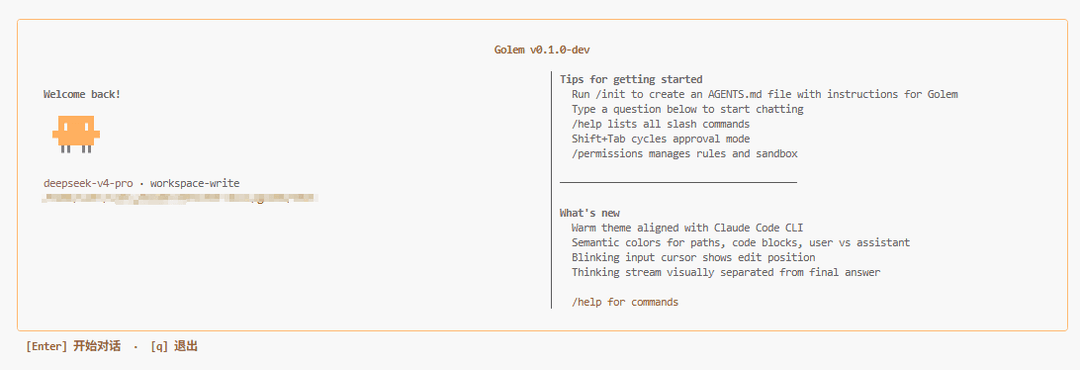
欢迎页
首次启动显示模型、sandbox 模式、常用斜杠命令提示。Enter 开始对话,q 退出。运行 /init 可生成 AGENTS.md 模板。
对话界面
状态栏显示 project_root、approval 模式、sandbox、session ID、Token 用量与模型名。Thinking 块与最终回答视觉分离,透明展示推理过程。

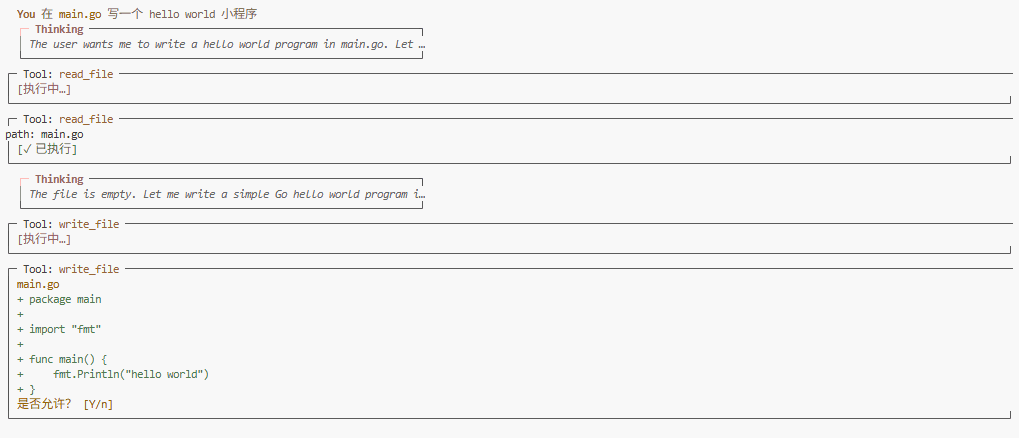
工具执行
read_file 自动执行,write_file 在 ask-before-edit 模式下弹确认。Diff 预览 inline 展示,Y/Enter 批准,n/Esc 拒绝。
更多截图与交互说明见 项目主页 · 如何使用。
系统架构
从用户输入到记忆提取的完整执行管道,安全层与审批层严格分离。
用户输入
  ↓
[会话管理层]
  ├── 读取历史会话(SQLite)
  ├── BM25 检索相关记忆片段(memory_facts 表)
  └── 注入 system prompt(user_profile.md + top-K 记忆)
  ↓
[Agent 主循环]
  ↓
  LLM API(Streaming SSE,goroutine + channel)
  ↓
  解析 tool_use 块
  ↓
[权限规则层]          ← 仅 bash;deny > ask > allow,先于审批层
  ├── deny 命中 → 直接拒绝,不弹框
  └── allow/ask 命中 → 进入审批层
  ↓
[审批交互层]          ← plan / ask-before-edit / ask / edit-automatically
  ↓
[沙箱 / 路径校验]      ← bash:namespace fork;文件工具:project_root 内
  ↓
  工具执行(循环直到无 tool_use)
  ↓
最终回答输出
  ↓
[记忆提取层]
  └── 会话结束同步提取 → SQLite;每 3 次会话触发 Layer 2 合并 → user_profile.md
记忆分层
Layer 0 · Working Memory
  当前会话 message history
  context 达 80% 自动压缩

Layer 1 · Episodic Memory
  会话结束提取 3–5 条事实
  BM25 检索 top-K 注入

Layer 2 · Semantic Memory
  每 3 次会话合并 → .golem/user_profile.md
  始终注入 system prompt
配置说明
配置优先级
~/.golem/config.yaml— 全局 base<project_root>/.golem/config.yaml— 同名字段覆盖- CLI flags — 覆盖
defaults字段
权限规则
合并加载 .golem/rules.yaml + ~/.golem/rules.yaml(项目在前)。仅匹配 bash 工具的 command 字符串;文件工具靠 project_root 路径限制。
# ~/.golem/rules.yaml
rules:
  - action: allow
    pattern: "go *"
  - action: allow
    pattern: "git *"
  - action: ask
    pattern: "curl *"
  - action: deny
    pattern: "rm -rf *"
  - action: deny
    pattern: "wget *"

priority: deny > ask > allow
Sandbox 模式
| 模式 | 行为 |
|---|---|
workspace-write(默认) | bash:namespace fork;文件工具限制在 project_root 内 |
danger-full-access | bash 无 namespace;文件工具仍限制在 project_root |
项目根目录:你在哪个目录执行 golem,哪里就是 project_root(启动时冻结)。
命令参考
CLI 入口
golem                                      # 启动 TUI,新建会话
golem --resume <session-id>                # 恢复历史(也可用 /sessions)
golem --approval ask-before-edit           # 指定审批模式
golem --sandbox workspace-write            # 指定沙箱模式
golem "帮我读一下 main.go 并总结"           # headless 模式
golem sessions list                        # CLI 列会话
golem sessions delete <id>                 # 删除会话
golem skill install github:user/repo/name  # 安装 Skill
常用斜杠命令
| 命令 | 说明 |
|---|---|
/permissions | 权限页:切换 approval 模式 + 查看 rules |
/sessions | 会话列表页,点选 resume |
/compact | 手动触发 Layer 0 压缩 |
/context | 可视化 context 占用 |
/diff | 显示 working tree git diff |
/status | 显示 model / approval / sandbox / session / tokens |
/model [name] | 运行时切换 LLM 模型 |
/clear | 清空上下文开新会话(保留 user_profile) |
/help | 命令与快捷键 |
/exit | 正常结束并退出 |
审批模式
| 模式 | 行为 | 适用场景 |
|---|---|---|
plan | 只读:read/list/grep 自动;write/edit/bash 直接拒绝 | 探索代码库、做方案 |
ask-before-edit | 读操作自动,write/edit/bash 前确认 | 默认推荐 |
ask | 任意 tool 执行前均弹确认 | 谨慎模式 |
edit-automatically | 全部自动执行(rules.ask 仍确认) | 完全信任环境 |
快捷键
| 按键 | 作用 |
|---|---|
Shift+Tab | 循环切换 approval 模式 |
Ctrl+C(流式中) | 取消当前轮 |
Ctrl+C / Ctrl+D(空闲) | 等同 /exit |
Ctrl+L | 清屏 |
Y / Enter | 批准工具执行 |
n / Esc | 拒绝工具执行 |
项目结构
golem/
├── cmd/golem/              # CLI 入口
├── internal/
│   ├── llm/                # LLMClient 接口与 Streaming 实现 + prompts/
│   ├── agent/              # Agent 主循环与 tool_use 分发
│   ├── tools/              # 内置工具集
│   ├── approval/           # 审批交互模式
│   ├── rules/              # YAML 权限规则引擎
│   ├── sandbox/            # Linux Namespace 沙箱
│   ├── session/            # SQLite 会话持久化
│   ├── memory/             # 三层记忆系统 + BM25 检索
│   ├── skills/             # Skill 加载与安装
│   ├── testutil/           # 跨包共享测试辅助
│   ├── integration/        # 端到端集成测试
│   └── tui/                # Bubble Tea TUI
├── scripts/
│   └── build-release.sh    # 多平台交叉编译
├── assert/                 # README / 主页截图素材
├── .github/workflows/      # CI + Release
└── .golem/                 # 项目级配置(运行时)
    ├── config.yaml
    ├── rules.yaml
    ├── user_profile.md
    └── data/golem.db
技术栈
| 类别 | 技术 |
|---|---|
| 语言 | Go 1.22+ |
| LLM | Anthropic Messages API,base_url 可配 Claude / DeepSeek 等 |
| 数据库 | modernc.org/sqlite(纯 Go,无 CGO) |
| TUI | Bubble Tea |
| 配置 | YAML(gopkg.in/yaml.v3) |
| 沙箱 | golang.org/x/sys/unix(Linux namespace) |
| CI/CD | GitHub Actions(ci.yml + release.yml) |
开发与测试
# 运行测试
go test ./...

# 静态检查
go vet ./...

# 构建
go build ./cmd/golem

# 本地打 Release 包
./scripts/build-release.sh v0.1.0-test dist
核心模块(记忆提取、BM25 检索、权限规则引擎、Agent tool_use 解析)均覆盖单元测试;internal/integration/ 提供 agent round-trip、--resume 还原、Layer 2 触发等端到端测试。CI 在每次 push / PR 时自动运行。
发布新版本
git tag v0.1.0
git push origin v0.1.0
推送 tag 后,release.yml 自动交叉编译四平台二进制并创建 GitHub Release。
路线图
| 优先级 | 模块 | 状态 |
|---|---|---|
| P0 | Agent 主循环、工具集、四种 approval、/permissions /sessions /help /exit、Session、配置 | 进行中 |
| P1 | 三层记忆(BM25)、权限规则引擎、Namespace 沙箱、CI Pipeline、/status /model /compact /context /diff | 计划中 |
| P2 | headless、/review /memories /usage /skills /init、Skills install、web_search | 计划中 |
| P3 | /rewind /doctor、Embedding 向量检索、Web UI | 待定 |
| P4 | MCP Servers | 不做 |
设计参考
golem 在架构设计上深入研究了以下开源项目:
| 项目 | 语言 | 借鉴点 |
|---|---|---|
| openai/codex | Rust | 审批模式、两阶段记忆管道、权限规则引擎 |
| AlleyBo55/gocode | Go | Skills 系统、多 Agent、Model Fallback |
| ProjectBarks/gopher-code | Go | 极简 Go 实现,毫秒级冷启动 |
| Kuberwastaken/claurst | Rust | ACP 协议支持 |
// faq
What is golem?
Go LLM Execution Model — Go 原生 AI 编程 Agent CLI。单二进制、三层记忆、YAML 权限规则,TUI 对齐 Claude Code / Codex。. It is open-source on GitHub.
Is golem free to use?
golem is open-source, so it is free to use.
What category does golem belong to?
golem is listed under devtools in the Claudeers registry of Claude-compatible tools.
// embed badge

[](https://claudeers.com/golem)
// retro hit counter

[](https://claudeers.com/golem)
// reviews
// guestbook
// related in Developer Tools
 🔓
🔓The agent harness performance optimization system. Skills, instincts, memory, security, and research-first development for Claude Code, Codex, Opencode, Curs…
 🔓
🔓Makes your AI agent think like the laziest senior dev in the room. The best code is the code you never wrote.
 🔓
🔓Use Garry Tan's exact Claude Code setup: 23 opinionated tools that serve as CEO, Designer, Eng Manager, Release Manager, Doc Engineer, and QA
 🔓
🔓AI coding assistant skill (Claude Code, Codex, OpenCode, Cursor, Gemini CLI, and more). Turn any folder of code, SQL schemas, R scripts, shell scripts, docs,…