
goal-prompt
Open-source Agent Skill for creating focused, verifiable /goal prompts across Codex, Claude Code, and compatible coding agents
Install with your AI
Paste into Claude Code, Cursor, or any agent — it reads the repo and wires the tool into your project.
Install and set up goal-prompt (release-binary project) into my current project.
Found on https://claudeers.com/goal-prompt
Repo: https://github.com/imbajin/goal-prompt
Homepage/docs: https://skills.sh/imbajin/goal-prompt/goal-prompt
Detected install method: release-binary → inspect the README
Category: skills. Platforms: cli.
Read the repo's README for exact setup and env vars, then install it and wire it into my project.

Claudeers Health Verdict:
active; community-verified: false. Confirm the source before running anything.
Grab the latest release asset from GitHub.
# download a build from https://github.com/imbajin/goal-prompt/releases
git clone https://github.com/imbajin/goal-prompt
// compatibility
| Platforms | cli |
|---|---|
| Operating systems | — |
| AI compatibility | claude |
| License | NOASSERTION |
| Pricing | open-source |
| Language | Shell |
goal-prompt
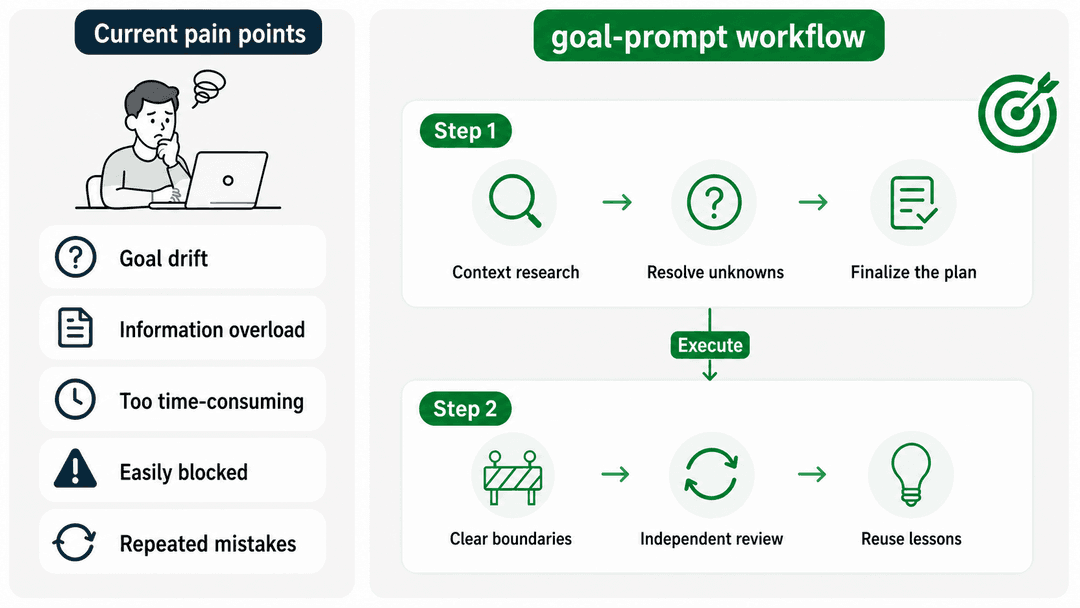
goal-prompt quickly creates /goal prompts with a clear outcome, bounded scope, and verifiable completion criteria. It reads the task and repository, asks only questions that can change the goal, and returns a copy-pasteable prompt after confirmation. You can also skip investigation or confirmation explicitly, or delegate the remaining judgment to the agent.
It adapts to the task's complexity and balances efficiency with quality.
Tested with real evals
We use skill-up to keep core behavior stable and provide a basic quality baseline. The test cases are ready to run, and better cases and suggestions are welcome.
Why use it?
Writing /goal by hand makes prompt size hard to judge:
- Too short, and the agent may rush to completion or stop halfway.
- Too long, or wrapped in a heavy spec workflow, and requirements, design, TODOs, and rules crowd the prompt before execution starts.
| Common approach | What goes wrong | How goal-prompt handles it |
|---|---|---|
Write /goal by hand | Length is hard to control, and scope or completion criteria are easy to miss | Keep the prompt concise and preserve the outcome, scope, completion gates, and essential execution rules |
| Follow only Codex or Claude Code docs | General docs cannot inspect your repository or choose task-specific scope, risks, and evidence | Read the real context before deciding what belongs in the goal |
| Use an older open-source workflow | Some predate current /goal behavior; others require several SPEC files and a long setup | Create no extra files by default and give complex work the smallest useful state |
| Generate once and execute immediately | Wrong assumptions flow straight into a long-running task | Investigate, ask, and confirm before generating the final /goal |
| Stop after a small failure | A CI wait, permission gap, or failed item can mark the whole goal blocked | Keep doing independent work and stop only when all meaningful remaining work is jointly blocked |
| Depend on chat history | Lessons disappear with the conversation, so the next run repeats the same mistakes | Reflect briefly after each loop and keep only high-value, reusable lessons |
| Tie the workflow to one agent | Commands, paths, or instructions break when moving to another agent | Keep the instructions portable and adapt only the platform entrypoint |
Core design
goal-prompt aims for both efficiency and quality by keeping only the information that must remain true throughout execution.
- Facts first: read the repository and existing documents instead of filling gaps with guesses.
- User control: confirm, revise, delegate judgment, or explicitly skip investigation or confirmation.
- Minimal state: create no files by default; add focused state only when recovery requires it.
- Evidence closes the goal: all scoped gates must pass, and tests cannot stand in for other deliverables.
- Blocking is exceptional: continue independent work and stop only when everything meaningful that remains is jointly blocked.
flowchart LR
    A["User intent"] --> B{"Skip investigation or confirmation?"}
    B -->|"Yes"| F["Keep unknowns visible and form the minimum execution contract"]
    B -->|"No"| C["Read the repository and existing documents"]
    C --> D["Disposable goal brief"]
    D --> E{"Confirm, revise, or delegate judgment"}
    E -->|"Revise"| C
    E -->|"Confirm or delegate"| F
    F --> G["Output a verifiable goal prompt"]
    G -. "Hand off to the execution agent" .-> H["Execute, validate, recover, and review"]
How it works
Two stages
+--------------------------- Step 1: goal-prompt ----------------------------+
|  Real task -> Context -> Key questions -> Confirm or delegate -> Final prompt
+----------------------------------------------------------------------------+

                               ↓  Run /goal

+-------------------------- Step 2: Execution agent -------------------------+
|  Execute in loops -> Review and report -> Capture useful lessons
+----------------------------------------------------------------------------+
Stage one returns a temporary goal brief with the outcome, scope, exclusions, and completion evidence. It does not generate /goal while an assumption that can change the goal remains unresolved.
After the user confirms, delegates judgment, or explicitly skips confirmation, stage two keeps only what the executor needs:
- the expected outcome, scope, and exclusions;
- completion criteria that must all pass, with supporting evidence;
- how to reprioritize around CI, test, or external-dependency blockers;
- when all remaining work is genuinely blocked and stopping is allowed;
- independent review for behavior-changing code.
Ordinary tasks create no extra files by default. Deep or cross-session work uses .goal-task/<task-slug>/state.md as the live execution record. Existing requirements, designs, specs, and TODOs remain authoritative and are linked rather than copied.
Create another file only when it has a distinct responsibility:
state.md: current phase, evidence, blockers, active-truth links, and next action;todo.md: large or frequently changing item-level work;design.md: confirmed design decisions when no stronger design document exists;lessons.md: evidence-backed lessons worth reusing.
Do not create a file that duplicates state.md or an existing document.
Install
Install and choose a target:
npx skills add imbajin/goal-prompt
(Optional) Install globally for Codex and Claude Code:
npx skills add imbajin/goal-prompt -g -a codex -a claude-code
(Optional) Send this prompt to any Agent:
Install goal-prompt by following https://github.com/imbajin/goal-prompt#install
Use
# Codex / Claude Code
/goal-prompt help me define a goal for implementing the authentication design in this repository
The agent can select the skill automatically when your request matches, or you can invoke it manually with /goal-prompt. Either way, it generates the prompt without executing it.
Compatibility
The installable Skill lives under skills/goal-prompt/ and follows the shared Agent Skills layout. Codex reads skills/goal-prompt/agents/openai.yaml; Claude Code reads the standard Skill frontmatter. Both support automatic selection and manual invocation.
Codex can pass the generated text to its native /goal runtime for continuous execution. Claude Code can invoke /goal-prompt and generate the same structured goal text, but it does not provide Codex's native /goal runtime. Continue through Claude Code's normal execution flow instead. Other agents can reuse the Skill when they support Agent Skills.
References
To avoid designing in isolation or rebuilding existing work, we surveyed and tested five goal-related Skills, then incorporated selected ideas from:
- OpenAI's
define-goalSkill - the
goal-prompt-builderSkill - a
goal + specSkill
See fusion-notes.md for design details and
CHANGELOG.md for version history.
License
Apache License 2.0. See LICENSE.
// faq
What is goal-prompt?
Open-source Agent Skill for creating focused, verifiable /goal prompts across Codex, Claude Code, and compatible coding agents. It is open-source on GitHub.
Is goal-prompt free to use?
goal-prompt is open-source under the NOASSERTION license, so it is free to use.
What category does goal-prompt belong to?
goal-prompt is listed under skills in the Claudeers registry of Claude-compatible tools.
// embed badge

[](https://claudeers.com/goal-prompt)
// retro hit counter

[](https://claudeers.com/goal-prompt)
// reviews
// guestbook
// related in Claude Skills
 🔓
🔓An agentic skills framework & software development methodology that works.
 🔓
🔓 🔓
🔓💫 Toolkit to help you get started with Spec-Driven Development
 🔓
🔓AI coding assistant skill (Claude Code, Codex, OpenCode, Cursor, Gemini CLI, and more). Turn any folder of code, SQL schemas, R scripts, shell scripts, docs,…