
gglint
Keeps the MCP servers of Claude Code, Codex, Cursor, Gemini CLI and other coding agents in sync
Install with your AI
Paste into Claude Code, Cursor, or any agent — it reads the repo and wires the tool into your project.
Install and set up gglint (pip project) into my current project.
Found on https://claudeers.com/gglint
Repo: https://github.com/corridor/gglint
Homepage/docs: —
Detected install method: pip → pip install gglint
Category: mcp-servers. Platforms: cli, api.
Read the repo's README for exact setup and env vars, then install it and wire it into my project.

Claudeers Health Verdict:
unknown; community-verified: false. Confirm the source before running anything.
pip install gglint
git clone https://github.com/corridor/gglint
// compatibility
| Platforms | cli, api |
|---|---|
| Operating systems | — |
| AI compatibility | claude |
| License | Apache-2.0 |
| Pricing | open-source |
| Language | Rust |
gglint
Keep the MCP servers of every coding agent in your repository in sync.
Claude Code, Codex, Cursor, Gemini CLI, Copilot CLI and nine other coding agents each read
MCP servers from their own config file, in their own format (see
Supported agents). In a repository set up for more than one of them,
those files drift apart: a server is added to .mcp.json but not to .cursor/mcp.json, a
version is pinned in one file and not the other, or an agent has no MCP config at all.
gglint finds every difference and fixes it for you, written in each agent's own format.
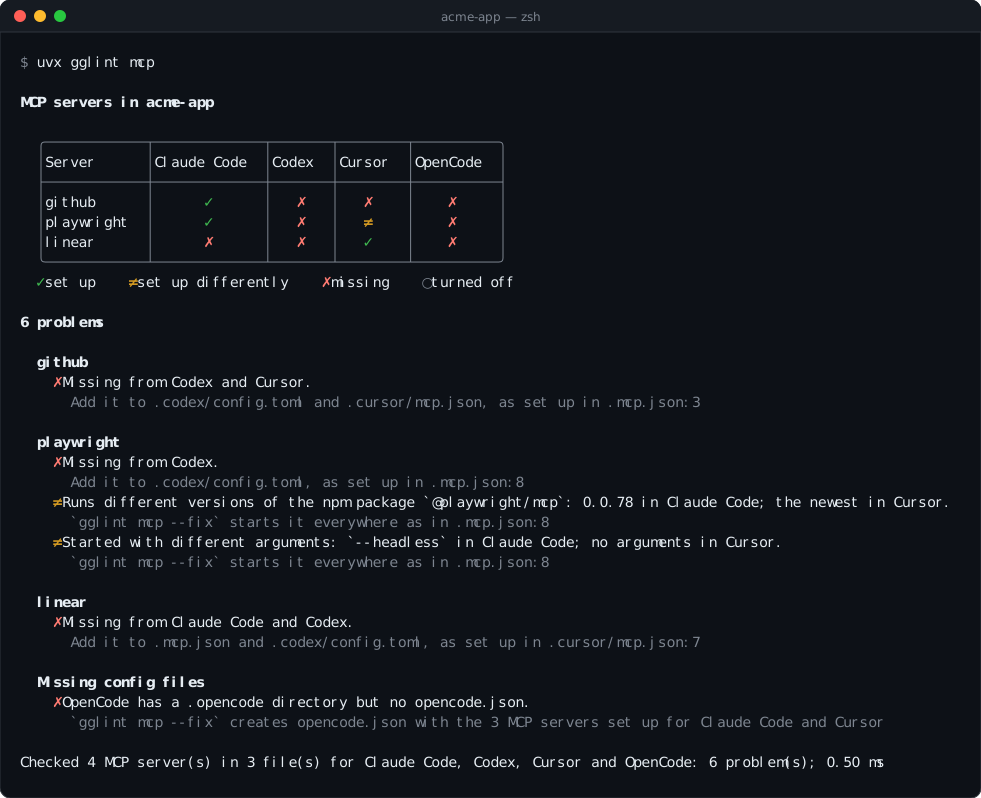
Click the terminal to open it on its own, then hover over a server, an agent, a cell or a
problem to see what gglint found there and what --fix does about it. The same details are
in this table, on hover:
| Server | Claude Code | Codex | Cursor | OpenCode |
|---|---|---|---|---|
github | ✓ | ✗ | ✗ | ✗ |
playwright | ✓ | ✗ | ≠ | ✗ |
linear | ✗ | ✗ | ✓ | ✗ |
- One view of every agent. A table shows which agent gets which server, and how each one differs.
- One fix.
--fixadds the missing servers and config files and starts each server the same way in every agent. It never removes a server, and keeps your comments and formatting. - Each agent's own format. A server is translated between JSON and TOML, between each agent's syntax for environment variables, and between local and remote server types.
- Fast and read-only by default. gglint reads a few files at fixed paths and typically finishes in under a millisecond. It never starts a server or downloads anything.
- Built for CI. It exits with status 1 when it finds a problem, and
--format linesprints one problem per line.
In November 2026 we checked the 258 most-starred GitHub repositories set up for two or more of Claude Code, Codex, Cursor and OpenCode. Of the 179 that configure MCP servers, 128 (72%) had at least one of the problems gglint reports. Among the 166 active repositories with 30 or more stars that set up a newer agent, such as Gemini CLI, Kiro or Junie, 83 of the 162 with MCP servers (51%) had at least one problem.
Quick start
gglint runs with uvx, which comes with uv. If uvx isn't on
your machine, install uv with its
installation guide first.
From the root of a repository, run these three commands in order:
uvx gglint mcp
uvx gglint mcp --fix
git diff
The first reports every problem, the second fixes them, and the third shows what changed.
uvx downloads gglint the first time and reuses it afterwards; there's nothing else to
install. It works on Linux, macOS and Windows.
Usage
uvx gglint mcp [--fix] [--source AGENT] [--format table|lines] [PATH]
uvx gglint mcp --servers [PATH]
| Option | Effect |
|---|---|
| (none) | Report every problem and draw each server in each agent. |
--fix | Add missing servers and config files, start each server the same way, then report what's left. |
--source AGENT | Take each server's setup from AGENT where it has the server. AGENT is a name from the --source column of Supported agents, such as claude-code or gemini-cli. |
--format lines | Print one line per problem instead of the table, for editors and CI. |
--servers | List every configured server, file by file, without comparing them. |
PATH | The repository's root. Defaults to the current directory. |
| Exit status | Meaning |
|---|---|
0 | Every agent gets the same servers, set up the same way. |
1 | gglint found a problem, one is left after --fix, or there are no MCP config files. |
Colours are used when standard output is a terminal and NO_COLOR isn't set. The summary
line, with counts and timing, goes to standard error.
What gglint checks
| Rule | Reported when | Fixed by |
|---|---|---|
missing-server | A server in one agent's config file is missing from another agent's. | --fix |
missing-config | An agent has its own directory but no MCP config file, while other agents have servers. | --fix |
different-server | The same server runs another version or has other arguments. | --fix |
| The same server runs another program or URL, has other environment variables or headers, or is turned off in one agent. | Reported only | |
renamed-server | The same server has a different name in some agents. | Reported only |
--fix makes the command lines match, since the same server should normally start the same
way everywhere. The other differences can be deliberate, such as each agent setting its own
environment variables, so gglint reports them and leaves them to you.
Matching servers. Servers are matched by name, then by what they run, so a server named differently in one agent is still recognised as the same server. The way a package is launched doesn't count as a difference:
npx -y pkg,npx --yes pkg@latest,pnpm dlx pkg,yarn dlx pkg,bunx pkgandbun x pkgall run the npm packagepkg.uvx pkg,uv tool run pkgandpipx run pkgall run the PyPI packagepkg.npx mcp-remote <url>reaches the remote server at<url>.- No version and
latestboth mean the newest version. ${KEY}in Claude Code,${env:KEY}in Cursor and$KEYin Gemini CLI refer to the same environment variable.
Environment variables and headers are compared by name only, since their values can be secrets.
Supported agents
| Agent | --source | MCP config file | Agent directory | Format |
|---|---|---|---|---|
| Claude Code | claude-code | .mcp.json | .claude/ | JSON, mcpServers |
| Codex | codex | .codex/config.toml | .codex/ | TOML, [mcp_servers.<name>] |
| Cursor | cursor | .cursor/mcp.json | .cursor/ | JSON, mcpServers |
| OpenCode | opencode | opencode.json, opencode.jsonc | .opencode/ | JSON with comments, mcp.servers or mcp |
| Antigravity | antigravity | .agents/mcp_config.json | none | JSON, mcpServers |
| Copilot CLI | copilot-cli | .github/mcp.json, or .mcp.json | none | JSON, mcpServers or servers at the top |
| Factory Droid | droid | .factory/mcp.json | .factory/ | JSON, mcpServers |
| Gemini CLI | gemini-cli | .gemini/settings.json | none | JSON, mcpServers among other settings |
| Junie | junie | .junie/mcp/mcp.json | .junie/ | JSON, mcpServers |
| Kimi Code | kimi-code | .kimi-code/mcp.json | .kimi-code/ | JSON, mcpServers |
| Kiro | kiro | .kiro/settings/mcp.json | .kiro/ | JSON, mcpServers |
| Qoder | qoder | .qoder/settings.json, .mcp.json | .qoder/ | JSON, mcpServers among other settings |
| Qwen Code | qwen-code | .qwen/settings.json | .qwen/ | JSON, mcpServers among other settings |
| Trae | trae | .trae/mcp.json | .trae/ | JSON, mcpServers |
gglint compares the agents that have an MCP config file or their own directory at the
repository's root. A CLAUDE.md, .cursorrules or AGENTS.md file on its own doesn't
count, because it doesn't show that the agent is set up in the repository. Antigravity,
Copilot CLI and Gemini CLI count only once they have their config file: many repositories
have an .agents/, .github/ or .gemini/ directory for other reasons, such as skills,
workflows or Gemini Code Assist's reviews.
Qoder reads Claude Code's .mcp.json as well as its own file: a server there counts as
Qoder's, and a server missing from both is added to .mcp.json only.
Copilot CLI reads .mcp.json instead of .github/mcp.json whenever .mcp.json exists, so it
gets the same servers as Claude Code, and gglint warns that .github/mcp.json goes unread.
--fix creates a .mcp.json only if every server in .github/mcp.json is written to it.
Copilot also skips a .github/mcp.json that lists no servers under mcpServers or at its
top, such as one with VS Code's servers: gglint warns about it and leaves it alone.
How fixing works
Every server is copied from the first config file where it's turned on, in the order of the
table in Supported agents. To make one agent the source of truth
instead, name it with --source: uvx gglint mcp --fix --source codex takes each server from
Codex wherever Codex has it turned on, and from the first agent otherwise. --fix never
removes a server.
- A missing server is added to each config file that lacks it.
- An agent with its own directory but no config file gets one, with every server that is turned on in the other agents.
- A server that runs another version of the same program, or the same program with other
arguments, gets the command and arguments of that first config file. Its environment
variables, headers, on/off state and keys only one agent has, such as Codex's
cwd, are kept. Review the result withgit diff: a difference such as a runtime chosen per agent, or a path that starts with Cursor's${workspaceFolder}, may have been deliberate. - JSON is edited with jsonc-parser and TOML with toml_edit, so comments and formatting are kept.
- Running
--fixa second time changes nothing. - A file excluded by
.gitignoreis still updated, and markedgitignoredin the output, because the change won't be committed.
References to environment variables are rewritten in each agent's syntax, in values and in command lines:
| Agent | Environment variable KEY |
|---|---|
| Claude Code | ${KEY} |
| Cursor | ${env:KEY} |
| OpenCode | {env:KEY} |
| Gemini CLI, Qoder, Qwen Code | $KEY or ${KEY}, written ${KEY} |
| Kiro, Factory Droid | ${KEY}, in environment variables and headers only |
| Codex | env_vars = ["KEY"], env_http_headers, or bearer_token_env_var for Authorization: Bearer |
| Kimi Code | bearerTokenEnvVar for Authorization: Bearer |
| Antigravity, Copilot CLI, Junie, Trae | None documented, so a server that reads the environment isn't copied to them |
Each server is written the way its agent expects:
- Remote servers get
"type": "http", or"sse"for a URL ending in/sse, in Claude Code, Copilot CLI, Factory Droid and Qoder. - Gemini CLI and Qwen Code get the URL as
httpUrl, or asurlfor SSE. - Kimi Code gets
"transport": "sse"for SSE, and a bearer token read from the environment asbearerTokenEnvVar. - Antigravity gets the URL as
serverUrl. It reaches remote servers over streamable HTTP only, so a server reached over SSE isn't added. - Copilot CLI's local servers get
"type": "local". - OpenCode servers get
"type": "local"or"remote", with the command and its arguments in one list.
A server is skipped, and listed under Not added:, when its setup can't be expressed in the
other agent's format: for example Claude Code's ${KEY:-default}, Cursor's
${workspaceFolder}, an environment variable inside a command line, which Codex, Kiro and
Factory Droid don't expand, or any environment variable for an agent whose docs don't say how
to refer to one.
Example
$ uvx gglint mcp --fix
Changed 4 files:
  .mcp.json             added linear
  .codex/config.toml    added github, playwright, linear
  .cursor/mcp.json      added github; updated playwright
  opencode.json (new)   added github, playwright, linear

Review the changes with `git diff`.
The same github server, written for Codex and Cursor:
# .codex/config.toml
+[mcp_servers.github]
+url = "https://api.githubcopilot.com/mcp/"
+bearer_token_env_var = "GITHUB_TOKEN"

# .cursor/mcp.json
+    "github": {
+      "url": "https://api.githubcopilot.com/mcp/",
+      "headers": {
+        "Authorization": "Bearer ${env:GITHUB_TOKEN}"
+      }
+    }
Cursor's playwright now starts as in Claude Code:
# .cursor/mcp.json
-      "args": ["-y", "@playwright/mcp@latest"]
+      "args": ["-y", "@playwright/[email protected]", "--headless"]
Output formats
--format lines prints one problem per line: where it is, the rule, and a description, with
the server's other locations indented below it.
$ uvx gglint mcp --format lines
./.mcp.json:3:5  missing-server   `github` is set up for Claude Code but not for Codex (.codex/config.toml) or Cursor (.cursor/mcp.json)
./.mcp.json:8:5  different-server `playwright` runs different versions of the npm package `@playwright/mcp`: 0.0.78 in Claude Code; the newest in Cursor
    also at ./.cursor/mcp.json:3:5
./.mcp.json:3:5  missing-config   OpenCode has a .opencode directory but no opencode.json, so it gets none of the 3 MCP servers set up for Claude Code and Cursor
--servers lists every server as it's written. Environment variables and headers are shown
by name, never by value.
$ uvx gglint mcp --servers
./.mcp.json:3:5  claude-code  github  https://api.githubcopilot.com/mcp/  (headers=[Authorization])
./.mcp.json:8:5  claude-code  playwright  npx -y @playwright/[email protected] --headless
./.cursor/mcp.json:3:5  cursor       playwright  npx -y @playwright/mcp@latest
./.cursor/mcp.json:7:5  cursor       linear  https://mcp.linear.app/sse
Continuous integration
Fail a pull request when the agents' MCP servers drift apart:
# .github/workflows/mcp.yml
name: MCP servers
on: [pull_request]

jobs:
  gglint:
    runs-on: ubuntu-latest
    steps:
      - uses: actions/checkout@v4
      - uses: astral-sh/setup-uv@v7
      - run: uvx [email protected] mcp --format lines
Security
- Read-only by default. Without
--fix, gglint reads files and writes nothing. - Nothing is executed or fetched. MCP servers aren't started, packages aren't resolved, and environment variables aren't expanded. It's safe to run on an untrusted repository.
- Secrets stay out of the output. Environment variables and headers are printed by name only.
- One external program. During
--fix, gglint runsgit check-ignoreto mark files your.gitignoreexcludes.
Limitations
- Servers added by Claude Code plugins, enabled in
.claude/settings.json, aren't read. A server provided by a plugin can be reported as missing from Claude Code. - User-level settings such as
~/.claude.jsonor~/.codex/config.tomlaren't read. - Only config files at the repository's root are read, so each package of a monorepo is checked separately.
- VS Code and GitHub Copilot in VS Code (
.vscode/mcp.json), Zed, Kilo Code, Crush, Amp, Continue and Mistral Vibe aren't supported yet (#10). - Gemini CLI loads only the servers listed in
mcp.allowed, when its settings have that list, and never those inmcp.excluded; gglint reports the servers these lists leave out as turned off.--fixdoesn't edit the lists, so a server it adds whilemcp.allowedis set stays off until you add it there. - Windsurf, Cline and Goose read MCP servers only from the user's home directory, so there's nothing in a repository to compare.
- Codex, Copilot CLI, Gemini CLI, Qoder and Qwen Code load a repository's MCP servers only
once you trust the project or approve its servers. Trae reads
.trae/mcp.jsononce project MCP is turned on in its settings.
Development
gglint is written in Rust. With a Rust toolchain 1.88 or later, run these three commands in order before each commit; CI runs the same checks:
cargo fmt
cargo clippy --all-targets -- --deny warnings
cargo test
tests/corpus.rs runs --fix against a directory of real repositories and checks that no
server is removed, that no environment variable, header or on/off state changes, that a
config file is created only in an agent's own directory, that no file becomes unreadable,
that the number of missing servers and differences never grows, and that a second run changes
nothing:
GGLINT_CORPUS=path/to/clones cargo test --release --test corpus -- --ignored --nocapture
The code lives in src/harness/:
agents.rs describes each agent in one table, mcp.rs reads each agent's config,
compare.rs finds the problems, and fix.rs writes the fixes. Supporting another agent
starts with a row in agents.rs.
Releasing
- Update
versioninCargo.tomland add the release toCHANGELOG.md. - Merge to
main. - Publish a GitHub release tagged
v<version>, for examplev0.3.0.
The release workflow builds and tests every wheel, publishes them to PyPI, and attaches them to the release.
License
gglint is licensed under the Apache License 2.0. The licenses of the libraries compiled into it are listed in THIRD_PARTY_LICENSES.
// faq
What is gglint?
Keeps the MCP servers of Claude Code, Codex, Cursor, Gemini CLI and other coding agents in sync. It is open-source on GitHub.
Is gglint free to use?
gglint is open-source under the Apache-2.0 license, so it is free to use.
What category does gglint belong to?
gglint is listed under mcp-servers in the Claudeers registry of Claude-compatible tools.
// embed badge

[](https://claudeers.com/gglint)
// retro hit counter

[](https://claudeers.com/gglint)
// reviews
// guestbook
// related in MCP Servers
 🔓
f.k.a. Awesome ChatGPT Prompts. Share, discover, and collect prompts from the community. Free and open source — self-host for your organization with complete…
 🔓
A cross-platform desktop All-in-One assistant for Claude Code, Codex, OpenCode, OpenClaw, Gemini CLI & Hermes Agent. Only official website: ccswitch.io
 🔓
🪨 why use many token when few token do trick — Claude Code skill that cuts 65% of tokens by talking like caveman
 🔓
An open-source AI agent that brings the power of Gemini directly into your terminal.