
freetoken
🆓 Free AI tokens by V Groups — pool every free LLM API (Gemini, Groq, OpenRouter, NVIDIA, Cohere, GitHub Models) into one chat, one OpenAI-compatible API an…
Install with your AI
Paste into Claude Code, Cursor, or any agent — it reads the repo and wires the tool into your project.
Install and set up freetoken (git-clone project) into my current project.
Found on https://claudeers.com/freetoken
Repo: https://github.com/V-Groups-Foundations/freetoken
Homepage/docs: https://github.com/V-Groups-Foundations/freetoken#-quick-start-3-minutes
Detected install method: git-clone → git clone https://github.com/V-Groups-Foundations/freetoken
Category: rag. Platforms: cli, api, desktop, web, mobile.
Read the repo's README for exact setup and env vars, then install it and wire it into my project.

Claudeers Health Verdict:
unknown; community-verified: false. Confirm the source before running anything.
git clone https://github.com/V-Groups-Foundations/freetoken
// compatibility
| Platforms | cli, api, desktop, web, mobile |
|---|---|
| Operating systems | — |
| AI compatibility | claude |
| License | MIT |
| Pricing | open-source |
| Language | TypeScript |
FreeToken · free AI tokens for everyone
Pool every free AI tier — Gemini, Groq, OpenRouter, NVIDIA, Cloudflare, Cohere, GitHub Models and more — into
one chat, one OpenAI- and Anthropic-compatible API, and V-Run, a desktop AI coding agent with a team of agents. $0, no credit card, self-hosted.
Quick start · Features · Claude Code & co. · V-Run · Providers · FAQ
A V Groups project · if it saves you money, a ⭐ helps others find it
💡 What is FreeToken?
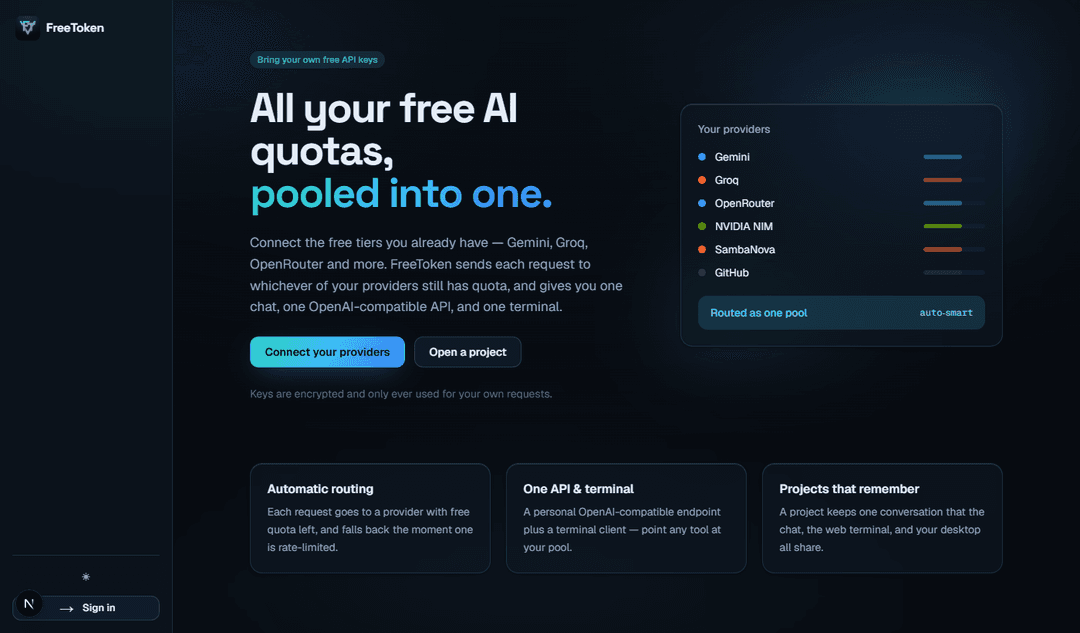
Every AI company gives away a free tier — Google Gemini, Groq, OpenRouter, NVIDIA NIM, Cloudflare, Cohere, GitHub Models… On its own each one runs out fast. FreeToken pools them. Add the free API keys you sign up for (no card needed for most) — or none at all to start — and every request goes to whichever provider still has quota, falling back automatically the moment one is rate-limited.
You get free AI tokens through:
- 💬 A chat app — like ChatGPT, but running on every free model you have.
- 🔌 Your own API — OpenAI-compatible and Anthropic-compatible, so Claude Code, Cursor, Cline, Continue, Aider, LangChain or your scripts run on it.
- 🖥️ V-Run — a desktop AI code editor (think Cursor / Claude Code) whose agents write code, run your app and fix what they see — alone or as a team working in parallel.
Your keys are encrypted and used only for your requests. Nothing is shared, nothing is billed.
  Kilo · LLM7 (no key) ┐
  Gemini · Groq        ┤                       ┌─► 💬 Chat
  NVIDIA · Cloudflare  ┼──►  FreeToken router  ┼─► 🔌 OpenAI + Anthropic API ─► Claude Code · Cursor · Cline…
  Cohere · GitHub      ┤     (auto-failover)   └─► 🖥️ V-Run agents (solo or a team)
  OpenRouter · Z.ai …  ┘
⚡ Quick start (one line)
Windows (PowerShell):
irm https://raw.githubusercontent.com/V-Groups-Foundations/freetoken/master/install.ps1 | iex
macOS / Linux:
curl -fsSL https://raw.githubusercontent.com/V-Groups-Foundations/freetoken/master/install.sh | bash
That's it. Your browser opens already signed in (no account, no password — a private link only your computer has), and chat works immediately: Kilo Gateway, LLM7 and a starter model need no key at all.
Then make it faster: on Connect, click Get key for Gemini or Groq, copy the key on their page, and come back — it's added automatically. OpenRouter is one click. Already have keys? Paste them all at once (or a whole .env file) and FreeToken recognises each one.
Prefer to do it by hand?
You need Node.js 20.9+. The database is built in, and it updates itself when you pull new code.
git clone https://github.com/V-Groups-Foundations/freetoken.git
cd freetoken
npm install
npm run dev       # sets itself up, then opens http://localhost:3000 signed in
Want the desktop coding agent too?
npm run desktop # builds and opens V-Run — it starts FreeToken and connects itself
🤖 Claude Code, Cursor & Cline — on free models
FreeToken speaks the OpenAI Chat Completions API (/api/v1/chat/completions), the OpenAI Responses API (/api/v1/responses, what the Codex CLI uses) and the Anthropic API (/api/v1/messages) — all with streaming and tool use — so the AI tools you already use run on your free pool.
One click: on the API page, press Connect next to a tool and FreeToken sets it up on your computer:
| Tool | After one click |
|---|---|
| Claude Code | type claude-free — Claude Code on your free models (your normal claude is untouched) |
| Codex (latest) | type codex-free (a separate freetoken profile; your default is untouched) |
| Aider | type aider-free |
| Continue | pick FreeToken (auto-smart) in its model list |
| Cursor · Cline | Get a key gives you the base URL, a key and the model to paste |
Each tool gets its own key you can revoke, and Disconnect removes exactly what FreeToken added. From a terminal:
freetoken run claude              # Claude Code, on free models (in this folder: npm run claude)
freetoken run aider --model openai/auto-smart
freetoken setup cursor            # copy-paste setup for Cursor, Cline, Continue, Codex, OpenCode…
Claude model names map to FreeToken automatically (haiku → auto-fast, everything else → auto-smart).
📸 Screenshots
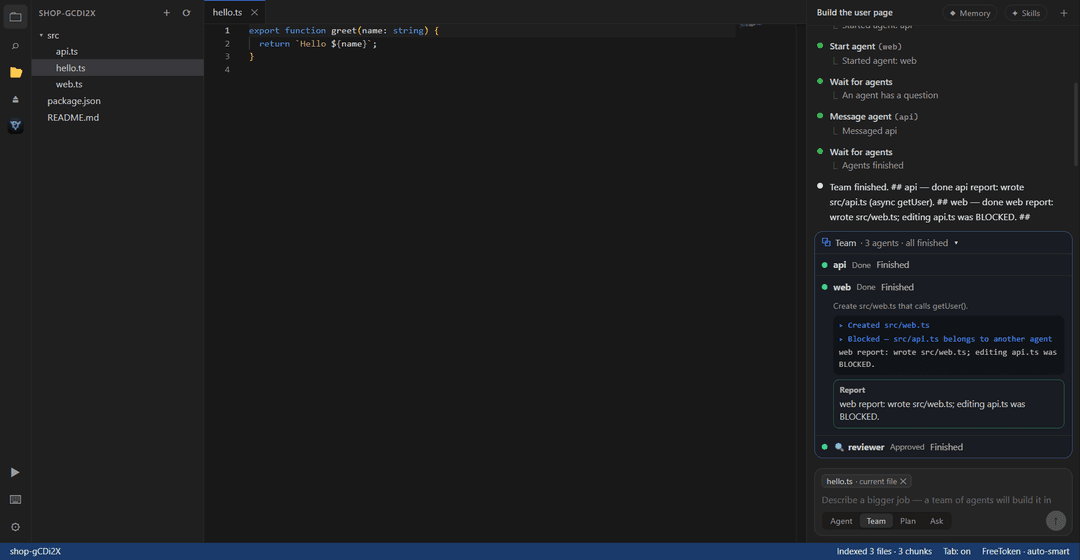
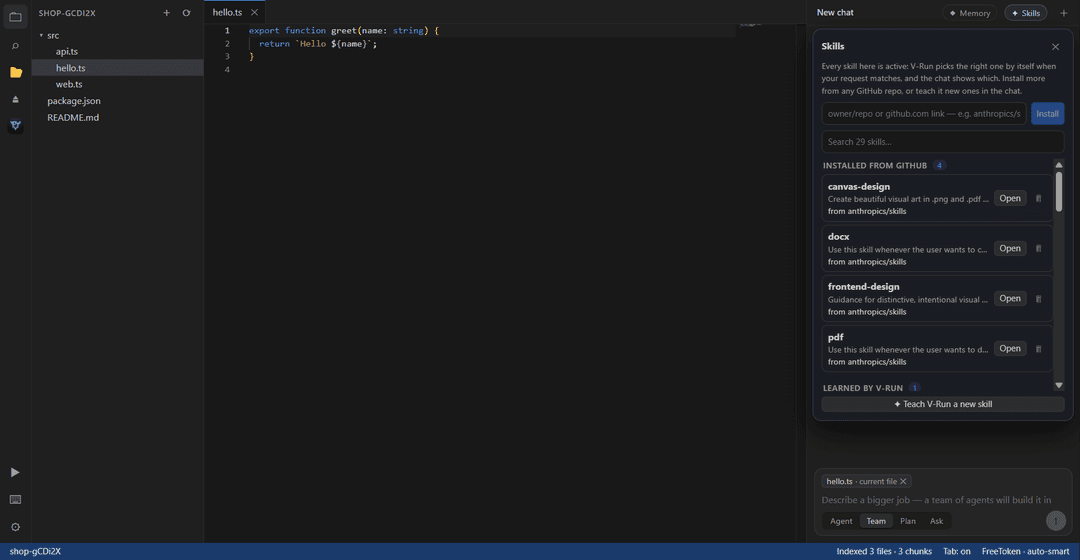
| V-Run Team mode: agents in parallel, one owner per file, a reviewer at the end | V-Run skills: built in, from GitHub, or learned |
|---|---|
 |  |
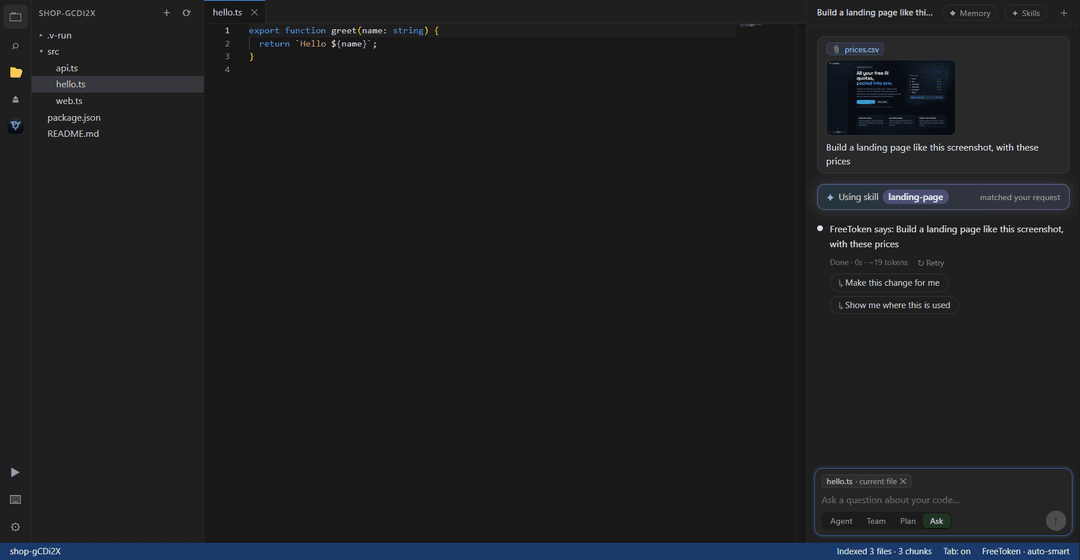
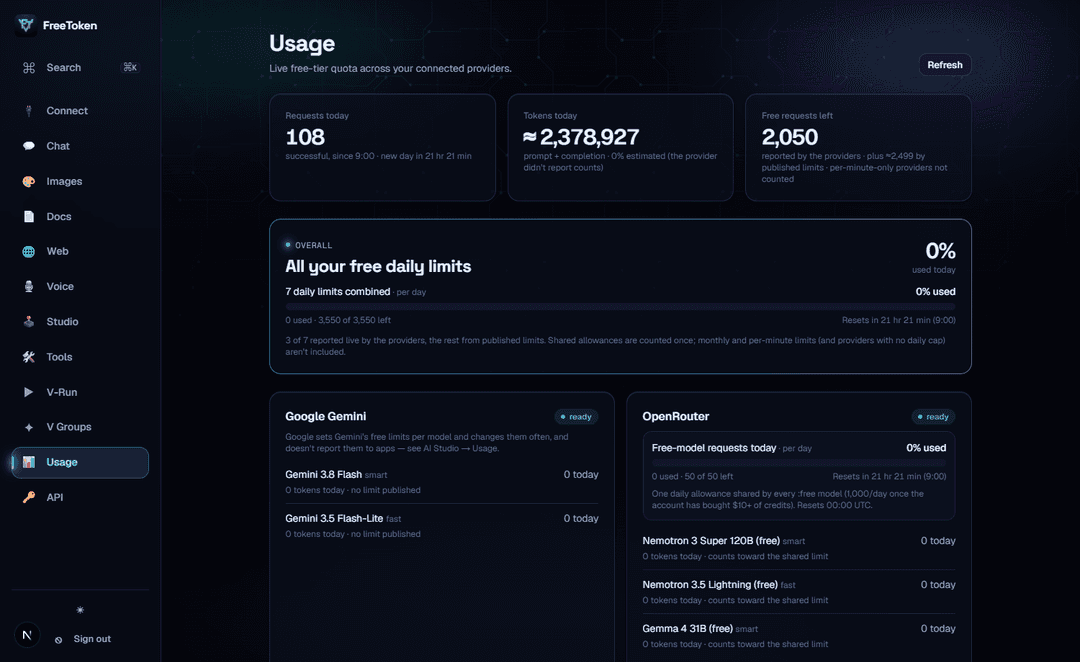
| Paste a screenshot, drop a file — the right skill loads itself | Usage: % used, what's left, when it resets |
 |  |
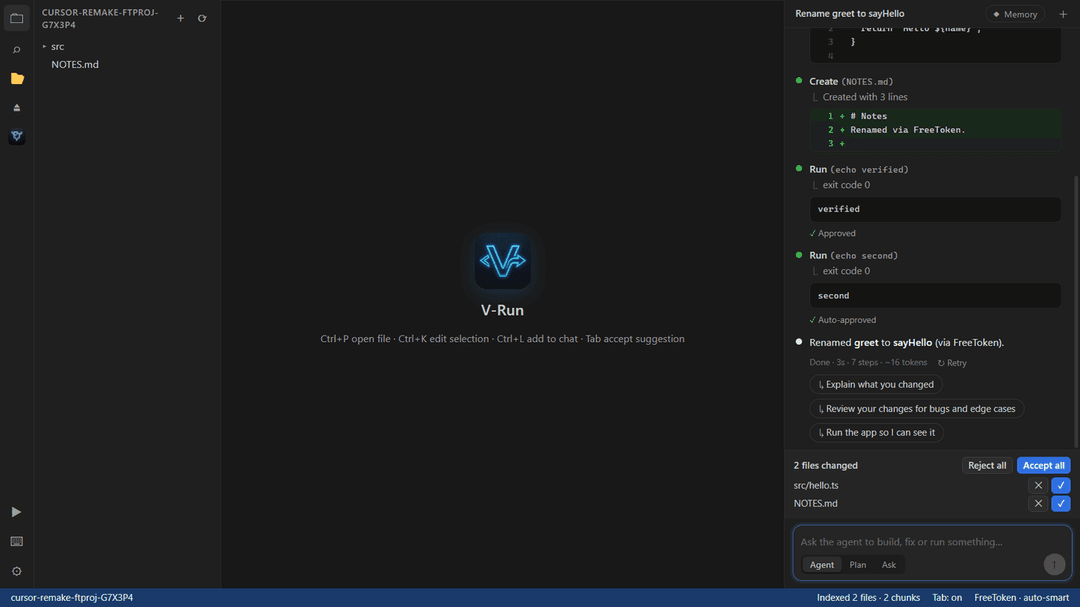
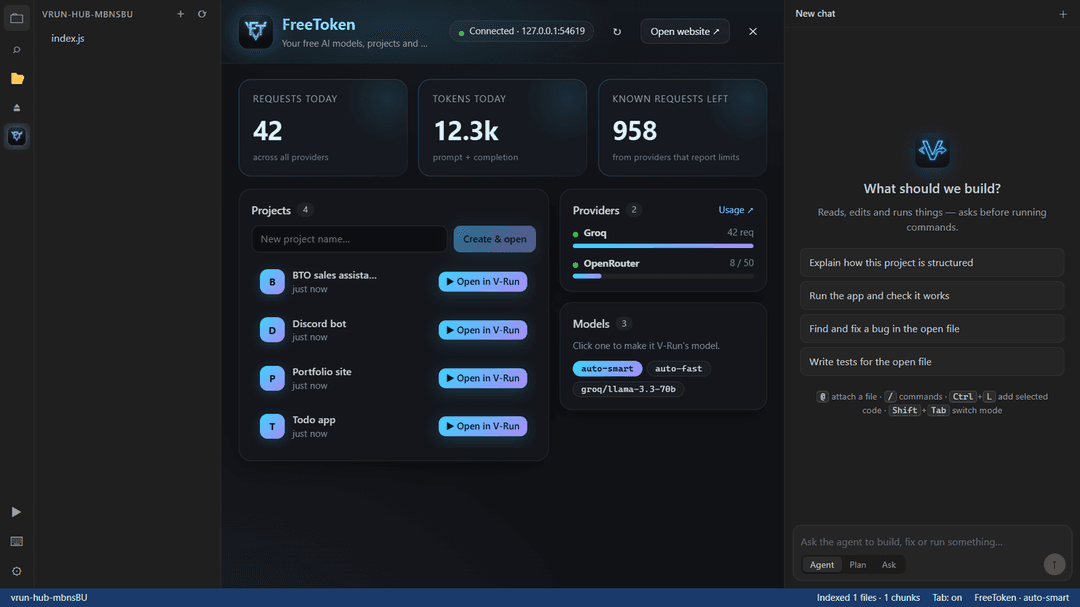
| V-Run: the agent edits, runs and verifies | V-Run: your FreeToken hub |
 |  |
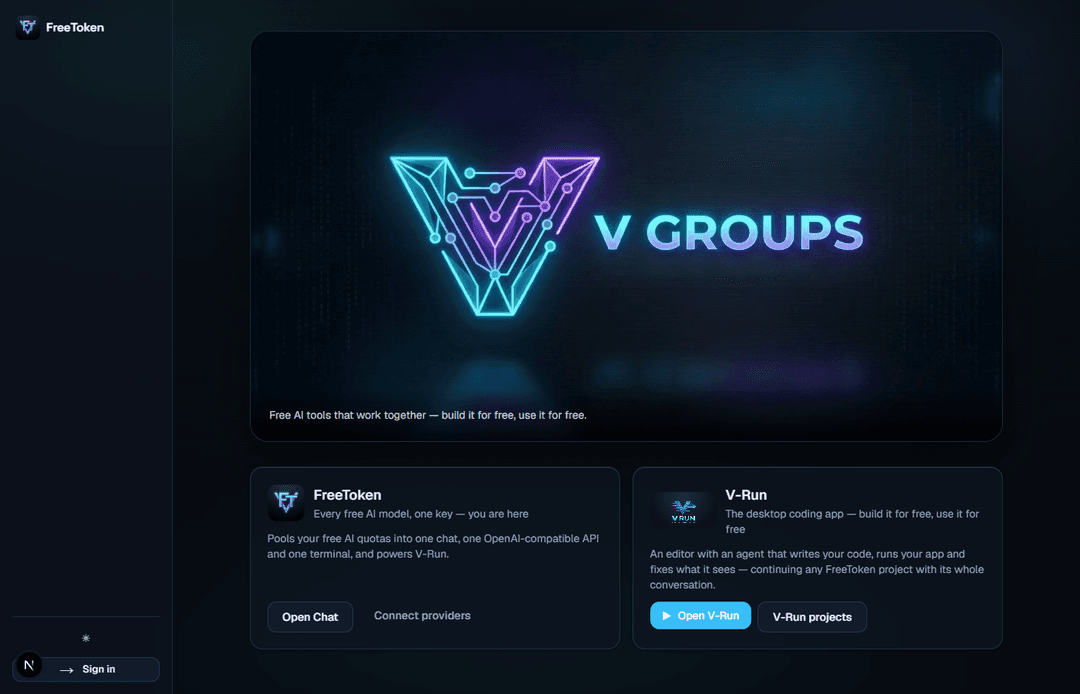
| FreeToken on the web | The V Groups family |
 |  |
🚀 What you get
| 🔀 Smart routing | auto-smart / auto-fast send each request to the best model for that kind of task (agent work, code, reasoning, images, writing) that still has quota; weaker models only take over when the strong ones are used up or failing. Routing learns from real results: models that often fail a kind of task, or that clients report as bad (broken tool calls, claiming work they didn't do), drop down; reliable ones rise. Benchmark runs (V-Run's real coding tasks, graded by running the result) count most. A conversation that sends x-freetoken-session stays on the model it's working with unless that model fails or a clearly better one frees up, and requests too big for a model's token allowance skip it instead of failing. Gemini takes agent work too: FreeToken keeps its thought signatures between steps. |
| 🔌 OpenAI-compatible API | /api/v1/chat/completions, streaming and tool calls — works with any OpenAI SDK or tool. |
| 🤖 Anthropic-compatible API | /api/v1/messages — Claude Code and Anthropic SDKs on free models. |
| 🧠 Responses API | /api/v1/responses — the latest Codex CLI and OpenAI SDK responses.create on free models. |
| 🧩 One-click tool setup | Claude Code, Codex, Aider, Continue set up for you; Cursor and Cline in two pastes. |
| 💬 Chat | Markdown, images, voice in/out, attachments, across all your providers. |
| 📁 Projects | One conversation per project — plan it in chat, then Continue in V-Run with the whole context. |
| 🎨 Image studio | Keyless image generation (Flux / Turbo) plus an optional Gemini engine. |
| 📄 Chat with docs | Text, PDFs and images (OCR) with cited answers (RAG). |
| 🌐 Web | Keyless URL reader and Tavily search, in chat and in the agents. |
| 🛠️ Tools | Extract · translate · summarize · classify. |
| 📊 Usage dashboard | Claude-style meters: % used, what's left and when each limit resets (per day / month / minute), plus one overall bar for all your daily limits. Live numbers from the providers are marked apart from published limits; estimated token counts are marked ≈. |
| 🖥️ Terminal agent | freetoken CLI: a coding agent in your terminal; you approve each step. |
🖥️ V-Run — the free AI coding agent
desktop/ is V-Run, a desktop AI code editor (Electron + Monaco) — a free alternative to Cursor and Claude Code that runs on your FreeToken models (or Claude, with your own key).
- Agent, Team, Plan and Ask modes — the agent reads, searches, edits files and runs commands; Plan proposes a plan you approve first; Ask only reads.
- Checks its own work — on bigger jobs the agent writes a plan with checkpoints first and verifies each step before the next. Before it says it's done it reads its changes back against your request, runs the app, and looks at the page: console errors, text, and a screenshot reviewed by a vision model (so layout bugs get caught too). It's sent back if it claims work it didn't do. ✓ Check it (or
/check) runs that check on demand. - Long-running tasks that don't lose the thread — no step limit: a task runs until it's done. When it starts going in circles (the same action with the same result, or bouncing between two servers) the agent is told so and its next step goes to a reasoning model to rethink; if it stays stuck it stops and explains instead of burning steps. Planning a big job and Plan mode also go to a reasoning model; ordinary steps to the best coding/agent model. Long tasks keep a running summary of earlier steps, the agent's memory is saved as it works, and a task interrupted by closing V-Run is offered for Resume after a restart. Close the window mid-task and it can keep working in the background (tray), with a notification when it's done.
- History — a safety net for everything the agent does — snapshots of your project before each task, at every finished step and after it, in V-Run's own store (your Git is never touched). History (or
/history) restores any point, and a restore can itself be undone. - Saved checks — when a feature works, the agent saves how it checked it (click here → expect that) in
.v-run/checks. Before any later task is called done, V-Run reruns them all, so a fix that breaks an earlier feature is caught. - Phone preview, Open on phone, Publish, Android — preview as a phone or tablet (real mobile viewport); open the app on your phone with a QR code, or a temporary HTTPS link (needed for location and camera on phones). Publish puts the website online on Cloudflare Pages or Netlify with one click. The Android app tab wraps the site in a native app with Wi-Fi scanning (for indoor/floor positioning, which a web page can't do), builds the APK and installs it over USB.
- See which model is working — the chat shows the model picked for each task and every switch (with what was unavailable); the status bar shows the model answering now. Benchmark (
/benchmark) runs the same coding tasks on several of your models, graded by running the results, and FreeToken's routing learns from them. - Team mode: agents working in parallel — a supervisor splits a bigger job between up to 4 agents running at once, each owning its own files. A file coordinator keeps them apart: an agent can't edit a file another one owns, everyone who read a file is told when another agent changes it, and nobody edits a stale copy. Questions go up to the supervisor, and the team survives a restart of V-Run. When the agents finish, a reviewer agent checks their work automatically (reads every change, runs the tests, never edits) and either approves or lists fixes for the owning agents — then reviews again. The Team panel shows every agent live, and all their changes land in one review.
- Skills, picked automatically — 25 built-in skills (frontend UI, backend APIs, web animation, landing pages, dashboards, React, Next.js, databases, auth, testing, debugging, refactoring, accessibility, performance, SEO, Python, Docker, git, API integrations, charts, SVG, browser games, three.js, HTML video, Android apps). V-Run matches each request to the right skill and the chat says “Using skill: …”. Install more from any GitHub repo (any folder with a
SKILL.md, e.g.anthropics/skills), or teach it new ones in the chat. - HTML videos → MP4 — the agent makes animated videos as HTML pages and exports them to real MP4 files, frame-perfect (time is stepped frame by frame, so heavy pages still come out smooth).
- Websites that don't all look the same — each project gets its own design direction (editorial, Swiss grid, neo-brutalist, luxury minimal, retro, dark terminal… 12 in all), and the agent is told to avoid the generic “AI website” look.
- Paste and drop anything — Ctrl+V a screenshot or drag files and images onto the chat; they're saved in the project and shared with the AI (images as images, text files with their contents).
- Accept all or step by step — chosen once per task, so it never nags you mid-job.
- Runs your app — starts your web app inside the editor, sees the page and its console errors, and fixes them. One-click Fix with AI on crashes.
- Diffs, rewind and retry — every edit shown as a diff; rewind any message to undo its file changes.
- Memory with
V.md— likeCLAUDE.md:/initwrites your project's memory,# noteadds to it, and the agent saves lasting facts (how to run and test the project, your preferences) — not logs of what it just did. - Visible reasoning, follow-up suggestions, @file mentions, Tab completion and Ctrl+K inline edits.
- FreeToken built in — sign in with one click; the FreeToken hub shows your projects, models and usage (with the overall limit bar); Continue in V-Run from any FreeToken project, and its turns are saved back to the web chat.
🔑 Free providers
| Provider | Free tier |
|---|---|
| Kilo Gateway · LLM7 | work with no key at all — used out of the box (Nemotron Ultra 550B, DeepSeek V4 Flash, Codestral…); a free key raises the limits |
| Google Gemini · Groq · NVIDIA NIM · Cohere · GitHub Models · SambaNova | free, no card |
| Cloudflare Workers AI | 10,000 neurons/day free (GPT-OSS 120B, GLM 4.7 Flash) |
| Z.ai | GLM Flash models free |
| OpenRouter · Requesty | free models (OpenRouter 50/day, Requesty 200/day) |
| Built-in starter | a keyless fallback so chat always works (set FREETOKEN_STARTER=off to turn keyless providers off) |
Optional tools: Tavily (web search) · DeepL (translation) · Jina (embeddings) · OCR.space (scanned files) · ElevenLabs / Google TTS (voices).
❓ FAQ
Is it really free?
Yes. FreeToken is open source (MIT) and runs on your machine. It uses the free tiers that AI providers already offer; you sign up for them yourself (most need no credit card). FreeToken just makes them work together — no subscription, no hidden costs. Kilo Gateway, LLM7 and a starter model (via Pollinations) work without any key so you can try everything first; they're shared and rate-limited, so add your own free keys for real use.
Where do the "free tokens" come from?
From your own free accounts with each provider (and the keyless free gateways). FreeToken doesn't resell or share anyone's quota — it routes your requests across your free tiers so you rarely hit a limit.
Can I use it with Claude Code, Cursor, Cline or LangChain?
Yes. On the API page, Connect sets up Claude Code, Codex, Aider and Continue for you; for Cursor and Cline, Get a key gives you the three values to paste. Or use http://localhost:3000/api/v1 as an OpenAI base URL (or http://localhost:3000/api as an Anthropic base URL) with model auto-smart. Note: Cursor calls models from its own servers, so it needs FreeToken on a public address rather than localhost.
Are the usage numbers real?
Request counts are counted from every request FreeToken makes. Token counts come from the providers (FreeToken asks every provider to report them); when one doesn't, the number is estimated and shown with ≈. “Requests left” comes live from the providers' own rate-limit headers where they send them; published limits are shown separately, and providers that only limit per minute (like NVIDIA) say so instead of showing a made-up daily number.
How does Team mode stop two agents editing the same file?
Every file belongs to one agent at a time — the one the supervisor assigned it to, or the first to change it. Another agent's edit to it is refused, and that agent is told to ask the supervisor, who can reassign the file. When an agent changes a file, every other agent that had read it is told who changed it and how, and can't edit it again until it has re-read the new version.
What are skills, and how do I add one?
A skill is know-how in a SKILL.md file (the same format Claude uses). V-Run ships 24 and picks the right one for each request automatically. To add more, open Skills in V-Run's chat and paste a GitHub repo (owner/repo or a link) — every folder with a SKILL.md becomes a skill, active straight away. A repo without skills is learned from its README. You can also say “learn this as a skill: …” in the chat.
Are my API keys safe?
They're encrypted at rest with your own VAULT_MASTER_KEY (generated on first start) and only ever sent to the provider they belong to. Signing in on your own computer uses a random link that changes every start and is readable only on your machine (like Jupyter's token); set FREETOKEN_LOCAL_LOGIN=off if you host FreeToken for others.
How is V-Run different from Cursor or Claude Code?
Same idea — an editor with an agent that edits code and runs commands — but it's free, open source, runs on free models through FreeToken, can run and look at your app while it works, and can split a job across a team of agents working in parallel.
🧱 Tech stack
Next.js 16 · React 19 · TypeScript · Drizzle ORM · PGlite (embedded Postgres) · Auth.js v5 · Tailwind v4 · Vitest — and for V-Run: Electron · Monaco · Vite · WebCodecs (video export) · Playwright (end-to-end tests).
🤝 Contributing
Contributions are very welcome — see CONTRIBUTING.md. Good first steps: add a free provider, write a skill for desktop/skills/, improve the docs, or try V-Run and open an issue with what you'd like next.
⭐ Support the project
FreeToken is free and will stay free. If it helps you, star the repo and share it — that's how other people find free AI tools.
📄 License
MIT — see LICENSE. Use it, fork it, share it.
// faq
What is freetoken?
🆓 Free AI tokens by V Groups — pool every free LLM API (Gemini, Groq, OpenRouter, NVIDIA, Cohere, GitHub Models) into one chat, one OpenAI-compatible API and V-Run, a free Cursor / Claude Code style AI coding agent. One-line setup, works with no key, self-hosted, $0.. It is open-source on GitHub.
Is freetoken free to use?
freetoken is open-source under the MIT license, so it is free to use.
What category does freetoken belong to?
freetoken is listed under rag in the Claudeers registry of Claude-compatible tools.
// embed badge

[](https://claudeers.com/freetoken)
// retro hit counter

[](https://claudeers.com/freetoken)
// reviews
// guestbook
// related in RAG & Knowledge
 🔓
Persistent Context Across Sessions for Every Agent – Captures everything your agent does during sessions, compresses it with AI, and injects relevant contex…
 🔓
✨ Light and Fast AI Assistant. Support: Web | iOS | MacOS | Android | Linux | Windows
 🔓
Compress tool outputs, logs, files, and RAG chunks before they reach the LLM. 60-95% fewer tokens, same answers. Library, proxy, MCP server.
 🔓
A light-weight and powerful meta-prompting, context engineering and spec-driven development system for Claude Code by TÂCHES.