
free-claude-code
Use Claude Code for free in the terminal, VSCode extension, or via Discord
Install with your AI
Paste into Claude Code, Cursor, or any agent — it reads the repo and wires the tool into your project.
⚠ Unverified source (community-unclaimed, low activity) — reveal the prompt
⚠ Unverified source (community-unclaimed, low activity). Inspect the repo before letting your agent install it.

Install and set up free-claude-code (git-clone project) into my current project.
Found on https://claudeers.com/free-claude-code-2
Repo: https://github.com/Rishurajgautam24/free-claude-code
Homepage/docs: —
Detected install method: git-clone → git clone https://github.com/Rishurajgautam24/free-claude-code
Category: devtools. Platforms: cli, api, web.
Read the repo's README for exact setup and env vars, then install it and wire it into my project.

Claudeers Health Verdict:
dormant; community-verified: false. Confirm the source before running anything.
git clone https://github.com/Rishurajgautam24/free-claude-code
// compatibility
| Platforms | cli, api, web |
|---|---|
| Operating systems | — |
| AI compatibility | claude |
| License | MIT |
| Pricing | open-source |
| Language | — |
Free Claude Code
Use Claude Code CLI & VSCode for free. No Anthropic API key required.
A lightweight proxy that routes Claude Code's Anthropic API calls to NVIDIA NIM (40 req/min free), OpenRouter (hundreds of models), or LM Studio (fully local).
Features · Quick Start · How It Works · Discord Bot · Configuration
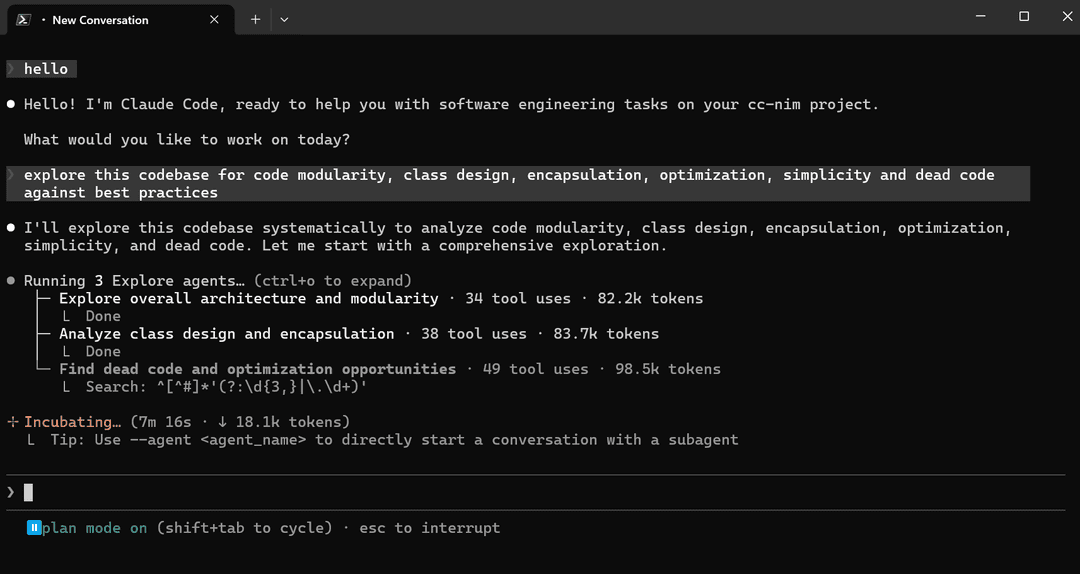
Claude Code running via NVIDIA NIM, completely free
Features
| Feature | Description |
|---|---|
| Zero Cost | 40 req/min free on NVIDIA NIM. Free models on OpenRouter. Fully local with LM Studio |
| Drop-in Replacement | Set 2 env vars. No modifications to Claude Code CLI or VSCode extension needed |
| 3 Providers | NVIDIA NIM, OpenRouter (hundreds of models), LM Studio (local & offline) |
| Per-Model Mapping | Route Opus / Sonnet / Haiku requests to different models and providers. Mix providers freely per model |
| Thinking Token Support | Parses <think> tags and reasoning_content into native Claude thinking blocks |
| Heuristic Tool Parser | Models outputting tool calls as text are auto-parsed into structured tool use |
| Request Optimization | 5 categories of trivial API calls intercepted locally, saving quota and latency |
| Discord Bot | Remote autonomous coding with tree-based threading, session persistence, and live progress (Telegram also supported) |
| Smart Rate Limiting | Proactive rolling-window throttle + reactive 429 exponential backoff + optional concurrency cap across all providers |
| Subagent Control | Task tool interception forces run_in_background=False. No runaway subagents |
| Extensible | Clean BaseProvider and MessagingPlatform ABCs. Add new providers or platforms easily |
Quick Start
Prerequisites
- Get an API key (or use LM Studio locally):
- NVIDIA NIM: build.nvidia.com/settings/api-keys
- OpenRouter: openrouter.ai/keys
- LM Studio: No API key needed. Run locally with LM Studio
- Install Claude Code
- Install uv
- Update uv if already installed:
uv self update
Clone & Configure
git clone https://github.com/Alishahryar1/free-claude-code.git
cd free-claude-code
cp .env.example .env
Choose your provider and edit .env:
NVIDIA NIM (40 req/min free, recommended)
NVIDIA_NIM_API_KEY="nvapi-your-key-here"

MODEL_OPUS="nvidia_nim/z-ai/glm4.7"
MODEL_SONNET="nvidia_nim/moonshotai/kimi-k2-thinking"
MODEL_HAIKU="nvidia_nim/stepfun-ai/step-3.5-flash"
MODEL="nvidia_nim/z-ai/glm4.7"                     # fallback
OpenRouter (hundreds of models)
OPENROUTER_API_KEY="sk-or-your-key-here"

MODEL_OPUS="open_router/deepseek/deepseek-r1-0528:free"
MODEL_SONNET="open_router/openai/gpt-oss-120b:free"
MODEL_HAIKU="open_router/stepfun/step-3.5-flash:free"
MODEL="open_router/stepfun/step-3.5-flash:free"     # fallback
LM Studio (fully local, no API key)
MODEL_OPUS="lmstudio/unsloth/MiniMax-M2.5-GGUF"
MODEL_SONNET="lmstudio/unsloth/Qwen3.5-35B-A3B-GGUF"
MODEL_HAIKU="lmstudio/unsloth/GLM-4.7-Flash-GGUF"
MODEL="lmstudio/unsloth/GLM-4.7-Flash-GGUF"         # fallback
Mix providers (use multiple providers together)
Each MODEL_* variable can use a different provider. MODEL is the fallback for unrecognized Claude models.
NVIDIA_NIM_API_KEY="nvapi-your-key-here"
OPENROUTER_API_KEY="sk-or-your-key-here"

MODEL_OPUS="nvidia_nim/moonshotai/kimi-k2.5"
MODEL_SONNET="open_router/deepseek/deepseek-r1-0528:free"
MODEL_HAIKU="lmstudio/unsloth/GLM-4.7-Flash-GGUF"
MODEL="nvidia_nim/z-ai/glm4.7"                      # fallback
Run It
Terminal 1: Start the proxy server:
uv run uvicorn server:app --host 0.0.0.0 --port 8082
Terminal 2: Run Claude Code:
ANTHROPIC_AUTH_TOKEN="freecc" ANTHROPIC_BASE_URL="http://localhost:8082" claude
That's it! Claude Code now uses your configured provider for free.
VSCode Extension Setup
- Start the proxy server (same as above).
- Open Settings (
Ctrl + ,) and search forclaude-code.environmentVariables. - Click Edit in settings.json and add:
"claude-code.environmentVariables": [
  { "name": "ANTHROPIC_BASE_URL", "value": "http://localhost:8082" },
  { "name": "ANTHROPIC_AUTH_TOKEN", "value": "freecc" }
]
- Reload extensions.
- If you see the login screen ("How do you want to log in?"): Click Anthropic Console, then authorize. The extension will start working. You may be redirected to buy credits in the browser; ignore it, the extension already works.
To switch back to Anthropic models, comment out the added block and reload extensions.
Multi-Model Support (Model Picker)
claude-pick is an interactive model selector that lets you choose any model from your active provider each time you launch Claude, without editing MODEL in .env.
https://github.com/user-attachments/assets/9a33c316-90f8-4418-9650-97e7d33ad645
1. Install fzf (highly recommended for the interactive picker):
brew install fzf # macOS/Linux
2. Add the alias to ~/.zshrc or ~/.bashrc:
# Use the absolute path to your cloned repo
alias claude-pick="/absolute/path/to/free-claude-code/claude-pick"
Then reload your shell (source ~/.zshrc or source ~/.bashrc) and run claude-pick to pick a model and launch Claude.
Skip the picker with a fixed model (no picker needed):
alias claude-kimi='ANTHROPIC_BASE_URL="http://localhost:8082" ANTHROPIC_AUTH_TOKEN="freecc:moonshotai/kimi-k2.5" claude'
How It Works
┌─────────────────┐        ┌──────────────────────┐        ┌──────────────────┐
│  Claude Code    │───────>│  Free Claude Code    │───────>│  LLM Provider    │
│  CLI / VSCode   │<───────│  Proxy (:8082)       │<───────│  NIM / OR / LMS  │
└─────────────────┘        └──────────────────────┘        └──────────────────┘
   Anthropic API                     │                       OpenAI-compatible
   format (SSE)              ┌───────┴────────┐                format (SSE)
                             │ Optimizations  │
                             ├────────────────┤
                             │ Quota probes   │
                             │ Title gen skip │
                             │ Prefix detect  │
                             │ Suggestion skip│
                             │ Filepath mock  │
                             └────────────────┘
- Transparent proxy: Claude Code sends standard Anthropic API requests to the proxy server
- Per-model routing: Opus / Sonnet / Haiku requests are resolved to their model-specific backend and provider, with the default
MODELas fallback - Request optimization: 5 categories of trivial requests (quota probes, title generation, prefix detection, suggestions, filepath extraction) are intercepted and responded to instantly without using API quota
- Format translation: real requests are translated from Anthropic format to the provider's OpenAI-compatible format and streamed back
- Thinking tokens:
<think>tags andreasoning_contentfields are converted into native Claude thinking blocks so Claude Code renders them correctly
Providers
| Provider | Cost | Rate Limit | Models | Best For |
|---|---|---|---|---|
| NVIDIA NIM | Free | 40 req/min | Kimi K2, GLM5, Devstral, MiniMax | Daily driver, generous free tier |
| OpenRouter | Free / Paid | Varies | 200+ (GPT-4o, Claude, Step, etc.) | Model variety, fallback options |
| LM Studio | Free (local) | Unlimited | Any GGUF model | Privacy, offline use, no rate limits |
Switch providers by changing MODEL in .env. Use the prefix format provider/model/name. Invalid prefix causes an error.
| Provider | MODEL prefix | API Key Variable | Base URL |
|---|---|---|---|
| NVIDIA NIM | nvidia_nim/... | NVIDIA_NIM_API_KEY | integrate.api.nvidia.com/v1 |
| OpenRouter | open_router/... | OPENROUTER_API_KEY | openrouter.ai/api/v1 |
| LM Studio | lmstudio/... | (none) | localhost:1234/v1 |
LM Studio runs locally. Start the server in the Developer tab or via lms server start, load a model, and set MODEL to the model identifier.
Discord Bot
Control Claude Code remotely from Discord. Send tasks, watch live progress, and manage multiple concurrent sessions. Telegram is also supported.
Capabilities:
- Tree-based message threading: reply to a message to fork the conversation
- Session persistence across server restarts
- Live streaming of thinking tokens, tool calls, and results
- Unlimited concurrent Claude CLI sessions (provider concurrency controlled by
PROVIDER_MAX_CONCURRENCY) - Voice notes: send voice messages; they are transcribed and processed like regular prompts (see Voice Notes)
- Commands:
/stop(cancel tasks; reply to a message to stop only that task),/clear(standalone: reset all sessions; reply to a message to clear that branch downwards),/stats
Setup
-
Create a Discord Bot: Go to Discord Developer Portal, create an application, add a bot, and copy the token. Enable Message Content Intent under Bot settings.
-
Edit
.env:
MESSAGING_PLATFORM="discord"
DISCORD_BOT_TOKEN="your_discord_bot_token"
ALLOWED_DISCORD_CHANNELS="123456789,987654321"
Enable Developer Mode in Discord (Settings → Advanced), then right-click a channel and "Copy ID" to get channel IDs. Comma-separate multiple channels. If empty, no channels are allowed.
- Configure the workspace (where Claude will operate):
CLAUDE_WORKSPACE="./agent_workspace"
ALLOWED_DIR="C:/Users/yourname/projects"
- Start the server:
uv run uvicorn server:app --host 0.0.0.0 --port 8082
- Invite the bot (OAuth2 URL Generator, scopes:
bot, permissions: Read Messages, Send Messages, Manage Messages, Read Message History). Send a task to an allowed channel and Claude responds with live thinking tokens and tool calls. Use commands above to cancel or clear.
Telegram (Alternative)
To use Telegram instead, set MESSAGING_PLATFORM=telegram and configure:
TELEGRAM_BOT_TOKEN="123456789:ABCdefGHIjklMNOpqrSTUvwxYZ"
ALLOWED_TELEGRAM_USER_ID="your_telegram_user_id"
Get a token from @BotFather; find your user ID via @userinfobot.
Voice Notes
Send voice messages on Telegram or Discord; they are transcribed to text and processed as regular prompts. Two transcription backends are available:
- Local Whisper (default): Uses Hugging Face transformers Whisper — free, no API key, works offline, CUDA compatible. No ffmpeg required.
- NVIDIA NIM: Uses NVIDIA NIM Whisper/Parkeet models via gRPC — requires
NVIDIA_NIM_API_KEY.
Install the optional voice extras:
# For local Whisper (cpu/cuda)
uv sync --extra voice_local

# For NVIDIA NIM transcription
uv sync --extra voice

# Install both
uv sync --extra voice --extra voice_local
Configuration:
| Variable | Description | Default |
|---|---|---|
VOICE_NOTE_ENABLED | Enable voice note handling | true |
WHISPER_DEVICE | cpu | cuda | nvidia_nim | cpu |
WHISPER_MODEL | See supported models below | base |
HF_TOKEN | Hugging Face token for faster model downloads (optional, for local Whisper) | — |
NVIDIA_NIM_API_KEY | API key for NVIDIA NIM (required for nvidia_nim device) | — |
Supported WHISPER_MODEL values:
| Model | Device | Description |
|---|---|---|
tiny, base, small, medium, large-v2, large-v3, large-v3-turbo | cpu / cuda | Local Whisper (Hugging Face) |
openai/whisper-large-v3 | nvidia_nim | Auto language detection (best overall) |
nvidia/parakeet-ctc-1.1b-asr | nvidia_nim | English-only |
nvidia/parakeet-ctc-0.6b-asr | nvidia_nim | English-only |
nvidia/parakeet-ctc-0.6b-zh-cn | nvidia_nim | Mandarin Chinese |
nvidia/parakeet-ctc-0.6b-zh-tw | nvidia_nim | Traditional Chinese |
nvidia/parakeet-ctc-0.6b-es | nvidia_nim | Spanish |
nvidia/parakeet-ctc-0.6b-vi | nvidia_nim | Vietnamese |
nvidia/parakeet-1.1b-rnnt-multilingual-asr | nvidia_nim | Multilingual RNNT |
Models
NVIDIA NIM
Full list in nvidia_nim_models.json.
Popular models:
nvidia_nim/minimaxai/minimax-m2.5nvidia_nim/qwen/qwen3.5-397b-a17bnvidia_nim/z-ai/glm5nvidia_nim/stepfun-ai/step-3.5-flashnvidia_nim/moonshotai/kimi-k2.5
Browse: build.nvidia.com
Update model list:
curl "https://integrate.api.nvidia.com/v1/models" > nvidia_nim_models.json
OpenRouter
Hundreds of models from StepFun, OpenAI, Anthropic, Google, and more.
Popular models:
open_router/stepfun/step-3.5-flash:freeopen_router/deepseek/deepseek-r1-0528:freeopen_router/openai/gpt-oss-120b:free
Browse: openrouter.ai/models
Browse free models: https://openrouter.ai/collections/free-models
LM Studio
Run models locally with LM Studio. Load a model in the Chat or Developer tab, then set MODEL to its identifier.
Examples (native tool-use support):
LiquidAI/LFM2-24B-A2B-GGUFunsloth/MiniMax-M2.5-GGUFunsloth/GLM-4.7-Flash-GGUFunsloth/Qwen3.5-35B-A3B-GGUFLocoreMind/LocoOperator-4B
Browse: model.lmstudio.ai
Configuration
| Variable | Description | Default |
|---|---|---|
MODEL | Fallback model (prefix format: provider/model/name; invalid prefix causes error) | nvidia_nim/stepfun-ai/step-3.5-flash |
MODEL_OPUS | Model for Claude Opus requests (optional, falls back to MODEL) | nvidia_nim/z-ai/glm4.7 |
MODEL_SONNET | Model for Claude Sonnet requests (optional, falls back to MODEL) | open_router/arcee-ai/trinity-large-preview:free |
MODEL_HAIKU | Model for Claude Haiku requests (optional, falls back to MODEL) | open_router/stepfun/step-3.5-flash:free |
NVIDIA_NIM_API_KEY | NVIDIA API key (NIM provider) | required |
OPENROUTER_API_KEY | OpenRouter API key (OpenRouter provider) | required |
LM_STUDIO_BASE_URL | LM Studio server URL | http://localhost:1234/v1 |
PROVIDER_RATE_LIMIT | LLM API requests per window | 40 |
PROVIDER_RATE_WINDOW | Rate limit window (seconds) | 60 |
PROVIDER_MAX_CONCURRENCY | Max simultaneous open provider streams | 5 |
HTTP_READ_TIMEOUT | Read timeout for provider API requests (seconds) | 120 |
HTTP_WRITE_TIMEOUT | Write timeout for provider API requests (seconds) | 10 |
HTTP_CONNECT_TIMEOUT | Connect timeout for provider API requests (seconds) | 2 |
FAST_PREFIX_DETECTION | Enable fast prefix detection | true |
ENABLE_NETWORK_PROBE_MOCK | Enable network probe mock | true |
ENABLE_TITLE_GENERATION_SKIP | Skip title generation | true |
ENABLE_SUGGESTION_MODE_SKIP | Skip suggestion mode | true |
ENABLE_FILEPATH_EXTRACTION_MOCK | Enable filepath extraction mock | true |
MESSAGING_PLATFORM | Messaging platform: discord or telegram | discord |
DISCORD_BOT_TOKEN | Discord Bot Token | "" |
ALLOWED_DISCORD_CHANNELS | Comma-separated channel IDs (empty = none allowed) | "" |
TELEGRAM_BOT_TOKEN | Telegram Bot Token | "" |
ALLOWED_TELEGRAM_USER_ID | Allowed Telegram User ID | "" |
VOICE_NOTE_ENABLED | Enable voice note handling | true |
WHISPER_MODEL | Local Whisper model size | base |
WHISPER_DEVICE | cpu | cuda | cpu |
MESSAGING_RATE_LIMIT | Messaging messages per window | 1 |
MESSAGING_RATE_WINDOW | Messaging window (seconds) | 1 |
CLAUDE_WORKSPACE | Directory for agent workspace | ./agent_workspace |
ALLOWED_DIR | Allowed directories for agent | "" |
See .env.example for all supported parameters.
Development
Project Structure
free-claude-code/
├── server.py              # Entry point
├── api/                   # FastAPI routes, request detection, optimization handlers
├── providers/             # BaseProvider, OpenAICompatibleProvider, NIM, OpenRouter, LM Studio
│   └── common/            # Shared utils (SSE builder, message converter, parsers, error mapping)
├── messaging/             # MessagingPlatform ABC + Discord/Telegram bots, session management
├── config/                # Settings, NIM config, logging
├── cli/                   # CLI session and process management
└── tests/                 # Pytest test suite
Commands
uv run ruff format     # Format code
uv run ruff check      # Code style checking
uv run ty check        # Type checking
uv run pytest          # Run tests
Extending
Adding a Provider
For OpenAI-compatible APIs (Groq, Together AI, etc.), extend OpenAICompatibleProvider:
from providers.openai_compat import OpenAICompatibleProvider
from providers.base import ProviderConfig

class MyProvider(OpenAICompatibleProvider):
    def __init__(self, config: ProviderConfig):
        super().__init__(config, provider_name="MYPROVIDER",
                         base_url="https://api.example.com/v1", api_key=config.api_key)

    def _build_request_body(self, request):
        return build_request_body(request)  # Your request builder
For fully custom APIs, extend BaseProvider directly:
from providers.base import BaseProvider, ProviderConfig

class MyProvider(BaseProvider):
    async def stream_response(self, request, input_tokens=0, *, request_id=None):
        # Yield Anthropic SSE format events
        ...
Adding a Messaging Platform
Extend MessagingPlatform in messaging/ to add Slack or other platforms:
from messaging.base import MessagingPlatform

class MyPlatform(MessagingPlatform):
    async def start(self):
        # Initialize connection
        ...

    async def stop(self):
        # Cleanup
        ...

    async def send_message(self, chat_id, text, reply_to=None, parse_mode=None, message_thread_id=None):
        # Send a message
        ...

    async def edit_message(self, chat_id, message_id, text, parse_mode=None):
        # Edit an existing message
        ...

    def on_message(self, handler):
        # Register callback for incoming messages
        ...
Contributing
- Report bugs or suggest features via Issues
- Add new LLM providers (Groq, Together AI, etc.)
- Add new messaging platforms (Slack, etc.)
- Improve test coverage
- Not accepting Docker Integration for now
- New and interesting features
# Fork the repo, then:
git checkout -b my-feature
# Make your changes
uv run ruff format && uv run ruff check && uv run ty check && uv run pytest
# Open a pull request
License
This project is licensed under the MIT License. See the LICENSE file for details.
Built with FastAPI, OpenAI Python SDK, discord.py, and python-telegram-bot.
// faq
What is free-claude-code?
Use Claude Code for free in the terminal, VSCode extension, or via Discord. It is open-source on GitHub.
Is free-claude-code free to use?
free-claude-code is open-source under the MIT license, so it is free to use.
What category does free-claude-code belong to?
free-claude-code is listed under devtools in the Claudeers registry of Claude-compatible tools.
// embed badge

[](https://claudeers.com/free-claude-code-2)
// retro hit counter

[](https://claudeers.com/free-claude-code-2)
// reviews
// guestbook
// related in Developer Tools
 🔓
🔓The agent harness performance optimization system. Skills, instincts, memory, security, and research-first development for Claude Code, Codex, Opencode, Curs…
 🔓
🔓Makes your AI agent think like the laziest senior dev in the room. The best code is the code you never wrote.
 🔓
🔓Use Garry Tan's exact Claude Code setup: 23 opinionated tools that serve as CEO, Designer, Eng Manager, Release Manager, Doc Engineer, and QA
 🔓
🔓AI coding assistant skill (Claude Code, Codex, OpenCode, Cursor, Gemini CLI, and more). Turn any folder of code, SQL schemas, R scripts, shell scripts, docs,…
// built by
2 of its contributors also build on official projects — claude-code, claude-cookbooks, claude-plugins-official, inspector
→ see how free-claude-code connects across the ecosystem