
fable-senior-mode
Claude Code skill: keep fable-5 on senior judgment, delegate repo investigation & review to Codex CLI via a bundled companion script. One-line curl install.
Install with your AI
Paste into Claude Code, Cursor, or any agent — it reads the repo and wires the tool into your project.
Install and set up fable-senior-mode (claude-skill project) into my current project.
Found on https://claudeers.com/fable-senior-mode
Repo: https://github.com/NewTurn2017/fable-senior-mode
Homepage/docs: —
Detected install method: claude-skill → # copy this skill into .claude/skills/fable-senior-mode/
Category: devtools. Platforms: cli.
Read the repo's README for exact setup and env vars, then install it and wire it into my project.

Claudeers Health Verdict:
active; community-verified: false. Confirm the source before running anything.
# copy the skill dir into your project:
# .claude/skills/fable-senior-mode/   (or ~/.claude/skills/fable-senior-mode/ for all projects)
git clone https://github.com/NewTurn2017/fable-senior-mode
// compatibility
| Platforms | cli |
|---|---|
| Operating systems | — |
| AI compatibility | claude |
| License | MIT |
| Pricing | open-source |
| Language | JavaScript |
senior-mode
비싼 모델은 시니어 판단에만 쓰고 손이 많이 가는 조사는 Codex에 맡기는 Claude Code 스킬.
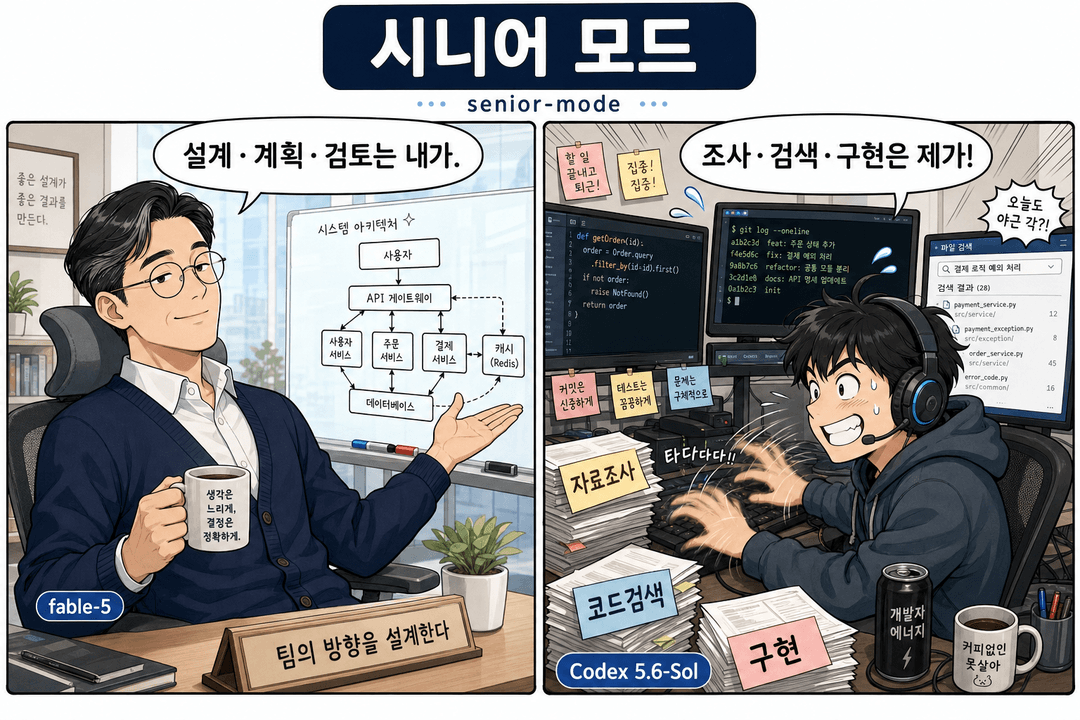
senior-mode를 켜면 Claude가 타이피스트가 아니라 시니어 엔지니어 리드처럼 움직입니다. 추론 비용이 큰 모델(fable-5)은 시니어만 해야 하는 일에만 씁니다. 무엇을 조사할지 정하고 정교한 위임 프롬프트를 쓰고 보고서를 읽고 트레이드오프를 판단하고 문서를 남기는 일이죠. 저장소를 읽고 근거를 모으고 리뷰와 디버깅을 돌리고 명시적으로 맡긴 구현을 처리하는 손품은 번들된 컴패니언 스크립트를 거쳐 Codex CLI가 맡습니다.
방식은 openai/codex-plugin-cc를 따릅니다. Claude는 codex를 직접 호출하지 않습니다. 모든 Codex 호출은 scripts/codex-companion.mjs를 거칩니다. 이 스크립트가 작업을 포그라운드나 백그라운드로 돌리고 상태를 디스크에 기록하고 기다리거나 지켜보거나 결과를 가져오거나 취소할 수 있게 해 줍니다.
언제 쓰나
빠르게 치는 것보다 시니어 판단이 더 값질 때 senior-mode를 부르세요.
- 멀티파일, 아키텍처, 마이그레이션, 디버깅처럼 섣불리 코딩하면 헛수고가 되는 문제.
- 트레이드오프 분석이나 잘 짜인 Codex 프롬프트가 필요한 결정.
- 트리거:
senior-mode,시니어 모드,fable-5로 판단,코덱스에게 조사 시켜,정교한 프롬프트 작성.
작은 작업, 단일 파일 수정, 뻔한 버그픽스, Claude가 그냥 코드를 쓰면 되는 일에는 쓰지 마세요.
준비물
- Claude Code (CLI, 데스크톱, IDE 확장 무엇이든).
- Node.js 18 이상 — 컴패니언 스크립트는 의존성 없는 ESM입니다.
- Codex CLI — senior-mode가 조사와 리뷰를 여기에 위임합니다.
- git — 설치 스크립트가 씁니다.
설치
한 줄이면 됩니다.
curl -fsSL https://raw.githubusercontent.com/NewTurn2017/fable-senior-mode/main/install.sh | bash
스킬을 ~/.claude/skills/senior-mode에 클론합니다. 같은 명령을 다시 실행하면 최신 버전으로 갱신됩니다. 스킬 경로가 다르면 CLAUDE_SKILLS_DIR를 먼저 지정하세요.
수동 설치
git clone https://github.com/NewTurn2017/fable-senior-mode.git ~/.claude/skills/senior-mode
chmod +x ~/.claude/skills/senior-mode/scripts/codex-companion.mjs
Codex 설정
senior-mode는 codex 바이너리를 호출하므로, Codex를 먼저 설치하고 로그인해 둬야 합니다.
-
Codex CLI를 설치합니다 (Codex 저장소 참고).
-
인증합니다. Codex 문서대로 ChatGPT/OpenAI 계정으로 로그인하거나
OPENAI_API_KEY를 내보내면 됩니다. -
이 스킬에서 준비 상태를 확인합니다.
node ~/.claude/skills/senior-mode/scripts/codex-companion.mjs setupdoctor 점검을 돌려 Codex가 닿는지 알려 줍니다. 설치 스크립트가 마지막 단계에서 대신 실행해 줍니다.
사용법
Claude Code에서 "senior-mode", "시니어 모드"라고 부르거나, 결정 전에 위임 조사가 필요한 작업을 설명하면 됩니다. 그러면 Claude가 컴패니언 스크립트를 알아서 몰아 줍니다. 스크립트를 직접 돌릴 수도 있습니다.
# 준비 상태 확인
node scripts/codex-companion.mjs setup

# 범위가 정해진 조사 — 보고서가 올 때까지 대기
node scripts/codex-companion.mjs task --wait --read-only --prompt-file <prompt-file> --cwd <repo>

# 열린 작업 — 백그라운드로 시작한 뒤 추적
node scripts/codex-companion.mjs task --background --read-only --prompt-file <prompt-file> --cwd <repo>

# 명시적으로 맡기는 구현 (정말 그럴 때만)
node scripts/codex-companion.mjs task --write --prompt-file <prompt-file> --cwd <repo>

# 베이스 브랜치 대비 코드 리뷰
node scripts/codex-companion.mjs review --background --base main --cwd <repo>
백그라운드 작업 추적
백그라운드 작업은 매번 job id를 돌려줍니다. 같은 작업을 다시 띄우지 말고 이 id를 쓰세요.
| 명령 | 하는 일 |
|---|---|
status <job-id> --cwd <repo> | 작업의 현재 상태(또는 최근 작업 목록). |
wait <job-id> --cwd <repo> | 끝날 때까지 기다린 뒤 결과 출력. |
watch <job-id> --cwd <repo> | 변경마다 JSON 상태 한 줄, 마지막에 done 또는 timeout. |
result <job-id> --cwd <repo> | 저장된 결과 출력 (id를 빼면 가장 최근 작업). |
cancel <job-id> --cwd <repo> | 실행 중인 작업과 Codex 프로세스를 멈춤. |
쓸 만한 플래그: --prompt-file(셸 따옴표에 안 깨지는 여러 줄 프롬프트), --timeout-ms, --poll-interval-ms, --model, --effort, --json, --state-dir.
작업 상태는 워크스페이스 루트의 .senior-mode/codex/jobs/ 아래에 기록되고 gitignore됩니다.
LazyCodex (선택)
LazyCodex는 프로젝트 메모리, 플래닝, 서브에이전트, 훅, 검증 완료 루프를 더해 주는 선택형 Codex 측 하니스입니다. senior-mode는 이게 없어도 돌아갑니다. 맡긴 작업이 충분히 넓어서 Codex가 플랜·실행·검증 루프를 직접 들고 가야 할 때만 쓰세요. ~/.codex 설정을 건드리므로 설치는 의도적으로 하세요.
npx lazycodex-ai install --no-tui --codex-autonomous   # 원할 때만
npx lazycodex-ai doctor                                 # 상태 점검
LazyCodex를 쓰기로 하면 Claude가 트리거 하나를 골라 위임을 라우팅합니다. 이 라우팅 판단 자체가 시니어의 일입니다.
| 상황 | 트리거 |
|---|---|
| 범위가 확정된 멀티파일 구현, 판단 여지 적음 | ulw (write task 한 방) |
| 크거나 모호한 작업 — 상세 플랜부터 필요 | $ulw-plan (read-only, 플랜만) |
| Claude가 검토하고 사용자가 승인한 플랜 실행 | $start-work (플랜 경로 지정 write task) |
| 장기 멀티골 작업, 증거 게이트 필요 | $ulw-loop (백그라운드 write task) |
| 범위를 한정할 수 없는 전방위 리서치 (코드베이스+웹+공식문서) | $ulw-research (백그라운드 read-only task) |
Claude는 설계 브리프(트리거 줄, 목표, 검증 가능한 성공 기준, Must-NOT 범위, 완료 마커)까지만 씁니다. 상세 태스크 분해는 저장소를 직접 탐색하는 OmO 플래너의 몫입니다. 큰 작업은 2단계로 갑니다: $ulw-plan이 .omo/plans/<slug>.md를 만들고, Claude가 시니어 관점으로 검토하고, 사용자가 승인하면 $start-work로 실행. 프롬프트 파일 첫 줄에 트리거를 단독으로 넣고 평소대로 task를 돌리면 됩니다. 완료 추적은 계속 wait / watch / status / result로 하세요.
제거
rm -rf ~/.claude/skills/senior-mode
저장소 구성
senior-mode/
├─ SKILL.md                    # Claude Code가 읽는 스킬 정의
├─ scripts/
│  └─ codex-companion.mjs      # 의존성 없는 Codex 런타임 경계
├─ install.sh                  # curl로 바로 실행하는 설치 스크립트
├─ README.md                   # 이 파일 (한국어)
└─ README.en.md                # 영문 README
라이선스
// faq
What is fable-senior-mode?
Claude Code skill: keep fable-5 on senior judgment, delegate repo investigation & review to Codex CLI via a bundled companion script. One-line curl install.. It is open-source on GitHub.
Is fable-senior-mode free to use?
fable-senior-mode is open-source under the MIT license, so it is free to use.
What category does fable-senior-mode belong to?
fable-senior-mode is listed under devtools in the Claudeers registry of Claude-compatible tools.
// embed badge

[](https://claudeers.com/fable-senior-mode)
// retro hit counter

[](https://claudeers.com/fable-senior-mode)
// reviews
// guestbook
// related in Developer Tools
 🔓
🔓The agent harness performance optimization system. Skills, instincts, memory, security, and research-first development for Claude Code, Codex, Opencode, Curs…
 🔓
🔓Makes your AI agent think like the laziest senior dev in the room. The best code is the code you never wrote.
 🔓
🔓Use Garry Tan's exact Claude Code setup: 23 opinionated tools that serve as CEO, Designer, Eng Manager, Release Manager, Doc Engineer, and QA
 🔓
🔓AI coding assistant skill (Claude Code, Codex, OpenCode, Cursor, Gemini CLI, and more). Turn any folder of code, SQL schemas, R scripts, shell scripts, docs,…