
explain-skill
Karpathy's output ladder as a Claude Code skill: ASD-STE100 text, technical-sheet diagrams, interactive HTML, and 3b1b-style narrated explainer videos.
Install with your AI
Paste into Claude Code, Cursor, or any agent — it reads the repo and wires the tool into your project.
Install and set up explain-skill (claude-plugin project) into my current project.
Found on https://claudeers.com/explain-skill
Repo: https://github.com/undefined-ui/explain-skill
Homepage/docs: —
Detected install method: claude-plugin → /plugin install explain-skill@undefined-ui/explain-skill
Category: devtools. Platforms: cli, api, web.
Read the repo's README for exact setup and env vars, then install it and wire it into my project.

Claudeers Health Verdict:
active; community-verified: false. Confirm the source before running anything.
/plugin marketplace add undefined-ui/explain-skill
/plugin install explain-skill@undefined-ui/explain-skill
git clone https://github.com/undefined-ui/explain-skill
// compatibility
| Platforms | cli, api, web |
|---|---|
| Operating systems | — |
| AI compatibility | claude |
| License | MIT |
| Pricing | open-source |
| Language | Python |
/explain: Karpathy's output ladder as a Claude Code skill
"As LLMs get better, they will do more and more of the legwork autonomously, and a lot more of our work will rise up the abstractions into oversight and understanding." — Andrej Karpathy, X post, 2 Oct 2026
Karpathy's post gives a ladder of output formats for understanding what models produce. Each rung is easier to absorb than the one below it. This skill implements all four rungs in Claude Code and installs with one command.
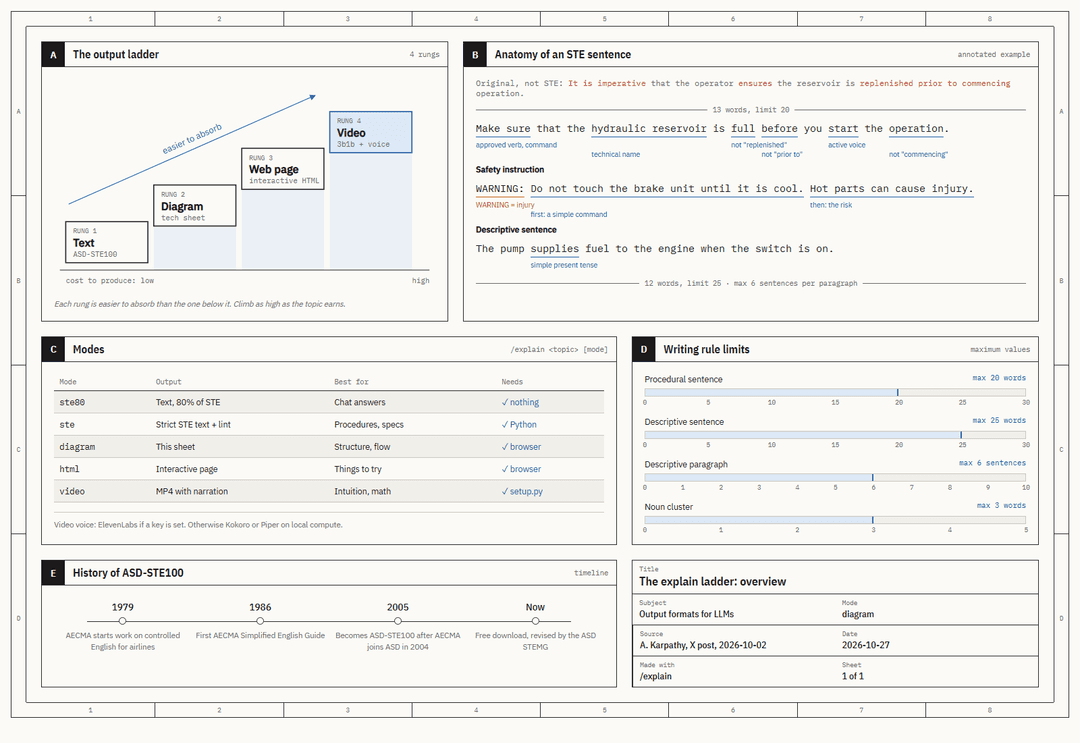
| Rung | Mode | You get | Best for |
|---|---|---|---|
| 1 | ste80 | Text "80% of the way" to ASD-STE100 (the default) | Normal answers |
| 1 | ste | Strict ASD-STE100 text, checked by a linter | Procedures, specs |
| 2 | diagram | An engineering-drawing "technical sheet" (HTML + SVG) | Structure, flows, comparisons |
| 3 | html | An interactive single-file web page | Things with knobs and steps |
| 4 | video | A 3Blue1Brown-style MP4 with narration and subtitles | Intuition, math, algorithms |
Video narration uses ElevenLabs if you set ELEVENLABS_API_KEY. Without a key it uses free voices that
run on your own CPU: Kokoro (English and 7 other languages) and Piper (Russian, Ukrainian, German,
Polish, and more).
Install (one command)
npx skills add undefined-ui/explain-skill -g
That is all. It works on macOS, Linux and Windows (Node.js 22.20+), through the skills CLI. Restart Claude Code after you install.
Text, diagram and HTML modes work at once. The first time you ask for a video, Claude tells you that video mode needs a one-time download (about 400 MB: uv, Python 3.12, Manim, Kokoro, Piper), then sets it up by itself. No ffmpeg and no LaTeX needed.
Other ways to install (video ready in advance, no Node.js, or as a plugin)
Install the skill and set up video mode in one step:
curl -fsSL https://raw.githubusercontent.com/undefined-ui/explain-skill/main/install.sh | bash
irm https://raw.githubusercontent.com/undefined-ui/explain-skill/main/install.ps1 | iex
Add -s -- --no-video after bash, or set $env:EXPLAIN_NO_VIDEO = 1 first, to skip the video setup.
As a Claude Code plugin:
/plugin marketplace add undefined-ui/explain-skill
/plugin install explain@explain-skill
Use
/explain how a TCP handshake works diagram
/explain this repo's auth flow html
/explain why softmax has a temperature video
/explain how to rotate the API keys ste
Or just ask: "explain X as a diagram", "make an interactive page about X", "make a 3b1b style video about X", "rewrite this in ASD-STE100". With no mode, the skill picks the highest rung the topic earns and says which.
Every output goes to explainers/<topic>/ in your current folder and opens when it is done.
ElevenLabs narration
export ELEVENLABS_API_KEY=sk_...               # PowerShell: $env:ELEVENLABS_API_KEY = "sk_..."
export ELEVENLABS_VOICE_ID=JBFqnCBsd6RMkjVDRZzb  # optional, any voice id from your library
export ELEVENLABS_MODEL=eleven_multilingual_v2   # optional
The key is read from the environment only. It is never written to a file.
How each rung works
1. ASD-STE100. ASD-STE100 is a controlled language made for aircraft maintenance manuals: about 900
approved words, one meaning each, sentences of 20 words or fewer for steps, active voice, no -ing forms.
The skill carries a working summary of the rules (references/ste100.md)
and a linter (scripts/ste_lint.py) for strict mode. ste80 keeps the
rules that make text easy to read and relaxes the ones that cost meaning, as Karpathy suggests.
Simplified text has one known failure mode: it can quietly drop facts. So every mode has a hard rule: keep every fact, and compare the output with the source before you hand it over.
2. Diagram. A technical sheet in the style of an engineering drawing: zone border, lettered panels,
blue callouts, red for "not this", a title block. One HTML file with inline SVG. It prints on A3, supports
dark mode, and stacks on a phone. Template: assets/sheet-template.html.
3. HTML. One self-contained page with real interaction: sliders that drive the real math, step-through controls, hover definitions. No build step.
4. Video. Claude writes the script as narration.json, then:
narration.json ──tts.py──▶ audio/*.wav + manifest.json (exact durations)
                                   │
scene.py (Manim) ──narrate.py──────┘  every animation block is timed to its voice clip
        │
        └──render.py──▶ topic.mp4 + topic.srt + stills/*.png  ──▶ Claude checks the stills, fixes, renders again
Claude looks at the stills before it reports, so it catches overlapping text and leftover shapes itself.
A complete example lives in assets/video/example/.
https://github.com/user-attachments/assets/1cd5da88-f66a-422b-b6bf-7bf375abfbf5
The example above: 37 seconds, voiced by Kokoro on a laptop CPU, bars computed with the real softmax.
What is installed where
| Path | What |
|---|---|
~/.claude/skills/explain/ | The skill: SKILL.md, references, scripts, templates |
~/.cache/explain-skill/venv/ | Python 3.12 with Manim, Kokoro, Piper |
~/.cache/explain-skill/models/ | Kokoro model; Piper voices download on first use |
Check the setup at any time: python ~/.claude/skills/explain/scripts/doctor.py.
Uninstall: npx skills remove --global explain, then delete ~/.cache/explain-skill.
(Installed with the script instead? Delete ~/.claude/skills/explain and ~/.cache/explain-skill.)
Linux note: Manim needs Cairo and Pango headers:
sudo apt install build-essential python3-dev libcairo2-dev libpango1.0-dev pkg-config.
Credits
- Idea and the ladder: Andrej Karpathy's post.
- ASD-STE100 is a specification of ASD. This repo has its own summary of the rules, not the specification. Get the official text free from asd-ste100.org.
- Manim Community, kokoro-onnx, Piper, ElevenLabs.
- The video style is inspired by 3Blue1Brown. This project is not affiliated with 3Blue1Brown, Andrej Karpathy, ASD, or ElevenLabs.
MIT License.
// faq
What is explain-skill?
Karpathy's output ladder as a Claude Code skill: ASD-STE100 text, technical-sheet diagrams, interactive HTML, and 3b1b-style narrated explainer videos.. It is open-source on GitHub.
Is explain-skill free to use?
explain-skill is open-source under the MIT license, so it is free to use.
What category does explain-skill belong to?
explain-skill is listed under devtools in the Claudeers registry of Claude-compatible tools.
// embed badge

[](https://claudeers.com/explain-skill)
// retro hit counter

[](https://claudeers.com/explain-skill)
// reviews
// guestbook
// related in Developer Tools
 🔓
The agent harness performance optimization system. Skills, instincts, memory, security, and research-first development for Claude Code, Codex, Opencode, Curs…
 🔓
Makes your AI agent think like the laziest senior dev in the room. The best code is the code you never wrote.
 🔓
AI coding assistant skill (Claude Code, Codex, OpenCode, Cursor, Gemini CLI, and more). Turn any folder of code, SQL schemas, R scripts, shell scripts, docs,…
 🔓
Use Garry Tan's exact Claude Code setup: 23 opinionated tools that serve as CEO, Designer, Eng Manager, Release Manager, Doc Engineer, and QA