
excalidraw-board
Free, editable Excalidraw diagrams from a JSON spec. Community icon libraries, no image model, no API key, no cost. A Claude Code skill.
Install with your AI
Paste into Claude Code, Cursor, or any agent — it reads the repo and wires the tool into your project.
Install and set up excalidraw-board (claude-skill project) into my current project.
Found on https://claudeers.com/excalidraw-board
Repo: https://github.com/afrozahmad07/excalidraw-board
Homepage/docs: —
Detected install method: claude-skill → # copy this skill into .claude/skills/excalidraw-board/
Category: integrations. Platforms: api, web.
Read the repo's README for exact setup and env vars, then install it and wire it into my project.

Claudeers Health Verdict:
active; community-verified: false. Confirm the source before running anything.
# copy the skill dir into your project:
# .claude/skills/excalidraw-board/   (or ~/.claude/skills/excalidraw-board/ for all projects)
git clone https://github.com/afrozahmad07/excalidraw-board
// compatibility
| Platforms | api, web |
|---|---|
| Operating systems | — |
| AI compatibility | claude |
| License | MIT |
| Pricing | open-source |
| Language | Python |
excalidraw-board
A Claude Code skill that turns a JSON spec into an editable Excalidraw diagram — built entirely from free community icon libraries.
No image model. No API key. No cost. The output is a real .excalidraw file, so
every box, arrow and label is still yours to drag around after import.
Why this exists
Most AI diagram tools hand you a picture. A picture is finished — you cannot fix the one label that is wrong, or move the box that overlaps.
This produces the file instead. You describe a panel; the layout engine places
it, checks nothing has fallen outside the frame, checks no two labels overlap,
and writes an .excalidraw you open on excalidraw.com and edit like anything
you drew yourself.
It rebuilds identically every run, so a board is source you can version rather than an artefact you regenerate and hope.
What it does
- Researches the topic first. For anything factual it checks current sources before drawing, instead of writing the diagram from memory.
- Asks instead of inventing. Ask it to draw your team, your setup or your onboarding and it asks you for the parts first, rather than making up a business you don't have and leaving you to spot every wrong bit. A public topic it just researches and draws.
- Finds icons for your subject.
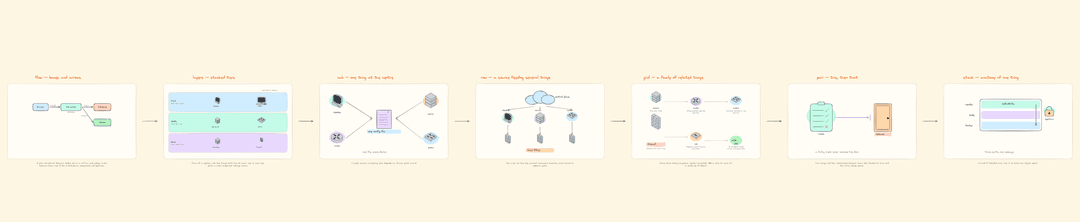
library.py find <word>searches icon names across every usable community library at once, so you see what exists before designing the panels. - Eight layouts, so you describe the shape of the idea rather than placing
boxes:
flow,layers,hub,row,grid,pair,stack,poster. - No coordinates in the spec. Columns, rows, gaps and wrapping are all measured from the content.
- Auto-fits. Rows that do not fit close their gaps and then shrink, long labels and notes wrap to their column, and boxes grow to hold their text. Icons in a row stand on one baseline, so their labels line up even when one icon is three times the height of its neighbour.
- Checks its own work. Lettering you cannot see against the colour behind it stops the build before a file is written. Elements outside their panel, and overlapping lettering, are reported with a non-zero exit — the file is still written so you can open it and see. All three are invisible when you look at a whole board zoomed out.
- Validates the spec first, with errors you can act on — an unknown layout lists the real ones, a missing icon names some that do exist, a bad arrow says which node id is wrong.
- Strips icons that carry their own captions, so your label is the only one on the board.
- Acronym expansions in a second colour beneath the label, when you want them.
- Imports Mermaid. Point it at a
.mmdfile, a Markdown fence or stdin and get an editable board back. Flowcharts only, and it reports what it dropped. - Themeable. A
themeblock overrides the background, the lettering and the six washes, so a board can carry your brand colours or go dark. - Colour-codes icons.
icon_tintrecolours a community icon's lines, so role reads before a label does. - Previews one panel at a time. A seven-panel board fits on screen at 14%, where every defect disappears. One file per panel, rebuilt through the same path as the board itself.
- PNG export and a shareable link. Both optional.
- Tests itself.
selftest.pybuilds every shipped spec, then deliberately breaks things to confirm each check still fails.
Install
git clone https://github.com/afrozahmad07/excalidraw-board.git \
  ~/.claude/skills/excalidraw-board
python3 -m pip install pillow
That is the whole core dependency. Then just ask Claude Code, in plain language:
make an excalidraw board of who owns what in my business — founder, marketing, sales, delivery — use the stick figures
draw my client onboarding: enquiry, discovery call, proposal, deposit, kickoff
make an excalidraw poster of how a lead becomes a paying customer, all in one block
draw where a deal stalls in my sales process: enquiry, demo, proposal, negotiation, signed
draw the steps of buying a house: offer, survey, mortgage, exchange, completion
make an excalidraw poster of how to plan a holiday, all in one block
draw me a diagram of how a request reaches my database
draw how my current setup works end to end: laptop, VPS, Postgres, S3 backups
draw an AWS diagram — Route 53, CloudFront, load balancer, EC2, RDS
turn the Mermaid flowchart in my README into an editable Excalidraw board
redraw that board in our brand colours — dark background, orange headings
You never write the spec yourself. It picks the layout, finds the icons and writes it.
Optional extras, only for PNG export and shareable links:
python3 -m pip install playwright && python3 -m playwright install chromium
Use it directly
python3 scripts/build.py specs/layouts-tour.json
Lands in boards/ where you ran it.
python3 scripts/preview_panels.py specs/layouts-tour.json     # one file per panel
python3 scripts/selftest.py                                   # is the kit healthy
python3 scripts/verify_board.py boards/flow-demo.excalidraw   # structure
python3 scripts/export_png.py  boards/flow-demo.excalidraw    # 2x PNG
python3 scripts/share_link.py  boards/flow-demo.excalidraw    # public URL
Already have a Mermaid diagram?
python3 scripts/mermaid_to_spec.py diagram.mmd --build
python3 scripts/mermaid_to_spec.py ARCHITECTURE.md --out specs/arch.json
pbpaste | python3 scripts/mermaid_to_spec.py - --build
flowchart and graph, all four directions. Nodes, edges and edge labels are
carried over, ranked into layers and centred so a parent sits over its children.
The panel is sized from the content, so it lands inside the frame without anyone
guessing at a width.
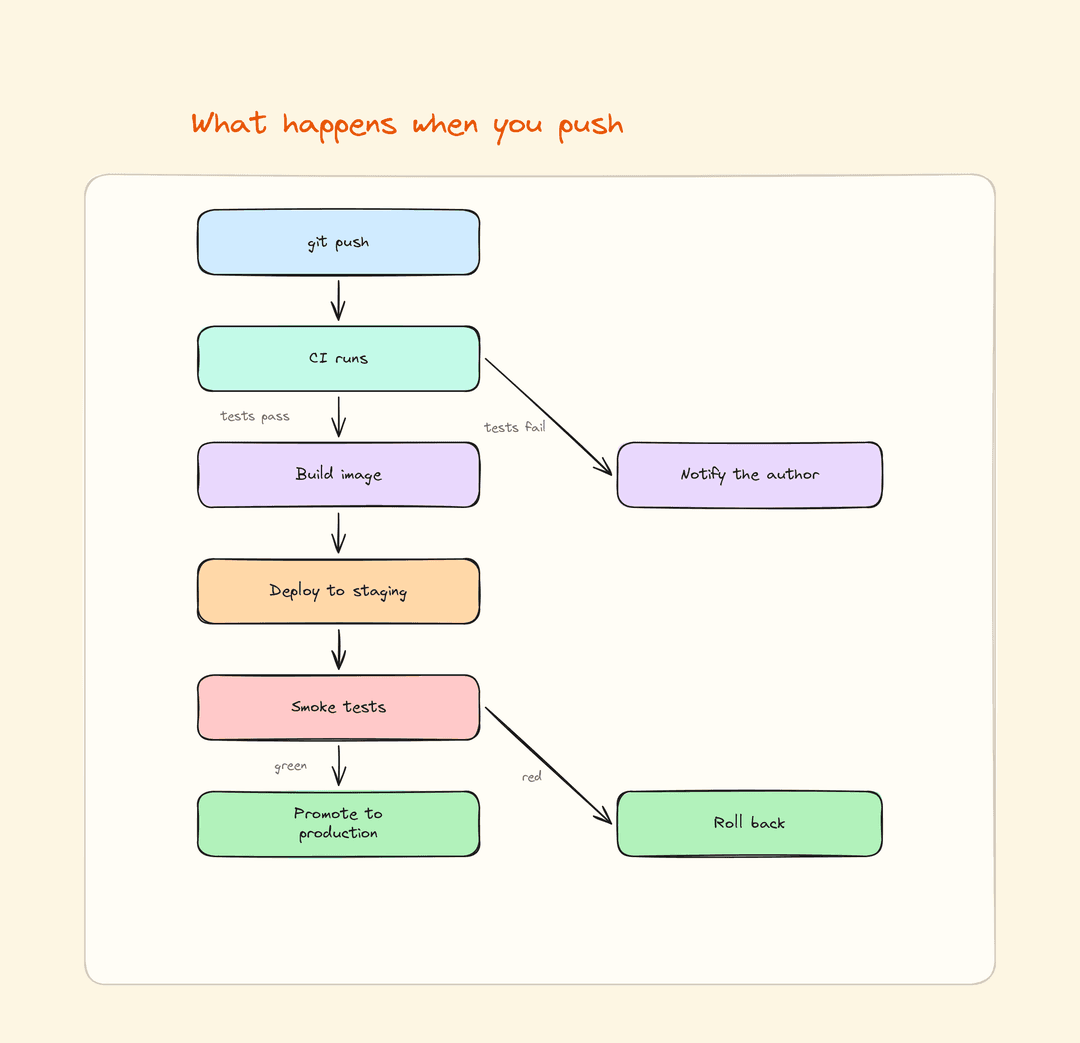
Any other Mermaid diagram type is refused by name rather than half-drawn. Node shapes, subgraph boxes, dotted links and the second arrowhead on a bidirectional link do not survive — and each one is reported, so you are never left comparing by eye.
The result is an ordinary spec. Edit it, add icons and washes, rebuild.
Your colours
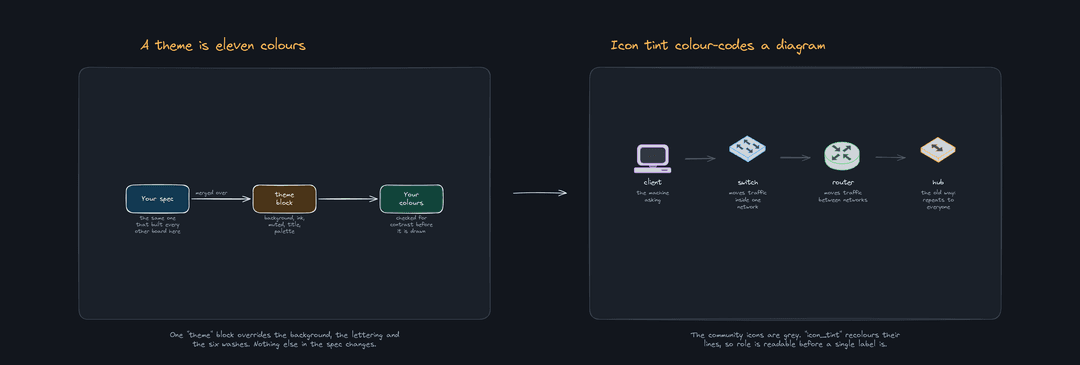
A theme block overrides the background, the lettering and the six washes.
Everything is optional and merges over the defaults, so naming one wash leaves
the other five alone.
"theme": {
  "background": "#12161d", "panel": "#1a2029", "ink": "#e9edf2",
  "muted": "#9aa6b4",      "title": "#ffb454",
  "palette": {"mint": "#12453c", "sky": "#123952"},
  "inks":    {"blue": "#66b8ff"}
}
icon_tint recolours a community icon's lines — red green blue orange
violet teal grey black, or a #hex — so a diagram is colour-coded by
role before a single label is read.
Every colour the spec names is checked before anything is drawn. Lettering you
cannot see against the panel, the wash it sits on, or the canvas fails the
build; a wash too pale to notice prints its contrast ratio. That check exists
because lemon (#fff3bf) scored 1.10 against the panel, was invisible, and
shipped anyway.
It does not reach inside the community icons. They keep their own greys, so
on a dark theme give them an icon_tint — otherwise they sit at about 2.0
against the panel and the build will not tell you.
Both are in specs/theme-demo.json.
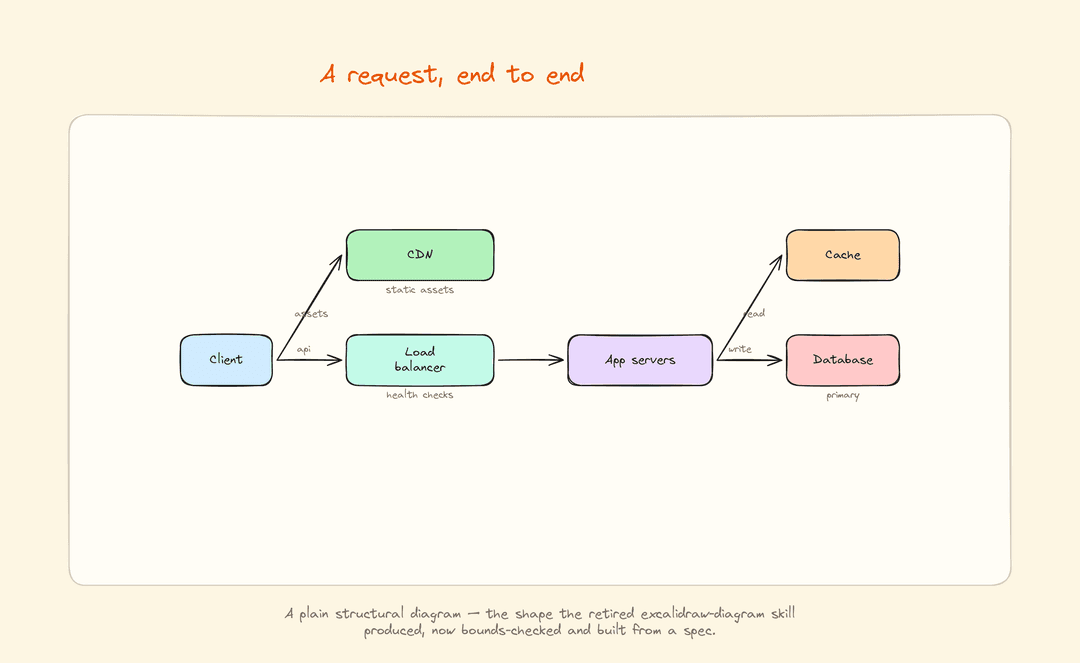
A spec
No coordinates anywhere. You pick a layout and list the content.
{
  "title": "Request path",
  "out": "boards/request-path.excalidraw",
  "panels": [{
    "head": "A request, end to end",
    "layout": "flow",
    "caption": "What happens between the browser and the database.",
    "nodes": [
      {"id": "client", "label": "Client",        "col": 0, "row": 1, "wash": "sky"},
      {"id": "lb",     "label": "Load balancer", "col": 1, "row": 1, "wash": "mint",
       "note": "health checks"},
      {"id": "app",    "label": "App servers",   "col": 2, "row": 1, "wash": "lilac"},
      {"id": "db",     "label": "Database",      "col": 3, "row": 1, "wash": "rose"}
    ],
    "edges": [["client","lb","api"], ["lb","app"], ["app","db","write"]]
  }]
}
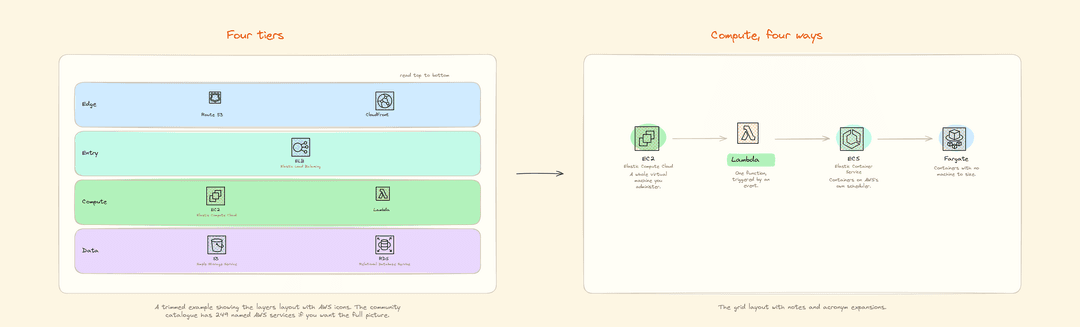
Eight layouts: flow (boxes and arrows), layers (stacked tiers), hub,
row, grid, pair, stack, and poster — one rich block with labelled
zones, items placed by relative position, and connectors between them. Several panels in one spec become a story laid
out left to right; one panel is just a diagram.
Full reference in SKILL.md.
Examples
Each was built from the spec beside it. No images generated, nothing paid for.
Every layout, one panel each — the picture at the top of this page.
specs/layouts-tour.json
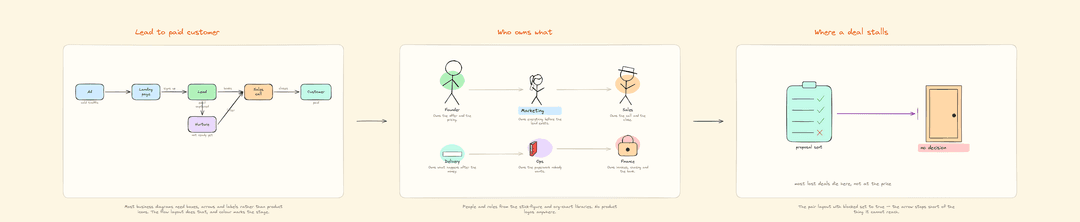
A business process — a funnel, who owns what, and where a deal stalls.
Built from shapes and people, with no product icons anywhere.
specs/business-demo.json
A request, end to end — the flow layout on its own.
specs/flow-demo.json
A dark theme and tinted icons — the picture further up this page.
specs/theme-demo.json
Cloud icons — short AWS and GCP boards showing layers and grid with
vendor icon sets. specs/aws-mini.json ·
specs/gcp-mini.json
Icons
Pulled from excalidraw.com's 231 community libraries, cached locally on first use.
python3 scripts/library.py find database    # which icon can I use for X
python3 scripts/library.py search network   # find a whole library
python3 scripts/library.py items <library>  # list what is inside one
Registered shorthands cover AWS (249 named icons), Google Cloud (139), Azure
(spread over six libraries), network topology, IT and technology logos, stick
people and figures, office items, org charts and computer parts. Any other
library works too — pass its full owner/name.excalidrawlib.
Business and process diagrams usually need none of them. Boxes, arrows, people and documents carry a funnel, an org chart or an approval flow, and those are built in — see the business example above.
One rule saves most of the trouble: if a library's items come back as
item-0 … item-N, skip it. About half the catalogue uses the older format
with unnamed items, and identifying those means rendering each one by hand.
Licence
MIT. See LICENSE.
// faq
What is excalidraw-board?
Free, editable Excalidraw diagrams from a JSON spec. Community icon libraries, no image model, no API key, no cost. A Claude Code skill.. It is open-source on GitHub.
Is excalidraw-board free to use?
excalidraw-board is open-source under the MIT license, so it is free to use.
What category does excalidraw-board belong to?
excalidraw-board is listed under integrations in the Claudeers registry of Claude-compatible tools.
// embed badge

[](https://claudeers.com/excalidraw-board)
// retro hit counter

[](https://claudeers.com/excalidraw-board)
// reviews
// guestbook
// related in Integrations & Connectors
 🔓
🔓Use claude code and codex for free in the terminal, VSCode extension, and discord like OpenClaw (voice supported)
 🔓
🔓Bridge local AI coding agents (Claude Code, Cursor, Gemini CLI, Codex) to messaging platforms (Feishu/Lark, DingTalk, Slack, Telegram, Discord, LINE, WeChat…
 🔓
🔓All parts of Claude Code's system prompt, 27 builtin tool descriptions, sub agent prompts (Plan/Explore/Task), utility prompts (CLAUDE.md, compact, statusli…
 🔓
🔓Claude Code skill/plugin: immersive scroll-scrubbed 'fly through the world' landing pages generated with Higgsfield (Emons-style diorama flights, seamless co…