
episko
A lightweight app for claude code cli agent organization in Rust
Install with your AI
Paste into Claude Code, Cursor, or any agent — it reads the repo and wires the tool into your project.
Install and set up episko (git-clone project) into my current project.
Found on https://claudeers.com/episko
Repo: https://github.com/respeak-io/episko
Homepage/docs: —
Detected install method: git-clone → git clone https://github.com/respeak-io/episko
Category: devtools. Platforms: cli, api, desktop.
Read the repo's README for exact setup and env vars, then install it and wire it into my project.

Claudeers Health Verdict:
active; community-verified: false. Confirm the source before running anything.
git clone https://github.com/respeak-io/episko
// compatibility
| Platforms | cli, api, desktop |
|---|---|
| Operating systems | — |
| AI compatibility | claude |
| License | MIT |
| Pricing | open-source |
| Language | TypeScript |
Episko
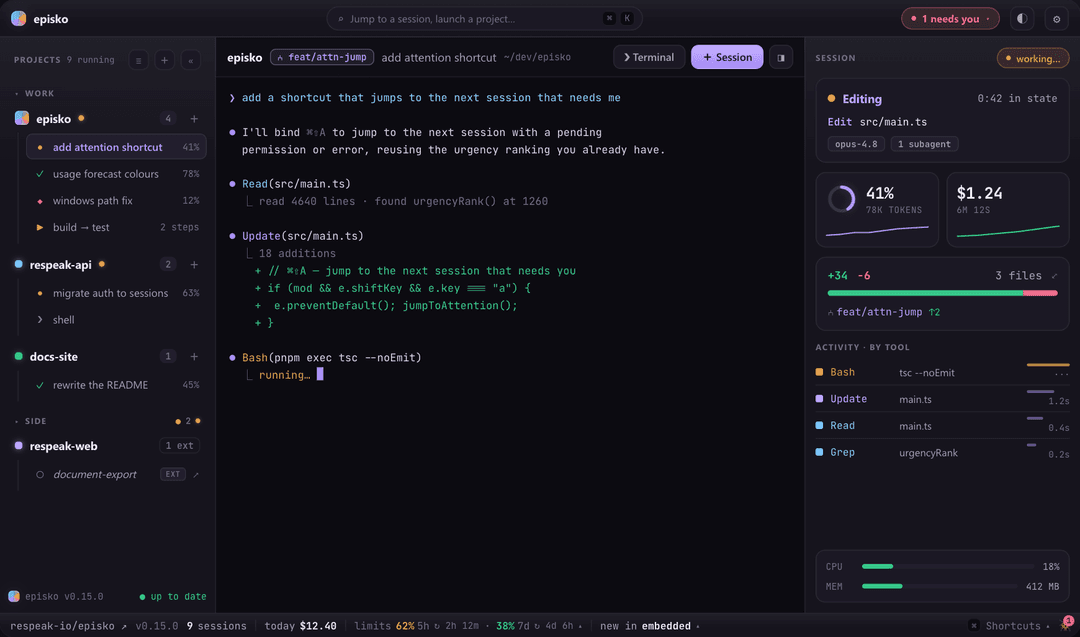
Run a whole flock of Claude Code sessions at once. Episko is a native desktop app that gives every agent its own real terminal and streams back what each one is doing — phase, model, context use, cost, the tool it's running right now — so a dozen agents are as easy to mind as one chat.
episko.dev · Download · macOS + Windows · free and open source
Status: early, but in daily use. Episko began as a Phase-0 spike (see
SPIKE.md) proving the two risky pieces — embedding a real terminal and instrumenting Claude Code per launch. It has grown well past that. Expect rough edges and fast-moving internals.
What it does
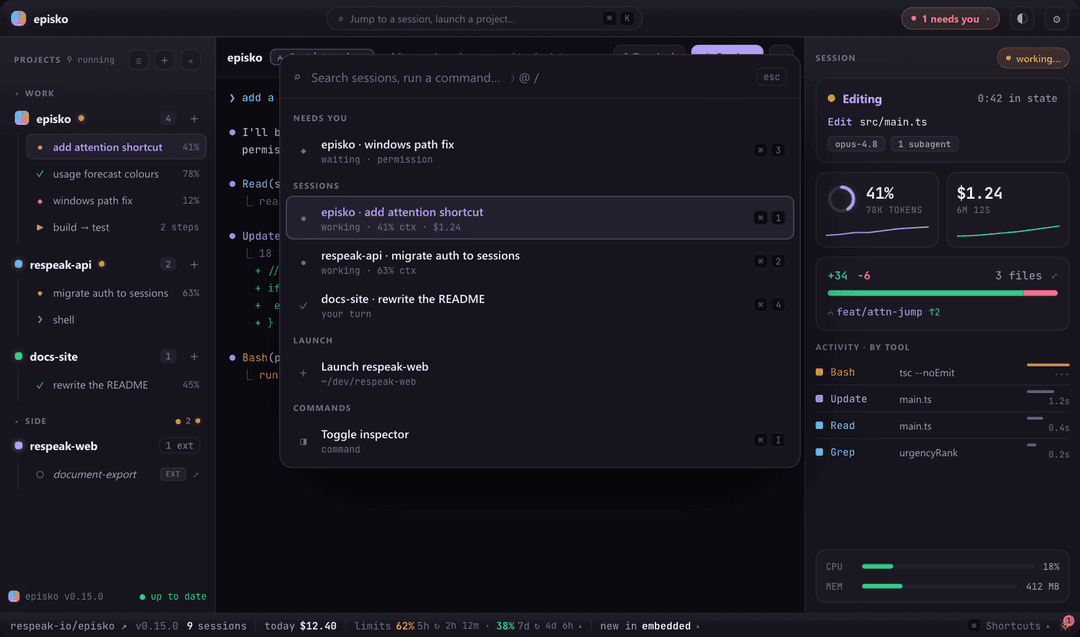
- Every session in one view. A sidebar of projects and their sessions, each with a status glyph and context %, sorted so whatever needs you floats up. Sessions that need a decision are called out in the header and the tray.
- Real terminals, not wrappers. Each session is a genuine PTY running the actual
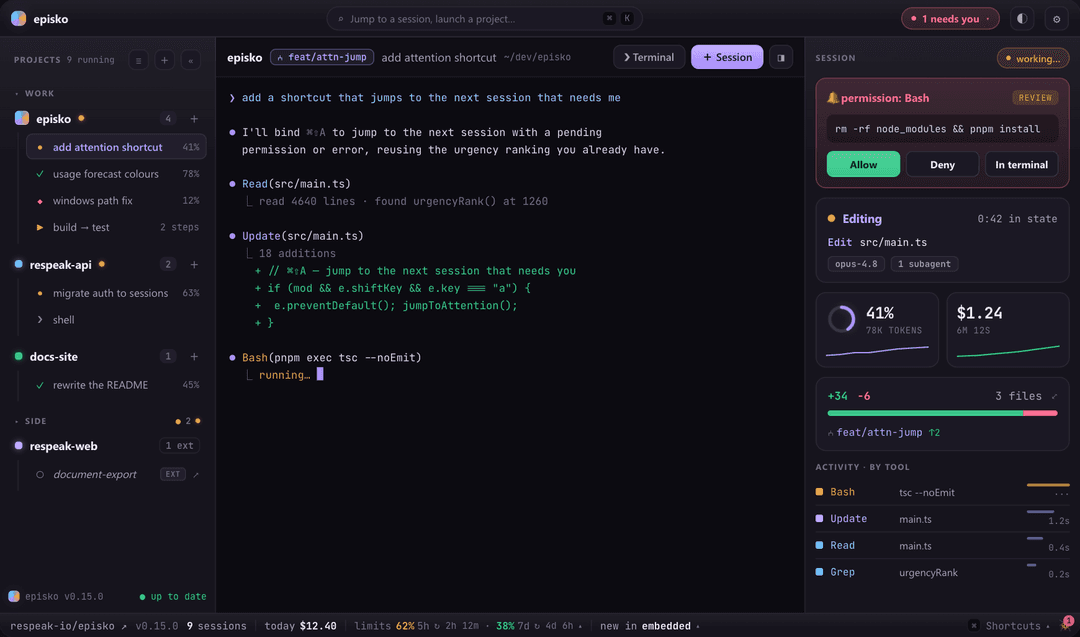
claudeTUI — type into it, watch it think. Render it embedded (xterm.js) or hand it to Ghostty, Terminal.app or iTerm2. Plain shell panes too, for when you just need a prompt next to an agent. - Answer permission prompts in-app. When Claude asks to run something, Episko surfaces the command with a risk read and lets you allow, deny, or drop into the terminal — instead of hunting for which window is blocked.
- Live telemetry per session. Model, context window use, cost, time in state, the running tool, and a short history of recent tool calls with latencies — plus per-session CPU/RAM and a git summary of what's changed.
- Usage limits, before you hit them. Your 5-hour and weekly limits with reset times, and a forecast that warms from amber to red when your current pace won't make it.
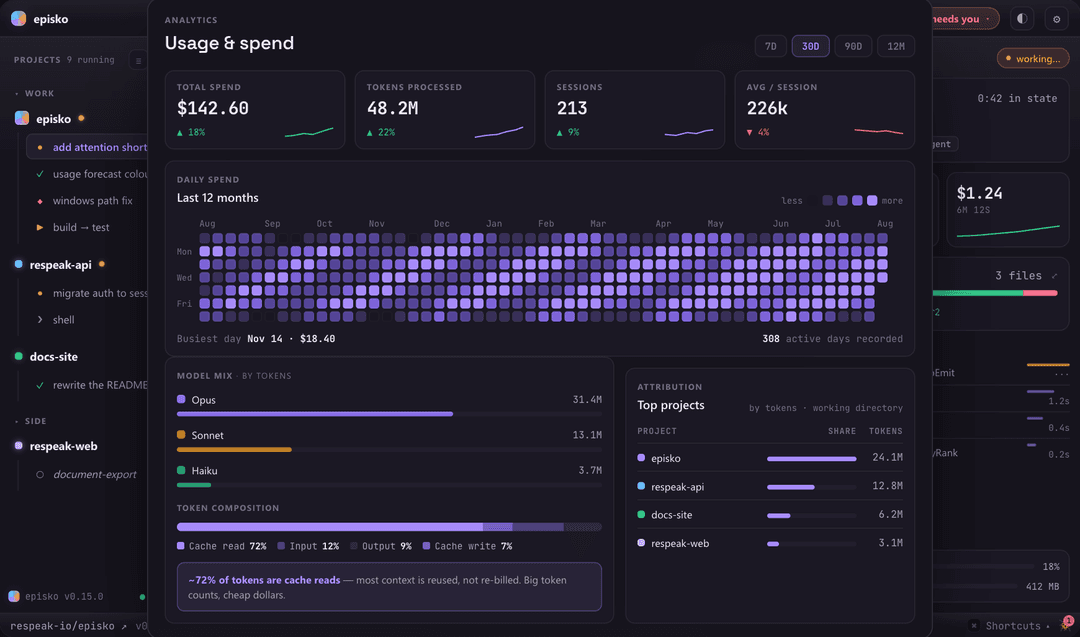
- A usage dashboard. Daily spend as a contribution heatmap, tokens by model, token composition (cache reads vs. input vs. output), and cost attributed per project.
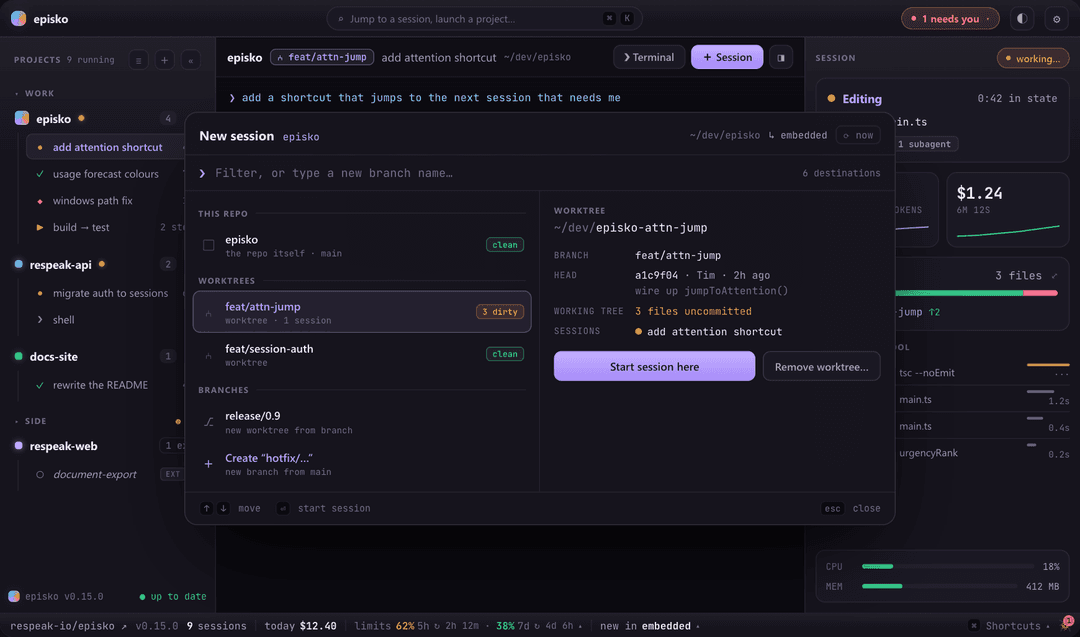
- Launch into worktrees. The new-session dialog lists the repo, its worktrees and branches, and can create a worktree on the fly so parallel agents don't fight over one checkout.
- A commit graph per project. Right-click a project → Commit graph… for its lanes, merges, branch and tag labels. It reads a page at a time and fetches the next as you scroll, so opening it on a huge repo costs the same as on a small one.
- Sessions started elsewhere show up too. Claude Code sessions launched outside Episko are discovered and listed read-only, with jump-to-terminal on macOS.
- Survives a restart. Episko's launch id is Claude's
--session-id, so resuming replays Claude's own transcript — nothing to capture, nothing to lose. - Run the project's own tasks — VS Code tasks, a
justfile, package scripts, a Makefile and more, in the same panes, with a run's exit code as its status. See below. - Command palette (
⌘K), a settings window (⌘,), per-project accent colours and icons, favourites and drag ordering, a daily cost rollup, and acaffeinatetoggle so long runs don't sleep.
Run your project's tasks, too
Agents aren't the only thing worth watching. Episko runs the task definitions your project already ships — no new file to write, no editor required — in the same PTY panes it uses for Claude sessions:
.episko/tasks.toml · .vscode/tasks.json · .vscode/launch.json · package.json scripts · justfile · Taskfile.yml · mise.toml · Makefile · Cargo.toml
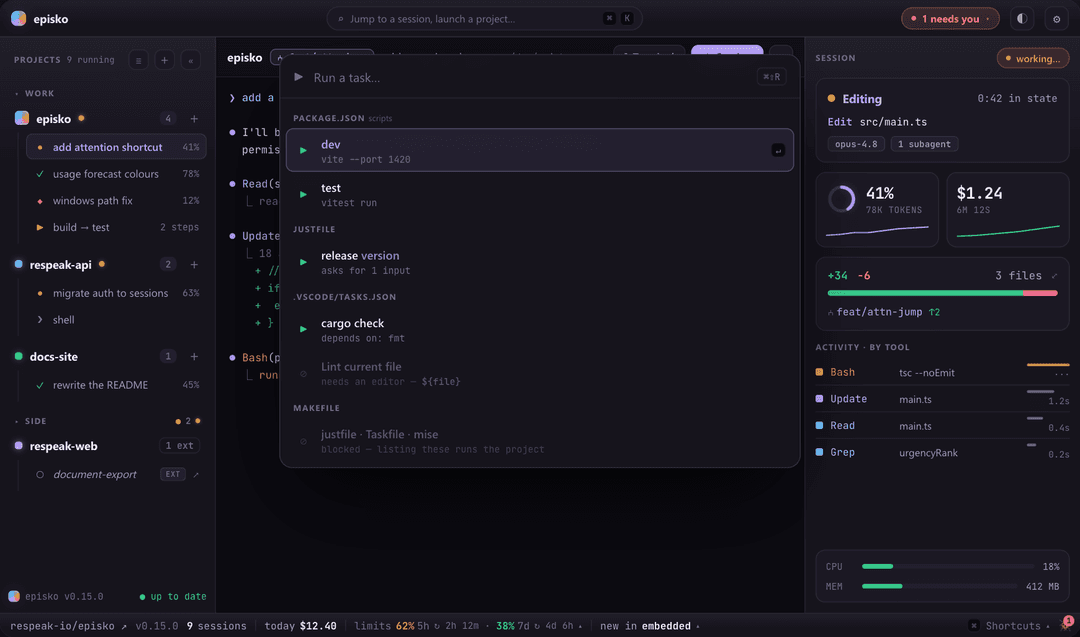
Hit ▶ Run in the header (or ⌘⇧R, or the Tasks group in ⌘K) and pick one. A task run is a session: it inherits the phase state machine, sidebar glyphs, attention badge, tray and ⌘1–9, because a run's exit code is simply its phase (0 → done, non-zero → error). Runs are deliberately un-instrumented — no settings file, no telemetry, no cost — and go through a login shell so they get the same PATH and version-manager shims your own terminal has. dependsOn chains are honoured, and a failed dependency stops the chain — "build then test" must not test a build that didn't happen.
Three rules shaped it:
- Discovery never executes the project.
just --dump,task --listandmise tasks lsall evaluate what they read, so they sit behind a trust gate; Makefiles are parsed statically becausemake -qpwould expand$(shell …). Untrusted providers show one blocked row rather than vanishing. - What can't run says so. A VS Code task needing an editor (
${file}) is listed greyed with the reason — a missing row reads as "Episko didn't find my task".launch.jsonruns without a debugger, soattachand compound configs are blocked rather than silently started as bare processes. - Personal preference →
localStorage; project fact →.episko/tasks.toml, which is the only file Episko writes, edited viatoml_editso hand-written comments and ordering survive.
A task inspector offers re-run / pin / stop / send output to a session — so a failing build can go straight to an agent. There's a per-project task panel for pinning, hiding and editing, and a prompt for ${input:…} values and just recipe parameters.
How it works
On each Claude launch Episko writes a throwaway --settings file whose statusLine command and lifecycle hooks POST to a tiny tiny_http server bound to an ephemeral localhost port. There is no global ~/.claude mutation and no transcript-file scraping — instrumentation is per-launch and vanishes with the temp file.
Every POST is tagged with the launch id Episko chose, so telemetry routes to the right pane before any output appears — and keeps routing after /clear, /compact or /resume, each of which makes Claude mint a new runtime session_id. The permission hook is the one blocking call: the server holds the request open until you answer.
CLAUDE.md is the architecture document — the module map for both sides and the invariants that keep it working. SPIKE.md is the original Phase-0 write-up, kept as a historical record of a single-session prototype; it predates most of the app and is not a reference.
Stack
- Tauri v2 — Rust backend, system WebView frontend
- portable-pty — the PTY (forkpty on macOS, ConPTY on Windows)
- tiny_http — the localhost telemetry receiver
- xterm.js — terminal rendering
- Vanilla TypeScript frontend (Vite) — no framework
Install
Grab the latest build from the Releases page. You need Claude Code installed and on your PATH.
macOS (Apple silicon)
Episko is self-signed but not notarized through Apple, so Gatekeeper quarantines the download and refuses to open it ("… is damaged and can't be opened"). Clear the quarantine flag before opening the .dmg:
xattr -dr com.apple.quarantine ~/Downloads/Episko_*.dmg
Then open it, drag Episko into Applications, and launch. If it's still blocked on first launch, run the same command on the installed app:
xattr -dr com.apple.quarantine /Applications/Episko.app
Windows (10 / 11)
Download the .msi (or the .exe installer) and run it. SmartScreen may warn on first run — choose More info ▸ Run anyway.
Episko keeps itself current after install: it checks the latest GitHub release on launch and offers an in-app update. It never installs one behind your back — a restart would kill your running sessions.
Build from source
Prerequisites
- Node.js 18+ and pnpm
- Rust (stable) + the Tauri system dependencies for your platform
- Claude Code on your
PATH
Run it
pnpm install          # first time
pnpm tauri dev        # run the app
pnpm tauri build      # production bundle
Then: add a project folder, hit + Session, accept Claude's workspace-trust prompt the first time in a directory, and ask it something. Watch the sidebar glyph, inspector and footer update live.
Other useful commands:
pnpm exec tsc --noEmit    # typecheck (strict; this is the real linter)
pnpm test                 # vitest — frontend unit tests
cd src-tauri && cargo test
Run dev builds from a real terminal, not from a terminal pane inside Episko — anything started inside Episko becomes its descendant and gets filtered out of the external-session list.
Platform support
| macOS | Windows | Linux | |
|---|---|---|---|
| Embedded terminal | ✅ | ✅ | — |
| Ghostty / Terminal / iTerm2 | ✅ | — | — |
| Telemetry, permissions, usage | ✅ | ✅ | — |
| External-session discovery | ✅ | ✅ | untested |
| Jump to a session's terminal | ✅ | — | — |
Release builds target Apple silicon (aarch64) and Windows x64. Intel Macs aren't covered; Linux isn't packaged, though the non-ps paths are written to be OS-agnostic.
More screenshots
Renders of the interface with representative data.
Answer a permission request without leaving the app — the command, how risky it looks, and allow / deny / open-in-terminal.
Run the project's own tasks — grouped by where they came from. What can't run is listed with the reason rather than hidden.
Jump anywhere with ⌘K — sessions ranked so whatever needs you comes first.
Start a session on any branch or worktree — create one on the fly, with a preview of HEAD and what's uncommitted.
See where the money and tokens went — daily spend, model mix, token composition, and cost per project.
License
MIT © Respeak GmbH, Karlsruhe
Episko is an independent project — not affiliated with, endorsed, or sponsored by Anthropic. Claude and Claude Code are trademarks of Anthropic, PBC.
// faq
What is episko?
A lightweight app for claude code cli agent organization in Rust. It is open-source on GitHub.
Is episko free to use?
episko is open-source under the MIT license, so it is free to use.
What category does episko belong to?
episko is listed under devtools in the Claudeers registry of Claude-compatible tools.
// embed badge

[](https://claudeers.com/episko)
// retro hit counter

[](https://claudeers.com/episko)
// reviews
// guestbook
// related in Developer Tools
 🔓
🔓The agent harness performance optimization system. Skills, instincts, memory, security, and research-first development for Claude Code, Codex, Opencode, Curs…
 🔓
🔓Makes your AI agent think like the laziest senior dev in the room. The best code is the code you never wrote.
 🔓
🔓Use Garry Tan's exact Claude Code setup: 23 opinionated tools that serve as CEO, Designer, Eng Manager, Release Manager, Doc Engineer, and QA
 🔓
🔓AI coding assistant skill (Claude Code, Codex, OpenCode, Cursor, Gemini CLI, and more). Turn any folder of code, SQL schemas, R scripts, shell scripts, docs,…