
ebo-workstation-skill
Claude skill for Schneider EcoStruxure Building Operation 7.1: an AI agent writes, loads and binds Function Block programs and graphics through WorkStation,…
Install with your AI
Paste into Claude Code, Cursor, or any agent — it reads the repo and wires the tool into your project.
Install and set up ebo-workstation-skill (claude-skill project) into my current project.
Found on https://claudeers.com/ebo-workstation-skill
Repo: https://github.com/Maxxis20/ebo-workstation-skill
Homepage/docs: —
Detected install method: claude-skill → # copy this skill into .claude/skills/ebo-workstation-skill/
Category: skills. Platforms: api, desktop, web.
Read the repo's README for exact setup and env vars, then install it and wire it into my project.

Claudeers Health Verdict:
unknown; community-verified: false. Confirm the source before running anything.
# copy the skill dir into your project:
# .claude/skills/ebo-workstation-skill/   (or ~/.claude/skills/ebo-workstation-skill/ for all projects)
git clone https://github.com/Maxxis20/ebo-workstation-skill
// compatibility
| Platforms | api, desktop, web |
|---|---|
| Operating systems | — |
| AI compatibility | claude |
| License | MIT |
| Pricing | open-source |
| Language | Python |
ebo-workstation: a Claude skill for Schneider EcoStruxure Building Operation
Lets an AI coding agent (Claude Code) program EBO 7.1 for you: you describe the plant, the agent writes the Function Block program, loads it into the Enterprise Server through WorkStation, compiles it, binds it, draws an operator graphic and can publish values over MQTT or take them from an MQTT broker. It works the real WorkStation through its user interface, the same dialogs you would click.
What is in the skill:
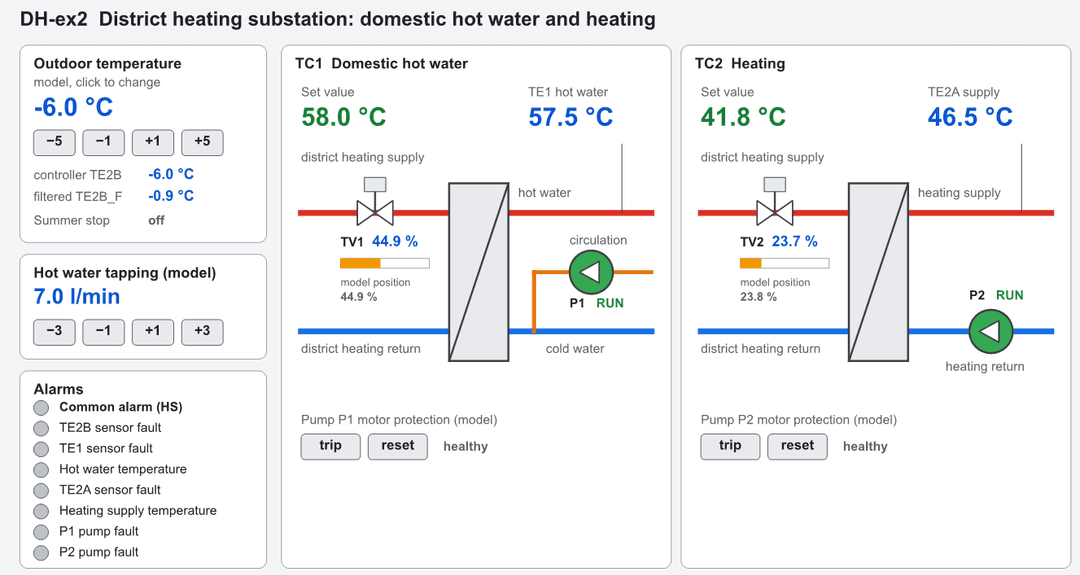
reference/findings.md: how WorkStation and the Function Block editor behave when driven from outside, the.autprogram text format with its traps, bindings, graphics (TGML), MQTT both ways, the servers as containers (Enterprise Server, Edge Server) and bindings between two servers.scripts/ebo.sh+scripts/win/: the driver. PowerShell that works WorkStation by UI Automation.scripts/aut.py: Function Block program generator with automatic layout and wire routing.scripts/tgml.py: graphic (HMI) generator.scripts/fuxa.py: FUXA project generator for an MQTT view.examples/dh-ex2/: a worked example, a district heating substation (Finnish Energy K1/2013, example connection 2) with controller, plant model, operator graphic and MQTT view.examples/ahu01/: a larger worked example, a generic air handling unit: controller with one PID per heating / cooling stage in 20 hierarchical blocks and 33 alarms, plant simulation, animated operator graphic with info boxes, weekly schedules, trend logs and dashboard, the same program prepared in an MP-C controller, MQTT and a FUXA view.deploy.shthere loads the lot. How it runs:examples/ahu01/README.md.examples/lora-mqtt/: values of a LoRaWAN sensor from an MQTT broker fed by a network server in ChirpStack format, into EBO server values with units, plus a "sensor stopped reporting" alarm.

What you need
Everything on one Windows machine, your laptop is fine:
- EcoStruxure Building Operation 7.1.1, Enterprise Server and WorkStation, with a valid licence. A test
installation, never a production server: the driver creates and deletes objects under
/Server 1. The server may also run elsewhere, for instance Schneider's container image of the Enterprise Server or Edge Server on a Linux machine (reference/findings.md, "Servers in containers"); WorkStation stays on Windows and must be the same build. Licences and Schneider's EULA apply there just the same. - Claude Code for Windows (it brings Git Bash, which runs
ebo.sh). - Python 3.
- For the MQTT part only: Mosquitto on
127.0.0.1:1883(also the broker to rehearse subscriptions on), and FUXA (npm install -g @frangoteam/fuxa) onhttp://127.0.0.1:1881/if you want the web view.
Install
In Git Bash:
git clone https://github.com/Maxxis20/ebo-workstation-skill ~/.claude/skills/ebo-workstation
cd ~/.claude/skills/ebo-workstation
To update later: git -C ~/.claude/skills/ebo-workstation pull, or tell Claude "update the EBO skill". The driver
runs straight from that folder, so nothing else needs redoing.
That is all you must do by hand. Start Claude Code and say what you want, for example "check that the EBO skill is ready on this machine" or straight away "build a Function Block program in EBO for an air handling unit with ...". The agent runs a check first, sets up what it can, and asks you for the rest:
- the WorkStation password, in a Windows box on your screen (not in the chat);
- Classic Mode, once: open any Function Block program in WorkStation and switch
Show Classic Modeon; - anything missing on the machine (Python, a stopped Enterprise Server service).
It also fetches the Function Block editor's block catalogue from your own installation. That is Schneider's file, so it is not in this repository, and the program generator needs it.
By hand, if you want to see it work first
E=~/.claude/skills/ebo-workstation/scripts/ebo.sh
$E check                                                    # what is ready, what is not
$E setup                                                    # work folder, block catalogue
$E logon                                                    # starts WorkStation, asks for the password
$E shot now.png                                             # a screenshot of your desktop
$E run "Ws-LoggedOn"                                        # True when WorkStation is logged on
$E put examples/blink.aut 'C:\agentwork\ebo\blink.aut'
$E run "Fb-Load '/Server 1' 'Blink' 'C:\agentwork\ebo\blink.aut'" 150
Hands off the keyboard and mouse while a command runs. The driver brings WorkStation to the front, types and
clicks. After about 40 seconds /Server 1/Blink exists, compiled and running.
Password. WorkStation logs off after 5 idle minutes, so the agent has to log on again now and then. It runs
ebo.sh logon, and a Windows credential box opens on your screen: type the WorkStation password there. It goes
straight to the log-on form; the agent does not see it. Do not paste the password into the chat. For unattended
use there is EBO_SECRET_RUN="op run --" with a secret manager, or EBO_ADMIN_PASSWORD in the environment.
Screen. No fixed resolution is needed: the driver finds buttons by name. Some clicks are placed a few pixels from an element it found, measured at 100 % display scaling, so set scaling to 100 % if clicks land beside their target. Very small screens (1024x768) do not fit the editor.
Limits, plainly
- Worked out and tested on one installation only: EBO 7.1.1.132, English, screen 1600x1200 at 100 % scaling. Not
yet tried on a range of laptops, and
ebo.shitself has not been run under Git Bash (the PowerShell side it calls has). Other display scaling, EBO versions or languages will break some of it. The findings say where each fact came from, so the agent can often work out a fix. Tell me what broke: issues are welcome. - WorkStation is driven through UI Automation names and menu command ids where it offers them, and through a few fixed screen positions where it does not.
- The WorkStation automation API would be the proper way in. It needs an SDK licence key, and this skill does not work around that.
- One command at a time, and nobody else on the keyboard while it runs.
- WebStation in the Brave browser: clicks on a graphic do nothing until "Block fingerprinting" is switched off for that site (lion icon > Advanced options). Not a fault of the graphic; details in the findings.
- Slow where the user interface is slow: about 10 s per MQTT data point, about 6 s per bound point.
- The engineering is still yours: check what the agent built before it goes anywhere near a real plant.
Not affiliated
An independent project, not made, endorsed or supported by Schneider Electric. EcoStruxure, Building Operation and Menta are trademarks of Schneider Electric. No Schneider software or files are included; you need your own licensed installation.
MIT licence.
// faq
What is ebo-workstation-skill?
Claude skill for Schneider EcoStruxure Building Operation 7.1: an AI agent writes, loads and binds Function Block programs and graphics through WorkStation, on your own EBO machine. It is open-source on GitHub.
Is ebo-workstation-skill free to use?
ebo-workstation-skill is open-source under the MIT license, so it is free to use.
What category does ebo-workstation-skill belong to?
ebo-workstation-skill is listed under skills in the Claudeers registry of Claude-compatible tools.
// embed badge

[](https://claudeers.com/ebo-workstation-skill)
// retro hit counter

[](https://claudeers.com/ebo-workstation-skill)
// reviews
// guestbook
// related in Claude Skills
 🔓
An agentic skills framework & software development methodology that works.
 🔓
 🔓
💫 Toolkit to help you get started with Spec-Driven Development
 🔓
AI coding assistant skill (Claude Code, Codex, OpenCode, Cursor, Gemini CLI, and more). Turn any folder of code, SQL schemas, R scripts, shell scripts, docs,…