
duo-adapt
Adapt any Flutter app for iPhone Duo, foldables and tablets without changing the phone layout. A Claude Code plugin: one skill, three agents and a tested ada…
Install with your AI
Paste into Claude Code, Cursor, or any agent — it reads the repo and wires the tool into your project.
Install and set up duo-adapt (claude-plugin project) into my current project.
Found on https://claudeers.com/duo-adapt
Repo: https://github.com/islam-diab/duo-adapt
Homepage/docs: —
Detected install method: claude-plugin → /plugin install duo-adapt@islam-diab/duo-adapt
Category: plugins. Platforms: mobile.
Read the repo's README for exact setup and env vars, then install it and wire it into my project.

Claudeers Health Verdict:
unknown; community-verified: false. Confirm the source before running anything.
⚠ Unverified / not recently updated — review before pasting a run-this config.
/plugin marketplace add islam-diab/duo-adapt
/plugin install duo-adapt@islam-diab/duo-adapt
git clone https://github.com/islam-diab/duo-adapt
// compatibility
| Platforms | mobile |
|---|---|
| Operating systems | — |
| AI compatibility | claude |
| License | MIT |
| Pricing | open-source |
| Language | Dart |
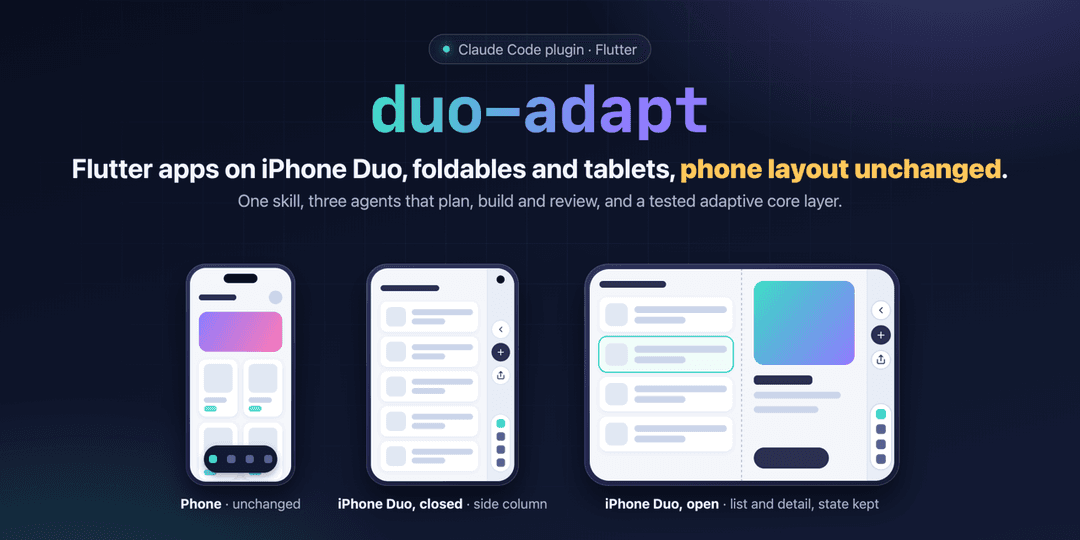
duo-adapt
Adapt any Flutter app for iPhone Duo, foldables and tablets, without changing a pixel of the phone layout.
duo-adapt is a Claude Code plugin. It brings one skill that orchestrates three agents (planner, executor, reviewer), a shared plan with the hard decisions already made, and a tested adaptive core layer that gets copied into your app.
Why
iPhone Duo puts the system bars in an 84 pt column on the side of the screen: on the outer display, and on the inner display in landscape. An app built for portrait phones has a rough time there:
- content slides under the side column;
flutter_screenutilwith a phone design size scales the whole UI about 2x on the inner display;- folding or unfolding rebuilds screens, so the text you typed, the selected item and the scroll position are gone;
- Flutter 3.47 does not report the fold on iOS yet (
MediaQuery.displayFeaturesis empty).
Tablets, Android foldables and phones in landscape share most of these problems. duo-adapt fixes them the same way in every app.
What it does
- Two layers. An adaptive layer for every device (breakpoints, navigation, list/detail, readable widths, grids, safe area, state), and a fold layer that only runs while a half-open fold is reported.
- Apple-style navigation on iPhone Duo. Back, page actions and tabs move into the side column, inside the system's own 84 pt bar. Everywhere else you get a bottom bar or a rail. The side column is detected from the safe area only, never from the device model.
- List/detail that survives folding. The selection lives in your state management, both panes keep their state under GlobalKeys, and grid columns stay even in Book posture.
- The phone stays exactly as it is. Every UI task pins phone values in a test before the code changes, and the reviewer checks them against
HEAD. - iOS groundwork. UIScene migration, all orientations, iPad support (only with your approval), and a pinned bridge package that reports the fold on iOS.
How it works
flowchart LR
  A["duo-planner<br/>reads the app, writes duo-plan.md"] --> B["plan review"]
  B --> C{"you approve"}
  C --> D["duo-executor<br/>one task at a time"]
  D --> E["reviews<br/>risky tasks and every phase"]
  E --> F["simulator checks"]
  F --> G["final review"]
- duo-planner profiles the project (state management, routing, ScreenUtil, iOS setup, plugins, payments, tests, the project's own checks) and turns the shared plan into small tasks that each stand on their own.
- duo-executor carries out one task at a time. It pins the phone values first, shows that every new test fails on the old code, runs the project's checks, and records the result in the plan.
- duo-reviewer is read-only. It reviews the plan before you see it, every high-risk task as soon as it is done, every phase (two reviewers in parallel, one on the rules and one on the tests) and the final result.
- The main session orchestrates, drives the iOS simulator, and brings you every decision the plan does not make.
Safety rails: it never commits or pushes, new packages, iPad support and payment changes wait for your approval, and only one agent writes at a time.
Install
As a Claude Code plugin:
/plugin marketplace add islam-diab/duo-adapt
/plugin install duo-adapt@duo-adapt
Or by hand:
git clone https://github.com/islam-diab/duo-adapt.git
cp -R duo-adapt/skills/duo-adapt ~/.claude/skills/
cp duo-adapt/agents/*.md ~/.claude/agents/
Use
Open Claude Code in your Flutter project and ask:
Adapt this app for iPhone Duo, foldables and tablets.
You can also run the skill directly: /duo-adapt (listed as duo-adapt:duo-adapt when installed as a plugin). Progress is kept in duo-plan.md at the project root, so running it again later continues where it stopped.
Requirements
- Claude Code. The three agents run on Opus.
- Flutter 3.41 or newer (3.47.5 is the version that builds with Xcode 27.1) and Dart 3.0 or newer.
- A git repository, because the reviews read
git diff. - For the iOS checks: Xcode 27.1 with the iPhone Duo simulator.
What it runs and changes
duo-adapt works only inside the Flutter project you open it in, through Claude Code's normal tools and your permission settings.
- Reads: your project's code, configuration and git history.
- Changes: files in your project only:
lib/,test/, iOS settings such asInfo.plist(UIScene and orientations, plus iPad support only with your approval), and its ownduo-plan.md. It never commits or pushes unless you ask. - Runs:
flutter analyze,flutter test,flutter build ios --simulator,dart formatanddart fixon the files it changed, read-onlygitcommands, andxcrun simctlfor the simulator checks. The template test script creates a throwaway Flutter project in a temporary folder. - Network: only Flutter's own package downloads from pub.dev. A new package, such as the bridge that reports the fold on iOS, is added only after you approve it.
- Data: it collects nothing and sends nothing anywhere.
What's inside
.claude-plugin/          plugin and marketplace manifests
agents/                  duo-planner, duo-executor, duo-reviewer
skills/duo-adapt/
  SKILL.md               the orchestration
  references/plan.md     the shared plan: decisions, measured facts, phases, rules
  templates/             core layer (lib/core/responsive), its tests (test/duo), iOS UIScene files, debug probe page
  scripts/               test_templates.sh, check_sync.sh
The core layer contains AdaptiveShell (bottom bar, rail or side column), AdaptivePage and PageAction, ListDetailLayout, AdaptiveSliverGrid and AdaptiveRowGrid, readableGutter, KeptAlive, SideInsetsFrame, the fold layer (activeFold, FoldLayoutBuilder, FoldAwareSplit) and CappedScreenUtilInit. Its 57 tests run on a matrix of 15 devices: phones, tablets, an Android foldable and every iPhone Duo pose.
Status
Built in October and November 2026, right after iPhone Duo came out, and already used on two real apps. The values come from a community design kit and from measurements on the Xcode 27.1 simulator. A few checks are still open (real devices, Split View, the outer display in landscape); the shared plan keeps the list. Reports and measurements are welcome.
Language
Everything in this repository is in English. Claude talks to you in the language you write in, and writes each project's duo-plan.md in that language.
Maintaining the templates
skills/duo-adapt/scripts/test_templates.sh          # strict analyze + tests, in a throwaway Flutter project
skills/duo-adapt/scripts/check_sync.sh <project>    # compare a project's core layer with the templates
Credits
- iPhone Duo values: iPhone Duo Adaptive Design Starter Kit by Noah Elhadedy (community, v1.0), checked against simulator measurements.
- The fold on iOS: the
foldablepackage.
License
// faq
What is duo-adapt?
Adapt any Flutter app for iPhone Duo, foldables and tablets without changing the phone layout. A Claude Code plugin: one skill, three agents and a tested adaptive core layer.. It is open-source on GitHub.
Is duo-adapt free to use?
duo-adapt is open-source under the MIT license, so it is free to use.
What category does duo-adapt belong to?
duo-adapt is listed under plugins in the Claudeers registry of Claude-compatible tools.
// embed badge

[](https://claudeers.com/duo-adapt)
// retro hit counter

[](https://claudeers.com/duo-adapt)
// reviews
// guestbook
// related in Claude Plugins
 🔓
A single CLAUDE.md file to improve Claude Code behavior, derived from Andrej Karpathy's observations on LLM coding pitfalls.
 🔓
Claude Code is an agentic coding tool that lives in your terminal, understands your codebase, and helps you code faster by executing routine tasks, explainin…
 🔓
"CLI-Anything: Making ALL Software Agent-Native" -- CLI-Hub: https://clianything.cc/
🔓financial-services — a Claude ecosystem project on GitHub.