
duck-on-desk
A physics-driven 3D Microduck on your desktop that reacts to Claude Code, Codex, Pi and opencode
Install with your AI
Paste into Claude Code, Cursor, or any agent — it reads the repo and wires the tool into your project.
Install and set up duck-on-desk (git-clone project) into my current project.
Found on https://claudeers.com/duck-on-desk
Repo: https://github.com/Happenmass/duck-on-desk
Homepage/docs: —
Detected install method: git-clone → git clone https://github.com/Happenmass/duck-on-desk
Category: devtools. Platforms: cli, api, desktop, web.
Read the repo's README for exact setup and env vars, then install it and wire it into my project.

Claudeers Health Verdict:
active; community-verified: false. Confirm the source before running anything.
git clone https://github.com/Happenmass/duck-on-desk
// compatibility
| Platforms | cli, api, desktop, web |
|---|---|
| Operating systems | — |
| AI compatibility | claude |
| License | AGPL-3.0 |
| Pricing | open-source |
| Language | JavaScript |
Duck on Desk
English | 简体中文
A physics-driven 3D Microduck that lives on your desktop and reacts to your AI coding agents — Claude Code, Codex CLI, Pi and opencode. Thinking when you prompt, walking when tools run, quacking at you when an agent needs approval, sulking on errors, sleeping when you step away.
AGPL-3.0 derivative of Clawd on Desk (baseline
5ca26b5c). The duck is the official Pollen Robotics Microduck simulator rig, MuJoCo physics and RL walking policies, not pre-baked animation. SeeNOTICE.md.
Demo
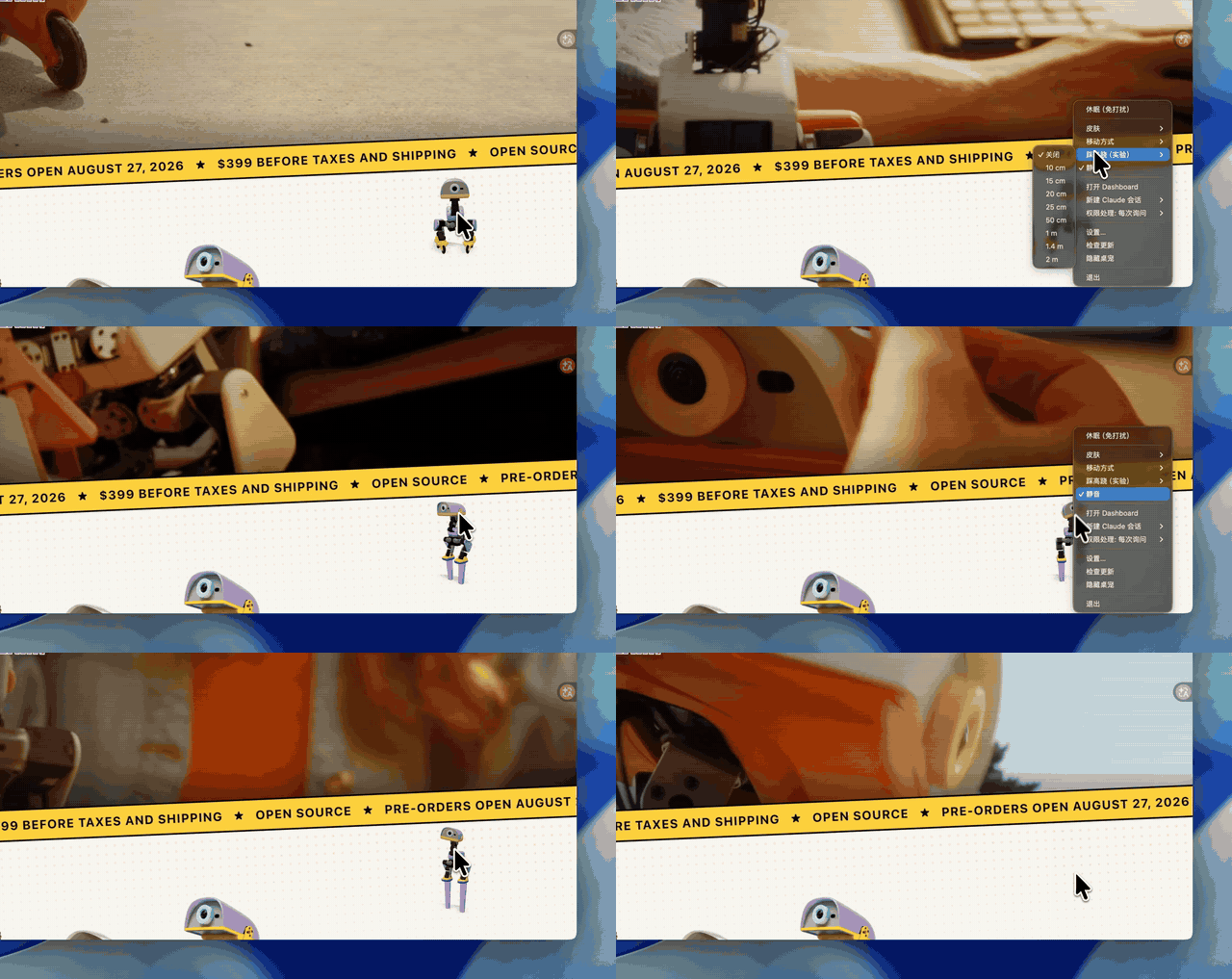
Full demo with sound (80 s, MP4)
Install
Prebuilt apps are on the Releases page:
- macOS:
Duck-on-Desk-<version>-arm64.dmg(Apple Silicon) or-x64.dmg(Intel). The build is unsigned, so after dragging it to Applications run once:xattr -dr com.apple.quarantine "/Applications/Duck on Desk.app" - Windows:
Duck-on-Desk-Setup-<version>-x64.exeor-arm64.exe(SmartScreen: More info → Run anyway).
Everything the duck needs is inside the app, including the RL policies (see NOTICE.md for their sources); nothing is downloaded at runtime. Launch, open the tray menu → Settings → Agents, and install the hooks for Claude Code, Codex, Pi or opencode.
Developer mode and training
Enable Settings → About → Developer mode to open the separate 3D robot laboratory. Inspect or control 14 joints, edit rewards and policy networks, run PPO training, evaluate, export ONNX, apply a policy to the desktop pet, and roll back.
The Agents page can install Robot Lab MCP for Claude Code, Codex CLI and OpenCode so coding agents can read API docs, write scripts and manage training. Walking training embeds the official mjlab / microduck_rl environment unchanged (the app clones the pinned commit and runs uv sync, so Git is required); on Apple Silicon physics runs on the CPU with the network on MPS, on NVIDIA it uses CUDA. MPS has been tested; CUDA awaits NVIDIA hardware verification. This first version trains the standard feet on flat ground. See Robot Lab instructions.
Roller skates
The tray menu's Locomotion entry switches the duck between its feet and the
official roller-skate variant: the shipped BEST_roller policy drives four
passive wheels (push, coast, brake) and BEST_roller_crouch is its crouch-glide
trick, which the duck performs whenever it would otherwise peck. Both policies
ship with the app like the walking ones. The policy was
trained without a turning demand, so on skates the duck is steered by rotating
its body directly, inside a wider ±80° camera-facing cone; a little bearing drag
on the wheels keeps the glide at a desktop pace. It cannot sit, and free roam
slides the window by the distance actually rolled.
Stilts (experimental)
The tray menu's Stilts entry puts the duck on the community stilt policies
(HannesVonEssen/microduck-stilts, trained in Vottivott/microduck-playground).
They ship with the app too (Apache-2.0).
Heights 10–25 cm are the printable ones; 50 cm–2 m are simulation-only. On stilts the duck walks and turns but does not sit, peck or get up on its own (a fallen duck is stood back up), and the servo gains are doubled: like every Microduck policy they were trained against the BAM servo model, and unlike the official ones they do not tolerate the plain MJCF position actuators this simulator runs.
Agents
| Agent | Integration | States | Permission bubble |
|---|---|---|---|
| Claude Code | command hooks in ~/.claude/settings.json + HTTP PermissionRequest hook | all | yes |
| Codex CLI | official hooks in ~/.codex/hooks.json, JSONL polling fallback | all | yes |
| opencode | plugin in ~/.config/opencode/ | all | yes (bridge) |
| Pi | global extension in ~/.pi/agent/extensions/duck-on-desk | state-only | no (by design) |
How states become duck behaviour
See docs/guides/state-mapping.md.
Skins
Tray → Skin: Cream, Graphite, Lavender, Sky (the four real Microduck colourways). Voices follow the skin.
Development
npm ci && npm run setup:models && npm start (setup:models fetches the policies into your Hugging Face cache once) · npm test · npm run build:mac / npm run build:win:all
Acknowledgements
- Clawd on Desk by rullerzhou-afk and contributors (AGPL-3.0): the desktop-pet shell, agent integrations, permission bubbles and settings this project is derived from (baseline commit
5ca26b5c). - Microduck by Pollen Robotics (Apache-2.0): the tiny biped duck robot itself; microduck_rl: the RL training environments behind the walking, sitting, ground-pick and roller policies; and the Microduck simulator Space: the 3D rig, MJCF, voices and the policies this duck runs (3D assets and voices are non-commercial, see
NOTICE.md). - microduck-playground by Vottivott (Apache-2.0) and the microduck-stilts weights by HannesVonEssen: the community stilt training and policies.
- The servo steps and landings are cut from "Small servo (arduino)" by gpag1 (CC0, on freesound); the notification sound is CC0 by iut_Paris8 on freesound; agent icons come from LobeHub Icons.
- The demo video's music is "Fluffing a Duck" by Kevin MacLeod (incompetech.com), licensed under CC BY 4.0.
License
AGPL-3.0-only for code. 3D assets and voice banks are non-commercial (see NOTICE.md).
// faq
What is duck-on-desk?
A physics-driven 3D Microduck on your desktop that reacts to Claude Code, Codex, Pi and opencode. It is open-source on GitHub.
Is duck-on-desk free to use?
duck-on-desk is open-source under the AGPL-3.0 license, so it is free to use.
What category does duck-on-desk belong to?
duck-on-desk is listed under devtools in the Claudeers registry of Claude-compatible tools.
// embed badge

[](https://claudeers.com/duck-on-desk)
// retro hit counter

[](https://claudeers.com/duck-on-desk)
// reviews
// guestbook
// related in Developer Tools
 🔓
🔓The agent harness performance optimization system. Skills, instincts, memory, security, and research-first development for Claude Code, Codex, Opencode, Curs…
 🔓
🔓Makes your AI agent think like the laziest senior dev in the room. The best code is the code you never wrote.
 🔓
🔓Use Garry Tan's exact Claude Code setup: 23 opinionated tools that serve as CEO, Designer, Eng Manager, Release Manager, Doc Engineer, and QA
 🔓
🔓AI coding assistant skill (Claude Code, Codex, OpenCode, Cursor, Gemini CLI, and more). Turn any folder of code, SQL schemas, R scripts, shell scripts, docs,…