
draw-architecture
Claude skill: turn any system architecture into an interactive, explorable canvas diagram
Install with your AI
Paste into Claude Code, Cursor, or any agent — it reads the repo and wires the tool into your project.
Install and set up draw-architecture (claude-skill project) into my current project.
Found on https://claudeers.com/draw-architecture
Repo: https://github.com/yulonghe97/draw-architecture
Homepage/docs: —
Detected install method: claude-skill → # copy this skill into .claude/skills/draw-architecture/
Category: skills. Platforms: cli, api, web.
Read the repo's README for exact setup and env vars, then install it and wire it into my project.

Claudeers Health Verdict:
active; community-verified: false. Confirm the source before running anything.
# copy the skill dir into your project:
# .claude/skills/draw-architecture/   (or ~/.claude/skills/draw-architecture/ for all projects)
git clone https://github.com/yulonghe97/draw-architecture
// compatibility
| Platforms | cli, api, web |
|---|---|
| Operating systems | — |
| AI compatibility | claude |
| License | MIT |
| Pricing | open-source |
| Language | HTML |
draw-architecture
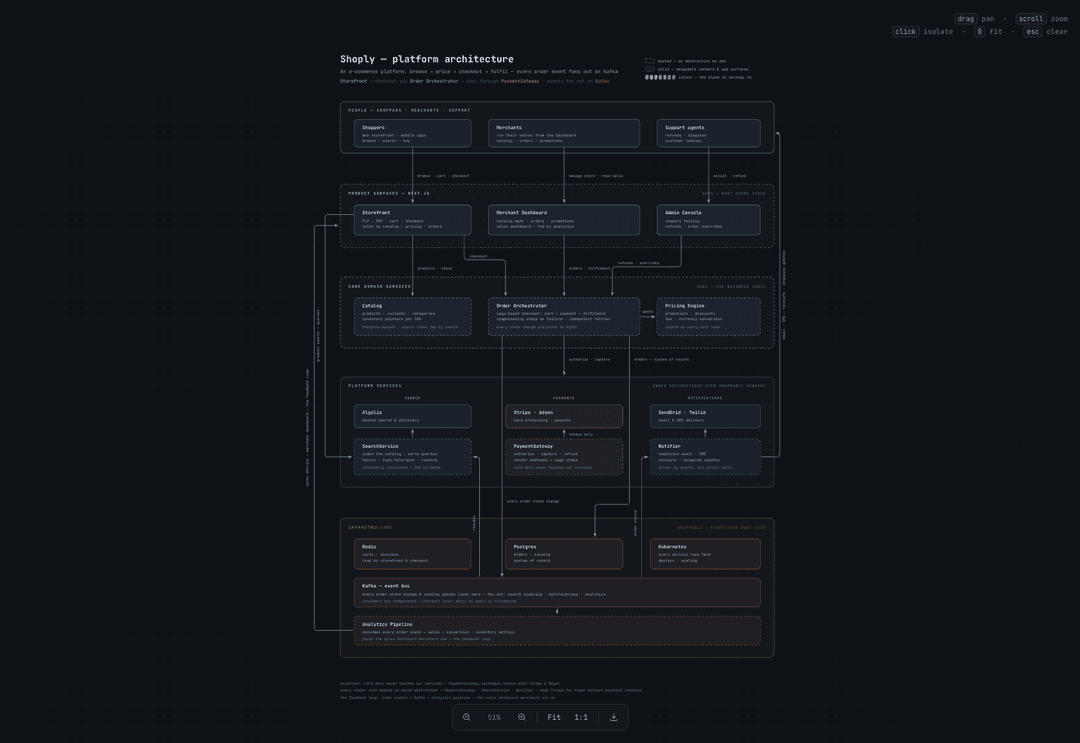
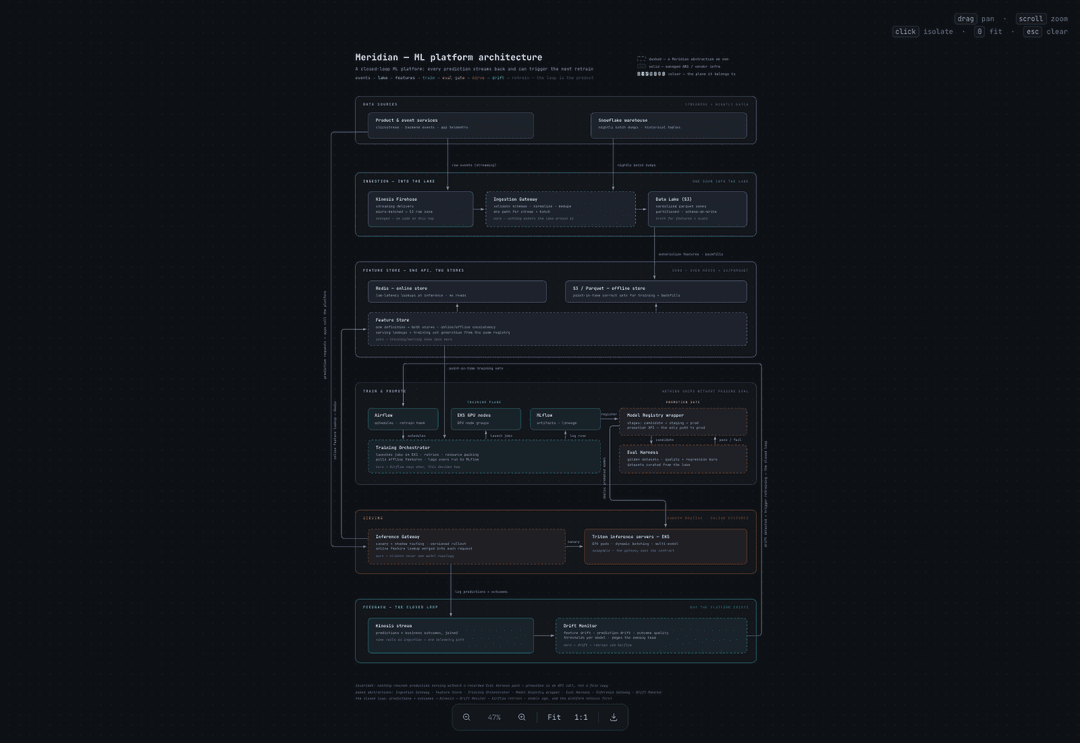
An agent skill that turns any system architecture — a codebase, an architecture doc, or a plain-English description — into an interactive, explorable canvas diagram: dark, monospaced, organized into colour-coded planes, with pan/zoom, click-to-isolate focus, and PNG export. One self-contained HTML file, ready to share or publish.
▶ Try the live demo — pan around, zoom in, click any component to isolate it and read what it does.
Install
Three ways in — pick one, since installing twice leaves you with the skill in two places and your agent loading whichever it finds first.
| Method | Command | Best for |
|---|---|---|
| skills.sh | npx skills add yulonghe97/draw-architecture | Any of 70+ agents; managed updates |
| npm installer | npx draw-architecture | Claude Code, or a shared ~/.agents/skills |
| Manual | git clone + symlink | Reading or modifying the skill itself |
skills.sh — works with any agent (recommended)
npx skills add yulonghe97/draw-architecture
The skills CLI supports Claude Code,
Codex, Cursor, OpenCode, Copilot, Gemini CLI, and 70-odd others. It asks which
agents to install to and whether to symlink or copy, then records a lockfile so
npx skills update can pull later versions.
Installs into the project (./.claude/skills/ for Claude Code) by default. For
every project on the machine, add -g:
npx skills add yulonghe97/draw-architecture -g
Non-interactive, for CI or dotfiles:
npx skills add yulonghe97/draw-architecture --skill architecture-canvas -g -a claude-code -y
Remove it again with npx skills remove architecture-canvas. The directory
page is at skills.sh/yulonghe97/draw-architecture.
npm installer — this repo's own
npx draw-architecture
Asks where to put the skill: your Claude Code skills directory
(~/.claude/skills), a shared ~/.agents/skills directory symlinked into
Claude Code, the current project (./.claude/skills), or a path you name. Pass
--global, --agents, --project, or --dir <path> to skip the question.
It refuses to overwrite or delete any directory it can't positively identify as
this skill, and records a marker file so upgrades and npx draw-architecture uninstall know what they're touching.
Manual — clone and symlink
The skill is just this repo's contents, so a symlink is enough:
git clone https://github.com/yulonghe97/draw-architecture.git
ln -s "$(pwd)/draw-architecture" ~/.claude/skills/architecture-canvas
Use this if you want to edit the template or the layout rules and have your changes take effect immediately.
Requirements: Node.js, for the build and validate scripts. The generated HTML has no dependencies beyond a Google Fonts request for JetBrains Mono.
[!NOTE] The npm package is
draw-architecture; the skill it installs isarchitecture-canvas— that's the name your agent matches against, and the directory name on disk.
Use it
Restart your agent so it picks up the new skill, then just describe what you want. It triggers on requests like:
- "Create an interactive architecture canvas for our platform — here's how it works: …"
- "Turn
docs/architecture.mdinto an explorable diagram"- "Map this codebase's architecture as a canvas I can pan around"
What you get
Every diagram is a single index.html with a full viewer built in:
- Pan / zoom / pinch — drag to pan, scroll to zoom, cursor-anchored;
keyboard shortcuts (
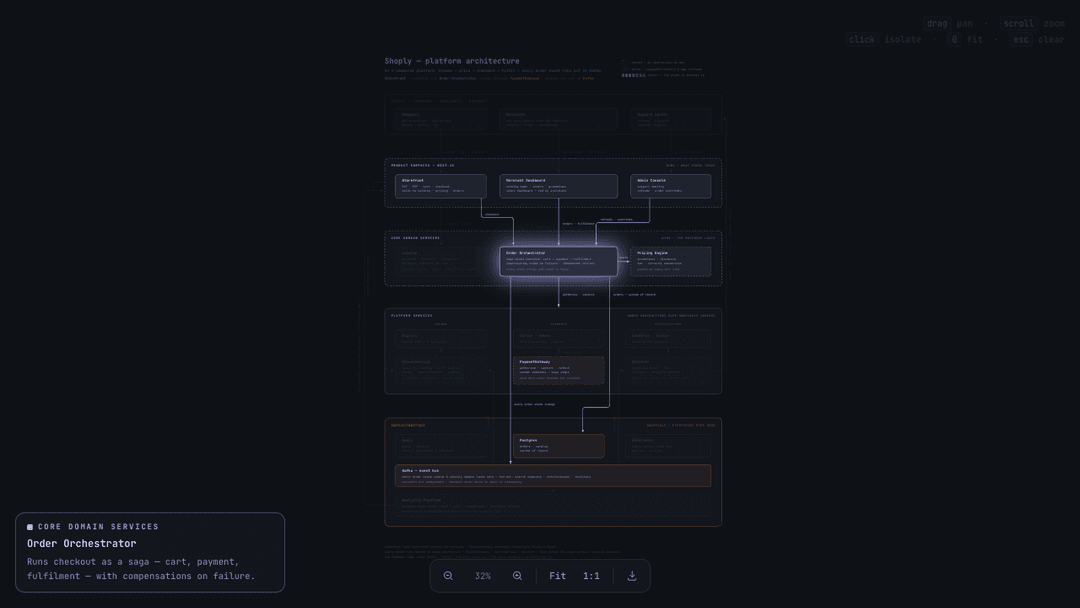
0fit,1actual size,+/−, arrows,Esc). - Click-to-isolate — click any component to dim everything unrelated, light up its connections, and open a readout panel describing it.
- Shareable views — the pan/zoom state lives in the URL hash, so you can link someone to an exact spot.
- PNG export — one click renders the full diagram at 2× to a PNG. Inside a review iframe that blocks downloads, the same click opens the PNG in a new tab instead.
And a consistent visual language that makes every diagram read the same way:
- Bands — horizontal zones, one per architectural layer, stacked in causal order so the story reads top-to-bottom.
- Ownership in line style — dashed borders mark abstractions you own; solid borders mark swappable vendors, infra, and app surfaces. The distinction is the diagram's argument.
- One hue per plane — colour says where a component belongs; long feedback loops travel the side gutters with rotated labels.
Click any box to isolate it and see what it does:
How it works
The skill never writes viewer code. The entire viewer ships as a fixed
template (assets/template.html); the agent authors
only a scene — pure data describing planes, bands, boxes, and edges — and
two small scripts do the rest:
understand the architecture → write scene.js → validate → build → (publish)
scripts/validate.jslints the layout before it's built: dangling references, boxes outside their band, overlaps, text overflow (real font metrics), diagonal edges, misplaced arrowheads, and composition drift (too many thin bands, under-filled bands, cramped boxes).scripts/build.jssplices the validated scene into the template and emits the finalindex.html.
Because outputs share one template, every diagram you generate looks like it came from the same design system — the model can't drift on typography, palette, or interaction design, only on content.
Try it without an agent
The live demo
is this repo's example, published as-is. Or open
examples/shoply-canvas.html in a browser
locally — it's the canvas from the first screenshot, built from
examples/shoply-scene.js, which doubles as the
canonical example of the scene format. To rebuild it yourself:
node scripts/build.js --scene examples/shoply-scene.js --out /tmp/demo/index.html \
  --title "Shoply — platform architecture" \
  --kicker "SHOPLY — PLATFORM ARCHITECTURE" \
  --sub "<b>browse</b> → <b>price</b> → <b>order</b> → <b>fulfil</b> → <b>learn</b>" \
  --slug shoply-architecture
The scene format
A scene is ~250 lines of declarative data — nine constants (W, H, PLANES, BANDS, BOXES, EDGES, TEXTS, SWATCHES, CHIPS) in world coordinates. The full
data model, layout recipe (band stacking math, text baselines, gutter
routing), and design guidance live in
references/scene-format.md.
{ id: 'orchestrator', plane: 'domain', band: 'band-domain',
  x: 590, y: 770, w: 440, h: 110, r: 10,
  dash: true,                     // dashed = an abstraction you own
  name: 'Order Orchestrator',
  about: 'Runs checkout as a saga — with compensations on failure.',
  texts: [ ['bl', 614, 798, 'Order Orchestrator'],
           ['bs', 614, 820, 'saga-based checkout: cart → payment → fulfilment'],
           ['bn', 614, 858, 'every state change published to Kafka'] ] }
Publishing
The skill can optionally hand the finished folder to the
artifact.cafe skill to publish a no-login review URL
reviewers can comment on. Any static host works too — the output is just a
folder with an index.html.
Repository layout
SKILL.md                     the skill definition the agent follows
bin/cli.js                   the `npx draw-architecture` installer
assets/template.html         the complete viewer (scene injected at build time)
scripts/build.js             scene + template → index.html
scripts/validate.js          layout linter for scenes
references/scene-format.md   data model + layout recipe
examples/shoply-scene.js     canonical example scene (fictional e-commerce platform)
examples/shoply-canvas.html  the built demo — open in a browser
evals/evals.json             test prompts + assertions used to develop the skill
Contributing
Issues and pull requests are welcome. If you're changing the viewer or the layout rules:
-
Edit
assets/template.html(the viewer) orscripts/validate.js(the linter) — never the built example directly. -
Run the validator and rebuild the example so the two stay in sync:
node scripts/validate.js examples/shoply-scene.js node scripts/build.js --scene examples/shoply-scene.js --out examples/shoply-canvas.html \ --title "Shoply — platform architecture" \ --kicker "SHOPLY — PLATFORM ARCHITECTURE" \ --sub "<b>browse</b> → <b>price</b> → <b>order</b> → <b>fulfil</b> → <b>learn</b>" \ --slug shoply-architecture -
Open
examples/shoply-canvas.htmlin a browser and check the change.
Changes to the skill's behaviour belong in SKILL.md or
references/scene-format.md;
evals/evals.json holds the prompts used to test them.
License
// faq
What is draw-architecture?
Claude skill: turn any system architecture into an interactive, explorable canvas diagram. It is open-source on GitHub.
Is draw-architecture free to use?
draw-architecture is open-source under the MIT license, so it is free to use.
What category does draw-architecture belong to?
draw-architecture is listed under skills in the Claudeers registry of Claude-compatible tools.
// embed badge

[](https://claudeers.com/draw-architecture)
// retro hit counter

[](https://claudeers.com/draw-architecture)
// reviews
// guestbook
// related in Claude Skills
 🔓
🔓An agentic skills framework & software development methodology that works.
 🔓
🔓 🔓
🔓💫 Toolkit to help you get started with Spec-Driven Development
 🔓
🔓AI coding assistant skill (Claude Code, Codex, OpenCode, Cursor, Gemini CLI, and more). Turn any folder of code, SQL schemas, R scripts, shell scripts, docs,…