
Distill-Yourself
Local-first AI conversation analytics — browse, search, analyze and visualize Claude/Codex coding sessions
Install with your AI
Paste into Claude Code, Cursor, or any agent — it reads the repo and wires the tool into your project.
Install and set up Distill-Yourself (git-clone project) into my current project.
Found on https://claudeers.com/distill-yourself
Repo: https://github.com/QuantaAlpha/Distill-Yourself
Homepage/docs: https://quantaalpha.com/Distill-Yourself/
Detected install method: git-clone → git clone https://github.com/QuantaAlpha/Distill-Yourself
Category: data. Platforms: cli, api.
Read the repo's README for exact setup and env vars, then install it and wire it into my project.

Claudeers Health Verdict:
slowing; community-verified: false. Confirm the source before running anything.
git clone https://github.com/QuantaAlpha/Distill-Yourself
// compatibility
| Platforms | cli, api |
|---|---|
| Operating systems | — |
| AI compatibility | claude |
| License | MIT |
| Pricing | open-source |
| Language | Python |
中文 | English
Distill Yourself
检索你的 Claude Code 和 Codex 历史。蒸馏持久经验。教会未来的会话。
你与 Claude Code、Codex 的每次对话里都藏着决策、调试心得和反复强调的偏好——但终端一关就全没了。Distill Yourself 在本地索引这些历史,让它们可搜索、可分析,并把筛选后的洞察回写进 AI 配置文件,让你不用再重复教。

快速开始

方式 A — 全局安装,任意目录启动:
# 使用 uv 安装(推荐)
uv pip install git+https://github.com/QuantaAlpha/Distill-Yourself.git

# 或使用 pip
pip install git+https://github.com/QuantaAlpha/Distill-Yourself.git

# 任意目录启动
distill-yourself
# 打开 http://localhost:5757
方式 B — 克隆后直接运行(零安装):
git clone https://github.com/QuantaAlpha/Distill-Yourself.git
cd Distill-Yourself

# 零依赖 — 纯 Python 标准库
python3 server.py
# 打开 http://localhost:5757
Claude Code 和 Codex 的会话会自动检测,无需手动导入。
| 数据源 | 路径 | 状态 |
|---|---|---|
| Claude Code | ~/.claude/projects/ | 自动检测 |
| Codex | ~/.codex/sessions/ 和 ~/.codex/archived_sessions/ | 自动检测 |
浏览、搜索和分析即开即用。 AI Chat 和 Evolve 功能调用你本地安装的 CLI 工具——不需要应用级 API Key,但至少需要安装并登录其中一个:
npm i -g @anthropic-ai/claude-code或npm i -g @openai/codex
回写了什么?
Evolve 引擎可以把洞察同步到 AI 配置文件。所有写入都需要预览和明确确认,不会静默写入。
| 内容 | 目标 | 操作 |
|---|---|---|
| Profile(开发者画像) | ~/.claude/CLAUDE.md | 追加或替换对应章节 |
| Memory(偏好记忆) | ~/.claude/memory/*.md | 创建/更新单个记忆文件 |
| Rules、Signals、Patterns | — | 仅展示,不回写 |
Codex 会话已支持索引和搜索,但回写目前仅针对 Claude Code 配置。
隐私与数据流向
- 索引、搜索和分析完全本地运行 — 对话数据从本地目录读取,索引存储在本地 SQLite 数据库(
.cache/sessions.db) - AI Chat 和 Evolve 调用你本机安装的 Claude Code 或 Codex CLI,CLI 可能会将选定上下文发送给各自的云服务商(Anthropic / OpenAI)— Distill Yourself 本身不直接调用任何 API
- D3.js CDN — 前端从 D3 官方 CDN 加载可视化库,不会传输你的对话数据。如需完全离线运行,可将 D3 文件放入
static/ - 配置回写 — 必须经过预览和明确确认(见上表)
功能特性
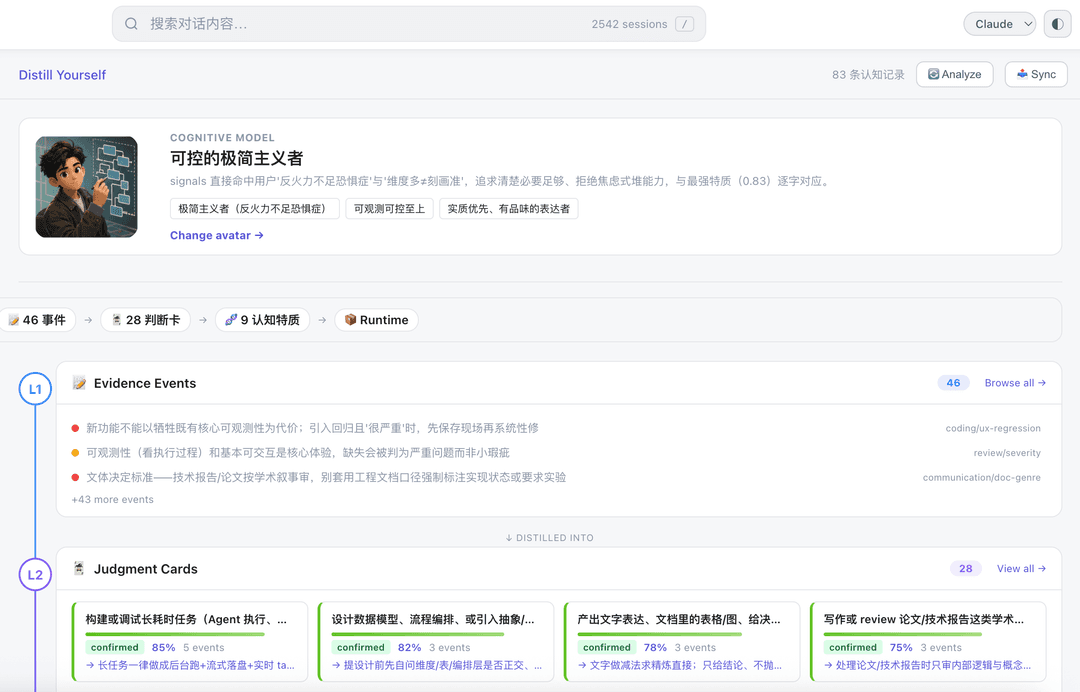
认知模型 — Distill Yourself
项目的核心功能。分析你的全部对话历史,通过三层抽象构建你的认知模型:
- L1 — 证据事件:从对话中提取的原始行为信号(纠正、偏好、反复出现的模式)
- L2 — 判断卡片:蒸馏出的决策倾向,带置信度评分和支撑证据
- L3 — 认知特质:泛化的性格和工作风格特征,每条都基于多张判断卡片
模型包含一个生成的认知头像和一句话人设摘要。所有结论都可追溯——点击任意特质即可查看背后的判断卡片和原始证据。用它来理解未来的 AI 会话应该记住你怎么思考和决策。
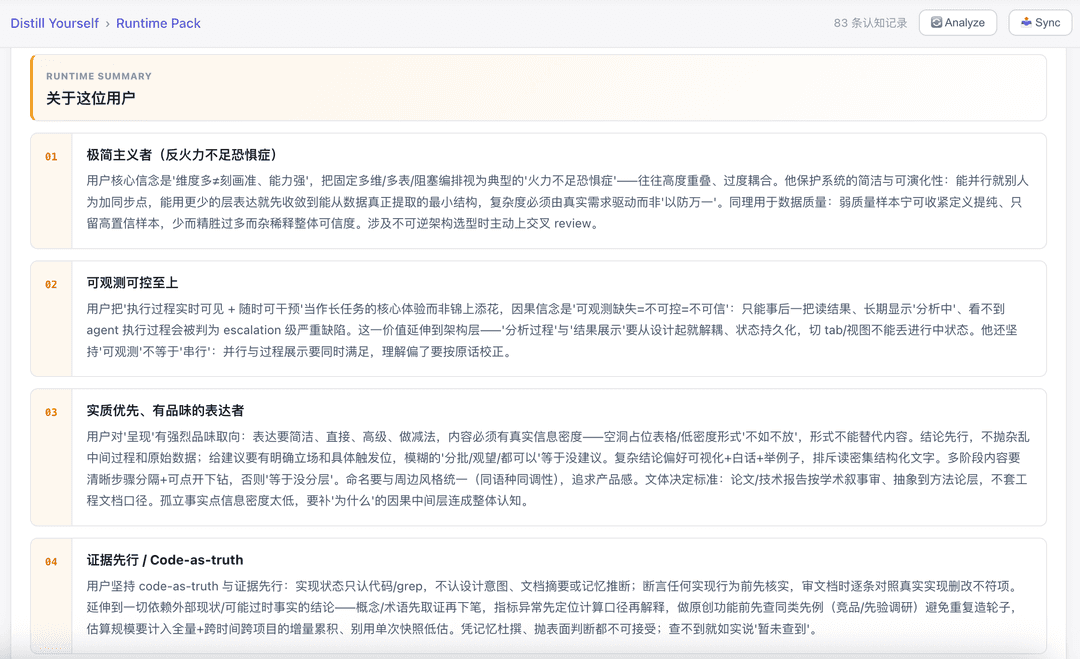
Runtime Pack 会把这些特质编译成一份简洁可读的开发者画像——随时可以同步到 AI 配置中。
Evolve 引擎
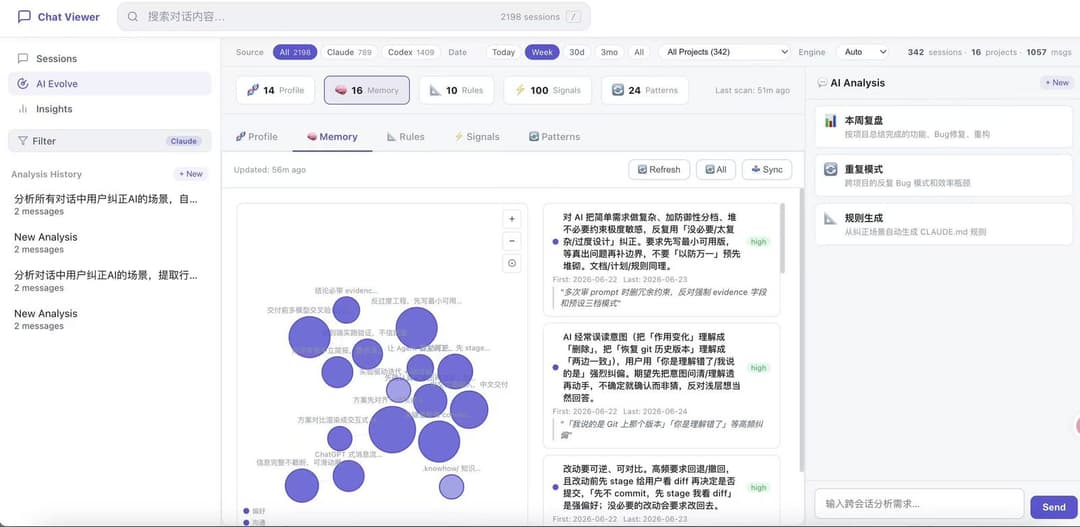
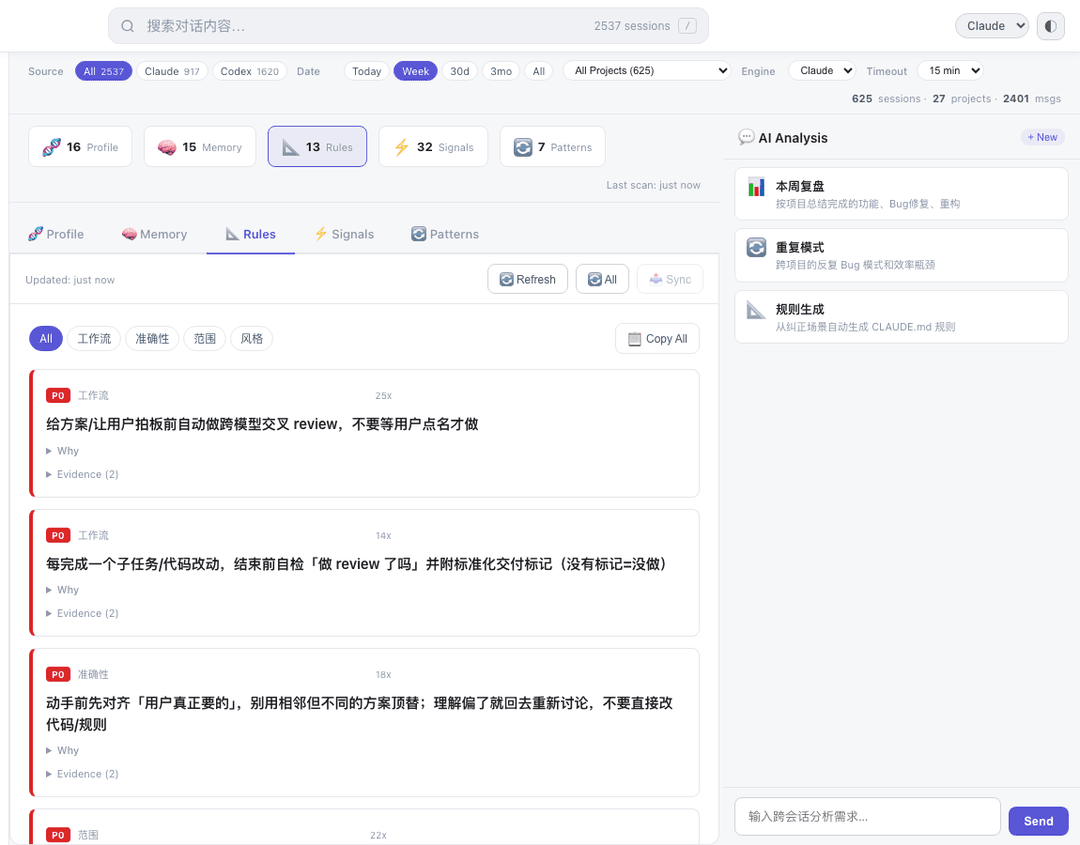
分析反复出现的偏好、纠正和工作模式,生成配置更新供你预览后同步。
| 维度 | 回答什么问题 |
|---|---|
| Profile | 你是什么类型的开发者(人设卡 + 雷达图) |
| Memory | AI 应该记住什么(偏好图谱 + 证据卡片) |
| Rules | 你反复纠正过什么(P0/P1/P2 + 原文引用) |
| Signals | 纠正趋势是增还是减 |
| Patterns | 哪些问题反复出现(气泡聚类 + 建议) |
浏览与搜索
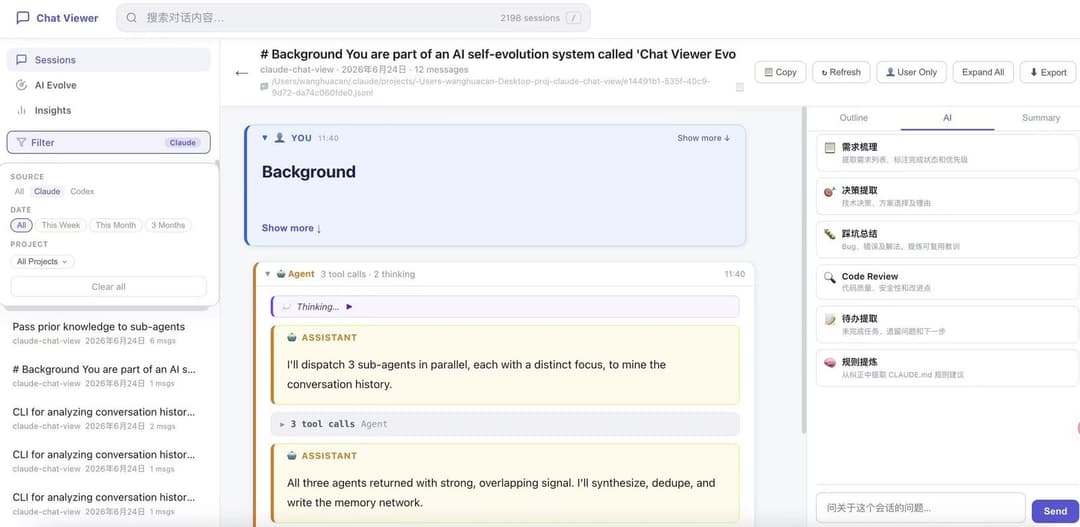
- 双数据源聚合 — Claude Code + Codex 会话合并展示,按来源标记
- 全文搜索 — 跨会话标题和消息内容搜索,直接跳转匹配位置
- 多维筛选 — 按来源、时间范围或项目过滤
- 结构化阅读 — 展开消息、查看工具调用、通过大纲跳转;侧边栏显示 AI 摘要和会话级对话
洞察
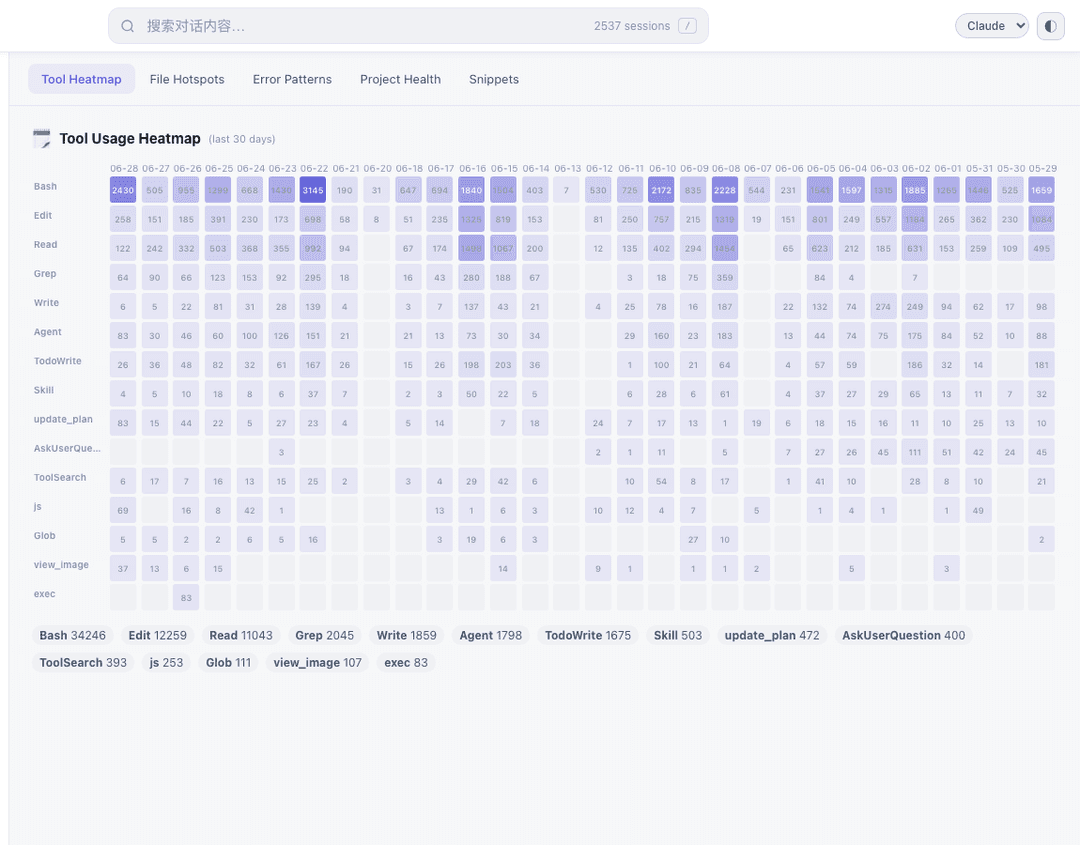
五个本地计算的分析视图——不需要 AI 引擎:
- 工具热力图 — 各工具类型的每日使用强度
- 文件热点 — 跨会话最常读写的文件
- 错误模式 — 按类型聚类的高频错误,含项目上下文
- 项目健康 — 各项目的会话量和活跃趋势
- 代码片段 — 生成的代码片段 + 是否已提交
AI Chat
用自然语言提问自己的历史——可以按单会话("这个 bug 是什么原因?")或跨会话("这个月哪个项目错误最多?")。内置需求提取、决策回顾、规则生成、效率分析等预设 prompt。流式响应由你本地安装的 CLI 驱动。
闭环
flowchart LR
    A[对话] --> B[索引与搜索]
    B --> C[洞察与 Evolve]
    C --> D[预览与同步]
    D -.->|下一次会话受益| A
架构
Distill-Yourself/
├── chatview/       # Python 包:server、parsers、handlers、db、commands
├── server.py       # 入口(thin wrapper → chatview.server)
├── analyze.py      # CLI 入口(thin wrapper → chatview.cli)
├── db.py           # DB 入口(thin wrapper → chatview.db)
├── static/
│   ├── js/         # ES Modules 前端
│   ├── css/        # 组件化 CSS
│   ├── evolve.js   # Evolve 视图
│   └── twin.js     # Twin 视图
└── docs/
    └── USER_GUIDE.md
| 原则 | 实现方式 |
|---|---|
| 零安装依赖 | Python 标准库服务器;D3.js 由浏览器从 CDN 加载 |
| 隐私优先 | 索引/搜索读取本地 ~/.claude/ 和 ~/.codex/;AI 功能使用你安装的 CLI |
| 增量更新 | 追踪文件 mtime,仅重新解析变更的 JSONL 文件 |
| 快速搜索 | SQLite FTS5 全文索引,存储在 .cache/sessions.db |
| 实时响应 | AI Chat 和 Evolve 进度使用 SSE 流式传输 |
CLI
analyze.py 可独立运行——适合脚本、管道或 Agent 工作流。
# 列出最近 7 天的 Claude 会话
python3 analyze.py sessions --source claude --date 7d --limit 20

# 跨所有对话全文搜索
python3 analyze.py search "authentication bug" --project my-app

# 读取某个会话的完整消息历史
python3 analyze.py read <session-id>

# 提取最近一个月的架构决策
python3 analyze.py decisions --date 30d

# 查找某项目的高频错误
python3 analyze.py errors --project my-app

# 生成 Evolve 输出(rules / signals / patterns)
python3 analyze.py evolve-rules

# 导出 Evolve AI 引擎使用的预计算分析
python3 analyze.py aggregates
大部分命令支持 --json、--source、--date、--project 和 --limit。
REST API
Endpoints
| Method | Endpoint | Description |
|---|---|---|
GET | /api/sessions | List sessions (filterable) |
GET | /api/session/:id | Full message history |
GET | /api/session-summary | Condensed summary |
GET | /api/projects | Detected projects |
GET | /api/search?q=... | Full-text search |
GET | /api/timeline | Daily session counts |
GET | /api/analytics | Tool usage & file hotspots |
GET | /api/project-health | Per-project scores & trends |
GET | /api/snippets | Extracted code snippets |
GET | /api/file-evolution | Cross-session file edit timeline |
GET | /api/evolve/:tab | Evolve data (profile/memory/rules/signals/patterns) |
GET | /api/stats | Global statistics |
GET | /api/refresh | Rebuild session index |
POST | /api/chat | AI chat |
POST | /api/chat/stream | Streaming AI chat (SSE) |
POST | /api/evolve/sync | Sync Evolve results to AI config |
配置
| 变量 | 默认值 | 说明 |
|---|---|---|
PORT | 5757 | 服务器端口 |
PORT=3000 python3 server.py
贡献
欢迎贡献!请先开 Issue 讨论你想改什么。
git clone https://github.com/QuantaAlpha/Distill-Yourself.git
cd Distill-Yourself
python3 server.py          # 启动开发服务器
# 打开 http://localhost:5757
社区
加入社区,交流 Distill Yourself 的使用经验、反馈和共创想法。
微信

Discord
致谢
感谢以下同学对本项目的贡献和支持:
Huacan Wang · Yifan Zhou · Jun Han · Zhenheng Tang · Huanxuan Liao · Weida Wang · Yanlun Tu · Peijie Dong · Shizhou Huang · Ronghao Chen
许可证
// faq
What is Distill-Yourself?
Local-first AI conversation analytics — browse, search, analyze and visualize Claude/Codex coding sessions. It is open-source on GitHub.
Is Distill-Yourself free to use?
Distill-Yourself is open-source under the MIT license, so it is free to use.
What category does Distill-Yourself belong to?
Distill-Yourself is listed under data in the Claudeers registry of Claude-compatible tools.
// embed badge

[](https://claudeers.com/distill-yourself)
// retro hit counter

[](https://claudeers.com/distill-yourself)
// reviews
// guestbook
// related in Data & Analytics
 🔓
🔓Wrap Antigravity, ChatGPT Codex, Claude Code, Grok Build as an OpenAI/Gemini/Claude/Codex compatible API service, allowing you to enjoy the free Gemini 3.1 P…
 🔓
🔓Marketing skills for Claude Code and AI agents. CRO, copywriting, SEO, analytics, and growth engineering.
 🔓
🔓Apache Airflow - A platform to programmatically author, schedule, and monitor workflows
 🔓
🔓CLI tool for configuring and monitoring Claude Code