
desk-buddy
Lump: a little desk buddy on an ESP32-S3 glass prism display that shows what your Claude sessions are up to. Built with Claude Code.
Install with your AI
Paste into Claude Code, Cursor, or any agent — it reads the repo and wires the tool into your project.
Install and set up desk-buddy (git-clone project) into my current project.
Found on https://claudeers.com/desk-buddy
Repo: https://github.com/joebentham/desk-buddy
Homepage/docs: —
Detected install method: git-clone → git clone https://github.com/joebentham/desk-buddy
Category: productivity. Platforms: cli, api, desktop, web.
Read the repo's README for exact setup and env vars, then install it and wire it into my project.

Claudeers Health Verdict:
unknown; community-verified: false. Confirm the source before running anything.
git clone https://github.com/joebentham/desk-buddy
// compatibility
| Platforms | cli, api, desktop, web |
|---|---|
| Operating systems | — |
| AI compatibility | claude |
| License | MIT |
| Pricing | open-source |
| Language | HTML |
Lump, a desk buddy for Claude
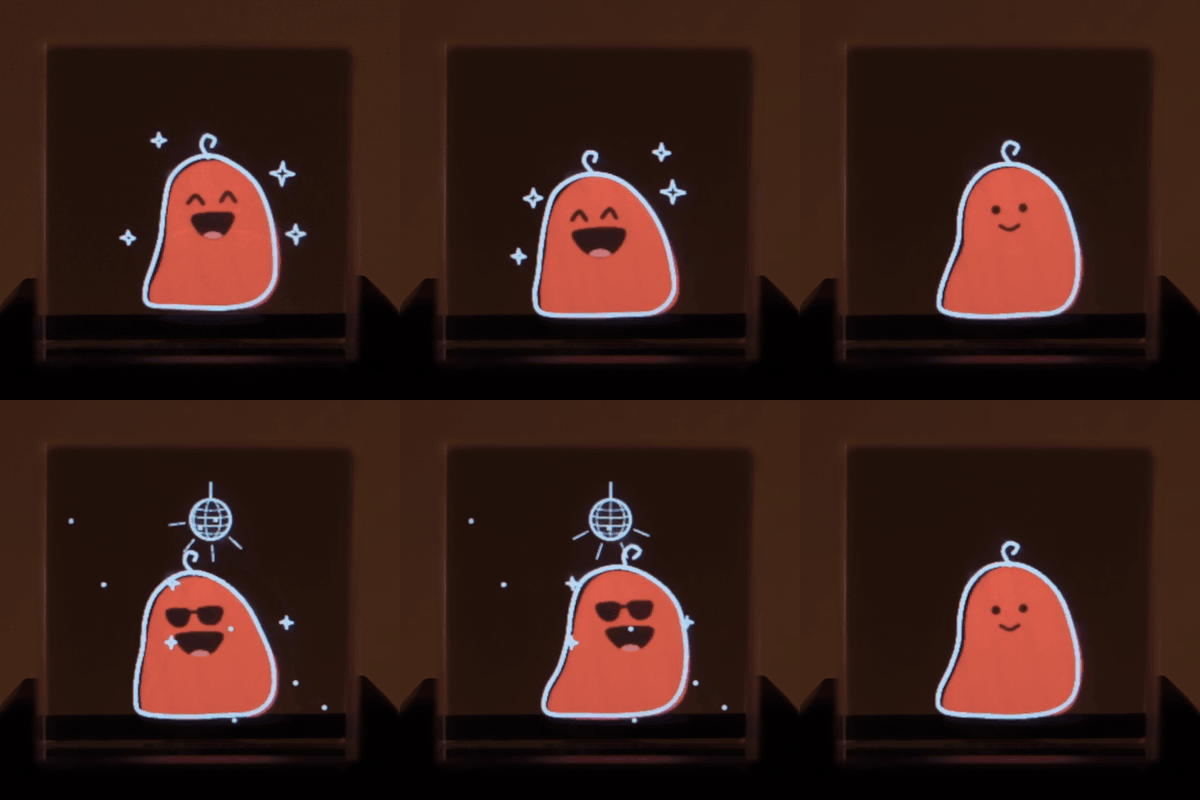
Lump is a little blob who lives in a tiny glass prism display on your desk and shows you what your Claude sessions are up to, so you can look away from the screen while Claude works.
- Working while Claude Code is busy, waving for attention when a session needs you (a permission prompt, a question, a plan to approve), and celebrating when it's done.
- Corner counters show how many sessions are working, waiting on you, or finished and unread.
- His colour warms from tangerine to red as you get close to your Claude usage limits.
- Tap the glass and he plays one of a dozen gags: electric shock, ring of fire, wolf howl, banana peel, cartoon bomb and more.
- Optional extras: turns blue before calendar meetings, holds up a letter when a Slack VIP messages you, a tiny ocarina voice and sound effects for the gags, sleeps at night, and runs over Wi-Fi with over-the-air updates.
Lump was built with Claude Code, drawings included: Claude draws every frame in code, in a scratchy
hand-drawn style, in one web page (design/lump.html), and a script bakes it into a file the ESP32
plays back at 24 fps.
What you need
- The display: Waveshare / SpotPear ESP32-S3-LCD-1.3 "prism" (ESP32-S3R8, 16 MB flash, 8 MB PSRAM, 240×240 ST7789 behind a glass cube, motion sensor for taps). Lump was built on this AliExpress listing, colour option ESP32-S3-LCD-1.3-C (about $20). Keep its stock case: the mount is sized for it.
- A USB-C data cable for the first flash. After Wi-Fi setup he only needs power.
- A Mac. The bridge that connects Claude to Lump is macOS-only (launchd, a small Swift helper,
afplay). The firmware itself doesn't care. - Claude Code, plus optionally the Claude desktop app (for Chat and Cowork states).
- PlatformIO (
brew install platformio), Python 3, and the Xcode command line tools (xcode-select --install). - Optional: a 3D printer for the monitor mount, which holds him on the back of your monitor, peeking over the top.
Setup
git clone https://github.com/joebentham/desk-buddy.git
cd desk-buddy
1. Flash the board. Plug it in with a data cable, then:
tools/flash.sh
This builds the firmware and writes it plus Lump's drawings (~11 MB; the drawings take about
5 minutes). It uses a paced esptool upload because macOS drops bytes from big bursts to
this board's USB-serial chip, so plain pio run -t upload fails.
2. Install the bridge. A small Python service that listens to Claude and drives Lump, plus a helper that reads the Claude app's window (Chat and Cowork have no hooks). Both run as login items.
tools/install_bridge.sh
When macOS asks, allow deskbuddy-appwatch under System Settings → Privacy & Security →
Accessibility. Everything it installs lives in ~/.desk-buddy.
3. Hook up Claude Code. Adds small async hooks to ~/.claude/settings.json that tell the
bridge what each session is doing, and a status line that feeds him your usage limits.
It backs up your settings first and keeps any hooks you already have.
python3 tools/install_hooks.py
Start a Claude Code session and Lump should wake up.
4. Optional: Wi-Fi. With the cable still plugged in (2.4 GHz networks only):
~/.desk-buddy/venv/bin/python tools/wifi_setup.py
Your Wi-Fi password goes straight into the board over USB and is never saved on the Mac. After
this he joins your network as lump.local, keeps time from the internet, and can live on any USB
charger, such as a monitor's power-only port. Updates then go over the air:
python3 tools/ota.py
Optional extras
Put these in ~/.desk-buddy/config.json. The bridge re-reads it, so no restart is needed.
| Key | What it does |
|---|---|
calendar_ics | Your calendar's private iCal link. He fades to blue over the 10 minutes before a meeting and plays a "meeting time" alert. |
my_email | With calendar_ics: skip meetings you've declined. |
slack_token | A Slack user token (xoxp-…) from your own private Slack app with read-only scopes im:read im:history mpim:read mpim:history users:read search:read. DMs and @-mentions send a paper plane round him. The token is never logged. |
slack_vips | Names as Slack shows them. An unread DM from one of them makes him hold up a letter until you've read it. |
Sounds: ~/.desk-buddy/sounds.json picks which moments make a noise ("enabled": false mutes him).
A second Claude Code config (such as ~/.claude-work) can drive him too: run
python3 tools/install_hooks.py --config-dir ~/.claude-work.
Lump on your Mac (for when you're away from the desk)
A little Lump for your screen that mirrors the desk one. On a MacBook with a notch he sits in a small black wing beside the camera; otherwise he's a menu bar item. There's no pop-out and no text. He's just a reminder of what the desk Lump is doing.
python3 tools/lumpbar/bake.py      # shrink his drawings (needs Google Chrome; re-run after editing lump.html)
zsh tools/lumpbar/build.sh         # builds ~/Applications/Lump.app and starts it
The Mac can't tell how far away you are, so it uses your monitor as a stand-in. While your desk monitor is plugged in and the desk Lump is online, you're "at your desk" and the Mac one hides. Right-click him to:
- pick My Desk Monitor: the screen the desk Lump sits by (the default is any external display), or
- show him All the Time (handy if you don't use a monitor, or if the desk Lump is by your laptop).
Can't see him? Open Lump (Spotlight works) and he appears with that menu open, even at your desk. Once you close it he hides again if you're at your desk. The same goes for the very first launch. To start him at login, add Lump.app under System Settings › General › Login Items.
Make him your own
All of Lump is drawn in code in design/lump.html: his body, faces, moods, transitions and
every tap gag. To preview and edit:
python3 tools/export_frames.py 8767
Open http://localhost:8767/lump.html#gags in a browser. The page reloads when you save, and the
"Tap gags" gallery lets you pause and step through frames. When you're happy, run the EXPORT_JS
snippet from tools/export_frames.py in the page's console. It bakes every frame into
firmware/data/lump.bin, then python3 tools/ota.py --art (Wi-Fi) or tools/flash.sh (cable) puts it on the board.
Two tips: keep repeating effects on a 12-tick beat, so frames are shared between moods and the file stays small (it has a 12 MB budget). Keep faces simple: dot eyes, small mouths, and let props sell the gag.
How it fits together
Claude Code hooks ─┐
status line ───────┤                           USB serial or Wi-Fi
Claude app window ─┼─▶ bridge (Mac, :47823) ─────────────────────▶ ESP32 prism: Lump
calendar / Slack ──┘   one mood for all sessions                   plays baked frames, senses taps
| Path | What's there |
|---|---|
firmware/src/main.cpp | The frame player: moods, transitions, taps, offline mode, Wi-Fi, OTA. The serial protocol is documented at the top. |
firmware/data/lump.bin | Lump's baked frames (written to their own flash partition) |
design/lump.html | Lump himself: every drawing and animation |
tools/buddy_bridge.py | The bridge: Claude hooks, app state, usage, calendar, Slack, sounds → one mood |
tools/appwatch/ | Swift helper that reads Chat/Cowork state from the Claude app's accessibility tree |
tools/lumpbar/ | Lump on your Mac: frame baker (bake.py) and the notch/menu bar app (main.swift) |
tools/flash.sh, tools/ota.py, tools/wifi_setup.py | Getting firmware and drawings onto the board |
enclosure/ | OpenSCAD source for the adjustable monitor mount, with ready-to-print STLs |
tests/ | Bridge tests (no board needed): ~/.desk-buddy/venv/bin/python -m unittest discover -s tests |
The bridge's debug endpoints help when you're poking at him: curl 127.0.0.1:47823/status, or
curl -X POST --data "e tap" 127.0.0.1:47823/cmd to send a raw command. To play an animation on
demand (from a hotkey, a menu bar app or Shortcuts), curl -X POST --data disco 127.0.0.1:47823/play;
curl 127.0.0.1:47823/play lists the names.
License
Code and 3D models: MIT. Lump himself (the character, his drawings, animations and sounds): CC BY-NC 4.0. Build one, remix him, share it; just don't sell him.
// faq
What is desk-buddy?
Lump: a little desk buddy on an ESP32-S3 glass prism display that shows what your Claude sessions are up to. Built with Claude Code.. It is open-source on GitHub.
Is desk-buddy free to use?
desk-buddy is open-source under the MIT license, so it is free to use.
What category does desk-buddy belong to?
desk-buddy is listed under productivity in the Claudeers registry of Claude-compatible tools.
// embed badge

[](https://claudeers.com/desk-buddy)
// retro hit counter

[](https://claudeers.com/desk-buddy)
// reviews
// guestbook
// related in Productivity
 🔓
Agent skills for Obsidian. Teach your agent to use Obsidian CLI and open formats including Markdown, Bases, JSON Canvas.
 🔓
Open source repository of plugins primarily intended for knowledge workers to use in Claude Cowork
 🔓
Garry's Opinionated OpenClaw/Hermes Agent Brain
 🔓
An open-source alternative to Claude Cowork (powered by opencode)