
deepcrew
🤿 The cheapest multi-agent workforce that is actually user-friendly: 7.7x more productive and 50x cheaper compared to your ultracode mode, an intelligent mu…
Install with your AI
Paste into Claude Code, Cursor, or any agent — it reads the repo and wires the tool into your project.
Install and set up deepcrew (claude-plugin project) into my current project.
Found on https://claudeers.com/deepcrew
Repo: https://github.com/KuiyiGao/deepcrew
Homepage/docs: —
Detected install method: claude-plugin → /plugin install deepcrew@KuiyiGao/deepcrew
Category: plugins. Platforms: cli, api, desktop, web.
Read the repo's README for exact setup and env vars, then install it and wire it into my project.

Claudeers Health Verdict:
active; community-verified: false. Confirm the source before running anything.
/plugin marketplace add KuiyiGao/deepcrew
/plugin install deepcrew@KuiyiGao/deepcrew
git clone https://github.com/KuiyiGao/deepcrew
// compatibility
| Platforms | cli, api, desktop, web |
|---|---|
| Operating systems | — |
| AI compatibility | claude |
| License | Apache-2.0 |
| Pricing | open-source |
| Language | Python |

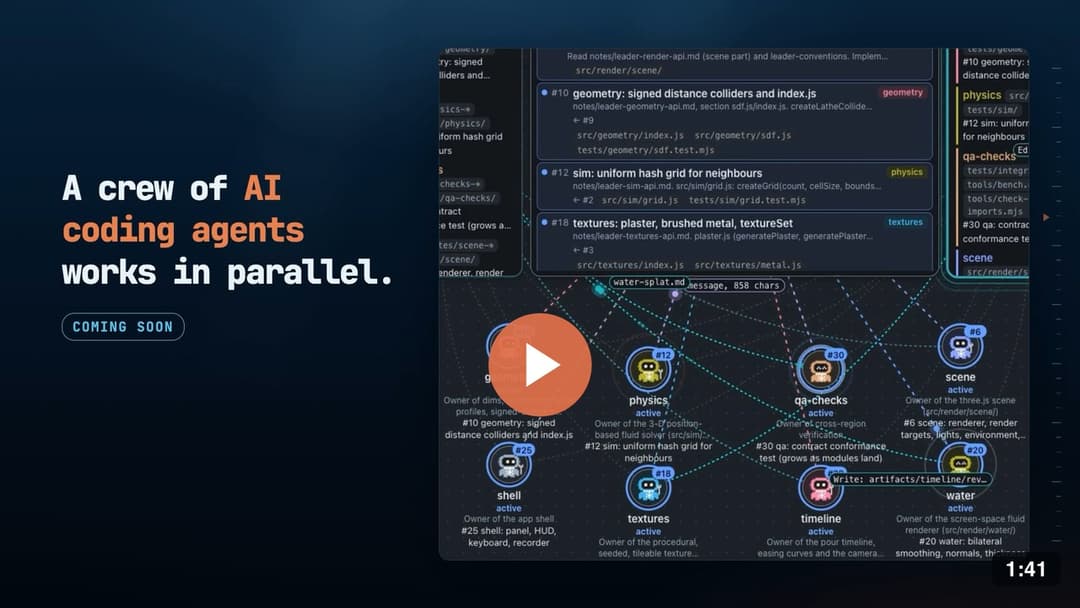
A team of regular Claude Code agents on DeepSeek, led by your own Claude Code or Codex, managed from one page next to the chat.
English | 中文
Why | Team page | Demo | Big jobs | Quick start | Mod | How it works | Cost | Settings | Prompts
Why I built DeepCrew
I know, ultracode is expensive, a few big ultracode runs could use up my whole weekly limit. And you couldn't really see what is going on or do anything before every agent has finished. I concluded the following three major problems when I'm using ultracode or Codex multi-agent system.
- Ever given agents a big job, watched your usage burn, and only found out at the end that it just isn't what you want?
- Ever wanted to see what each agent is doing, and approve its commands and answer its questions in one place(by the way it is cool)?
- Ever wanted a swarm that works well with its defaults, and that you can still adjust to your project settings?
If any of these sounds familiar, DeepCrew is for you. It has now integrated with my workflow pretty well, I am now sharing it to you, and updates will keep coming because I use it everyday.
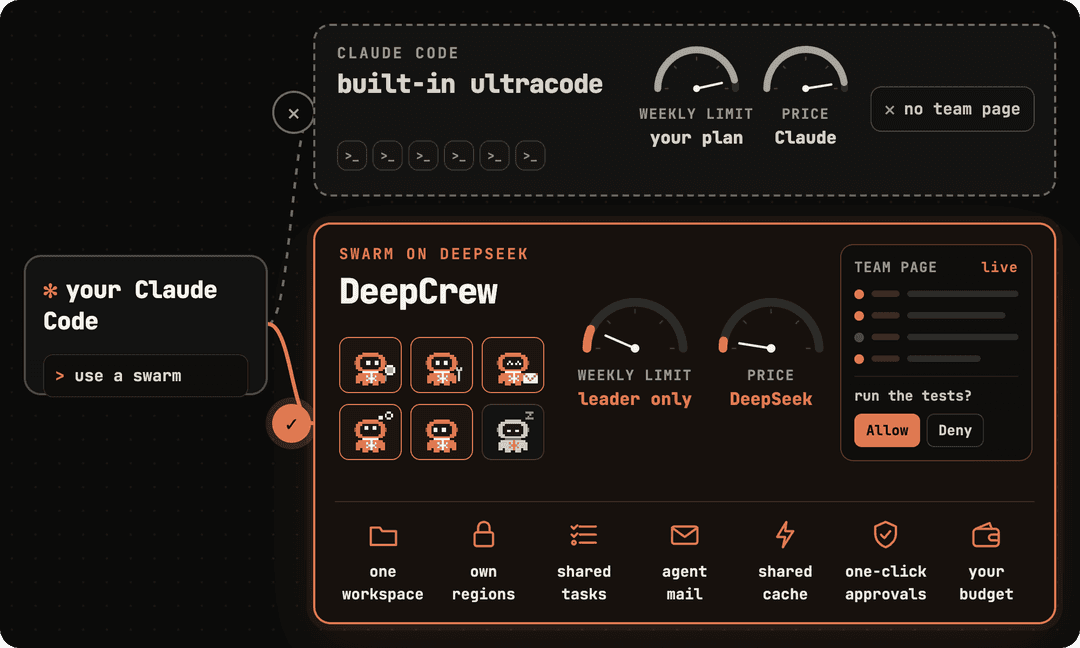
- Native Claude Code agents. Every agent is the regular
claudeprogram with all its tools, and it reads your project'sCLAUDE.md. The leader can be your Claude Code, Codex or another agent. - Approximately 7.7× more work from the same weekly limit. Only the leader uses your plan. The agents run on DeepSeek, where the same tokens cost about 50× less than on Opus 5.5.
- Not tied to one API provider. DeepSeek is the default, and the figures here are DeepSeek's. Z.ai, Zhipu GLM and MiniMax come ready, any Anthropic-compatible endpoint works with a few lines of settings, and a backup takes over when the provider in use runs out of credit or is overloaded.
- One page for setup and approvals. The team page opens beside the chat, with the key, presets, approvals, questions and a budget.
- Answers and grant any permission from inside Claude Code. On Claude Code 2.1.287 or newer, the DeepCrew mod shows what an agent asks right above your prompt, and you answer it with one press.
- Light on memory. Each agent uses about 300 MB, so a 16 GB machine runs about 20 at once.
The team page
The team page opens beside the chat, and you steer the crew from it, you could do command free.
Team Call | Monitor | Setup | Approvals | Questions | The crew | Budget | Recommended setups
| Team Call Whoever speaks takes the stage with the screen it shares: its task, the files it holds, or the picture it took last. An agent that asks raises its hand, and you answer it in the column beside the call. 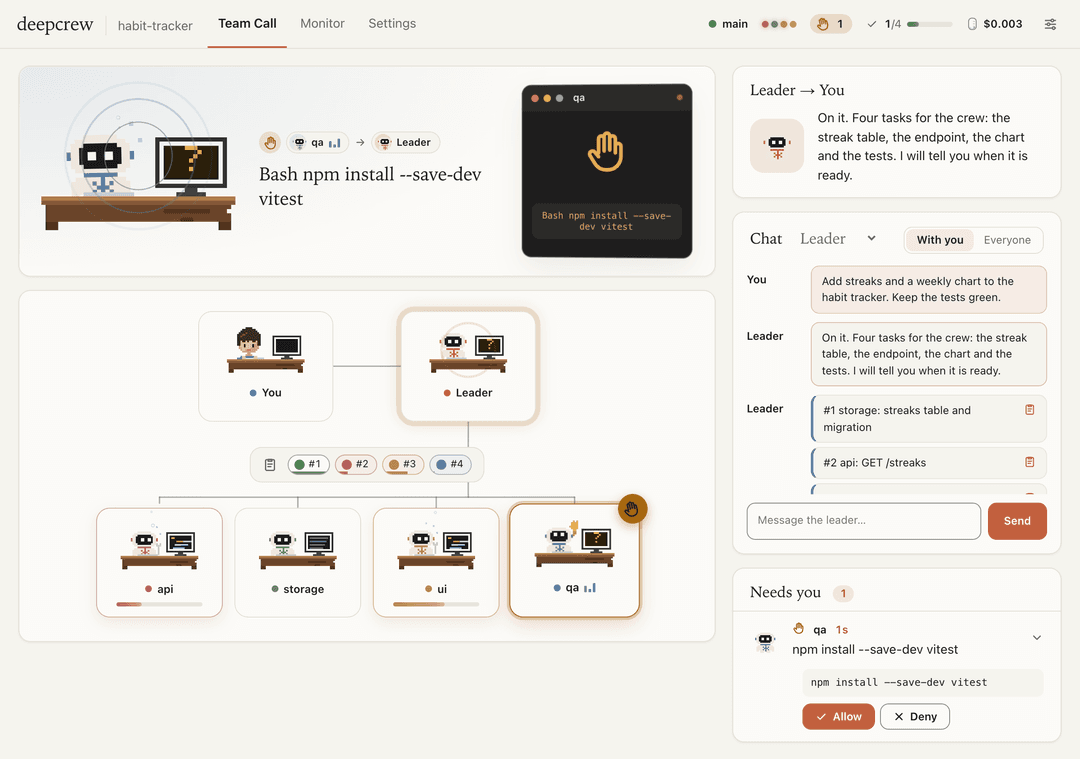 | Monitor You, the leader, the blackboard and every agent as a network, the tasks as a table with what each one waits on, and the activity, the decisions and the cost below. 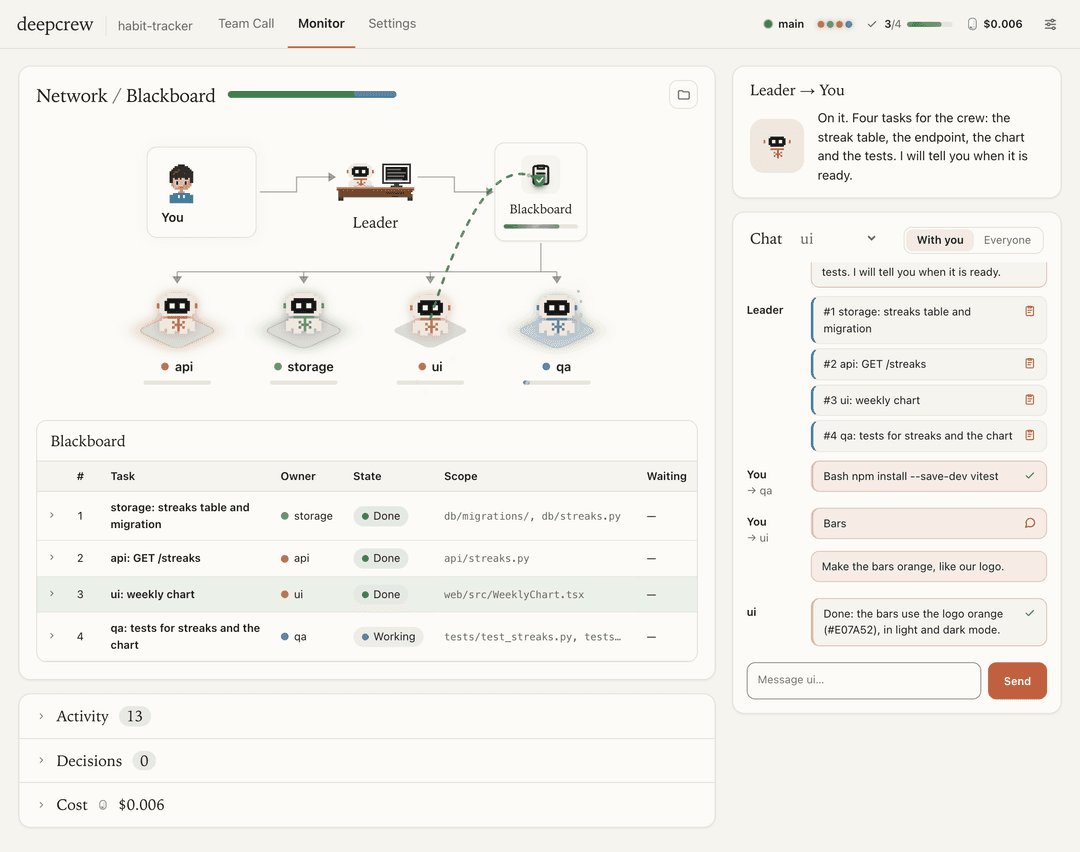 |
| Setup Paste the key once, pick a preset and press Done. The key stays on this computer and goes only to your provider, DeepSeek by default. 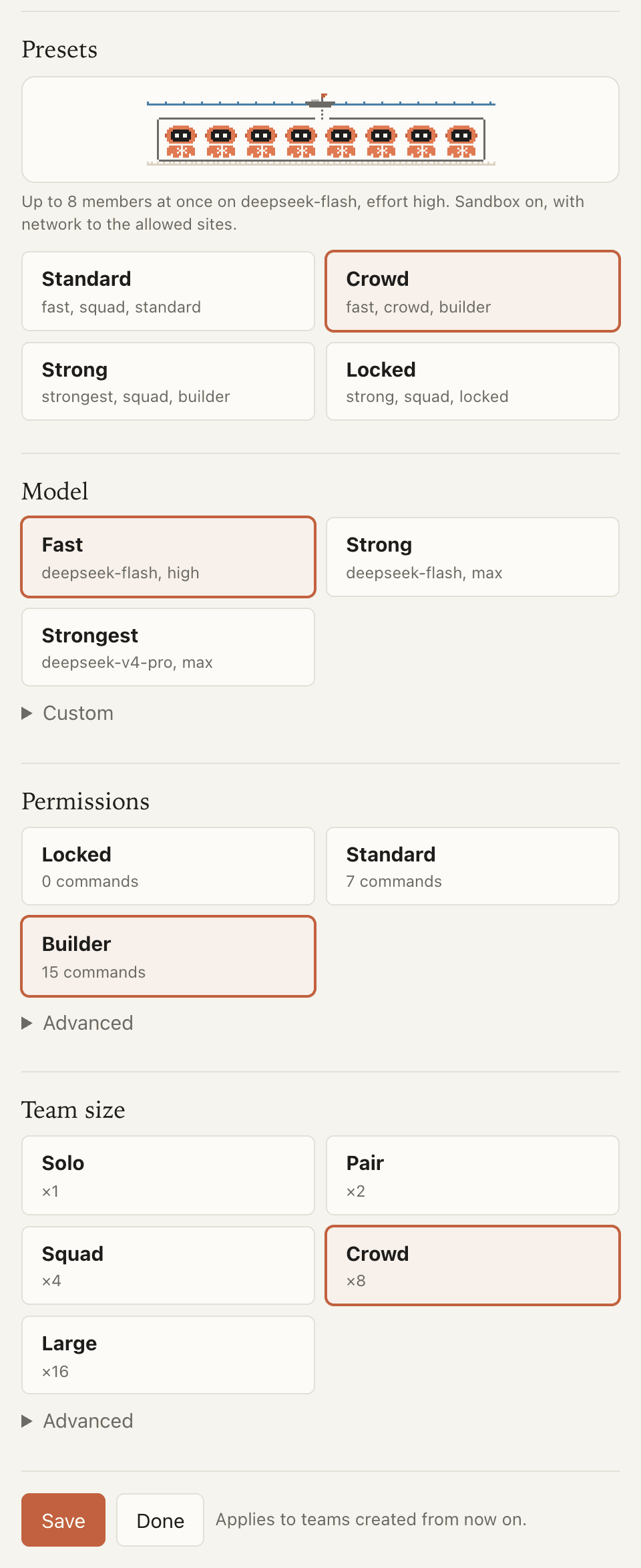 | Approvals A low-cost reviewer approves routine commands for you. The rest wait here for Allow or Deny, and a command you allow does not ask again. 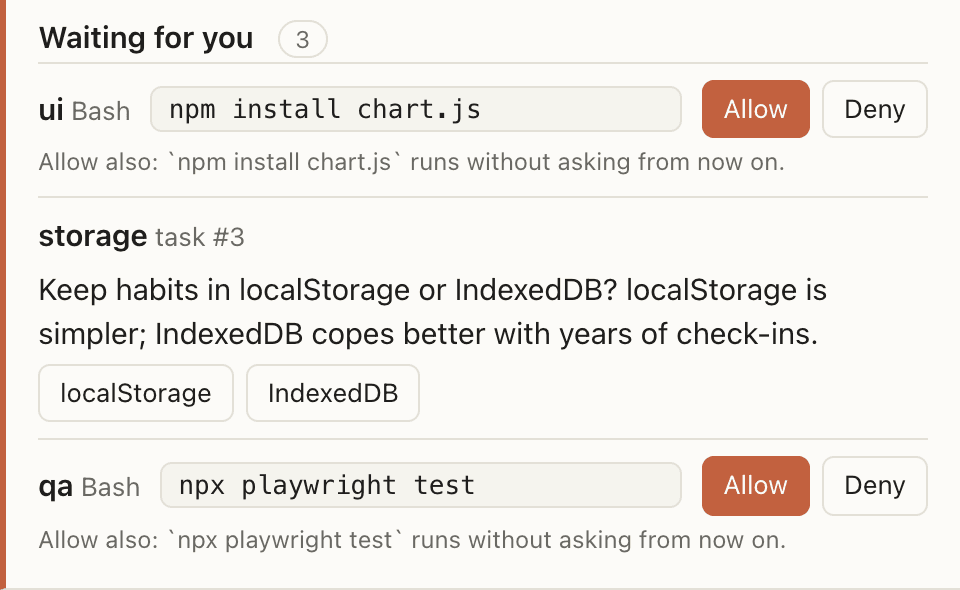 |
| Questions When an agent asks the leader something, you can answer it here too. 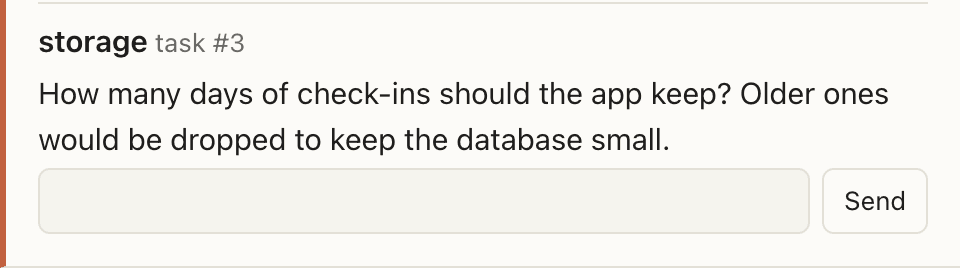 | |
| The crew Who works on what, and who is idle. Stop the crew from here at any time. 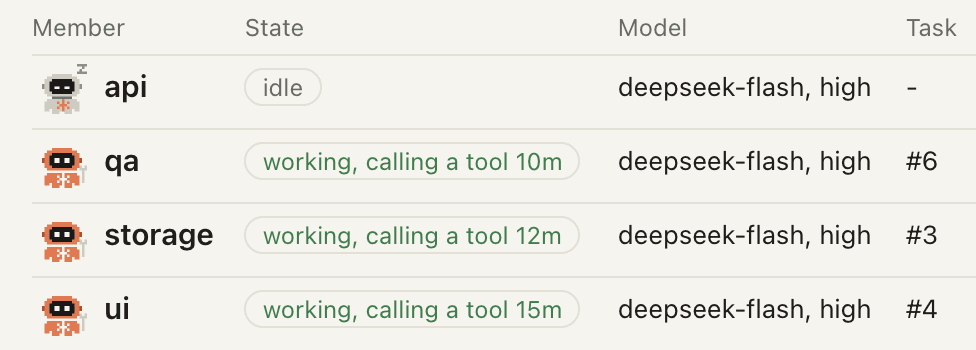 | |
| Budget At 80% the leader tells you, and at 100% the crew pauses.  |
Demo
Here I provided a simple demo, made from one short prompt.
Generate a water pouring simulation with two containers, both 3D and 2D, with controls for the physics.
On the left, the crew at work, replayed in the live monitor. And on the right, the result.
| 3D demo | |
 |  |
| 2D demo | |
 |  |
Built for big jobs
One agent takes a big job one step at a time, and a single context has to hold all of it. DeepCrew splits the job the way a lead engineer would, and that is what lets it take on large work with many parts.
- Interfaces first. The leader writes down how the parts fit together as notes every agent reads, then posts one task per part, with the files it may change and the tasks it waits for.
- Many hands, no collisions. Each agent owns a region of the project, and a gate refuses its edits anywhere else, so up to 32 agents work in one folder at the same time.
- The hard part gets the strong model. The leader puts the core of the job on the provider's strongest model and the routine parts on the fast one.
- Checked before it lands. Agents mail each other about bugs and check their own pages with a screenshot tool. The leader ends with a read-only review, then reads the diff and makes the commit itself.
- Long runs keep going. No single context holds the whole job, idle agents exit and pick their sessions up again when work comes in, and a backup provider takes over when the one in use runs out of credit. Only the leader draws on your plan, so a big job can run to the end.
Quick start
1. Get it.
git clone https://github.com/KuiyiGao/deepcrew
cd deepcrew
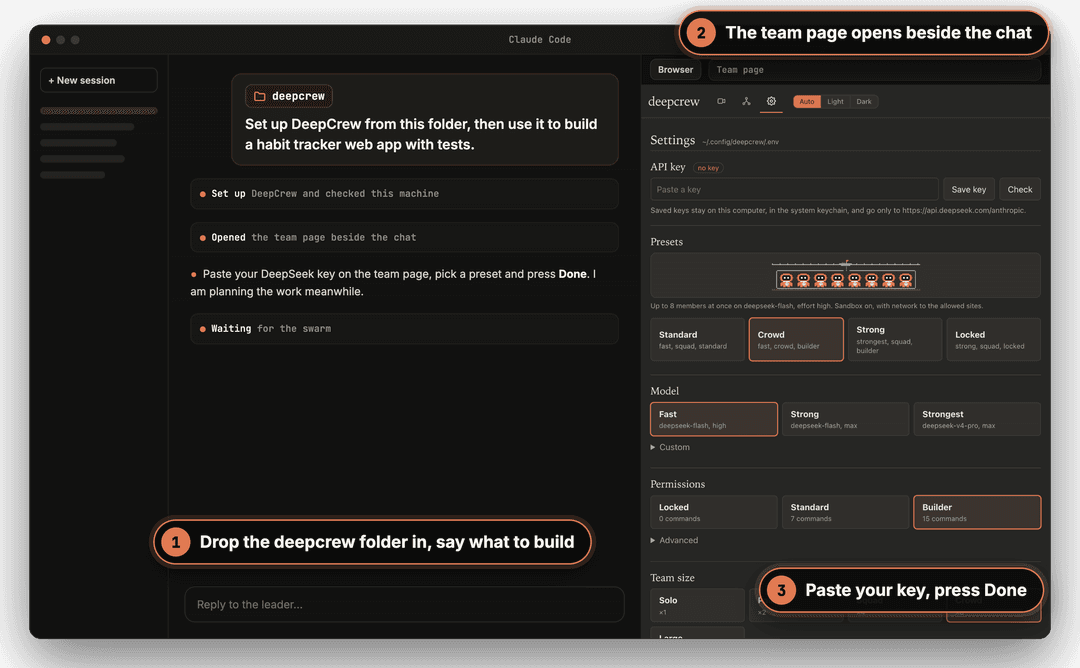
2. Naive configuration for Claude Code or Codex. In the desktop app, open your project, drop the deepcrew folder into the chat
and say what to build, an example prompt would be
Set up DeepCrew from this folder, then use it to build a habit tracker web app with a working page and a database.
Claude installs DeepCrew, checks your machine and opens the team page beside the chat. Paste your DeepSeek key, pick a preset and press Done. The crew gets to work, as simple as that.
Prefer commands? In the deepcrew folder, install the command and the plugin, which brings the /deepcrew skill and
the mod, then check your machine. Open Claude Code in your project and type /deepcrew with your goal.
uv tool install .
claude plugin marketplace add ./
claude plugin install deepcrew@deepcrew
deepcrew check
Before the first run, type /init in Claude Code so your project has a CLAUDE.md, which every agent reads. If the
shell cannot find deepcrew after the install, run uv tool update-shell and open a new terminal. More leader options,
see Terminal, Codex and manual setup.
Updating
In the deepcrew folder, get the new version, reinstall the command and update the plugin, then start a new Claude Code session.
git pull
uv tool install --reinstall .
claude plugin marketplace update deepcrew
claude plugin update deepcrew@deepcrew
Recommended setups
| for | preset | why |
|---|---|---|
| a first try | standard | the cheap model and up to four agents |
| a project with many tasks | crowd | eight agents, and tests and builds run without asking |
| a hard bug or a tricky task | strong | the provider's strongest model. More agents cost more, so size the team to the job |
| a repository you don't know yet | locked | no network, and anything beyond reading files asks you first |
Claude Code mod
The DeepCrew plugin brings the /deepcrew skill and, on Claude Code 2.1.287 or newer, a mod. What the crew asks shows
up right above your prompt, and you answer it there with one press, the same as on the team page. Checking on the crew no longer means asking the leader,
so it spends no turn of your plan.
- Above the prompt. The oldest request waits there with Allow, Always and Deny, or with a question's options.
/crew. Where the crew stands, in one line that you and the leader both read, and a pane with every request and every agent./crew restand/crew resumestop the crew and bring it back.- The status line. How many agents are working, the tasks done and what the crew has spent.
Install it once. In Claude Code in a terminal:
/plugin install deepcrew --marketplace KuiyiGao/deepcrew
Or from the deepcrew folder, in a shell:
claude plugin marketplace add ./
claude plugin install deepcrew@deepcrew
In the desktop app, deepcrew check gives the same two commands for the app's own Claude Code. The mod follows the team
of the folder Claude Code is open in. If it says it cannot find deepcrew, set the full path
with /plugin configure deepcrew@deepcrew.
How the swarm works
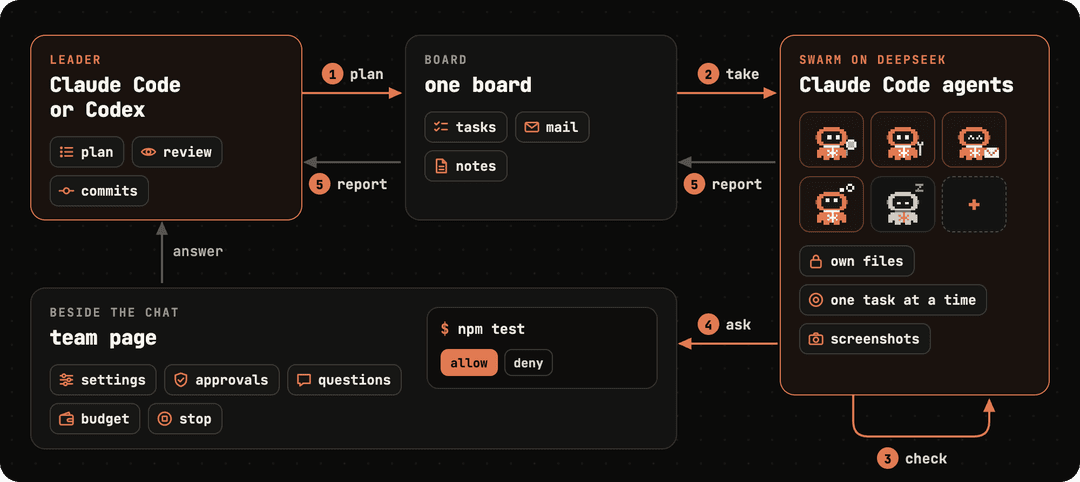
Under the hood
- Stock Claude Code. Each agent is
claude -p, run by a small driver and pointed at the Anthropic-compatible API of DeepSeek or another provider. No key leakage problems. - One board. The tasks are Claude Code's own task list, which the leader fills and the whole crew shares.
- Rules in gates. A pre-tool gate refuses edits outside an agent's region. Every shell command goes through one permission tool that reads the allowlist each time.
- Automatic model selection. Fast model and pro model are selected automatically depending on the task, it will save your money.
- Idle agents exit. An agent with nothing to do stops, and picks its session up again when work comes in.
What it costs
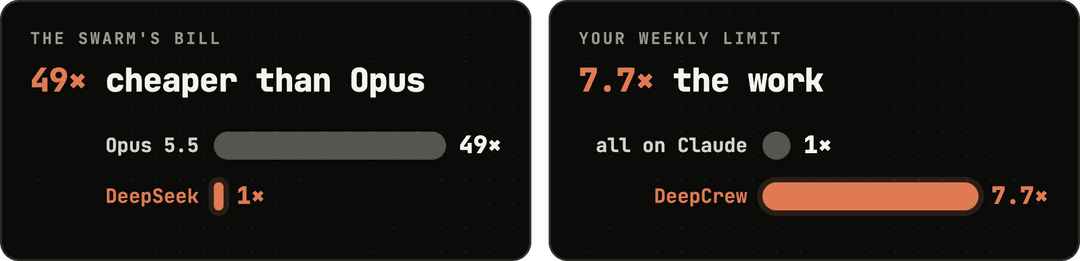
The same tokens cost 49× more at Opus 5.5 prices than on DeepSeek prices. deepcrew prices shows what
your provider charges right now and when that changes.
The leader still runs on your own plan. In our test the same weekly limit covered 7.7× the work of an all-Claude swarm. Set a budget on the team page and the crew pauses when it is spent. 49× prices the same tokens twice, at Opus 5.5 list prices and at DeepSeek's off-peak prices. 7.7× comes from our runs: priced at Claude list prices, the leader's tokens were about 13% of the whole, and 1 / 0.13 ≈ 7.7.
Settings
Pick a preset on the team page, or run deepcrew config preset crowd.
| preset | model | team size | permissions |
|---|---|---|---|
| standard | fast | squad, 4 | standard |
| crowd | fast | crowd, 8 | builder |
| strong | strongest | squad, 4 | builder |
| locked | strong | squad, 4 | locked |
Or mix your own, as in deepcrew config preset strongest crowd builder.
| choices | |
|---|---|
| model | On DeepSeek, fast, the default, is Flash at high effort, strong is Flash at max effort, and strongest is V4 Pro at max effort. Other providers map them to their own models |
| team size | solo 1, pair 2, squad 4, crowd 8 by default, large 16. Up to 32 with deepcrew config set max_active 32 |
| permissions | locked runs a sandbox with no network, and only reading runs without asking. standard, the default, has no sandbox. Reading runs freely, the reviewer approves routine work, the leader approves the rest, and what it approves once does not ask again. builder runs a sandbox that reaches the package registries, so tests and builds run without asking |
- Memory. Each working agent is one
claudeprocess, about 300 MB at start. They share your project folder, with no container or worktree of their own, and idle agents exit. About 10 fit in 8 GB, 20 in 16 GB, and the maximum of 32 in 32 GB. - Rules. Agents read your
CLAUDE.md. Rules for this session only go indeepcrew instructions "...". - Reply language. The crew works in English and writes to you in the language you pick: the sliders button at the top of
the Team Call or the Monitor, then Replies in, or
deepcrew lang "Simplified Chinese". English, Simplified and Traditional Chinese, Japanese, Korean, Spanish, French, German, Portuguese, Italian and Russian are on offer. - Other providers.
deepcrew config set provider zaimoves the crew to Z.ai, and Zhipu GLM and MiniMax come ready too.deepcrew config set fallback zai,minimaxnames backups that take over when the provider in use runs out of balance or stays overloaded. Any other Anthropic-compatible endpoint works with an entry of your own in~/.config/deepcrew/providers.toml.
Use your own setup
Agents start from a clean Claude Code setup of their own, so your personal settings stay out of the crew. This is how they get what you use.
| You have | Give it to the agents |
|---|---|
CLAUDE.md | Nothing to do. Every agent reads the project's CLAUDE.md, .claude/CLAUDE.md, .claude/rules/ and what they import with @path |
| Your MCP servers | deepcrew mcp NAME, from the project's .mcp.json or your Claude Code settings |
| Your skills | deepcrew skill NAME, from .claude/skills/ or ~/.claude/skills/ |
| Another repository or folder | deepcrew link PATH, with --write if the agents may change it |
| A website or an API | deepcrew site DOMAIN |
| Your own add-on | a Python file you declare with deepcrew config set extensions, or an installed module for every project with --global |
| Logins, plugins, anything else | They stay with the leader. An agent asks, and the leader does it with your own Claude Code |
Requirements
| Python | 3.11 or newer, with uv or pipx |
| Claude Code | 2.1.133 or newer, tested up to 2.1.295. The agents run the same Claude Code as the leader, so the desktop app alone is enough; when Codex leads, they run the claude on your PATH. The mod needs 2.1.287 or newer |
| A model provider | a DeepSeek API key with credit, or another provider's. The agents send the code they read to it |
| git | your project needs one commit |
| macOS | works as is |
| Linux, WSL2 | bubblewrap and socat for the presets with a sandbox |
| Windows | the native Claude Code, Git for Windows and Python 3.11 or newer. The presets with a sandbox need WSL2 |
Terminal, Codex and manual setup
Claude Code in a terminal. Start claude in your project, paste the path of the deepcrew folder and ask the same
way. Claude prints a link to the team page.
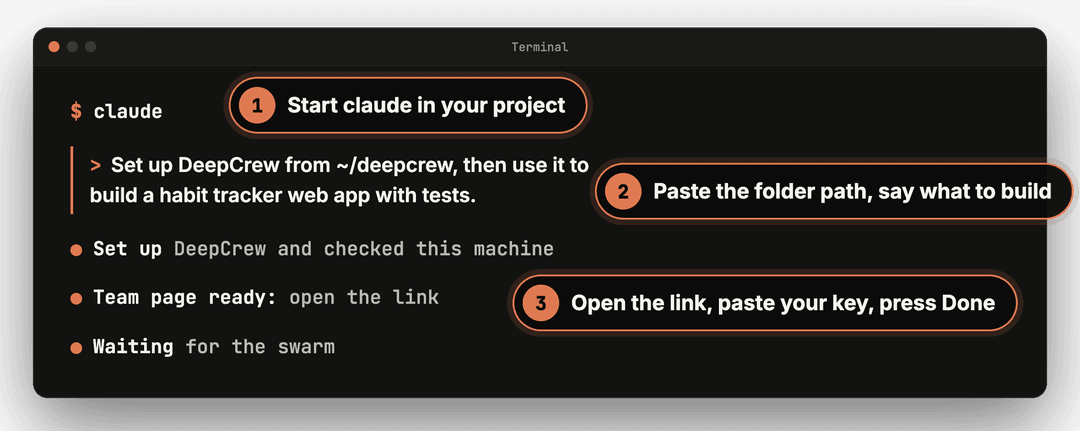
Codex. In the deepcrew folder, install the command and the skill, then ask Codex the same way, or type $deepcrew
and your goal. The crew itself runs on Claude Code, so claude must be installed.
uv tool install .
mkdir -p ~/.agents/skills && cp -R mod/skills/deepcrew ~/.agents/skills/
Fewer prompts. To let Claude Code run deepcrew without asking each time, and outside its own sandbox, add this to
~/.claude/settings.json.
{
  "permissions": { "allow": ["Bash(deepcrew:*)"] },
  "sandbox": { "excludedCommands": ["deepcrew *"] }
}
A call for prompts
How the crew splits a job is set by prompts, and the best prompts come from people using it on real work.
[!TIP] Prompts wanted. Got a prompt that makes the crew smarter on a job you run all the time? Open a pull request and tell us about one real run, with the job, the setup, what the team page says it cost and what changed.
Want to change the prompts deepcrew itself sends? Copy the shipped pack, deepcrew/prompts/basic, to
~/.config/deepcrew/packs/mine, change it, and switch to it with deepcrew config set pack mine.
Coming next
Internal testing is under operation, and on their way here.
- Replay. Any run played back at 10, 30 or 100 times its speed, in the Team Call or the Monitor. The demos above were recorded with it.
- Better prompts. Leader and agent prompts tuned run after run on real projects.
- Economy mode. More ways to spend less on every run.

If DeepCrew saved you some of your limit, a ⭐ helps others find it, it means a lot for me.
Issues, ideas and prompts are just as welcome.
License
// faq
What is deepcrew?
🤿 The cheapest multi-agent workforce that is actually user-friendly: 7.7x more productive and 50x cheaper compared to your ultracode mode, an intelligent multi-agent swarm of Claude Code agents on DeepSeek or other providers, integrated with your own Claude Code or Codex.. It is open-source on GitHub.
Is deepcrew free to use?
deepcrew is open-source under the Apache-2.0 license, so it is free to use.
What category does deepcrew belong to?
deepcrew is listed under plugins in the Claudeers registry of Claude-compatible tools.
// embed badge

[](https://claudeers.com/deepcrew)
// retro hit counter

[](https://claudeers.com/deepcrew)
// reviews
// guestbook
// related in Claude Plugins
 🔓
A single CLAUDE.md file to improve Claude Code behavior, derived from Andrej Karpathy's observations on LLM coding pitfalls.
 🔓
Claude Code is an agentic coding tool that lives in your terminal, understands your codebase, and helps you code faster by executing routine tasks, explainin…
 🔓
"CLI-Anything: Making ALL Software Agent-Native" -- CLI-Hub: https://clianything.cc/
🔓financial-services — a Claude ecosystem project on GitHub.