
deep-memory
A self-evolving knowledge accumulation & hybrid retrieval system for AI coding agents (Claude Code / Codex / etc.)
Install with your AI
Paste into Claude Code, Cursor, or any agent — it reads the repo and wires the tool into your project.
Install and set up deep-memory (git-clone project) into my current project.
Found on https://claudeers.com/deep-memory
Repo: https://github.com/kevintsai1202/deep-memory
Homepage/docs: —
Detected install method: git-clone → git clone https://github.com/kevintsai1202/deep-memory
Category: rag. Platforms: cli, api.
Read the repo's README for exact setup and env vars, then install it and wire it into my project.

Claudeers Health Verdict:
slowing; community-verified: false. Confirm the source before running anything.
git clone https://github.com/kevintsai1202/deep-memory
// compatibility
| Platforms | cli, api |
|---|---|
| Operating systems | — |
| AI compatibility | claude |
| License | MIT |
| Pricing | open-source |
| Language | Python |
Deep-Memory: A Self-Evolving Knowledge Accumulation & Hybrid Retrieval System
English | 繁體中文
💡 Project note: This project is a deep refactor and rename of the original auto-skill project. We restructured it into a minimal, modular open-source skill pack, decoupled "code" from "data," and integrated local ChromaDB hybrid retrieval with BGE-Reranker re-ranking.
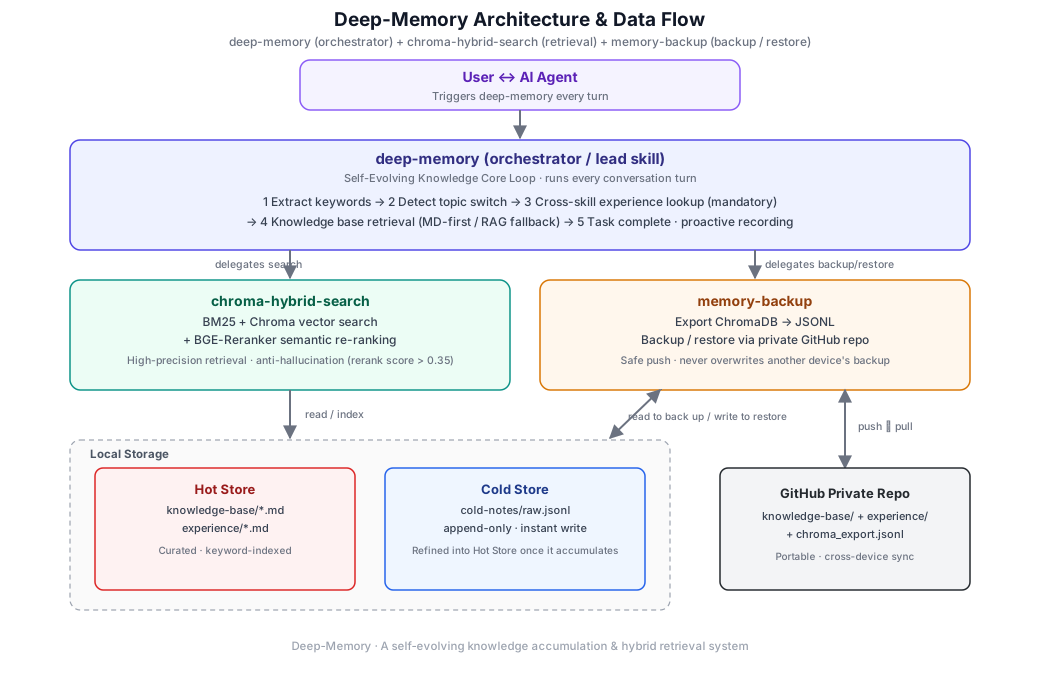
This skill turns your AI agent from a tool that forgets everything the moment a session ends into a self-evolving "second brain" that gets better the more you use it.
Deep-Memory is a meta-skill designed for AI assistants. It runs as a background knowledge system that automatically retrieves past experience during conversations, captures best practices, and — once a task succeeds — proactively writes the "successful approach" into your private knowledge base and indexes it, intelligently cutting down on token usage. You just keep working as usual; Deep-Memory runs automatically in the background.
Core Highlights
1. Genuinely Gets Stronger With Use
Traditional agents reset to zero the moment a conversation ends. Deep-Memory's Core Loop automatically checks a keyword index on every turn — if it recognizes a problem it has solved before, it directly recalls the "best solution" or "pitfall guide" from that time.
2. Cross-Skill Memory
Whenever you invoke another specific skill (coding, writing, drawing, etc.), Deep-Memory automatically checks its skill experience store.
Example: when you invoke remotion-video-gen, it proactively reminds you: "Last time we worked on this, setting FPS to 30 caused audio/video desync — we recommend switching to 60."
3. Proactive Experience Capture
You don't need to take notes by hand. When the AI detects that a task has been completed well, or you express satisfaction, it proactively asks:
"We just solved [problem]. I'd like to record this so we have it on hand next time something similar comes up — sound good?"
4. Modular Skill Packaging & RAG Integration
- Separation of concerns: private data folders and binary files are completely removed from the package; the code ships independently.
- Local hybrid retrieval: integrates the
chroma-hybrid-searchsub-skill for local semantic + BM25 hybrid search, with CPU-based BGE-Reranker-base re-ranking. - Hot/cold tiered storage: frequently-used curated knowledge lives in the hot store (
knowledge-base/,experience/); fresh, unrefined conversation notes land first in the cold store (cold-notes/raw.jsonl) and get refined into hot-store entries once enough accumulate.
5. Cross-Device Portability & Safe Backup
Integrates the memory-backup sub-skill: export your knowledge base and push it to your own private GitHub repo in one step; restore safely via restore.py on a new machine (by default it only fills in missing files and never overwrites existing ones). Before pushing, it automatically checks whether the remote is ahead, so devices never silently overwrite each other's backups.
How It Works (The Loop)
Deep-Memory runs a disciplined 5-step loop on every conversation turn:
-
Keyword Fingerprinting Extracts core keywords from the conversation to generate a topic fingerprint.
-
Topic Switch Detection Intelligently determines whether the user has started a new topic, deciding whether the knowledge base needs to be re-read.
-
Experience Lookup (Skill Experience) If a specific skill was used, mandatorily checks for past "pitfall records" or "working parameters."
-
General Knowledge Base Retrieval Automatically matches the index based on task type and loads the relevant best practices.
-
Proactive Recording (Write Back) Once a task reaches a high degree of completion, extracts and writes back the core takeaway.
Full decision flow, split into three diagrams (kickoff → retrieval → recording):
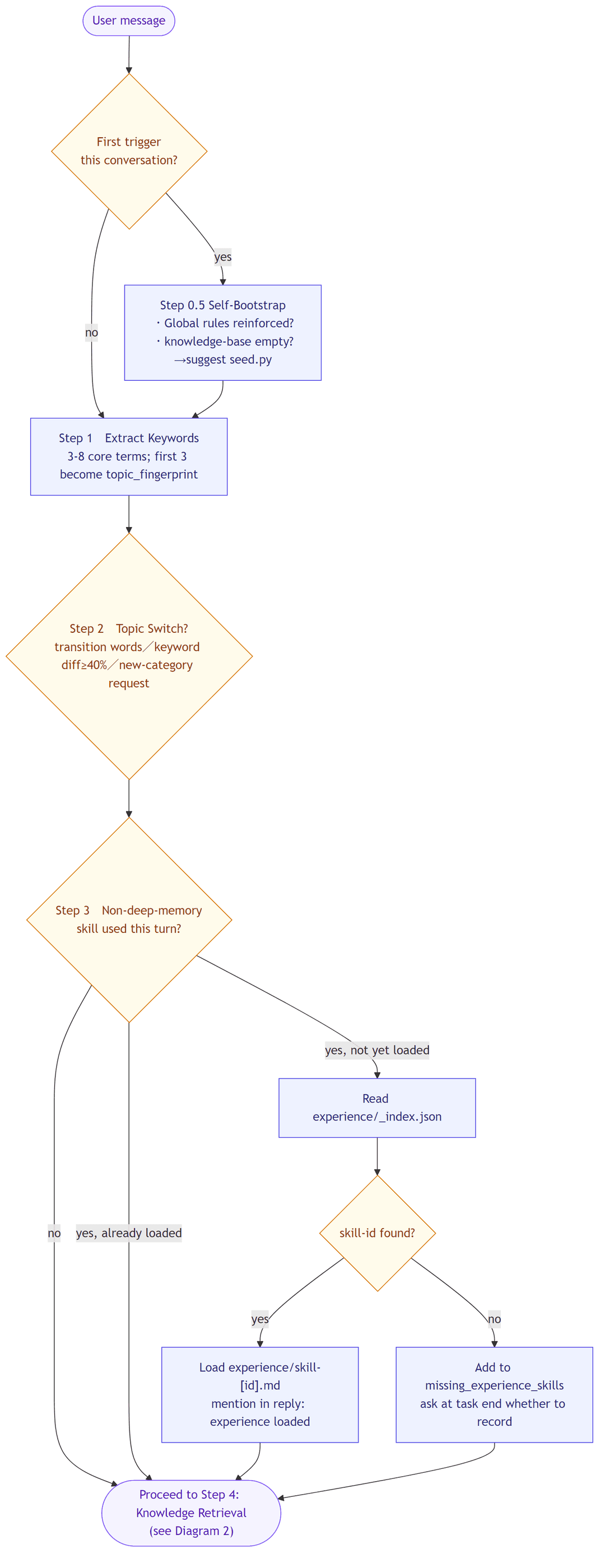
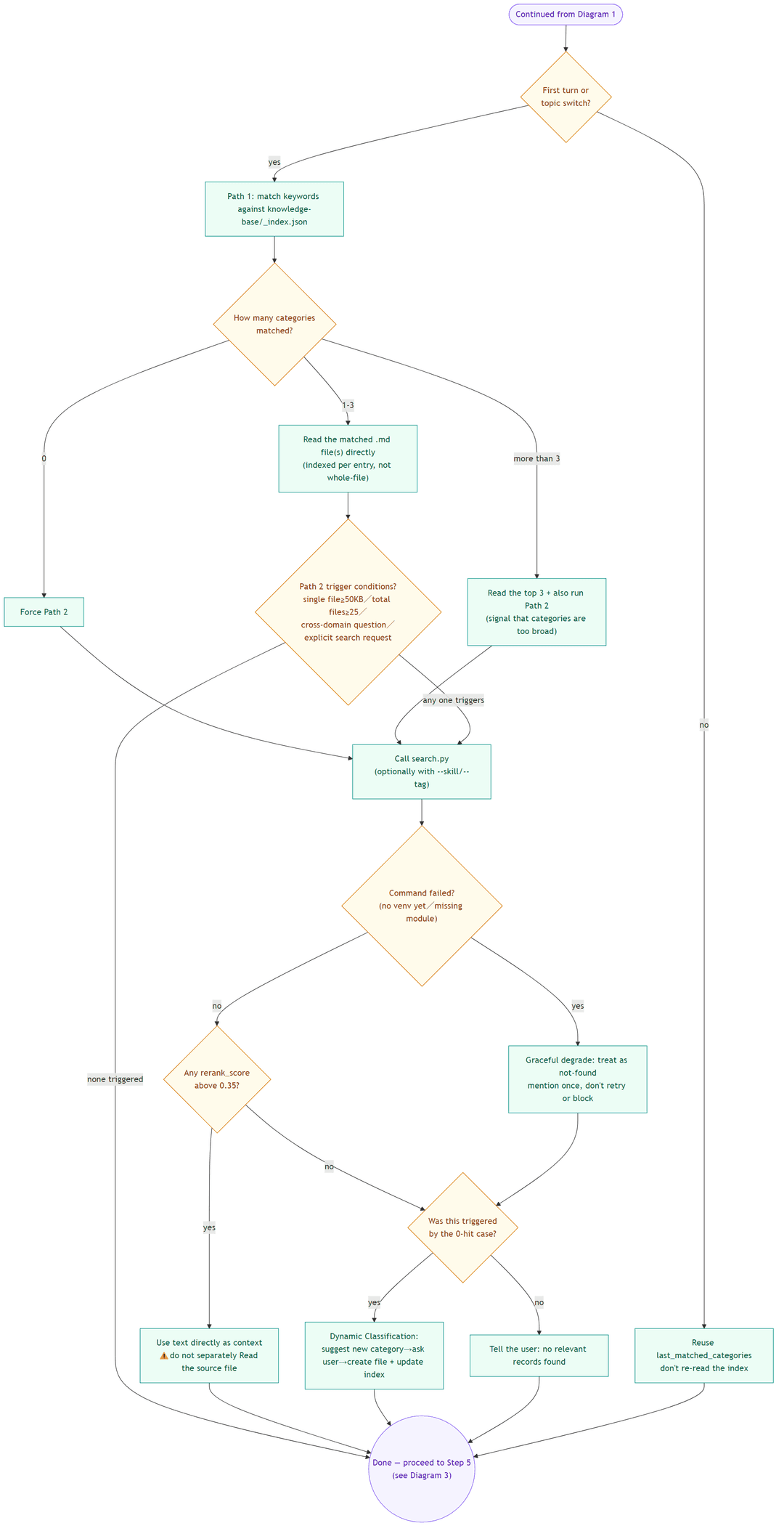
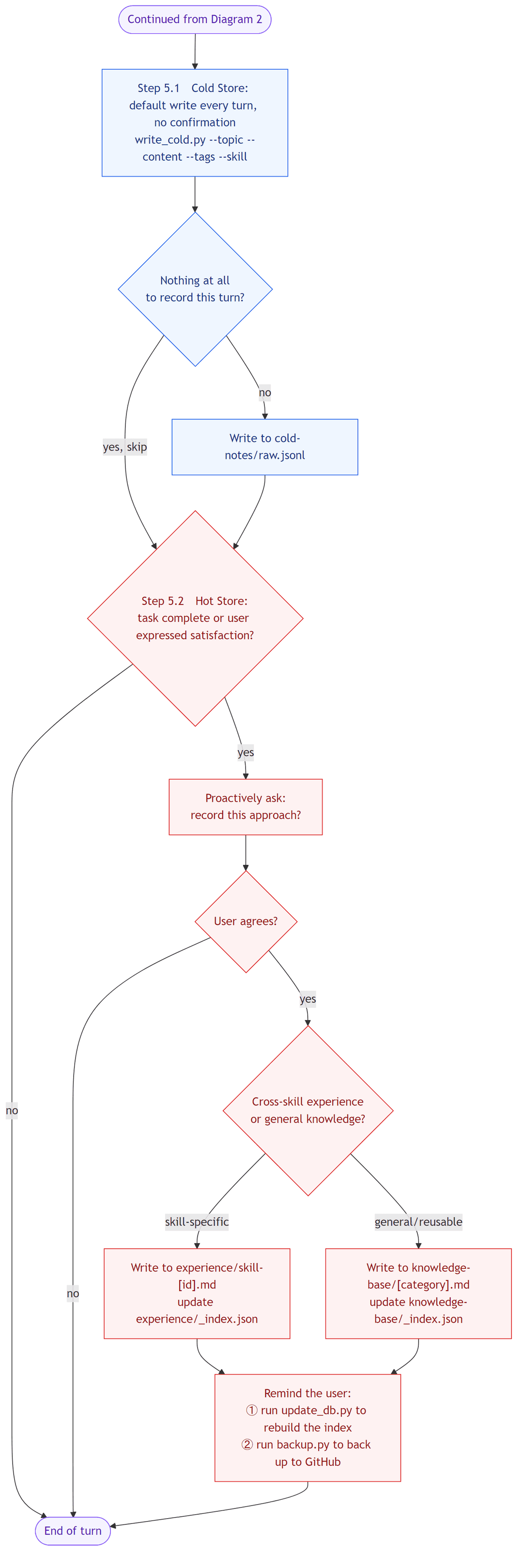
Mermaid source for these diagrams lives in assets/diagrams/*.mmd. Regenerate with: mmdc -i assets/diagrams/flow-1-kickoff.en.mmd -o assets/flow-1-kickoff.en.png -b white -s 2 -w 1000 (swap the filename for each diagram).
File Structure & Format
1) Skill Install Package (GitHub Release Pack)
skills/
├── deep-memory/
│   ├── SKILL.md                 # Lead protocol and flow control
│   ├── scripts/seed.py          # Installs the bundled seed knowledge base
│   └── resources/                # Recording format & hot/cold rules (loaded on demand)
├── chroma-hybrid-search/
│   ├── SKILL.md                 # Hybrid retrieval sub-skill spec
│   ├── requirements.txt         # Local AI dependency declarations
│   └── scripts/
│       ├── search.py            # RAG retrieval + rerank
│       ├── update_db.py         # Local vector database init / update
│       └── write_cold.py        # Instant write to the cold store (cold-notes/)
├── memory-backup/
│   ├── SKILL.md                 # GitHub backup/restore sub-skill spec
│   └── scripts/
│       ├── backup.py            # Export and safely push to a private GitHub repo
│       ├── restore.py           # Restore the knowledge base from GitHub on any device
│       └── export_jsonl.py      # ChromaDB → portable JSONL export
└── memory-import/
    ├── SKILL.md                 # External memory import sub-skill spec
    └── scripts/import.py        # Imports ChatGPT / Claude local / legacy auto-skill data
2) Private Data Store (created under your home directory, shared by every project)
All scripts default --workspace to ~/.deep-memory — one store for every project on the machine, not a folder created inside each project. Set --workspace (or the DEEP_MEMORY_WORKSPACE env var) explicitly if you want a project to keep a fully isolated store instead.
~/.deep-memory/
├── knowledge-base/              # Hot store: curated, keyword-indexed
│   ├── _index.json              # Keyword index
│   └── backend-dev.md           # Your own domain-knowledge handbook
├── experience/                  # Hot store: skill-specific pitfalls & lessons
│   ├── _index.json              # Skill index
│   └── skill-python-code.md     # Gotchas for a specific tool
├── cold-notes/
│   └── raw.jsonl                # Cold store: instant write, refined into the hot store once it accumulates.
│                                 # Each entry auto-tags a `project` field (from the calling directory's name)
│                                 # so search.py can look at the current project before falling back to everything.
├── chroma_hybrid_db/            # Locally-built ChromaDB binaries (indexes both hot and cold stores)
└── backup/                      # memory-backup's staging area (its own git repo, pushed to GitHub)
Usage
Installation Model (pick one)
| Model | Where the skills live | Command path | Best for |
|---|---|---|---|
| Global (recommended) | Copy to your agent's global skill library (e.g., ~/.gemini/config/skills/ for Antigravity, ~/.claude/skills/ for Claude Code) | Point to that global path, or use it directly as a global agent skill | Best default, sharing one skill installation across all workspaces |
| Quick install | npx skills add -g fetches straight from GitHub into your global agent skill library | Use global paths (e.g., ~/.gemini/config/skills/...) | Fastest way to get started with global installation |
| In-project | Copy skills/ into your project root | Use skills/... directly (matches every SKILL.md example) | Single project use-case, want it fully self-contained |
All data directories (
knowledge-base/,experience/,chroma_hybrid_db/) are always created under your home directory (~/.deep-memory), regardless of where the skills themselves live or which project you're in — the scripts use--workspace(default:~/.deep-memory, overridable viaDEEP_MEMORY_WORKSPACE) to decide where to read/write. This single store is shared across every project; cold-store entries carry aprojectfield so retrieval favors the current project before falling back to everything else.
Quick Install with npx skills add
skills is a small CLI that installs Agent Skills straight from a public GitHub repo — no cloning needed. Since this repo keeps its skills under skills/, the tool discovers them automatically:
# Preview what's available before installing
npx skills add kevintsai1202/deep-memory --list

# Install everything globally, no prompts (shorthand for --skill '*' --agent '*' -y -g)
npx skills add kevintsai1202/deep-memory --all -g

# Or be explicit about the target agent and install globally
npx skills add kevintsai1202/deep-memory --skill '*' -a claude-code -g

# Or install just the core skill globally
npx skills add kevintsai1202/deep-memory --skill deep-memory -a claude-code -g
Adding
-ginstalls the skills into your global skill library (e.g.~/.gemini/config/skills/or~/.claude/skills/), making them available across all your workspaces.--allinstalls into every agent the CLI recognizes (Claude Code, Cursor, Codex, etc.). Use-a <agent-name> -gif you only want it in a specific agent's global path.
This only places the skill files — you still need to run the Python initialization steps below, once per machine (the venv and all data live in the global ~/.deep-memory workspace, shared by every project).
Initialization Steps
-
Pick an install model from the table above and place
skills/accordingly (skip this if you usednpx skills add). -
Initialize the virtual environment, install dependencies, seed the bundled knowledge base, and build the local vector index (no need to activate — call the venv's Python directly):
Windows (PowerShell)
python -m venv "$HOME\.deep-memory\.venv"
& "$HOME\.deep-memory\.venv\Scripts\python" -m pip install -r skills/chroma-hybrid-search/requirements.txt
& "$HOME\.deep-memory\.venv\Scripts\python" skills/deep-memory/scripts/seed.py
& "$HOME\.deep-memory\.venv\Scripts\python" skills/chroma-hybrid-search/scripts/update_db.py
Linux / macOS
python3 -m venv ~/.deep-memory/.venv ~/.deep-memory/.venv/bin/python -m pip install -r skills/chroma-hybrid-search/requirements.txt ~/.deep-memory/.venv/bin/python skills/deep-memory/scripts/seed.py ~/.deep-memory/.venv/bin/python skills/chroma-hybrid-search/scripts/update_db.pyknowledge-base/is created byseed.py;experience/andcold-notes/are created automatically the first time something is written to them — no manualmkdirneeded.If you installed globally (recommended) or via
npx skills add -g, swapskills/...in the commands above for the actual path where the files were placed (typically~/.gemini/config/skills/...or~/.claude/skills/...).
Changelog
2026-07-02
- Cold-store entries now auto-tag a
projectfield (derived from the calling directory's name);search.pysearches the current project first and only falls back to the full store when nothing project-specific matches.search.py's output shape changed from a bare array to{"scope": "...", "results": [...]}. - Entries written before this change have no
projectfield and are only reachable via the fallback pass — they were intentionally left as-is, not backfilled. - Documentation fix: this README previously described the private data store as being created under your project directory. It was already always created under
~/.deep-memoryby default — that part of the docs was simply wrong, not a behavior change.
// faq
What is deep-memory?
A self-evolving knowledge accumulation & hybrid retrieval system for AI coding agents (Claude Code / Codex / etc.). It is open-source on GitHub.
Is deep-memory free to use?
deep-memory is open-source under the MIT license, so it is free to use.
What category does deep-memory belong to?
deep-memory is listed under rag in the Claudeers registry of Claude-compatible tools.
// embed badge

[](https://claudeers.com/deep-memory)
// retro hit counter

[](https://claudeers.com/deep-memory)
// reviews
// guestbook
// related in RAG & Knowledge
 🔓
🔓Persistent Context Across Sessions for Every Agent – Captures everything your agent does during sessions, compresses it with AI, and injects relevant contex…
 🔓
🔓✨ Light and Fast AI Assistant. Support: Web | iOS | MacOS | Android | Linux | Windows
 🔓
🔓Compress tool outputs, logs, files, and RAG chunks before they reach the LLM. 60-95% fewer tokens, same answers. Library, proxy, MCP server.
 🔓
🔓A light-weight and powerful meta-prompting, context engineering and spec-driven development system for Claude Code by TÂCHES.