
deadskills
💀 Find the agent skills you never use. Local-first analytics for Claude Code & Codex skills.
Install with your AI
Paste into Claude Code, Cursor, or any agent — it reads the repo and wires the tool into your project.
Install and set up deadskills (npm project) into my current project.
Found on https://claudeers.com/deadskills
Repo: https://github.com/anandsaini18/deadskills
Homepage/docs: —
Detected install method: npm → npm install deadskills
Category: skills. Platforms: cli, api.
Read the repo's README for exact setup and env vars, then install it and wire it into my project.

Claudeers Health Verdict:
slowing; community-verified: false. Confirm the source before running anything.
npm install deadskills
git clone https://github.com/anandsaini18/deadskills
// compatibility
| Platforms | cli, api |
|---|---|
| Operating systems | — |
| AI compatibility | claude |
| License | NOASSERTION |
| Pricing | open-source |
| Language | TypeScript |
Every installed skill adds its name and description to every prompt you send. That cost is paid on every message, whether the skill gets used or not. deadskills reads your local transcripts and shows which skills earn their seat, and which ones are probably safe to remove.
Quick start
Requires Node 18+. Auto detects Claude Code (~/.claude) and Codex (~/.codex) when those directories exist. No config, no login, no telemetry.
npx deadskills
That is the whole workflow. Everything below is reference.
Install
npx deadskills               # one-off run, always latest (recommended)
npm install -g deadskills    # global install: run deadskills anywhere
From source (development):
git clone https://github.com/anandsaini18/deadskills
cd deadskills
make install && make link    # deadskills on PATH from local build
Zero runtime dependencies. The published package is one ~22 KB file you can read in a sitting.
Commands
| Command | What it does |
|---|---|
deadskills | Full report for all detected agents |
deadskills dead | List dead skills only |
deadskills doctor | Parse health: are your transcripts being read correctly? |
deadskills --since 30d | Limit analysis to a window (30d, 8w, 6m, or an ISO date) |
deadskills --json | Machine readable output (schema) |
deadskills --agent <name> | One agent only (name shown in report header) |
npx deadskills
npx deadskills dead
npx deadskills doctor
npx deadskills --since 30d
npx deadskills --json
npx deadskills --agent <name>
What you learn in one run
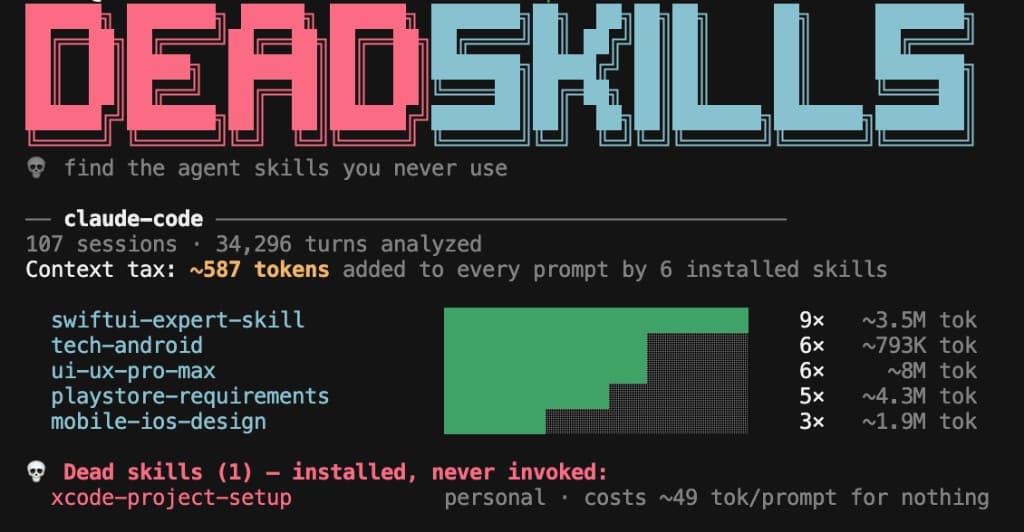
- Your context tax. One number for how many tokens your installed skills add to every prompt. The rest of the report exists to help you lower it.
- What each skill actually cost you. Invocation counts from your own transcript history, next to estimated token totals. Grounded in evidence, not vibes.
- What to remove. Dead skills are named with their per prompt cost. They were probably useful once. If the number looks wrong, run
deadskills doctorand open an issue. - How much history was read. Session and turn counts show the report is built from real volume, not a toy demo.
- A ranking you can scan in seconds. Skill names, usage bars, and humanized totals (
~3.5M tok) so the story is obvious before you read a doc.
Skill states
| State | Meaning |
|---|---|
| active | Invoked at least once. Earning its context seat. |
| zombie | Invoked before, silent for 90+ days |
| dead | Installed, never invoked |
How it works
- Discovers installed skills from each agent's skill directories and reads
SKILL.mdfrontmatter for name, description, and token cost. - Parses session transcripts as JSONL. Skipped lines are counted and surfaced via
doctor, never silently dropped. - Reports per skill invocation counts and token cost (injection cost × turns, plus expansion cost × invocations), then flags dead and zombie skills.
Token figures are estimates (~4 chars/token). They are directionally right, and real cost is usually lower thanks to prompt caching. We label every estimate with a tilde because pretending otherwise would defeat the point of the tool.
Your transcripts never leave your machine. No network calls at runtime.
Agents
| Agent | Data directory | Status |
|---|---|---|
| Claude Code | ~/.claude | Supported |
| Codex | ~/.codex | Supported |
Both adapters auto detect when their data directories exist. More agents are welcome via PR: one adapter file plus fixtures. See CONTRIBUTING.md.
More detail
| Doc | When to read it |
|---|---|
| CONTRIBUTING.md | Adding an adapter or fixing a parser |
| SECURITY.md | Reporting a vulnerability privately |
| schema/report.schema.json | Building on --json output |
| Issues | Bugs (paste doctor output) or adapter requests |
Contributing
An adapter is one TypeScript file implementing a three method interface, plus hand written fixtures. Run make check to verify, then open a PR. See CONTRIBUTING.md.
This tool was built to scratch an itch, and it is young. If a number looks wrong on your machine, run deadskills doctor and open an issue with the output. It is designed to be safe to paste. Ideas, corrections, and skepticism are all welcome.
License
MIT. The report schema is CC0, so build on it freely.
// faq
What is deadskills?
💀 Find the agent skills you never use. Local-first analytics for Claude Code & Codex skills.. It is open-source on GitHub.
Is deadskills free to use?
deadskills is open-source under the NOASSERTION license, so it is free to use.
What category does deadskills belong to?
deadskills is listed under skills in the Claudeers registry of Claude-compatible tools.
// embed badge

[](https://claudeers.com/deadskills)
// retro hit counter

[](https://claudeers.com/deadskills)
// reviews
// guestbook
// related in Claude Skills
 🔓
🔓An agentic skills framework & software development methodology that works.
 🔓
🔓 🔓
🔓💫 Toolkit to help you get started with Spec-Driven Development
 🔓
🔓AI coding assistant skill (Claude Code, Codex, OpenCode, Cursor, Gemini CLI, and more). Turn any folder of code, SQL schemas, R scripts, shell scripts, docs,…