
coralline
🪸 Powerlevel10k-inspired statusline for Claude Code — paste one prompt and your AI interviews you, then installs it
Install with your AI
Paste into Claude Code, Cursor, or any agent — it reads the repo and wires the tool into your project.
Install and set up coralline (release-binary project) into my current project.
Found on https://claudeers.com/coralline
Repo: https://github.com/Nanako0129/coralline
Homepage/docs: —
Detected install method: release-binary → inspect the README
Category: devops. Platforms: cli, api.
Read the repo's README for exact setup and env vars, then install it and wire it into my project.

Claudeers Health Verdict:
active; community-verified: false. Confirm the source before running anything.
Grab the latest release asset from GitHub.
# download a build from https://github.com/Nanako0129/coralline/releases
git clone https://github.com/Nanako0129/coralline
// compatibility
| Platforms | cli, api |
|---|---|
| Operating systems | — |
| AI compatibility | claude |
| License | MIT |
| Pricing | open-source |
| Language | Shell |
coralline
A Powerlevel10k-inspired statusline for Claude Code with one installer entrypoint for humans and AI: run it directly, or ask Claude to run it and handle the setup for you.
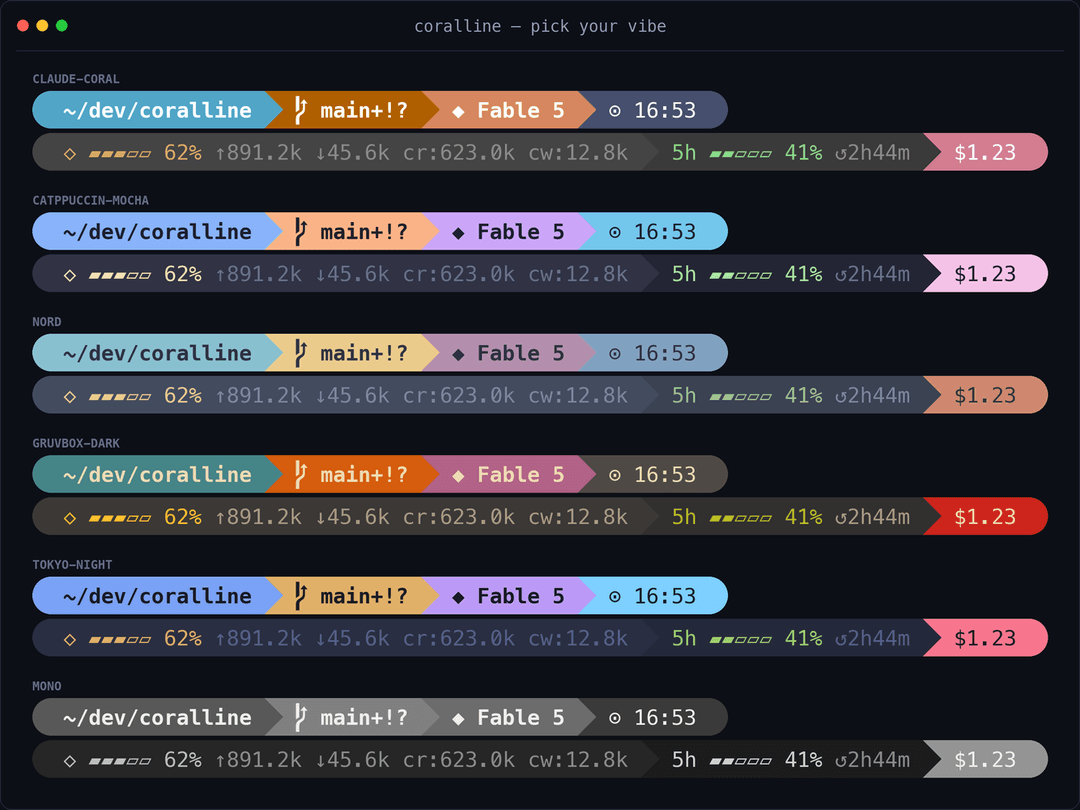
What you get
╭ ~/side-project/coralline ⬢ coralline ⎇ main+! ◆ Fable 5 ψ high ⬡ ▰▰▰▱▱ 62% ↑1.2M ↓45.6k 5h ▰▰▱▱▱ 41% ↺2h44m 7d ▰▰▰▰▱ 79% ↺1d11h +321 −87 $1.23 ✎ Explanatory ⧖ 47m ⚑ 1 ⊙ 02:45 pm ╮
| Segment | Shows |
|---|---|
dir | current directory, long paths collapsed to ~/a/…/z |
project | repo name (⬢), stable across every worktree; hidden outside a git repo |
git | branch, staged + / modified ! / untracked ?, ahead ⇡ behind ⇣ |
model | active Claude model |
effort | reasoning effort level (ψ) — low / med / high / xhigh / max |
ctx | context-window gauge, input/output/cache token counts |
limit5h / limit7d | rate-limit gauges with reset countdown |
burn | range-to-empty: projected time until the binding limit (5h or 7d) hits 100% at the recent burn rate (↗); opt-in by adding burn to VL_SEGMENTS |
lines | lines added/removed this session |
cost | session cost in USD |
style | active output style |
duration | session wall-clock duration |
stash | git stash count |
clock | time, 12h or 24h |
Gauges change color as they fill: green → yellow at 50% → red at 75% (thresholds configurable).
Install
Three ways to install, all driven by the same install.sh. Each one copies the renderer and
the setup wizard into ~/.claude/coralline and registers the status line in Claude Code, so
you can re-run the wizard later no matter which way you installed.
Requirements:
jqand a Nerd Font terminal. No Nerd Font? SetVL_ASCII=1in your config for a glyph-free rendering.
Ask Claude (recommended)
Paste this into Claude Code:
Please install coralline for me:
fetch https://raw.githubusercontent.com/Nanako0129/coralline/main/INSTALL.md
and follow the playbook in it.
Claude will read the playbook, use the same installer to bootstrap the runtime, interview you about the look, write the config, verify it, and remind you that you can rerun the visual wizard if the first result doesn't match your taste.
Install it yourself
Run the installer in your terminal:
curl -fsSL https://raw.githubusercontent.com/Nanako0129/coralline/main/install.sh | bash
When run interactively it asks which version to install — the latest tagged release
(recommended) or main (latest development). To skip the prompt, pin one explicitly with
--ref, e.g. ... | bash -s -- --ref v0.6.0 or --ref main.
Manual
git clone https://github.com/Nanako0129/coralline ~/.claude/coralline-src
mkdir -p ~/.claude/coralline/themes
cp ~/.claude/coralline-src/statusline.sh ~/.claude/coralline/
cp ~/.claude/coralline-src/configure.sh ~/.claude/coralline/
cp ~/.claude/coralline-src/install.sh ~/.claude/coralline/
cp ~/.claude/coralline-src/themes/claude-coral.conf ~/.claude/coralline/themes/
Then add to ~/.claude/settings.json:
{
  "statusLine": {
    "type": "command",
    "command": "bash ~/.claude/coralline/statusline.sh",
    "refreshInterval": 1
  }
}
Note: the commands above copy only the
claude-coraltheme. The Ask-Claude and one-line installers bundle every theme; after a manual install, copy the rest of~/.claude/coralline-src/themes/*.confinto~/.claude/coralline/themes/to switch themes.
Updating
Two ways to update, both driven by the same installer. Either way your
~/.claude/coralline.conf is preserved and the previous statusline.sh is backed up
under ~/.claude/coralline/ (the 3 newest are kept).
Ask Claude (recommended)
Paste this into Claude Code:
Please update coralline for me:
fetch https://raw.githubusercontent.com/Nanako0129/coralline/main/UPGRADE.md
and follow the playbook in it.
Claude re-runs the installer, reads the "new since your installed copy" report, and offers to turn on any new opt-in features for you.
Update it yourself
Re-run the installer — it prints a short "new since your installed copy" report when something new shipped:
curl -fsSL https://raw.githubusercontent.com/Nanako0129/coralline/main/install.sh | bash -s -- --install-only
Setup
Both paths use the same installer. Humans run it with no mode and get the visual setup. Claude
uses it with --install-only, then follows INSTALL.md to interview you and write config.
Setup modes
| Mode | Use when |
|---|---|
| Default | You want the coralline default immediately |
| Powerlevel10k import | You already have ~/.p10k.zsh and want to carry over its style, time format, and main colors |
| Visual wizard | You want to preview themes, style, segments, wrapping, clock, and font compatibility before writing config |
Running the installer yourself with no mode opens the interactive setup. Claude should not operate that TUI unless you explicitly ask for visual customization.
Reconfigure
Every install path copies the wizard into ~/.claude/coralline, so you can rerun it anytime to
restyle:
bash ~/.claude/coralline/configure.sh
Testing a fork
Point the installer at the same fork:
curl -fsSL https://raw.githubusercontent.com/YOU/coralline/main/install.sh | bash -s -- --repo YOU/coralline
Configuration
Everything lives in ~/.claude/coralline.conf (plain bash, sourced by the script):
| Variable | Default | Meaning |
|---|---|---|
VL_STYLE | pill | pill: powerline pills · lean: flat colored text, p10k-lean style |
VL_LAYOUT | fixed | fixed: one line per VL_SEGMENTS* var · auto: responsive |
VL_MAX_LINES | 3 | auto only — wrap into at most this many lines (1 = never wrap) |
VL_WRAP_MARGIN | 4 | auto only — columns kept free on the right so segments never touch the edge |
VL_SEGMENTS | dir git model ctx limit5h limit7d cost clock | segments on line 1, in order (the full list in auto mode) |
VL_SEGMENTS2 / VL_SEGMENTS3 | (empty) | fixed only — optional second/third line |
VL_CLOCK | 12h | 12h / 24h / off |
VL_CLOCK_SECONDS | 1 | show seconds in the clock |
VL_BAR_WIDTH | 5 | gauge width in cells |
VL_PATH_DEPTH | 4 | collapse paths deeper than this |
VL_NAME_MAX | 0 | max chars for the project / git names before … truncation (0 = off) |
VL_COST_DECIMALS | 2 | decimal places for the cost segment |
VL_WARN_PCT / VL_HOT_PCT | 50 / 75 | gauge color thresholds |
VL_ASCII | 0 | 1 disables Nerd Font glyphs |
VL_BG_* / VL_FG_* | theme | colors — 256-color index or "R,G,B" |
Burn-rate segment
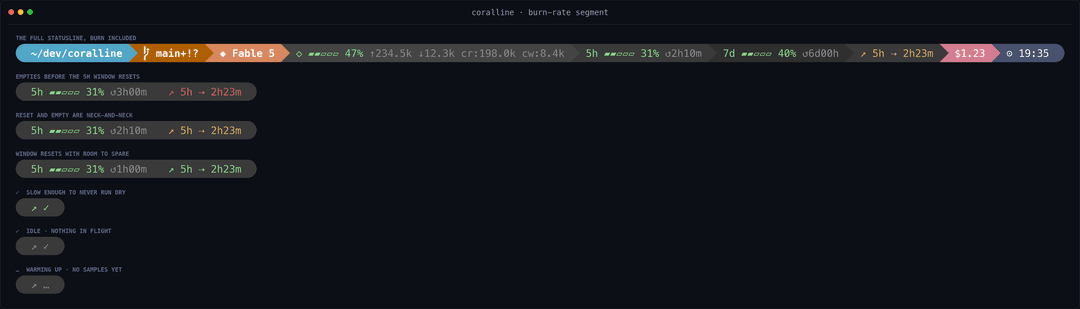
Off by default. Add burn to VL_SEGMENTS to show a "range to empty" — the projected
time until whichever rate limit (5h or 7d) binds first, e.g. ↗ 5h ⇢ 1h58m. Keys:
CORALLINE_BURN_WINDOW (recent-slope lookback, default 600s), VL_BURN_GLYPH (default
↗), VL_BG_BURN (defaults to the 5h background). While burn is in the segment list,
coralline writes samples to ~/.claude/coralline/burn-5h.tsv; drop it from the list and
nothing is written.
The ETA is coloured by urgency against the window reset, and collapses to a glyph when a number would be noise:
| You see | When |
|---|---|
↗ 5h ⇢ 1h58m red | you'd empty before the window resets |
↗ 5h ⇢ 1h58m yellow | reset and empty are a close call |
↗ 5h ⇢ 1h58m green | the window resets with room to spare |
bright ↗ ✓ | at this pace a full window can't run dry — a number like 24d15h would just be noise |
dim ↗ ✓ | idle: you've stopped burning, nothing in flight |
dim ↗ … | warming up: a cold start with no samples yet (deliberately not a green check, so a fresh install doesn't read as healthy) |
The label tells you which limit binds — whichever of 5h/7d will hit 100% soonest.
5h only appears once you're burning hard enough to register at least two integer-%
steps within the recent window; at a light or steady pace there's no short-term slope to
fit, so the 7d projection binds and you see ↗ 7d.
Cross-session limit sync (optional)
VL_LIMIT_SYNC=1 makes limit5h / limit7d show the freshest rate-limit reading any of your sessions has seen, instead of just this session's own snapshot. Each render records its 5h / 7d value to a small per-host store (limit-5h.d / limit-7d.d), and the segments display the highest percentage recorded for the current window. Off by default.
This exists because Claude Code re-renders a session's statusline only when that session is active, and the rate-limit numbers it passes are that session's last-seen values. So idle sessions show stale, divergent percentages. With sync on, every session converges to the latest known value the next time it redraws.
It only updates on redraw. It cannot refresh a session that is not redrawing at all, and "latest known" is only as fresh as your most recently active session. coralline has no API access. So this narrows the gap between sessions, it does not make a fully idle bar live.
Single-session users gain nothing from it (there is only one snapshot), so it stays opt-in.
Responsive layout
With VL_LAYOUT="auto" the bar stays on a single line while it fits, and greedily wraps into
up to VL_MAX_LINES rows when the window gets narrow. Once the line cap is reached, remaining
segments overflow on the last line. VL_WRAP_MARGIN keeps a few columns free on the right so
wrapped lines never butt against the window edge — raise it if your terminal adds padding.
Width comes from $COLUMNS. Claude Code v2.1.153+ sets COLUMNS to the current terminal width
before running the status line, so wrapping responds to window resizing out of the box. Outside
Claude Code the script falls back to stty size on the controlling terminal; if neither is
available it stays on one line.
wide window:    ~/dev/app  ⎇ main  ◆ Fable 5  ⬡ ▰▰▰▱▱ 62%  5h ▰▰▱▱▱ 41%  $1.23  ⊙ 14:45

narrow window:  ~/dev/app  ⎇ main  ◆ Fable 5
                ⬡ ▰▰▰▱▱ 62%  5h ▰▰▱▱▱ 41%  $1.23  ⊙ 14:45
Prefer a layout that never moves? Keep VL_LAYOUT="fixed" and pin rows with
VL_SEGMENTS / VL_SEGMENTS2 / VL_SEGMENTS3.
Lean style
Prefer Powerlevel10k's lean look — no backgrounds, just colored text? Set
VL_STYLE="lean" and each segment's VL_BG_* color becomes its text accent instead:
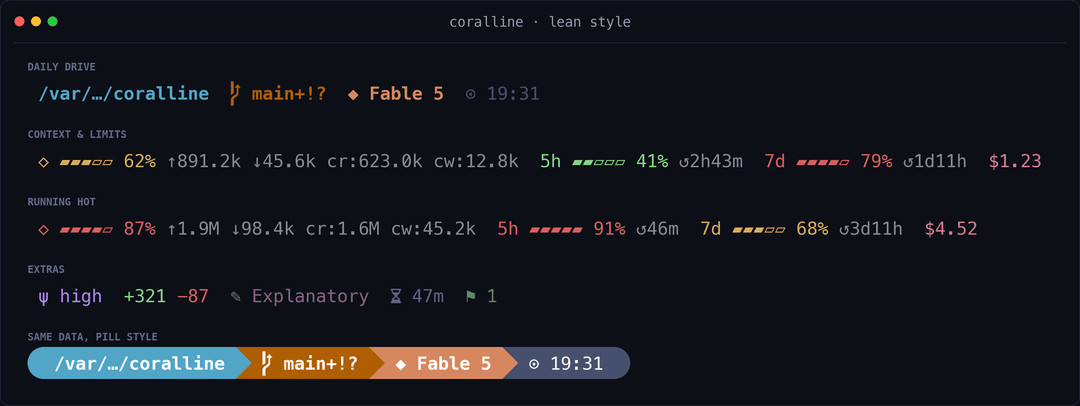
| Variable | Default | Meaning |
|---|---|---|
VL_STYLE | pill | set to lean for the flat look |
VL_LEAN_SEP | (empty) | extra text between segments, e.g. · |
VL_LEAN_FG | (empty) | force a text color; empty = inherit each segment's accent |
Tip: already a p10k user? Tell the AI installer or the visual wizard to import your
~/.p10k.zsh— it will carry over your style, colors, and time format after you opt in. See the AI interview notes in INSTALL.md.
Float readout (optional)
VL_FLOAT=1 makes statusline.sh write a one-line plain-text readout to
~/.claude/coralline/float.txt on every render (segments from
VL_FLOAT_SEGMENTS, default model ctx cost). That's all coralline does —
it ships no display carrier. The file is the seam: pipe it wherever you want
a glanceable readout that stays visible without looking at Claude Code's bottom
statusline (a terminal status bar, tmux, a menu-bar app, …).
The readout is plain text (no ANSI color), so the default favors stable,
glance-friendly segments and leaves the color-driven limit warnings
(limit5h / limit7d) in the bottom statusline, where threshold colors work.
You can still add them to VL_FLOAT_SEGMENTS if you want the numbers up top.
Config keys
| Key | Default | Meaning |
|---|---|---|
VL_FLOAT | 0 | 1 = write float.txt each render |
VL_FLOAT_SEGMENTS | model ctx cost | segments rendered into the readout (plain text, no color) |
VL_FLOAT_SEP | · | separator between segments |
VL_FLOAT_FILE | ~/.claude/coralline/float.txt | where the readout is written |
(Or toggle VL_FLOAT via "float readout" in configure.sh's Details menu.)
A worked iTerm2 carrier (the coralline-float companion + setup steps) lives in
example/float-display-iterm2/ — copy it into
your dotfiles and adapt. Other terminals (tmux, WezTerm, a menu-bar app, …) just
need to read float.txt the same way.
Themes
claude-coral — steel blue · mauve · Claude coral (default)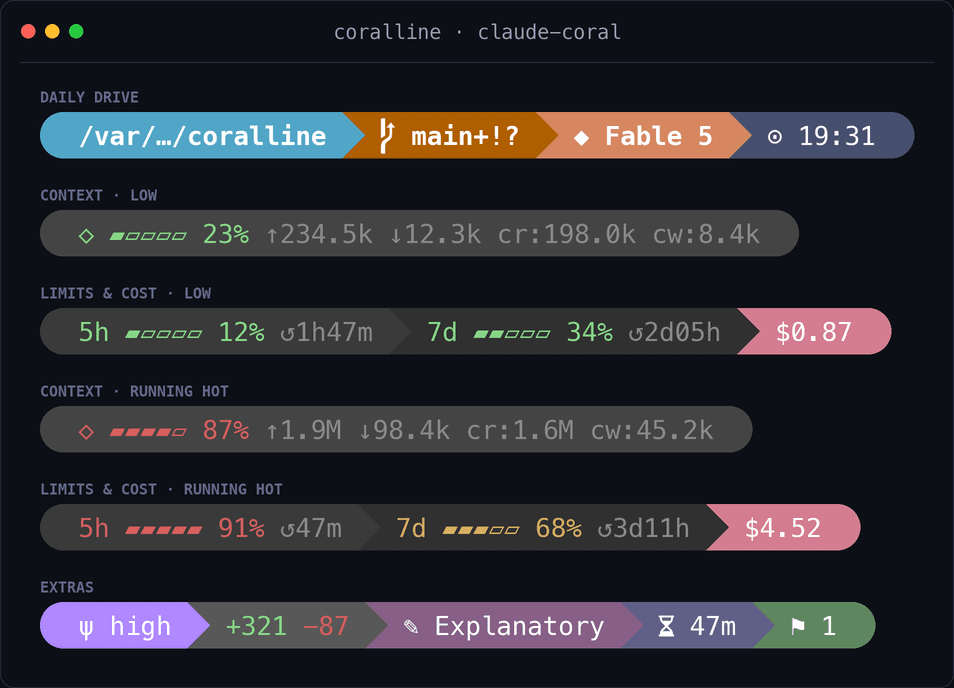 | catppuccin-mocha — soft pastels on dark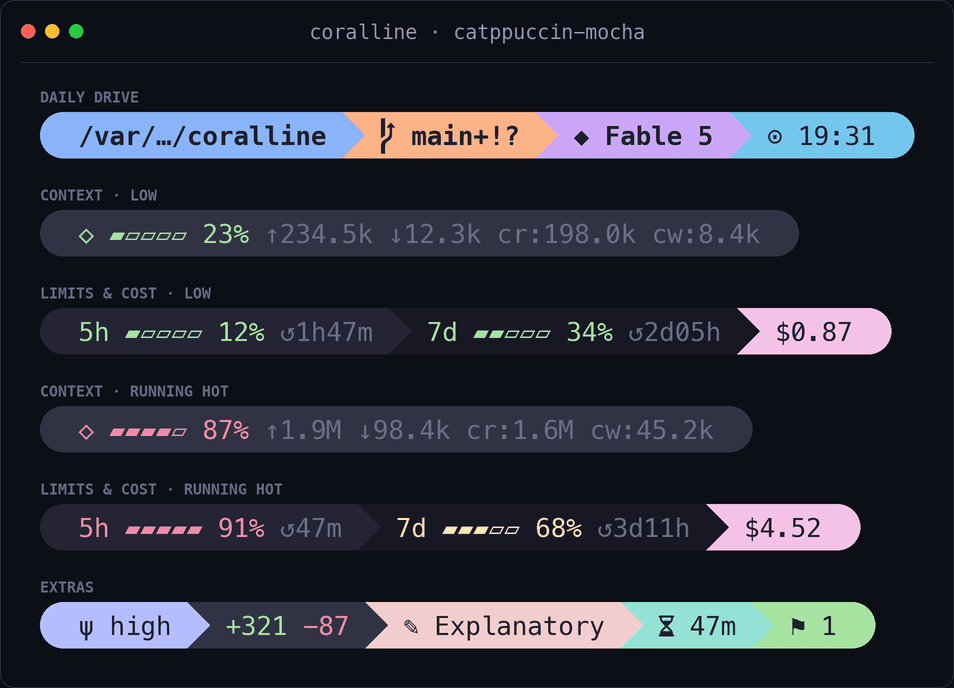 |
nord — arctic frost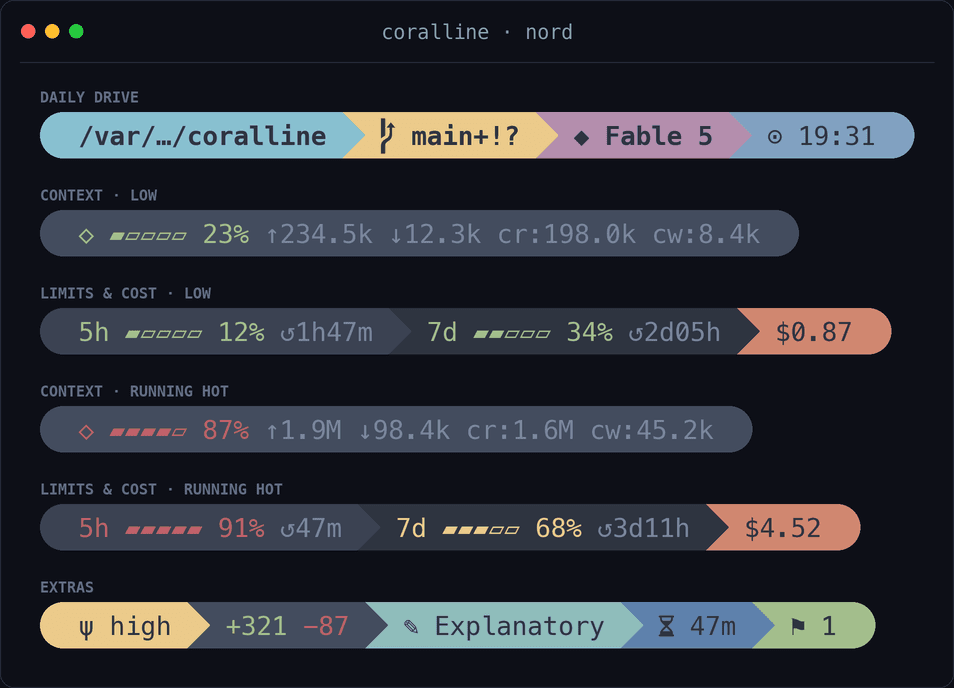 | gruvbox-dark — warm retro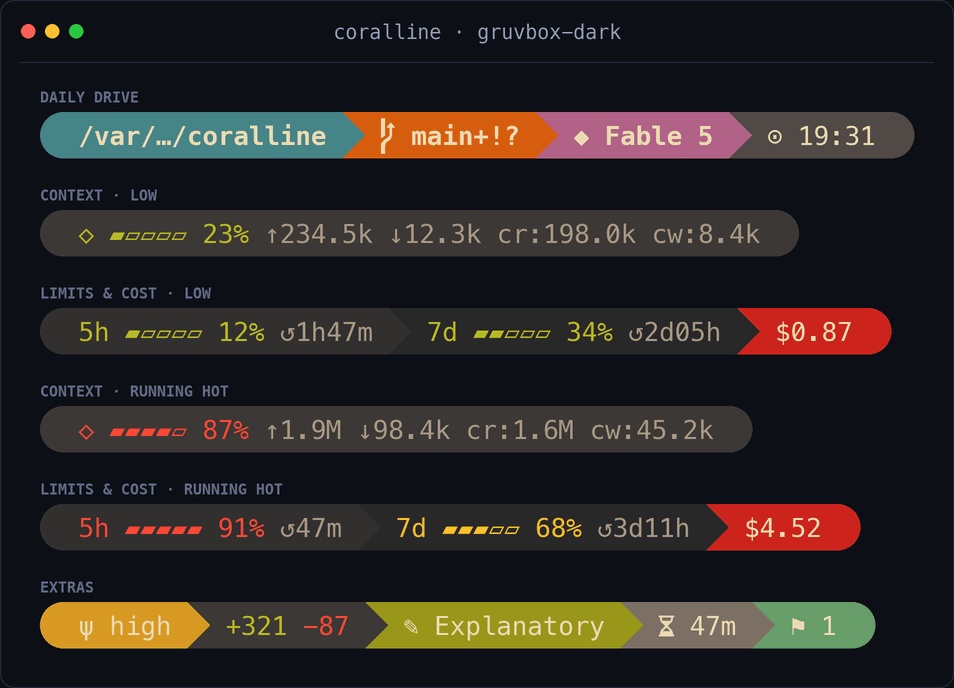 |
tokyo-night — neon on deep navy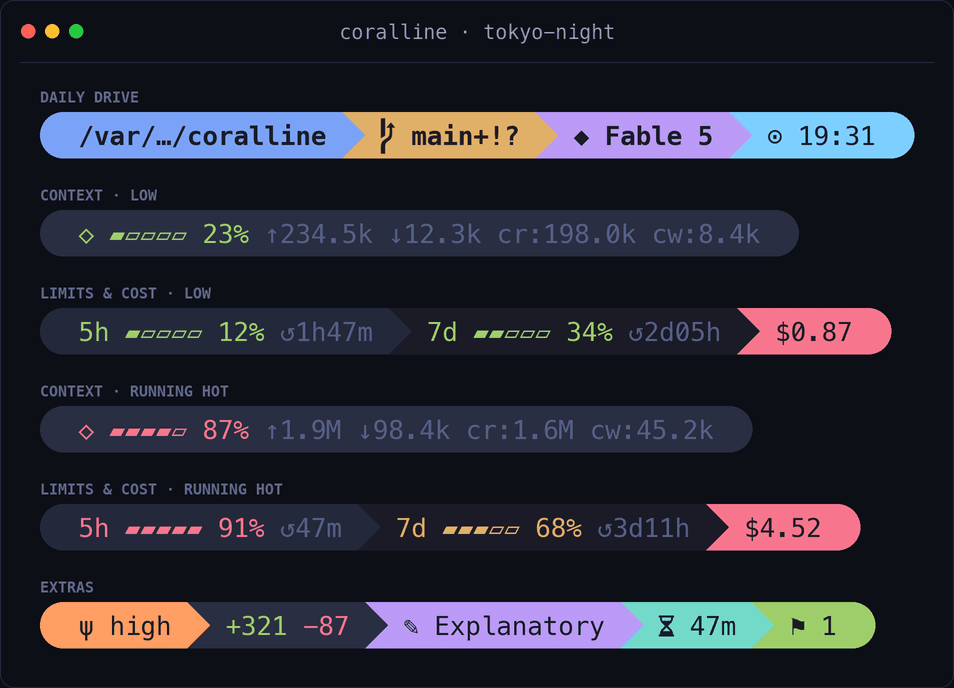 | mono — grayscale minimalism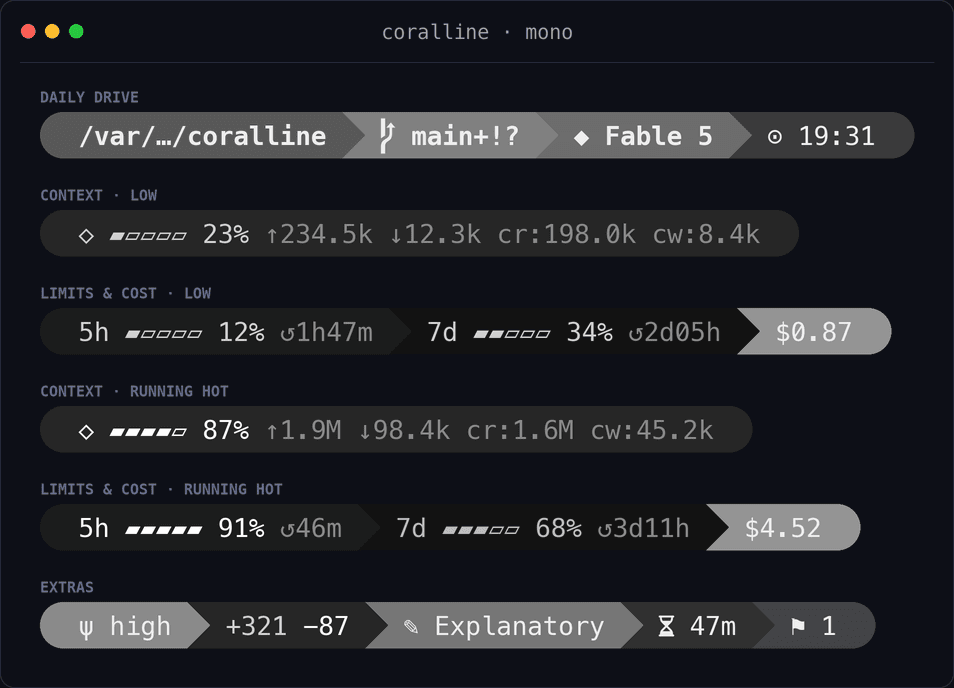 |
dracula — cyan · pink · purple on charcoal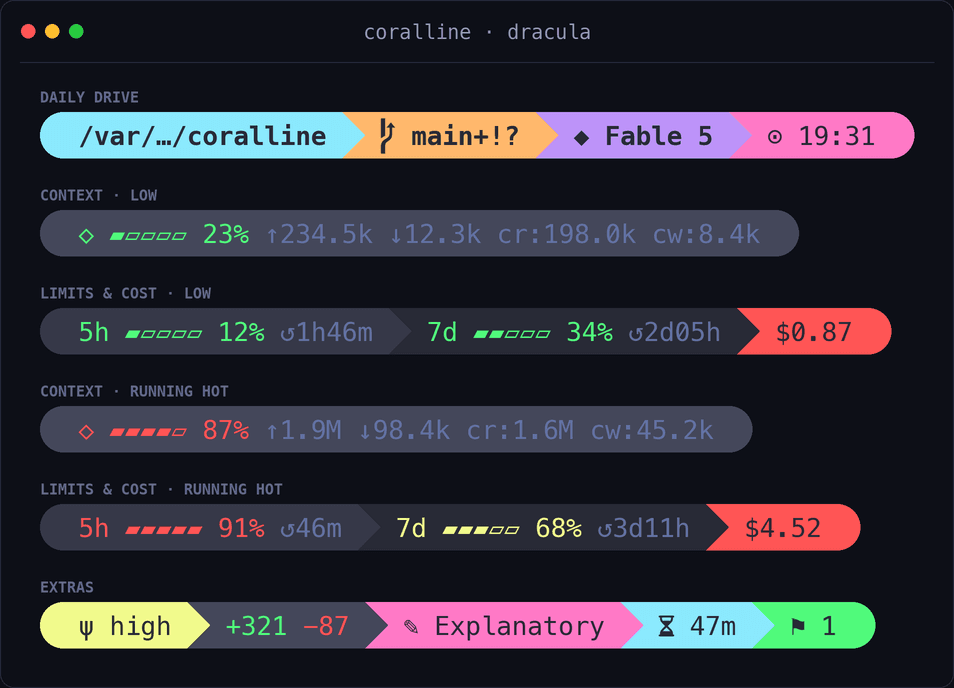 | lunar-pink — pink · cyan · yellow on near-black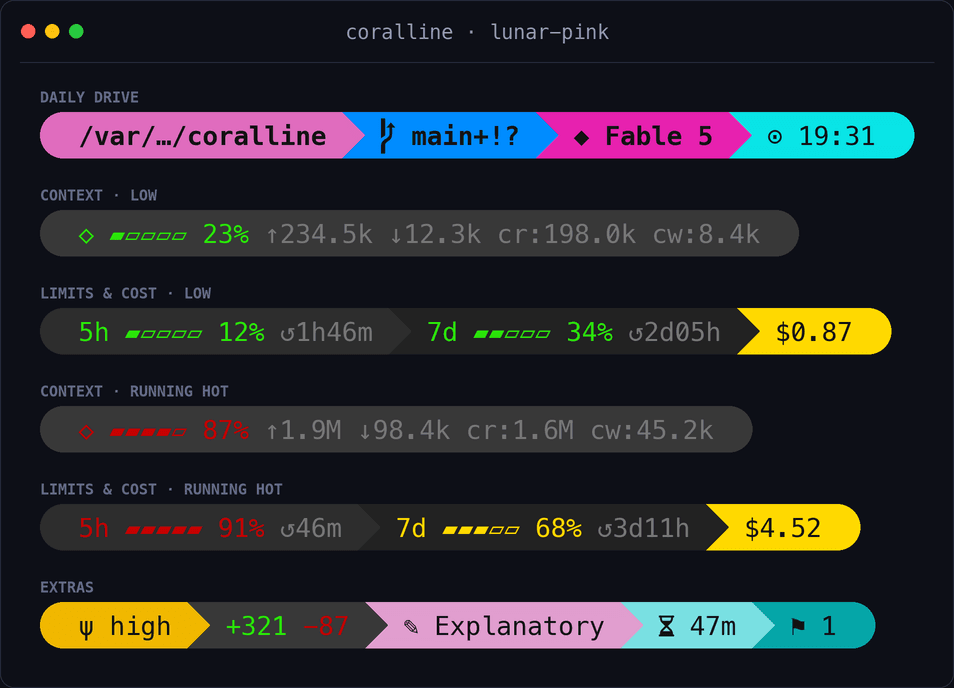 |
reverie — soft pastels · plum text on warm-dark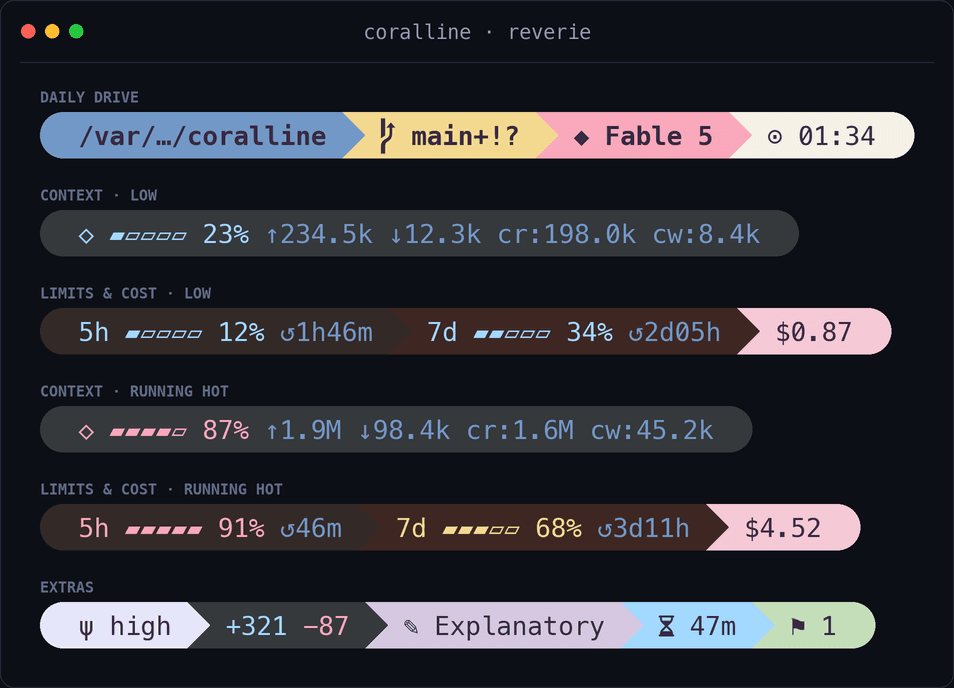 |
A theme is just a .conf file assigning VL_BG_* / VL_FG_* — copy one, change the colors,
and source yours from coralline.conf instead. PRs with new themes are welcome.
The wizard discovers themes automatically from themes/*.conf and nested collections such as
themes/best-themes/*.conf, so adding a theme file does not require editing configure.sh.
Adding a theme? Copy an existing
.conf, set everyVL_BG_*/VL_FG_*(includingVL_BG_EFFORT), add its name to theTHEMESlist intools/render-screenshots.py, re-run it to generateassets/theme-<name>.png, and add a row to the table above. Please don't regeneratehero.png— it's a fixed sampler of the original six themes, not a full catalog.
Platform support
| Platform | Status |
|---|---|
| macOS | ✅ supported (works on the stock bash 3.2) |
| Linux | ✅ supported |
| Windows + Git Bash | ✅ supported — Claude Code runs the status line through Git Bash when it's installed |
| Windows without Git Bash | ❌ not yet — Claude Code falls back to PowerShell, which can't run the bash script (roadmap) |
Windows note: install Git for Windows (which bundles Git Bash) and
jq, and coralline runs natively. A native PowerShell port for the no-Git-Bash case is on the roadmap. The render path is built to stay cheap under Git Bash's emulatedfork()— onejq, onegit, and no per-field subprocess spawning.
Why it's fast
The statusline is just a local shell script: it makes no network or API calls and uses zero tokens. Claude Code pipes the session JSON to it on stdin and renders whatever it prints.
It runs every second (refreshInterval: 1), so the script is built to be cheap on CPU: one
jq invocation extracts every field at once, and one git status --porcelain=v2 --branch
call provides branch, dirty state, and ahead/behind together. No bc, no per-field subprocess
spam. Works on stock macOS bash 3.2 and any Linux bash.
Acknowledgements
The visual language of coralline — segmented pills, powerline transitions, the ⇡⇣ git
glyphs, gauges that shift color as they fill — is a loving tribute to
Powerlevel10k by
@romkatv, which set the bar for what a fast, beautiful prompt
can be. Thanks also to the wider powerline lineage
that started it all, and to Nerd Fonts for the glyphs that make
the pill shapes possible.
As for the name: coralline algae build reefs one thin, colorful layer at a time — and coral·line is exactly what this is: a line, in Claude's coral.
License
// faq
What is coralline?
🪸 Powerlevel10k-inspired statusline for Claude Code — paste one prompt and your AI interviews you, then installs it. It is open-source on GitHub.
Is coralline free to use?
coralline is open-source under the MIT license, so it is free to use.
What category does coralline belong to?
coralline is listed under devops in the Claudeers registry of Claude-compatible tools.
// embed badge

[](https://claudeers.com/coralline)
// retro hit counter

[](https://claudeers.com/coralline)
// reviews
// guestbook
// related in DevOps & CI/CD
 🔓
🔓⭐AI-driven public opinion & trend monitor with multi-platform aggregation, RSS, and smart alerts.🎯 告别信息过载,你的 AI 舆情监控助手与热点筛选工具!聚合多平台热点 + RSS 订阅,支持关键词精准筛选。AI…
 🔓
🔓Use Claude Code as the foundation for coding infrastructure, allowing you to decide how to interact with the model while enjoying updates from Anthropic.
 🔓
🔓Professional Antigravity Account Manager & Switcher. One-click seamless account switching for Antigravity Tools. Built with Tauri v2 + React (Rust).专业的 Antig…
 🔓
🔓Roadmap to becoming an ASP.NET Core developer in 2026