
conversation-reclaim
Libera espacio de tus conversaciones de IA (Claude Code, Codex, OpenCode, Antigravity, Command Code) recortando lo anterior a la última compactación — con re…
Install with your AI
Paste into Claude Code, Cursor, or any agent — it reads the repo and wires the tool into your project.
Install and set up conversation-reclaim (git-clone project) into my current project.
Found on https://claudeers.com/conversation-reclaim
Repo: https://github.com/ANGELBERRIOS23/conversation-reclaim
Homepage/docs: —
Detected install method: git-clone → git clone https://github.com/ANGELBERRIOS23/conversation-reclaim
Category: skills. Platforms: cli, api, desktop, web, mobile.
Read the repo's README for exact setup and env vars, then install it and wire it into my project.

Claudeers Health Verdict:
active; community-verified: false. Confirm the source before running anything.
git clone https://github.com/ANGELBERRIOS23/conversation-reclaim
// compatibility
| Platforms | cli, api, desktop, web, mobile |
|---|---|
| Operating systems | — |
| AI compatibility | claude |
| License | MIT |
| Pricing | open-source |
| Language | Python |
conversation-reclaim
Tested on macOS. Linux should work. Windows: NOT tested yet — the tool is multi-platform by design and includes path detection for Windows, but if you run it there you are the pioneer. See Windows notes.
Reclaim the disk space your AI conversations silently eat — without breaking them.
Every AI coding agent keeps a full copy of every conversation on disk. When a conversation hits the context limit it gets compacted: the model summarizes everything so far into a few paragraphs and keeps going. But the original content is never deleted — it stays on disk, useless, waiting for a resume that will only load the summary and the latest messages.
1 → 100 (full conversation)          compacted → summary A
1 → 100 (full conversation)          compacted → summary B (includes A)
1 → 100 (full conversation)          compacted → summary C (includes B)
That was a 776 MB conversation we found — of which 774 MB was pre-compaction garbage. And it's not only compactions: OpenCode keeps an event log where every streaming update stores a full copy of the message (one session reached 4.7 GB of redundant events), Antigravity leaves gigabytes of browser-mode screenshots, and agents copy the same skills into four different folders.
This tool detects the last compaction marker of every conversation and trims everything before it — keeping the summary and the recent messages intact. Then it cleans the other disposable data: snapshots, tool-outputs, logs, caches, browser recordings and closed subagent transcripts. It previews these destructive categories first; a full external backup is optional.
Native desktop preview
| macOS | Windows 10/11 |
|---|---|
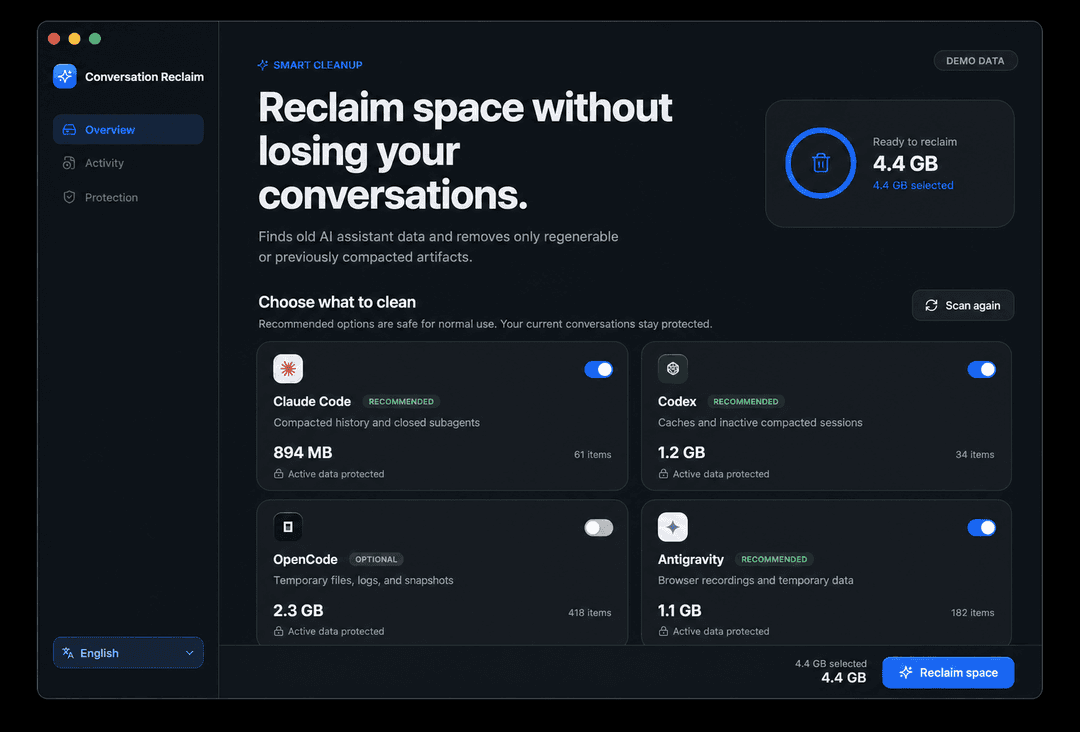 | 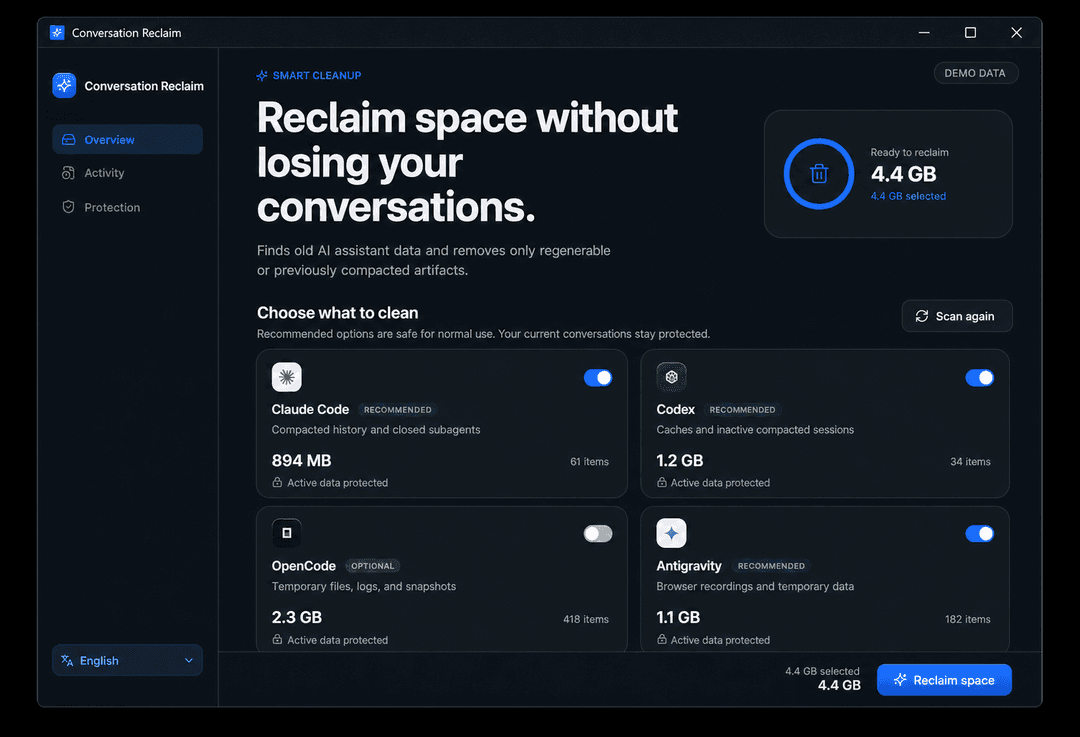 |
The values shown are clearly labeled demonstration data; the installed app calculates the real reclaimable space locally. The macOS image is based on the native app, while the Windows image is a platform-frame preview pending a real Windows capture from the published build.
Designed for AI agents — and for humans
Three ways to use it:
- By an AI agent (recommended) — the repo ships an agent skill
(
skills/conversation-reclaim/SKILL.md). Install it and just tell your agent "libera espacio de mis conversaciones" (or "free up space from my conversations" — the tool speaks your language). The skill knows the markers, the safety rules and the preview-first workflow. This is how the author uses it. - Visual interface — a native Tauri 2 application with a React interface and Rust cleanup engine. It follows the system light/dark appearance, adapts to small windows, remembers Español/English, preselects recommended cleanup, and asks for confirmation before writing. The portable app is independent from the Python CLI: end users do not install Python, Node, or Rust.
- Manually from a terminal — a plain Python CLI (stdlib
only), no dependencies, no install. Run
scanfirst, review the numbers, thenapplywith a backup destination:
Download choices
The GitHub Releases provide native downloads generated by GitHub Actions:
- Windows x64 Setup (recommended): installs the app and enables signed automatic updates.
- Windows x64 portable: unzip and run it without installing. Use Setup if you want seamless updates.
- macOS Apple Silicon: unzip the
macOS-arm64package and open the app. - macOS Intel: unzip the
macOS-x64package and open the app.
Those packages contain the compiled React/Rust application; end users install
nothing and do not need Python. Unsigned
development builds may require right-click → Open on macOS or confirmation
through Windows SmartScreen. The app checks the latest GitHub Release at launch;
an available update is shown under Protection and is installed only after the
user chooses Install and restart. Every update is cryptographically signed
and verified before installation. A tagged version (v*) builds the native
packages, updater metadata and signatures, then attaches them to its release.
python3 reclaim.py scan                    # read-only estimate
python3 reclaim.py apply                   # apply; writes a change manifest to ~/.conversation-reclaim/
python3 reclaim.py apply --backup-dir /Volumes/DISCO/respaldos-ia   # optional full backup first
python3 reclaim.py apply --only antigravity   # one tool only
python3 reclaim.py apply --only media         # only old temporary image attachments (optional)
python3 reclaim.py apply --include-media      # include old temporary attachments in a full cleanup
python3 reclaim.py apply-db --backup-dir /Volumes/DISCO   # prune opencode.db (opencode closed, backup required or --no-backup)
python3 reclaim.py apply-db --no-backup --close-opencode  # warn, quit OpenCode normally, then prune
python3 reclaim.py skills                  # list skills + find duplicates
python3 reclaim.py restore --backup-dir /ruta
Backups are optional, not the default. apply does not copy anything to
an external disk unless you pass --backup-dir. Without it, every change is
still recorded in a manifest at ~/.conversation-reclaim/manifest-<date>.jsonl
(file, bytes cut, marker offset, timestamp), and the JSONL trims are atomic
(temp file + rename), so an interrupted run leaves the original intact.
apply-db is the only irreversible operation: it requires an explicit
--backup-dir (or --no-backup to accept the risk).
Language: the output follows $RECLAIM_LANG, then $LANG, or use
--lang es|en. Ask the tool in Spanish and it answers in Spanish; ask in
English and it answers in English.
What it cleans, per tool
| Tool | Storage | Compaction marker | What apply does |
|---|---|---|---|
| Claude Code | ~/.claude/projects/**/*.jsonl | structured summary/compaction event | trims before the last marker + removes closed sidechains |
| Codex | ~/.codex/sessions/**/rollout-*.jsonl | top-level event "type":"compacted" | same + removes closed subagent rollouts/index rows |
| OpenCode | ~/.local/share/opencode/opencode.db | part type=compaction with tail_start_id | apply-db: redundant streaming events + pre-compaction messages + VACUUM |
| OpenCode (files) | snapshot/, tool-output/, log/ | — | all local snapshots, tool outputs, logs |
| Antigravity / Gemini | ~/.gemini/antigravity{,,-cli,-ide}/conversations/*.db | steps step_type 98 (CONVERSATION_HISTORY) | prunes pre-compaction steps + transcripts, scratch, logs, caches, browser_recordings |
| Temporary media (optional) | OS temp codex-clipboard-* and Antigravity tempmediaStorage | older than 7 days, regular file, not open | deletes only structurally identified temporary images; old chat previews may disappear |
| Command Code | ~/.commandcode/projects/ | none detected | scan/backup only |
The OpenCode database problem (opencode-db-prune, integrated)
OpenCode's opencode.db event-sources every message: each streaming update
writes a full snapshot of the part. A long session generates hundreds of
thousands of rows of pure duplication — in our case 147k rows / 4.4 GB of a
4.9 GB database, 90%+ redundancy. apply-db removes those redundant events,
then prunes pre-compaction messages, then VACUUMs. This is a merge of the
dedicated opencode-db-prune
project (use it directly if you only care about the DB).
Safety
- Backup optional but recommended.
applywithout--backup-dirnever copies data anywhere; instead it writes a change manifest to~/.conversation-reclaim/and uses atomic file replacements (an interrupted run leaves originals intact — see the skill for manual fallback recipes). apply-dbrequires an explicit backup (--backup-dir) or--no-backup.- Refuses to touch
opencode.dbwhile opencode is running. --close-opencodewarns and requests a normal app quit before pruning on macOS and Windows. Windows uses Restart Manager to identify the exact holders and sendsWM_CLOSE; it never uses forcedtaskkill. It refuses when OpenCode is an ancestor/host of the running command, so it never terminates the agent executing the cleanup. Run that command from Terminal, Codex or another external harness.- Pre-flight check: won't delete events if the content only lives in the event table.
- Integrity checks (
PRAGMA integrity_check) after DB operations. - Antigravity conversation DBs are skipped if the app has them open.
- Closed Codex subagents are identified from structured
session_meta; active children are preserved whenever a writer lock or open spawn edge exists. - Claude sidechains, including
agent-acompact-*, are validated from their JSON metadata and deleted only when they are not open. - Before deleting subagent transcripts or Antigravity
browser_recordings, the CLI prints their count and size. Browser recordings are already-consumed screenshots and Antigravity does not reuse them. - Temporary media is separate and off by default.
--only mediaor--include-mediaremoves only oldcodex-clipboard-*files and images in Antigravity's explicit temporary-media folders. Files newer than seven days, files in use, symlinks, and images in normal brain/project folders are kept. An old conversation may lose its local image preview after this cleanup. - Cleanup may run from inside Codex: the current task, locked rollouts and live log databases are skipped, while closed histories and other disposable data remain eligible. A later run can reclaim the current task after it closes.
- Skills are only listed, never deleted (duplicates can be deduplicated with symlinks).
- Caches (tool-output, logs, snapshots, scratch) are safe to delete — prompt caching lives on the server, it does not cost tokens.
Local usage reports and billing
Cleanup never changes provider billing, API charges, subscription usage, invoices, or server-side account records. However, tools such as ccusage build their historical reports from local agent logs. Trimming a transcript or deleting an old session can therefore make older local totals and session breakdowns lower or incomplete. Export the ccusage report to JSON before cleanup if that local history matters to you.
Windows notes: how to find what to clean
The desktop app targets 64-bit Windows 10 version 1803 or later and Windows 11. Tauri uses the system Microsoft Edge WebView2 runtime, which is distributed with those Windows versions. The cleanup paths still need broader real-world testing, so feedback from Windows users is welcome:
| What | Windows path |
|---|---|
| Claude Code conversations | %USERPROFILE%\.claude\projects\<proyecto>\<uuid>.jsonl |
| Codex sessions | %USERPROFILE%\.codex\sessions\<año>\<mes>\<día>\rollout-*.jsonl |
| OpenCode database | %USERPROFILE%\.local\share\opencode\opencode.db (also %LOCALAPPDATA%\opencode\data or %APPDATA%\opencode) |
| OpenCode snapshots / tool-output / logs | same directory as the DB |
| Antigravity / Gemini | %USERPROFILE%\.gemini\antigravity{,,-cli,-ide}\... |
| Antigravity desktop logs | %APPDATA%\Antigravity\logs and %APPDATA%\Antigravity IDE\logs |
| Command Code | %USERPROFILE%\.commandcode\projects |
| Skills | %USERPROFILE%\.claude\skills, %USERPROFILE%\.config\opencode\skills, %USERPROFILE%\.agents\skills |
Notes for Windows users:
- Open-file detection uses the native Windows file-sharing API, so active
histories are skipped even without
lsof. Restart Manager reports the exact processes holdingopencode.db;--close-opencodecan request a normal OpenCode window close but refuses unknown holders and never force-kills. - The JSONL truncation works exactly the same: the file is rewritten from the last compaction marker onward.
- Antigravity paths under
%USERPROFILE%\.geminiare the same on Windows. - If you find a path that differs, open an issue or a PR — the project wants to be truly cross-platform.
Verified results (macOS, author's machine)
- Claude Code: 1.8 GB → 355 MB (one conversation was 776 MB, 774 MB of it pre-compaction garbage).
- OpenCode DB: 4.9 GB with 4.7 GB of redundant events (147k rows).
- Antigravity/Gemini: 19 GB → 4.6 GB (conversation pruning + browser recordings + backups the user no longer needed).
- Skills: 12 duplicates found across 5 skill roots (~17 MB, dedup via symlinks).
Disclaimer
No warranty, use at your own risk. This tool deletes data (pre-compaction
conversation content, caches, subagent transcripts, redundant events). It is
designed to keep your conversations working — the summary and recent messages
are preserved — but you are fully responsible for what you ask your AI agent
to delete. If you remove an important conversation, that is the caller's
decision, not this project's. Always review scan output before apply, and
use --backup-dir when in doubt.
Contributing — new harnesses welcome
This project wants to cover every AI coding harness, not just the current ones. Contributions for Cursor, Kiro, Ghost, Trae, the DeepSeek harnesses, or anything else are welcome — including a harness you are building yourself.
The native app uses a discoverable Harness registry: each integration owns
its metadata, permitted roots, scan rules, and cleanup plan in one module.
The dashboard and executor discover registered integrations automatically and
show a neutral fallback logo when no brand asset exists. See the concise
adding a harness guide.
PR checklist (so the maintainers can trust and verify it):
- State the OS you tested on (e.g. "tested on Windows 11 Pro 24H2", "tested on macOS 15, Linux not tested").
- State the tool name and a URL — the CLI/app repository, marketplace page or docs link — so the maintainers can verify the tool actually exists and how it stores data before reviewing.
- Explain where the data lives and what the compaction marker is
(a JSONL field, a SQLite table/column, an event type...). Reuse the same
patterns:
scan_<tool>()+apply_<tool>()+ an entry inPATHS. - Show the
scanoutput for your tool before/after, and confirm resume works after trimming. - Every PR gets a human review before anything is merged. No automation
merges external code. Keep changes in one file (
reclaim.py) plus docs.
Even if you don't write code: open an issue with the tool name, where its conversations live, and a sample of the storage format — that is already a great contribution.
Development checks
The Python CLI remains stdlib-only. Run both regression suites with:
python3 -m unittest discover -v
npm ci
npm run build
cargo test --manifest-path src-tauri/Cargo.toml
To build the native package for the current operating system (contributors need Node.js, Rust, and the Tauri system prerequisites):
npm ci
npm run tauri build -- --bundles app       # macOS .app
# Windows: npm run tauri build -- --no-bundle
It covers structured markers, atomic permission-preserving rewrites, subagent detection, manifests, totals, OpenCode transactions and CLI exit codes.
License
MIT — see LICENSE.
// faq
What is conversation-reclaim?
Libera espacio de tus conversaciones de IA (Claude Code, Codex, OpenCode, Antigravity, Command Code) recortando lo anterior a la última compactación — con respaldo previo. Reclaim AI conversation storage safely.. It is open-source on GitHub.
Is conversation-reclaim free to use?
conversation-reclaim is open-source under the MIT license, so it is free to use.
What category does conversation-reclaim belong to?
conversation-reclaim is listed under skills in the Claudeers registry of Claude-compatible tools.
// embed badge

[](https://claudeers.com/conversation-reclaim)
// retro hit counter

[](https://claudeers.com/conversation-reclaim)
// reviews
// guestbook
// related in Claude Skills
 🔓
🔓An agentic skills framework & software development methodology that works.
 🔓
🔓 🔓
🔓💫 Toolkit to help you get started with Spec-Driven Development
 🔓
🔓AI coding assistant skill (Claude Code, Codex, OpenCode, Cursor, Gemini CLI, and more). Turn any folder of code, SQL schemas, R scripts, shell scripts, docs,…