
context-attachment-manager
Codex and Claude Code plugin (works in Claude Desktop): choose which past images go to the model with your next message. Unchecked images become placeholders…
Install with your AI
Paste into Claude Code, Cursor, or any agent — it reads the repo and wires the tool into your project.
Install and set up context-attachment-manager (claude-plugin project) into my current project.
Found on https://claudeers.com/context-attachment-manager
Repo: https://github.com/chipfighter/context-attachment-manager
Homepage/docs: —
Detected install method: claude-plugin → /plugin install context-attachment-manager@chipfighter/context-attachment-manager
Category: plugins. Platforms: cli, api, desktop, web.
Read the repo's README for exact setup and env vars, then install it and wire it into my project.

Claudeers Health Verdict:
active; community-verified: false. Confirm the source before running anything.
/plugin marketplace add chipfighter/context-attachment-manager
/plugin install context-attachment-manager@chipfighter/context-attachment-manager
git clone https://github.com/chipfighter/context-attachment-manager
// compatibility
| Platforms | cli, api, desktop, web |
|---|---|
| Operating systems | — |
| AI compatibility | claude |
| License | MIT |
| Pricing | open-source |
| Language | TypeScript |

Context Attachment Manager
Choose which past images go to the model with your next message, in Codex and in Claude Desktop, without leaving the conversation.
English · 简体中文
New in 0.4: it works in Claude Desktop too. In the Code tab of Claude Desktop, install the plugin and type
/camin a session: the same panel opens in Claude Desktop's built-in browser, next to the conversation. Formerly Codex Attachment Manager; the project was renamed because it no longer works with Codex alone.
Why I built this
I was iterating on image generation with GPT in Codex. After a dozen or so images, the task started failing: the connection kept dropping, and the retries every few minutes never went through. Digging into it, I found that Codex sends every image in the task's history again with every request, and each request had grown to about 44 MB. The only way out was a new task, which meant losing the conversation.
So I wanted to keep the long conversation going and decide, turn by turn, which images the model still gets. Uncheck the ones you no longer need: from the next message on they become short placeholders, and the task and the conversation stay the same. Claude Code also sends the whole history with every request, so 0.4 brings the same panel to Claude Desktop.
Features
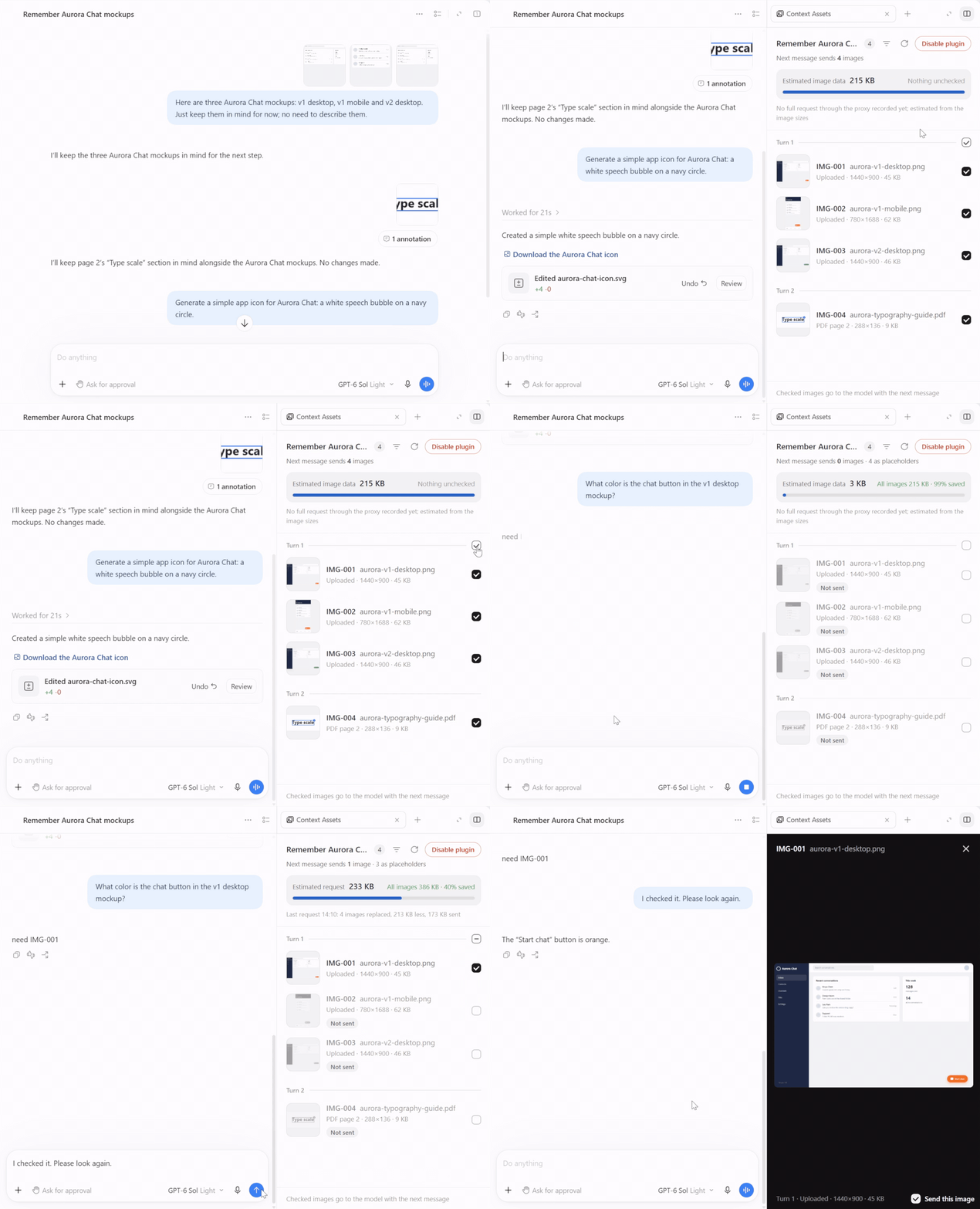
- Every image in one list: the panel lists every image in the task (in Codex) or session (in Claude Code), turn by turn: the ones you uploaded and the ones the model viewed or generated, with thumbnails, IDs and sizes. Click one to preview it. In Codex it's a Context Assets tab in the side panel; in Claude Desktop,
/camopens it in the built-in browser. - Filter by source: with many images, show only some sources: your uploads, PDF pages you commented on in Codex (with the page number and the PDF's name), web page screenshots, and images the model viewed, got from a tool or generated. Filtering changes what you see, never what is sent.
- One click to leave an image out: unchecked images become a short placeholder from the next message on. Toggle single images or a whole turn.
- Duplicates handled: when an identical image is still being sent, the placeholder points to it.
- The model knows why: a note tells the model the images were left out by you to save context, so its earlier answers still stand and it doesn't make up details it can't see.
- The model asks, you decide: when it needs an image, it replies
need IMG-xxx. The panel lists what it asked for and jumps to it in one click. A checked image goes back to its place in the conversation, marked with its ID. - Or let the model pick (new in 0.3): switch on Auto-select at the bottom of the panel, per task or session. Images from earlier turns are then left out by default, and the model fetches the ones it needs by ID, for that turn only. Images you check are pinned and go every turn. The panel shows what the model fetched in the latest turn.
- See the savings: the panel estimates the size of the next request and how much you save compared with sending every image, and warns you when a request could not be rewritten.
- English and Simplified Chinese: the panel, the tab name and the note for the model follow Codex's language, or your system's language when Codex isn't installed.
- Stays on your machine: the plugin sends nothing anywhere besides the requests Codex and Claude Code already make to OpenAI and Anthropic.
How it works
- The plugin runs a small local proxy, the engine, between Codex and OpenAI, and between Claude Code and Anthropic. Before a request goes out, the engine swaps unchecked images for placeholders and adds the note; everything else is forwarded as is, including your sign-in.
- In Codex, installing points Codex at the engine. In Claude Desktop, the plugin points each Claude Code session at the engine when the session starts, and puts it back when the session ends.
- With Auto-select on, the engine does the same for the images of earlier turns you haven't pinned, and the plugin gives the model one tool,
cam_view_image, to fetch an image back into the current turn. The placeholders before it stay as they were, so the cached part of the request isn't broken. - Selections and the Auto-select switch are saved per task or session. Only you can change them; the model can only fetch an image for one turn, and only with Auto-select on.
- The panel doesn't go through the model and costs no tokens. In Codex it's an MCP app in the side panel; in Claude Desktop the engine serves the same page to the built-in browser, on your machine only.
Requirements
- Codex: the Codex desktop app. Tested on Windows with Codex 26.924.
- Claude Desktop: the Code tab, local sessions, signed in with your Claude subscription. Tested on Windows with the Claude Code 2.1.295 that Claude Desktop runs.
- macOS and Linux: CI installs the plugin with Codex's own CLI, starts it, and runs the install and uninstall scripts, but nobody has tried it in the desktop apps on these platforms yet. Issues welcome.
- Node: the plugin uses the Node 24 that ships with Codex, and falls back to
node24 or later on your PATH. Claude Desktop doesn't ship Node, so without Codex, install Node 24 or later.
Install
In Codex, no terminal
- On Codex's Plugins page, click Add a marketplace, enter
chipfighter/context-attachment-manageras the Source, leave the rest empty, and click Add marketplace. - Install Context Attachment Manager from the list.
- Open a task, click Toggle side panel at the top right, open a new tab with +, and choose Context Assets under Plugins and MCPs. If it isn't there, restart Codex once.
- The panel says the plugin is not enabled yet. Click Enable plugin, then restart Codex.
In Codex, one command
Windows (PowerShell):
irm https://github.com/chipfighter/context-attachment-manager/releases/latest/download/install.ps1 | iex
macOS and Linux:
curl -fsSL https://github.com/chipfighter/context-attachment-manager/releases/latest/download/install.sh | sh
The command installs the plugin with Codex's own CLI and sets up the proxy. Restart Codex afterwards. Run it again later to upgrade.
What installing changes in Codex:
- Adds a marked proxy block to
~/.codex/config.toml, after backing the file up. - If a proxy is set in your environment variables, adds a marked
NO_PROXYblock with local addresses only to~/.codex/.env. - Nothing else. If you have set
openai_base_urlyourself, installing stops without writing anything.
In Claude Desktop
Claude Desktop installs plugins only from marketplaces you have added, and adding one from GitHub takes the claude command, Claude Code's command line (setup guide). Once:
claude plugin marketplace add chipfighter/context-attachment-manager
claude plugin install codex-attachment-manager@codex-attachment-manager
Instead of the second command, you can also install it in the Code tab: click + next to the prompt box, choose Plugins, then Add plugin, pick Context Attachment Manager, and install it for your user account. The install ID keeps the project's old name.
Then start a new session in the Code tab. There is nothing to set up: the plugin doesn't edit any settings, and only points that session's own Claude Code process at the engine while it runs.
Usage
In Codex
- Open Context Assets in the side panel of a task. On a new chat you can open it before the first message; it switches to the task once you send.
- Uncheck the images you don't want to send anymore. Each change is saved at once and applies from the next message.
- When the model replies
need IMG-xxxfor an unchecked image, a bar at the top of the panel lists it. Click the ID to jump to the image and check it. - With many images, click the filter button next to refresh and pick the sources to show. A turn's checkbox then covers only the images shown.
- To let the model pick, switch on Auto-select at the bottom of the panel. Check the images that should go every turn, such as a reference image; the model fetches the others when it needs them. Switch it off to get your own checks back.
In Claude Desktop
- In a session in the Code tab, type
/camand send it. The panel opens in Claude Desktop's built-in browser, next to the conversation. If/camis your first message in a new session, the prompt box may say the command doesn't exist: send it anyway. Claude Desktop starts the session when you send your first message, and the plugin adds/camthen. - From there it works as in Codex: uncheck, check again, answer
need IMG-xxx, filter, or switch on Auto-select. Changes apply from the next message. - With Auto-select on, the model's
cam_view_imagecalls don't ask for your permission, unless your own Claude Code settings or hooks say otherwise.
If the built-in browser can't be used (in the terminal, for example), /cam shows a small pane with a link to the panel instead.
Uninstall
Codex
Disable first, then remove: click Disable plugin in the panel, remove the plugin on the Plugins page, and restart Codex.
Or run the uninstall command. It restores the direct connection and removes the plugin, and it works even when the plugin files are gone:
Windows (PowerShell):
irm https://github.com/chipfighter/context-attachment-manager/releases/latest/download/uninstall.ps1 | iex
macOS and Linux:
curl -fsSL https://github.com/chipfighter/context-attachment-manager/releases/latest/download/uninstall.sh | sh
If Codex can't connect and its errors mention localhost:17891 (for example, the plugin was removed without disabling it first), run the uninstall command above and restart Codex. On macOS and Linux the engine also restores the direct connection by itself once the plugin is removed or turned off, from the next start of Codex.
Claude Desktop
Uninstall it with Manage plugins under + → Plugins in the Code tab, or with claude plugin uninstall codex-attachment-manager@codex-attachment-manager. New sessions then connect directly; there is nothing to restore.
Your selections and logs stay in the data folder (see Privacy); delete it if you don't need them.
Good to know
- Only images are managed, because they are the only files that reach the model as they are. Codex doesn't send PDFs or videos themselves, only text the model extracts from them or images it makes of them, and those images are listed like any other. Audio waits for a model that accepts it: until then, Codex replaces audio with a short note before sending.
- Results of Codex's built-in image generation can't be unchecked.
- With Auto-select on, each image the model fetches adds a request to that turn. Smaller models may misread small details in an image they fetched: in our tests GPT-6 Luna at low effort sometimes did, as it does with images opened with Codex's own image viewer, while GPT-6 Sol and Astra read them right. Pin an image whose details matter, or use a larger model.
- Claude accounts created on or after August 31, 2026 check the model's earlier thinking against the conversation before it. To leave an image out on such an account, the engine also leaves out the earlier thinking that no longer matches the conversation as sent, so the model may think again and use more tokens; the panel tells you each time. Thinking from after the change is kept, and checking the image again brings back the thinking from before. Older accounts aren't affected.
- In Claude Code, the main conversation is managed; subagents keep their own history as it is. Sessions that use another API address or a cloud provider (Bedrock, Vertex, Foundry) are left alone.
- If you uncheck an image while a Codex turn is still running over WebSocket, the rest of that turn still carries the original. The panel tells you; the change applies from the next message.
- In Codex, enabling, disabling and upgrading take effect after you restart Codex. In Claude Desktop, a new plugin version takes effect in new sessions: upgrade with
claude plugin marketplace update codex-attachment-manager, thenclaude plugin update codex-attachment-manager@codex-attachment-manager. - After you switch Codex's language, the panel changes right away and the note for the model changes from the next message, but the tab name in the side panel changes only after a restart.
- Right after Codex starts, the engine may restart a few times and you may see "Reconnecting" once.
- The engine goes through your system proxy: on Windows it reads the system setting, on macOS it supports HTTP(S) proxies only (no PAC or SOCKS), and on Linux it reads
HTTPS_PROXYand similar variables.
Privacy
- All data stays in a local folder:
%USERPROFILE%\.codex-attachment-manageron Windows,~/Library/Application Support/codex-attachment-manageron macOS,~/.local/share/codex-attachment-manageron Linux. It holds your selections, request statistics (sizes and counts only, never content), hashes the engine uses to tell which thinking still matches (never content), logs (no conversation content or credentials) and the backup ofconfig.toml. - Besides the requests Codex and Claude Code already send to OpenAI and Anthropic, the plugin sends nothing anywhere.
- The conversation records of Codex and Claude Code are only read, never modified.
Development
plugin/is the plugin itself: the MCP server, the engine, the panel and thecamcommand line (runtime code inplugin/src). The Claude plugin is.claude-plugin/plus the mod inhooks/.spike/holds the tests and experiments,scripts/the one-line install and uninstall scripts, anddocs/the spec and the technical design (in Chinese; start with docs/spec.md). The development records of v0.1 are indocs/history/v0.1/.- Install from source into your Codex: quit Codex, run
cam installin the repository (./cam installon macOS and Linux), then start Codex.cam statusshows the installation,cam uninstallremoves it. - Run the tests with Node 24 or later:
cd spike && node --test. CI runs them on Windows, macOS and Linux, then installs the plugin with Codex's CLI and runs the install and uninstall scripts. - Work on the panel without Codex:
node spike/scripts/panel-dev.ts, then openhttp://127.0.0.1:17895/?solo=1. The page uses synthetic images and a temporary Codex folder, so your real data is never read or changed. - When you change the text the model sees (
plugin/src/rewrite.ts), run the self-tests inspike/src/v01-placeholder-selftest.tsandspike/src/v01-needs-selftest.ts, and for Auto-select's wordingspike/src/v03-auto-selftest.ts, in Chinese and with--lang en. They start their own engine and app-server, use your Codex account, and archive the test tasks they create. - Release notes: CHANGELOG.md.
License
// faq
What is context-attachment-manager?
Codex and Claude Code plugin (works in Claude Desktop): choose which past images go to the model with your next message. Unchecked images become placeholders, the conversation goes on, and requests stay small.. It is open-source on GitHub.
Is context-attachment-manager free to use?
context-attachment-manager is open-source under the MIT license, so it is free to use.
What category does context-attachment-manager belong to?
context-attachment-manager is listed under plugins in the Claudeers registry of Claude-compatible tools.
// embed badge

[](https://claudeers.com/context-attachment-manager)
// retro hit counter

[](https://claudeers.com/context-attachment-manager)
// reviews
// guestbook
// related in Claude Plugins
 🔓
A single CLAUDE.md file to improve Claude Code behavior, derived from Andrej Karpathy's observations on LLM coding pitfalls.
 🔓
Claude Code is an agentic coding tool that lives in your terminal, understands your codebase, and helps you code faster by executing routine tasks, explainin…
 🔓
"CLI-Anything: Making ALL Software Agent-Native" -- CLI-Hub: https://clianything.cc/
🔓financial-services — a Claude ecosystem project on GitHub.