
ConTeX
20 context-window meters for the Claude Code statusline. Clone, pick a bar, vibe.
Install with your AI
Paste into Claude Code, Cursor, or any agent — it reads the repo and wires the tool into your project.
Install and set up ConTeX (git-clone project) into my current project.
Found on https://claudeers.com/contex
Repo: https://github.com/JustinGamer191/ConTeX
Homepage/docs: —
Detected install method: git-clone → git clone https://github.com/JustinGamer191/ConTeX
Category: devtools. Platforms: cli, api.
Read the repo's README for exact setup and env vars, then install it and wire it into my project.

Claudeers Health Verdict:
active; community-verified: false. Confirm the source before running anything.
git clone https://github.com/JustinGamer191/ConTeX
// compatibility
| Platforms | cli, api |
|---|---|
| Operating systems | — |
| AI compatibility | claude |
| License | MIT |
| Pricing | open-source |
| Language | JavaScript |
ConTeX ✦
25 context-window meters for the Claude Code statusline. Clone, pick a bar, vibe. macOS and Windows.
Your context window is the fuel gauge of a Claude Code session — this repo replaces the boring readout with a bar you actually want to look at: a comet burning across the line, a constellation going dark star by star, a Zelda heart meter, digital rain, a fuse running out.
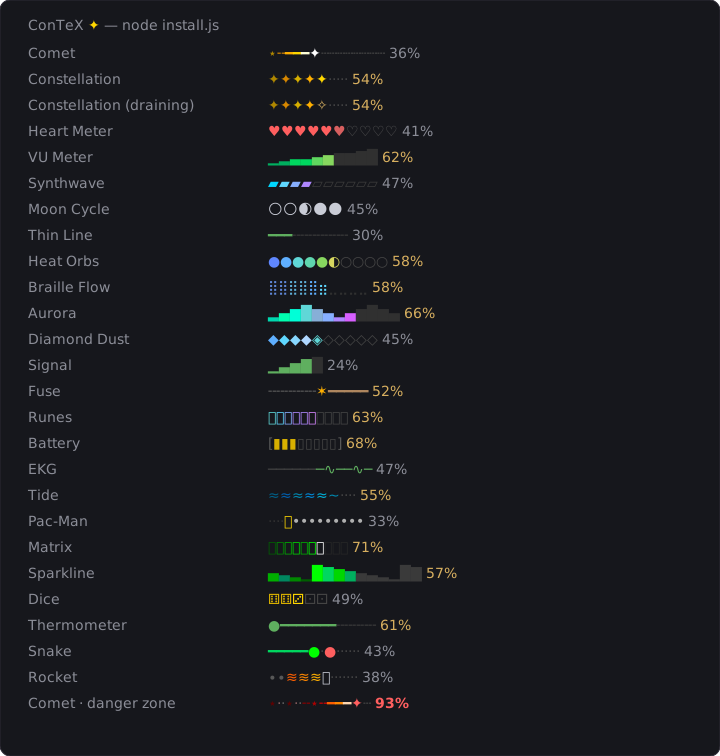
(Rendered by the actual design code — regenerate with node scripts/generate-preview.js. Every design also has a separate light-terminal palette.)
Install
git clone https://github.com/JustinGamer191/ConTeX.git
cd ConTeX
node install.js
The picker previews every bar live in your terminal, in real color, on your actual background — at 35% and 85% used — then you pick a number. It wires the statusline into ~/.claude/settings.json (backing up whatever statusline you had, restorable later) and stores your choice in ~/.claude/context-bar.json.
Switch designs anytime by running node install.js again. No restart needed — the statusline picks up the change on its next render.
Requires Node 18+ and Claude Code. No dependencies.
The bars
| # | Design | Vibe |
|---|---|---|
| 1 | Comet | One star travels the session; its wake cools into stardust |
| 2 | Constellation | Stars ignite one by one, each brighter than the last |
| 3 | Constellation (draining) | A full sky goes dark as context burns — count your stars |
| 4 | Heart Meter | Ten Zelda hearts drain right-to-left — finish the fight |
| 5 | VU Meter | Audio LEDs climbing green through amber into the red |
| 6 | Synthwave | Neon cells sweeping cyan → magenta |
| 7 | Moon Cycle | Five moons waxing through real phases 🌒🌓🌔 |
| 8 | Thin Line | A quiet hairline for people who want the bar to whisper |
| 9 | Heat Orbs | Thermal dots, cold blue → molten red |
| 10 | Braille Flow | Sub-segment precision fill — 46% looks different from 43% |
| 11 | Aurora | A wave lighting up in northern-lights colors |
| 12 | Diamond Dust | Diamonds crystallizing ice-blue → white |
| 13 | Signal | Phone bars for remaining context; 5 chars wide |
| 14 | Fuse | Ash behind, a spark ✶ at the burn point, cord ahead |
| 15 | Runes | Elder futhark igniting in arcane cyan → pink |
| 16 | Battery | The classic — green, amber under half, red on the last bar |
| 17 | EKG | A pulse that flatlines from the left as the session dies |
| 18 | Tide | Water rising through deepening blues |
| 19 | Pac-Man | ᗧ eats the session; a ghost ᗣ shows up past 80% |
| 20 | Matrix | Digital rain waking column by column; corrupts red past 80% |
| 21 | Sparkline | A contribution graph lighting up bar by bar |
| 22 | Dice | Five dice rolling up pip by pip ⚀→⚅ |
| 23 | Thermometer | Mercury climbing cool blue → red |
| 24 | Snake | The snake grows as the session eats; out of board at 100% |
| 25 | Rocket | 🚀 with a flame-and-smoke trail; on fumes past 80% |
Every design goes red (its own way) at 80%+ used — the danger zone before autocompact.
What the line shows
<model> │ <current task, when one is in progress> │ <directory> <bar> <pct>
- The percentage is used context, scaled to the usable window (Claude Code reserves ~16.5% for autocompact;
CLAUDE_CODE_AUTO_COMPACT_WINDOWis respected). It stays dim until 50%, warms, then goes bold red at 80%. - What the bar measures is the context window by default. Set
"source": "five_hour"or"seven_day"in~/.claude/context-bar.jsonto show your plan's rate-limit usage instead — the 5-hour or 7-day window Claude Code reports in the statusline payload. On Claude Code versions that don't sendrate_limits, the bar falls back to context. - Light/dark is auto-detected from the OS appearance — macOS system appearance or the Windows
AppsUseLightThemeregistry key (cached, checked every 20s) — so the palette follows your system's day/night switching. Override withCONTEXT_BAR_THEME=light|darkor"theme": "light"in~/.claude/context-bar.json. Other platforms default to dark.
Platform support
| macOS | Windows | Linux | |
|---|---|---|---|
| Bars & picker | ✅ | ✅ | ✅ |
| Light/dark auto-detection | ✅ | ✅ | dark default (use the override) |
Windows notes: use a VT-capable terminal (Windows Terminal — which Claude Code effectively requires anyway). A few designs lean on font fallback for their glyphs (Runes ᚠᚢᚦ, Matrix katakana, Pac-Man ᗧ) — the picker previews everything up front, so if a glyph looks wrong in your font, pick a different bar.
Uninstall
node install.js --uninstall
Restores whatever statusline you had before, removes the config, and then the cloned folder is yours to delete.
Contributing a design
A design is one small file in designs/:
'use strict';
const { c } = require('../lib/ansi');

module.exports = {
  name: 'my-bar',          // kebab-case, unique
  title: 'My Bar',
  blurb: 'One line for the picker.',
  render(used, { light }) {
    // used: 0–100 (% of usable context consumed)
    // light: true when the terminal background is light
    // return JUST the bar as an ANSI string — the core adds everything else
    return c(light ? 28 : 46, '█'.repeat(Math.round(used / 10)));
  },
};
Register it in designs/index.js, run node test.js (every design must render 0–100 in both themes without throwing), and open a PR. House rules:
- 256-color ANSI only (
38;5;n) — truecolor support varies too much - Design both palettes. Bright pale colors vanish on light backgrounds; deep saturated colors read as "hot" there instead
- Have a danger state at 80%+ used
- Keep it under ~16 characters wide so the line survives narrow terminals
License
MIT
// faq
What is ConTeX?
20 context-window meters for the Claude Code statusline. Clone, pick a bar, vibe.. It is open-source on GitHub.
Is ConTeX free to use?
ConTeX is open-source under the MIT license, so it is free to use.
What category does ConTeX belong to?
ConTeX is listed under devtools in the Claudeers registry of Claude-compatible tools.
// embed badge

[](https://claudeers.com/contex)
// retro hit counter

[](https://claudeers.com/contex)
// reviews
// guestbook
// related in Developer Tools
 🔓
🔓The agent harness performance optimization system. Skills, instincts, memory, security, and research-first development for Claude Code, Codex, Opencode, Curs…
 🔓
🔓Makes your AI agent think like the laziest senior dev in the room. The best code is the code you never wrote.
 🔓
🔓Use Garry Tan's exact Claude Code setup: 23 opinionated tools that serve as CEO, Designer, Eng Manager, Release Manager, Doc Engineer, and QA
 🔓
🔓AI coding assistant skill (Claude Code, Codex, OpenCode, Cursor, Gemini CLI, and more). Turn any folder of code, SQL schemas, R scripts, shell scripts, docs,…