
comfyui-agent-kit
One ComfyUI skill for every AI coding agent (Claude Code, Codex, Gemini CLI, Qwen Code): drives a local ComfyUI end to end. 65 model prompt recipes, 534 temp…
Install with your AI
Paste into Claude Code, Cursor, or any agent — it reads the repo and wires the tool into your project.
Install and set up comfyui-agent-kit (claude-plugin project) into my current project.
Found on https://claudeers.com/comfyui-agent-kit
Repo: https://github.com/SlavaSexton/comfyui-agent-kit
Homepage/docs: —
Detected install method: claude-plugin → /plugin install comfyui-agent-kit@SlavaSexton/comfyui-agent-kit
Category: skills. Platforms: cli, api, desktop, web.
Read the repo's README for exact setup and env vars, then install it and wire it into my project.

Claudeers Health Verdict:
active; community-verified: false. Confirm the source before running anything.
/plugin marketplace add SlavaSexton/comfyui-agent-kit
/plugin install comfyui-agent-kit@SlavaSexton/comfyui-agent-kit
git clone https://github.com/SlavaSexton/comfyui-agent-kit
// compatibility
| Platforms | cli, api, desktop, web |
|---|---|
| Operating systems | — |
| AI compatibility | claude |
| License | MIT |
| Pricing | open-source |
| Language | PowerShell |
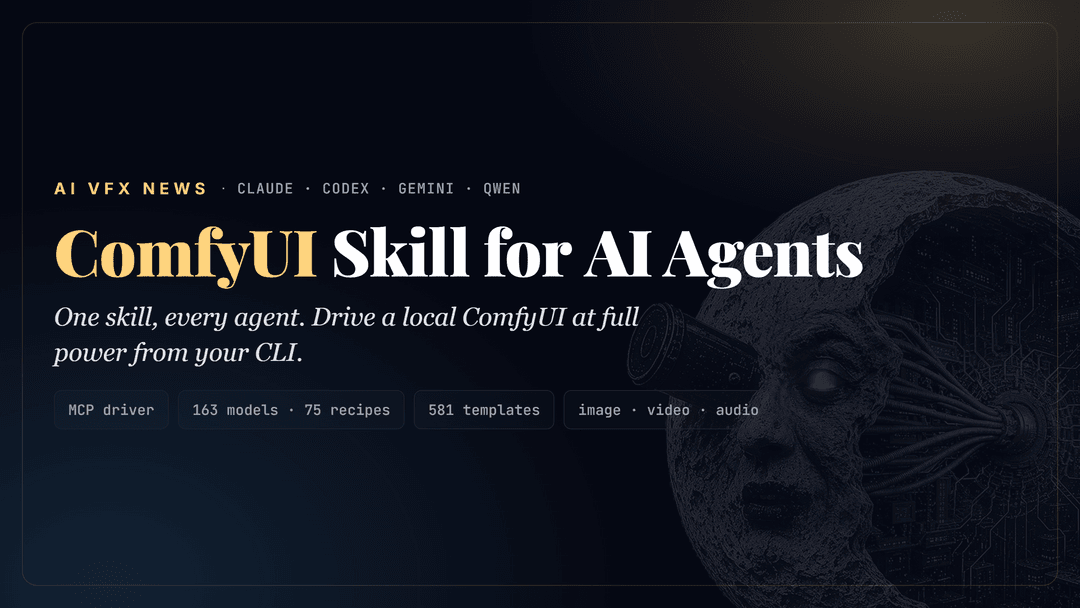
comfyui-agent-kit
The signature ComfyUI skill for AI coding agents: Claude Code, Codex, Gemini CLI, and Qwen Code.
By AI VFX NEWS.
Make your AI coding agent drive a local ComfyUI at full power, generate images, video, and audio, build and run workflows, and show the graph live in your own ComfyUI canvas, then hand the whole setup to someone else with one command.
This is the portable, machine-independent, multi-agent version of a working ComfyUI setup. One shared core
(the knowledge + the MCP driver) plus a thin adapter per agent. Clone it, run the installer, and each of your
agents gets the same stack, wired to your hardware. GLM (z.ai) run through Claude Code is covered by the
claude adapter. See docs/AGENTS.md for how each agent connects.
What it can do
- Drive ComfyUI from four agents (Claude Code, Codex, Gemini CLI, Qwen Code) off one shared core. GLM via Claude Code is covered too. (docs/AGENTS.md)
- ~90-tool MCP driver. The agent operates ComfyUI directly: generate, build / edit / validate graphs, queue, download models, manage VRAM, read logs, diagnose.
- Per-model "mega-brain": 65 prompt recipes distilled from official sources (image, video, audio, 3D); the agent auto-pulls the right recipe when you name a model, so it prompts each one in its own dialect.
- Knows where each model runs: a full index of all 147 library models (recipe / utility / template-only), local vs API.
- Hardware-aware model selection: detects your VRAM, RAM, and free disk, then recommends the variant that fits (fp8 / offload / multi-GPU / quant) and refuses a download that won't fit, before wasting the bandwidth.
- 18 enhancement and utility tools: upscale / restore (Real-ESRGAN, SUPIR, SeedVR2), frame interpolation (FILM, RIFE), segmentation / depth / pose (SAM3, BiRefNet, Depth Anything), plus restoration chains.
- 534-template library as the source of truth, plus fetch any shared workflow by hash and a model shootout (run a prompt through many models small, pick the winner, then scale up).
- Assembles new workflows from parts: decomposes a task into stages, mixes templates and blueprint subgraphs,
and wires the nodes correctly (output-to-input by type, with converters where needed), validated against
/object_infobefore running. Not a preset runner. - Starts ComfyUI for you: when the server is down, the agent launches it headless in the background and
generates (no need to open the app first); to peek, you open
http://127.0.0.1:8188in a browser. For an unattended pipeline the start policy is configurable per project (env vars or a.comfyui-agent.json), so it never blocks on a prompt. - GUI bridge + persistence: the agent writes graphs into your ComfyUI canvas, and SAVES every workflow it builds or runs to ComfyUI's workflows folder, so you can open it later from the Workflows sidebar (an API generation alone leaves no trace on the canvas).
- Stays current on its own:
check_updates.pydiffs the template repo and reads the blog RSS; an optional weekly task adds recipes for new models and pushes them. (docs/UPDATING.md) - Portable and idempotent: one installer, auto-detects your agents, re-runnable. MIT, no vendored third-party code (everything heavy is fetched at install).
The four-layer stack
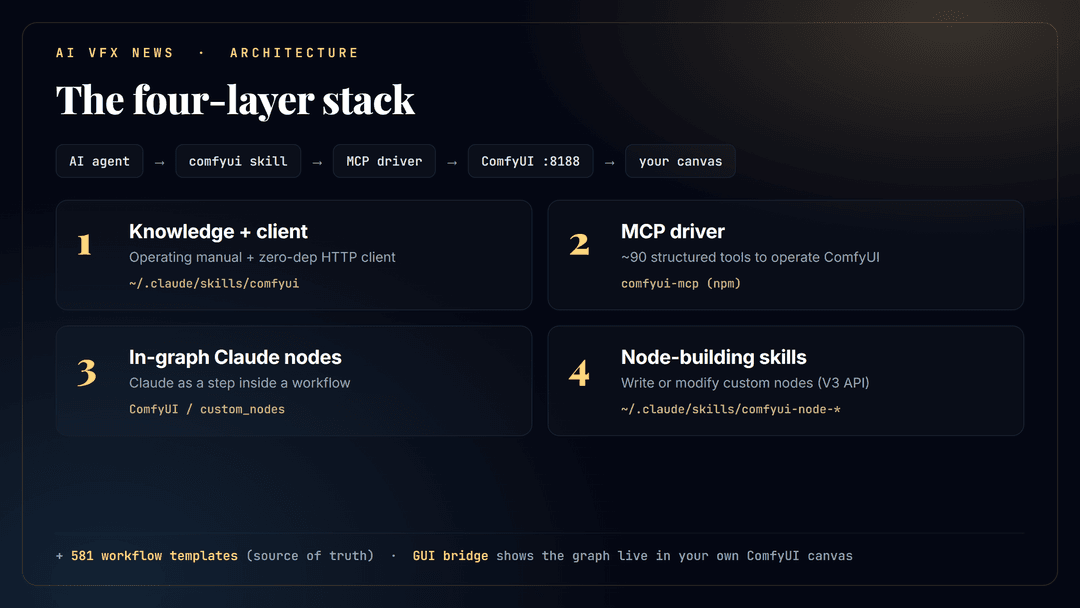
| Layer | What | Installed as |
|---|---|---|
| 1 | Knowledge + client the operating manual and a zero-dependency HTTP client | the agent's skill / extension dir |
| 2 | MCP driver ~90 structured tools so the agent operates ComfyUI directly | comfyui-mcp (npm) + per-agent MCP registration |
| 3 | In-graph Claude nodes an LLM as a step inside a workflow (prompt enrichment, vision QA) | ComfyUI custom_nodes |
| 4 | Node-building skills for writing/modifying custom nodes (V3 API) | the agent's skill dir (Claude/Codex) |
| + | Template library the official 500+ workflow templates, the source of truth | sparse git clone + quick index |
Plus a GUI bridge: the agent writes graphs to <ComfyUI>/user/default/workflows/, you open them in the
built-in Workflows sidebar and tweak them. No extra "agent panel" node required.
See docs/LAYERS.md for each layer, and docs/AGENTS.md for the per-agent matrix.
The template library is the source of truth
The kit clones the official Comfy-Org/workflow_templates and builds a compact lookup index so the agent can match any request to the right template. 534 templates span every task, image, video, 3D, audio, utilities:

It knows every model's dialect
Each generative model rewards a different prompt approach: SDXL wants comma tags, FLUX wants natural-language
sentences, video models want camera and motion direction, audio models want genre/tempo/instruments, and
negative-prompt support varies wildly. The kit ships MODELS.md, a per-model
prompting reference distilled from official sources (each maker's docs and model cards, docs.comfy.org, and
the per-model templates from the anthropic-claude node). When you name a model in a request or a workflow,
the agent reads that model's entry first and prompts it correctly.
Covered today (65 models with recipes): FLUX.1/.2 + Kontext, Z-Image, Qwen-Image/Edit, SDXL, SD1.5/3.5, HiDream, Ideogram, Nano Banana Pro/2, Seedream, Recraft, GPT-Image, Grok, Reve, Kandinsky, BRIA, OmniGen, Chroma, Krea, ERNIE-Image, FireRed/LongCat/ChronoEdit (edit), Capybara, Bernini-R, Anima, NewBie, PixelDiT, Ovis-Image, Lens, Quiver, Wan 2.1-2.7, LTX-2.3/2 Pro, Hunyuan Video, SVD, Kling, Veo, Sora, Seedance, Luma, Runway, MiniMax, PixVerse, Vidu, Pika, HappyHorse, HuMo, SCAIL-2, Stable Audio, ACE-Step, ElevenLabs, ChatterBox, Sonilo, Hunyuan3D, Tripo, Rodin, Meshy. Plus a separate Enhancement and utility section (not prompt-driven, settings not prompts): upscalers and restorers (Real-ESRGAN, SUPIR, SeedVR2, FlashVSR, Topaz, Magnific), frame interpolation (FILM, RIFE), conditioning helpers (SAM3, BiRefNet, Depth Anything, DWPose, MoGe, IP-Adapter, LivePortrait, Mediapipe), and video object removal (VOID). Anything else falls back to the template library.

Full model index: every model in the library and exactly what the kit has for it (recipe / utility / template-only): docs/MODEL_INDEX.md.
Coverage table: every model and whether a prompt recipe is ready
✅ recipe = a dedicated, up-to-date prompting guide in MODELS.md. 🔧 tool = an
enhancement/utility note (settings, not prompts). Updated: 2026-06-19 23:08.
One table, columns aligned to the widest row (the video models).
| Modality | Model / tool | Prompt recipe | Runs |
|---|---|---|---|
| Image | FLUX.1 / FLUX.2 / Kontext | ✅ | local + API |
| Image | Z-Image-Turbo | ✅ | local |
| Image | Qwen-Image / Edit | ✅ | local |
| Image | SDXL · SD 1.5 · SD 3.5 | ✅ | local |
| Image | HiDream-I1 | ✅ | local |
| Image | BRIA 3.x | ✅ | local |
| Image | OmniGen v1/v2 | ✅ | local |
| Image | Chroma | ✅ | local |
| Image | Krea 1 | ✅ | local |
| Image | ERNIE-Image | ✅ | local |
| Image | Capybara (image+video) | ✅ | local |
| Image | Bernini-R (relight) | ✅ | local |
| Image | Anima (anime) | ✅ | local |
| Image | NewBie (anime, XML prompts) | ✅ | local |
| Image | PixelDiT | ✅ | local |
| Image | Ovis-Image (text rendering) | ✅ | local |
| Image | Lens / Lens Turbo | ✅ | local |
| Image | Quiver (text to SVG) | ✅ | API |
| Image | Ideogram 2/3 | ✅ | API |
| Image | Nano Banana Pro / 2 | ✅ | API |
| Image | Seedream 4/5 | ✅ | API |
| Image | Recraft V3 | ✅ | API |
| Image | GPT-Image | ✅ | API |
| Image | Grok Image | ✅ | API |
| Image | Reve | ✅ | API |
| Image | Kandinsky 3.x | ✅ | local + API |
| Image edit | FireRed / LongCat / ChronoEdit | ✅ | local |
| Video | Wan 2.1-2.7 (+VACE/Animate/ATI) | ✅ | local + API |
| Video | LTX-2.3 / LTX-2 Pro | ✅ | local |
| Video | Hunyuan Video | ✅ | local |
| Video | SVD (image-to-video) | ✅ | local |
| Video | HuMo (lip-sync) | ✅ | local |
| Video | SCAIL-2 (character) | ✅ | local |
| Video | HappyHorse 1.0 | ✅ | API |
| Video | Kling (1.6-3.0, O1/O3) | ✅ | API |
| Video | Veo 3/3.1 | ✅ | API |
| Video | Sora 2 | ✅ | API |
| Video | Seedance 1.0/1.5/2.0 | ✅ | API |
| Video | Luma Ray · Runway Gen-4/4.5 | ✅ | API |
| Video | MiniMax/Hailuo · PixVerse · Vidu · Pika | ✅ | API |
| Audio | Stable Audio · ACE-Step · ChatterBox | ✅ | local |
| Audio | ElevenLabs · Sonilo | ✅ | API |
| 3D | Hunyuan3D | ✅ | local |
| 3D | Tripo · Rodin · Meshy | ✅ | API |
| Enhance / utility | Real-ESRGAN, SUPIR, SeedVR2, FlashVSR (upscale/restore) | 🔧 settings | local |
| Enhance / utility | Topaz, Magnific (upscale) | 🔧 settings | API |
| Enhance / utility | FILM, RIFE (frame interpolation) | 🔧 settings | local |
| Enhance / utility | SAM3, BiRefNet (segmentation/matting) | 🔧 settings | local |
| Enhance / utility | Depth Anything v2/v3, MoGe (depth/geometry) | 🔧 settings | local |
| Enhance / utility | DWPose, Mediapipe (pose/landmarks) | 🔧 settings | local |
| Enhance / utility | IP-Adapter, LivePortrait (conditioning/portrait) | 🔧 settings | local |
| Enhance / utility | VOID (video object removal) | 🔧 settings | local |
Niche models still without a recipe (very new, thin docs) run from their template and borrow the closest family's approach; see docs/MODEL_INDEX.md for the full per-variant breakdown.
Prerequisites
- One or more agent CLIs on PATH: Claude Code (
claude), Codex (codex), Gemini CLI (gemini), Qwen Code (qwen) - Node.js (
node+npm) - git, Python 3
- A local ComfyUI install (Desktop or source), comfy.org
Install
Windows (PowerShell):
git clone https://github.com/SlavaSexton/comfyui-agent-kit.git
cd comfyui-agent-kit
./install.ps1 -ComfyUIPath "E:\path\to\ComfyUI"   # installs for every agent CLI found on PATH
Linux / macOS:
git clone https://github.com/SlavaSexton/comfyui-agent-kit.git
cd comfyui-agent-kit
./install.sh --comfyui-path /path/to/ComfyUI       # installs for every agent CLI found on PATH
The installer runs the shared machine setup once (MCP package, templates, in-graph nodes), then auto-detects
which of claude / codex / gemini / qwen are installed and wires each one. It is idempotent, re-run it
any time. Limit the targets with -Agents claude,gemini / --agents claude,gemini. Flags: -SkipTemplates /
--skip-templates (skip the ~900MB template clone), -SkipNodes / --skip-nodes. Per-agent details and the GLM
note are in docs/AGENTS.md.
First run on a new machine
After install, start ComfyUI, then in an agent session tell it to run the bootstrap once
(docs/BOOTSTRAP.md): it detects your GPUs, VRAM, RAM, free disk, paths, and installed models
via the MCP health_check, fills the machine-specific block in the skill, and does a smoke-test generation. After
that, just ask for media. On Claude/Codex the skill auto-activates on ComfyUI keywords; on Gemini/Qwen the
knowledge is loaded as the extension's context.
Optional: in-graph LLM key
Only needed if you want a workflow to enrich prompts without the agent in the loop (e.g. an unattended pipeline):
setx CLAUDE_API_KEY "sk-ant-..." # then restart ComfyUI
See docs/NODES.md. When you are driving, the agent writes prompts directly, better and free.
Layout
comfyui-agent-kit/
├── install.ps1 / install.sh         top-level: shared setup + auto-detect agents + run adapters
├── shared/
│   ├── comfyui/                     SKILL.md + MODELS.md + comfy_client.py  (one source of truth)
│   └── tools/gen_quick_index.py     rebuild the template lookup index
├── agents/
│   ├── claude/   install.ps1/.sh    -> ~/.claude/skills/comfyui + claude mcp add + CLAUDE.md
│   ├── codex/    install.ps1/.sh    -> ~/.agents/skills/comfyui + ~/.codex/config.toml
│   ├── gemini/   install.ps1/.sh    -> ~/.gemini/extensions/comfyui (gemini-extension.json + GEMINI.md)
│   └── qwen/     install.ps1/.sh    -> ~/.qwen/extensions/comfyui (qwen-extension.json + QWEN.md)
├── docs/AGENTS.md                   per-agent matrix (how each connects) + GLM note
├── docs/MODEL_INDEX.md              every model in the library and what the kit has for it
├── docs/EXAMPLE_WORKFLOWS.md        notable shared workflows (model shootouts, restoration) + fetch helper
├── docs/UPDATING.md                 stay current: check_updates.py (templates diff + blog RSS) + the loop
├── docs/BOOTSTRAP.md / LAYERS.md / NODES.md
├── ATTRIBUTION.md                   credits for fetched third-party pieces
├── CHANGELOG.md                     curated history of notable changes (Keep a Changelog)
└── LICENSE                          MIT (this kit's original files)
What is and isn't in this repo
In the repo (original work, MIT): the skill, the client, the installer, the index generator, the docs, the
generated visuals. Fetched at install time from their own sources (not redistributed here): the comfyui-mcp
package, the node-building skills, the workflow templates, and the in-graph Claude nodes.
Credits and thanks
This kit stands on excellent open-source work. It is a thin wiring layer over these projects, and the heavy lifting is theirs. Huge thanks to:
- ComfyUI by comfyanonymous / Comfy-Org, the engine everything runs on.
- comfyui-mcp by artokun, the MCP driver (Layer 2) that lets the agent operate ComfyUI with structured tools.
- comfyui-custom-node-skills by jtydhr88 / Terry Jia, the node-building skills (Layer 4).
- workflow_templates by Comfy-Org, the template library that is the source of truth.
- comfyui-anthropic-claude by alexmunteanu and comfyui_claude_prompt_generator by PauldeLavallaz, the in-graph Claude nodes (Layer 3).
v1.1.0 builds on more excellent work. Thanks also to:
- Prompt Relay by Gordon Chen, Ziqi Huang, and Ziwei Liu (S-Lab, NTU), the training-free temporal prompt-routing method (arXiv 2604.10030).
- ComfyUI-PromptRelay and ComfyUI-SUPIR by kijai, the ComfyUI ports this kit recommends and drives.
- LTX Director 2.0 by WhatDreamsCost, the LTX-2.3 timeline-editor node.
- Z-Image-Turbo Fun-ControlNet-Union by alibaba-pai (PAI), plus the LTX-2.3 model and HDR IC-LoRA by Lightricks.
- Real-ESRGAN by Xintao Wang and the BasicSR team, and SUPIR by the XPixel Group (Fanghua Yu et al.), the upscale and restore models. Note: the SUPIR weights are non-commercial.
Field techniques in wide community use lean on:
- KJNodes by kijai (LTX-2.3 NAG, GGUF loading, chunked feed-forward, multi-guide), ComfyUI-CacheDiT by Jasonzzt (inference caching), ComfyUI-MelBandRoFormer (audio stem separation), ComfyUI-Frame-Interpolation by Fannovel16 (FILM), comfyui-inpaint-cropandstitch (Flux.2 masked inpaint), and GAP LTX 2.3 Motion by GeekatplayStudio (lipsync / storyboard / long audio).
Full per-component licensing is in ATTRIBUTION.md. If anything here misattributes your work, open an issue and it will be fixed.
License
MIT, see LICENSE. Third-party components keep their own licenses.
Made by AI VFX NEWS
// faq
What is comfyui-agent-kit?
One ComfyUI skill for every AI coding agent (Claude Code, Codex, Gemini CLI, Qwen Code): drives a local ComfyUI end to end. 65 model prompt recipes, 534 templates, hardware-aware selection, auto-start, workflow building, multi-shot video, ControlNet, HDR, enhance/restore. By AI VFX NEWS.. It is open-source on GitHub.
Is comfyui-agent-kit free to use?
comfyui-agent-kit is open-source under the MIT license, so it is free to use.
What category does comfyui-agent-kit belong to?
comfyui-agent-kit is listed under skills in the Claudeers registry of Claude-compatible tools.
// embed badge

[](https://claudeers.com/comfyui-agent-kit)
// retro hit counter

[](https://claudeers.com/comfyui-agent-kit)
// reviews
// guestbook
// related in Claude Skills
 🔓
🔓An agentic skills framework & software development methodology that works.
 🔓
🔓 🔓
🔓💫 Toolkit to help you get started with Spec-Driven Development
 🔓
🔓AI coding assistant skill (Claude Code, Codex, OpenCode, Cursor, Gemini CLI, and more). Turn any folder of code, SQL schemas, R scripts, shell scripts, docs,…