
code-by-wire
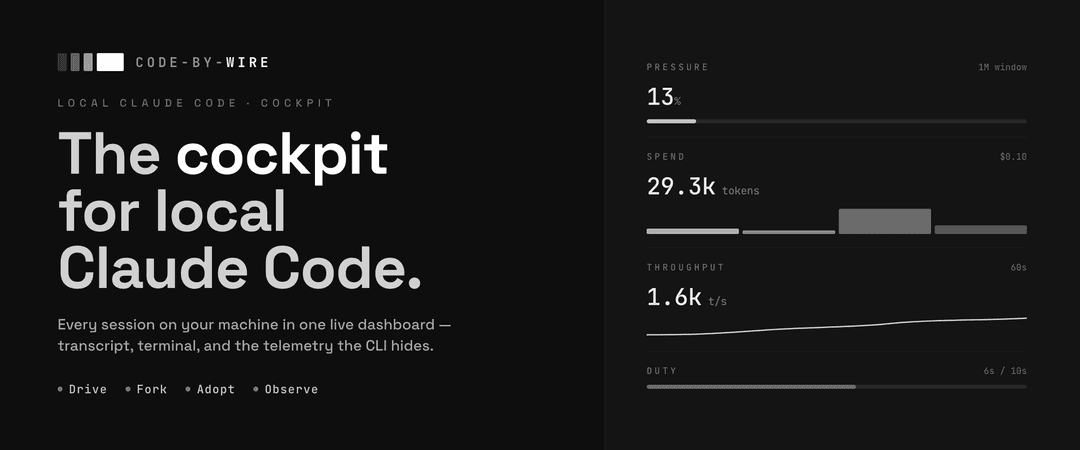
The cockpit for local Claude Code.
Install with your AI
Paste into Claude Code, Cursor, or any agent — it reads the repo and wires the tool into your project.
Install and set up code-by-wire (git-clone project) into my current project.
Found on https://claudeers.com/code-by-wire
Repo: https://github.com/luojiahai/code-by-wire
Homepage/docs: —
Detected install method: git-clone → git clone https://github.com/luojiahai/code-by-wire
Category: productivity. Platforms: cli, api, desktop, web.
Read the repo's README for exact setup and env vars, then install it and wire it into my project.

Claudeers Health Verdict:
active; community-verified: false. Confirm the source before running anything.
git clone https://github.com/luojiahai/code-by-wire
// compatibility
| Platforms | cli, api, desktop, web |
|---|---|
| Operating systems | — |
| AI compatibility | claude |
| License | MIT |
| Pricing | open-source |
| Language | TypeScript |
 Code-by-wire
English | 简体中文
Claude Code writes a rich trail to the .claude directory as it works: every
turn, every token, every tool call, the running cost, the context window. The
CLI shows you almost none of it.
Code-by-wire reads that trail and turns it into one live dashboard. Every session on your machine in one place, with live state, the full transcript, an embedded terminal to drive or take over, and the telemetry the terminal hides. One pane instead of a dozen terminal windows.

Download for macOS (Apple Silicon or Intel)
Download for Windows (x64 or ARM64)
What you get
- Every session in one rail. Active sessions in one live list, each card flagging its own state; ended ones fold into a zone below.
- Drive, fork, or just watch. Spawn a managed session in an embedded terminal, fork or adopt any other, or observe one read-only.
- The full transcript. Every message, tool call, and result, reconstructed from disk and rendered cleanly.
- The telemetry the CLI hides. Live cost, context window, token throughput, git, tasks, subagents, and background shells, per session.
- The whole story. A cross-session overview with a year-long contributions calendar and exact, never-estimated totals.
- Knows your account. Reads your plan and rate-limit gauges straight from
the
.claudedirectory.
Features
Nothing to set up. Open the app and every session already running on your machine is there.
👀 See every session at a glance
Active up top, ended folded away. Everything still running sits in one live list, newest first, each card carrying a small state icon for working, waiting, or idle. A filter box narrows it as you type. Ended sessions collapse into their own zone below, the archive, not the live work.
🕹️ Start, drive, or watch any session
Start one in a click. New session picks a directory and a model, then spawns Claude Code in an embedded terminal. Fork any session to branch a fresh copy from where it left off, or end a running one right from its header.
Observe safely, adopt later. A session you started elsewhere shows up read-only, because two processes writing one transcript would corrupt it. Once it ends, adopt it to resume inside the app and take the controls. The adopt button appears only when the original process is gone, the only time it's safe.
Terminal or transcript. A managed session toggles between its live terminal and the rendered transcript. Switching away only detaches the view. The terminal keeps buffering, so you never lose scrollback.
Label it, open it. Rename any session inline to whatever you'll recognize it by. Open its working directory straight in your editor or file browser.
📜 Read exactly what the agent did
The full transcript, step by step. Every message, tool call, and tool result, reconstructed from the raw transcript on disk and rendered cleanly.
A dock that follows the work. Below the live view, a dock tabs through the session's structure and snaps to whatever's happening:
- Tasks. The task list with each item's status and what it's blocked by.
- Subagents. The child sessions a session spawned, as a live timeline you can drill into.
- Shells. Background shells the session kicked off, reconstructed from the transcript, with their full output on demand.
- Turns. A turn-by-turn strip: each prompt you sent, how many tools it triggered, how long it ran, and how long ago.
📊 The telemetry Claude Code keeps out of sight
A right-hand rail of live panels:
- Context. How full the window is, as a ring toward the ceiling, using Claude's own number when it reports one. The session rail also flags any session whose context is running high.
- Cost. The session's spend, with a donut of where it went by token kind and how much the prompt cache saved. On a subscription account this is equivalent API value: what the tokens would cost at API rates. A reference figure, never money owed.
- Tokens. Input, output, and cached totals as a stacked bar.
- Token speed. Live throughput, output and input rates over a rolling window.
- Git. Branch, lines added and removed, ahead/behind, current SHA, and working-tree status. Hidden when the directory isn't a repo.
- Session. Model, effort level, and the run clock.
📈 The whole story across every session
Overview is where the app opens. Reached from the account card pinned to the top of the rail, it's an app-level view that totals every Claude Code session on your machine, not just the one you're watching. Pick a range: Today, 7d, 30d, 90d, or All.
Headline numbers. Sessions, turns, tokens, and equivalent API value for the range, with a stacked bar of where the tokens went.
A contributions calendar. A year of activity as a heatmap, colored by turns, tokens, or equivalent API value. Click any day to scope the whole page to it.
Daily usage. One stacked bar per day, split by token kind or by model.
Three ways to slice it. By model, by project with each project's branches folded in, and by session in a sortable table. An Include cache toggle decides whether cached tokens count toward the totals.
Exact, never estimated. Every number is read straight from the transcripts on disk, deduped and totalled. No sampling, no guesses. The first launch backfills your history behind a progress bar, then it stays live like everything else.
💳 Know your account
The rail's top card reads your account straight from the .claude directory. On
a subscription (Pro or Max) it shows your plan and rate-limit gauges with live
reset countdowns, so you can see how close you are to a wall. On an API account
it shows the endpoint host and plan. The account email is masked by default, one
click to reveal, so you can screen-share without leaking it. The same card opens
Overview.
⚙️ Settings and CLI health
A gear in the title bar opens Settings. System checks your local Claude Code, whether it's found, current, and logged in, and hands you the exact fix when something's off, plus a field to point the app at a non-standard binary. Account expands your plan and limits; Appearance and About round it out. The gear wears a caution badge that lights amber or red the moment the CLI needs attention, so a broken or logged-out install never slips by.
Install
Download the prebuilt app, or build it yourself.
Download
- Download the latest
.dmgfor your Mac (Apple Silicon or Intel). - Open it and drag Code-by-wire to Applications.
- Launch it. The app is signed and notarized by Apple, so it opens straight away, no Gatekeeper warning and no quarantine workaround.
On Windows, download the .exe for your CPU (x64 or ARM64) and run it. It's unsigned for now, so Windows
SmartScreen may warn — click More info → Run anyway. Build from source with
pnpm dist:win (see CONTRIBUTING).
Build from source
Build an unsigned app locally instead. Run the command for your platform:
pnpm install
pnpm rebuild:native   # rebuild better-sqlite3 + node-pty for Electron's ABI
pnpm dist             # macOS: writes the .dmg to release/
pnpm dist:win         # Windows: writes the .exe to release/
On macOS, open the .dmg from release/ and drag Code-by-wire to Applications.
Because it's unsigned, the first launch may need a right-click → Open, or
clearing the quarantine flag:
xattr -dr com.apple.quarantine /Applications/Code-by-wire.app
On Windows, run the .exe from release/. It's unsigned, so SmartScreen may
warn — click More info → Run anyway.
Requirements
- macOS (Apple Silicon or Intel) or Windows (x64 or ARM64)
- Claude Code installed locally, so there are sessions to observe and control
Develop
pnpm install
pnpm rebuild:native   # rebuild better-sqlite3 + node-pty for Electron's ABI
pnpm dev              # launch the app
pnpm test runs the provider read tests over the redacted .claude fixtures
in tests/fixtures/. pnpm typecheck checks the main and renderer projects.
This is a personal project and isn't taking outside code, but bug reports and ideas are welcome. Open an issue, or see CONTRIBUTING.md.
License
// faq
What is code-by-wire?
The cockpit for local Claude Code.. It is open-source on GitHub.
Is code-by-wire free to use?
code-by-wire is open-source under the MIT license, so it is free to use.
What category does code-by-wire belong to?
code-by-wire is listed under devtools in the Claudeers registry of Claude-compatible tools.
// embed badge

[](https://claudeers.com/code-by-wire)
// retro hit counter

[](https://claudeers.com/code-by-wire)
// reviews
// guestbook
// related in Productivity
 🔓
🔓Agent skills for Obsidian. Teach your agent to use Obsidian CLI and open formats including Markdown, Bases, JSON Canvas.
 🔓
🔓Garry's Opinionated OpenClaw/Hermes Agent Brain
 🔓
🔓Open source repository of plugins primarily intended for knowledge workers to use in Claude Cowork
 🔓
🔓An open-source alternative to Claude Cowork (powered by opencode)